# Themes
Vitality GOES supports theming to give the web app a completely different look and feel. To set a theme globally, [configure the `siteTheme` option in your config.ini ](/docs/config.md#general) to match the desired theme ID.
Your users can also select an available theme from the "Local Settings" screen in the Web App to customize it on their local device.

 ## Included Themes
The following themes are included with Vitality GOES:
|Name |ID (Folder Name) |Description |
|:--------------------|:----------------|:-------------------------------------------------------------------------------|
|*Built-in* |*default/unset* |*The default theme for Vitality GOES if another valid theme is not selected* |
|Dark Red |red |Red variant of the built-in theme |
|GOES Assistant |light |Light theme inspiried by Home Assistant |
|Purple |purple |My very supportive wife wanted to make her own theme and I said OK |
|RobCo Industries UOS |uos |Vitality GOES for RobCo's Unified Operating System (UOS). Pip-Boy not included. |
## Installing Themes
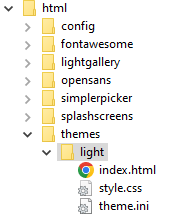
A theme is simply a folder containing `theme.ini` and one or more CSS stylesheets/associated resources. To install a theme, copy the theme folder into the `/themes/` folder of your Vitality GOES installation. Afterwards, you can use its folder name in `siteTheme` of your config.ini file.
The theme will also be selectable in the "Local Settings" screen.
## Making Themes
Making themes requires knowledge of CSS. To make a theme, follow the steps below. You can also copy an existing theme [from this repository](/html/themes/) and modify it as necessary.
1. Create an empty folder in the `themes` folder of your Vitality GOES Installation. The name you give it will be used to select it with the `siteTheme` option.
2. Create a blank file named `index.html` in the theme folder for security purposes
3. Create a file named `theme.ini` in the theme folder. Configure the following options in it:
- `name`: Human-readable name of the theme as shown in the web interface. *Optional*
- `themeColor`: Background color used for the theme. Used by the web app's manifest for coloring the user's web browser. *Optional*
- `stylesheets[]`: Array of CSS stylesheets to be loaded into the web app. Can be speficied multiple times. Specify either a path relative to the theme folder, or a full URL for an external stylesheet. *At least one stylesheet is required*
Finally, add custom styles into the stylesheet specified in `theme.ini`. Any styles specified will override those set in the built-in theme, making for a highly configurable user experience.
## Included Themes
The following themes are included with Vitality GOES:
|Name |ID (Folder Name) |Description |
|:--------------------|:----------------|:-------------------------------------------------------------------------------|
|*Built-in* |*default/unset* |*The default theme for Vitality GOES if another valid theme is not selected* |
|Dark Red |red |Red variant of the built-in theme |
|GOES Assistant |light |Light theme inspiried by Home Assistant |
|Purple |purple |My very supportive wife wanted to make her own theme and I said OK |
|RobCo Industries UOS |uos |Vitality GOES for RobCo's Unified Operating System (UOS). Pip-Boy not included. |
## Installing Themes
A theme is simply a folder containing `theme.ini` and one or more CSS stylesheets/associated resources. To install a theme, copy the theme folder into the `/themes/` folder of your Vitality GOES installation. Afterwards, you can use its folder name in `siteTheme` of your config.ini file.
The theme will also be selectable in the "Local Settings" screen.

## Making Themes
Making themes requires knowledge of CSS. To make a theme, follow the steps below. You can also copy an existing theme [from this repository](/html/themes/) and modify it as necessary.
1. Create an empty folder in the `themes` folder of your Vitality GOES Installation. The name you give it will be used to select it with the `siteTheme` option.
2. Create a blank file named `index.html` in the theme folder for security purposes
3. Create a file named `theme.ini` in the theme folder. Configure the following options in it:
- `name`: Human-readable name of the theme as shown in the web interface. *Optional*
- `themeColor`: Background color used for the theme. Used by the web app's manifest for coloring the user's web browser. *Optional*
- `stylesheets[]`: Array of CSS stylesheets to be loaded into the web app. Can be speficied multiple times. Specify either a path relative to the theme folder, or a full URL for an external stylesheet. *At least one stylesheet is required*
Finally, add custom styles into the stylesheet specified in `theme.ini`. Any styles specified will override those set in the built-in theme, making for a highly configurable user experience.