# Summer Race Reading
> [!IMPORTANT]
> This project is still a work in progress. This is a first fully usable version. But theres still stuff to do.
> 💡 **Note:** This WebApp is being developed for the **Summer of Making** by **HackClub**.
---
## 🏁 What is it about
**Summer Race Reading** is a **web app** to motivate you and your Readmates to read by creating a **competition**. You and your Readmates can agree among yourselves on a **fair section** of your individual books that you want to read in the same time frame. Everyone then has to enter their **current page number** to give their Readmates **live updates**, and whoever finishes their section first **wins**.
## 🤖 Usage of AI
AI was used in this project as a support tool.
Since I had little to no experience in web development, I used AI alongside tutorials to find ways to realize this project.
Almost none of the code in this project was written directly by AI.
This README file was written by a human but improved with the help of AI.
## 📖 User Guide
## 📖 - 🏠 Homepage Overview
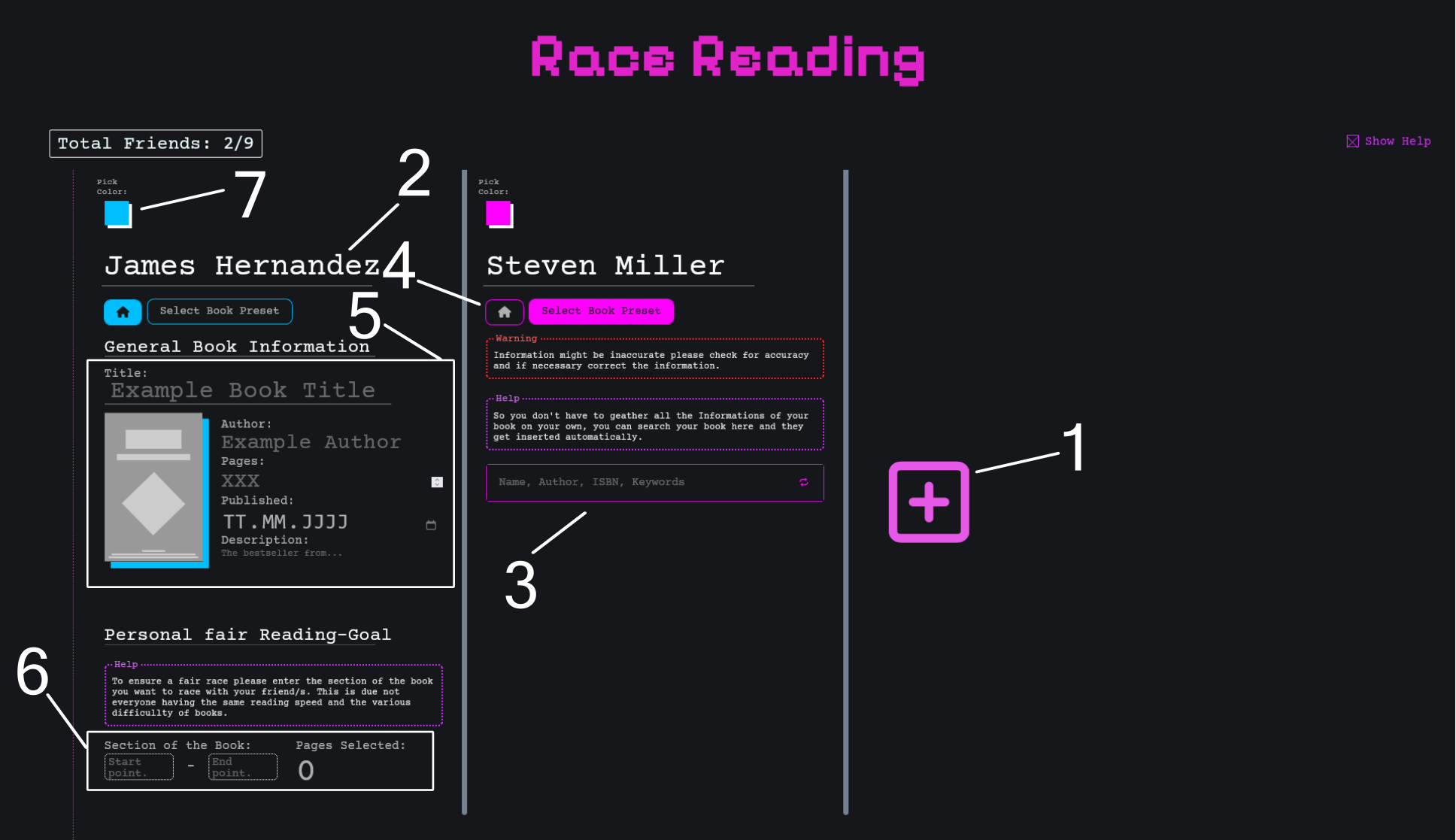 Each Readmate you want to read with is represented by a **Readmate Column**. These columns are separated by grey vertical lines.
---
### ➕ Adding a Readmate
To add a new Readmate Column, click the **pink “+” button** at the end of the Readmate Columns (**ref. 1**).
---
### 🧍 Changing the Readmate's Name
At the top of each column, you'll see a **randomly generated name** (**ref. 2**).
You can change this name to one that matches your Readmate.
---
### 🔍 Selecting a Book
Each Readmate Column has two tabs:
1. **Home** – lets you enter and edit information about the book.
2. **Search Book Preset** – selected by default; allows you to search for a book preset.
#### 🔎 Option 1: Search for a Book
- By default, the **Search tab** is selected (**ref. 3**). If it isn’t, you can switch to it.
- Use this tab to **search for a book preset**, so you don’t have to enter all book details manually.
- Enter a keyword (e.g., book title), then select the appropriate result from the displayed list.
After selecting a book, you'll be **automatically redirected to the Home tab**, where you can **review and edit** the suggested data (**ref. 5**).
#### ✍️ Option 2: Enter Information Manually
- Click the **Home tab** (**ref. 4**).
- You'll find all input fields required to manually enter your book’s details.
- If you hover over the **book cover image**, an upload icon will appear – click it to upload your own cover.
💡 **Tip:** All the requirded fields are marked with a *
---
### 🎯 Setting a Fair Reading Goal
At the bottom of each Readmate Column (**ref. 6**), you'll find the **Personal Fair Reading Goal** section.
Here you can:
- Define which part of the book your Readmate should read.
- Ensure a fair competition, taking into account different reading speeds and book difficulties.
---
### 🎨 Changing the Readmate Column Color
To change the color of a Readmate Column:
- Click the **colored square** at the top of the column (**ref. 7**).
- Choose from the list of available colors.
💡 **Tip:** Colors that are already in use are marked with a **grey diagonal line**.
If you choose one of them, the colors will be **swapped** between the two columns.
---
### 📖 Create a Reading Group
Once you’ve filled in all required fields for every Readmate you’ve added, the **Create Reading Group** button will become active.
When you click it, after a short moment a pop-up will appear where you can copy:
- **The Overview link** – for all Readmates to view the reading progress of everyone.
- **Private Progress Update links** – individual links for each Readmate to update their own progress.
After you’ve sent out all the links, click **Finished** and you’ll be redirected to the Overview page.
## 📖 - 📚 Reading Group Overview
### 🌍 In General
This is the place where you can compare your reading progress with your **Readmates** and see what books they’re currently enjoying.
---
### 📊 Compare Your Progress
In the **Reading Progress Overview** section, you’ll find a bar chart showing the percentage of each Readmate’s progress toward their reading goal.
- **Reading Goals** (in pages) are shown at the far right of the chart.
- Hover over or click a bar to see:
- The current page they’re on
- Where their goal started
- At the top of the **Reading Progress Overview**, you’ll see all your Readmates as buttons.
- Click a name to include or exclude them from the chart.
- Above these buttons, you can choose how the chart should be sorted.
---
### 🔍 Look Up More Specific Information About a Readmate
By clicking on a Readmate in the chart, you can view details in the **Readmate’s Specific Overview** section, currently just the book they’re reading.
- Click the selected bar again to deselect it and return to the general view.
## Setup Instructions
> [!TIP]
> If you’re just here to try out the demo, use the demo provided on The Summer of Making Project page to test it quickly.
### Informations
- [Node.js](https://nodejs.org/) - **v22** (tested)
- The Fronted was written in React.
- The **backend** is written in plain JavaScript (Node.js), located in the `/api` folder.
- You need and a MariaDB with a database like described below.
Please your preferred way to run the three. The Backend **port** is **3001**.
### 🌐 Environment Configuration
Please enter the Api-Key to the [Goolge Books API](https://developers.google.com/books/docs/v1/using#APIKey) (just the Api-Key) as
```bash
BOOK_API_KEY = ''
```
from [Cloudinary](https://cloudinary.com/) the Cloud Name, Cloud Secret and the Api-Key as
```bash
CLOUD_NAME = ''
CLOUD_SECRET = ''
CLOUD_API_KEY = ''
```
the MariaDB login data:
```bash
DB_HOST=''
DB_USER=''
DB_PASSWORD=''
DB_NAME='race-reading'
```
Set the domain where your **backend API** is running and the domain where your **frontend** is served from:
```bash
VITE_API='http://localhost:3001' # Backend API
VITE_ORIGIN='' # Frontend
```
### 💾 MariaDB Configuration
```sql
-- Create the database
CREATE DATABASE `race-reading`;
-- Use the database
USE `race-reading`;
-- Create the config table
CREATE TABLE `config` (
`id` INT AUTO_INCREMENT PRIMARY KEY,
`name` VARCHAR(100) NOT NULL,
`slug` VARCHAR(100) NOT NULL UNIQUE
);
-- Create the Readmates table
CREATE TABLE `Readmates` (
`id` INT AUTO_INCREMENT PRIMARY KEY,
`config_id` VARCHAR(100) NOT NULL,
`slug` VARCHAR(5) NOT NULL UNIQUE,
`name` VARCHAR(30) NOT NULL,
`color` VARCHAR(10),
`book` LONGTEXT,
`current_page` INT,
CONSTRAINT `fk_Readmates_config`
FOREIGN KEY (`config_id`)
REFERENCES `config` (`slug`)
ON DELETE CASCADE
ON UPDATE CASCADE
);
```
## 📊 Basic Progress Overview
### ✅ Finished
- UI for selecting Readmates and their corresponding book
- Integration of the **Google Books API** for book search
- Page to view each Readmate's reading progress
- Create a personal page for each Readmate to update their progress
---
### 🛠️ To Do
- Live Updates on the Reading Progress
- Allow accounts for settings (and make a settings page)
- Add mobile/phone support
Each Readmate you want to read with is represented by a **Readmate Column**. These columns are separated by grey vertical lines.
---
### ➕ Adding a Readmate
To add a new Readmate Column, click the **pink “+” button** at the end of the Readmate Columns (**ref. 1**).
---
### 🧍 Changing the Readmate's Name
At the top of each column, you'll see a **randomly generated name** (**ref. 2**).
You can change this name to one that matches your Readmate.
---
### 🔍 Selecting a Book
Each Readmate Column has two tabs:
1. **Home** – lets you enter and edit information about the book.
2. **Search Book Preset** – selected by default; allows you to search for a book preset.
#### 🔎 Option 1: Search for a Book
- By default, the **Search tab** is selected (**ref. 3**). If it isn’t, you can switch to it.
- Use this tab to **search for a book preset**, so you don’t have to enter all book details manually.
- Enter a keyword (e.g., book title), then select the appropriate result from the displayed list.
After selecting a book, you'll be **automatically redirected to the Home tab**, where you can **review and edit** the suggested data (**ref. 5**).
#### ✍️ Option 2: Enter Information Manually
- Click the **Home tab** (**ref. 4**).
- You'll find all input fields required to manually enter your book’s details.
- If you hover over the **book cover image**, an upload icon will appear – click it to upload your own cover.
💡 **Tip:** All the requirded fields are marked with a *
---
### 🎯 Setting a Fair Reading Goal
At the bottom of each Readmate Column (**ref. 6**), you'll find the **Personal Fair Reading Goal** section.
Here you can:
- Define which part of the book your Readmate should read.
- Ensure a fair competition, taking into account different reading speeds and book difficulties.
---
### 🎨 Changing the Readmate Column Color
To change the color of a Readmate Column:
- Click the **colored square** at the top of the column (**ref. 7**).
- Choose from the list of available colors.
💡 **Tip:** Colors that are already in use are marked with a **grey diagonal line**.
If you choose one of them, the colors will be **swapped** between the two columns.
---
### 📖 Create a Reading Group
Once you’ve filled in all required fields for every Readmate you’ve added, the **Create Reading Group** button will become active.
When you click it, after a short moment a pop-up will appear where you can copy:
- **The Overview link** – for all Readmates to view the reading progress of everyone.
- **Private Progress Update links** – individual links for each Readmate to update their own progress.
After you’ve sent out all the links, click **Finished** and you’ll be redirected to the Overview page.
## 📖 - 📚 Reading Group Overview
### 🌍 In General
This is the place where you can compare your reading progress with your **Readmates** and see what books they’re currently enjoying.
---
### 📊 Compare Your Progress
In the **Reading Progress Overview** section, you’ll find a bar chart showing the percentage of each Readmate’s progress toward their reading goal.
- **Reading Goals** (in pages) are shown at the far right of the chart.
- Hover over or click a bar to see:
- The current page they’re on
- Where their goal started
- At the top of the **Reading Progress Overview**, you’ll see all your Readmates as buttons.
- Click a name to include or exclude them from the chart.
- Above these buttons, you can choose how the chart should be sorted.
---
### 🔍 Look Up More Specific Information About a Readmate
By clicking on a Readmate in the chart, you can view details in the **Readmate’s Specific Overview** section, currently just the book they’re reading.
- Click the selected bar again to deselect it and return to the general view.
## Setup Instructions
> [!TIP]
> If you’re just here to try out the demo, use the demo provided on The Summer of Making Project page to test it quickly.
### Informations
- [Node.js](https://nodejs.org/) - **v22** (tested)
- The Fronted was written in React.
- The **backend** is written in plain JavaScript (Node.js), located in the `/api` folder.
- You need and a MariaDB with a database like described below.
Please your preferred way to run the three. The Backend **port** is **3001**.
### 🌐 Environment Configuration
Please enter the Api-Key to the [Goolge Books API](https://developers.google.com/books/docs/v1/using#APIKey) (just the Api-Key) as
```bash
BOOK_API_KEY = ''
```
from [Cloudinary](https://cloudinary.com/) the Cloud Name, Cloud Secret and the Api-Key as
```bash
CLOUD_NAME = ''
CLOUD_SECRET = ''
CLOUD_API_KEY = ''
```
the MariaDB login data:
```bash
DB_HOST=''
DB_USER=''
DB_PASSWORD=''
DB_NAME='race-reading'
```
Set the domain where your **backend API** is running and the domain where your **frontend** is served from:
```bash
VITE_API='http://localhost:3001' # Backend API
VITE_ORIGIN='' # Frontend
```
### 💾 MariaDB Configuration
```sql
-- Create the database
CREATE DATABASE `race-reading`;
-- Use the database
USE `race-reading`;
-- Create the config table
CREATE TABLE `config` (
`id` INT AUTO_INCREMENT PRIMARY KEY,
`name` VARCHAR(100) NOT NULL,
`slug` VARCHAR(100) NOT NULL UNIQUE
);
-- Create the Readmates table
CREATE TABLE `Readmates` (
`id` INT AUTO_INCREMENT PRIMARY KEY,
`config_id` VARCHAR(100) NOT NULL,
`slug` VARCHAR(5) NOT NULL UNIQUE,
`name` VARCHAR(30) NOT NULL,
`color` VARCHAR(10),
`book` LONGTEXT,
`current_page` INT,
CONSTRAINT `fk_Readmates_config`
FOREIGN KEY (`config_id`)
REFERENCES `config` (`slug`)
ON DELETE CASCADE
ON UPDATE CASCADE
);
```
## 📊 Basic Progress Overview
### ✅ Finished
- UI for selecting Readmates and their corresponding book
- Integration of the **Google Books API** for book search
- Page to view each Readmate's reading progress
- Create a personal page for each Readmate to update their progress
---
### 🛠️ To Do
- Live Updates on the Reading Progress
- Allow accounts for settings (and make a settings page)
- Add mobile/phone support