# LeanFPS
**[Website](https://leanfps.com/) · [Download](https://leanfps.com/download/) · [Pro](https://leanfps.com/pro/) · [Compare 8 game optimizers](https://leanfps.com/game-optimizer-comparison/) · [Radiant Optimizer alternatives](https://leanfps.com/radiant-optimizer-alternative/)**
**Free, open source and tiny.** LeanFPS is a game performance optimizer for Windows 10/11
written in Rust, the free and lightweight alternative to Radiant Optimizer, Hone, Razer
Cortex, Tier1Suite and Process Lasso. One native ~6.5 MB executable: no installer required,
no .NET, no WebView, no Overwolf, no account.
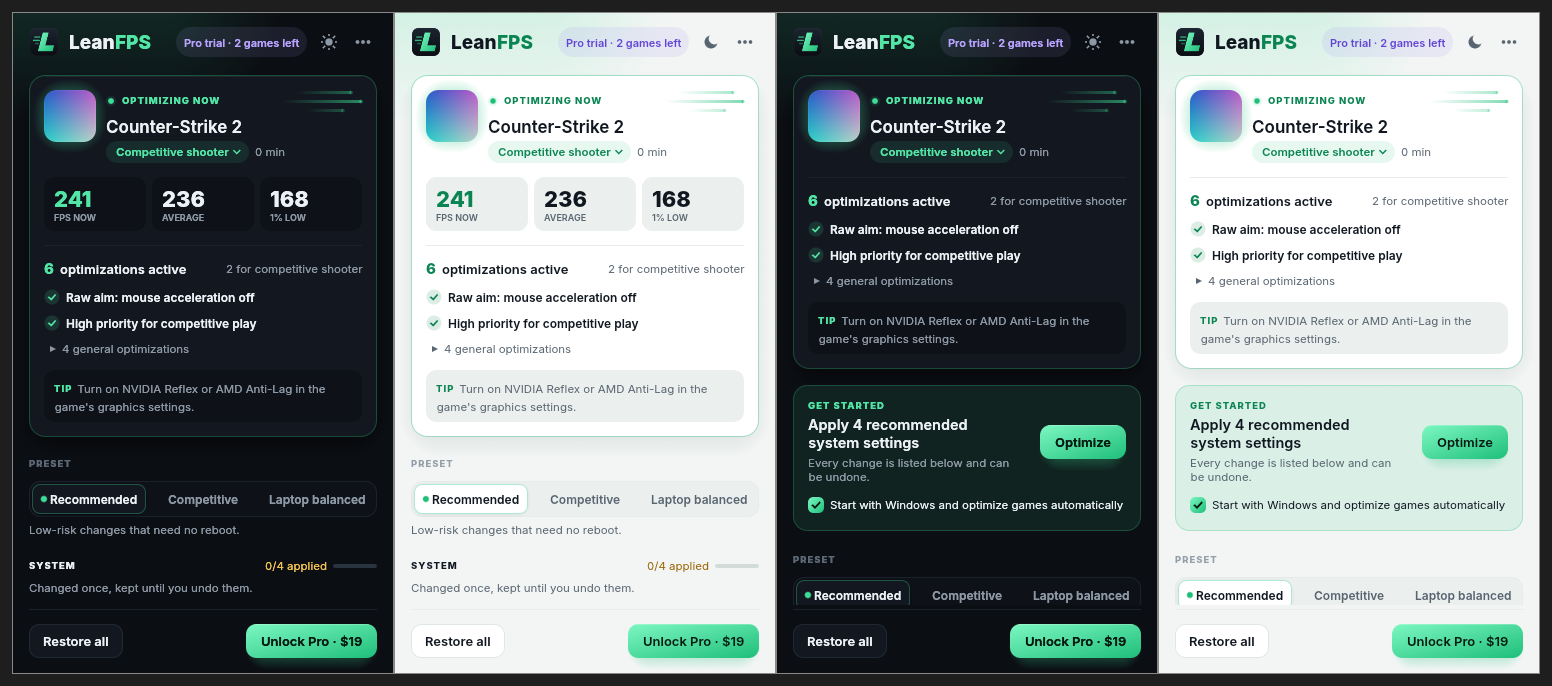
LeanFPS recognizes the game you are playing, applies [tweaks that have a real mechanism
behind them](https://leanfps.com/optimizations/) (power plan, core parking, process priority, V-Cache placement on X3D CPUs,
[genre-specific settings](https://leanfps.com/games/)) and **[measures your real FPS and 1% lows every session](https://leanfps.com/fps-measurement/)**, so you
can see whether a change actually helped. Every change saves the real previous value first
and can be [undone one at a time, all at once, or automatically after a crash](https://leanfps.com/safety/). It never
touches Defender, Memory Integrity, the firewall, Windows Update or CPU mitigations.
## Open source, with an optional Pro
The full source is here under the MIT license. Build it, read it, change it, ship your own
version. If you'd rather not bother, [LeanFPS Pro](https://leanfps.com/pro/) unlocks everything in the
official build and supports the project. Lost your key or changed PCs? Use the
[license page](https://leanfps.com/license/). Questions: [contact](https://leanfps.com/contact/).
## LeanFPS vs Radiant Optimizer, Hone, Razer Cortex, Tier1Suite, Process Lasso and WinUtil
Three things set LeanFPS apart: it is **free and open source**, it is **small** (one ~6.5 MB
exe), and it is **native Rust**, so it starts fast and uses next to no memory or CPU while
you play. Facts about the others come from each maker's own pages (read 2026-10-10); the
full table follows, and the [game optimizer comparison](https://leanfps.com/game-optimizer-comparison/)
on leanfps.com has charts.
- **LeanFPS vs Radiant Optimizer**: Radiant Optimizer ships a 194 MB installer (v7.0.4) and
is closed source. LeanFPS is open source, about 30 times smaller, and measures your FPS
and 1% lows every session. See [LeanFPS vs Radiant Optimizer](https://leanfps.com/leanfps-vs-radiant-optimizer/)
and [7 Radiant Optimizer alternatives](https://leanfps.com/radiant-optimizer-alternative/).
- **LeanFPS vs Hone**: Hone is delivered through Overwolf and needs a sign-in. LeanFPS is a
standalone native exe with no account and no extra platform.
- **LeanFPS vs Razer Cortex**: Razer Cortex comes inside the Cortex launcher with deals and
rewards, and Booster Prime shows a predicted FPS. LeanFPS is just the optimizer, and
measures the FPS you actually get.
- **LeanFPS vs Tier1Suite**: Tier1Suite is a 75 MB installer and its Pro catalog offers turning
off VBS and Memory Integrity. LeanFPS is a fraction of the size and never weakens Windows security.
- **LeanFPS vs Process Lasso**: Process Lasso is a process manager with an always-on
service and no FPS measurement. LeanFPS's background check is optional and only looks
at the foreground window every 2 s.
- **LeanFPS vs WinUtil**: Chris Titus WinUtil is free and MIT like LeanFPS, but it is a
PowerShell script, its optional "Disable Updates" tweak also stops security updates, and it
has no game detection or FPS measurement.
- **LeanFPS vs Windows Game Mode**: keep Game Mode on (LeanFPS turns it on for you); LeanFPS
adds per-game tuning, FPS measurement and undo on top.
## How it compares
| | **LeanFPS** | **Radiant Optimizer** | **Hone** | **Razer Cortex** | **Tier1Suite** | **Process Lasso** | **WinUtil** | **Windows Game Mode** |
|---|---|---|---|---|---|---|---|---|
| **Free and open** | | | | | | | | |
| What is free | ✅ Detection, FPS measurement, core tweaks; no time limit | ✅ 8 starter tweaks; profiles only as a preview | 🟡 10 optimizations (15 with referrals), with ads | ✅ No paid tier shown | ✅ 20 of 43 catalog entries | ✅ Free edition | ✅ Free, MIT license | ✅ Built in |
| **Size and footprint** | | | | | | | | |
| Download size | ✅ About 6.5 MB, one exe | ❌ 194 MB installer (v7.0.4) | 🟡 3 MB Overwolf stub, downloads more | 🟡 15 MB web installer, downloads more | ❌ 75 MB installer | ✅ 3 MB installer | ✅ 0.9 MB PowerShell script | ✅ Nothing to install |
| No account needed | ✅ No account; Pro is a license key | 🟡 Free: no. Premium: account and motherboard-locked licence | ❌ “Do I need to sign in? Yes.” | ❔ Not stated | ✅ No account | ✅ Pro needs an activation code | ✅ No account; run as administrator | ✅ No account |
| No extra platform Overwolf, launchers, stores | ✅ Standalone | ✅ Standalone | ❌ Delivered through Overwolf | ❌ Part of the Razer Cortex launcher, deals and rewards app | ✅ Standalone | ✅ Standalone | ✅ Script | ✅ Part of Windows |
| In the background | 🟡 Optional: checks the foreground window every 2 s, about 10 MB | ❔ Not stated | 🟡 Manages processes while you play | 🟡 Kicks in when a game launches | 🟡 Optional tray automation (Pro) | ❌ Always-on background service | ✅ Only runs when you start it | 🟡 Built into Windows |
| **Proof it works** | | | | | | | | |
| Measures your real FPS | ✅ Every session, from Windows event tracing; no overlay | 🟡 Premium “Live FPS overlay”, method not stated; home page demo is simulated | ❔ Not stated | 🟡 FPS counter; Booster Prime gives a predicted FPS | 🟡 Latency benchmark; per-game frame time “not measured” | ❌ No FPS measurement stated | ❌ None | ❔ Not stated |
| 1% lows saved per session To see whether a tweak really helped | ✅ Average, 1% and 0.1% lows, compared with your usual | ❔ Not stated | ❔ Not stated | ❔ Not stated | ❌ Not measured | ❌ | ❌ | ❔ Not stated |
| Per-game or per-genre profiles | ✅ 8 genres, detected automatically | 🟡 Premium only | 🟡 Presets “where available” | 🟡 Booster Prime: 7 games | 🟡 1 free, unlimited in Pro | ✅ Per-process rules | ❌ | ❌ |
| **Safety** | | | | | | | | |
| Never weakens security Defender, Memory Integrity, Windows Update, firewall, mitigations | ✅ None of these are in the tweak list | ❔ Not stated | ❔ Not stated | ❔ Not stated | 🟡 Offers turning off VBS / Memory Integrity (opt-in, Pro) | ❔ Not stated | 🟡 Optional “Disable Updates” stops security updates | ✅ Only holds back driver installs and restart prompts |
| Undo one change at a time | ✅ Real previous value saved before each change | 🟡 “Supported settings” have backup or undo | 🟡 Supported registry tweaks | 🟡 Restores after gaming; Booster Prime has Revert | ✅ Per-tweak revert and revert all | ✅ No changes left after uninstall | ✅ “Undo Selected Tweaks” | ✅ One switch |
| Recovers after a crash | ✅ Journal on disk; next start reverses an open session | 🟡 Restore point before every change | ❔ Not stated | ❔ Not stated | 🟡 Restore point before changes | ❔ Not stated | 🟡 Optional restore point | ❔ Not stated |
| Anti-cheat | ✅ No injection, no overlay; uses Windows launch priority when blocked | 🟡 Says compatible, “not responsible for any bans” | ❔ Not stated | 🟡 Booster Prime “is not a cheat” | ✅ No injection, no kernel driver | ✅ “Will not cause bans” | ❔ Not stated | ✅ Part of Windows |
| **Privacy and support** | | | | | | | | |
| Sends nothing from your PC | ✅ No telemetry; network only to activate and refresh Pro | ❌ Registered users “cannot opt out” of usage data | ❌ May collect hardware, BIOS settings, installed games | ❔ Not stated | 🟡 Update check; usage data only if you opt in | ✅ Only activation and update checks | ❔ Not stated | ❔ Not stated |
| Open source | ✅ MIT | ❌ | ❌ | ❌ | ❌ | ❌ | ✅ MIT | ❌ |
| Support | ✅ Email: contact@leanfps.com | 🟡 Discord only | ✅ Contact page, Discord | ✅ Razer support | ✅ Contact form | ✅ Forum, contact form | ✅ GitHub issues, Discord | ✅ Microsoft support |
✅ yes · 🟡 partly · ❌ no · ❔ not stated by the maker. Competitor facts come only from each maker's own pages, read on 2026-10-10; anything they don't state is marked as not stated.
Sources:
- Radiant Optimizer: , , ,
- Hone: , , , ,
- Razer Cortex: , ,
- Tier1Suite: ,
- Process Lasso: , , ,
- WinUtil:
- Windows Game Mode:
## What it does
- **[System tweaks](https://leanfps.com/optimizations/)** (persistent): power plan, core parking, Game Mode, background recording,
Windows 11 optimizations for windowed games, plus advanced opt-ins (HAGS, MPO). The real previous value is saved before every change and
restored on undo, one tweak at a time or all at once.
- **While gaming** (session): when a game is in the foreground LeanFPS raises its priority,
opts it out of power throttling, keeps the PC awake and lowers background apps. On Ryzen
X3D CPUs with two dies the game runs on the V-Cache die (Windows CPU sets). Everything
is undone when the game exits, and after a crash on the next start.
- **[Game profiles](https://leanfps.com/games/)**: the game is identified (built-in database, Steam and Epic libraries,
or fullscreen fallback), its icon is shown, and genre-specific tweaks run (e.g. mouse
acceleration off for shooters, standby-memory purge for open-world games).
- Never: Defender, HVCI/VBS, firewall, Windows Update, CPU mitigations, game injection or
overlays.
## Safety rules
More on the [safety page](https://leanfps.com/safety/).
- **Record first, then modify.** Every change reads the current value and writes it to the
undo journal on disk (flushed) before touching the system. If the journal can't be saved,
nothing is changed. If a change fails half-way, what was done is undone.
- **Nothing is forgotten.** A value that can't be restored stays in the journal (or
`session.json`) and is retried by the next start or **Restore all**. A journal file that
can't be read is moved aside as `*.corrupt-