▶ 30-second no-voice intro · MP4
MobileVC gives DSH a phone-first interface. Connect it to your running DSH and use the same sessions: read history, send prompts, interrupt a run, approve tools, attach images/files, browse the workspace and manage plugins. It is not a second Agent and not another relay or session store. Every read and write goes through DSH's `sessionController`: **one session, one runtime**. - Version: `0.1.0` - Tested with: DSH `0.2.0-rc.2`, Node 22+ - Shape: DSH Host plugin + static PWA UI - Website: https://mobilevc.top/ - Screenshots: `docs/images/` - Demo: `docs/media/mobilevc-demo.mp4` - Promo: `docs/media/mobilevc-promo.mp4` ## Promo

32s Chinese text-only promo · no voiceover / subtitles · instrumental only
## Features - **Real sessions** — DSH session list, history and tool calls - **Live stream** — `sessionController.follow()` with `assistantStream`; token-level reasoning and text - **Reasoning cards** — “thinking” while running, then a collapsible “deep thinking · N chars” card - **Tool cards** — collapsed by default; name, args and status; tap for full output - **Image previews** — `read_image` reads the original from the DSH attachment store; thumbnail + full screen - **Attachments** — images as image parts; files via `fileUploads` receipts - **Direct approvals** — mobile presence takes priority; survives SSE drops/backgrounding; a stale click becomes a no-op - **Trace** — user → thinking → tool → reply → compaction timeline; simple mode groups thinking/tool chains and folds raw English/tool args, with a full-mode toggle - **Files** — real workspace, breadcrumbs and subdirectory browsing - **Plugin manager** — real `pluginManager` list and toggles - **Account balance** — live balance chip and automatic official DeepSeek top-up when credit runs out - **Background jobs** — browse DSH jobs, read output, stop; long commands no longer block a foreground wait - **Web Push** — completion / failure / approval notifications; iOS 16.4+ and Home Screen required - **Interjections** — show queued steering, edit/remove, or steer immediately - **PWA** — home-screen install, standalone, safe-area, portrait lock, no pinch/double-tap zoom - **No manual refresh** — SSE auto-reconnect plus a durable polling fallback for new replies - **Visible failures** — quota/model failures become error cards instead of silence ## Screenshots | Chat | Trace | Plugins | |---|---|---| |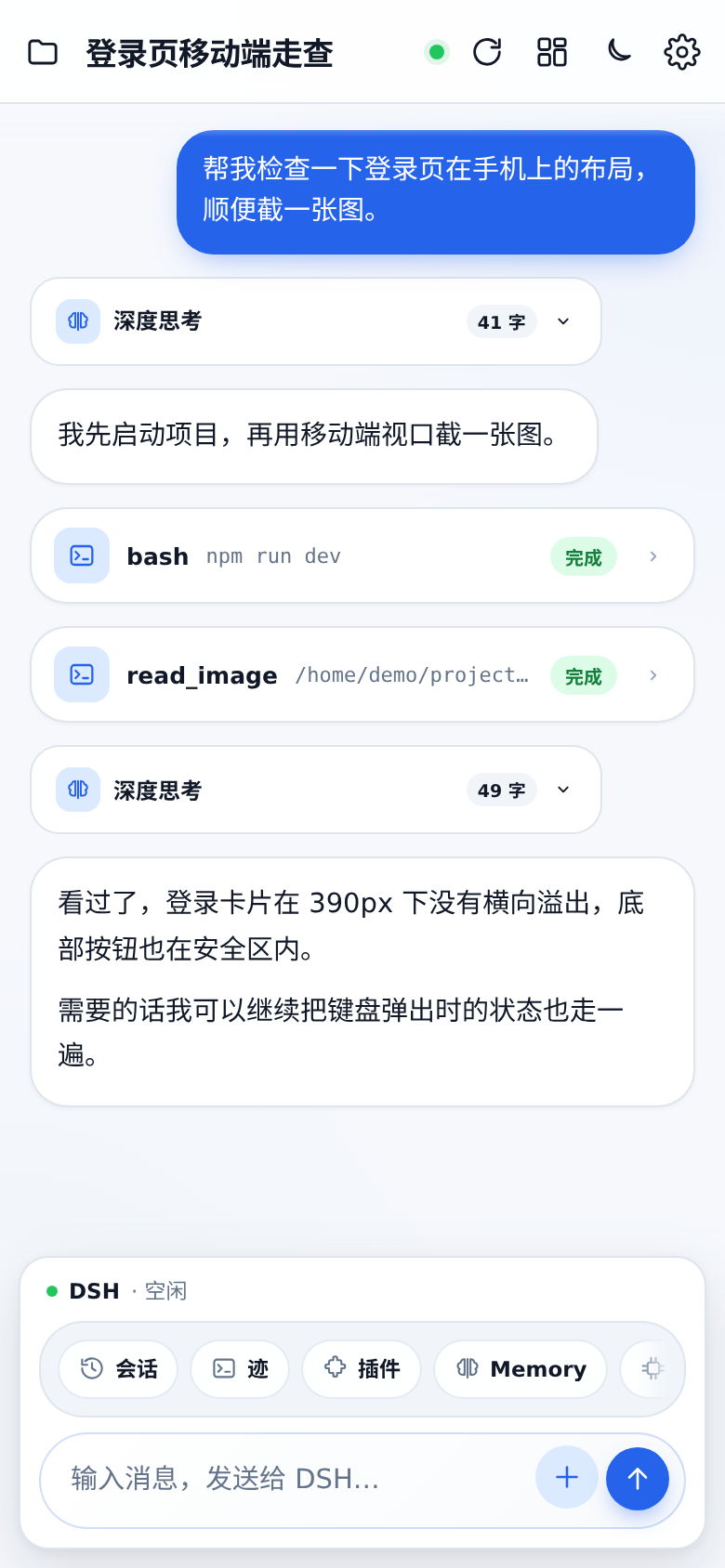 |
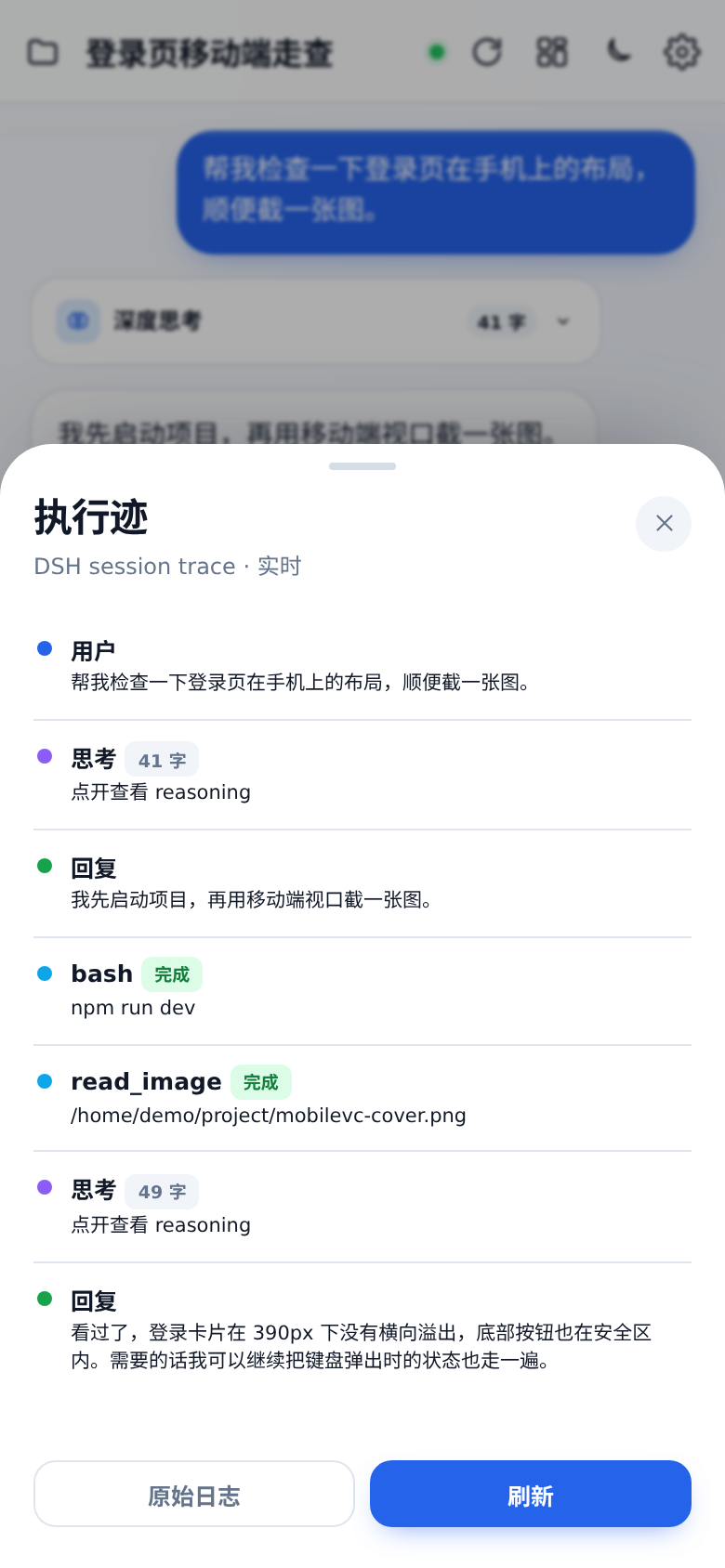 |
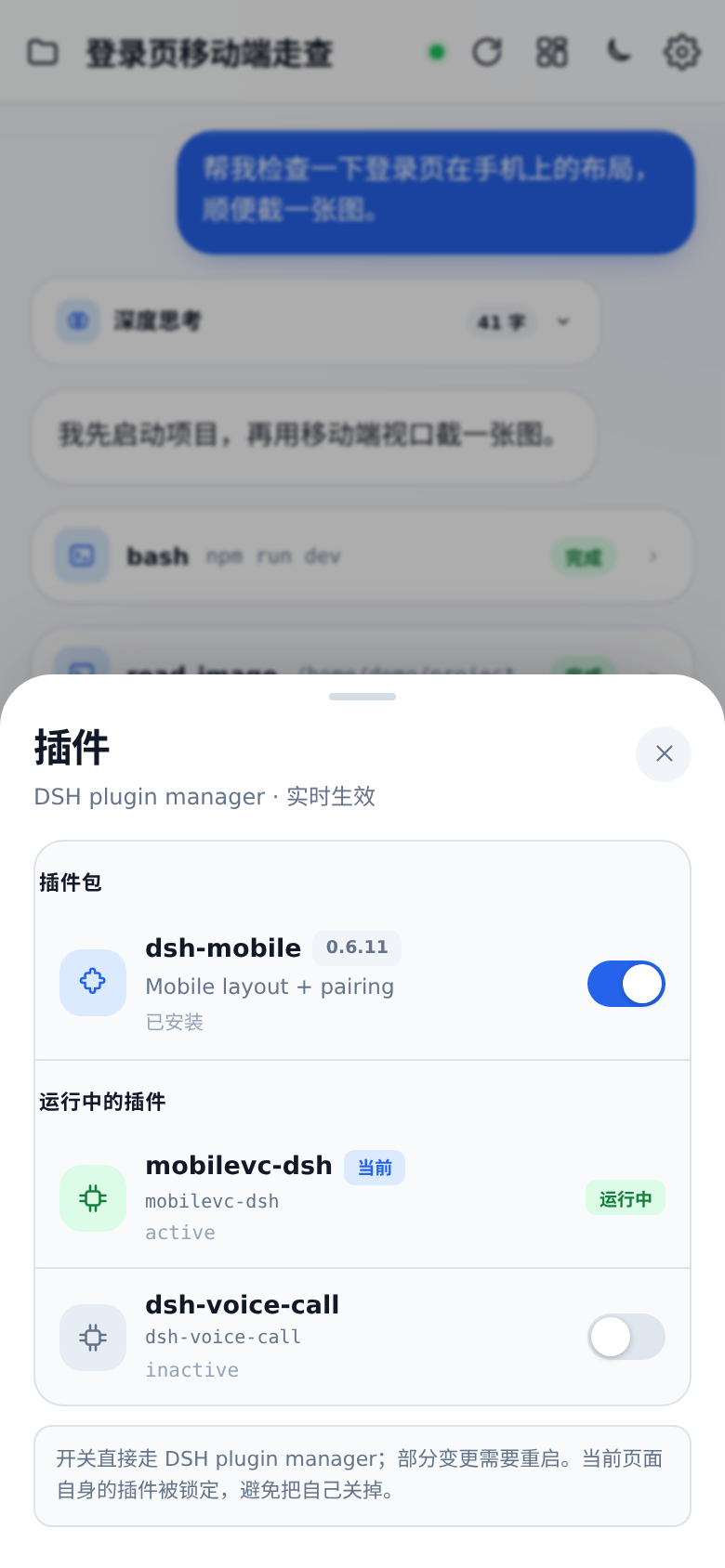 |
More: `docs/images/sessions.png`, `docs/images/files.png`, `docs/images/image-preview.png`.
## Install
You need a machine already running DSH Web.
### As a DSH bundle (recommended)
```bash
dsh plugin --profile web add "github:JayCRL/MobileVC"
systemctl restart dsh-web
```
Or from a local clone:
```bash
git clone https://github.com/JayCRL/MobileVC.git mobilevc
dsh plugin --profile web add ./mobilevc
systemctl restart dsh-web
```
Open:
```text
http://127.0.0.1:8898/mobilevc/
```
Health check:
```bash
curl http://127.0.0.1:8898/mobilevc/api/health
# {"ok":true,"plugin":"mobilevc","interactive":true}
```
### Self-host edge (optional)
`edge/` packages Caddy + an optional cloudflared tunnel, so users do not have to write nginx or an auth proxy:
```bash
cd edge
cp .env.example .env
./hash-password.sh
docker compose --profile tunnel up -d
```
See [edge/README.md](./edge/README.md). It packages the edge only; DSH and its runtime stay on the user's machine.
Deployment, nginx, PWA, upgrade/uninstall and troubleshooting: [INSTALL.en.md](./INSTALL.en.md) · [中文部署说明](./INSTALL.md).
> `/mobilevc/` has no login screen of its own. Put it behind an authenticating HTTPS reverse proxy.
## Usage
- **+** — attach an image or file
- **Enter** send, **Shift+Enter** newline
- While running, the red stop button right of Send interrupts the current turn
- Send while running: the message enters the interjection queue; the sheet opens for edit/remove/steer-now
- Landscape: a portrait-only gate is shown instead of the desktop horizontal layout
- Tap a tool card to expand its output
- Tap a `read_image` thumbnail for full screen
- **Trace** — execution timeline
- **Plugins** — DSH plugin management
- **Memory** — read/write real `AGENTS.md`
- Approval card — Reject / Allow once
- **Settings → Notifications → Enable** to opt into Web Push; **Test** sends a test notification
## Notifications (Web Push)
- Triggers: task complete, task failed, approval needed, background job finished
- No public IP needed: the DSH host makes outbound HTTPS to Apple/Google push services
- iPhone: iOS 16.4+, must be added to the Home Screen and launched from its icon; Safari tabs are unsupported
- Notification payload is generic; tap opens MobileVC
- No duplicate push while the page is in the foreground; after leaving, Web Push takes over
## Architecture
```mermaid
flowchart LR
B[Phone / PWA] -->|HTTPS + SSE| P[MobileVC host plugin]
P --> S[ctx.sessionController]
P --> F[ctx.fileUploads]
P --> A[approval/request answerer]
P --> M[ctx.pluginManager]
S --> L[(DSH session log)]
F --> O[(DSH attachment store)]
```
- `/mobilevc/api/follow` → `sessionController.follow({ assistantStream: true })`
- `/mobilevc/api/prompt` → `sessionController.prompt()`; images as image parts, files first uploaded through `fileUploads.uploadStream()` for a receipt
- `/mobilevc/api/approval` → mobile presence answerer; without an active follow/presence it delegates with `next()` to the desktop
- `/mobilevc/api/queue` → `resolveAgent().inbox` lists interjections; `updateQueue()` edits/removes/steers them
- `/mobilevc/api/plugins` → `pluginManager`
- UI and API are same-origin; no CORS
## Remote access / no public IP
A browser cannot dial into a NATed DSH by itself. Two options:
1. **Personal / friends**: Cloudflare Tunnel or Tailscale exposes `127.0.0.1:8898` as a reachable URL. No code changes.
2. **Product**: a central Relay + a `mobilevc-connect` plugin. DSH dials out; the Relay is a transparent tunnel and stores no session.
This repository provides the Host plugin and UI; it does not bundle a Relay.
## Security
`/mobilevc/` is registered by a Host plugin and does not go through DSH's `/api` browser-trust fence. It can:
- read every session, log and workspace file
- send prompts, stop runs, approve tool calls
- write `AGENTS.md`
- upload images/files
- enable/disable DSH plugins
All authenticated users share one DSH identity; there is no multi-tenant isolation. Use authentication and HTTPS on the public edge; never expose port 8898 directly.
## Direction
- Cut a proper release
- Finer trace: step grouping and tool durations
- Attachment UX: paste, camera, drag/drop
- Interjection queue UX: keyboard, scrolling and multi-message handling
- Optional native shell over the same PWA/HTTP surface; no second runtime
Not planned: rewriting the Agent loop, adding another relay/E2EE layer inside the plugin, or multi-tenant isolation inside one DSH process.
## Relation to the original MobileVC
The original app was a Flutter client + Go relay + E2EE. It is preserved under [`legacy/`](https://github.com/JayCRL/MobileVC/tree/main/legacy) and in git history, but it is no longer the default client.
The move to DSH is deliberate: DSH already provides the Agent runtime, durable session log, follow stream, approvals and plugin system. Keeping the Flutter client and relay would mean maintaining a second session/queue/runtime outside DSH — exactly where the old sync and queue problems came from.
Today there is one rule:
> **DSH owns the runtime. MobileVC owns the surface.**
The old app remains for historical reference; new deployments should use the DSH install above.
## License
MIT — see [LICENSE](./LICENSE).