# Tree3D
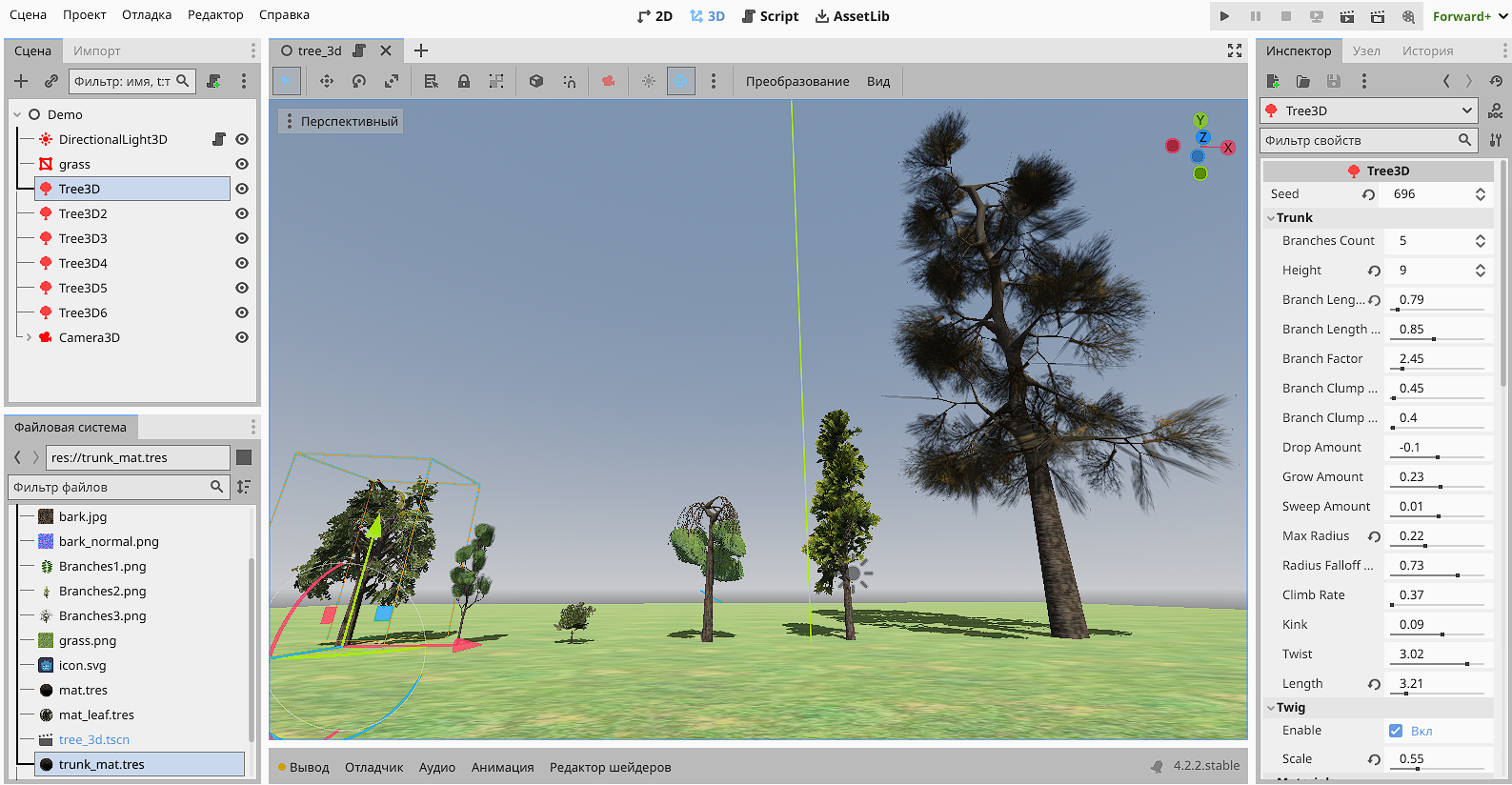
Plugin for procedural generation of 3D trees of varying complexity.
 [](https://godotengine.org)
[](https://ko-fi.com/jeksun)
## Possibilities
- Procedural tree generation. Control the height, slope, number of branches, branch length, gravity, twist, and detail.
- Turn leaves on or off depending on the season, plant size and material.
- Generate collision automatically, fast for collisions with tree trunks only, or detailed for the trunk and all tree branches.
- Advanced wind system. Fine-tune generated vertex colors for wind influence and apply the specially supported Tree3DUniversalMaterial shader to any trees.
- Create procedural tree growth from a sapling to a large mature tree using code.
## Supported Godot Engine Versions
- Godot 4.5+ (Windows, Linux, MacOS)
[](https://godotengine.org)
[](https://ko-fi.com/jeksun)
## Possibilities
- Procedural tree generation. Control the height, slope, number of branches, branch length, gravity, twist, and detail.
- Turn leaves on or off depending on the season, plant size and material.
- Generate collision automatically, fast for collisions with tree trunks only, or detailed for the trunk and all tree branches.
- Advanced wind system. Fine-tune generated vertex colors for wind influence and apply the specially supported Tree3DUniversalMaterial shader to any trees.
- Create procedural tree growth from a sapling to a large mature tree using code.
## Supported Godot Engine Versions
- Godot 4.5+ (Windows, Linux, MacOS)
 ## Notes
- To ensure the tree displays correctly, use Cull Mode: Front for the tree trunk material.
- To change the season, you can make one unique leaf material for all the trees and then change its color or texture to make them yellow.
## Notes
- To ensure the tree displays correctly, use Cull Mode: Front for the tree trunk material.
- To change the season, you can make one unique leaf material for all the trees and then change its color or texture to make them yellow.
 ## Building the GDExtension
1. Place [godot-cpp](https://github.com/godotengine/godot-cpp) of the version you need in the godot-cpp folder
2. Use the SCons command (depending on your platform and Godot build version):
```sh
scons target=template_release platform=windows
```
Or use [ready-made libraries](https://github.com/JekSun97/gdTree3D/releases)
## Using Docker to build this GDExtension
For easier reproducibility, there is a Dockerfile provided for building binaries for Linux and Windows.
```sh
docker build -t tree3dbuilder:latest .
docker run --rm -v "$(pwd):/source" tree3dbuilder:latest scons target=template_release arch=x86_64 platform=windows
```
## Soon...
- [x] Wind and swaying foliage.
- [ ] A tool for quickly placing trees and forests in any location or landscape.
- [ ] Support for custom models instead of default foliage.
- [ ] Automatic LOD.
## Donations
If you liked this plugin, you could send me a thank you via Ko-Fi using [Ko-Fi](https://ko-fi.com/jeksun), I would be very grateful!
Your name and your GitHub account (if you have one) will be listed below :)
(Don't forget to write me an email so I can add you, your name and account)
**List:**
- Meier Lukas
- Adam Heinermann (@Heinermann)
Thank you for your support!
## Building the GDExtension
1. Place [godot-cpp](https://github.com/godotengine/godot-cpp) of the version you need in the godot-cpp folder
2. Use the SCons command (depending on your platform and Godot build version):
```sh
scons target=template_release platform=windows
```
Or use [ready-made libraries](https://github.com/JekSun97/gdTree3D/releases)
## Using Docker to build this GDExtension
For easier reproducibility, there is a Dockerfile provided for building binaries for Linux and Windows.
```sh
docker build -t tree3dbuilder:latest .
docker run --rm -v "$(pwd):/source" tree3dbuilder:latest scons target=template_release arch=x86_64 platform=windows
```
## Soon...
- [x] Wind and swaying foliage.
- [ ] A tool for quickly placing trees and forests in any location or landscape.
- [ ] Support for custom models instead of default foliage.
- [ ] Automatic LOD.
## Donations
If you liked this plugin, you could send me a thank you via Ko-Fi using [Ko-Fi](https://ko-fi.com/jeksun), I would be very grateful!
Your name and your GitHub account (if you have one) will be listed below :)
(Don't forget to write me an email so I can add you, your name and account)
**List:**
- Meier Lukas
- Adam Heinermann (@Heinermann)
Thank you for your support!