Download for Windows, macOS or Linux · website · faq
Turn podcasts, webinars, streams and interviews into ready-to-post vertical clips for TikTok, Reels and YouTube Shorts.
AI-picked moments, virality scores, animated captions, auto zoom and speaker-aware reframing.
A normal installer: no Docker, no watermark, no per-minute credits.




If Cutawan saves you an editing session, a ⭐ helps other creators find it.
--- ## Download and get started 1. **[Download the latest release](https://github.com/JeremySNR/cutawan/releases/latest).** Pick the Windows `.exe`, macOS `.dmg` (Apple Silicon) or Linux `.AppImage` under **Assets**. No Node.js, Python or Docker needed to start. 2. **Choose how the AI runs.** The first-run wizard offers **ChatGPT sign-in** (via Codex, with local transcription), an **OpenAI-compatible API key**, **OpenRouter** (any model it lists, including Claude and Gemini), or **Local captions only** with no AI connection at all. 3. **Import a video or paste a link.** Choose **Find viral clips** to review AI-suggested moments, or **Caption whole video** for one captioned vertical edit. Adjust trim, captions and framing, then export an MP4.
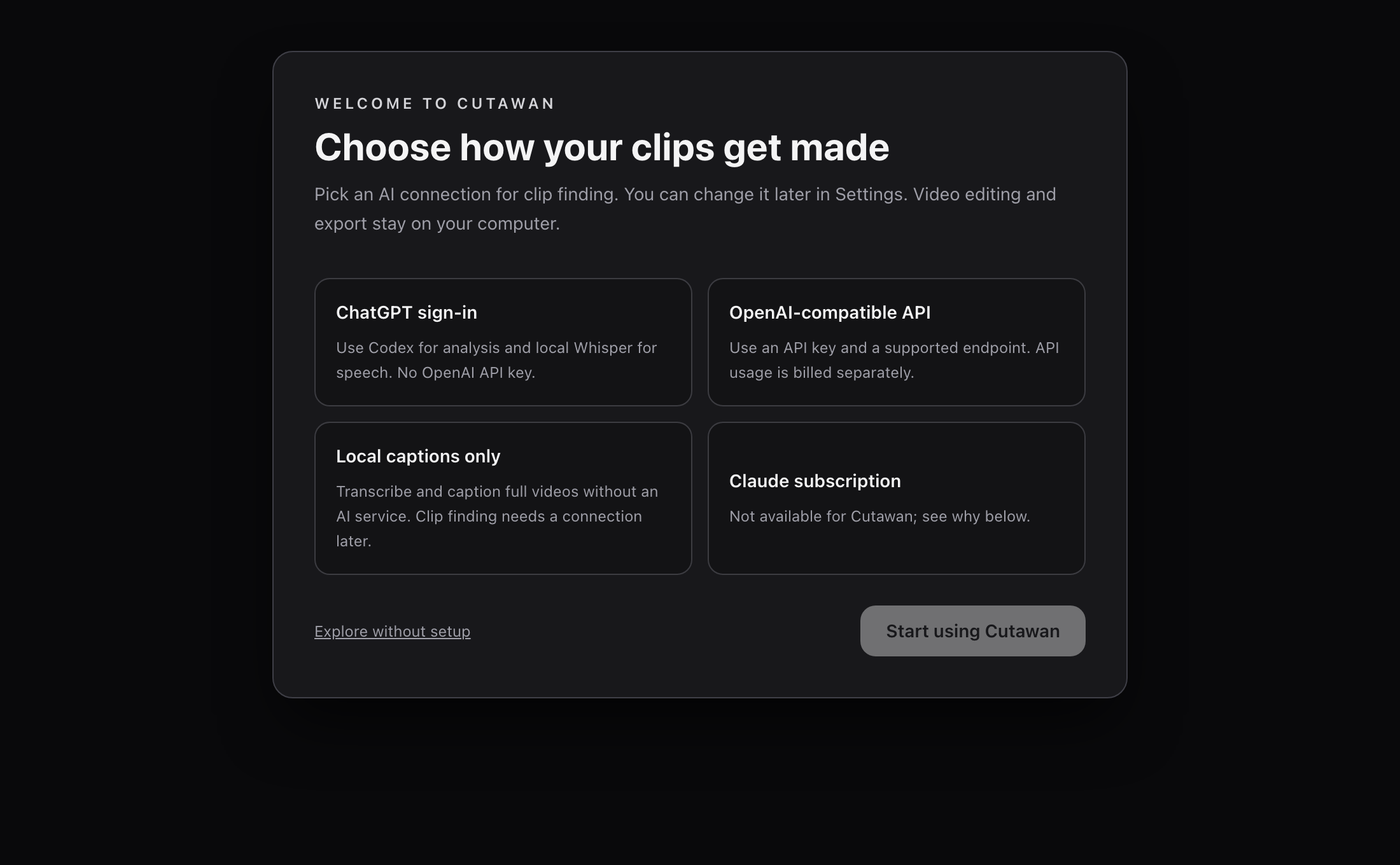
Pick how you want to work on first launch. Local captions do not need an AI connection.
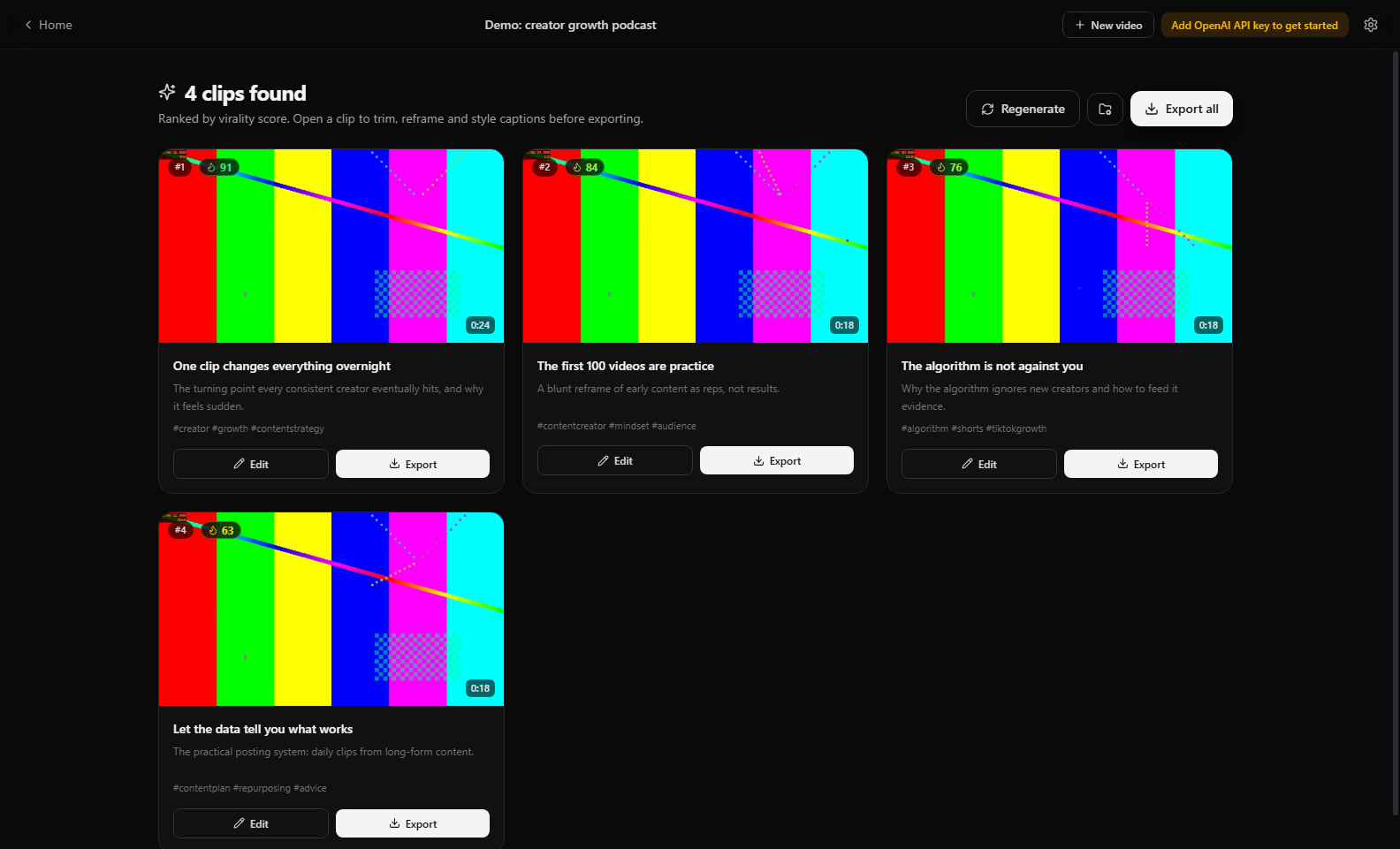
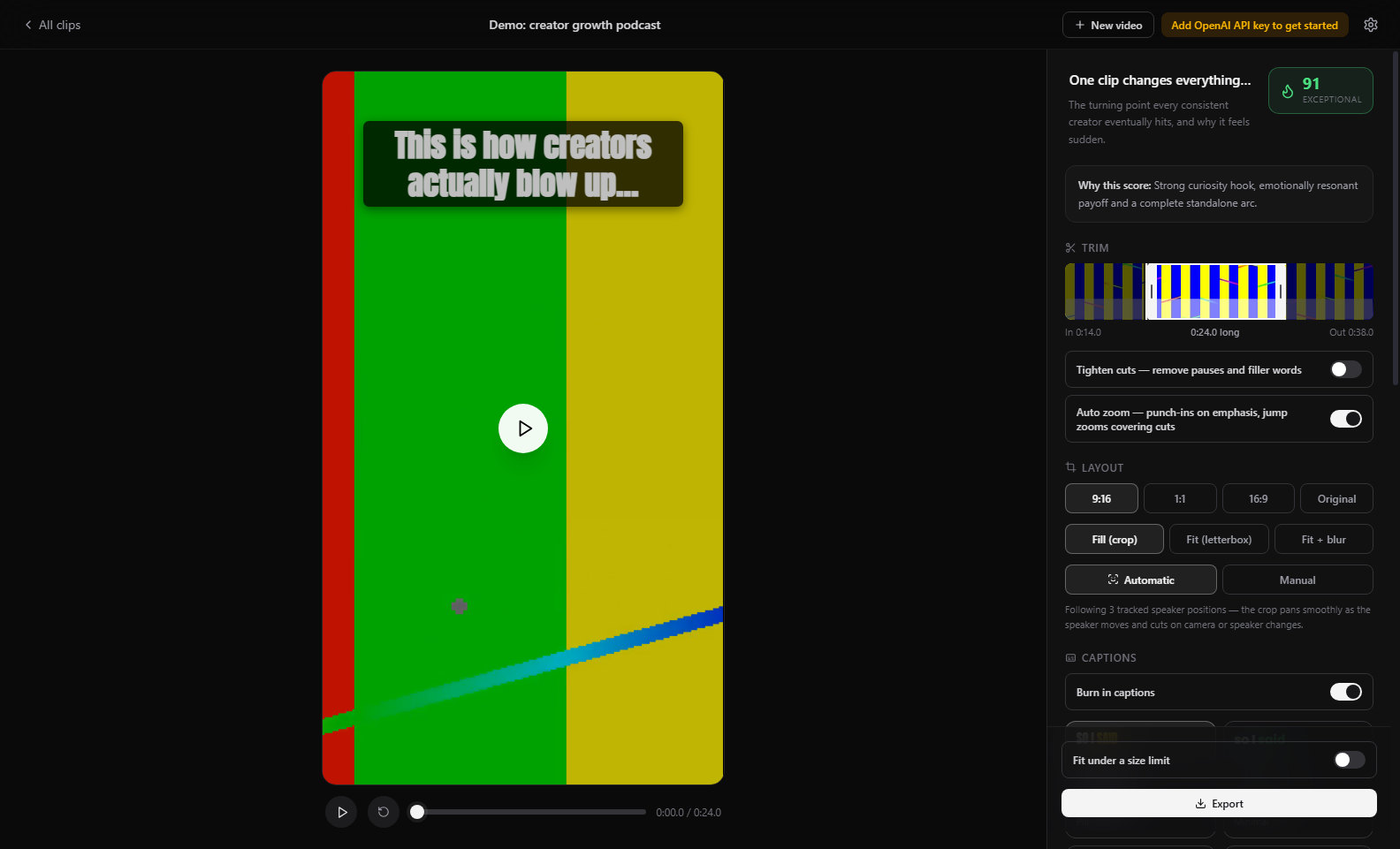
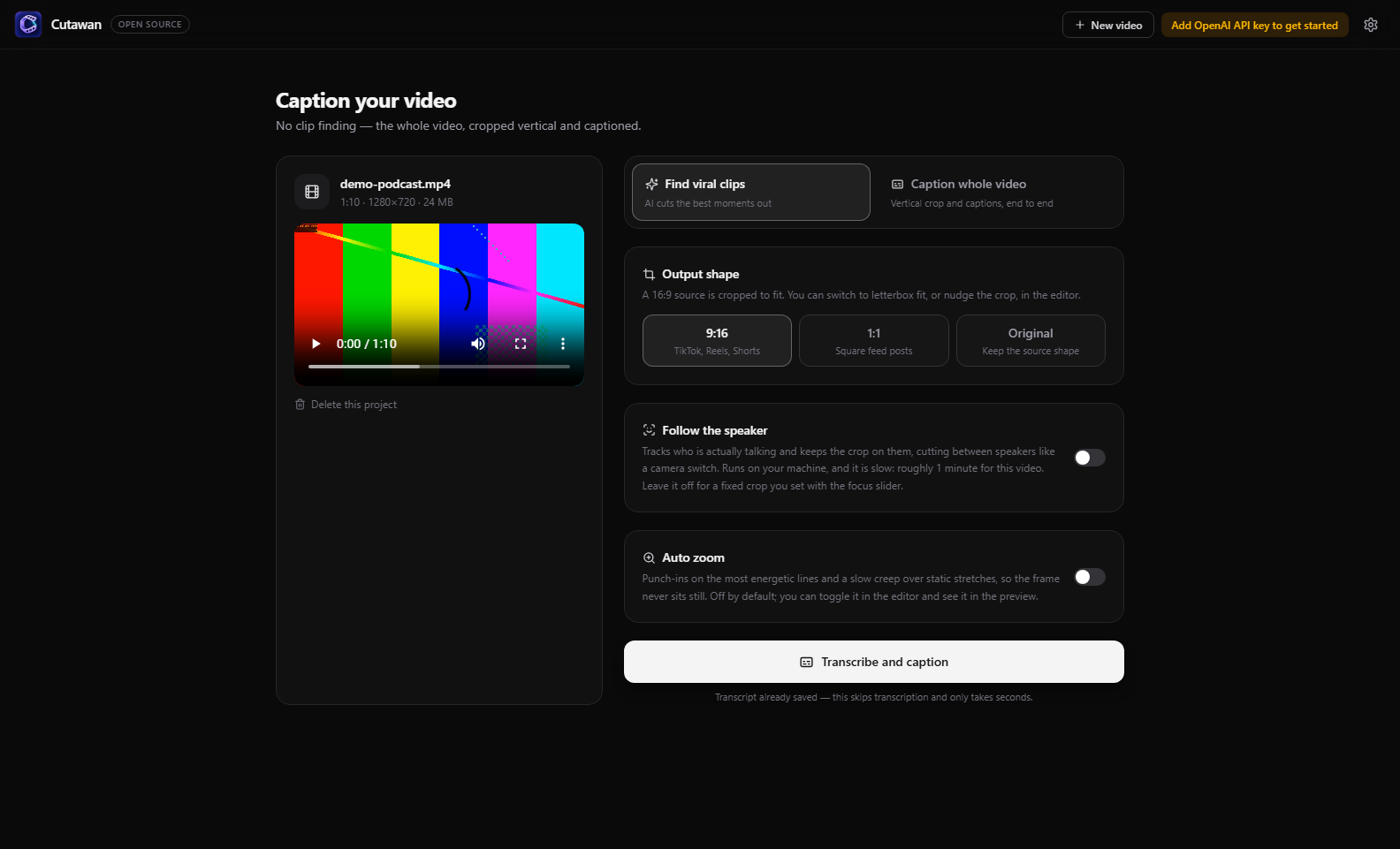
Pick a mode at setup: let the AI find clips, or caption the whole video end to end.
## Features **Two ways to work** - **Find viral clips.** The AI reads the transcript, cuts the best moments out and scores them, and you pick from the results. - **Caption the whole video.** No clip finding: give it a 16:9 video and it comes back as one vertical, captioned edit you can trim, restyle and export. Optionally tracks the speaker across the whole video and adds auto zoom. Both modes work on the same project, and the transcript is shared between them. **Finding the clips** - **Import anything.** Local files (MP4/MOV/MKV/WEBM and more) or paste a URL from YouTube, Vimeo, TikTok, Twitch, or any site yt-dlp supports. Private or SSO-protected videos (like enterprise Vimeo) work by borrowing the login from your browser. No server integration needed. - **Whisper transcription** with word-level timestamps. Long videos are chunked automatically and checkpointed, so retries and re-generations never pay for transcription twice. - **Find visual moments (beta).** Opt in to sampled source-wide discovery before transcript selection, including demonstrations and visible events without speech. The app shows sampling gaps and failed coverage. [How it works and its limits](docs/source-discovery.md). - **Viral moment detection backed by research.** An LLM picks self-contained hook, build, payoff micro-stories (not clips that trail off mid-setup). You can steer it with your own prompt if you want, like "find the funniest exchanges". A second AI pass reviews every clip ending and extends it to the beat that actually completes the thought. - **Editorial selection and ranking.** Review retained speech, nearby context and sampled frames against common hook, clarity, value, payoff and audience-fit criteria. Incomplete stories need evidence; uncertainty stays visible, repeated ideas move down the list, and scores are provisional editorial assessments. [How ranking and its comparison baseline work](docs/editorial-ranking.md). **Making them good** - **Presenter + content layouts.** Separate a webcam inset from a screen recording and compose both into 9:16, with content-first, stacked and content-only choices. Set source regions manually offline or use sampled AI layout review. Uncertain layouts keep the full scene and ask for review; moving insets still need careful checking. [Scope and remaining work](docs/adaptive-clipping-status.md). - **Auto zoom.** Scene-aware punch-ins on the speaker's most energetic lines, jump zooms that cover cuts, and slow creep on static stretches. The kind of thing top short-form editors do to keep people watching. - **Tighten cuts.** Pauses and filler words ("um", "uh") get removed automatically. Captions, B-roll, zoom and the face track all remap to the shorter timeline. - **Speaker-aware auto-reframe.** On-device audio-visual active speaker detection (UltraFace face tracking + the LR-ASD model via ONNX Runtime, no cloud) checks every face's lip movement against the actual soundtrack, so the crop stays on the person talking — not whoever moves or gestures. The 9:16 crop cuts between speakers like a camera switch. - **12 caption styles plus your own fonts.** Karaoke-style word highlighting burned in with libass. Upload any TTF/OTF and previews match exports exactly. - **Your branding.** Overlay your logo or watermark (corner, size, opacity) on the preview and every export. - **AI B-roll.** Say "Yoda" and a picture of Yoda pops over the video at that word. Uses Wikipedia and Openverse images, no extra API keys. - **A real editor.** Filmstrip trim with waveform and live playhead, click-to-seek transcript that doubles as a trim tool, aspect ratios (9:16 / 1:1 / 16:9), and a live preview that matches the export. **Shipping them** - **Export** H.264/AAC MP4s with burned-in captions. Loudness-normalised to -14 LUFS, gentle audio tail fade, three quality tiers, NVIDIA NVENC GPU encoding with automatic CPU fallback. Optionally encode once to fit under a megabyte cap (Discord, email, WhatsApp). - **AI post captions.** One click writes a scroll-stopping TikTok/Reels/Shorts caption (hook-first line, one engagement driver, niche hashtags). Copy it and jump straight to TikTok Studio upload. - **Update notifications.** Windows/Linux packages download and install updates in the app. Unsigned Mac builds download and verify the installer in the app, then guide you through replacing it in Applications. Source checkouts update with one click (pull, rebuild, relaunch). ## Website The marketing website is [cutawan.xyz](https://cutawan.xyz). Its source lives in the separate private [cutawan-website](https://github.com/JeremySNR/cutawan-website) repository. App releases and documentation remain here. ## Build from source For contributors and developers; everyone else can use the [prebuilt downloads](#download-and-get-started). ```bash git clone https://github.com/JeremySNR/cutawan.git cd cutawan npm install npm run dev # development with hot reload npm run package # distributable build (dmg / nsis / AppImage) ``` ### Publishing a release (for maintainers) Most people should just download the app from the [releases page](https://github.com/JeremySNR/cutawan/releases/latest) — there's no need to run anything from source. To cut a new release, bump the version and push a tag; the [`Release` workflow](.github/workflows/release.yml) builds the macOS `.dmg`, Windows installer and Linux `AppImage` and publishes them, along with the update manifests the in-app updater reads: ```bash npm version patch # or minor / major — bumps package.json and creates the tag git push --follow-tags # pushes the commit and the vX.Y.Z tag ``` Windows packages can also be listed on [winget](docs/winget.md) after a one-off first submit. Windows/Linux packages support in-app installation of later releases. The macOS app is **not Developer ID signed or notarized**, so it downloads and verifies a Mac installer, then offers **Open installer**. Quit Cutawan and replace the app in Applications; projects and settings remain in the app-data folder. Proper Mac signing/notarization requires Apple Developer Program membership. Before enabling Mac auto-updates, wire the signing credentials into the workflow and verify an upgrade between two signed releases. Updates are checked on launch and every six hours, with retries after a failed check or reconnection. The toolbar shows download progress and readiness, and opens Settings → Updates directly. Windows/Linux installation requires an explicit restart and is blocked while work is active. The release workflow verifies every platform’s installer and manifest before publishing a completed draft. The Mac release is built for Apple Silicon. CI and the release workflow run `bash scripts/check-mac-package.sh` against the packaged app before publication. This checks native binary architecture, isolated inference, speaker-model batch parity, saved projects, captioned export, first-run setup, and the assisted-update UI (available, downloading, retry, and ready states). Run GUI checks from a normal macOS GUI session; an agent's restricted shell can fail in Launch Services before Electron starts. Native ONNX processing runs in a child process with bounded frontend batches so a native failure cannot terminate the editor. Building from source needs **Node.js 20+**. The local speech routes need Python 3.10+; the wizard can install faster-whisper and a speech model into Cutawan's app-data folder. FFmpeg is bundled. On Windows, `winget install JeremySNR.Cutawan` will work once the [winget package](docs/winget.md) is listed. Rendering, face tracking, editing, zoom and export run locally. Speech can also run locally with faster-whisper. For API transcription, extracted audio goes to the configured endpoint; analysis sends transcript text and sampled frames through the selected connection. The full video is never uploaded. ## Architecture ``` src/ ├── main/ Electron main process │ ├── pipeline/ │ │ ├── ffmpeg.ts probe, audio chunk extraction, thumbnails │ │ ├── openai.ts minimal REST client (Whisper + structured chat) │ │ ├── transcribe.ts chunked transcription, timestamp stitching │ │ ├── highlights.ts LLM viral-moment detection, scoring, ending review │ │ ├── faces.ts auto-reframe orchestration + focus track building │ │ ├── asd.ts LR-ASD audio-visual active speaker detection │ │ ├── facetracks.ts per-person face tracking (IOU + interpolation) │ │ ├── detect.ts UltraFace face detection + scene-cut detection │ │ ├── mfcc.ts MFCC audio features for the ASD model │ │ ├── energy.ts per-segment vocal energy (arousal signal) │ │ ├── ytdlp.ts yt-dlp binary management + URL downloads │ │ ├── broll.ts LLM keyword tagging for B-roll inserts │ │ ├── imagesearch.ts keyless Wikipedia/Openverse image search │ │ ├── encoders.ts NVENC detection/verification, GPU ffmpeg download │ │ ├── captions.ts ASS karaoke subtitle generation │ │ ├── socialCaption.ts AI post-caption writer │ │ └── render.ts cut, reframe, auto zoom, watermark, burn-in │ ├── updates.ts GitHub release checks + self-update │ ├── fonts.ts custom caption fonts (sfnt parsing, merged fontsdir) │ ├── ipc.ts typed IPC handlers │ ├── settings.ts encrypted API key, models, branding │ └── projects.ts project persistence (userData/projects) ├── preload/ context-isolated typed bridge ├── shared/ types, caption styles/layout, tighten + zoom planners └── renderer/ React UI (Tailwind, Zustand) ``` The live preview and the export share the same planning code in `src/shared/` (caption layout, tighten cuts, zoom), so what you see is what gets rendered. ## Tests Unit tests, typecheck and lint run in CI on every push, alongside the offline pipeline test and a UI smoke test: ```bash npm test # vitest unit tests npm run typecheck npm run lint ``` Integration test scripts live in `scripts/` (`test-pipeline`, `test-e2e`, `test-quality`, `test-wholevideo`, `test-encoders`, `test-resilience`, `test-broll`, `test-youtube`, `test-asd`, `smoke-test.sh`). See each file's header for what it covers. The e2e ones need `OPENAI_API_KEY`. To measure clip quality on your own projects, `scripts/eval-clips.ts` reads every saved project and reports how many clips open mid-sentence, cut a sentence off, or trail into dead air, plus the length spread. Add `--rerun` (needs `OPENAI_API_KEY`, a few cents per project, no transcription cost) to re-run clip detection on the saved transcripts with the current prompts and compare, which is how to check a prompt change actually helps: ```bash npx tsx --tsconfig tsconfig.node.json scripts/eval-clips.ts --verbose ``` The bundled active-speaker model (`resources/models/lr-asd-*.onnx`) is exported from the MIT-licensed [LR-ASD](https://github.com/Junhua-Liao/LR-ASD) weights with `scripts/export-asd-onnx.py` (requires Python with `torch`, `onnx`, `onnxruntime`, `python_speech_features`). ## FAQ **Is it actually free?** The app is free and MIT licensed. The API route incurs separate provider charges; the ChatGPT/Codex route uses your existing plan allowance and local Whisper. Neither route adds a Cutawan subscription or paid feature tier. Provider limits and charges still apply. **Do I need an OpenAI API key?** No. The first-run wizard also offers ChatGPT sign-in via Codex for analysis, paired with local Whisper transcription, and a local-only route for whole-video captions (without AI clip finding). ChatGPT's subscription is separate from OpenAI API billing, and Codex plan limits apply. Everything else runs locally without an API key: the editor, trimming, caption styling, auto zoom, speaker reframing, watermarks and export. If you already have a transcript from a previous run, you can keep editing and exporting offline. **Does my video get uploaded anywhere?** The full video is not uploaded. On the API route, extracted audio, transcript text and sampled frames are sent to the configured endpoint. On the ChatGPT/Codex route, speech is transcribed locally and only transcript text and sampled frames are sent for analysis. Rendering, face tracking, zoom and export are local. **Can I use my Claude subscription?** Not as Cutawan's AI connection. [Anthropic's guidance](https://support.claude.com/en/articles/13189465-log-in-to-your-claude-account) directs developers of third-party apps, including open-source apps, to use API-key authentication. Cutawan will not route automated requests through a personal Claude login. You can use Claude models with an API key through the **OpenRouter** connection instead. **How is this different from Opus Clip's free tier?** Free SaaS tiers cap your processing minutes and usually watermark the output. Cutawan has no cap because it runs on your hardware, and the only watermark is one you add yourself. **Do I need a GPU?** No. Cutawan uses NVIDIA NVENC if it finds it and falls back to CPU encoding automatically. A GPU makes exports faster, nothing more. Speaker detection runs on-device through ONNX Runtime and is fine on CPU. **How long can my video be?** There is no fixed limit. Audio is chunked and transcription is checkpointed to disk as it goes, so hour-plus recordings work and a failure part way through does not mean paying to transcribe it again. **Does it work in languages other than English?** Transcription does. Set the language in Settings (it defaults to English, which is more reliable than auto-detect, since auto occasionally mislabels English as something else). Captions burn in whatever Whisper returns. Translating captions into another language is on the roadmap, not built yet. **Can it post to TikTok or YouTube for me?** Not automatically. It writes the post caption and hands you the file, then you upload. Direct publishing needs an audited TikTok/YouTube app, which is on the roadmap and a good contribution if you fancy it. **Can I use the clips commercially?** Yes. MIT licence, and the output is yours. Do check the rights on any source footage you did not create, and note that AI B-roll pulls from Wikipedia and Openverse, whose images carry their own licences. **macOS says the app cannot be opened. Why?** The macOS builds are not code-signed yet, so Gatekeeper may block first launch. After trying to open the app, use **System Settings → Privacy & Security → Open Anyway**. Signing and notarisation are wanted; see [CONTRIBUTING.md](CONTRIBUTING.md) if you can help. **Which OpenAI models does it use?** `whisper-1` for transcription and `gpt-5.4-mini` for analysis by default. Both are configurable in Settings, including a cheaper legacy option. **Can I run it against a local or non-OpenAI model?** Yes. The **OpenRouter** connection takes one OpenRouter key and lets you pick any chat model it lists, plus a hosted Whisper model or local transcription. Your key is encrypted with the OS keychain. For anything else that speaks the OpenAI REST shape, set the API base URL in Settings (or `OPENAI_BASE_URL`) to Azure OpenAI, Groq, LM Studio, Ollama, or anything else with `/v1/chat/completions`. Transcription can point at a separate local Whisper server (faster-whisper, whisper.cpp’s compatible endpoint) — it must return **word-level timestamps**, because captions and tighten-cuts depend on them. The ChatGPT/Codex route instead uses local faster-whisper directly, with an in-app installer and no server. ## Roadmap Each of these is an open issue, so the discussion and the detail live there. Contributions very welcome. - [Multi-language caption translation](https://github.com/JeremySNR/cutawan/issues/49) - [Manual zoom keyframes on the timeline](https://github.com/JeremySNR/cutawan/issues/50) - Easier fully bundled on-device Whisper, without requiring a separate Python installation - Direct publishing and scheduling to socials (needs an audited TikTok/YouTube app) Looking for somewhere to start? The [good first issues](https://github.com/JeremySNR/cutawan/issues?q=is%3Aissue+is%3Aopen+label%3A%22good+first+issue%22) need no deep knowledge of the pipeline. ## Contributing Issues and PRs are welcome. The codebase is TypeScript end-to-end. `npm test && npm run typecheck && npm run lint` must pass. CI enforces all three plus an offline render test. See [CONTRIBUTING.md](CONTRIBUTING.md) for setup (including how to explore the UI without an API key), how the code is laid out, and the handful of things that are easy to get wrong. Release history is in [CHANGELOG.md](CHANGELOG.md). Security issues go through [SECURITY.md](SECURITY.md) rather than a public issue. ## License [MIT](LICENSE) > On Windows `cmd.exe` (and PowerShell), don't paste the `#` comments in the examples above — they aren't comment characters there and get passed to the script as arguments. Run just `npm run dev`. ### Troubleshooting: `Error: Electron uninstall` If `npm run dev` fails with `Error: Electron uninstall` (or `An entry point is required…` right before it), the Electron runtime binary didn't finish downloading during `npm install` — a common consequence of a dropped/interrupted connection. `node_modules/electron/dist/` ends up missing `electron.exe`. Fix it without a full reinstall: ```bash npm rebuild electron ``` If that no-ops and the binary is still missing, force a clean re-download: ```bash # macOS / Linux rm -rf node_modules/electron/dist node_modules/electron/path.txt force_no_cache=true node node_modules/electron/install.js ``` ```powershell # Windows PowerShell Remove-Item -Recurse -Force node_modules\electron\dist, node_modules\electron\path.txt -ErrorAction SilentlyContinue $env:force_no_cache = "true"; node node_modules/electron/install.js ``` Verify with `npx electron --version` (should print the Electron version, e.g. `v35.7.5`). Note that `npm run package` can succeed even while this is broken — electron-builder downloads its own copy of Electron separately from the dev runtime. ## Screenshots and brand assets Run `npm run screenshots` to build Cutawan and capture the first-run wizard plus eight app views with isolated offline demo profiles. See [rename notes](docs/rename-plan.md) for existing-install compatibility and screenshot details.