There are 2 options for controlling the robot. You can run The python GUI script from a remote device and connect to the robot via WiFi (recommended) or use a remote desktop application to run the script from the RPi.
# WiFi
There are a few references to IP addresses in the code. You will have to modify them in the python and the .ino file. I am working on making this easier.
The robot will want to connect to WiFi when it starts.
The default login details are:
* SSID : dog-net
* PASSWORD: dognet123
You can change these near the top of the yertle_lib.cpp file.
- - -
# Firmware
This was written in C++ using the Arduino IDE. It uses FreeRtos to separate tasks to different cores of the ESP32.
One task deals with WiFi and serial communication, while the other deals with I2C communication and inverse kinematics calculations. [Link](ESP32/firmware/firmware.ino)
- - -
# Control Software
This was written in Python3 and uses the tkinter library to generate a GUI to control the robot. It connects to the robot through either Wifi or serial communication. The robot sends sensor information and the control software generates the feet's position and sends it back to the robot in real-time.
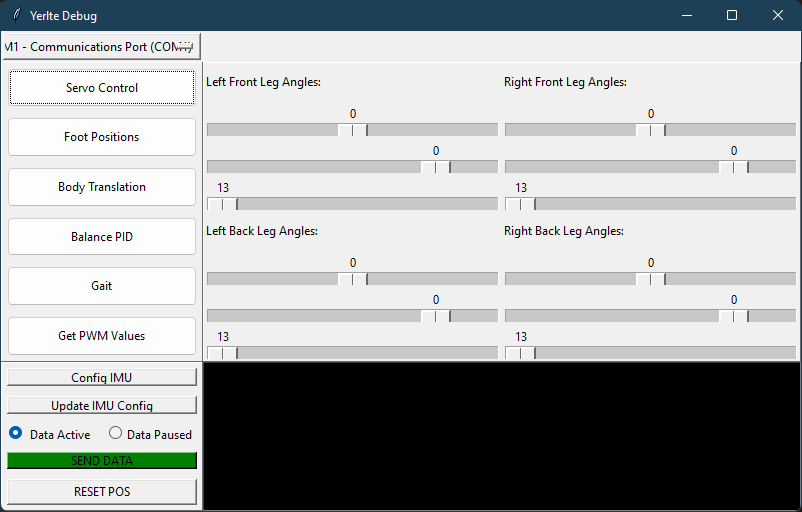
## Configuring IMU
The IMU needs to be initially calibrated. These settings are saved in an .ini and reused when the robot is restarted.
- - -
## Zeroing servos
You can use this GUI to Zero servos before fully constructing robot.
* Use the servo control tab bo visual center servos
* Press the Get PWM button to get the current PWM values and use these in .ino file to set servo offsets.
# ROS 2
Done. A ROS 2 package (`ros2/yertle_rl`) runs a trained locomotion policy as a
node (subscribes `/cmd_vel` and `/imu/data`, publishes 12 joint targets), with a
closed-loop walking demo over live topics and a bidirectional Isaac Sim bridge.
See [ros2/README.md](../ros2/README.md).
- - -



 # Table of Contents