.ignore 4.x
=============
[][jb:confluence-on-gh]
[][gh:build]
[][plugin-website]
[][plugin-website]
[][plugin-website]
Introduction
------------
**.ignore** is a plugin for:
- `.bzrignore` (Bazaar)
- `.chefignore` (Chef)
- `.cfignore` (CloudFoundry)
- `.cvsignore` (Cvs)
- `.boringignore` (Darcs)
- `.deployignore` (DeployHQ)
- `.distignore` (WP-CLI)
- `.dockerignore` (Docker)
- `.ebignore` (ElasticBeanstalk)
- `.eleventyignore` (Eleventy)
- `.eslintignore` (ESLint)
- `.flooignore` (Floobits)
- `ignore-glob` (Fossil)
- `.gitignore` (Git)
- `.gcloudignore` (GoogleCloud)
- `.helmignore` (Kubernetes Helm)
- `.jpmignore` (Jetpack)
- `.jshintignore` (JSHint)
- `.hgignore` (Mercurial)
- `.mtn-ignore` (Monotone)
- `.nodemonignore` (Nodemon)
- `.npmignore` (Npm)
- `.nuxtignore` (NuxtJS)
- `.openapi-generator-ignore` (OpenAPI Generator)
- `.p4ignore` (Perforce)
- `.prettierignore` (Prettier)
- `.ignore` (Sourcegraph)
- `.stylelintignore` (StyleLint)
- `.stylintignore` (Stylint)
- `.swagger-codegen-ignore` (SwaggerCodegen)
- `.terraformignore` (Terraform)
- `.tfignore` (TF)
- `.tokeignore` (Tokei)
- `.upignore` (Up)
- `.vercelignore` (Vercel)
- `.yarnignore` (Yarn)
files in your project. It supports the following IDEs:
- Android Studio
- AppCode
- CLion
- GoLand
- IntelliJ IDEA
- PhpStorm
- PyCharm
- RubyMine
- WebStorm
- DataGrip
Features
--------
- Files syntax highlight
- Templates filtering and selecting in rules generator by name and content
- User custom templates
- Show ignored files by specified Gitignore file (right-click on `.gitignore` file)
- Create a file in the currently selected directory
- Generate Gitignore rules basing on [GitHub's templates collection][github-gitignore]
- Add a selected file/directory to Gitignore rules from the popup menu
- Suggesting `.gitignore` file creation for a new project
- Entries inspection (duplicated, covered, unused, incorrect syntax, relative entries) with quick-fix actions
- Comments and brackets support
- Navigation to entries in Project view
- Renaming entries from a dot-ignore file
- Close opened ignored files action
- Custom user templates with import/export features
Supported IDEs
--------------
Since `v4.0.0`, .ignore plugin updates will be delivered only to the latest stable IDE version.
No worries! It means .ignore for all IDE version from before - `139-193` - will be frozen at `v3.x.x`.
Installation
------------
- Using IDE built-in plugin system:
- Preferences > Plugins > Browse repositories... > Search for ".ignore" > Install Plugin
- Manually:
- Download the [latest release][latest-release] and install it manually using Preferences > Plugins > Install plugin from disk...
Restart IDE.
Usage
-----
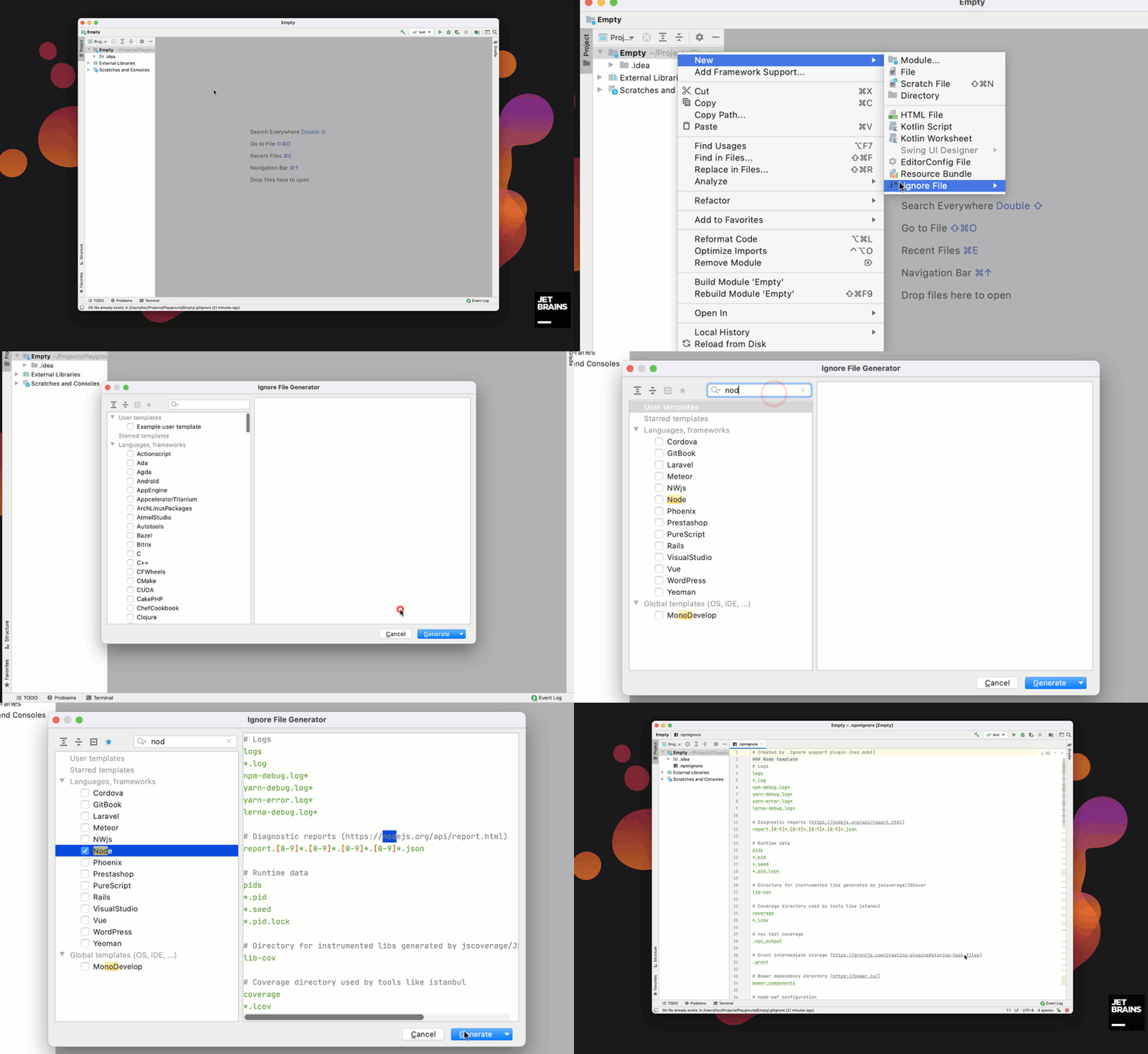
1. Generate a new file and templates usage
To generate new ignore file, just click on File > New or use Alt + Insert shortcut and select `.ignore file` element.
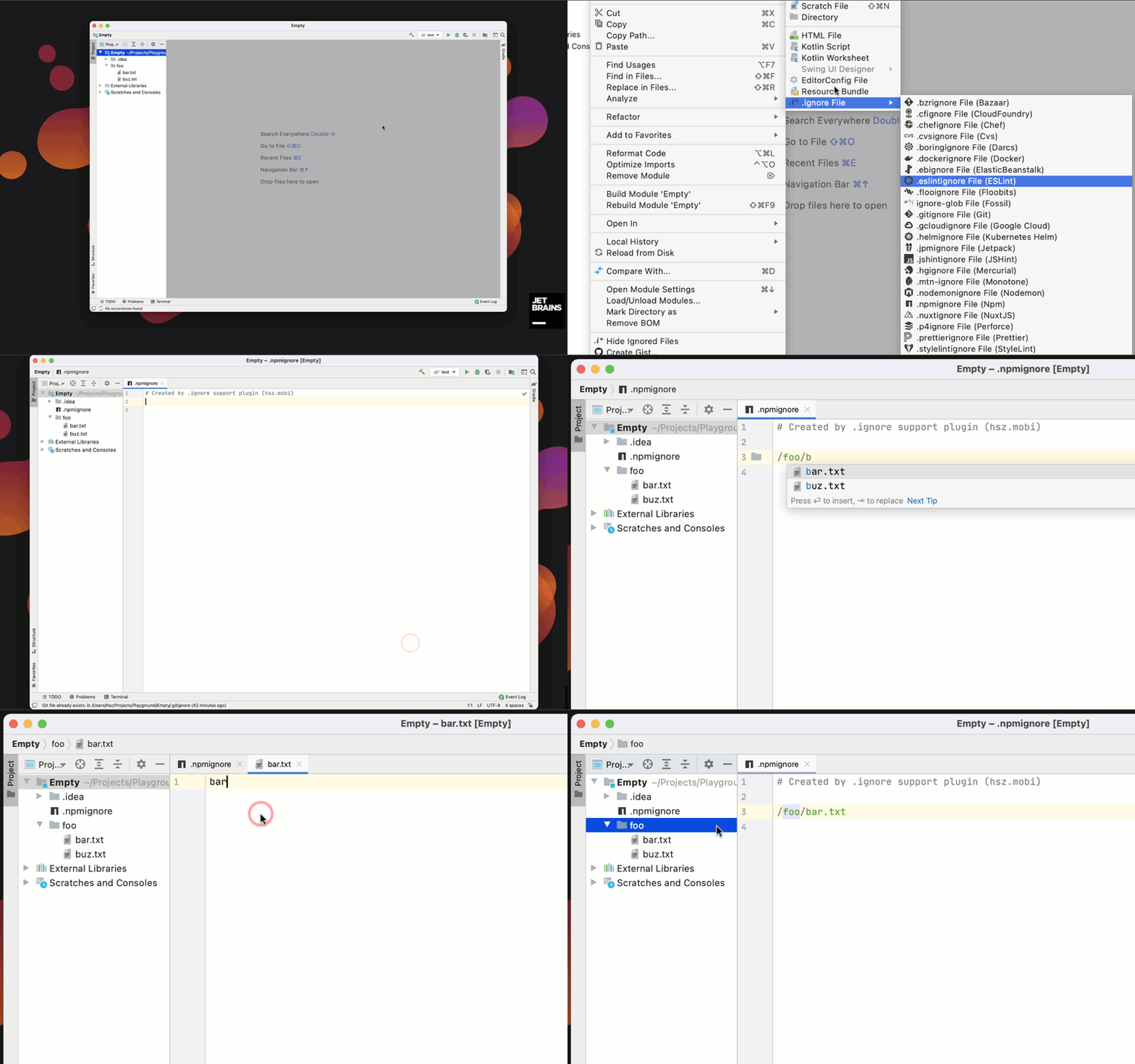
2. Support for typing new rules, linking rules with matched files
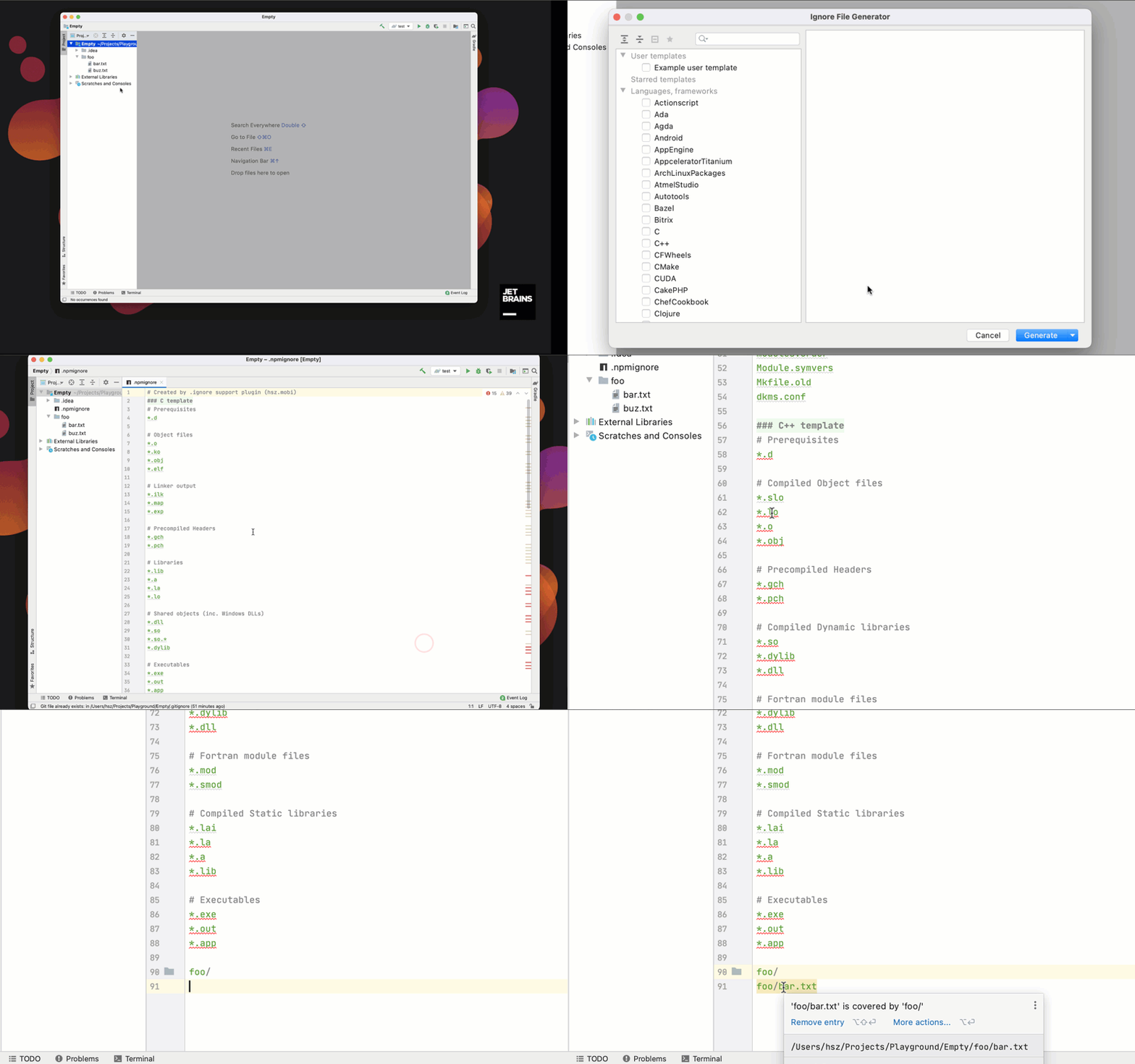
3. Code inspections
Code inspections covers few cases:
- duplicated entries (checks if entry is defined more than once)
- covered entries - entry is covered by more general one
- unused entries
- incorrect syntax (regexp rules)
- relative entries
[github-gitignore]: https://github.com/github/gitignore
[plugin-website]: https://plugins.jetbrains.com/plugin/7495
[latest-release]: https://github.com/JetBrains/idea-gitignore/releases/latest
[jb:confluence-on-gh]: https://confluence.jetbrains.com/display/ALL/JetBrains+on+GitHub
[gh:build]: https://github.com/JetBrains/idea-gitignore/actions?query=workflow%3ABuild