| [](http://nuget.org/packages/Dirkster.AvalonDock) | Dirkster.AvalonDock |
| ------------------------------------------------------------------------------------------------------------------------------------------------------- | --------------------------------- |
| [](http://nuget.org/packages/Dirkster.AvalonDock.Themes.Aero) | Dirkster.AvalonDock.Themes.Aero |
| [](http://nuget.org/packages/Dirkster.AvalonDock.Themes.Expression) | Dirkster.AvalonDock.Themes.Expression |
| [](http://nuget.org/packages/Dirkster.AvalonDock.Themes.Metro) | Dirkster.AvalonDock.Themes.Metro |
| [](http://nuget.org/packages/Dirkster.AvalonDock.Themes.VS2010) | Dirkster.AvalonDock.Themes.VS2010 |
| [](http://nuget.org/packages/Dirkster.AvalonDock.Themes.VS2013) | [Dirkster.AvalonDock.Themes.VS2013](https://github.com/Dirkster99/AvalonDock/wiki/WPF-VS-2013-Dark-Light-Demo-Client) |
 
## Master Branch
[](https://ci.appveyor.com/project/Dirkster99/avalondock/branch/master)[](https://github.com/Dirkster99/avalondock/releases/latest) [Continues Integration](https://ci.appveyor.com/project/Dirkster99/AvalonDock/build/artifacts)



 # AvalonDock
Support this project with a :star: -report an issue, or even better, place a pull request :mailbox: :blush:
My projects Edi, Aehnlich, and [many others](https://github.com/search?p=4&q=%22dirkster.avalondock%22&type=Code) (open source or commercial) are powered by this project.
AvalonDock is a WPF Document and Tool Window layout container that is used to arrange documents
and tool windows in similar ways than many well known IDEs, such as, Eclipse, Visual Studio,
PhotoShop and so forth. Here are some CodeProject articles:
* [AvalonDock [2.0] Tutorial Part 1 - Adding a Tool Window](https://www.codeproject.com/Articles/483507/AvalonDock-Tutorial-Part-Adding-a-Tool-Windo)
* [AvalonDock [2.0] Tutorial Part 2 - Adding a Start Page](https://www.codeproject.com/Articles/483533/AvalonDock-Tutorial-Part-Adding-a-Start-Page)
* [AvalonDock [2.0] Tutorial Part 3 - AvalonEdit in AvalonDock](https://www.codeproject.com/Articles/570313/AvalonDock-Tutorial-Part-AvalonEdit-in-Avalo)
* [AvalonDock [2.0] Tutorial Part 4 - Integrating AvalonEdit Options](https://www.codeproject.com/Articles/570324/AvalonDock-Tutorial-Part-Integrating-AvalonE)
* [AvalonDock [2.0] Tutorial Part 5 - Load/Save Layout with De-Referenced DockingManager](https://www.codeproject.com/Articles/719143/AvalonDock-Tutorial-Part-Load-Save-Layout)
This repository contains **additional bug fixes and a feature added** fork for:
xceedsoftware/wpftoolkit version **3.2-3.6**. But most importantly, the usage of this AvalonDock project remains free for both, comercial and open source users.
There is also an open source repository https://github.com/dotnetprojects/WpfExtendedToolkit with a fixed and stable version of all other (other than AvalonDock) components from the WPFToolKit.
Be sure to checkout the Wiki for more details.
## Building AvalonDock from Source
This project supports multitargeting frameworks (NetCore 3 and .Net 4). This means that it requires
Visual Studio Community 2019 or better to build.
# Feature Added - Dark and Light VS 2013 Theme
Please review the Project Wiki to see more demo screenshots.
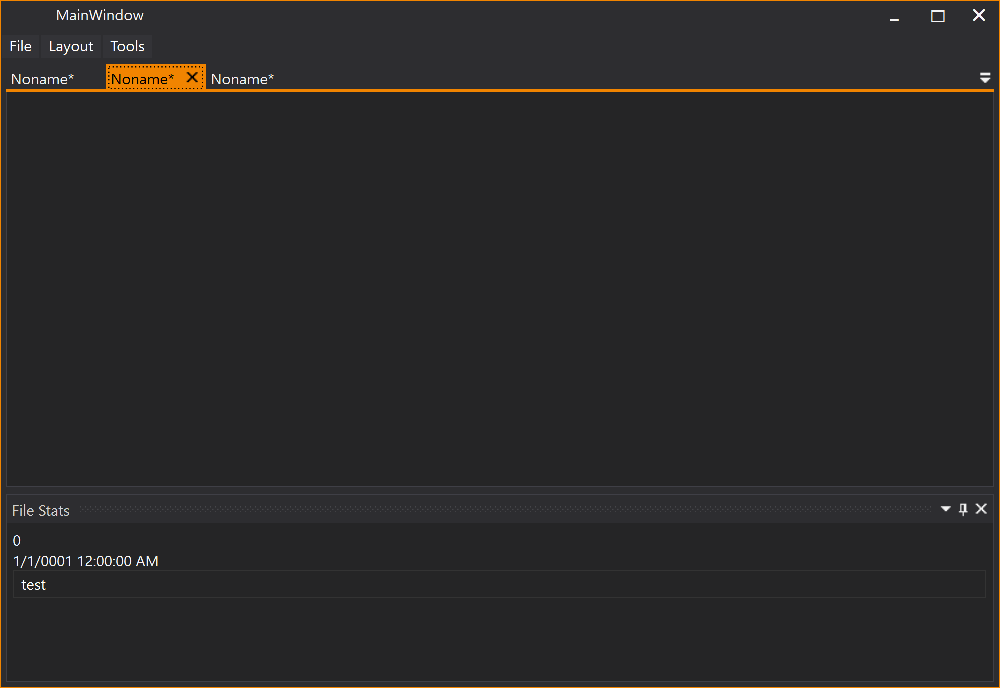
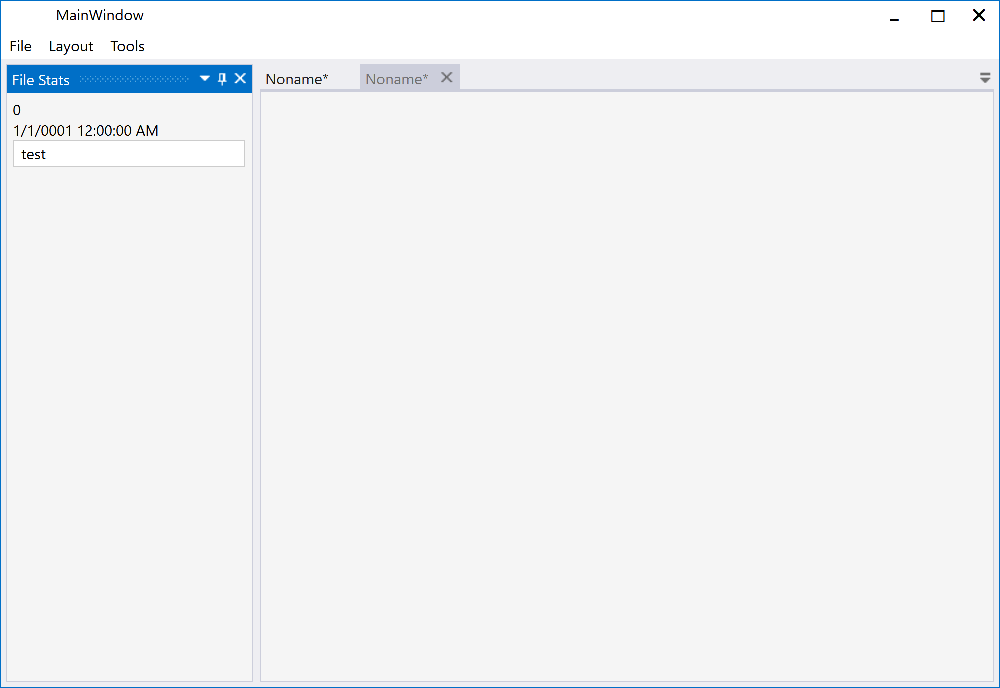
All screenshots below are from the MLib based VS 2013 Dark (Accent Color Gold)/Light (Accent Color Blue) theme on Windows 10. Similar theming results should be possible with other theming libraries since the implementation follow these guidelines.
The Docking Buttons are [defined in XAML](https://github.com/Dirkster99/AvalonDock/wiki/OverlayWindow), which ensures a good looking image on all resolutions, even 4K or 8K, and enables us to color theme consistently with the Window 10 Accent Color.
# AvalonDock
Support this project with a :star: -report an issue, or even better, place a pull request :mailbox: :blush:
My projects Edi, Aehnlich, and [many others](https://github.com/search?p=4&q=%22dirkster.avalondock%22&type=Code) (open source or commercial) are powered by this project.
AvalonDock is a WPF Document and Tool Window layout container that is used to arrange documents
and tool windows in similar ways than many well known IDEs, such as, Eclipse, Visual Studio,
PhotoShop and so forth. Here are some CodeProject articles:
* [AvalonDock [2.0] Tutorial Part 1 - Adding a Tool Window](https://www.codeproject.com/Articles/483507/AvalonDock-Tutorial-Part-Adding-a-Tool-Windo)
* [AvalonDock [2.0] Tutorial Part 2 - Adding a Start Page](https://www.codeproject.com/Articles/483533/AvalonDock-Tutorial-Part-Adding-a-Start-Page)
* [AvalonDock [2.0] Tutorial Part 3 - AvalonEdit in AvalonDock](https://www.codeproject.com/Articles/570313/AvalonDock-Tutorial-Part-AvalonEdit-in-Avalo)
* [AvalonDock [2.0] Tutorial Part 4 - Integrating AvalonEdit Options](https://www.codeproject.com/Articles/570324/AvalonDock-Tutorial-Part-Integrating-AvalonE)
* [AvalonDock [2.0] Tutorial Part 5 - Load/Save Layout with De-Referenced DockingManager](https://www.codeproject.com/Articles/719143/AvalonDock-Tutorial-Part-Load-Save-Layout)
This repository contains **additional bug fixes and a feature added** fork for:
xceedsoftware/wpftoolkit version **3.2-3.6**. But most importantly, the usage of this AvalonDock project remains free for both, comercial and open source users.
There is also an open source repository https://github.com/dotnetprojects/WpfExtendedToolkit with a fixed and stable version of all other (other than AvalonDock) components from the WPFToolKit.
Be sure to checkout the Wiki for more details.
## Building AvalonDock from Source
This project supports multitargeting frameworks (NetCore 3 and .Net 4). This means that it requires
Visual Studio Community 2019 or better to build.
# Feature Added - Dark and Light VS 2013 Theme
Please review the Project Wiki to see more demo screenshots.
All screenshots below are from the MLib based VS 2013 Dark (Accent Color Gold)/Light (Accent Color Blue) theme on Windows 10. Similar theming results should be possible with other theming libraries since the implementation follow these guidelines.
The Docking Buttons are [defined in XAML](https://github.com/Dirkster99/AvalonDock/wiki/OverlayWindow), which ensures a good looking image on all resolutions, even 4K or 8K, and enables us to color theme consistently with the Window 10 Accent Color.
| Description |
Dark |
Light |
| Dock Document |
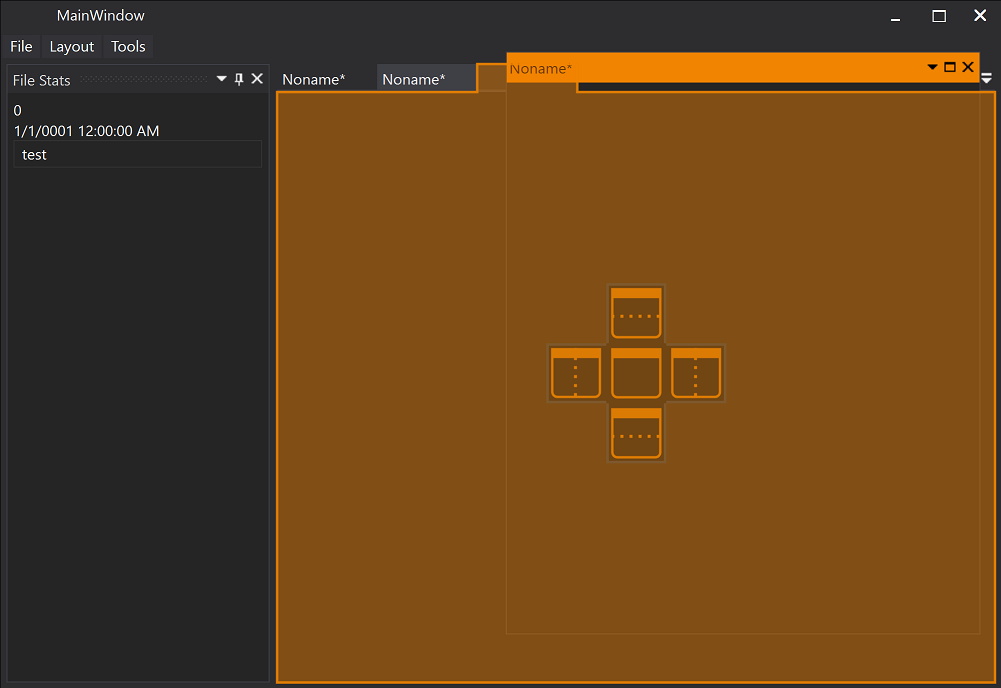 |
 |
| Dock Document |
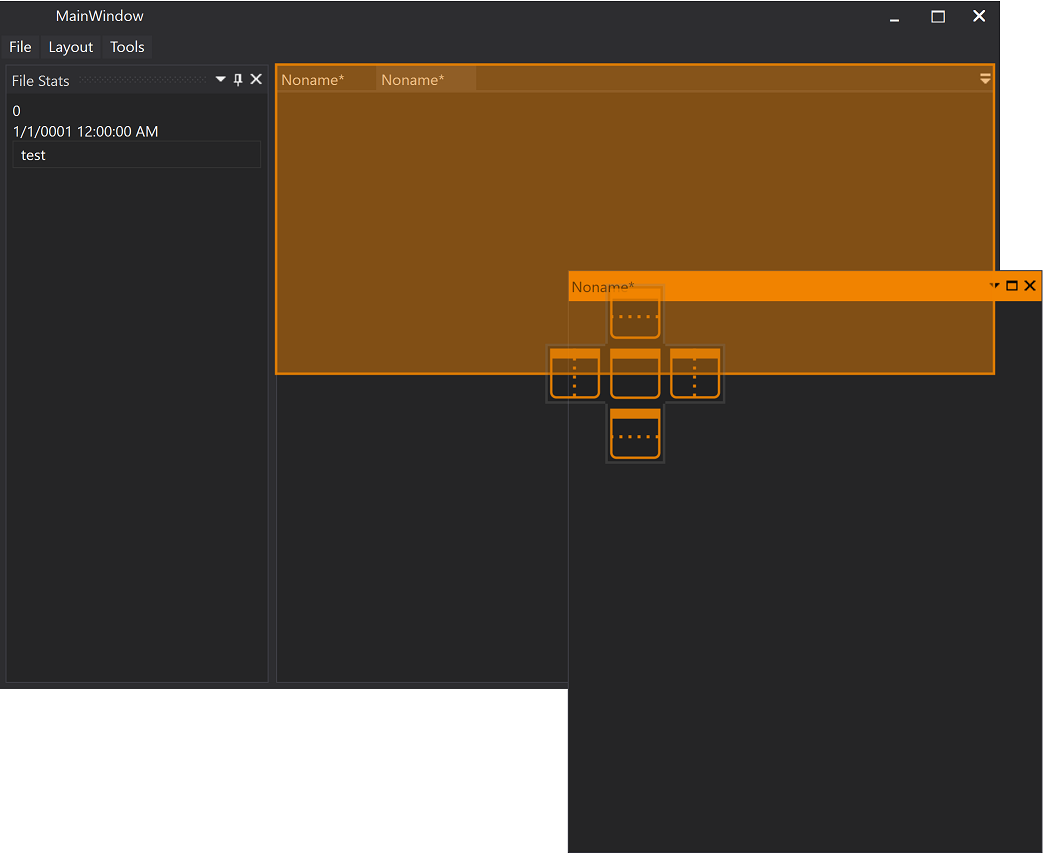 |
 |
| Dock Tool Window |
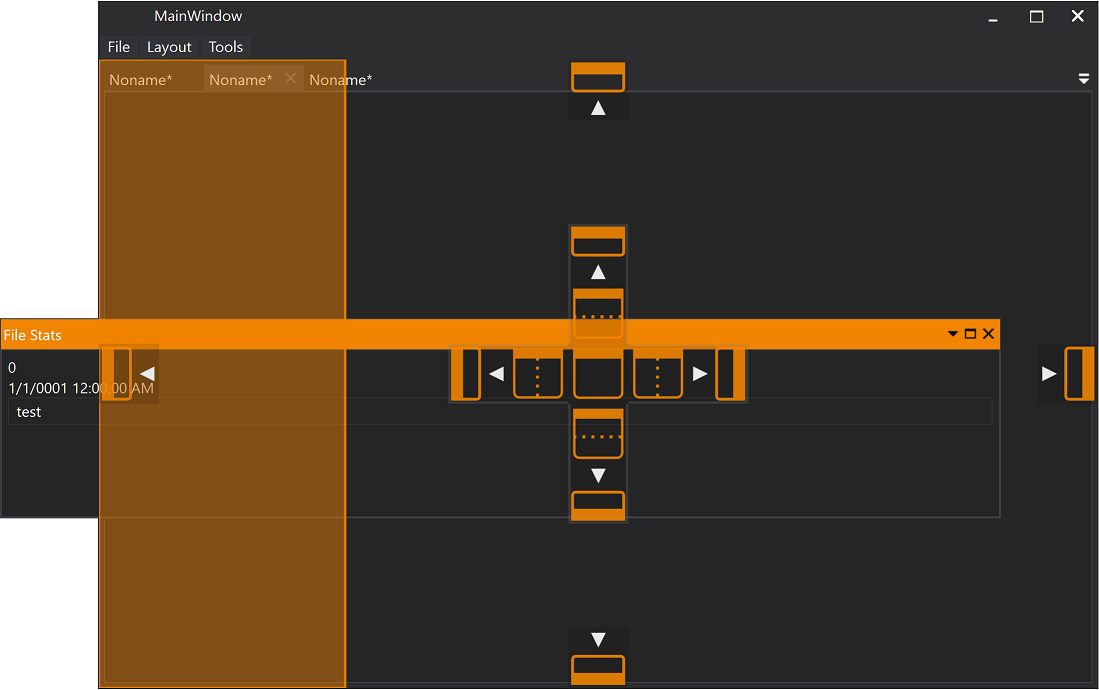 |
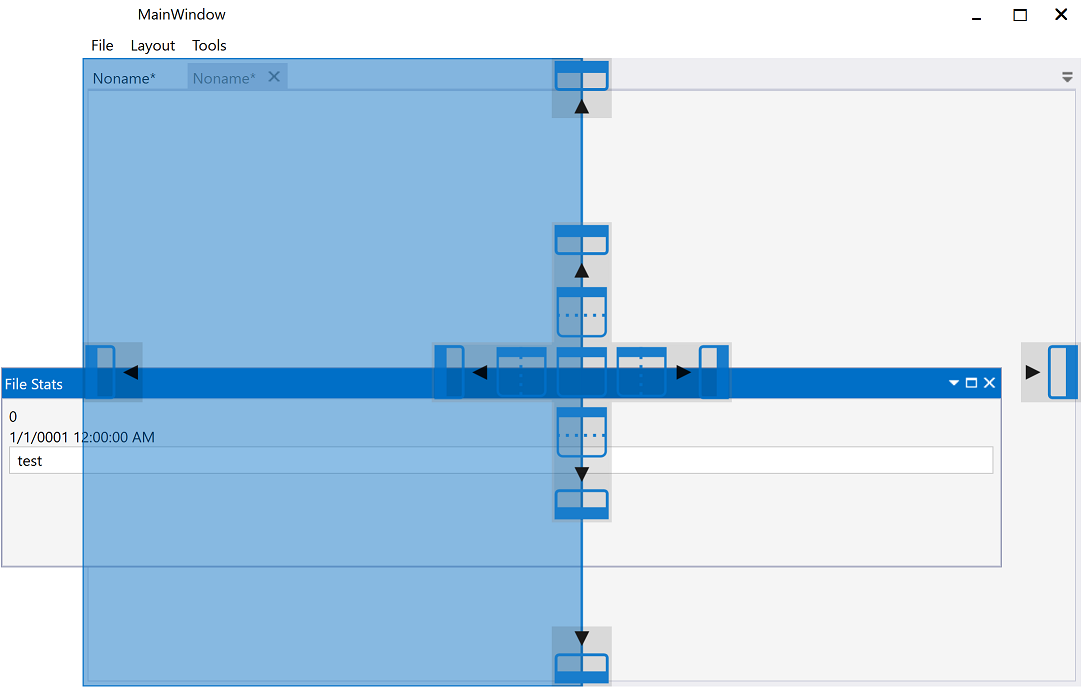 |
| Document |
 |
 |
| Tool Window |
 |
 |
## Theming
Using the *Xceed.Wpf.AvalonDock.Themes.VS2013* theme is very easy with *Dark* and *Light* themes.
Just load *Light* or *Dark* brush resources in you resource dictionary to take advantage of existing definitions.
```XAML
```
```XAML
```
These definitions do not theme all controls used within this library. You should use a standard theming library, such as:
- [MahApps.Metro](https://github.com/MahApps/MahApps.Metro),
- [MLib](https://github.com/Dirkster99/MLib), or
- [MUI](https://github.com/firstfloorsoftware/mui)
to also theme standard elements, such as, button and textblock etc.
# Mile Stone History
## In Master branch but not yet released
- [Resolve #98 with floating window without a content #99](https://github.com/Dirkster99/AvalonDock/pull/99) Thanx to [scdmitryvodich](https://github.com/scdmitryvodich)
- Changed coding style to using TABS as indentation
- [Changed namespaces to AvalonDock (as authored originally in version 2.0 and earlier)](https://github.com/Dirkster99/AvalonDock/pull/102)
- [Fix #101 and new fix for #81 with docked pane becomes not visible.](https://github.com/Dirkster99/AvalonDock/issues/101) Thanx to [scdmitryvodich](https://github.com/scdmitryvodich)
## Patch History for AvalonDock 3.6.2
- [Fixed issue #92 Always update floating properties](https://github.com/Dirkster99/AvalonDock/issues/92) Thanx to [scdmitryvodich](https://github.com/scdmitryvodich)
- [Fixed issue #95 AvalonDock: Autohidden Anchorable appears totally invisible after dragging](https://github.com/Dirkster99/AvalonDock/issues/95)
- [System.ArgumentOutOfRangeException in LayoutAnchorableTabItem.OnMouseEnter line](https://github.com/Dirkster99/AvalonDock/issues/90) Thanx to [sharpSteff](https://github.com/sharpSteff)
## Patch History for AvalonDock 3.6.1
- [Fixed issue #81 with docked pane becomes not visible (overlapped)](https://github.com/Dirkster99/AvalonDock/pull/82) Thanx to [scdmitryvodich](https://github.com/scdmitryvodich)
- [Fixed issue #83 with LayoutDocument disappearance](https://github.com/Dirkster99/AvalonDock/pull/84) Thanx to [scdmitryvodich](https://github.com/scdmitryvodich)
- [Fixed InvalidOperationException when deserializing layout](https://github.com/Dirkster99/AvalonDock/issues/59) [@dirkster](https://github.com/Dirkster99/AvalonDock/pull/86)
- [Fixed LayoutRoot implementation of IXmlSerializable.ReadXml to read the end element](https://github.com/Dirkster99/AvalonDock/issues/88) thanx to [prmartinuk](https://github.com/prmartinuk)
## Patch History for AvalonDock Version 3.6
- selecting a new LayoutAnchorableTabPanel from an auto sized width panel, will no longer undock the LayoutAnchorableTabPanel [@dirkster99](https://github.com/Dirkster99/AvalonDock/commit/8dfde7b011b30f4f9576cf414eb87090e4544aeb)
- null checks will now prevent crashes when creating the View [@dirkster99](https://github.com/Dirkster99/AvalonDock/commit/fdc7f6af4941690a3bc7852d09394e7d87bd4c23) [@dirkster99_1](https://github.com/Dirkster99/AvalonDock/commit/c06efac6479a3bad1417356e39f5974dadedc662)
- LayoutAnchorablePanes now have the possibility to be docked in a LayoutAnchorableFloatingWindow, when hosted in a WinForm [@dirkster99](https://github.com/Dirkster99/AvalonDock/commit/aed7a02470d52e4a29264c710f8edd7b5e63fa21)
- LayoutContent.ContentID is now a bindable dependency property (@dirkster99)[https://github.com/Dirkster99/AvalonDock/commit/9fa76a74fae69865d1adfee0dc8865d8085e03e5]
- floating windows will no longer have blurry buttons (@dirkster99)[https://github.com/Dirkster99/AvalonDock/commit/813f4bae9aa6525fabbe3b045ab968af5d69a276]
- modifying the theme will now update the side anchored items [@dirkster99](https://github.com/Dirkster99/AvalonDock/commit/f0afbfe18abfbf32aa3bac088c68dbc8f898c95d) [@dirkster99_1](https://github.com/Dirkster99/AvalonDock/commit/bd740e30ebd277f82716e6dc50442471d8e0d64b)
- to improve the performance when the LayoutGridControl is initialized, children are now updated only for DirectChildren changes [@dirkster99](https://github.com/Dirkster99/AvalonDock/commit/f7427b756211c3a0a533a13ae24f59fbdf3b817b)
- when the last LayoutDocument is removed, the DockingManager.ActiveContent will no longer have a reference to this last removed LayoutDocument, to prevent a memory leak [@dirkster99](https://github.com/Dirkster99/AvalonDock/commit/37109e1d8431d30651fcffcfd0b5aacf6484573a) [@dirkster99_1](https://github.com/Dirkster99/AvalonDock/commit/b054943a51c8baabd9a4a7caff401fc4c00839ba)
- the DockingManager.AnchorTemplate property will now be applied to LayoutAnchorable controls.
[@dirkster99](https://github.com/Dirkster99/AvalonDock/commit/f0afbfe18abfbf32aa3bac088c68dbc8f898c95d)
- using frame navigation with LayoutAnchorableFloatingWindow will no longer cause a crash.
[@dirkster99](https://github.com/Dirkster99/AvalonDock/commit/deab47852eed20369d1781db35a44bd4df6f6164)
- Removed unused code
[@dirkster99](https://github.com/Dirkster99/AvalonDock/commit/7f6646bc9227348f4699613d8a352ac93efccb33)
## More Patch History
Please review the Path History for more more information on patches in previously released versions of AvalonDock:
- Patch History for version 3.5
- Patch History before version 3.5