
dsh-usage-stats
See your token usage, balances, and provider quotas inside DSH.
A local usage dashboard for DeepSeek Harness Desktop.



简体中文
Download ·
Features ·
Installation ·
Usage ·
FAQ ·
Changelog ·
Feedback
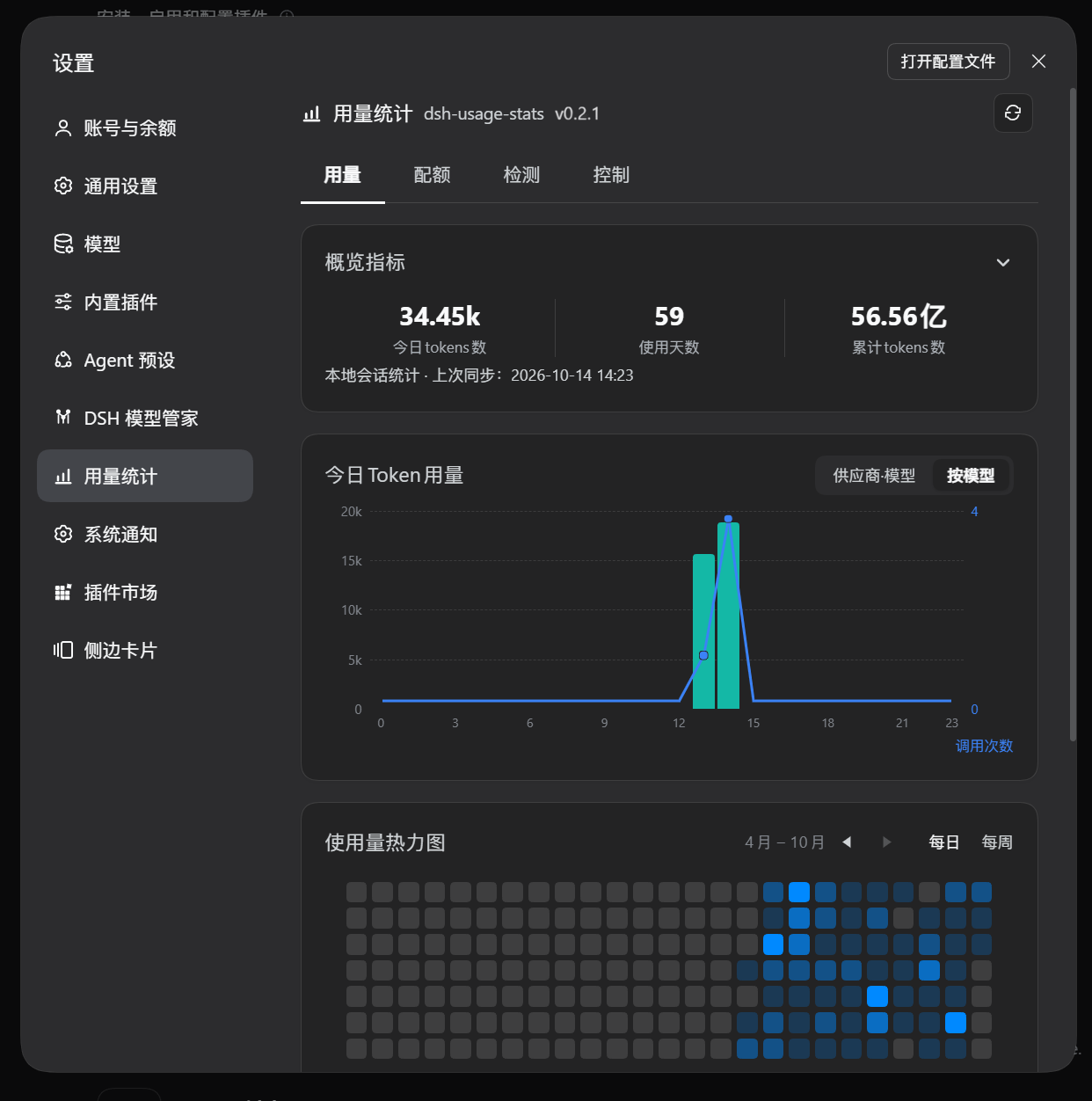
Today's usage, lifetime totals, and usage patterns.
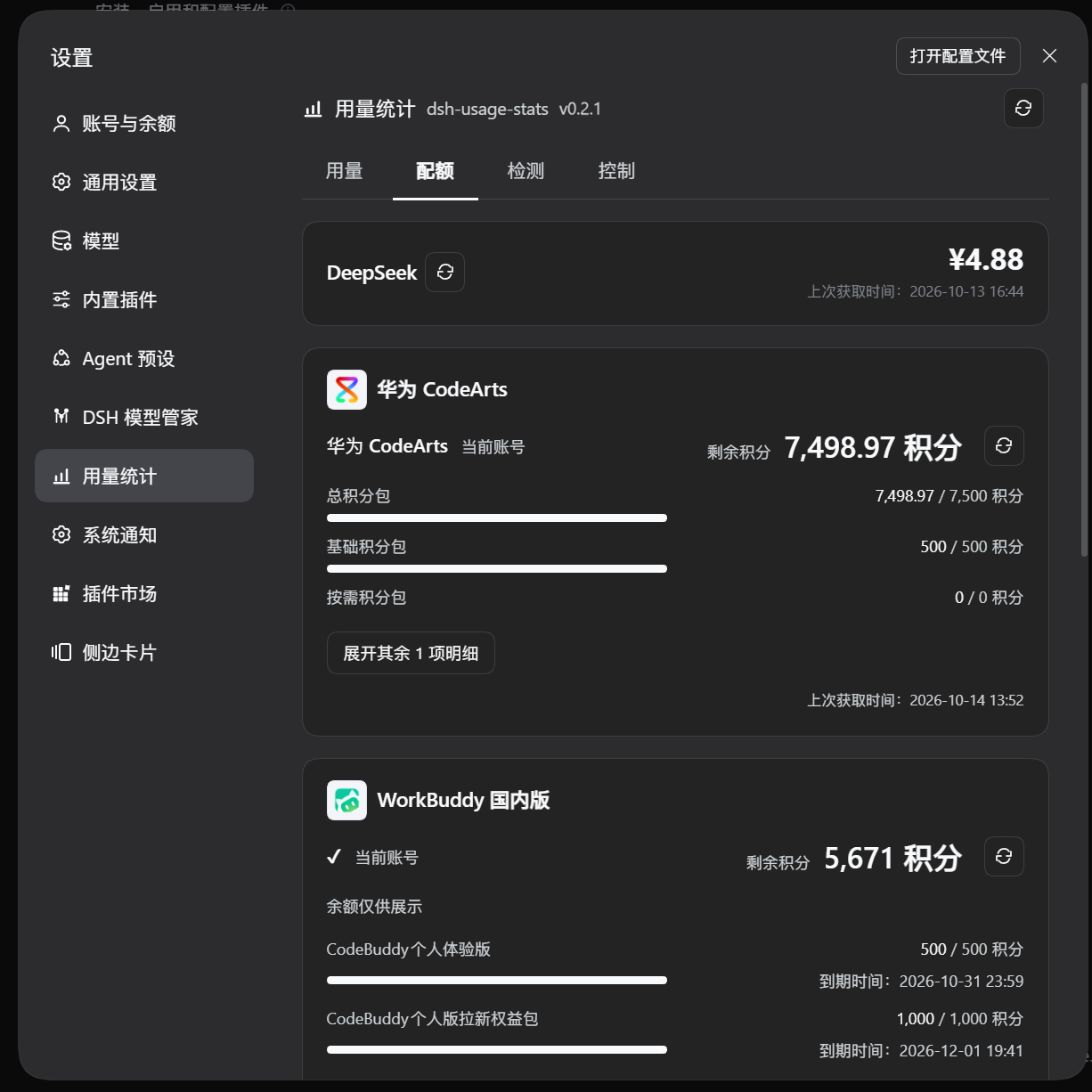
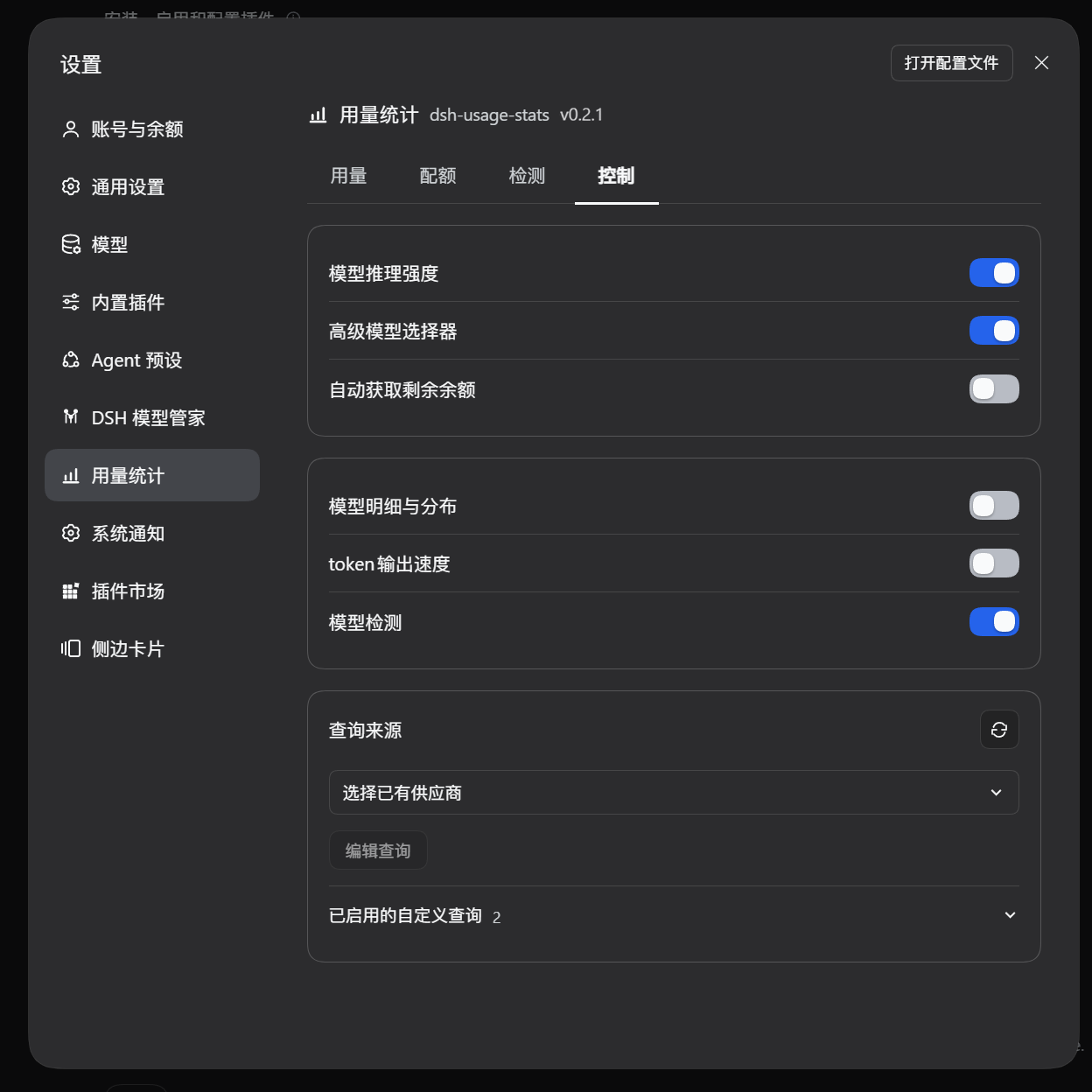
| Quotas | Controls |
|---|
 |
 |
| Check provider balances, account credits and quota windows. |
Set model features, display preferences and custom quota queries. |
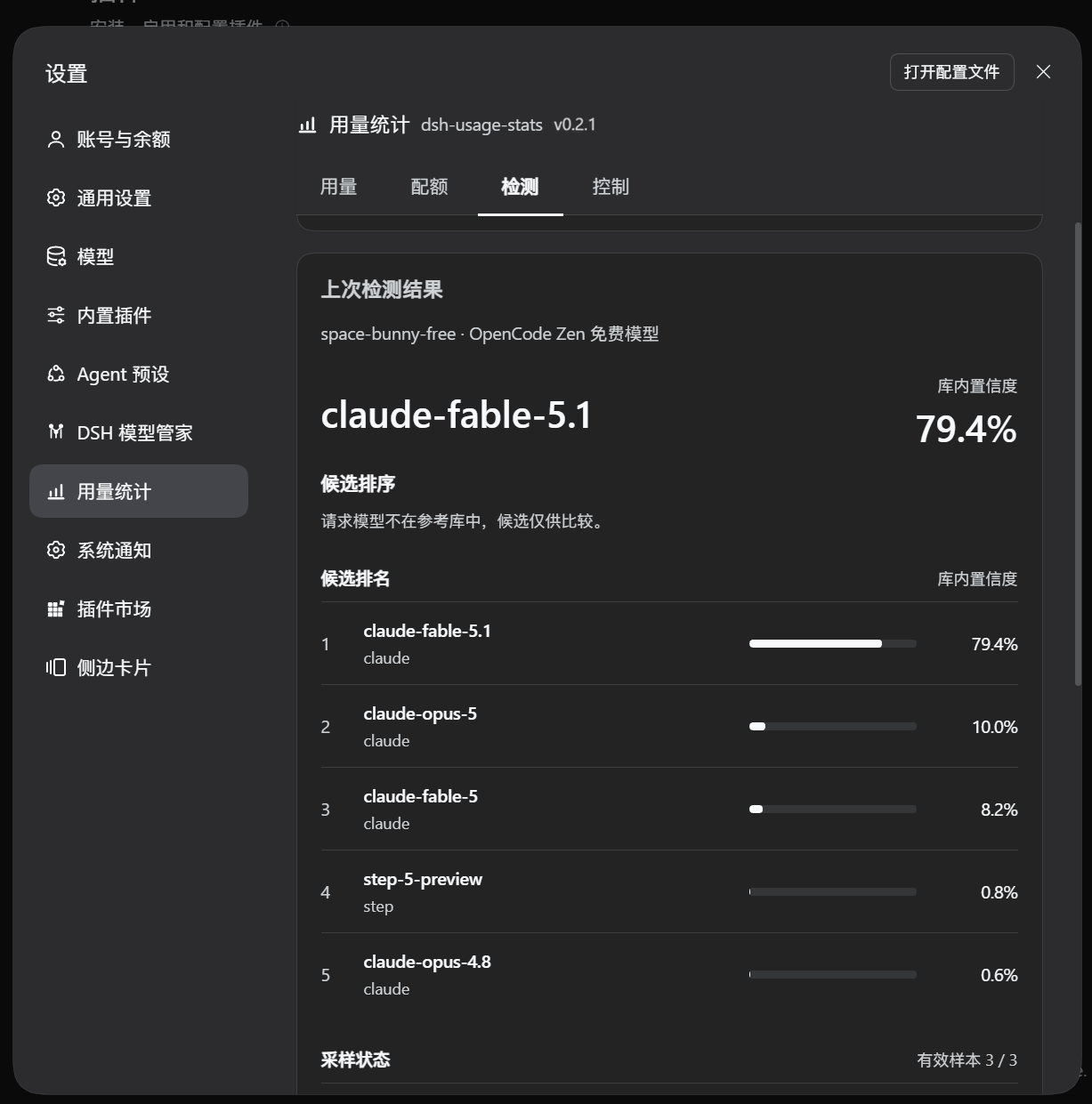
LM Fingerprint candidate rankings, sample status and incurred usage.
## Features
| Tab | What you can do |
| --- | --- |
| **Usage** | View today's and lifetime tokens, active days, hourly calls, daily/weekly heatmaps, trends, model breakdowns and output speed. |
| **Quotas** | Check provider balances, account credits and quota windows, with manual or scheduled refresh and custom queries. |
| **Detection** | Select a provider and model independently, confirm a budget, then run LM Fingerprint sampling and review candidate rankings, sample status and history. |
| **Controls** | Adjust display preferences, quota query settings, the advanced model selector and per-model reasoning levels. |
- **Follow usage trends:** browse daily/weekly heatmaps, switch between 7/30-day trends and compare providers and models.
- **Compare output speed:** rank models by TPS and show average time to first token (TTFT); samples without valid timing are excluded from speed rankings.
- **Refresh quotas on demand:** use DSH credentials for configured providers. Account quotas require the corresponding plugin or host service. Automatic refresh is off by default.
- **Run independent detection:** use three samples by default or one for screening. Confirm the budget before manually starting; cancellation, timeouts and usage budgets are supported.
- **Adjust model settings:** control the advanced model selector and reasoning features independently while retaining model properties, parameter mappings and saved preferences.
- **Follow the application language:** Chinese, English and Japanese UI text follows DSH's selected language; custom names and quota labels remain unchanged.
Detection compares random-number samples with a reference library. Rankings and library confidence measure similarity to known candidates; they do not prove model identity or capability. Reading catalogs, budgets or saved results does not start inference.
## Installation
Plugin version **0.2.3** requires **DSH Desktop `0.2.1-alpha.2` or `0.2.0-rc.2`**. The host plugin manager rejects installation or activation on a mismatched runtime.
**Recommended: install the [npm package `@sligqoer/dsh-usage-stats`](https://www.npmjs.com/package/@sligqoer/dsh-usage-stats) through DSH Desktop.** It includes prebuilt modules, needs no Git checkout or local build, and supports Check updates when installed by package name.
### 1. Open the plugin installer
In DSH Desktop's main sidebar, open **Plugins → Add plugin**.
### 2. Enter the full npm package name
```text
@sligqoer/dsh-usage-stats
```
Paste it into **Package name or address**, click **Install**, and keep the full `@sligqoer/` scope.
### 3. Enable and open
Click **Enable now**, then open **Settings → Usage Stats**. Fully exit and reopen DSH Desktop when the plugin manager requests a restart.
Install a specific version or a downloaded archive
Enter this in the same installer for this release:
```text
@sligqoer/dsh-usage-stats@0.2.1
```
Alternatively, download a `.tgz` and `SHA256SUMS` from the [GitHub release page](https://github.com/Jockjrop/dsh-usage-stats/releases/latest), verify the hash and enter the archive's local absolute path. Do not extract it before installation.
```powershell
Get-FileHash ./sligqoer-dsh-usage-stats-0.2.1.tgz -Algorithm SHA256
```
Assets include `sligqoer-dsh-usage-stats-0.2.1.tgz`, the equivalent `dsh-usage-stats.tgz`, and `SHA256SUMS`. Both archives contain identical modules.
Updates and migration
Use **Check updates** for installations made by npm package name. Installations from GitHub URLs, archives or local paths require a new manual installation.
If you use the old `dsh-usage-stats` package name, uninstall it once and install `@sligqoer/dsh-usage-stats`. Saved settings and usage remain available. See [CHANGELOG.md](CHANGELOG.md) for upgrade changes.
## Usage
1. Open Usage for the overview, trends, heatmaps and output speed. Use Controls to adjust model breakdown and speed visibility.
2. Refresh provider or account cards in Quotas. Automatic refresh is off by default; enable it in Controls after confirming the notice.
3. Select a provider and model in Detection, set sample counts and output limits, confirm a budget, then start manually. Reading catalogs or saved results never starts detection.
4. Use Controls to toggle the advanced model selector, reasoning features and detection independently, or edit custom quota queries.
## Data and compatibility
Local data is stored under `DSH_HOME/storages`:
| File or directory | Contents |
| --- | --- |
| `usage-stats-corpus.json` | Session usage aggregates. |
| `usage-stats-display.json` | Usage display preferences. |
| `usage-stats-quota-controls.json` | Query and model settings plus provider quota caches. |
| `usage-stats-detections.json` | Detection results and reported sample usage. |
| `usage-stats-lm-fingerprint/` | Verified engine and reference updates. |
| `usage-stats-supplemental.json` | Detection usage deduplicated by task and sample ID and retained across restarts. |
Conversation tokens come from DSH session logs. Detection usage is deduplicated by task and sample ID before aggregation. Request diagnostics are excluded from token totals. Updates retain saved configuration and usage history.
After upgrading from 0.2.0, detection uses LM Fingerprint. The earlier behavioral references, KBF import/export and capability baseline tests are no longer provided; previously incurred detection usage remains available. Release packages exclude personal sessions, account credentials, quota caches and detection history.
## FAQ
**Does it work in DSH Web?**
This version supports only DSH Desktop's desktop profile.
**Why is a quota card missing or unavailable?**
Check provider configuration, credentials, enabled account plugins and support for the quota API. A model API key may not have billing permissions.
**Are token totals a bill?**
No. Token totals come from local sessions and reported detection usage. Balances and quota windows come from provider APIs.
**Can detection rankings prove model identity?**
No. Rankings measure similarity to the reference library. When the requested model is outside the library, candidates serve only as comparisons.
## API
The `dshUsageStats` host service uses `protocolVersion: 1` and exposes `readStats`, `readControls`, `updateControls`, `readProviderQuotas` and `readSupplementalUsage`.
HTTP routes under `/api/dsh-usage-stats/*` provide statistics, controls, quotas and detection. They require loopback access and trusted origins and disable caching.
## Development
Use Node.js 24 and the dependencies pinned in `package-lock.json`:
```sh
npm ci
npm run build
npm test
npm run check:release
npm run release
```
Edit `src/` and run `npm run build` to generate `lib/`. `npm run check:release` checks versions, generated files, third-party integrity and private workspace files. `npm run release` builds the package and verifies installation and loading in an isolated temporary project; artifacts go to `release/`.
The GitHub workflow requires the tag to match the package version (`v0.2.1` for this release) and publishes the same verified archive to npm and GitHub Releases. The npm trusted publisher workflow file is `.github/workflows/release.yml`. Third-party assets, source revisions and licenses are recorded in `third_party/` and [NOTICE](NOTICE). This project uses the [Apache-2.0 license](LICENSE).