
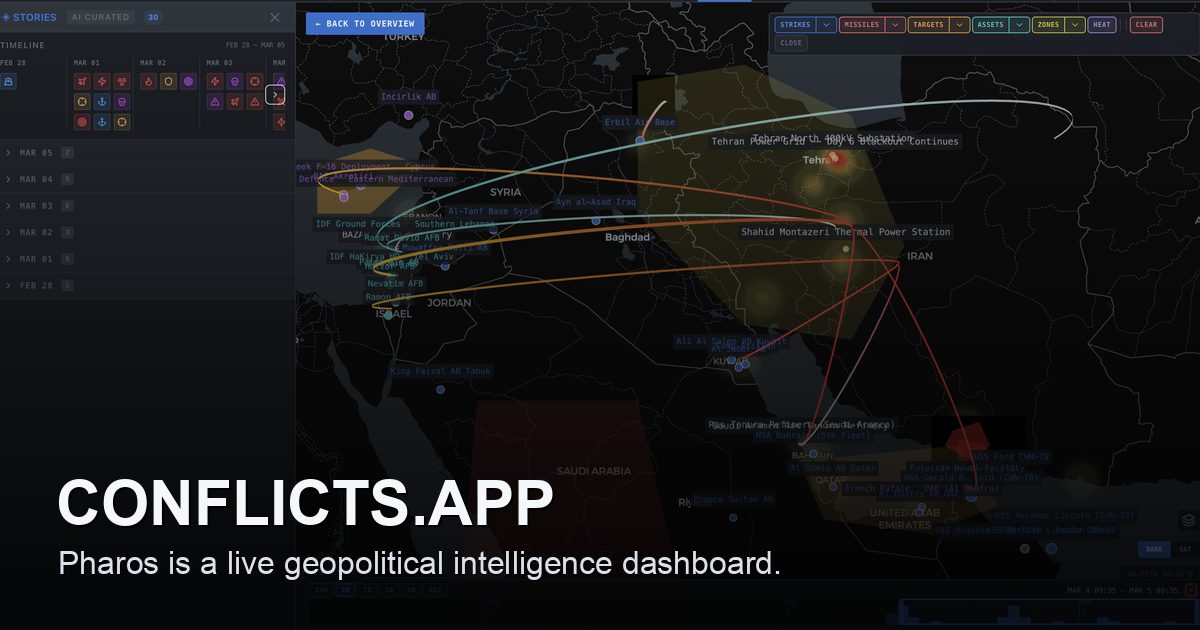
Open-source intelligence dashboard tracking the Iran conflict in real time.
conflicts.app





 ---
## How it works
Pharos tracks a conflict through a few core concepts:
- **Conflicts** — the top-level entity. Everything else belongs to a conflict.
- **Intel events** — individual incidents (strikes, statements, movements) with severity, timestamps, and source citations.
- **Actors** — state and non-state participants. Each actor has capability snapshots, actions, and day-level assessments.
- **X posts** — social media signals scraped from X/Twitter, tagged by significance and verification status.
- **Map stories** — curated narratives that group events into a geographic sequence you can play back on the map.
- **Daily briefs** — generated situation reports that summarize the last 24 hours of activity including escalation scoring, casualties, and scenarios.
The dashboard ties these together so you can move between the map, the event timeline, actor dossiers, and the daily brief without losing context.
## Project structure
```
src/
app/ Next.js app router — pages, API routes, layouts
features/ Feature modules (actors, events, map, news, signals, etc.)
shared/ Shared components, hooks, state, and query utilities
server/ Server-only code — DB client, API helpers, scoring logic
types/ Domain types used across features
prisma/
schema.prisma Database schema
migrations/ Tracked Prisma migrations
seed.ts Deterministic fallback seed
scripts/
db/ Snapshot bootstrap, publish, restore, and verify tooling
.github/
workflows/ CI, deploy, and snapshot publishing workflows
```
Features are self-contained under `src/features/{name}/` with their own `components/`, `queries/`, and `hooks/` subdirectories. Shared UI primitives live in `src/components/ui/` (shadcn). Design tokens are defined as CSS variables in `src/app/globals.css`.
## Database and snapshots
Pharos publishes a sanitized database snapshot every 12 hours as a public GitHub Release asset. When you run `npm run setup`, the bootstrap script downloads the latest snapshot and restores it into your local Docker Postgres. If the download fails (offline, first release not yet published, etc.) it falls back to the deterministic seed in `prisma/seed.ts`.
The snapshot contains only allowlisted application tables — no chat sessions, no user data, no Supabase system schemas. The full policy is documented in [`docs/database/SNAPSHOT_POLICY.md`](docs/database/SNAPSHOT_POLICY.md).
Useful commands:
| Command | What it does |
|---------|-------------|
| `npm run setup` | Start Postgres + bootstrap from snapshot |
| `npm run db:bootstrap` | Pull, verify, and restore latest snapshot |
| `npm run db:seed` | Restore deterministic fallback dataset |
| `npm run db:studio` | Open Prisma Studio for local DB browsing |
| `npm run db:migrate` | Create a new migration from schema changes |
## Contributing
See [`CONTRIBUTING.md`](CONTRIBUTING.md) for the full setup walkthrough, branch workflow, and PR guidelines.
Code conventions are documented in [`CODEX.md`](CODEX.md). The key rules: 150-line file limit, `type` not `interface`, CSS variables for all colours, shadcn primitives for interactive elements, and enforced import ordering.
## Contributors