# DSH Image Tools
Unified multi-provider image generation and editing for DeepSeek Harness through provider-neutral
`image-generate` and `image-edit` tools backed by OpenAI Images-compatible services and the Google
Gemini Interactions API.

Generated through `image-generate` as a 16:9 output.
[简体中文](./README.zh-CN.md)
## Third-party Service Recommendation (Affiliate Link)
> If you are looking for an API relay with an OpenAI-compatible interface, you may consider
> [WPIronman API Relay](https://api.wpironman.top/register?aff=JUNE). This is an affiliate link, and
> registrations through it may provide me with a referral reward. Campaign rules and discounts are
> determined by the provider. This plugin is independent from WPIronman and does not require any
> specific relay; evaluate pricing, reliability, and privacy policies before choosing a service.
>
> New users can redeem code `99F509ABC6C38F77` for promotional credit, subject to the provider's
> current terms.
## Table of Contents
- [Third-party Service Recommendation (Affiliate Link)](#third-party-service-recommendation-affiliate-link)
- [Installation](#installation)
- [Usage](#usage)
- [Features](#features)
- [Supported Protocols](#supported-protocols)
- [Migrating from dsh-image2-draw](#migrating-from-dsh-image2-draw)
- [Assets and Metadata](#assets-and-metadata)
- [Failure and Billing Safety](#failure-and-billing-safety)
- [Contributing](#contributing)
- [Tests](#tests)
- [Compatibility](#compatibility)
- [Support](#support)
- [Acknowledgements](#acknowledgements)
- [License](#license)
## Installation
### Requirements
- Node.js 20 or newer; Node.js 24 LTS is recommended;
- Git;
- pnpm;
- DeepSeek Harness `0.1.0-rc.6`.
### Clone and run
This is the shortest path from `git clone` to a running Web UI and does not require a Harness source
checkout:
```powershell
git clone https://github.com/JuneLearn/dsh-image-tools.git
cd dsh-image-tools
npm install
npm test
npx --yes -p @deepseek-ai/dsh dsh plugin --profile web add .
npx --yes -p @deepseek-ai/dsh dsh web
```
The Web UI normally listens at [http://127.0.0.1:3080](http://127.0.0.1:3080).
### Install directly from GitHub
To install without keeping a local checkout:
```powershell
corepack enable
npx --yes -p @deepseek-ai/dsh dsh plugin --profile web add github:JuneLearn/dsh-image-tools
npx --yes -p @deepseek-ai/dsh dsh web
```
From a Harness source checkout at `D:\deepseek-harness`:
```powershell
pnpm install
pnpm dsh plugin --profile web add github:JuneLearn/dsh-image-tools
pnpm dsh web
```
The package's `dsh.bundle` declaration mounts both the Host and Web client. No manual profile patch
is required.
## Usage
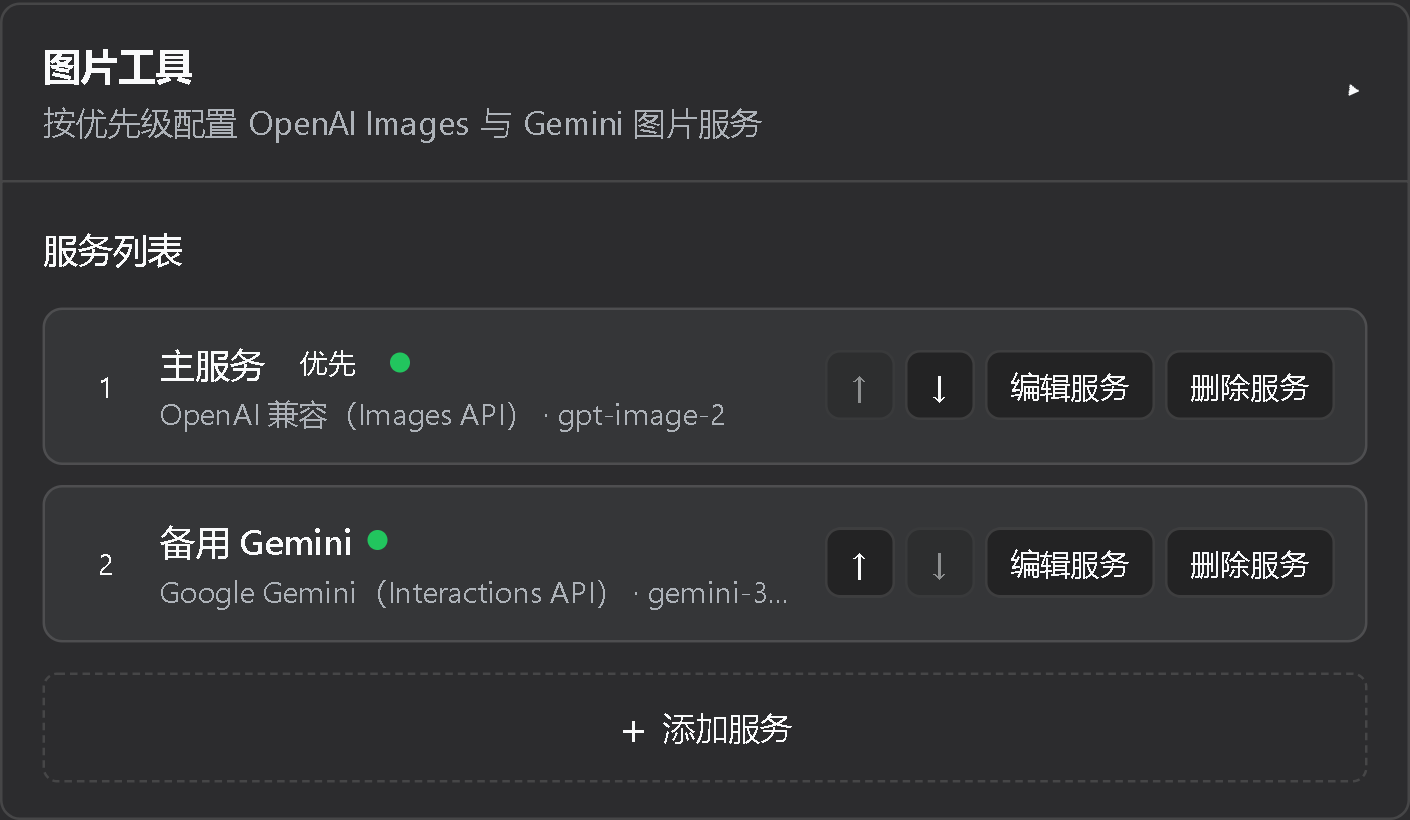
### 1. Configure an image service
1. Open **Settings > Plugins > Configurable plugins > Image Tools**.
2. Click **Add service** and select OpenAI, OpenAI Compatible, or Google Gemini in the dedicated editor.
3. Enter the service name, endpoint, API key, and model, then save.
4. Optionally test the saved URL, key, and model. Connection tests do not generate an image.
API keys are stored through DSH credentials and are never returned by the normal settings state.
Services are ordered from highest to lowest priority.
### 2. Generate images
Once configured, there is no need to mention a tool, model, or parameter. Just describe what you
want in the conversation:
> Create a cute moe-style image of a blue whale maid.
DSH automatically calls `image-generate` and tries the configured services in order. You can also
describe the quantity, composition, and quality naturally:
> Create two high-quality 16:9 cinematic concept images of a futuristic city.
View available tool parameters
- `prompt`: required image prompt;
- `profile`: optional service ID; omitting it enables ordered failover;
- `count`: 1 to 8, default 1;
- `size`: `auto`, `square`, `portrait`, `landscape`, an OpenAI `WIDTHxHEIGHT`, or a Gemini
resolution tier;
- `aspect_ratio`: `auto` or a supported `W:H` ratio;
- `resolution`: Gemini `auto`, `0.5K`, `1K`, `2K`, or `4K`;
- `quality`, `output_format`, `compression`, and `background`: available when supported by the model.
Prefer `aspect_ratio` alone for composition ratios. If a model sends redundant same-orientation
arguments such as `portrait` plus `3:4`, the explicit ratio wins; a real orientation conflict is
still rejected.
### 3. Edit images
After generating an image, continue naturally in the same conversation:
> Change the background of the previous image to an underwater castle, but keep the character unchanged.
DSH automatically references the previous result and calls `image-edit`. You can also upload a local
image from the current session working directory as a reference.
View image editing parameters
- `refs`: required array of local paths or `asset:image-*` values;
- `mask`: optional alpha PNG matching the first reference dimensions when the model supports masks.
Remote reference URLs and paths outside the current session working directory are rejected.
### 4. Manage service order
The settings list shows each service's name, type, model, key state, and row actions. Use the up and
down controls to change failover priority. Adding or editing opens a dedicated detail view. An
OpenAI-compatible relay without a model-list endpoint is reported as reachable but unverifiable.
## Features
- Manage ordered image services, each with an independent API key and one configured model;
- Start from OpenAI, OpenAI Compatible, or Google Gemini presets;
- Generate, edit, use multiple references and masks, and run sequential batches of up to eight images;
- Use dimensions, aspect ratios, resolutions, quality, format, compression, and background controls
when supported by the selected protocol and model;
- Preview results in the conversation and save them under `outputs/images/`;
- Reuse stable `asset:image-*` references and redacted JSON metadata;
- Fail over only on connection-class failures and avoid automatic retries for ambiguously billed requests.
## Supported Protocols
| Protocol | Authentication | Generate | Edit | Main output controls |
| --- | --- | --- | --- | --- |
| OpenAI Images | `Authorization: Bearer` | `/images/generations` | `/images/edits` | Size, quality, format, compression, background, mask |
| Gemini Interactions | `x-goog-api-key` | `/v1beta/interactions` | Same endpoint with image inputs | Aspect ratio, resolution, format |
Relay behavior and supported models vary. The plugin validates options before each request instead of
silently dropping unsupported values. Gemini requests always set `store=false` and do not depend on
vendor session state.
## Migrating from dsh-image2-draw
This package uses a new settings namespace and does not import legacy settings, keys, tools, or
result cards. Remove the old package before installing the new one:
```powershell
npx --yes -p @deepseek-ai/dsh dsh plugin --profile web remove dsh-image2-draw
npx --yes -p @deepseek-ai/dsh dsh plugin --profile web add github:JuneLearn/dsh-image-tools
```
Recreate services under **Settings > Plugins > Configurable plugins > Image Tools**. API keys are not
copied automatically.
## Assets and Metadata
Each output produces an image and a same-name JSON sidecar:
```text
outputs/images/image-YYYYMMDD-HHMMSS-xxxxxxxx.png
outputs/images/image-YYYYMMDD-HHMMSS-xxxxxxxx.json
```
The corresponding `asset:image-YYYYMMDD-HHMMSS-xxxxxxxx` can be resolved after a process restart.
Exclusive writes and random suffixes prevent overwrites. Sidecars record the prompt, profile ID,
protocol, model, request options, timing, dimensions, asset ID, and available non-sensitive revised
prompt, request ID, and usage. They never contain API keys, complete response bodies, or headers.
## Failure and Billing Safety
- Batches execute one image request at a time;
- Without an explicit `profile`, first-item network, timeout, 429, 5xx, authentication, or missing-key
failures advance to the next service;
- Invalid inputs, capability mismatches, invalid references or masks, moderation, and cancellation do
not trigger failover;
- Once a service produces an image, a later failure returns a partial result without switching services;
- An explicit `profile` disables failover;
- Timeouts and other ambiguously billed failures are never retried automatically.
## Contributing
Reproducible bug reports, focused feature proposals, and scoped pull requests are welcome. Run the
test commands below before submitting a change, and never include real API keys in tests, logs, or
sample configuration.
## Tests
```powershell
npm install
npm test
npm pack --dry-run
```
Automated tests use mocked HTTP responses and never call a paid image API. Run live smoke tests only
when explicitly enabled with dedicated credentials and low-cost prompts.
## Compatibility
The plugin targets the public dual-end plugin, settings, credentials, attachments, tools, client
slots, and WebServer interfaces in DeepSeek Harness `0.1.0-rc.6`. Harness is still in Developer
Preview; verify these interfaces and `dsh.client.inject` after a Harness upgrade.
## Support
Open an issue in [GitHub Issues](https://github.com/JuneLearn/dsh-image-tools/issues). Include the
Harness and Node.js versions, selected protocol, redacted error code, and reproduction steps. Never
post an API key.
## Acknowledgements
Parts of the attachment and result-card approach were adapted from the MIT-licensed
[dsh-multimodal](https://github.com/MC5lan/dsh-multimodal). See
[THIRD_PARTY_NOTICES.md](./THIRD_PARTY_NOTICES.md).
## License
This project is licensed under the [MIT License](./LICENSE), matching the repository's `LICENSE` file.