npm-deprecated-check
Check for deprecated packages
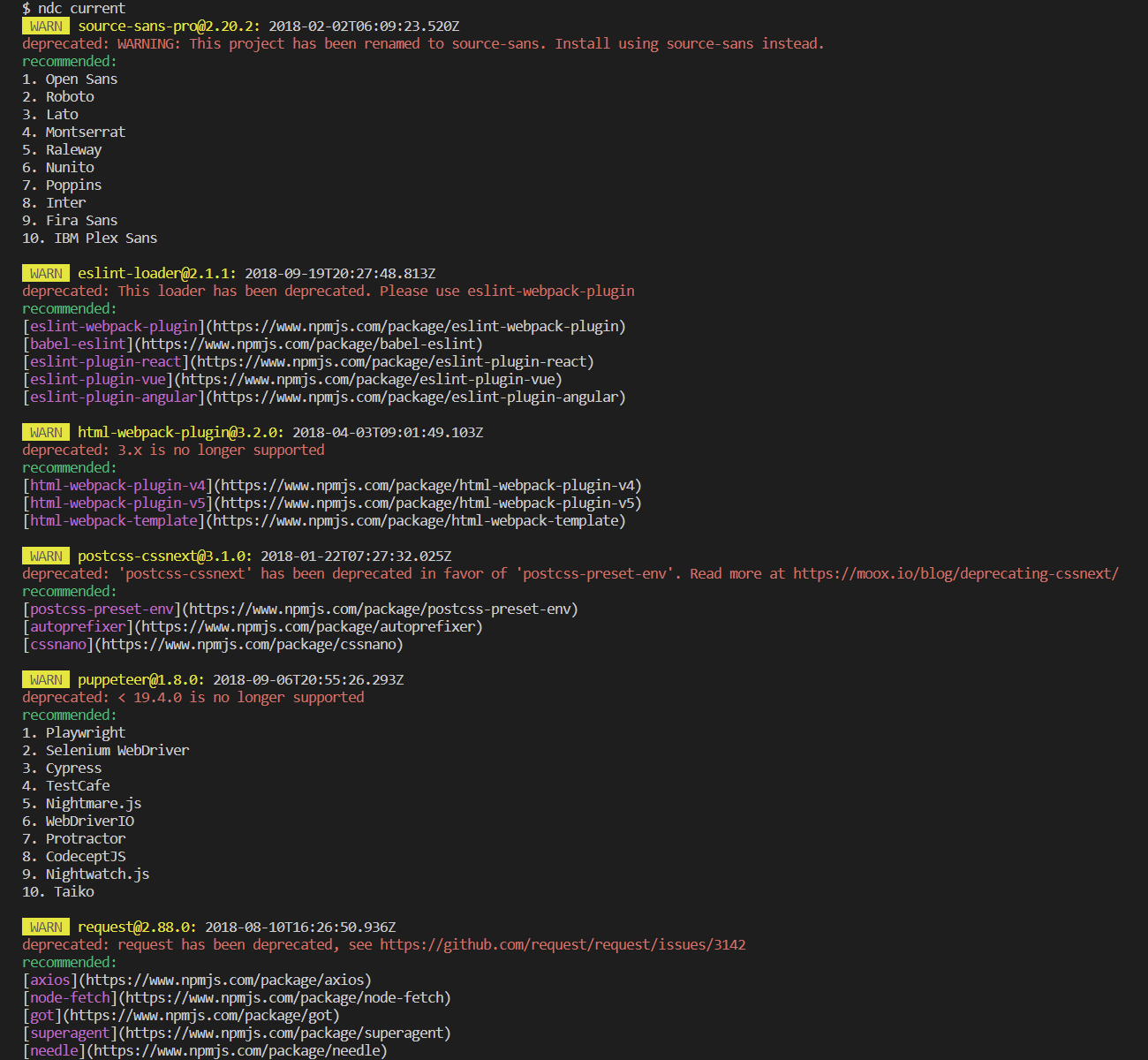
## Preview
## Requirements
Since version 1.4.0, `npm-deprecated-check` requires Node.js 18 or higher.
## Install
```bash
npm install -g npm-deprecated-check
```
## Features
- Check the packages of current project, global or specified is deprecated.
- According to the version range of lockfile and package.json.
- Additionally checks if the running node version reached End Of Life.
- Return the minimum upgradable version.
- Check if the current environment meets the Node.js version range required for dependency operation.
- Calculate the minimum Node.js version required across all dependencies.
- Suggest compatible dependency versions when Node.js version requirements are not met.
- Check Node.js version compatibility for a project or package when upgrading or downgrading Node.js.
- MCP Server support: expose tools for external AI agents to consume deprecation data.
## Node.js Version Compatibility
The tool automatically analyzes Node.js version requirements across all dependencies and provides helpful information.
### Default Output
By default, you get a concise summary showing the recommended engines.node value:
```
Node Version Summary:
Minimum engines.node: >=20.0.0
Recommendation: Update package.json engines.node to ">=20.0.0"
Current: >=18.12
```
### Detailed Output (--verbose)
Use the `--verbose` flag for detailed information:
```bash
ndc current --verbose
```
```
Node Version Summary (detailed):
Minimum Node version (production): 20.0.0
Determined by: eslint@9.35.0
Minimum Node version (development): 20.17.0
Determined by: typescript@5.7.2
Current Node version: v25.4.0
Project engines.node: >=18.12
Production dependencies require Node >=20.0.0, but package.json allows >=18.12
Consider updating engines.node to ">=20.0.0"
```
### Compatible Version Suggestions
When a dependency requires a newer Node.js version than you're currently running, the tool suggests a compatible alternative version:
```
WARN eslint@9.35.0: 2024-10-05T18:45:12.345Z
Required node: ^18.18.0 || ^20.9.0 || >=21.1.0
Compatible version for current Node: 8.57.1
```
## Usage
```bash
Usage: ndc [options]
Options:
-V, --version output the version number
-h, --help display help for command
Commands:
current [options] check the packages of the current project
global [options] check global packages, default: npm
package [options] check for specified package
compat [options] [packageName] check Node.js version compatibility for project or package
node check if used node version is deprecated (reached End Of Life)
config [options] inspect and modify the config
help [command] display help for command
```
For `current`:
```bash
Options:
--registry specify registry URL, default: https://registry.npmjs.org/
--ignore ignore specific packages, example: request,tslint
--failfast exit the program if it has been deprecated
--deep deep inspection for monorepo projects
--verbose show detailed Node version compatibility information
```
For `global`:
```bash
Options:
-m, --manager check specified package manager (choices: "npm", "yarn", "pnpm")
--registry specify registry URL, default: https://registry.npmjs.org/
--ignore ignore specific packages, example: request,tslint
--failfast exit the program if it has been deprecated
```
For `package`:
```bash
Options:
-r, --range check specified versions
--registry specify registry URL, default: https://registry.npmjs.org/
```
For `compat`:
```bash
Usage: ndc compat [packageName] [options]
check Node.js version compatibility for project or package
Options:
--node target Node.js version (e.g. "18", "20.11.0"), default: current Node version
--deep deep inspection for monorepo projects (project mode only)
--ignore ignore specific packages, example: request,tslint
--registry specify registry URL, default: https://registry.npmjs.org/
```
### Compat Examples
Check current project against the current Node version:
```bash
ndc compat
```
Check current project against a target Node version:
```bash
ndc compat --node 18
```
Check a specific package against a target Node version:
```bash
ndc compat esbuild --node 18
```
Deep check monorepo projects:
```bash
ndc compat --node 20 --deep
```
You can also save options to global configuration:
```bash
Usage: ndc config [options]
inspect and modify the config
Options:
-g, --get get value from option
-s, --set set option value
-d, --delete delete option from config
-l, --list list all options
```
## MCP Server
`npm-deprecated-check` can run as an MCP (Model Context Protocol) Server, exposing its checking capabilities as tools for AI agents.
### Start the MCP Server
```bash
npx -y npm-deprecated-check --mcp
```
### Client Configuration
**Claude Desktop / OpenCode (recommended: global install):**
```json
{
"mcpServers": {
"npm-deprecated-check": {
"command": "npm-deprecated-check",
"args": ["--mcp"]
}
}
}
```
> Install globally first: `npm install -g npm-deprecated-check`
**Claude Desktop / OpenCode (npx):**
```json
{
"mcpServers": {
"npm-deprecated-check": {
"command": "npx",
"args": ["-y", "npm-deprecated-check", "--mcp"]
}
}
}
```
### Available Tools
| Tool | Description |
|------|-------------|
| `check_package` | Check if a specific npm package is deprecated |
| `check_current_project` | Check all dependencies of the current project |
| `check_global` | Check globally installed packages |
| `check_node` | Check if the current Node.js version has reached EOL |
| `check_compat` | Check Node.js version compatibility for a project or package |
All tools return structured JSON data. The AI agent can use this data to provide recommendations, suggest alternatives, or generate reports.
### Tool Parameters
**check_package:**
- `packageName` (required) — npm package name
- `range` (optional) — version range, e.g. `"^1.0.0"`
- `registry` (optional) — custom npm registry URL
**check_current_project:**
- `ignore` (optional) — comma-separated package names to ignore
- `deep` (optional) — deep inspection for monorepo projects
- `registry` (optional) — custom npm registry URL
**check_global:**
- `manager` (optional) — package manager: `"npm"`, `"yarn"`, or `"pnpm"` (default: `"npm"`)
- `ignore` (optional) — comma-separated package names to ignore
- `registry` (optional) — custom npm registry URL
**check_node:** No parameters.
**check_compat:**
- `packageName` (optional) — npm package name. If not provided, checks the current project
- `nodeVersion` (optional) — target Node.js version (e.g. `"18"`, `"20.11.0"`). Defaults to current Node version
- `projectPath` (optional) — absolute path to project root (only used when `packageName` is not provided)
- `deep` (optional) — deep inspection for monorepo projects
- `ignore` (optional) — comma-separated package names to ignore
- `registry` (optional) — custom npm registry URL
## Credits
`npm-deprecated-check` is inspired by [`check-is-deprecated`](https://github.com/awesome-cli/check-is-deprecated).