







# Glassys
Glassys is a self-hosted **chat face** for the coding agent that already runs on your machine. It is not the agent. The job is **systems work** on that host (the machine, files, services, git) from a phone or another device — not application development. Coding agents are the runtime; Glassys is not an IDE.
A Node gateway talks to each vendor’s **local SDK** (or ACP), translates the stream into a stable UI protocol, and serves a PWA.
Website, docs and an interactive demo: **[glassys.dev](https://glassys.dev)**.
Analogy: Open WebUI is to Ollama what Glassys is to Cursor, Claude Code, OpenCode, and similar tools — the UI, not the runtime.
- **Audience:** operators and sysadmins who want a persistent chat while a local coding agent does systems work on the host.
- **UI language:** English by default; Spanish (`es`) is available in Settings.
- **Distribution:** self-hosted. Every operator runs their own instance. Not a Glassys SaaS.
- **Adapters:** Cursor (`@cursor/sdk` local), Claude Agent SDK, OpenCode SDK + local server, Gemini CLI SDK (not on npm yet; use Gemini through ACP meanwhile), Codex SDK (runs the Codex binary its SDK ships with), plus a generic ACP host for any agent in the ACP registry. Same UI protocol. Cursor, Claude, and OpenCode list models from the live runtime catalog; an ACP agent lists the models it announces (after “Agent default”); Gemini and Codex use a documented static fallback.
- **v1:** one profile / one agent / **one live thread** / one run at a time (FIFO queue). The thread list includes archived transcripts; only one thread is live.
**Agent / adapter** is the product on the host. **Transport** is how Glassys talks to it (SDK or ACP — never print-mode). **CLI** is the vendor’s terminal app: it may stay installed; its login does not authenticate Glassys. OpenCode still needs its `opencode` binary on PATH; Codex uses the one its SDK ships, not the one on PATH.
## What it is not
- Not the agent. It does not infer and has no personality.
- Not a development IDE. Coding agents can still write files; the product is for operating the machine, not pairing on application code.
- Not an editor: no Apply/Reject. The agent writes the disk; Glassys shows thinking, tools, and diffs.
- Not OpenClaw, Open WebUI, or a PTY/xterm product.
- Not a Cloudflare product. Tunnel and Access are optional recipes.
- Not a wrapper of `cursor-agent -p --output-format stream-json` (print mode suppresses thinking).
## Interface
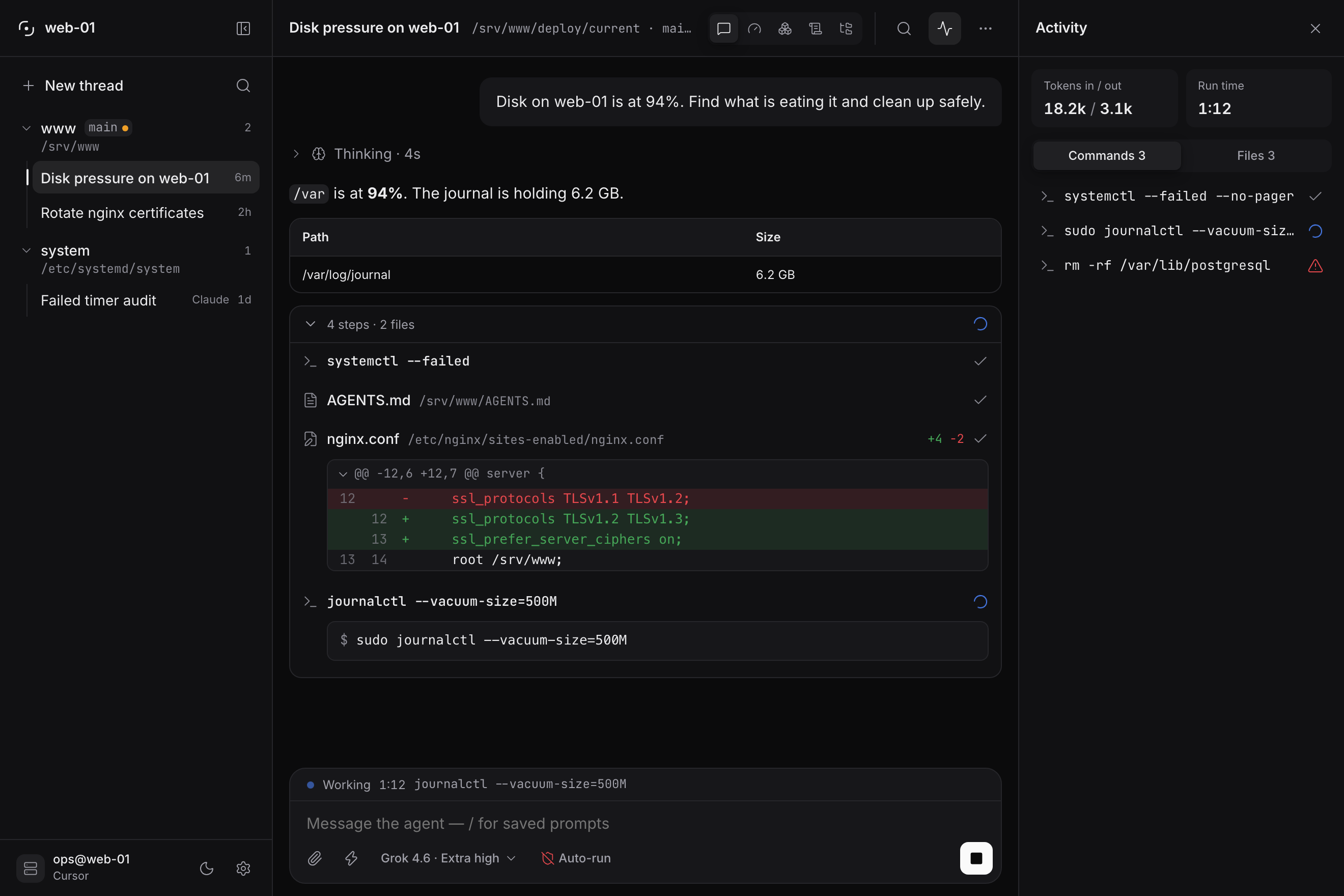
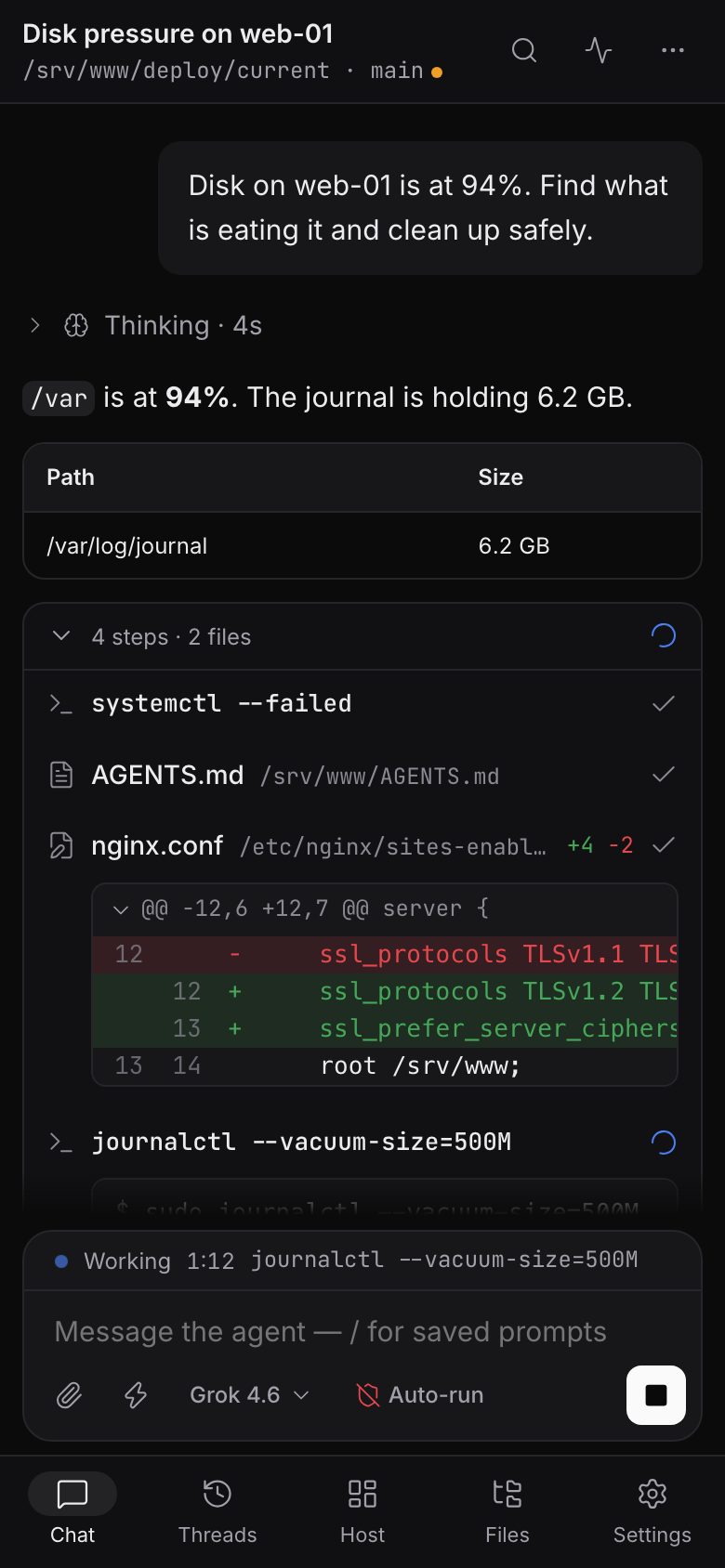
The PWA is one surface at two sizes. Wide screens get a persistent rail: one row
per workspace with its threads nested under it, and the machine and its agent at
the bottom. It collapses to a 56px strip with `⌘B`. Phones get the same tree as
a sheet plus a bottom tab bar — Chat, Threads, Host, Files, Settings — and the
composer clears the home indicator.
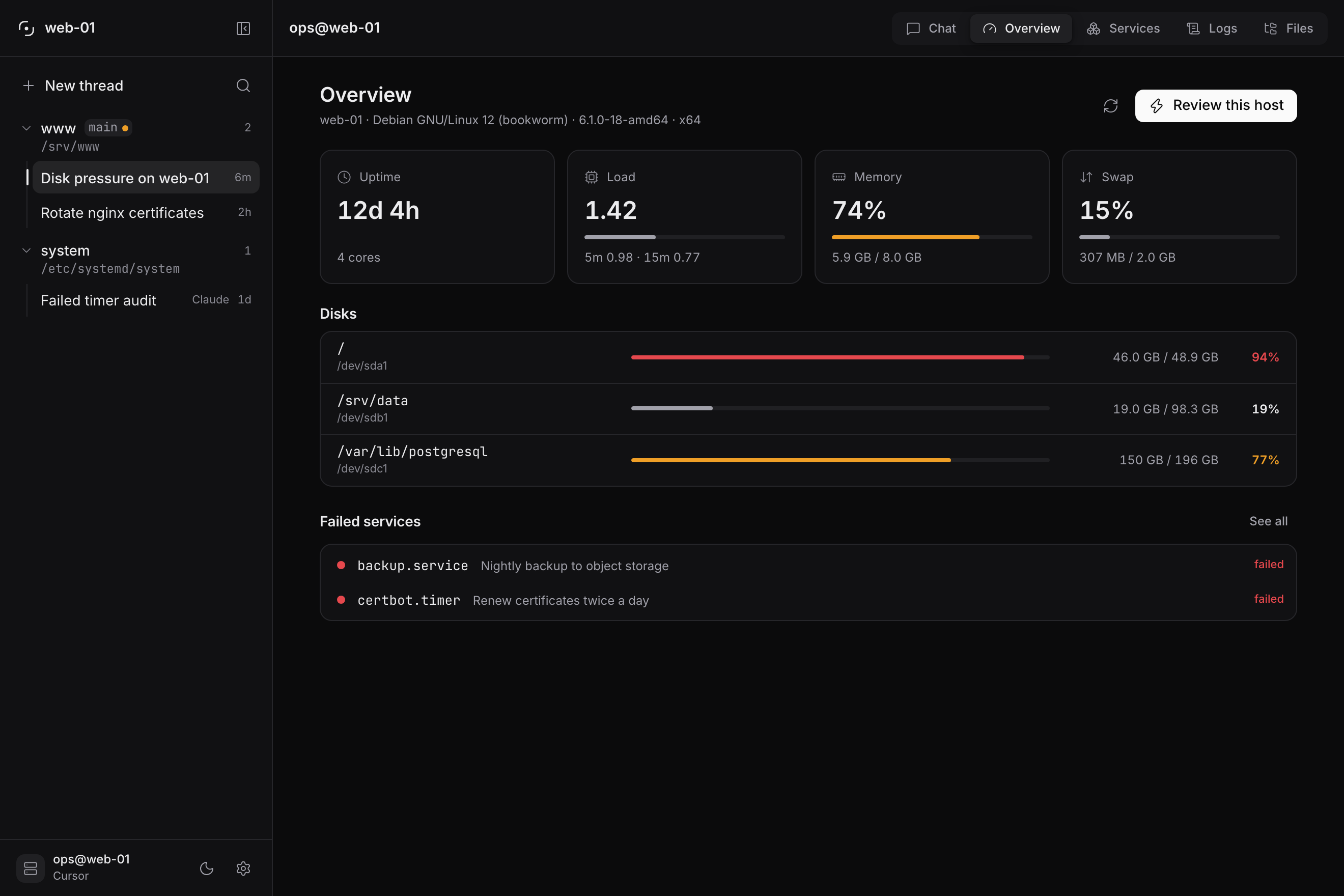
- **Host views** — beside the chat, the machine the agent works on:
**Overview** (uptime, load, memory, swap, every disk, failed services),
**Services** (systemd or launchd), **Logs** (the journal, filterable, with
Follow) and **Files** (a read-only browser with previews). They only read:
Diagnose, Restart, Review this host or Ask the agent draft a prompt into the
composer, and the agent does the work. Glassys's own data directory is never
browsable.
- **Transcript** — thinking, then the run itself: consecutive tool calls fold
into one band ("6 steps · 3 files +4 −2"), shell calls render as a terminal
block, diffs get a sign channel, and text paints from the first token.
- **Activity** — `⌘I`, or the button in the chat's topbar: every command this thread ran
with how it ended, and every file it read or rewrote, derived from the
transcript. Clicking a row jumps to that call, opening its folded group.
- **Composer** — one card. Attach, saved prompts, the model chip and the
permission chip sit inside its bottom edge; while a run is in flight, stop
takes send's place and send comes back beside it once there is something to
queue, and `Esc` cancels. A message the gateway does not confirm goes back
into the box instead of being lost.
- **Command palette** — `⌘K` / `Ctrl+K` for threads, export, restart, upgrade,
workspaces, and your saved prompts. Typing `/` in the composer filters the
same prompts inline; a message that merely starts with a path is sent as is.
- **Saved operations** — slash templates you define in Settings. The empty
transcript offers them as a list, so a fresh thread starts with one tap.
- **Scheduled prompts** — cron or a one-shot time, queued when the gateway is
idle.
- **Settings** — appearance, agent, session, templates, schedules, updates,
phone access, and token usage. Label and description on the left, one control
on the right; the save bar appears only when something is unsaved, and theme
and language preview as you pick them.
- **Themes and language** — dark, light, or follow the system; English and
Spanish.
## Requirements
- Node.js **22.13+** (`.nvmrc`)
- **pnpm** 11.14+ (this repo is a pnpm workspace; do not use npm)
- A git workspace on the machine that will run the agent
- Cursor: **Cursor SDK** sign-in on that host (`Sign in with Cursor SDK` / `Cursor.auth.login()`), **or** optional `CURSOR_API_KEY` for CI or an override. Installing the vendor CLI does not sign Glassys in. The wizard shows a login URL if the host has no display (Linux systemd, SSH, phone).
- Other adapters: the matching SDK (and, for OpenCode, the `opencode` binary on the host) plus optional API keys: `ANTHROPIC_API_KEY`, `CODEX_API_KEY` / `OPENAI_API_KEY`, `OPENCODE_API_KEY`, `GEMINI_API_KEY` / `GOOGLE_API_KEY` (Cursor reads `CURSOR_API_KEY`). The Gemini adapter talks to `@google/gemini-cli-sdk`, which is not on npm yet, so it stays visible in the wizard but **not selectable**; pick **Gemini** from the ACP adapter's agent list instead (it runs `gemini --acp`).
### Already have cursor-cli?
Keep it. Glassys talks to `@cursor/sdk`, not `cursor-cli` / `cursor-agent`. Sign in with **Cursor SDK** in the wizard, or paste a key from [Cursor Dashboard → Integrations](https://cursor.com/dashboard/integrations). Do not run two auto-run agents on the same `cwd` at once. Credential order and per-setup notes: [docs/deploy/host.md](docs/deploy/host.md).
`settingSources` (default project + user) can load **rules** from `~/.cursor`; it does not copy IDE tokens.
## Quick start
Install on the machine the agent should operate (systems work: git, files, services).
```bash
curl -fsSL https://raw.githubusercontent.com/KN990x/Glassys/main/scripts/install.sh | bash
```
Same result as `git clone https://github.com/KN990x/Glassys.git glassys && cd glassys && pnpm install && pnpm run service:install`. From a clone: `bash scripts/install.sh`.
Needs Node.js **22.13+** and pnpm (Corepack: `corepack enable`; Node 25+ no longer ships Corepack, so install it first with `npm install -g corepack`, or [install pnpm](https://pnpm.io/installation)). The installer clones if needed, installs, builds if needed, and starts a **user service** (launchd on macOS, systemd --user on Linux). Closing the terminal does not stop Glassys. Open `http://127.0.0.1:8787` (or `GLASSYS_PORT`) and complete the wizard (operator password, adapter, absolute workspace path, **Cursor SDK** sign-in on the host). An API key is optional. The PWA will not enter chat until onboarding is done.
Whoever sets the operator password owns the instance, so setup from any other device, or through a reverse proxy, asks for the one-time **setup code** the installer prints (also in the gateway log, and in `$GLASSYS_DATA_DIR/setup-code` until setup is done). The installer also prints a first-run link with the code in it. Setup in a browser on the host itself needs no code.
If you are already inside the repo: `pnpm install && pnpm run service:install`.
```bash
# status
cd glassys && pnpm run service:status
# upgrade (git pull, install, build, restart; checks /health reports the new commit)
cd glassys && pnpm run service:upgrade
# uninstall (stops the service; does not delete the clone or data/)
cd glassys && pnpm run service:uninstall
```
An upgrade stops if `git pull --ff-only` fails, instead of rebuilding the old clone; `pnpm run service:upgrade -- --allow-stale` rebuilds anyway. The service runs the stable node link (`opt/node` under Homebrew), not a versioned path; set `GLASSYS_NODE` before installing to choose another. `GET /health` reports the `commit` the gateway is running.
Foreground (blocks the terminal): `pnpm run build && pnpm start`. Default bind is **localhost**. Put Caddy or Cloudflare Tunnel in front if you need a public URL. See [docs/deploy/host.md](docs/deploy/host.md).
## Development
```bash
pnpm install
pnpm run dev
```
- PWA: Vite on `http://127.0.0.1:5173` (dev-only proxy: `/api`, `/health`, `/ws` → gateway `:8787`)
- Gateway: `http://127.0.0.1:8787`
That Vite proxy is **not** a homelab reverse proxy. In production the PWA is served by the gateway.
```bash
pnpm test
```
See [CONTRIBUTING.md](CONTRIBUTING.md).
## Configuration
Non-secrets live in `$GLASSYS_DATA_DIR/config.yaml` (created from defaults on first run). See [config.example.yaml](config.example.yaml). In-app Settings writes locale, theme, agent, display, and session. Bind, port, allowed origins, `trustProxy`, and edge auth are yaml (or env) only. Behind a reverse proxy on the same host (Caddy, cloudflared), set `network.trustProxy: true` (or `GLASSYS_TRUST_PROXY=1`) so login limits apply per visitor instead of to everyone at once.
Secrets (optional per-adapter API keys, operator password hash, JWT secret) live in environment variables or `$GLASSYS_DATA_DIR/secrets.json` (gitignored). Env overrides: `GLASSYS_OPERATOR_PASSWORD_HASH` (then the password can only be changed there), `GLASSYS_JWT_SECRET`, and the adapter keys above. Other env: `GLASSYS_DATA_DIR`, `GLASSYS_BIND`, `GLASSYS_PORT`, `GLASSYS_WEB_DIR` (serve the PWA from another build), `GLASSYS_NODE` (installer). The UI can show **configured / rotate**, never the full key again. Host installs should prefer Cursor SDK login (`~/.cursor/sdk/auth.json`) over storing a key. The vendor terminal CLI / IDE login is a different store.
## Security
Glassys with auto-run and a host workspace is **operator access to that machine**. Read [SECURITY.md](SECURITY.md).
- Built-in operator auth is always on, even behind Access.
- Optional Cloudflare Access JWT (or a documented identity header).
- Sandbox and auto-run are visible in Settings. Cursor’s headless SDK cannot pause for a human OK; “auto-run off” uses Auto-review, which **denies** risky calls. ACP with auto-run off denies file writes and terminals.
- Default bind is `127.0.0.1`. CORS / origin allowlist comes from config.
- Keep the workspace outside Glassys's data directory (secrets, sessions); Settings warns when it is not. Claude and ACP refuse tool calls into it, but Cursor, Codex, OpenCode and Gemini run their tools inside their own process, where Glassys cannot step in: for them only a sandbox or a separate workspace keeps the agent out.
- An ACP agent starts with the gateway's environment, provider API keys included; registry agents run through `npx`, so pick ones you trust.
- `edgeAuth: header` trusts the named header as-is: use it only behind a proxy that sets it, never with the port reachable directly.
- Runs use **WebSocket + keepalive** (default 25s), not SSE. Proxies often cut idle HTTP around 100s; agent runs last minutes.
## Layout
| Path | Role |
| --- | --- |
| `protocol/` | Versioned UI protocol |
| `gateway/` | Auth, WebSocket, queue, static PWA, adapter registry |
| `adapters/contract/` | Adapter interface |
| `adapters/cursor/` | Only package that imports `@cursor/sdk` |
| `adapters/claude/` | Claude Agent SDK |
| `adapters/opencode/` | OpenCode SDK + local server |
| `adapters/gemini/` | Gemini CLI SDK |
| `adapters/codex/` | Codex SDK |
| `adapters/acp/` | Generic ACP host |
| `web/` | Dumb PWA |
| `docs/deploy/` | Host, Caddy, Cloudflare appendix |
## License
Apache-2.0. See [LICENSE](LICENSE).
---
# Glassys
Glassys es una **cara de chat** self-hosted para el agente de código que ya corre en tu máquina. No es el agente. El trabajo es **sistemas** en ese host (la máquina, archivos, servicios, git) desde el teléfono u otro dispositivo — no desarrollar aplicaciones. Los agentes de código son el runtime; Glassys no es un IDE.
Un gateway Node habla con el **SDK local** de cada vendor (o ACP), traduce el stream a un protocolo de UI estable y sirve una PWA.
Web, documentación y demo interactiva: **[glassys.dev/es](https://glassys.dev/es/)**.
Analogía: Open WebUI es a Ollama lo que Glassys es a Cursor, Claude Code, OpenCode y herramientas similares — la UI, no el runtime.
- **Audiencia:** operadores y sysadmins que quieren un chat persistente mientras un agente de código local hace tareas de sistemas en el host.
- **Idioma de la UI:** inglés por defecto; español (`es`) en Ajustes.
- **Distribución:** self-hosted. Cada operador monta la suya. No hay SaaS de Glassys.
- **Adaptadores:** Cursor (`@cursor/sdk` local), Claude Agent SDK, OpenCode SDK + servidor local, Gemini CLI SDK (aún no en npm; mientras tanto, Gemini vía ACP), Codex SDK (usa el binario de Codex que trae consigo), más un host ACP genérico para cualquier agente del registro ACP. El mismo protocolo de UI. Cursor, Claude y OpenCode listan modelos del catálogo vivo del runtime; un agente ACP lista los modelos que anuncia (tras “Agent default”); Gemini y Codex usan un fallback estático documentado.
- **v1:** un perfil / un agente / **un hilo vivo** / un run a la vez (cola FIFO). La lista de hilos incluye los transcripts archivados; solo un hilo está vivo.
**Agente / adaptador** es el producto en el host. **Transporte** es cómo le habla Glassys (SDK o ACP — nunca print-mode). **CLI** es el programa de terminal del vendor: puede seguir instalado; su login no autentica Glassys. OpenCode sí necesita su binario `opencode` en el PATH; Codex usa el que trae su SDK, no el del PATH.
## Qué no es
- No es el agente. No infiere y no tiene personalidad.
- No es un IDE de desarrollo. El agente puede escribir archivos; el producto es operar la máquina, no programar aplicaciones.
- No es un editor: no hay Apply/Reject. El agente escribe el disco; Glassys muestra thinking, tools y diffs.
- No es OpenClaw, Open WebUI ni un producto PTY/xterm.
- No es un producto de Cloudflare. Tunnel y Access son recetas opcionales.
- No es un wrapper de `cursor-agent -p --output-format stream-json` (el print mode oculta el thinking).
## Interfaz
La PWA es una sola superficie a dos tamaños. En pantalla ancha hay un rail fijo:
una fila por workspace con sus hilos anidados debajo, y la máquina y su agente al
pie. Se pliega a una tira de 56px con `⌘B`. En el teléfono ese mismo árbol
aparece como hoja, con una barra inferior —Chat, Hilos, Host, Archivos, Ajustes—
y el composer respeta el indicador de inicio.
- **Vistas del host** — junto al chat, la máquina en la que trabaja el agente:
**Resumen** (encendido, carga, memoria, swap, cada disco y los servicios con
fallos), **Servicios** (systemd o launchd), **Logs** (el journal, con filtros
y Seguir) y **Archivos** (un explorador de solo lectura con vista previa).
Solo leen: Diagnosticar, Reiniciar, Revisar este host o Preguntar al agente
redactan un prompt en el composer, y el agente hace el trabajo. El directorio
de datos de Glassys nunca se puede explorar.
- **Transcript** — el razonamiento y después la ejecución: las llamadas
consecutivas se agrupan en una banda («6 pasos · 3 archivos +4 −2»), las de
shell se dibujan como un bloque de terminal, los diffs llevan canal de signo,
y el texto se pinta desde el primer token.
- **Actividad** — `⌘I`, o el botón del topbar del chat: cada comando que ha
ejecutado el hilo y cómo terminó, y cada archivo leído o reescrito, derivado
del transcript. Al pulsar una fila, el transcript salta a esa llamada y abre
su grupo si estaba plegado.
- **Composer** — una sola tarjeta. Adjuntar, prompts guardados, el chip de
modelo y el de permisos van dentro de su borde inferior; mientras hay una
ejecución, detener ocupa el sitio de enviar y enviar vuelve a su lado en cuanto
hay algo que encolar, y `Esc` cancela. Un mensaje que el gateway no confirma
vuelve al cuadro en lugar de perderse.
- **Paleta de comandos** — `⌘K` / `Ctrl+K` para hilos, exportar, reiniciar,
actualizar, workspaces y tus prompts guardados. Escribir `/` en el composer
filtra esos mismos prompts en línea; un mensaje que solo empieza por una ruta
se envía tal cual.
- **Operaciones guardadas** — plantillas slash que defines en Ajustes. El
transcript vacío las ofrece como una lista, así un hilo nuevo arranca de un
toque.
- **Prompts programados** — cron o una hora única, encolados cuando la pasarela
está libre.
- **Ajustes** — apariencia, agente, sesión, plantillas, programaciones,
actualizaciones, acceso desde el teléfono y uso de tokens. Etiqueta y
descripción a la izquierda, un control a la derecha; la barra de guardado solo
aparece cuando hay algo sin guardar, y el tema y el idioma se previsualizan al
elegirlos.
- **Temas e idioma** — oscuro, claro o seguir al sistema; inglés y español.
## Requisitos
- Node.js **22.13+** (`.nvmrc`)
- **pnpm** 11.14+ (este repo es un workspace pnpm; no uses npm)
- Un workspace git en la máquina que ejecutará el agente
- Cursor: login del **SDK de Cursor** en ese host (`Sign in with Cursor SDK` / `Cursor.auth.login()`), **o** `CURSOR_API_KEY` opcional para CI o un override. Instalar el CLI del vendor no autentica Glassys. El asistente muestra una URL de login si el host no tiene display (systemd en Linux, SSH, teléfono).
- Otros adaptadores: el SDK correspondiente (y, para OpenCode, el binario `opencode` en el host) más API keys opcionales: `ANTHROPIC_API_KEY`, `CODEX_API_KEY` / `OPENAI_API_KEY`, `OPENCODE_API_KEY`, `GEMINI_API_KEY` / `GOOGLE_API_KEY` (Cursor lee `CURSOR_API_KEY`). El adaptador Gemini habla con `@google/gemini-cli-sdk`, que aún no está en npm, así que se ve en el asistente pero **no se puede elegir**; elige **Gemini** en la lista de agentes del adaptador ACP (ejecuta `gemini --acp`).
### ¿Ya tienes cursor-cli?
Déjalo. Glassys habla con `@cursor/sdk`, no con `cursor-cli` / `cursor-agent`. Inicia sesión con el **SDK de Cursor** en el asistente, o pega una key de [Cursor Dashboard → Integrations](https://cursor.com/dashboard/integrations). No lances dos agentes auto-run a la vez sobre el mismo `cwd`. Orden de credenciales y notas por entorno: [docs/deploy/host.md](docs/deploy/host.md).
`settingSources` (por defecto project + user) puede cargar **reglas** de `~/.cursor`; no copia tokens del IDE.
## Arranque rápido
Instálalo en la máquina que el agente debe operar (tareas de sistemas: git, archivos, servicios).
```bash
curl -fsSL https://raw.githubusercontent.com/KN990x/Glassys/main/scripts/install.sh | bash
```
Equivalente a `git clone https://github.com/KN990x/Glassys.git glassys && cd glassys && pnpm install && pnpm run service:install`. Desde un clone: `bash scripts/install.sh`.
Hace falta Node.js **22.13+** y pnpm (Corepack: `corepack enable`; Node 25+ ya no trae Corepack, así que instálalo antes con `npm install -g corepack`, o [instala pnpm](https://pnpm.io/installation)). El script clona si hace falta, instala, construye si hace falta y arranca un **servicio de usuario** (launchd en macOS, systemd --user en Linux). Cerrar la terminal no para Glassys. Abre `http://127.0.0.1:8787` (o `GLASSYS_PORT`) y completa el asistente (contraseña de operador, adaptador, ruta absoluta del workspace, login del **SDK de Cursor** en el host). La API key es opcional. La PWA no entra al chat hasta terminar el onboarding.
Quien fija la contraseña de operador se queda con la instancia, así que el setup desde cualquier otro dispositivo, o a través de un reverse proxy, pide el **código de configuración** de un solo uso que imprime el instalador (también en el log del gateway y en `$GLASSYS_DATA_DIR/setup-code` hasta terminar el setup). El instalador imprime además un enlace de primer arranque con el código. Desde un navegador en el propio host no hace falta.
Si ya estás dentro del repo: `pnpm install && pnpm run service:install`.
```bash
# estado
cd glassys && pnpm run service:status
# actualizar (git pull, install, build, restart; comprueba que /health da el commit nuevo)
cd glassys && pnpm run service:upgrade
# desinstalar (para el servicio; no borra el clone ni data/)
cd glassys && pnpm run service:uninstall
```
Un upgrade se detiene si `git pull --ff-only` falla, en vez de reconstruir el clon viejo; `pnpm run service:upgrade -- --allow-stale` lo reconstruye igualmente. El servicio usa el enlace estable de node (`opt/node` en Homebrew), no una ruta con versión; define `GLASSYS_NODE` antes de instalar para elegir otro. `GET /health` informa del `commit` que ejecuta el gateway.
En primer plano (bloquea la terminal): `pnpm run build && pnpm start`. El bind por defecto es **localhost**. Pon Caddy o Cloudflare Tunnel delante si necesitas una URL pública. Véase [docs/deploy/host.md](docs/deploy/host.md).
## Desarrollo
```bash
pnpm install
pnpm run dev
```
- PWA: Vite en `http://127.0.0.1:5173` (proxy solo de desarrollo: `/api`, `/health`, `/ws` → gateway `:8787`)
- Gateway: `http://127.0.0.1:8787`
Ese proxy de Vite **no** es un reverse proxy de homelab. En producción la PWA la sirve el gateway.
```bash
pnpm test
```
Véase [CONTRIBUTING.md](CONTRIBUTING.md).
## Configuración
Lo que no es secreto vive en `$GLASSYS_DATA_DIR/config.yaml` (se crea con valores por defecto en el primer arranque). Véase [config.example.yaml](config.example.yaml). Ajustes escribe locale, tema, agente, display y sesión. Bind, puerto, orígenes permitidos, `trustProxy` y edge auth son solo yaml (o env). Detrás de un reverse proxy en el mismo host (Caddy, cloudflared), pon `network.trustProxy: true` (o `GLASSYS_TRUST_PROXY=1`) para que los límites de login se apliquen por visitante y no a todos a la vez.
Los secretos (API keys opcionales por adaptador, hash de la contraseña, secreto JWT) viven en variables de entorno o `$GLASSYS_DATA_DIR/secrets.json` (gitignored). Variables que mandan sobre el fichero: `GLASSYS_OPERATOR_PASSWORD_HASH` (entonces la contraseña solo se cambia ahí), `GLASSYS_JWT_SECRET` y las keys de adaptador de arriba. Otras: `GLASSYS_DATA_DIR`, `GLASSYS_BIND`, `GLASSYS_PORT`, `GLASSYS_WEB_DIR` (servir la PWA de otro build), `GLASSYS_NODE` (instalador). La UI puede mostrar **configurado / rotar**, nunca la clave completa otra vez. En el host, preferible el login del SDK de Cursor (`~/.cursor/sdk/auth.json`) a guardar una key. El login del CLI de terminal / IDE es otro almacén.
## Seguridad
Glassys con auto-run y un workspace del host es **acceso de operador a esa máquina**. Lee [SECURITY.md](SECURITY.md).
- La autenticación de operador va siempre, también detrás de Access.
- JWT opcional de Cloudflare Access (o un header de identidad documentado).
- Sandbox y auto-run se ven en Ajustes. El SDK headless de Cursor no puede pausar para un OK humano; “auto-run off” usa Auto-review, que **deniega** llamadas arriesgadas. ACP con auto-run off deniega escrituras y terminales.
- El bind por defecto es `127.0.0.1`. CORS / allowlist de orígenes sale de la config.
- Deja el workspace fuera del directorio de datos de Glassys (secretos, sesiones); Ajustes avisa si no lo está. Claude y ACP rechazan las herramientas que entran ahí, pero Cursor, Codex, OpenCode y Gemini ejecutan sus herramientas dentro de su propio proceso, donde Glassys no puede intervenir: con ellos solo un sandbox o un workspace aparte mantienen fuera al agente.
- Un agente ACP arranca con el entorno del gateway, claves de API de los proveedores incluidas; los del registro se ejecutan con `npx`, así que elige los que te fíes.
- `edgeAuth: header` se fía de la cabecera tal cual llega: úsalo solo detrás de un proxy que la ponga, nunca con el puerto accesible directamente.
- Los runs van por **WebSocket + keepalive** (25s por defecto), no SSE. Los proxies suelen cortar HTTP idle ~100s; un run del agente dura minutos.
## Estructura
| Path | Rol |
| --- | --- |
| `protocol/` | Protocolo de UI versionado |
| `gateway/` | Auth, WebSocket, cola, PWA estática, registro de adaptadores |
| `adapters/contract/` | Interfaz de adaptador |
| `adapters/cursor/` | Único paquete que importa `@cursor/sdk` |
| `adapters/claude/` | Claude Agent SDK |
| `adapters/opencode/` | OpenCode SDK + servidor local |
| `adapters/gemini/` | Gemini CLI SDK |
| `adapters/codex/` | Codex SDK |
| `adapters/acp/` | Host ACP genérico |
| `web/` | PWA tonta |
| `docs/deploy/` | Host, Caddy, apéndice Cloudflare |
## Licencia
Apache-2.0. Véase [LICENSE](LICENSE).