[](https://android-arsenal.com/details/1/7896)
[](http://androidweekly.net/issues/issue-383)
[](http://androidweekly.net/issues/issue-392)
[](https://search.maven.org/artifact/com.kaspersky.android-components/kaspresso)

[](https://t.me/kaspresso)
[](https://t.me/kaspresso_en)
[](https://kas.pr/gh_discord)
# Kaspresso
Kaspresso is a framework for Android UI testing. Based on [Espresso](https://developer.android.com/training/testing/espresso) and [UI
Automator](https://developer.android.com/training/testing/ui-automator), Kaspresso provides a wide range of additional features, such as:
* Built-in protection against flaky tests
* Jetpack Compose support
* Screenshot testing with native approach (with dark mode support)
* Declarative approach for writing tests
* Ability to interact with other applications and system elements and interfaces
* Human readability with Kotlin DSL wrappers over UiAutomator and Espresso
* Detailed logs and reports (logs, view hierarchy, screenshots, video etc.)
* ADB support
* Allure support
* Robolectric support
* Easy migration from Espresso
* Flexible configuration options
* Automatic artifacts pulling after tests execution
* Significantly faster execution of UI Automator commands. With Kaspresso, some UI Automator commands run **10 times faster**!
* Page object pattern from the box
And many more!

## Integration
To integrate Kaspresso into your project:
1. If the `mavenCentral` repository does not exist, include it to your root `build.gradle` file:
```groovy
allprojects {
repositories {
mavenCentral()
}
}
```
2. Add a dependency to `build.gradle`:
```groovy
dependencies {
androidTestImplementation 'com.kaspersky.android-components:kaspresso:'
// Allure support
androidTestImplementation "com.kaspersky.android-components:kaspresso-allure-support:"
// Jetpack Compose support
androidTestImplementation "com.kaspersky.android-components:kaspresso-compose-support:"
}
```
To try out the cutting edge kaspresso updates before an official release add a snapshot repository to your `build.gradle`
```groovy
dependencyResolutionManagement {
repositories {
maven { url = uri("https://central.sonatype.com/repository/maven-snapshots/") }
}
}
```
To use a snapshot version of a Kaspresso add a "-SNAPHOT" postfix to the latest Kaspresso version e.g.
```groovy
dependencies {
androidTestImplementation 'com.kaspersky.android-components:kaspresso:-SNAPSHOT'
}
```
If you are still using the old Android Support libraries, we strongly recommend to migrate to AndroidX.
The last version with Android Support libraries is:
```groovy
dependencies {
androidTestImplementation 'com.kaspersky.android-components:kaspresso:1.5.3'
}
```
## FAQ
[See our website.](https://kasperskylab.github.io/Kaspresso/en/)
You can also reach out to us on [Discord](https://kas.pr/gh_discord).
## Tutorial *NEW*
To make it easier to learn the framework, a step-by-step tutorial is available on [our website](https://kasperskylab.github.io/Kaspresso/Tutorial/).
## Capabilities of Kaspresso
### Readability
We like the syntax that [Kakao](https://github.com/KakaoCup/Kakao) applies to write UI tests. This wrapper over Espresso uses the Kotlin DSL approach, that makes the code
significantly shorter and more readable. See the difference:
**Espresso**:
```kotlin
@Test
fun testFirstFeature() {
onView(withId(R.id.toFirstFeature))
.check(ViewAssertions.matches(
ViewMatchers.withEffectiveVisibility(
ViewMatchers.Visibility.VISIBLE)))
onView(withId(R.id.toFirstFeature)).perform(click())
}
```
**Kakao**:
```kotlin
@Test
fun testFirstFeature() {
mainScreen {
toFirstFeatureButton {
isVisible()
click()
}
}
}
```
We used the same approach to develop our own wrapper over UI Automator, and we called it *Kautomator*. Take a look at the code below:
**UI Automator**:
```kotlin
val instrumentation: Instrumentation = InstrumentationRegistry.getInstrumentation()
val uiDevice = UiDevice.getInstance(instrumentation)
val uiObject = uiDevice.wait(
Until.findObject(
By.res(
"com.kaspersky.kaspresso.sample_kautomator",
"editText"
)
),
2_000
)
uiObject.text = "Kaspresso"
assertEquals(uiObject.text, "Kaspresso")
```
**Kautomator**:
```kotlin
MainScreen {
simpleEditText {
replaceText("Kaspresso")
hasText("Kaspresso")
}
}
```
Since Kakao and Kautomator provide almost identical APIs, you don’t have to care about what is under the hood of your tests, either Espresso or UI Automator. With Kaspresso, you write tests in the same style for both.
However, Kakao and Kautomator themselves don't help you to see the relation between the test and the corresponding test case. Also, a long test often becomes a giant piece of code that is impossible to split into smaller parts.
That's why we have created an additional Kotlin DSL that allows you to read your test more easily.
See the example below:
```kotlin
@Test
fun shouldPassOnNoInternetScanTest() =
beforeTest {
activityTestRule.launchActivity(null)
// some things with the state
}.afterTest {
// some things with the state
}.run {
step("Open Simple Screen") {
MainScreen {
nextButton {
isVisible()
click()
}
}
}
step("Click button_1 and check button_2") {
SimpleScreen {
button1 {
click()
}
button2 {
isVisible()
}
}
}
step("Click button_2 and check edit") {
SimpleScreen {
button2 {
click()
}
edit {
flakySafely(timeoutMs = 7000) { isVisible() }
hasText(R.string.text_edit_text)
}
}
}
step("Check all possibilities of edit") {
scenario(
CheckEditScenario()
)
}
}
```
### Stability
Sometimes your UI test passes ten times, then breaks on the eleventh attempt for some mysterious reason. It’s called *flakiness*.
The most popular reason for flakiness is the instability of the UI tests libraries, such as Espresso and UI Automator. To eliminate this instability, Kaspresso uses DSL wrappers and [interceptors](#Interceptors).
### UI test libraries acceleration
Let’s watch some short video that shows the difference between the original UI Automator (on the right) and the accelerated one (on the left).

Here is [a short explanation](https://kasperskylab.github.io/Kaspresso/Wiki/Kautomator-wrapper_over_UI_Automator/#accelerate-ui-automator) of why it is possible.
### Interceptors
We developed [Kaspresso behavior interceptors](https://kasperskylab.github.io/Kaspresso/Wiki/Kaspresso_configuration/#some-words-about-behavior-interceptors) on the base of [Kakao/Kautomator
Interceptors](https://kasperskylab.github.io/Kaspresso/Wiki/Kaspresso_configuration/#kaspresso-interceptors-based-on-kakaokautomator-interceptors) to catch failures.
Thanks to interceptors, you can do a lot of useful things, such as:
* add custom actions to each framework operation like writing a log or taking a screenshot;
* overcome flaky operations by re-running failed actions, scrolling the parent layout or closing the android system dialog;
and many more (see [the manual](https://kasperskylab.github.io/Kaspresso/Wiki/Kaspresso_configuration/#kaspresso-interceptors-based-on-kakaokautomator-interceptors)).
### Writing readable logs
Kaspresso writes its own logs, detailed and readable:


### Ability to call ADB commands
Espresso and UI Automator don't allow to call ADB commands from inside a test. To fix this problem, we developed AdbServer (see the [wiki](https://kasperskylab.github.io/Kaspresso/Wiki/Executing_adb_commands/)).
### Ability to work with Android System
You can use Kaspresso classes to work with Android System.
For example, with the ```Device``` class you can:
* push/pull files,
* enable/disable network,
* give permissions like a user does,
* emulate phone calls,
* take screenshots,
* enable/disable GPS,
* set geolocation,
* enable/disable accessibility,
* change the app language,
* collect and parse the logcat output.
(see more about the [Device class](https://kasperskylab.github.io/Kaspresso/Wiki/Working_with_Android_OS/)).
### Features screenshotting
If you develop an application that is available across the world, you have to *localize* it into different languages. When UI is localized, it’s important for the translator to see the context of a word or a phrase, that is the specific screen.
With Kaspresso, translators can automatically take a screenshot of any screen. It’s incredibly fast, even for legacy screens, and you don't have to refactor or mock anything (see [the manual](https://kasperskylab.github.io/Kaspresso/Wiki/Screenshot_tests/)).
### Configurability
You can tune any part of Kaspresso (read [more](https://kasperskylab.github.io/Kaspresso/Wiki/Kaspresso_configuration/)).
### Robolectric support
You can run your UI-tests on the JVM environment. Additionally, almost all interceptors improving stability, readability and other will work.
Read [more](https://kasperskylab.github.io/Kaspresso/Wiki/Kaspresso_Robolectric/).
### Allure support
Kaspresso can generate very detailed Allure-reports for each test:
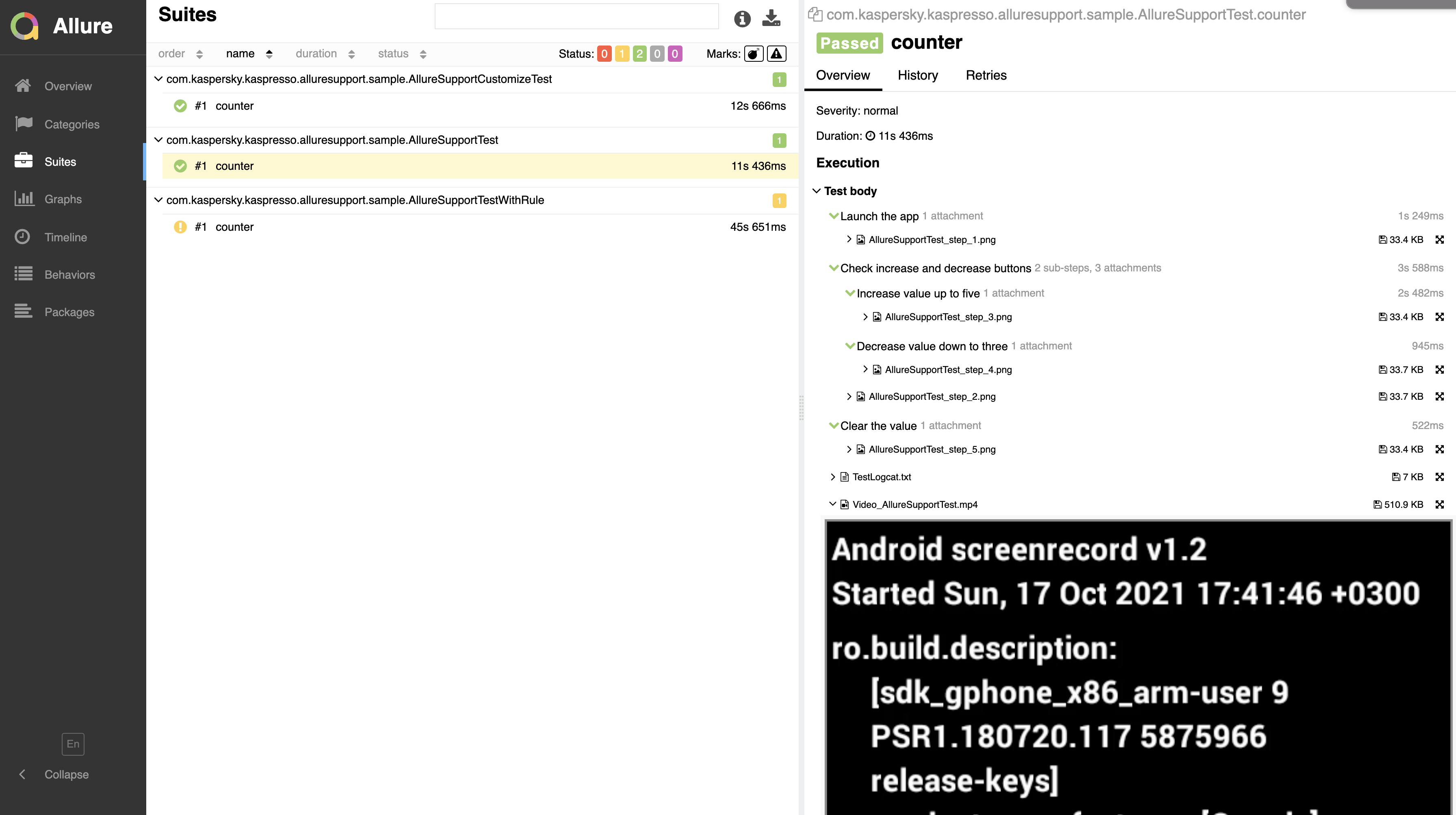
More information is available [here](https://kasperskylab.github.io/Kaspresso/Wiki/Kaspresso_Allure/).
### Jetpack Compose support
Now, you can write your Kaspresso tests for Jetpack Compose screens! DSL and all principles are the same.
So, you will not see any difference between tests for View screens and for Compose screens.
More information is available [here](https://kasperskylab.github.io/Kaspresso/Wiki/Jetpack_Compose/).
## Samples
All samples are available in the [samples](https://github.com/KasperskyLab/Kaspresso/tree/master/samples) folder.
Most of the samples require AdbServer. To start AdbServer you should do the following steps:
1. Go to the `Kaspresso` folder
```
cd ~/Workspace/Kaspresso
```
2. Start `adbserver-desktop.jar`
```
java -jar artifacts/adbserver-desktop.jar
```
## Existing issues
All existing issues in Kaspresso can be found [here](https://kasperskylab.github.io/Kaspresso/Issues/).
## Breaking changes
Breaking changes can be found [here](https://kasperskylab.github.io/Kaspresso/Home/Breaking-changes/)
## Contribution
Kaspresso is an open source project, so you are welcome to contribute (see the [Contribution Guidelines](https://kasperskylab.github.io/Kaspresso/Home/Contribution_guide/)).
## License
Kaspresso is available under the [Apache License, Version 2.0](https://github.com/KasperskyLab/Kaspresso/blob/master/LICENSE).
## Runner
If you looking for a Runner to execute your UI tests we strongly recommend to use [Marathon](https://github.com/MarathonLabs/marathon). [Marathon](https://github.com/MarathonLabs/marathon) is a fast, platform-independent test runner focused on performance and stability. It offers easy to use platform implementations for Android and iOS as well as an API for use with custom hardware farms and more techstacks.