FortiWeb Universal Orchestrator Extension



Support
·
Installation
·
License
·
Related Integrations
## Overview
The FortiWeb Orchestrator Extension is an integration that can replace and inventory certificates on the device that are bound to a Vitrual Server via Policy. The certificate store types that can be managed in the current version are:
* FortiWeb - See Test Cases For Specific Use Cases that are supported.
## Compatibility
This integration is compatible with Keyfactor Universal Orchestrator version 10.4 and later.
## Support
The FortiWeb Universal Orchestrator extension is supported by Keyfactor for Keyfactor customers. If you have a support issue, please open a support ticket with your Keyfactor representative. If you have a support issue, please open a support ticket via the Keyfactor Support Portal at https://support.keyfactor.com.
> To report a problem or suggest a new feature, use the **[Issues](../../issues)** tab. If you want to contribute actual bug fixes or proposed enhancements, use the **[Pull requests](../../pulls)** tab.
## Requirements & Prerequisites
Before installing the FortiWeb Universal Orchestrator extension, we recommend that you install [kfutil](https://github.com/Keyfactor/kfutil). Kfutil is a command-line tool that simplifies the process of creating store types, installing extensions, and instantiating certificate stores in Keyfactor Command.
## Create the FortiWeb Certificate Store Type
To use the FortiWeb Universal Orchestrator extension, you **must** create the FortiWeb Certificate Store Type. This only needs to happen _once_ per Keyfactor Command instance.
* **Create FortiWeb using kfutil**:
```shell
# FortiWeb
kfutil store-types create FortiWeb
```
* **Create FortiWeb manually in the Command UI**:
Create FortiWeb manually in the Command UI
Create a store type called `FortiWeb` with the attributes in the tables below:
#### Basic Tab
| Attribute | Value | Description |
| --------- | ----- | ----- |
| Name | FortiWeb | Display name for the store type (may be customized) |
| Short Name | FortiWeb | Short display name for the store type |
| Capability | FortiWeb | Store type name orchestrator will register with. Check the box to allow entry of value |
| Supports Add | ✅ Checked | Check the box. Indicates that the Store Type supports Management Add |
| Supports Remove | 🔲 Unchecked | Indicates that the Store Type supports Management Remove |
| Supports Discovery | 🔲 Unchecked | Indicates that the Store Type supports Discovery |
| Supports Reenrollment | 🔲 Unchecked | Indicates that the Store Type supports Reenrollment |
| Supports Create | 🔲 Unchecked | Indicates that the Store Type supports store creation |
| Needs Server | ✅ Checked | Determines if a target server name is required when creating store |
| Blueprint Allowed | 🔲 Unchecked | Determines if store type may be included in an Orchestrator blueprint |
| Uses PowerShell | 🔲 Unchecked | Determines if underlying implementation is PowerShell |
| Requires Store Password | 🔲 Unchecked | Enables users to optionally specify a store password when defining a Certificate Store. |
| Supports Entry Password | 🔲 Unchecked | Determines if an individual entry within a store can have a password. |
The Basic tab should look like this:

#### Advanced Tab
| Attribute | Value | Description |
| --------- | ----- | ----- |
| Supports Custom Alias | Required | Determines if an individual entry within a store can have a custom Alias. |
| Private Key Handling | Optional | This determines if Keyfactor can send the private key associated with a certificate to the store. Required because IIS certificates without private keys would be invalid. |
| PFX Password Style | Default | 'Default' - PFX password is randomly generated, 'Custom' - PFX password may be specified when the enrollment job is created (Requires the Allow Custom Password application setting to be enabled.) |
The Advanced tab should look like this:

#### Custom Fields Tab
Custom fields operate at the certificate store level and are used to control how the orchestrator connects to the remote target server containing the certificate store to be managed. The following custom fields should be added to the store type:
| Name | Display Name | Description | Type | Default Value/Options | Required |
| ---- | ------------ | ---- | --------------------- | -------- | ----------- |
| ServerUsername | Server Username | A username for CLI/SSH and REST API access. Used for inventory. (or valid PAM key if the username is stored in a KF Command configured PAM integration). | Secret | | 🔲 Unchecked |
| ServerPassword | Server Password | A password for CLI/SSH and REST API access. Used for inventory.(or valid PAM key if the password is stored in a KF Command configured PAM integration). | Secret | | 🔲 Unchecked |
| ServerUseSsl | Use SSL | Should be true, http is not supported. | Bool | true | ✅ Checked |
| ADom | Administrative Domain | Specifies the administrative or virtual domain within the FortiWeb system that the API user is targeting. | String | root | ✅ Checked |
The Custom Fields tab should look like this:

Create Certificate Stores manually in the UI
1. **Navigate to the _Certificate Stores_ page in Keyfactor Command.**
Log into Keyfactor Command, toggle the _Locations_ dropdown, and click _Certificate Stores_.
2. **Add a Certificate Store.**
Click the Add button to add a new Certificate Store. Use the table below to populate the **Attributes** in the **Add** form.
| Attribute | Description |
| --------- | ----------- |
| Category | Select "FortiWeb" or the customized certificate store name from the previous step. |
| Container | Optional container to associate certificate store with. |
| Client Machine | The Client Machine field should contain the IP or Domain name and Port Needed for REST API Access. For SSH Access, Port 22 will be used. |
| Store Path | The Store Path field should always be / unless we later determine there are alternate locations needed. |
| Orchestrator | Select an approved orchestrator capable of managing `FortiWeb` certificates. Specifically, one with the `FortiWeb` capability. |
| ServerUsername | A username for CLI/SSH and REST API access. Used for inventory. (or valid PAM key if the username is stored in a KF Command configured PAM integration). |
| ServerPassword | A password for CLI/SSH and REST API access. Used for inventory.(or valid PAM key if the password is stored in a KF Command configured PAM integration). |
| ServerUseSsl | Should be true, http is not supported. |
| ADom | Specifies the administrative or virtual domain within the FortiWeb system that the API user is targeting. |
Attributes eligible for retrieval by a PAM Provider on the Universal Orchestrator
If a PAM provider was installed _on the Universal Orchestrator_ in the [Installation](#Installation) section, the following parameters can be configured for retrieval _on the Universal Orchestrator_.
| Attribute | Description |
| --------- | ----------- |
| ServerUsername | A username for CLI/SSH and REST API access. Used for inventory. (or valid PAM key if the username is stored in a KF Command configured PAM integration). |
| ServerPassword | A password for CLI/SSH and REST API access. Used for inventory.(or valid PAM key if the password is stored in a KF Command configured PAM integration). |
Please refer to the **Universal Orchestrator (remote)** usage section ([PAM providers on the Keyfactor Integration Catalog](https://keyfactor.github.io/integrations-catalog/content/pam)) for your selected PAM provider for instructions on how to load attributes orchestrator-side.
> Any secret can be rendered by a PAM provider _installed on the Keyfactor Command server_. The above parameters are specific to attributes that can be fetched by an installed PAM provider running on the Universal Orchestrator server itself.
Create Certificate Stores with kfutil
1. **Generate a CSV template for the FortiWeb certificate store**
```shell
kfutil stores import generate-template --store-type-name FortiWeb --outpath FortiWeb.csv
```
2. **Populate the generated CSV file**
Open the CSV file, and reference the table below to populate parameters for each **Attribute**.
| Attribute | Description |
| --------- | ----------- |
| Category | Select "FortiWeb" or the customized certificate store name from the previous step. |
| Container | Optional container to associate certificate store with. |
| Client Machine | The Client Machine field should contain the IP or Domain name and Port Needed for REST API Access. For SSH Access, Port 22 will be used. |
| Store Path | The Store Path field should always be / unless we later determine there are alternate locations needed. |
| Orchestrator | Select an approved orchestrator capable of managing `FortiWeb` certificates. Specifically, one with the `FortiWeb` capability. |
| ServerUsername | A username for CLI/SSH and REST API access. Used for inventory. (or valid PAM key if the username is stored in a KF Command configured PAM integration). |
| ServerPassword | A password for CLI/SSH and REST API access. Used for inventory.(or valid PAM key if the password is stored in a KF Command configured PAM integration). |
| ServerUseSsl | Should be true, http is not supported. |
| ADom | Specifies the administrative or virtual domain within the FortiWeb system that the API user is targeting. |
Attributes eligible for retrieval by a PAM Provider on the Universal Orchestrator
If a PAM provider was installed _on the Universal Orchestrator_ in the [Installation](#Installation) section, the following parameters can be configured for retrieval _on the Universal Orchestrator_.
| Attribute | Description |
| --------- | ----------- |
| ServerUsername | A username for CLI/SSH and REST API access. Used for inventory. (or valid PAM key if the username is stored in a KF Command configured PAM integration). |
| ServerPassword | A password for CLI/SSH and REST API access. Used for inventory.(or valid PAM key if the password is stored in a KF Command configured PAM integration). |
> Any secret can be rendered by a PAM provider _installed on the Keyfactor Command server_. The above parameters are specific to attributes that can be fetched by an installed PAM provider running on the Universal Orchestrator server itself.
API User and Profile Setup
This document outlines the security configuration for the FortiWeb API integration with the Keyfactor Orchestrator. The API profile, `ApiProfile`, has been configured to grant minimal access while ensuring the orchestrator has the necessary permissions to perform its functions.
### API Profile: `ApiProfile`
The `ApiProfile` is configured with the following permissions:
#### Access Control Permissions
The table below specifies the permissions granted to the API profile for each area of the FortiWeb system:
| **Access Control** | **Permissions** |
|----------------------------------------|------------------|
| Maintenance | None |
| System Configuration | Read-Write |
| Network Configuration | None |
| Log & Report | None |
| Auth Users | None |
| Server Policy Configuration | Read-Write |
| Web Protection Configuration | None |
| Machine Learning Configuration | None |
| Web Anti-Defacement Management | None |
| Web Vulnerability Scan Configuration | None |
#### Description of Permissions
- **None**: No access to the specified area.
- **Read-Only**: The user can view configurations but cannot make changes.
- **Read-Write**: The user can view and modify configurations.
#### Key Permissions for Integration
1. **System Configuration**: Grants the orchestrator the ability to manage system settings required for certificate deployment and system integration.
2. **Server Policy Configuration**: Allows the orchestrator to manage server policies, ensuring secure and efficient traffic handling.
### Security Best Practices
- Limit the use of the `ApiProfile` to only the Keyfactor Orchestrator account.
- Regularly audit API profile usage and permissions to ensure alignment with the principle of least privilege.
- Enable logging for API activity to monitor orchestrator interactions with the FortiWeb system.
### Integration Checklist
1. Create the `ApiProfile` in the FortiWeb system with the permissions listed above.
2. Assign the profile to the user account that the Keyfactor Orchestrator will use for authentication.
3. Verify that the orchestrator can access and modify only the required areas (System Configuration and Server Policy Configuration).
4. Perform a functionality test to ensure the orchestrator can complete all necessary operations without encountering permission errors.
By following this configuration, the Keyfactor Orchestrator will have secure and functional access to integrate with the FortiWeb system effectively.
For additional guidance, consult the FortiWeb and Keyfactor documentation or reach out to your administrator.
## **API User Field Descriptions**
### 1. **`username`**
- **Definition**: The username of the FortiWeb API account.
- **Purpose**: Identifies the specific user accessing the FortiWeb API.
- **Details**: This username should belong to a user account configured in FortiWeb with an associated API profile that has the necessary permissions for the integration.
- **Example**:
```admin```
---
### 2. **`password`**
- **Definition**: The password associated with the username for authentication.
- **Purpose**: Used to securely authenticate the API user and ensure access control.
- **Details**: Ensure the password is strong and stored securely (e.g., encrypted storage or environment variables).
- **Example**:
```P@ssw0rd123!```
---
### 3. **`vdom` (ADOM Name)**
- **Definition**: The **Administrative Domain (ADOM)** or **Virtual Domain (VDOM)** name in the FortiWeb system.
- **Purpose**: Specifies the administrative or virtual domain within the FortiWeb system that the API user is targeting.
- **ADOMs (Administrative Domains)**: Used in FortiManager environments to manage multiple instances of FortiWeb. ADOMs isolate administrative control between teams or environments.
- **VDOMs (Virtual Domains)**: Virtualization feature in FortiWeb to segment and isolate configurations or policies within a single appliance.
- **When Required**: If the FortiWeb appliance is configured with multiple ADOMs or VDOMs, this field directs the API user to the correct domain. If no ADOMs/VDOMs are configured, use `"root"`.
- **Example**:
```Production_ADOM```
---
### **Best Practices**
#### 1. **Username & Password Security**
- Use a dedicated API user account with minimal permissions.
- Store credentials securely using encrypted storage or environment variables.
- Regularly rotate passwords and follow your organization's security policies.
#### 2. **VDOM/ADOM Selection**
- Ensure the `vdom` value corresponds to the correct administrative or virtual domain in your FortiWeb system.
- For single-domain systems, use the default value: `"root"`.
#### 3. **Audit Access**
- Regularly review and audit API user activity to ensure security and compliance.
## Test Cases
Test Case List
| Test Case | Description | Parameters | Expected Result | Actual Result | Pass/Fail| Screenshot |
|-----------|-------------------------------------------------------------------------------------------------|-------------------------------------------------------------------------------------------------------------------------------------------------------------|------------------------------------------------------------------------------------------------------|----------------------------------------------------------------------------------|----------|-------------|
| TC1 | Add certificate with no existing bindings and no overwrite. | `managementtype=add`, `overwrite=false`, `certalias=www.tc1.com` | Operation should not proceed since there are no existing bindings for the certificate. | Operation did not proceed since there are no existing bindings for the certificate | Pass | 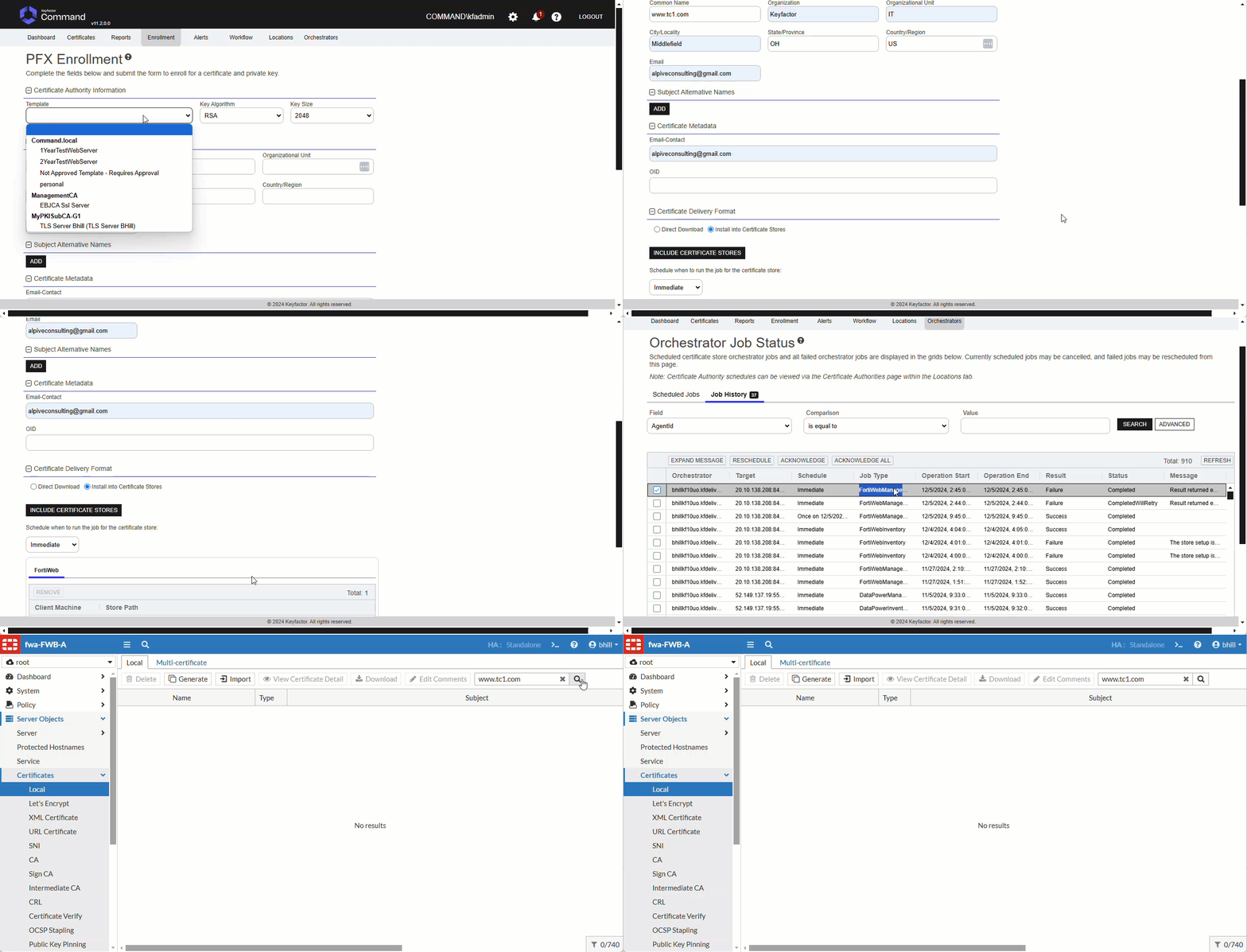 |
| TC2 | Add certificate with no existing bindings and overwrite enabled. | `managementtype=add`, `overwrite=true`, `certalias=www.tc2.com` | Operation should not proceed even with overwrite, as there are no existing bindings. | Operation did not proceed since there are no existing bindings for the certificate | Pass | 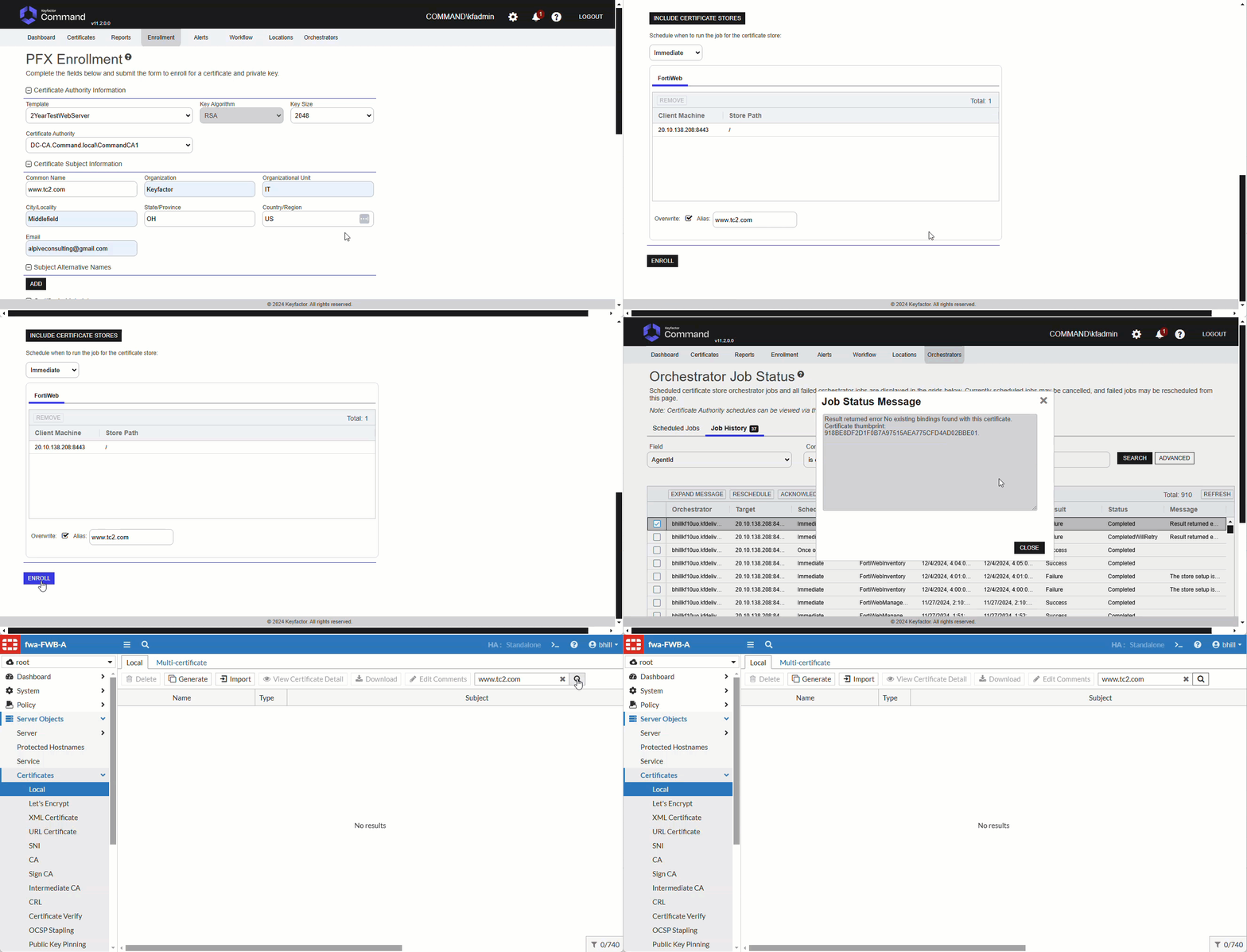 |
| TC3 | Replace a certificate bound to multiple policies. | `managementtype=add`, `overwrite=true`, `certalias=www.testerdomain82.com` | Certificate should be replaced across all policies it is bound to. | Certificate was replaced across all policies it is bound to. | Pass | 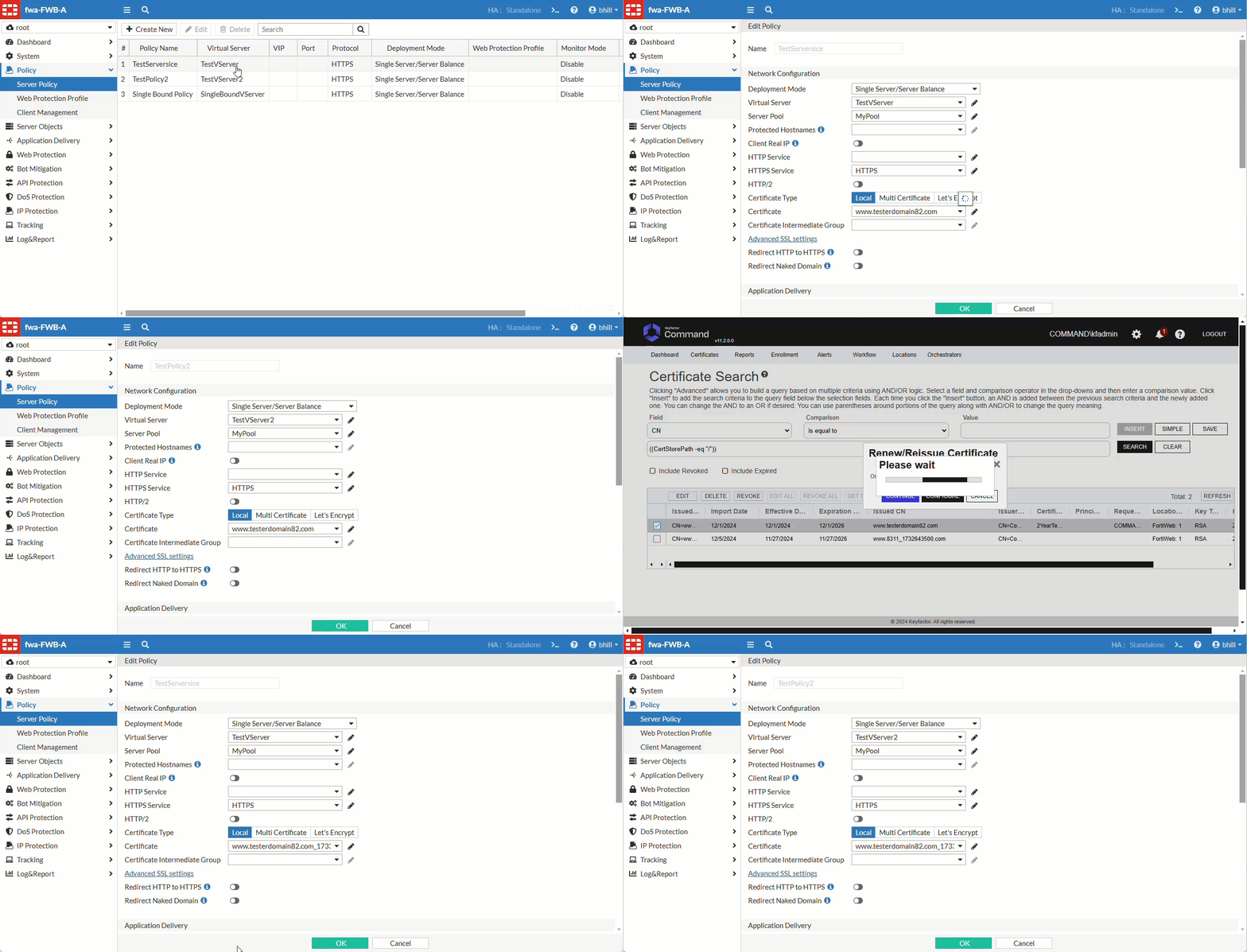 |
| TC4 | Replace a certificate bound to a single policy. | `managementtype=add`, `overwrite=true`, `certalias=www.testerdomain1.com` | Certificate should be replaced in the single policy it is bound to. | Certificate was replaced in the single policy it is bound to | Pass | 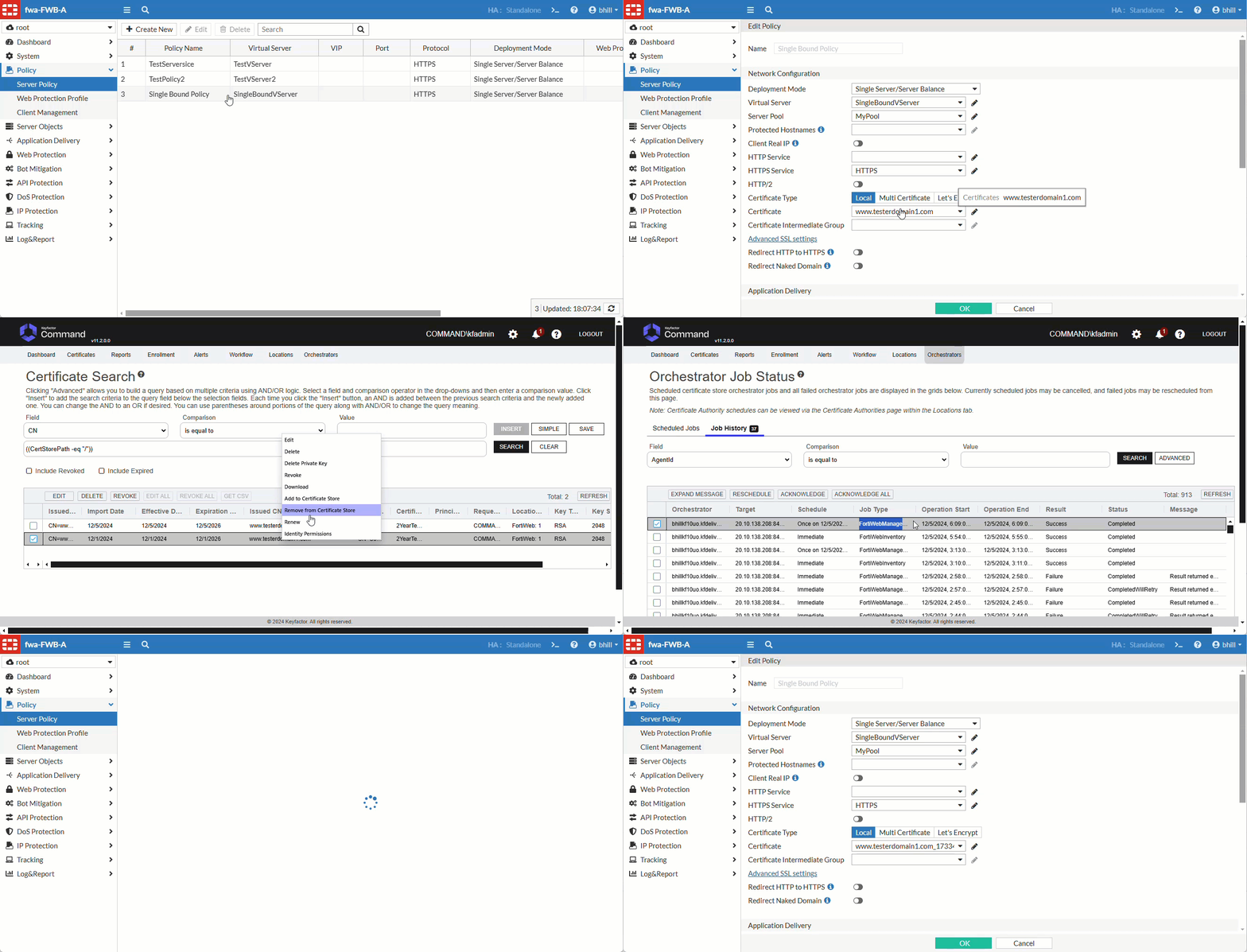 |
| TC5 | Attempt to replace a certificate bound to a single policy without overwrite enabled. | `managementtype=add`, `overwrite=false`, `certalias=www.testerdomain2.com` | Operation should fail with a message indicating overwrite is needed. | Operation failed with a message indicating overwrite is needed. | Pass| 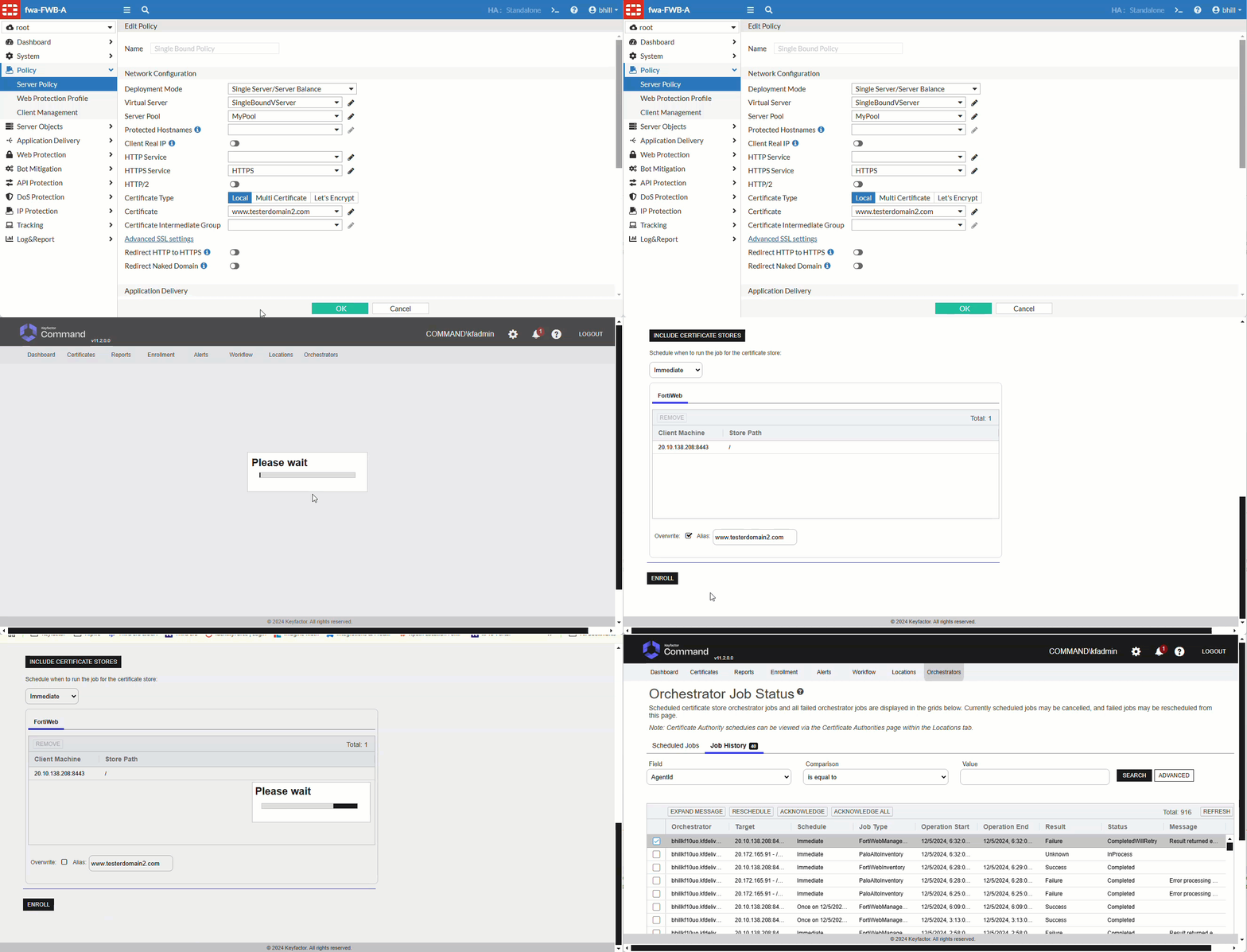 |
| TC6 | Inventory test to list only bound certificates. | `casename=Inventory`, `storepath=/`, `clientmachine=20.10.138.208:8443` | Should return a list of two bound certificates. | Returned a list of the two bound certificates | Pass | 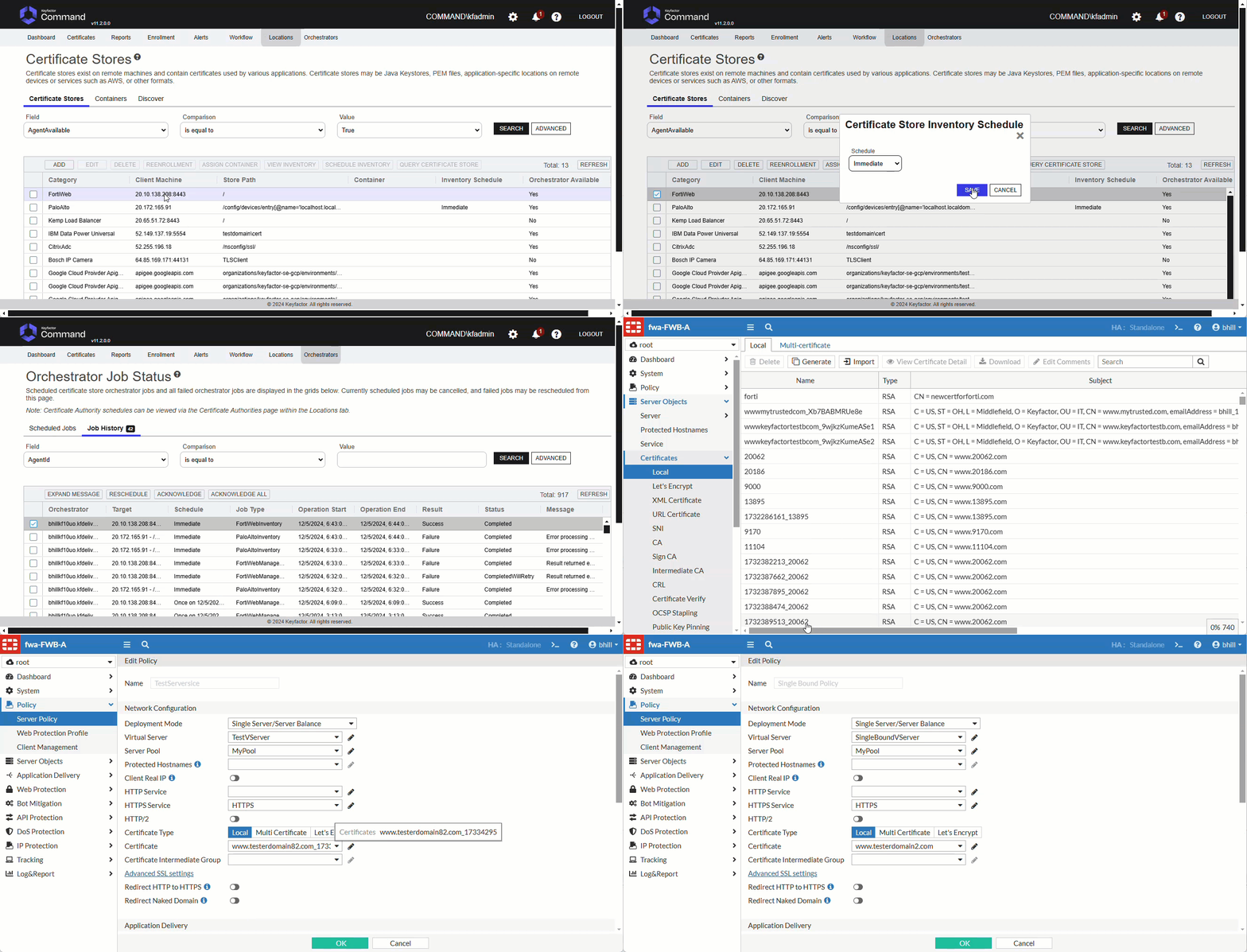 |
| TC7 | Test error handling with an invalid client machine. | `casename=Inventory`, `storepath=/`, `clientmachine=20.10.138.211:8443` | Should return a reasonable error indicating the client machine is invalid. | Did return a reasonable error indicating the client machine is invalid. | Pass| 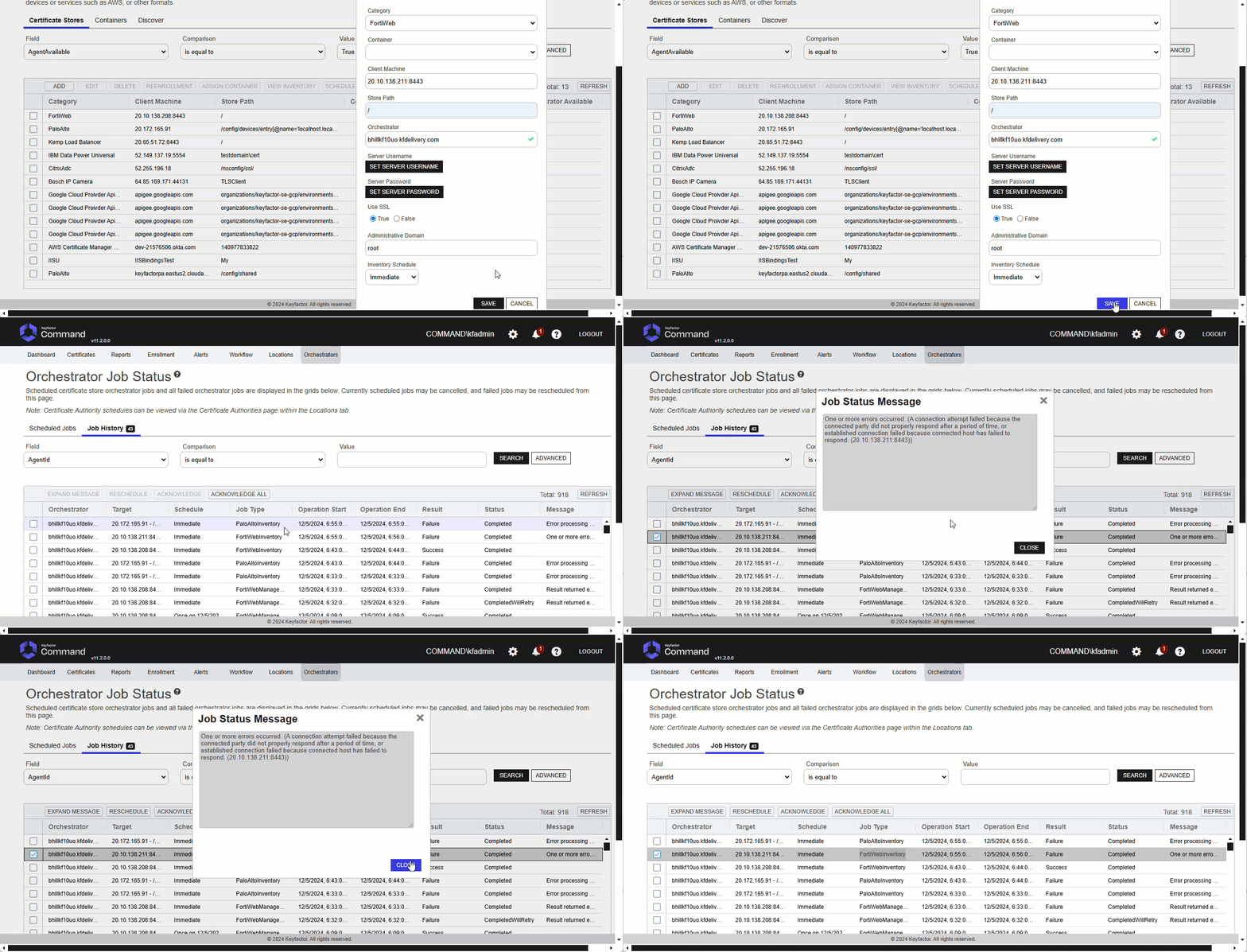 |
## License
Apache License 2.0, see [LICENSE](LICENSE).
## Related Integrations
See all [Keyfactor Universal Orchestrator extensions](https://github.com/orgs/Keyfactor/repositories?q=orchestrator).