HP iLO Universal Orchestrator Extension


Support
·
Installation
·
License
·
Related Integrations
## Overview
This is an HP iLO orchestrator extension.
### ⚠️ Important Notice
**Cert Store Type has been changed from version 1.0. Please update existing stores to include the new entry parameter, enable Add job functionality and make sure the default values for custom fields and entry parameters align, then run an inventory job afterwards. Please see Changelog for the full list of many changes. See store type documentation below for reference.**
## Compatibility
This integration is compatible with Keyfactor Universal Orchestrator version 25.2 and later.
## Support
The HP iLO Universal Orchestrator extension is open source and there is **no SLA**. Keyfactor will address issues and feature requests as resources become available. Keyfactor customers may request escalation by opening up a support ticket through their Keyfactor representative.
> To report a problem or suggest a new feature, use the **[Issues](../../issues)** tab. If you want to contribute bug fixes or additional enhancements, use the **[Pull requests](../../pulls)** tab.
## Requirements & Prerequisites
Before installing the HP iLO Universal Orchestrator extension, we recommend that you install [kfutil](https://github.com/Keyfactor/kfutil). Kfutil is a command-line tool that simplifies the process of creating store types, installing extensions, and instantiating certificate stores in Keyfactor Command.
- **Target Platform:** HP iLO 6
- **Tested HPiLO Firmware Versions:** 1.58 and 1.69
## HPiLO Certificate Store Type
To use the HP iLO Universal Orchestrator extension, you **must** create the HPiLO Certificate Store Type. This only needs to happen _once_ per Keyfactor Command instance.
This document details supported certificate operations for HP iLO.
`IncludeIP` entry parameter should be set to false outside of HTTPSCert reenrollment/ODKG operation.
`CertType` entry parameter is required for all operations and should be set to the type of certificate the operation is carried out on.
Please review the description of each supported operation below to understand the requirements and limitations.
#### Supported Operations
| Operation | Is Supported |
|--------------|------------------------------------------------------------------------------------------------------------------------|
| Add | ✅ Checked |
| Remove | ✅ Checked |
| Discovery | 🔲 Unchecked |
| Reenrollment | ✅ Checked |
| Create | 🔲 Unchecked |
#### Store Type Creation
##### Using kfutil:
`kfutil` is a custom CLI for the Keyfactor Command API and can be used to create certificate store types.
For more information on [kfutil](https://github.com/Keyfactor/kfutil) check out the [docs](https://github.com/Keyfactor/kfutil?tab=readme-ov-file#quickstart)
Click to expand HPiLO kfutil details
##### Using online definition from GitHub:
This will reach out to GitHub and pull the latest store-type definition
```shell
# HP iLO Cert Store
kfutil store-types create HPiLO
```
##### Offline creation using integration-manifest file:
If required, it is possible to create store types from the [integration-manifest.json](./integration-manifest.json) included in this repo.
You would first download the [integration-manifest.json](./integration-manifest.json) and then run the following command
in your offline environment.
```shell
kfutil store-types create --from-file integration-manifest.json
```
Click to expand manual HPiLO details
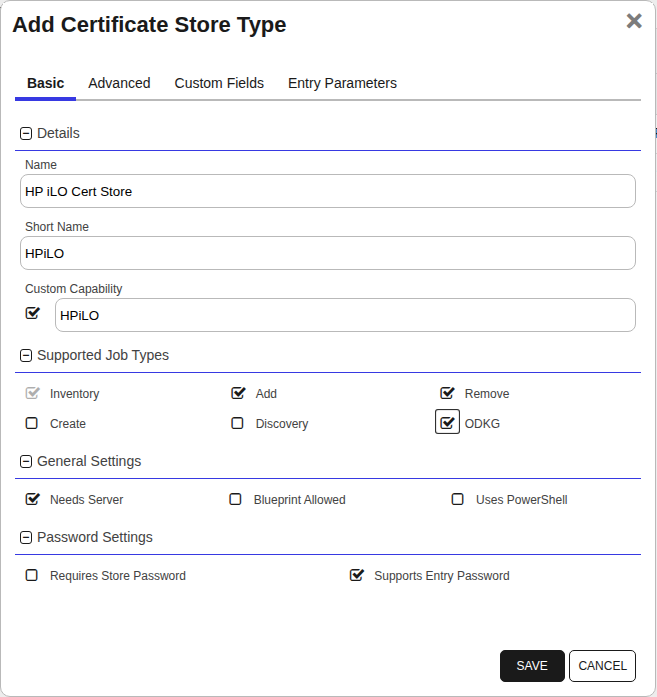
Create a store type called `HPiLO` with the attributes in the tables below:
##### Basic Tab
| Attribute | Value | Description |
| --------- | ----- | ----- |
| Name | HP iLO Cert Store | Display name for the store type (may be customized) |
| Short Name | HPiLO | Short display name for the store type |
| Capability | HPiLO | Store type name orchestrator will register with. Check the box to allow entry of value |
| Supports Add | ✅ Checked | Check the box. Indicates that the Store Type supports Management Add |
| Supports Remove | ✅ Checked | Check the box. Indicates that the Store Type supports Management Remove |
| Supports Discovery | 🔲 Unchecked | Indicates that the Store Type supports Discovery |
| Supports Reenrollment | ✅ Checked | Indicates that the Store Type supports Reenrollment |
| Supports Create | 🔲 Unchecked | Indicates that the Store Type supports store creation |
| Needs Server | ✅ Checked | Determines if a target server name is required when creating store |
| Blueprint Allowed | 🔲 Unchecked | Determines if store type may be included in an Orchestrator blueprint |
| Uses PowerShell | 🔲 Unchecked | Determines if underlying implementation is PowerShell |
| Requires Store Password | 🔲 Unchecked | Enables users to optionally specify a store password when defining a Certificate Store. |
| Supports Entry Password | ✅ Checked | Determines if an individual entry within a store can have a password. |
The Basic tab should look like this:
##### Advanced Tab
| Attribute | Value | Description |
| --------- | ----- | ----- |
| Supports Custom Alias | Required | Determines if an individual entry within a store can have a custom Alias. |
| Private Key Handling | Required | This determines if Keyfactor can send the private key associated with a certificate to the store. Required because IIS certificates without private keys would be invalid. |
| PFX Password Style | Default | 'Default' - PFX password is randomly generated, 'Custom' - PFX password may be specified when the enrollment job is created (Requires the Allow Custom Password application setting to be enabled.) |
The Advanced tab should look like this:
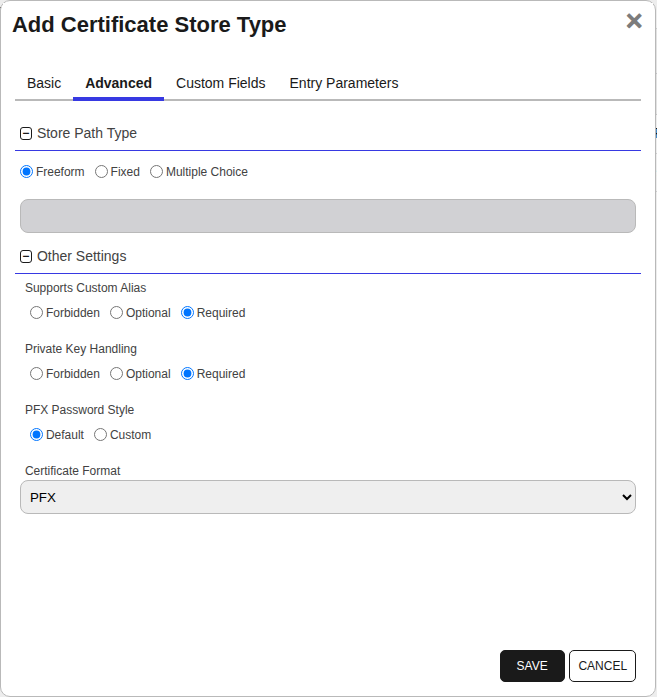
> For Keyfactor **Command versions 24.4 and later**, a Certificate Format dropdown is available with PFX and PEM options. Ensure that **PFX** is selected, as this determines the format of new and renewed certificates sent to the Orchestrator during a Management job. Currently, all Keyfactor-supported Orchestrator extensions support only PFX.
##### Custom Fields Tab
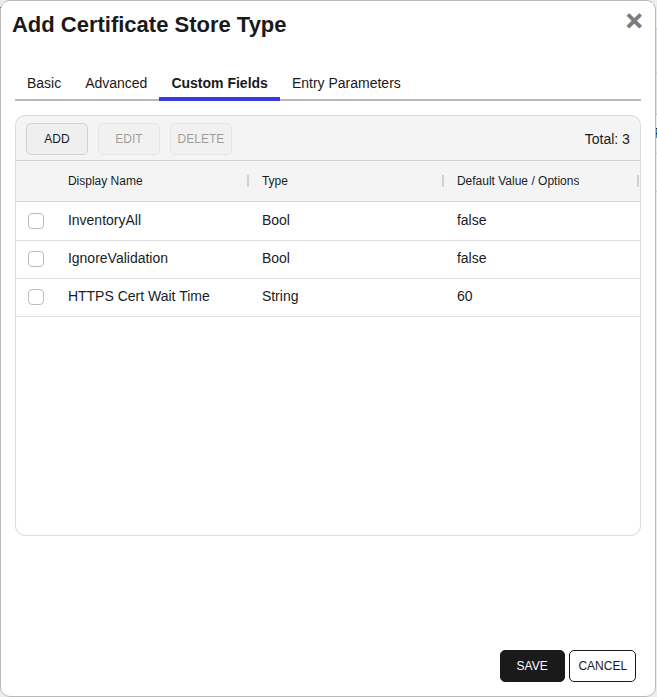
Custom fields operate at the certificate store level and are used to control how the orchestrator connects to the remote target server containing the certificate store to be managed. The following custom fields should be added to the store type:
| Name | Display Name | Description | Type | Default Value/Options | Required |
| ---- | ------------ | ---- | --------------------- | -------- | ----------- |
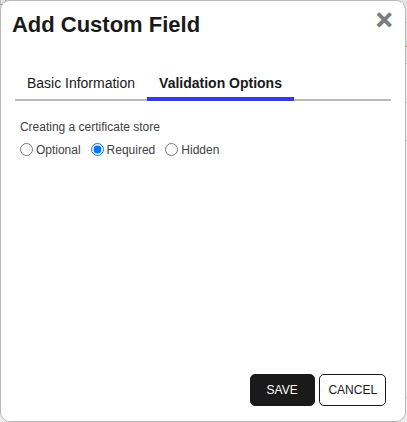
| InventoryAll | InventoryAll | If true, allows for inventory of additional factory-installed certificates and their chains: `Platform Cert`,`SystemIAK`,`SystemIDevID`, `iLOIDevID/BMCIDevIDPCA` | Bool | false | ✅ Checked |
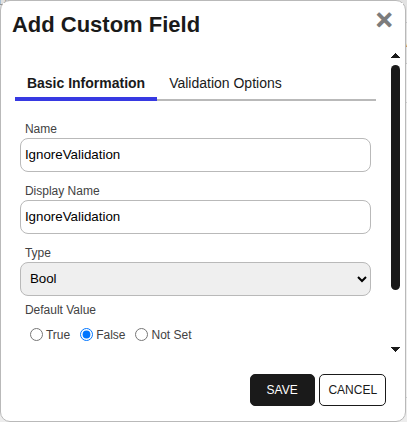
| IgnoreValidation | IgnoreValidation | WARNING: Only enable if testing. Used to disable certificate validation checks at the API endpoint. Should be set to false in any production scenario. | Bool | false | ✅ Checked |
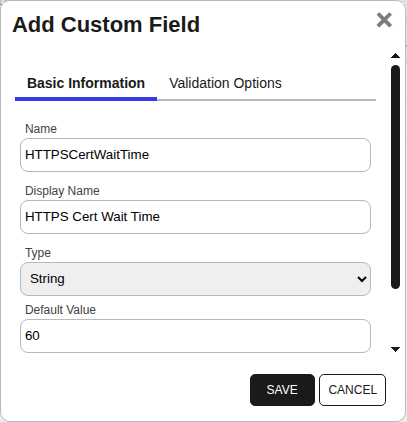
| HTTPSCertWaitTime | HTTPS Cert Wait Time | The HPiLO API requires the user to wait while the HTTPS Cert CSR is generated. HP suggests a time of 60 seconds, as is the default setting, but it can be adjusted. | String | 60 | ✅ Checked |
The Custom Fields tab should look like this:
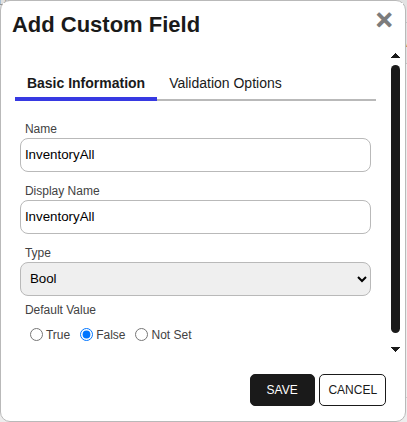
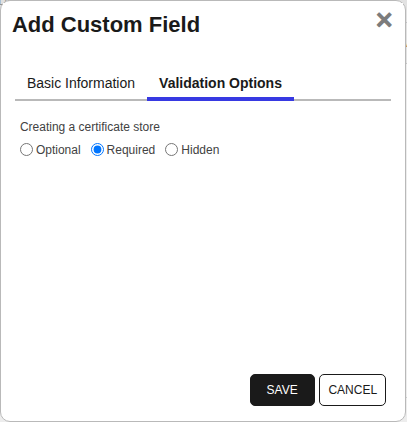
###### InventoryAll
If true, allows for inventory of additional factory-installed certificates and their chains: `Platform Cert`,`SystemIAK`,`SystemIDevID`, `iLOIDevID/BMCIDevIDPCA`
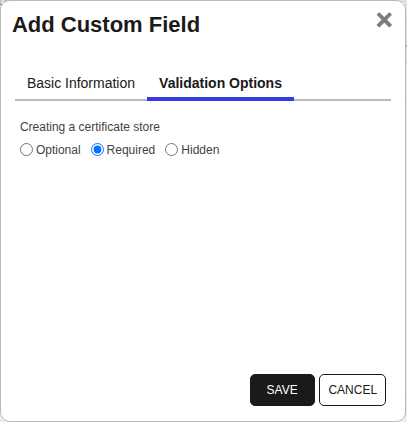
###### IgnoreValidation
WARNING: Only enable if testing. Used to disable certificate validation checks at the API endpoint. Should be set to false in any production scenario.
###### HTTPS Cert Wait Time
The HPiLO API requires the user to wait while the HTTPS Cert CSR is generated. HP suggests a time of 60 seconds, as is the default setting, but it can be adjusted.
##### Entry Parameters Tab
| Name | Display Name | Description | Type | Default Value | Entry has a private key | Adding an entry | Removing an entry | Reenrolling an entry |
| ---- | ------------ | ---- | ------------- | ----------------------- | ---------------- | ----------------- | ------------------- | ----------- |
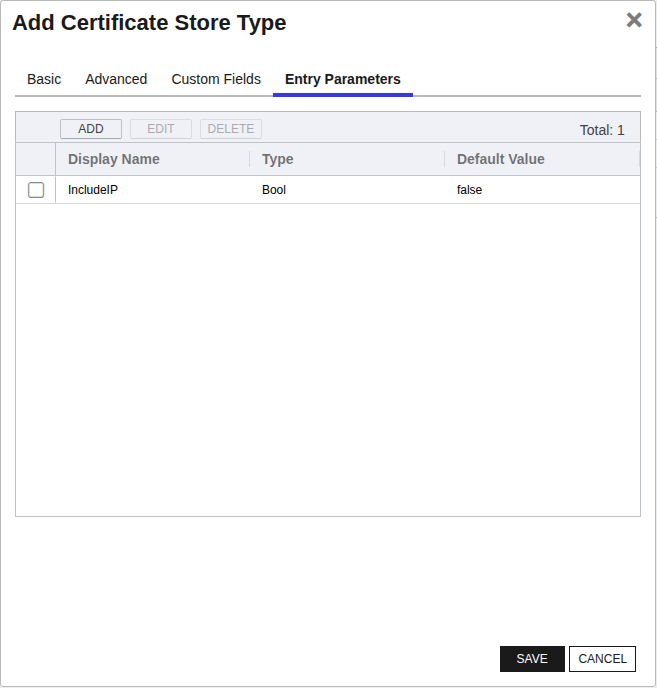
| IncludeIP | IncludeIP | Enables the addition of the device IP as a SAN to the CSR during reenrollment. Used particularly during HTTPSCert reenrollment, where it can be set as desired, and should be set to false during all other operations. | Bool | false | 🔲 Unchecked | 🔲 Unchecked | 🔲 Unchecked | ✅ Checked |
The Entry Parameters tab should look like this:
##### IncludeIP
Enables the addition of the device IP as a SAN to the CSR during reenrollment. Used particularly during HTTPSCert reenrollment, where it can be set as desired, and should be set to false during all other operations.


Click to expand details
1. **Navigate to the _Certificate Stores_ page in Keyfactor Command.**
Log into Keyfactor Command, toggle the _Locations_ dropdown, and click _Certificate Stores_.
2. **Add a Certificate Store.**
Click the Add button to add a new Certificate Store. Use the table below to populate the **Attributes** in the **Add** form.
| Attribute | Description |
| --------- |---------------------------------------------------------|
| Category | Select "HP iLO Cert Store" or the customized certificate store name from the previous step. |
| Container | Optional container to associate certificate store with. |
| Client Machine | Currently unused. |
| Store Path | This should contain the full URI pointing to the HPiLO instance, using IP (e.g. `https://10.1.1.1/`) or domain name (e.g. `https://hpilo.test.local/`). The orchestrator will connect to the iLO instance using the iLO API. |
| Store Password | Password to use when reading/writing to store |
| Orchestrator | Select an approved orchestrator capable of managing `HPiLO` certificates. Specifically, one with the `HPiLO` capability. |
| InventoryAll | If true, allows for inventory of additional factory-installed certificates and their chains: `Platform Cert`,`SystemIAK`,`SystemIDevID`, `iLOIDevID/BMCIDevIDPCA` |
| IgnoreValidation | WARNING: Only enable if testing. Used to disable certificate validation checks at the API endpoint. Should be set to false in any production scenario. |
| HTTPSCertWaitTime | The HPiLO API requires the user to wait while the HTTPS Cert CSR is generated. HP suggests a time of 60 seconds, as is the default setting, but it can be adjusted. |
Click to expand details
1. **Generate a CSV template for the HPiLO certificate store**
```shell
kfutil stores import generate-template --store-type-name HPiLO --outpath HPiLO.csv
```
2. **Populate the generated CSV file**
Open the CSV file, and reference the table below to populate parameters for each **Attribute**.
| Attribute | Description |
| --------- | ----------- |
| Category | Select "HP iLO Cert Store" or the customized certificate store name from the previous step. |
| Container | Optional container to associate certificate store with. |
| Client Machine | Currently unused. |
| Store Path | This should contain the full URI pointing to the HPiLO instance, using IP (e.g. `https://10.1.1.1/`) or domain name (e.g. `https://hpilo.test.local/`). The orchestrator will connect to the iLO instance using the iLO API. |
| Store Password | Password to use when reading/writing to store |
| Orchestrator | Select an approved orchestrator capable of managing `HPiLO` certificates. Specifically, one with the `HPiLO` capability. |
| Properties.InventoryAll | If true, allows for inventory of additional factory-installed certificates and their chains: `Platform Cert`,`SystemIAK`,`SystemIDevID`, `iLOIDevID/BMCIDevIDPCA` |
| Properties.IgnoreValidation | WARNING: Only enable if testing. Used to disable certificate validation checks at the API endpoint. Should be set to false in any production scenario. |
| Properties.HTTPSCertWaitTime | The HPiLO API requires the user to wait while the HTTPS Cert CSR is generated. HP suggests a time of 60 seconds, as is the default setting, but it can be adjusted. |
3. **Import the CSV file to create the certificate stores**
```shell
kfutil stores import csv --store-type-name HPiLO --file HPiLO.csv
```
Attributes eligible for retrieval by a PAM Provider on the Universal Orchestrator
If a PAM provider was installed _on the Universal Orchestrator_ in the [Installation](#Installation) section, the following parameters can be configured for retrieval _on the Universal Orchestrator_.
| Attribute | Description |
| --------- | ----------- |
| ServerUsername | Username to use when connecting to server |
| ServerPassword | Password to use when connecting to server |
| StorePassword | Password to use when reading/writing to store |
Please refer to the **Universal Orchestrator (remote)** usage section ([PAM providers on the Keyfactor Integration Catalog](https://keyfactor.github.io/integrations-catalog/content/pam)) for your selected PAM provider for instructions on how to load attributes orchestrator-side.
> Any secret can be rendered by a PAM provider _installed on the Keyfactor Command server_. The above parameters are specific to attributes that can be fetched by an installed PAM provider running on the Universal Orchestrator server itself.