Previous: [Scenes and Nodes](gltfTutorial_004_ScenesNodes.md) | [Table of Contents](README.md) | Next: [Simple Animation](gltfTutorial_006_SimpleAnimation.md)
# Buffers, BufferViews, and Accessors
An example of `buffer`, `bufferView`, and `accessor` objects was already given in the [Minimal glTF File](gltfTutorial_003_MinimalGltfFile.md) section. This section will explain these concepts in more detail.
## Buffers
A [`buffer`](https://www.khronos.org/registry/glTF/specs/2.0/glTF-2.0.html#reference-buffer) represents a block of raw binary data, without an inherent structure or meaning. This data is referred to by a buffer using its `uri`. This URI may either point to an external file, or be a [data URI](gltfTutorial_002_BasicGltfStructure.md#binary-data-in-buffers) that encodes the binary data directly in the JSON file. The [minimal glTF file](gltfTutorial_003_MinimalGltfFile.md) contained an example of a `buffer`, with 44 bytes of data, encoded in a data URI:
```javascript
"buffers" : [
{
"uri" : "data:application/octet-stream;base64,AAABAAIAAAAAAAAAAAAAAAAAAAAAAIA/AAAAAAAAAAAAAAAAAACAPwAAAAA=",
"byteLength" : 44
}
],
```

Image 5a: The buffer data, consisting of 44 bytes.
Parts of the data of a `buffer` may have to be passed to the renderer as vertex attributes, or as indices, or the data may contain skinning information or animation key frames. In order to be able to use this data, additional information about the structure and type of this data is required.
## BufferViews
The first step of structuring the data from a `buffer` is with [`bufferView`](https://www.khronos.org/registry/glTF/specs/2.0/glTF-2.0.html#reference-bufferview) objects. A `bufferView` represents a "slice" of the data of one buffer. This slice is defined using an offset and a length, in bytes. The [minimal glTF file](gltfTutorial_003_MinimalGltfFile.md) defined two `bufferView` objects:
```javascript
"bufferViews" : [
{
"buffer" : 0,
"byteOffset" : 0,
"byteLength" : 6,
"target" : 34963
},
{
"buffer" : 0,
"byteOffset" : 8,
"byteLength" : 36,
"target" : 34962
}
],
```
The first `bufferView` refers to the first 6 bytes of the buffer data. The second one refers to 36 bytes of the buffer, with an offset of 8 bytes, as shown in this image:
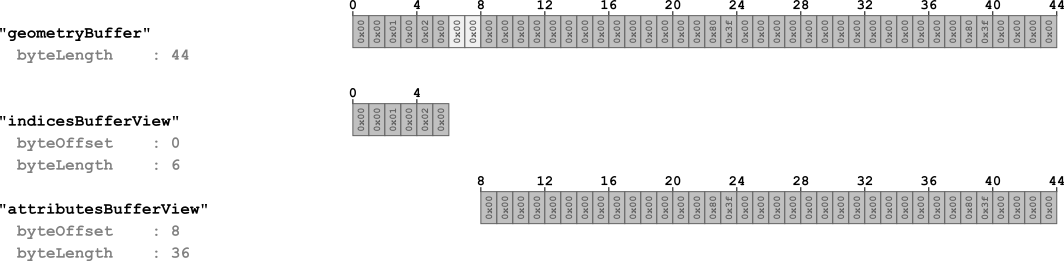
Image 5b: The buffer views, referring to parts of the buffer.
The bytes that are shown in light gray are padding bytes that are required for properly aligning the accessors, as described below.
Each `bufferView` additionally contains a `target` property. This property may later be used by the renderer to classify the type or nature of the data that the buffer view refers to. The `target` can be a constant indicating that the data is used for vertex attributes (`34962`, standing for `ARRAY_BUFFER`), or that the data is used for vertex indices (`34963`, standing for `ELEMENT_ARRAY_BUFFER`).
At this point, the `buffer` data has been divided into multiple parts, and each part is described by one `bufferView`. But in order to really use this data in a renderer, additional information about the type and layout of the data is required.
## Accessors
An [`accessor`](https://www.khronos.org/registry/glTF/specs/2.0/glTF-2.0.html#reference-accessor) object refers to a `bufferView` and contains properties that define the type and layout of the data of this `bufferView`.
### Data type
The type of an accessor's data is encoded in the `type` and the `componentType` properties. The value of the `type` property is a string that specifies whether the data elements are scalars, vectors, or matrices. For example, the value may be `"SCALAR"` for scalar values, `"VEC3"` for 3D vectors, or `"MAT4"` for 4×4 matrices.
The `componentType` specifies the type of the components of these data elements. This is a GL constant that may, for example, be `5126` (`FLOAT`) or `5123` (`UNSIGNED_SHORT`), to indicate that the elements have `float` or `unsigned short` components, respectively.
Different combinations of these properties may be used to describe arbitrary data types. For example, the [minimal glTF file](gltfTutorial_003_MinimalGltfFile.md) contained two accessors:
```javascript
"accessors" : [
{
"bufferView" : 0,
"byteOffset" : 0,
"componentType" : 5123,
"count" : 3,
"type" : "SCALAR",
"max" : [ 2 ],
"min" : [ 0 ]
},
{
"bufferView" : 1,
"byteOffset" : 0,
"componentType" : 5126,
"count" : 3,
"type" : "VEC3",
"max" : [ 1.0, 1.0, 0.0 ],
"min" : [ 0.0, 0.0, 0.0 ]
}
],
```
The first accessor refers to the `bufferView` with index 0, which defines the part of the `buffer` data that contains the indices. Its `type` is `"SCALAR"`, and its `componentType` is `5123` (`UNSIGNED_SHORT`). This means that the indices are stored as scalar `unsigned short` values.
The second accessor refers to the `bufferView` with index 1, which defines the part of the `buffer` data that contains the vertex attributes - particularly, the vertex positions. Its `type` is `"VEC3"`, and its `componentType` is `5126` (`FLOAT`). So this accessor describes 3D vectors with floating point components.
### Data layout
Additional properties of an `accessor` further specify the layout of the data. The `count` property of an accessor indicates how many data elements it consists of. In the example above, the count has been `3` for both accessors, standing for the three indices and the three vertices of the triangle, respectively. Each accessor also has a `byteOffset` property. For the example above, it has been `0` for both accessors, because there was only one `accessor` for each `bufferView`. But when multiple accessors refer to the same `bufferView`, then the `byteOffset` describes where the data of the accessor starts, relative to the `bufferView` that it refers to.
### Data alignment
The data that is referred to by an `accessor` may be sent to the graphics card for rendering, or be used at the host side as animation or skinning data. Therefore, the data of an `accessor` has to be aligned based on the *type* of the data. For example, when the `componentType` of an `accessor` is `5126` (`FLOAT`), then the data must be aligned at 4-byte boundaries, because a single `float` value consists of four bytes. This alignment requirement of an `accessor` refers to its `bufferView` and the underlying `buffer`. Particularly, the alignment requirements are as follows:
- The `byteOffset` of an `accessor` must be divisible by the size of its `componentType`.
- The sum of the `byteOffset` of an accessor and the `byteOffset` of the `bufferView` that it refers to must be divisible by the size of its `componentType`.
In the example above, the `byteOffset` of the `bufferView` with index 1 (which refers to the vertex attributes) was chosen to be `8`, in order to align the data of the accessor for the vertex positions to 4-byte boundaries. The bytes `6` and `7` of the `buffer` are thus *padding* bytes that do not carry relevant data.
Image 5c illustrates how the raw data of a `buffer` is structured using `bufferView` objects and is augmented with data type information using `accessor` objects.
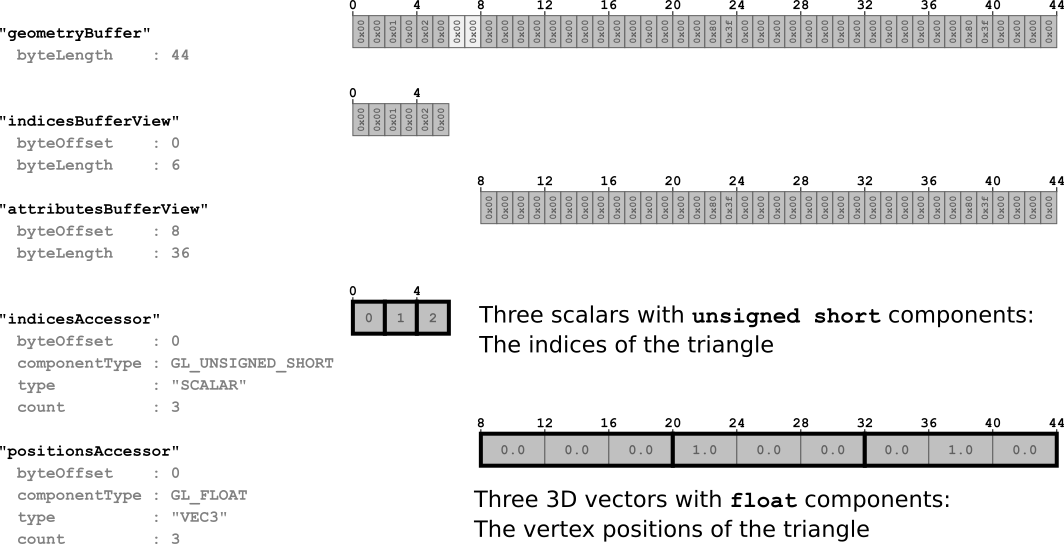
Image 5c: The accessors defining how to interpret the data of the buffer views.
### Data interleaving
The data of the attributes that are stored in a single `bufferView` may be stored as an *Array-Of-Structures*. A single `bufferView` may, for example, contain the data for vertex positions and for vertex normals in an interleaved fashion. In this case, the `byteOffset` of an accessor defines the start of the first relevant data element for the respective attribute, and the `bufferView` defines an additional `byteStride` property. This is the number of bytes between the start of one element of its accessors, and the start of the next one. An example of how interleaved position and normal attributes are stored inside a `bufferView` is shown in Image 5d.
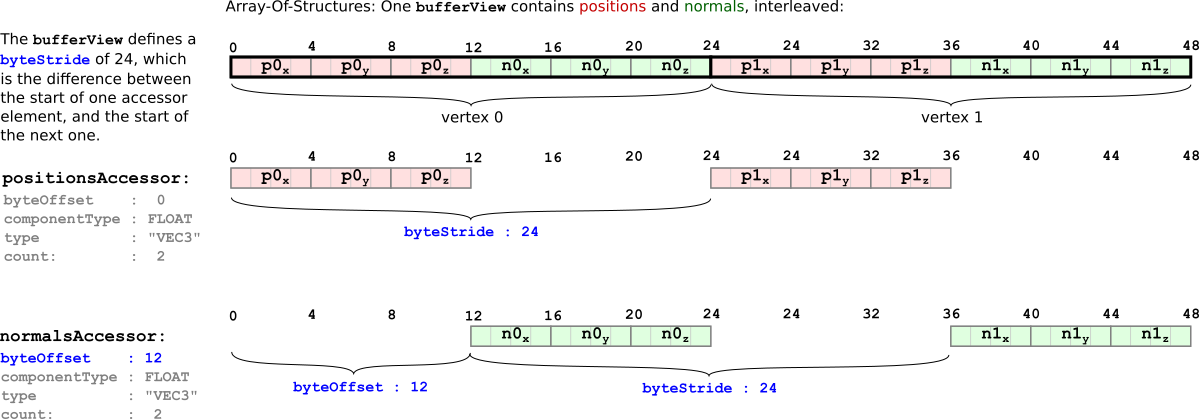
Image 5d: Interleaved accessors in one buffer view.
### Data contents
An `accessor` also contains `min` and `max` properties that summarize the contents of their data. They are the component-wise minimum and maximum values of all data elements contained in the accessor. In the case of vertex positions, the `min` and `max` properties thus define the *bounding box* of an object. This can be useful for prioritizing downloads, or for visibility detection. In general, this information is also useful for storing and processing *quantized* data that is dequantized at runtime, by the renderer, but details of this quantization are beyond the scope of this tutorial.
## Sparse accessors
With version 2.0, the concept of *sparse accessors* was introduced in glTF. This is a special representation of data that allows very compact storage of multiple data blocks that have only a few different entries. For example, when there is geometry data that contains vertex positions, this geometry data may be used for multiple objects. This may be achieved by referring to the same `accessor` from both objects. If the vertex positions for both objects are mostly the same and differ for only a few vertices, then it is not necessary to store the whole geometry data twice. Instead, it is possible to store the data only once, and use a sparse accessor to store only the vertex positions that differ for the second object.
The following is a complete glTF asset, in embedded representation, that shows an example of sparse accessors:
```javascript
{
"scenes" : [ {
"nodes" : [ 0 ]
} ],
"nodes" : [ {
"mesh" : 0
} ],
"meshes" : [ {
"primitives" : [ {
"attributes" : {
"POSITION" : 1
},
"indices" : 0
} ]
} ],
"buffers" : [ {
"uri" : "data:application/gltf-buffer;base64,AAAIAAcAAAABAAgAAQAJAAgAAQACAAkAAgAKAAkAAgADAAoAAwALAAoAAwAEAAsABAAMAAsABAAFAAwABQANAAwABQAGAA0AAAAAAAAAAAAAAAAAAACAPwAAAAAAAAAAAAAAQAAAAAAAAAAAAABAQAAAAAAAAAAAAACAQAAAAAAAAAAAAACgQAAAAAAAAAAAAADAQAAAAAAAAAAAAAAAAAAAgD8AAAAAAACAPwAAgD8AAAAAAAAAQAAAgD8AAAAAAABAQAAAgD8AAAAAAACAQAAAgD8AAAAAAACgQAAAgD8AAAAAAADAQAAAgD8AAAAACAAKAAwAAAAAAIA/AAAAQAAAAAAAAEBAAABAQAAAAAAAAKBAAACAQAAAAAA=",
"byteLength" : 284
} ],
"bufferViews" : [ {
"buffer" : 0,
"byteOffset" : 0,
"byteLength" : 72,
"target" : 34963
}, {
"buffer" : 0,
"byteOffset" : 72,
"byteLength" : 168
}, {
"buffer" : 0,
"byteOffset" : 240,
"byteLength" : 6
}, {
"buffer" : 0,
"byteOffset" : 248,
"byteLength" : 36
} ],
"accessors" : [ {
"bufferView" : 0,
"byteOffset" : 0,
"componentType" : 5123,
"count" : 36,
"type" : "SCALAR",
"max" : [ 13 ],
"min" : [ 0 ]
}, {
"bufferView" : 1,
"byteOffset" : 0,
"componentType" : 5126,
"count" : 14,
"type" : "VEC3",
"max" : [ 6.0, 4.0, 0.0 ],
"min" : [ 0.0, 0.0, 0.0 ],
"sparse" : {
"count" : 3,
"indices" : {
"bufferView" : 2,
"byteOffset" : 0,
"componentType" : 5123
},
"values" : {
"bufferView" : 3,
"byteOffset" : 0
}
}
} ],
"asset" : {
"version" : "2.0"
}
}
```
The result of rendering this asset is shown in Image 5e:
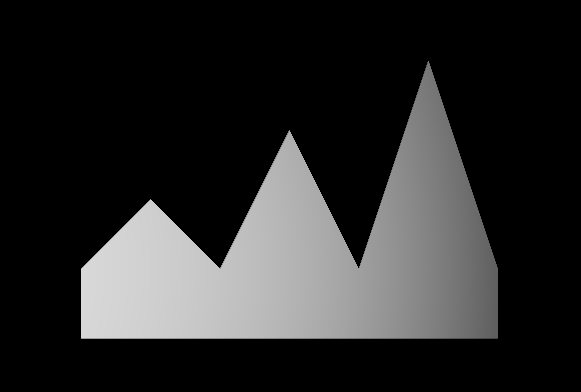
Image 5e: The result of rendering the simple sparse accessor asset.
The example contains two accessors: one for the indices of the mesh, and one for the vertex positions. The one that refers to the vertex positions defines an additional `accessor.sparse` property, which contains the information about the sparse data substitution that should be applied:
```javascript
"accessors" : [
...
{
"bufferView" : 1,
"byteOffset" : 0,
"componentType" : 5126,
"count" : 14,
"type" : "VEC3",
"max" : [ 6.0, 4.0, 0.0 ],
"min" : [ 0.0, 0.0, 0.0 ],
"sparse" : {
"count" : 3,
"indices" : {
"bufferView" : 2,
"byteOffset" : 0,
"componentType" : 5123
},
"values" : {
"bufferView" : 3,
"byteOffset" : 0
}
}
} ],
```
This `sparse` object itself defines the `count` of elements that will be affected by the substitution. The `sparse.indices` property refers to a `bufferView` that contains the indices of the elements which will be replaced. The `sparse.values` refers to a `bufferView` that contains the actual data.
In the example, the original geometry data is stored in the `bufferView` with index 1. It describes a rectangular array of vertices. The `sparse.indices` refer to the `bufferView` with index 2, which contains the indices `[8, 10, 12]`. The `sparse.values` refers to the `bufferView` with index 3, which contains new vertex positions, namely, `[(1,2,0), (3,3,0), (5,4,0)]`. The effect of applying the corresponding substitution is shown in Image 5f.
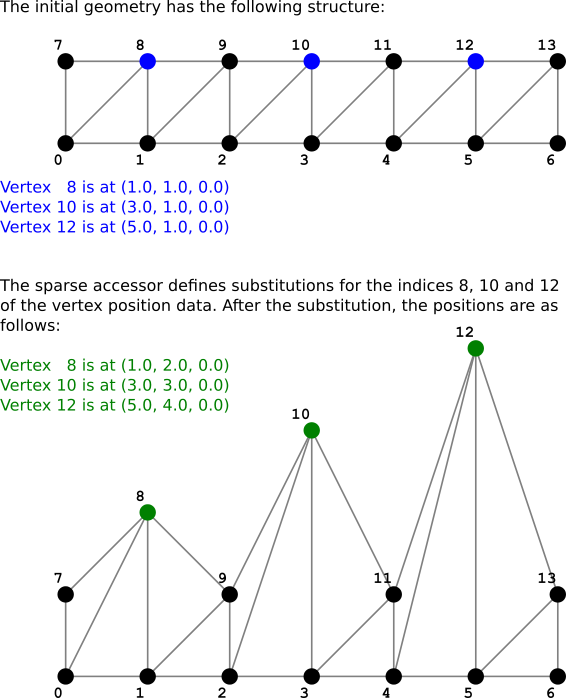
Image 5f: The substitution that is done with the sparse accessor.
Previous: [Scenes and Nodes](gltfTutorial_004_ScenesNodes.md) | [Table of Contents](README.md) | Next: [Simple Animation](gltfTutorial_006_SimpleAnimation.md)