Instead of controlling projects,
care for them and let them grow with us.
[](README.md) [](README.en.md) [](README.zh-CN.md) [](README.ja.md)
Version metadata details
- Base README: [README.md](README.md)
- README version: `1.1-doc.12`
- Package version: see [package.json](package.json)
- Adapter JSON contract: `0.1`
- Base language: `ko`
- Translation source of truth: `README.md` (`ko`)
If this translation falls behind, use the Korean README as the source of truth. README version, package version, and Adapter JSON contract version are separate version axes.
[](https://www.npmjs.com/package/orange-hyper) [](https://github.com/KoreanCode/orange-hyper/actions/workflows/ci.yml) [](LICENSE) [](package.json)
## Problem · Reflection · Direction
| Problem | Reflection | Direction |
| --- | --- | --- |
| A strong harness can impose too much process on small tasks. | A harnessless flow is light, but memory, verification, and boundaries are weak. | Orange Hyper grows only the needed memory through proposal -> review -> accept. |
## Problem Definition
A strong SDD harness is useful for large work. But when it forces a branch, spec, review, verification, and PR loop for small tasks, fatigue builds quickly.
A harnessless flow is light. It also struggles to preserve memory, verification, repeated learning, and context boundaries over time.
Sequential SPEC files are weak for collaboration and nonlinear thinking. Decisions, constraints, checks, and risks connect to each other instead of stacking in a straight line.
Users want to talk lightly. The project still must not lose memory or verification.
## Reflection on Harnesses
A harness creates procedure, and procedure can create safety. But if every task gets the same procedure, the user ends up working to operate the harness.
Orange Hyper does not turn on a strong harness immediately. It also does not leave everything to model instructions as a harnessless flow would.
What is needed is the space between those two. Small requests should stay small. Larger work should leave behind intent, constraints, memory, and verification evidence.
## Chosen Direction
- Intent should be compiled.
- Work should be divided by level and layer.
- Verification should become stronger by work level.
- Memory should grow like a node graph, not a sequential SPEC chain.
- role, MCP, hook, and subagent are not enabled from the start.
- role, MCP, hook, and subagent grow only from repeated evidence.
- Start light and grow gradually.
- Do not accept durable/shared memory automatically.
- On an activated supported host, Orange may automatically manage local runtime state, Quest, Capsule, evidence, working memory, and pending proposal candidates within activation policy.
- Create a Memory Delta Proposal only from a completed Quest.
- Only user-accepted proposals become graph node candidates.
- Only memory with the current `project_id` is treated as current project memory.
- The CLI is a kernel interface for skills, agents, and adapters. It is not the final end-user UX.
## Core Flow
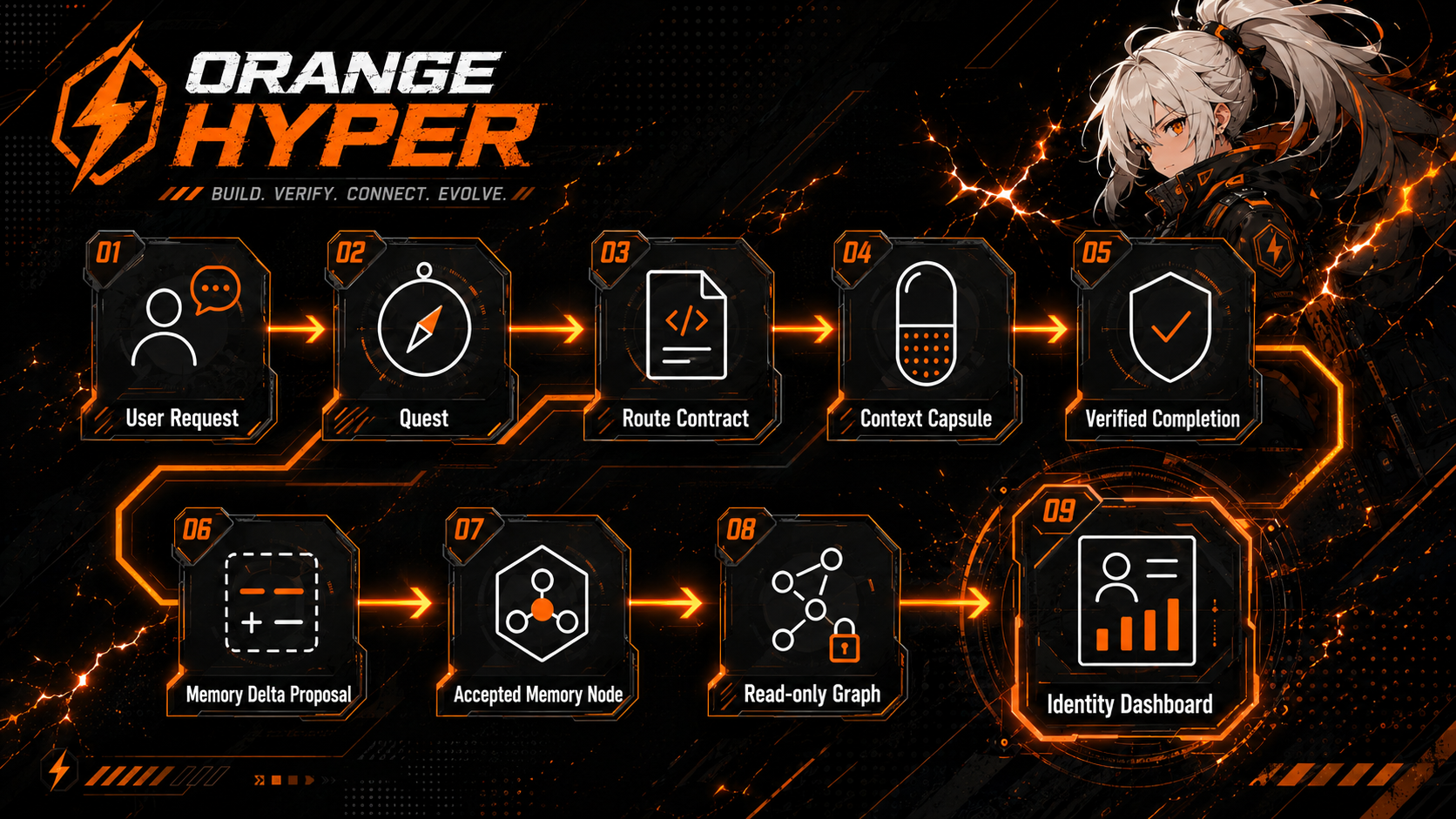
A user request becomes a Quest, then moves through the Route Contract and Capsule toward a verified completion. Only completed Quests can start a Memory Delta Proposal.
## What Orange Hyper Is
Orange Hyper is a repo-local project-memory kernel for coding agents.
A user request becomes a Quest and a Route Contract. The result and verification evidence are recorded on the completed Quest. When useful, a completed Quest can produce a Memory Delta Proposal, and only a user-approved proposal becomes a project memory candidate.
The goal is not a giant automation system. The user keeps asking lightly. The project remembers only what it should and strengthens verification only to the level the work needs.
## Installation
The default installation path is not a project-local npm dependency. Orange Hyper prefers a standalone binary so a non-Node project does not gain `package.json`, `package-lock.json`, or `node_modules` just to use Orange.
Installation priority:
1. Standalone binary: install the platform-specific `orange` executable from GitHub Releases into a user-local directory.
2. Future package managers: Homebrew, Scoop, and similar user-scope package managers are future channels.
3. `npx` exact-version fallback: use only for temporary checks, and specify `orange-hyper@1.1.0-beta.2` or `@beta`.
4. Project-local npm install: an advanced/manual option only when the user explicitly asks for it.
Release policy: one `v*` tag push runs the single Release workflow. That workflow performs the test gate, standalone binary matrix build, `install.sh`/`install.ps1`, `checksums.txt`, `release-manifest.json`, GitHub Release asset upload, npm publish, asset gate, and installer smoke together. Existing GitHub Release backfills use the same pipeline through the `workflow_dispatch` `tag` input, so routine releases do not require manual `gh release upload`.
macOS/Linux user-local install:
```bash
curl -fsSL https://github.com/KoreanCode/orange-hyper/releases/download/v1.1.0-beta.2/install.sh | sh
"$HOME/.local/bin/orange" --version
```
Windows PowerShell user-local install:
```powershell
$Installer = Join-Path $env:TEMP "orange-install.ps1"
Invoke-WebRequest "https://github.com/KoreanCode/orange-hyper/releases/download/v1.1.0-beta.2/install.ps1" -OutFile $Installer
powershell -NoProfile -ExecutionPolicy Bypass -File $Installer -Version "1.1.0-beta.2" -AddToPath
& (Join-Path $env:LOCALAPPDATA "OrangeHyper\bin\orange.exe") --version
```
After using `-AddToPath` on Windows, a new PowerShell window can run `orange --version` from PATH. The installer verifies SHA-256 checksums and stops on mismatch. It does not use npm, create package files, create `node_modules`, or modify the current project.
Closed technical beta participants should use [Closed Beta Program](docs/28_CLOSED_BETA_PROGRAM.md) for onboarding and safe diagnostics, then record actual test results with [Beta Test Checklist](docs/29_BETA_TEST_CHECKLIST.md).
For fallback package visibility checks, pin the exact version:
```bash
npx -y --package orange-hyper@1.1.0-beta.2 orange --help
```
This is not the default installation path. AI should not automatically run `npm init -y` or `npm install -D orange-hyper`. The npm package remains available as a developer/fallback channel.
## Closed Beta Channel
The recommended test channel is now `v1.1.0-beta.2`. This build is an official Closed Beta prerelease and is not the npm `latest` stable channel.
The primary validated environment is macOS arm64, Codex CLI, the standalone binary, user-scoped Codex Host Binding, project-scoped Activation, and interactive Codex `/hooks` review. macOS x64, Linux x64, Windows x64, and other Codex minor versions remain exploratory until real user validation accumulates.
In this Beta, users keep asking their AI for work normally instead of operating Orange directly. The AI installs the Codex Host Binding once in the user's environment and activates only the repositories that should use Orange. After the Codex `/plugins` install/enable step and the Codex `/hooks` review step, the lifecycle connects automatically. L0/L1 work stays quiet. L2+ work manages Quest, Capsule, and verification evidence within policy. If verification evidence is not observed, Stop asks for one continuation. Working memory and pending Memory Proposals may be created, but durable memory accept is never automated.
Beta quick start:
1. Install standalone `v1.1.0-beta.2` into a user-local location.
2. Install the Codex Host Binding.
3. Install and enable the Orange plugin in Codex `/plugins`.
4. Review the current definitions in Codex `/hooks`.
5. Activate Orange in the repository that should use it.
6. Confirm `active` with `orange activate status --host codex --json`.
7. Then keep working with your AI normally.
Longer commands and state interpretation live in [Closed Beta Program](docs/28_CLOSED_BETA_PROGRAM.md), [Activation Runtime](docs/26_ACTIVATION_RUNTIME.md), and [Codex Binding E2E Checklist](docs/27_CODEX_BINDING_E2E.md).
Safety boundaries that are not automated:
- Memory Proposal accept
- MCP installation or execution
- project-specific Skill/Agent creation
- subagent execution
- branch/PR/SPEC workflow
- telemetry or network upload
- raw prompt and transcript storage
Beta participants should use [Closed Beta Program](docs/28_CLOSED_BETA_PROGRAM.md), [Beta Test Checklist](docs/29_BETA_TEST_CHECKLIST.md), [Beta Bug](.github/ISSUE_TEMPLATE/beta-bug.yml), [Beta Feedback](.github/ISSUE_TEMPLATE/beta-feedback.yml), and [Codex Binding E2E Checklist](docs/27_CODEX_BINDING_E2E.md).
If you used alpha.8, install beta.1 and review the Codex `/hooks` definitions again when the plugin version and binding fingerprint change. Existing accepted project memory is not deleted or reset automatically. alpha.8 is not republished; beta.1 is the new Closed Beta distribution channel.
## First Prompt To Give Your AI
Paste this into your AI when you want to use Orange Hyper in a new or existing repo.
```text
Use Orange Hyper for this project.
Install the Orange Codex Host Binding once.
Activate Orange in the repositories where you want it.
Then work normally.
First, check whether `orange --version` and `orange env --json` work from PATH.
If `orange` is missing, suggest standalone binary installation and install it into a user-local location only after I approve.
Do not run `npm init -y`. Do not use `npm install -D orange-hyper` as the default install path. Do not create or modify project `package.json`, `package-lock.json`, or `node_modules`.
Use npm fallback only if I explicitly ask for it, and then specify `orange-hyper@beta` or `orange-hyper@1.1.0-beta.2`.
If the Orange Codex Host Binding is not installed in this Codex environment, run `orange binding plan --host codex --scope user --json` and show me the read-only binding plan.
If I approve, run `orange binding install --host codex --scope user --json`. This can prepare the user-scoped marketplace and plugin source only; do not describe marketplace registration as plugin installation, enablement, hook review, or operational status.
Then run `orange activate plan --host codex --scope project --json` and show me the read-only project activation plan.
If I approve, run `orange activate apply --host codex --scope project --json` to activate this project. Do not report active until an actual lifecycle heartbeat exists.
Then run `orange sync plan --json` and show me the diff. If I approve, run `orange sync apply --json` and `orange sync status --json` to refresh generated Structure Graph and Identity HTML.
I will not manage CLI commands directly. When needed, call orange ... --json kernel commands yourself.
Do not turn small questions or simple explanations into Quests. When real work begins, record the intent and verification evidence.
If a decision, constraint, risk, or verification result is worth remembering, propose it as a Memory Proposal. Do not accept a proposal before I approve it.
Do not auto-install MCPs. Only suggest them when useful. Use Hook, Growth, and Eval only as warnings and summaries, not as automatic fixes.
Do not edit .orange-hyper files directly. Use Orange Kernel commands.
When useful, refresh Identity HTML so I can view the Knowledge Graph.
```
## Real Flow With Your AI
Start with conversation before reaching for CLI commands.
**Example 1**
User: Manage this work with Orange Hyper as you proceed.
AI: This is worth recording as a Quest. I will record the intent and verification criteria in Orange Hyper, then proceed.
**Example 2**
User: I think this decision should be remembered later.
AI: I will propose it as a Memory Proposal. If you approve it, it can become accepted memory.
**Example 3**
User: Show me how this project is growing right now.
AI: I will refresh Identity HTML and check the Knowledge Graph plus Growth/Eval summaries.
**Example 4**
User: I probably need the latest docs for this library.
AI: I will use MCP Advisor to suggest an appropriate tool. I will not install it automatically.
## What Orange Hyper Quietly Leaves Behind
Orange Hyper is easier to understand by its artifacts than by a feature list.
- Quest: work intent and scope.
- Evidence: proof that work was actually verified.
- Memory Proposal: a candidate decision, constraint, risk, or verification result worth remembering.
- Accepted Memory: project memory approved by the user.
- Knowledge Graph: accepted memory read as decision, constraint, risk, verification, and component nodes.
- Identity HTML: a single HTML view of project memory, accepted memory graph, growth signals, and eval summary.
- Hook Warning: a warning without automatic repair.
- Activation Runtime: a user-approved supported-host lifecycle binding. Installation alone is not active; a heartbeat is required.
- MCP Suggestion: a tool suggestion without installation.
- Growth Signal: a growth candidate without automatic unlock.
- Eval Report: a local-only evaluation report.
## Identity HTML / Knowledge Graph
Orange Hyper's Knowledge Graph is not a code dependency graph. It is an accepted project memory graph.
It shows user-approved decision, constraint, risk, verification, and component memory. Pending and rejected proposals are not included.
If you tell the AI "refresh Identity HTML", the AI can use the Orange Kernel to update this file:
```text
.orange-hyper/identity/orange-hyper.html
```
Identity HTML is the primary product surface for Orange Hyper Identity. The v1.1 target is a first screen that is a full-screen Knowledge Graph Dashboard, not a document-style report.
Identity HTML currently provides a read-only full-screen Knowledge Graph Dashboard. The first screen is a Canvas graph stage that combines generated Structure Graph nodes with accepted memory, with a floating action dock, search popover, selected-node badge, minimap, and click-to-inspect node drawer. In addition to the default Combined view, Structure and Memory views are available. Layout coordinates are computed at build time, so the same revision keeps the same initial positions, and search/view filters plus fit/reset/pan/zoom do not mutate source state. It is not a graph editor, and Obsidian/JSON Canvas export is a future interoperability layer, not the default product experience.
## Detailed Docs Links
- [Project Definition](docs/00_PROJECT_DEFINITION.md)
- [Architecture](docs/01_ARCHITECTURE.md)
- [Memory Graph Spec](docs/02_MEMORY_GRAPH_SPEC.md)
- [Route Level System](docs/04_ROUTE_LEVEL_SYSTEM.md)
- [Development Roadmap](docs/10_DEVELOPMENT_ROADMAP.md)
- [Identity Dashboard Spec](docs/14_IDENTITY_DASHBOARD_SPEC.md)
- [Minimal Hook Preview](docs/17_MINIMAL_HOOK_PREVIEW.md)
- [MCP Advisor](docs/18_MCP_ADVISOR.md)
- [Growth Signal Preview](docs/19_GROWTH_SYSTEM.md)
- [Eval and Reports](docs/21_EVAL_AND_REPORTS.md)
- [v1 Stabilization Readiness](docs/22_V1_STABILIZATION.md)
- [Project Sync](docs/24_PROJECT_SYNC.md)
- [Standalone Distribution](docs/25_STANDALONE_DISTRIBUTION.md)
- [Activation Runtime](docs/26_ACTIVATION_RUNTIME.md)
- [Codex Binding E2E Checklist](docs/27_CODEX_BINDING_E2E.md)
- [Closed Beta Program](docs/28_CLOSED_BETA_PROGRAM.md)
- [Beta Test Checklist](docs/29_BETA_TEST_CHECKLIST.md)
- [Release Notes](RELEASE_NOTES.md)
## Manual fallback / Kernel command reference
Most users do not run CLI commands directly. Use [Manual fallback](docs/23_MANUAL_FALLBACK.md) only when the AI has no tool access or a manual check is needed.
- For AI / Adapter authors: [Adapter Layer](docs/20_ADAPTER_LAYER.md)
- Kernel command reference: [Adapter JSON Contract](docs/16_ADAPTER_CONTRACT.md)
- Manual fallback: [Manual Fallback](docs/23_MANUAL_FALLBACK.md)
The list below is not a long usage guide. It is the top-level kernel surface for AI and adapter reference.
- `init`
- `activate`
- `lifecycle`
- `host`
- `quest`
- `route`
- `capsule`
- `remember`
- `graph`
- `hook`
- `mcp`
- `growth`
- `adapter`
- `binding`
- `eval`
- `sync`
- `env`
- `doctor`
- `identity`