
> **[Support Theft4 via PayPal](https://www.paypal.com/donate/?hosted_button_id=XSBF9HXAS89EL)** — donations help fund continued development and testing.
> **Thank you to everyone behind the unprecedented work on
> [LibertyRecomp](https://github.com/OZORDI/LibertyRecomp) and the
> [ReXGlue SDK](https://github.com/rexglue/rexglue-sdk).** Without their
> foundation, Theft4 would have taken much, much longer to reach this point.
> Please support their projects and the upstream developers who made this work possible.

**SUBMIT your custom device log here: [Theft4 Tester Log & Bug Submission](https://docs.google.com/forms/d/e/1FAIpQLScZNq2hjni8wgChCYl1oaRdJU0XPsVLFWwmVtqYxnIQ708t7A/viewform?usp=publish-editor)**
Help improve Theft4 on your device: capture a slow or problematic scene with the
built-in **Long Performance Capture**, export the saved log, and upload it with
your survey answers and screenshots. Smooth runs are useful comparisons too.
**[Follow the capture, export, and submission instructions below.](#capture-and-submit-a-performance-log)**
# Theft4
Theft4 is an experimental, title-specific static ahead-of-time recompilation of
the Xbox 360 release of Grand Theft Auto IV for ARM64 iOS and iPadOS. The
original PowerPC game instructions are translated to C++ ahead of time and
compiled into the signed application. Theft4 does not generate or download CPU
code at runtime and does not require a JIT entitlement.
This is an ahead-of-time game recompilation with a compatibility runtime, not a
PC source port or a complete Xbox 360 emulator. **Theft4 0.3** prepares the running
game's frames directly for Metal, including native passes, game-shader bindings,
lighting, reflections, effects and presentation. The game continues to use
LibertyRecomp/ReXGlue's generated-code and runtime foundation. The official app
identity remains `com.lukebrosious.theft4`.
> [!NOTE]
> **0.3.1 is available:** [download the unsigned iOS IPA](https://github.com/KoreanSeats1/Theft4/releases/tag/v0.3.1).
> Update in place using your sideloading tool. TestFlight publication is separate.
> M5 testing reports excellent visuals and a major native-resolution performance
> improvement, with a remaining spike that recovers. The tested native run used
> 2416 × 1359 without upscaling. Locked 30 FPS across every scene/device is not
> established.
## Get Theft4 running on your iPhone or iPad
Start with the [installation guide](docs/IOS_SIDELOAD_INSTALL.md). Want Codex or
Claude to help with setup? **[Copy the complete setup prompt](docs/IOS_SIDELOAD_INSTALL.md#copy-and-paste-setup-prompt-for-codex-or-claude)**
into a session that can access your computer's files and tools. It walks the
assistant through the official release, signing, exact game/TU8 validation,
file transfer, one-time texture preparation where required, and a gameplay check.
A chat-only assistant can guide the manual steps; Apple sign-in and device
actions may still require you. You supply your own supported game files.
## What changed in 0.3.1
The performance follow-up reduces cold geometry conversion, upload and driver
allocation overhead, repeated draw preparation, frame bookkeeping and CPU wait
busy polling. Bounded caches retain useful warm entries instead of clearing
whole working sets. These changes retain the direct Metal renderer and original
icon; they do not establish locked 30 FPS on every device.
The optional **Mods** tab adds Native Aspect Ratio, SBerrix's Custom Time Cycle,
God Mode and Unlimited Ammo. Native Aspect Ratio expands the scene to the
launch window with matching camera/lighting reconstruction and proportional
interface corrections. More visible scenery can cost additional frame time.
The one-time ASTC preparation flow remains capability-gated for GPUs without
BC texture support, and existing prepared caches are retained on app updates.
Read the [0.3.1 release notes](docs/RELEASE_0.3.1.md) and the
[detailed implementation and validation record](docs/IOS_MODS.md).
## What changed in 0.3
The live direct Metal renderer replaces the previous Vulkan → MoltenVK route for
normal Metal gameplay. Substantial follow-up work rebuilt frame ownership,
geometry conversion, constant preparation, uploads, caches and native draw
encoding. This is the full game renderer, not just the separate Metal Lab.
| Area | Change |
| --- | --- |
| Native graphics | Ordered Metal passes, game shaders, depth/lighting aliases, reflections, host effects and direct drawable presentation. |
| Frame time | Streamed draw encoding, redundant-binding avoidance, shared constants, incremental registry maintenance and completion-owned storage reuse. |
| Geometry | Exact reusable conversion recipes, shared vertex/index allocations, large upload-view reuse and bounded index-range eviction without clearing every mesh. |
| Visual controls | Adjustable sharpening, corrected AA-Off startup, existing resolution/FSR choices, resident LOD and explicit draw-distance profiles. Native Pixels uses a centered 16:9 physical-pixel target. |
| Everyday use | Default-on intro skipping, development telemetry disabled for normal play, optional graphs and bounded captures, preserved saves/settings and Game Mode metadata. |
| Older GPUs | Capability-gated one-time BC-to-ASTC preparation with progress, estimate, resume, cache reuse and confirmed deletion. BC-capable GPUs skip this sweep. |
| Future ports | A source-backed record of the rewritten boundaries, prior costs, fidelity contracts, measurements and title-specific assumptions. |
Read the [complete 0.3 release notes](docs/RELEASE_0.3.md),
[architecture and recompilation lessons](docs/THEFT4_0.3_ARCHITECTURE.md), and
[main integration status](docs/THEFT4_0.3_MAIN_INTEGRATION.md).
The [0.2.1 notes](docs/RELEASE_0.2.1.md) remain the historical public-release record.
Legacy Vulkan code/build dependencies and game compatibility services are retained;
direct Metal does not mean every subsystem has been rewritten from source.
### Capture and submit a performance log
0.3 uses optimized normal play automatically, with no Retail Mode toggle.
Development logging and probes stay disabled. Optional graphs and Long
Performance Capture are separate choices; recording does not require a crash.
#### 1. Enable capture before Play, then reproduce the issue
1. Open **System → Long Performance Capture** in the launcher and enable it.
This choice resets Off every time the app opens. It records bounded timings
for up to five minutes, even when every overlay is hidden.
2. Optionally open **Interface** and enable **Frame-Time Graph** and **Frame
Counter**. The graph can show recording status and offers capture actions.
3. Note your graphics settings, press **Play**, then drive the route or reach the
scene you want to test. Record the issue while it happens: a first visit, a
heavy camera turn, a hitch or a focus transition. Smooth runs are useful too.
4. With the graph enabled, **hold the frame-time graph** to mark a lag spike or
choose **Stop and save capture**. The recording indicator ends when stopped.
The capture also stops and saves when the app enters the background, or after
five minutes. Save your game separately; capture does not save game progress.
The report includes publication intervals, renderer stage timing and bounded
runtime/scheduling observations, along with available configuration and memory
information. Detailed development counters may be absent or zero because the
ordinary optimized policy remains active. Publication timestamps measure frames
handed to the presenter; they are not physical display scanout timestamps.
Capture adds measurement overhead. Describe gameplay before recording as well as
during it, and use the same route/settings without recording when comparing
normal performance. Note app switching, charging, Low Power Mode and how long
the device had been running. Avoid changing graphics settings midway through a
comparison.
#### 2. Export the saved report to Files
1. Stop and save using the graph, or background the app to save, before closing.
Reopen Theft4 to its launcher if necessary.
2. Open **System → Download Latest Log Capture**. This exports existing data; it
does not start another recording.
3. The dated **`Theft4-Performance-Capture-.txt`** is saved under
**Files → On My iPhone/iPad → Theft4 → Diagnostics**. The share sheet also
lets you save elsewhere, including iCloud Drive.
4. Upload the complete `.txt`; individual CSV/JSON sections do not need to be
extracted. Export before starting another test so the latest context matches
the run. If export reports a failure, retain the app data and report the error.
One long capture is available per app launch. Export the first, reopen, and
explicitly enable capture again for another run. Older releases and engineering
launches also have a short detailed profiler; its double-tap workflow is not the
normal 0.3 capture procedure.
#### 3. Fill out the survey and attach the file
1. Open the **[Theft4 Tester Log & Bug Submission survey](https://docs.google.com/forms/d/e/1FAIpQLScZNq2hjni8wgChCYl1oaRdJU0XPsVLFWwmVtqYxnIQ708t7A/viewform?usp=publish-editor)**.
Sign in to Google if prompted. The form states that your Google account's
name, email, and photo are recorded when you upload files and submit.
2. In **App log → Add file**, select the exported
`Theft4-Performance-Capture-….txt` from Files. Wait for the upload to finish.
The current exporter is bounded to about 50 MB and the form allows up to
100 MB, so a normal export does not need splitting.
3. Add your username if desired, choose **iPhone** or **iPad**, and press **Next**
to complete the remaining survey pages. Include the following details in the
relevant questions or description:
- Exact device model/chip, iOS/iPadOS version, and Theft4 version/build. Say
whether it is a TestFlight, sideloaded, or locally installed test build.
- Scene resolution, FSR and other graphics settings; attach screenshots of
the **Graphics** page so we can reproduce your configuration.
- Where you were, what you were doing, the camera direction, and steps to
reproduce it. Distinguish moving/driving from standing still.
- FPS/frame-time behavior before and during capture; whether the issue is
repeatable, improves after waiting, or happens only on a first visit.
- Time spent playing, whether the device felt hot, charging/battery status,
and whether Low Power Mode was enabled. Note the approximate point in the
capture when a noticeable hitch or visual problem occurred.
4. Attach supporting screenshots wherever the survey requests them: the scene
**with the graph and FPS visible**, your graphics settings, and any visual
defect or error message. Screenshots supplement the `.txt`; they do not
replace it. If a screenshot or screen recording was taken during the
measured interval, mention that because it can affect performance.
5. Review the answers and attachments, then press **Submit** and wait for the
confirmation. Keep a copy of the log until the report has been investigated.
Do not upload your ISO, extracted game folder, title-update package, or save
files. Review logs/screenshots for personal information before sharing; runtime
logs can contain device details and file paths. If upload fails, keep the
original `.txt` and report the exact error instead of substituting a screenshot
of the log.
Screenshot guide: enable the graph; historical capture indicator
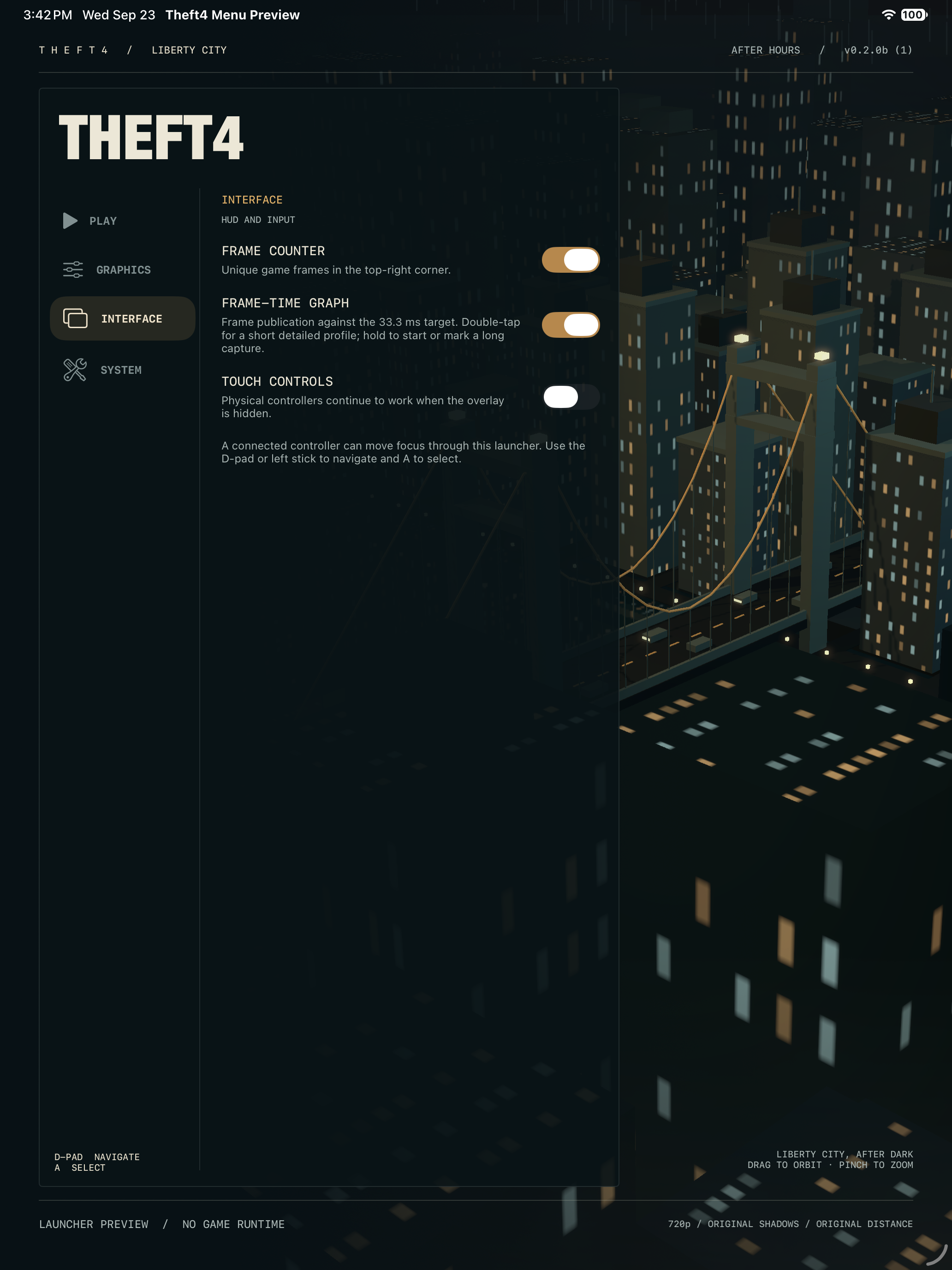
*Enable Frame-Time Graph under Interface before pressing Play. This is the real
launcher UI in an isolated simulator preview; no game data is loaded.*
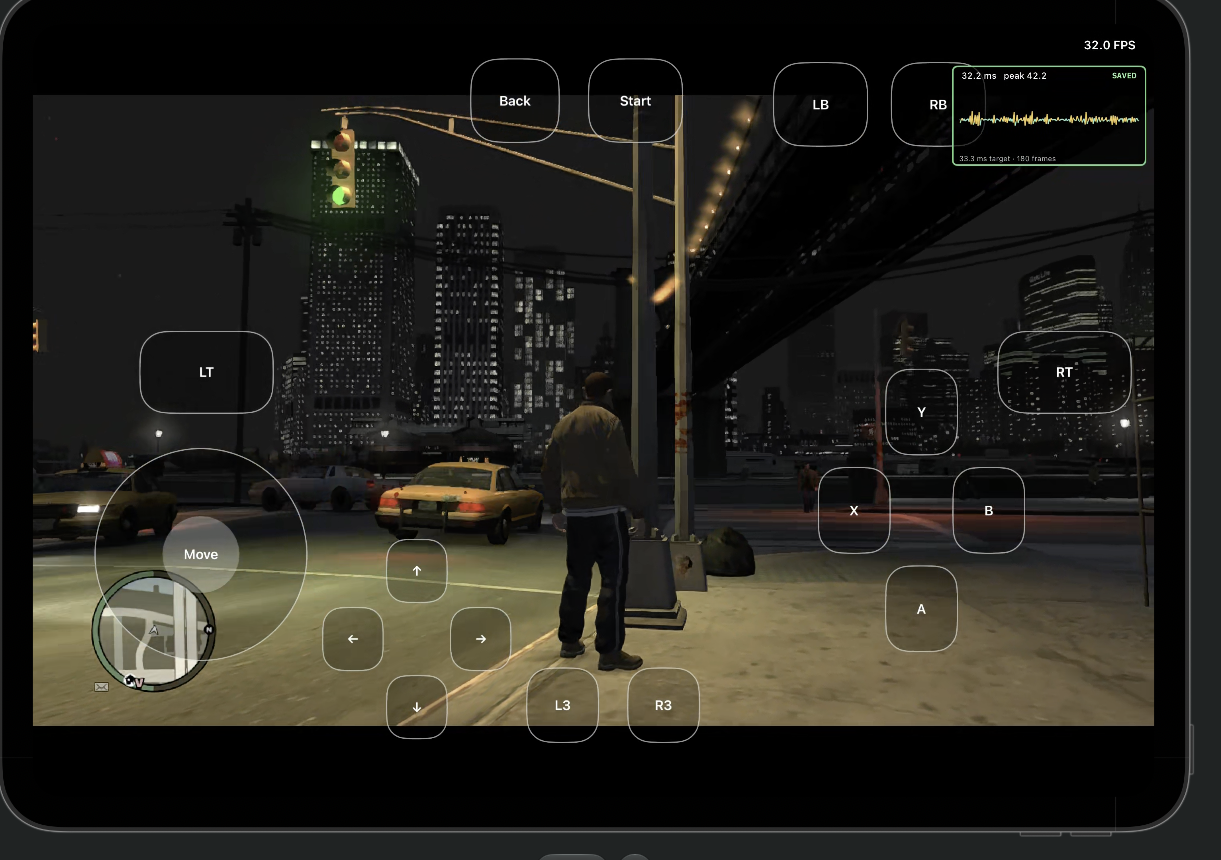
*Historical screenshot from the earlier short-profiler workflow. In normal 0.3,
enable Long Performance Capture before Play and hold the graph to mark or stop
the run. The image illustrates graph placement; it is not a performance guarantee.*
### Move or back up saves with Files
This feature is included in 0.2.1 build 53.
Quit the game and reopen Theft4, then open **System → Export Saves to Files**.
Theft4 copies the saved-game packages and GTA IV profile data into a dated
`Theft4-Saves-…` folder under **Files → On My iPhone/iPad → Theft4 → Save Exports**.
Copy the **entire folder** to iCloud Drive, another device, or another backup
location. To restore, open **System → Import Saves from Files** and select that
`Theft4-Saves-…` folder. Theft4 validates it, asks before replacing data, and
backs up the current saves to **Save Exports** first. Restart the game after
import. Game installation files are not included in save exports.
The historical `com.theft4.m5lab` app has a separate private container; this
feature does not automatically extract its saves. Keep that app until its data
has been transferred or backed up.
## Current status
**0.3.0 build 123 uses the live direct Metal game renderer by default.** The
signed Release app has been installed and normally launched on the M5 iPad.
Recent gameplay testing reports excellent visual clarity and a major
native-resolution performance improvement; the retrieved native run used
2416 × 1359 without upscaling. A remaining spike can occur and recover. Locked
30 FPS across all scenes and devices has not been established.
The implementation includes:
- signed ahead-of-time ARM64 game code, Xbox guest memory and compatibility
services, matching XEX/TU8 loading, and native input/audio host integration;
- a complete live Metal route with game shaders, ordered render passes, depth
and lighting contracts, reflections, effects and CAMetalLayer presentation;
- shared geometry and shader constants, bounded CPU/GPU caches and storage
recycling protected by GPU completion;
- capability-gated static BC-to-ASTC preparation for GPUs without BC support,
including progress, ETA, pause/resume and persistent cache reuse;
- optimized normal launches with independent optional graphs and bounded
performance capture.
Build 123 passed 34 launcher/build tests, 27 CPU contracts, and 45 GPU graphics
cases plus 32 saved draw replays in each of optimized and diagnostic configurations.
Worker and delayed-GPU lifetime checks also passed. Tests prove their specific
contracts; device coverage, long sessions, thermals and focus recovery still
require broader validation. Older-device texture compatibility is not a promise
of M5-equivalent performance.
The source update and full engineering record are published on main. The
[0.3 GitHub release](https://github.com/KoreanSeats1/Theft4/releases/tag/v0.3)
includes the unsigned ARM64 IPA and its SHA-256 checksum. TestFlight distribution
remains separate.
See the [0.3 release notes](docs/RELEASE_0.3.md) and
[current architecture record](docs/THEFT4_0.3_ARCHITECTURE.md).
## Engineering record
### Before starting the game
The **After Hours** launcher places a procedural 3D city and suspension bridge
behind Play / Graphics / Interface / System navigation. Drag the city to change the view.
Its scene and effects are released before the game runtime starts.
**Graphics** offers independent scene resolution and FSR choices, texture
filtering, shadows, draw distance, model detail, reflection quality, edge
smoothing, depth of field, motion blur and adjustable sharpening. **Frame Speed**
preserves the selected resolution, uses original shadows, earlier resident LOD
and shorter world distance, and disables optional blur and edge filtering. Changes
apply at the next game launch. **Interface** provides the FPS counter,
frame-time graph and touch controls. Existing preferences remain in the app
data after an in-place update.
Motion blur applies at the next game launch. Turning it off selects the stock
non-blur composite variant; it does not disable depth of field or the entire
post-processing pass. See the
[earlier motion-blur and fast-driving test plan](docs/THEFT4_MOTION_BLUR_AND_STREAMING.md)
for the experiment history.
Enable touch controls for
a movement stick, swipe-to-look on empty screen space, Xbox buttons/triggers,
D-pad, and L3/R3. Physical controllers remain supported with either setting.
The compact touch layout is adapted from XeniOS; its attribution and license
are bundled with Theft4. The full XeniOS layout editor is not included.
Touch gameplay and save/reload are still undergoing device verification.
GPU freezes during extended play and app switching are known issues; the
input/display switches do not change renderer stability settings.
The promoted renderer uses bounded completion-owned frames and GPU-retired
upload storage. Scene resolution and output mode are selected in Graphics before launch; 720p remains
available. Long-session stability and background/foreground recovery still
need device testing.
The project keeps a detailed public record of implementation work, experiments,
measured outcomes, rejected approaches, and remaining verification:
- [Engineering changelog](CHANGELOG.md) — the running, file-mapped technical record;
- [3D performance execution plan](THEFT4_3D_PERFORMANCE_PLAN.md) — ordered work and
the latest renderer checkpoint;
- [CPU-first native-renderer audit](docs/THEFT4_CPU_PERFORMANCE_AUDIT.md) — the
historical 1080p city CPU profile, logging/validation costs, safe optimization
experiments and paced-30 acceptance criteria;
- [Current paced-30 implementation plan](docs/THEFT4_30FPS_IMPLEMENTATION_PLAN.md)
— historical planning baseline for CPU passes, tests and keep/revert gates;
see the 0.3 architecture record for what was implemented;
- [September 16 GPU diagnosis](THEFT4_GPU_DIAGNOSTIC_2026-09-16.md) — trace-backed
generic-renderer analysis and experiment design;
- [iOS architecture report](LIBERTYRECOMP_IOS_ARCHITECTURE.md) and
[implementation plan](LIBERTYRECOMP_IOS_PLAN.md) — the original port audit and
milestone architecture.
The changelog distinguishes validated defaults from opt-in experiments and
records failed approaches so they are not rediscovered. Private game data,
captures, logs, device identifiers, and signing material are deliberately excluded.
## Architecture
```text
Theft4 UIKit application and iOS lifecycle
|
Versioned bridge + LibertyRecomp / ReXGlue compatibility runtime
|
+--> signed AOT game code (PowerPC -> C++ -> ARM64)
+--> Xbox memory, kernel, threading, filesystem, input and audio services
|
+--> GTA IV ordered rendering commands
|
Immutable CPU frame preparation
geometry / constants / texture views / pipeline recipes
|
Native Metal worker and encoders
|
Metal GPU resources and CAMetalLayer presentation
|
Completion receipts -> retirement and upload recycling
Offline stock shader export -> reflected Metal libraries -> native Metal pipelines
```
The iOS application owns `UIApplication`/`UIScene`, the visible view and
`CAMetalLayer`, device storage, user interaction, and lifecycle. The runtime is
embedded in-process as statically linked code behind a small C interface.
## No game files are included
This repository contains no ISO, title update, extracted game assets, saves, or
Rockstar Games source code. You must supply files from your own legally obtained
Xbox 360 copy. Do not open issues requesting copyrighted game files, download
links, signature-check bypasses, or prebuilt bundles containing game data.
The currently validated input is the supported USA retail Xbox 360 base and its
matching title update. Input validation is intentionally strict; files accepted
by an emulator are not automatically compatible with this title-specific AOT
build.
## Building
**For normal play, follow [Build and run the Release app](docs/IOS_RELEASE_BUILD.md).**
The generator defaults to optimized **Release**, not the old Debug/core-probe
configuration. This is the same app/runtime source used for the latest on-device
tests, not a second emulator. A fresh-clone end-to-end build is not yet certified;
the external MoltenVK prerequisite is documented explicitly.
Initialize the pinned public dependencies and apply the reviewed dependency
patches:
```sh
git clone --recurse-submodules https://github.com/KoreanSeats1/Theft4.git
cd Theft4
python3 tools/setup_repo.py
python3 tools/setup_repo.py --check
```
On macOS, `Generate-Theft4-Xcode.command` validates the dependencies and
generates the Release Xcode project. Pass your Apple development-team ID as
its optional first argument to configure device signing:
```sh
./Generate-Theft4-Xcode.command YOUR_TEAM_ID
```
The direct Metal build requires the documented offline game/host Metal libraries.
Legacy MoltenVK archives remain link prerequisites; their presence does not mean
normal gameplay submits through Vulkan. The generator rejects missing shader
inputs rather than silently selecting another renderer.
Then follow:
- [iOS core build](docs/IOS_CORE_BUILD.md)
- [iOS application and device build](docs/IOS_APP_BUILD.md)
- [real AOT startup status](docs/IOS_GAME_STARTUP.md)
- [iOS Mods: time-cycle replacement and Native Aspect Ratio](docs/IOS_MODS.md)
- [desktop/upstream build guide](docs/BUILDING.md)
- [lawful dumping guide](docs/DUMPING-en.md)
The default Xcode project is generated under `out/build/ios-device-release/`.
Select **Theft4**, your physical device, and **Release**. For normal play,
uncheck **Edit Scheme → Run → Info → Debug executable**, or launch the installed
app directly on the iPad. Leave capture/validation and opt-in diagnostic flags off.
The new guide covers signing, game-file transfer, starting the game, and the
explicit Debug opt-in. CMake files, not generated project build settings, remain
the source of truth.
The GTA-IV-specific direct Metal renderer is the default for 0.3. An explicit
`THEFT4_RENDERER=vulkan` build selects the retained comparison path. The
[build guide](docs/IOS_RELEASE_BUILD.md) documents both routes, offline shader
preparation, signing and remaining dependency prerequisites; the
[architecture record](docs/THEFT4_0.3_ARCHITECTURE.md) explains the implemented
boundaries and validation evidence.
GitHub's automatic source ZIP does not contain the contents of Git submodules.
For a complete checkout, use the recursive clone command above. The release IPA
is deliberately unsigned and must be signed by the user's sideloading tool;
TestFlight distributes a separately Apple-signed build. The application never
contains game files.
## Origins and credits
Theft4 is built on substantial existing open-source work. It began as an iOS
porting branch of [LibertyRecomp](https://github.com/OZORDI/LibertyRecomp) and
preserves that project's Git history and GPL license. The runtime and translation
stack draws heavily from ReXGlue and Xenia; its ahead-of-time approach was
inspired by XenonRecomp. The direct Metal renderer uses offline stock shader export,
SPIR-V tooling and SPIRV-Cross to produce reflected Metal libraries. The earlier
Vulkan/MoltenVK implementation remains available for comparison. FFmpeg, SDL
and numerous smaller libraries are included or referenced through pinned
dependencies.
See [Third-party projects and attribution](docs/ATTRIBUTION.md) and the license
files in each dependency for details. XeniOS was used as an iOS behavior and
debugging reference during bring-up; XeniOS is not embedded as Theft4's runtime.
## License and trademarks
The project-level license is [GPL-3.0](COPYING), inherited from LibertyRecomp.
Vendored and submodule dependencies retain their respective licenses.
Theft4 is an unofficial community research project. It is not affiliated with or
endorsed by Rockstar Games, Take-Two Interactive, Microsoft, Xbox, Apple, or the
maintainers of the upstream projects. Grand Theft Auto, GTA, Xbox, iOS, iPadOS,
Metal, and other names are trademarks of their respective owners.