# Integrate new libraries
This document contains information about the different methods to integrate new libraries into your Kotlin Kernel for
Jupyter notebooks. It also describes the supported integration features a library can provide when integrated into your Kotlin Kernel.
Click here to expand the table of contents.
* [Integrate new libraries](#integrate-new-libraries)
* [Library integration methods](#library-integration-methods)
* [Supported integration features](#supported-integration-features)
* [List of supported integration features](#list-of-supported-integration-features)
* [Dependencies](#dependencies)
* [Descriptor API](#descriptor-api)
* [JupyterIntegration API](#jupyterintegration-api)
* [Repositories](#repositories)
* [Descriptor API](#descriptor-api-1)
* [JupyterIntegration API](#jupyterintegration-api-1)
* [Initial imports](#initial-imports)
* [Descriptor API](#descriptor-api-2)
* [JupyterIntegration API](#jupyterintegration-api-2)
* [Callbacks after library loading (called once)](#callbacks-after-library-loading-called-once)
* [Descriptor API](#descriptor-api-3)
* [JupyterIntegration API](#jupyterintegration-api-3)
* [Callbacks before each cell execution](#callbacks-before-each-cell-execution)
* [Descriptor API](#descriptor-api-4)
* [JupyterIntegration API](#jupyterintegration-api-4)
* [Callbacks after each cell execution](#callbacks-after-each-cell-execution)
* [JupyterIntegration API](#jupyterintegration-api-5)
* [Callbacks on cell execution interruption](#callbacks-on-cell-execution-interruption)
* [JupyterIntegration API](#jupyterintegration-api-6)
* [Callbacks right before kernel shutdown](#callbacks-right-before-kernel-shutdown)
* [Descriptor API](#descriptor-api-5)
* [JupyterIntegration API](#jupyterintegration-api-7)
* [Callbacks on color scheme change](#callbacks-on-color-scheme-change)
* [JupyterIntegration API](#jupyterintegration-api-8)
* [Results renderers](#results-renderers)
* [Descriptor API](#descriptor-api-6)
* [JupyterIntegration API](#jupyterintegration-api-9)
* [Results text renderers](#results-text-renderers)
* [JupyterIntegration API](#jupyterintegration-api-10)
* [Throwables renderers](#throwables-renderers)
* [JupyterIntegration API](#jupyterintegration-api-11)
* [Variables handling](#variables-handling)
* [JupyterIntegration API](#jupyterintegration-api-12)
* [Annotated classes handling](#annotated-classes-handling)
* [JupyterIntegration API](#jupyterintegration-api-13)
* [File annotations handling](#file-annotations-handling)
* [JupyterIntegration API](#jupyterintegration-api-14)
* [Code preprocessing](#code-preprocessing)
* [JupyterIntegration API](#jupyterintegration-api-15)
* [Library static resources loading](#library-static-resources-loading)
* [JupyterIntegration API](#jupyterintegration-api-16)
* [Variables reporting](#variables-reporting)
* [Internal variables markers](#internal-variables-markers)
* [Typename rules for transitively loaded integration classes](#typename-rules-for-transitively-loaded-integration-classes)
* [Descriptor API](#descriptor-api-7)
* [JupyterIntegration API](#jupyterintegration-api-17)
* [Minimal kernel version supported by the library](#minimal-kernel-version-supported-by-the-library)
* [Descriptor API](#descriptor-api-8)
* [JupyterIntegration API](#jupyterintegration-api-18)
* [Library options](#library-options)
* [Descriptor API](#descriptor-api-9)
* [JupyterIntegration API](#jupyterintegration-api-19)
* [Link to the library site](#link-to-the-library-site)
* [Descriptor API](#descriptor-api-10)
* [JupyterIntegration API](#jupyterintegration-api-20)
* [Library description](#library-description)
* [Descriptor API](#descriptor-api-11)
* [JupyterIntegration API](#jupyterintegration-api-21)
* [Creating a library descriptor](#creating-a-library-descriptor)
* [Integration using the Kotlin API](#integration-using-the-kotlin-api)
* [Adding library integration using Gradle](#adding-library-integration-using-gradle)
* [Integration testing for the integration logic](#integration-testing-for-the-integration-logic)
* [Integration using other build systems](#integration-using-other-build-systems)
## Library integration methods
There are two main methods for integrating a new library into your Kotlin Kernel for notebooks:
* **[Creating a JSON library descriptor](#creating-a-library-descriptor):** It's an easy-to-go solution that does not
require you changing the library. You create a JSON file defining the most
frequent library features, such as properties, renderers, and initial imports. The exact syntax depends on where the descriptor is located.
You can make the new library available via the [`%use` line magic](README.md#supported-libraries).
* **[Using the Kotlin API](#integration-using-the-kotlin-api):** This method requires modifying the library code to include integration logic. You can define an integration class
in your library code, or create a separate project for integration if it's a library you don't maintain.
The library is automatically integrated when ist JAR containing the `META-INF/kotlin-jupyter-libraries/libraries.json` file
(with the integration class name) is added to the notebook classpath. You can add the integration class name with
the `@file:DependsOn` annotation or with a descriptor (see above) that defines the corresponding dependency. Additionally, it is possible to write tests
for this kind of integration.
Once you have defined the integration class, you can use all available [integration features](#supported-integration-features).
Regardless of the integration method, library integrations can define dependencies
and callbacks to interact with the notebook environment. The dependencies can contain Kotlin-API-based integrations, and the callbacks
can contain the [`%use` line magic](README.md#line-magics), which means that library integrations can load other libraries, and so on. Don't
hesitate to rely on this feature.
## Supported integration features
Supported integration features are functionalities a library can provide when integrated into your Kotlin Kernel for notebooks.
To use the [supported integration features](#list-of-supported-integration-features), you can:
* **Use the descriptor API:** If the feature is supported in the descriptor API, you can create a JSON file containing this feature description.
This JSON file is loaded into the notebook via the `%use` line magic.
If the feature is supported in the descriptor API, you can load the corresponding JSON string directly using
the `loadLibraryDescriptor` method inside a notebook cell.
* **Use the JupyterIntegration API:** You can add the feature directly from a notebook cell using the `USE {}` method and adding the feature method. Here's
an example of the `import` method. For more feature methods, see the [list of supported integration features](#list-of-supported-integration-features).
```kotlin
USE {
import("my.awesome.Clazz")
}
```
* **Use the LibraryDefinition API:** You can add the feature directly from the notebook cell if you have a `LibraryDefinition` instance. This
instance can be created using the `libraryDefinition {}` method. Use the following syntax:
```kotlin
USE(libraryDefinition)
```
Inside a Kotlin JVM library, you can create a class implementing the `LibraryDefinition` or `LibraryDefinitionProducer` interfaces in one of the following ways:
* Create a direct implementor of `LibraryDefinition`. Override the properties defined in the "LibraryDefinition API" column from the following table.
* Extend the `LibraryDefinitionImpl` interface. Set its properties defined in the "LibraryDefinition API" column from the following table.
* Define a class that implements the `JupyterIntegration` interface. [Override the `Builder.onLoaded` method](#adding-library-integration-using-the-ksp-plugin) and use methods from the "JupyterIntegration API" column.
This class is loaded into the notebook via the `%use` line magic along with the whole library artifact. To let the notebook know about this class, adjust the build correspondingly.
If you don't adjust the build, the class is not loaded. However, you can still load this class from the notebook using the `loadLibraryDefinitions()` or `loadLibraryProducers()` methods.
### List of supported integration features
Here's a list of the supported integration features. See interactive examples in this [API guide notebook](../samples/api-guide.ipynb).
| Feature | Descriptor API | LibraryDefinition API | JupyterIntegration API |
|:--------------------------------------------------------------------------------------------------------------------------|:---------------------------|:------------------------------|--------------------------------------------------------------------------------------------------------------------------------|
| [Dependencies](#dependencies) | `dependencies` | `dependencies` | `dependencies()` |
| [Repositories](#repositories) | `repositories` | `repositories` | `repositories()`
`addRepository()`
`repository()` |
| [Initial imports](#initial-imports) | `imports` | `imports` | `import()`
`importPackage()` |
| [Callbacks after library loading (called once)](#callbacks-after-library-loading-called-once) | `init` | `init` | `onLoaded{}` |
| [Callbacks before each cell execution](#callbacks-before-each-cell-execution) | `initCell` | `initCell` | `beforeCellExecution{}` |
| [Callbacks after each cell execution](#callbacks-after-each-cell-execution) | - | `afterCellExecution` | `afterCellExecution{}` |
| [Callbacks on cell execution interruption](#callbacks-on-cell-execution-interruption) | - | `interruptionCallbacks` | `onInterrupt{}` |
| [Callbacks right before kernel shutdown](#callbacks-right-before-kernel-shutdown) | `shutdown` | `shutdown` | `onShutdown{}` |
| [Callbacks on color scheme change](#callbacks-on-color-scheme-change) | - | `colorSchemeChangedCallbacks` | `onColorSchemeChange{}` |
| [Results renderers](#results-renderers) | `renderers` | `renderers` | `addRenderer()`
`render{}`
`renderWithHost{}` |
| [Results text renderers](#results-text-renderers) | - | `textRenderers` | `addTextRenderer()` |
| [Throwables renderers](#throwables-renderers) | - | `throwableRenderers` | `addThrowableRenderer()`
`renderThrowable{}` |
| [Variables handling](#variables-handling) | - | `converters` | `addTypeConverter()`
`onVariable{}`
`updateVariable{}`
`onVariableByRuntimeType{}`
`updateVariableByRuntimeType{}` |
| [Annotated classes handling](#annotated-classes-handling) | - | `classAnnotations` | `addClassAnnotationHandler()`
`onClassAnnotation{}` |
| [File annotations handling](#file-annotations-handling) | - | `fileAnnotations` | `addFileAnnotationHanlder()`
`onFileAnnotation{}` |
| [Code preprocessing](#code-preprocessing) | - | `codePreprocessors` | `addCodePreprocessor()`
`preprocessCodeWithLibraries{}`
`preprocessCode{}` |
| [Library static resources loading](#library-static-resources-loading) | `resources` | `resources` | `resource()` |
| [Internal variables markers](#internal-variables-markers) | - | `internalVariablesMarkers` | `markVariableInternal()` |
| [Typename rules for transitively loaded integration classes](#typename-rules-for-transitively-loaded-integration-classes) | `integrationTypeNameRules` | `integrationTypeNameRules` | `addIntegrationTypeNameRule()`
`acceptIntegrationTypeNameIf{}`
`discardIntegrationTypeNameIf{}` |
| [Minimal kernel version supported by the library](#minimal-kernel-version-supported-by-the-library) | `minKernelVersion` | `minKernelVersion` | `setMinimalKernelVersion()` |
| [Library options](#library-options) | `properties` | `options` | `addOption()`
`addOptions()` |
| [Link to the library site, used to generate the README](#link-to-the-library-site) | `link` | `website` | `setWebsite()` |
| [Library description, used to generate the README](#library-description) | `description` | `description` | `setDescription()` |
### Dependencies
Regardless of the API you use for adding dependencies, notebook dependencies are expressed as Kotlin strings. The supported
formats are:
* Coordinates of Maven dependencies in form of `::`
* Absolute paths to the local JAR files
* Absolute paths to the local directories containing classes
Mind the following:
* The `compile` and `runtime` scopes of dependencies are resolved transitively, but added to
both compile and runtime classpath. That's why you may see undesired variants offered in completion.
* In Kotlin Notebook, sources of the dependencies are resolved and included in the response metadata.
In other clients, they do not. To control this behavior, use the `SessionOptions.resolveSources` option.
* To show the current notebook classpath, use the `:classpath` command.
#### Descriptor API
Here's an example of how to use the `dependencies` feature via the Descriptor API:
```json
{
"dependencies": [
"",
""
]
}
```
#### JupyterIntegration API
Here's an example of how to use the `dependencies` feature via the JupyterIntegration API:
```kotlin
USE {
dependencies("", "")
// or
dependencies {
implementation("")
}
}
```
### Repositories
Repositories are strings describing where the dependencies come from:
* Maven repositories containing URLs and credentials (if applicable)
* Local directories, relatively to which local dependencies are resolved
#### Descriptor API
Here's an example of how to use the `repositories` feature via the Descriptor API:
```json
{
"repositories": [
"",
{
"path": "",
"username": "auth-username",
"password": "auth-token"
}
]
}
```
#### JupyterIntegration API
Here's an example of how to use the `repositories` feature via the JupyterIntegration API:
```kotlin
USE {
repositories("", "")
// or
repositories {
maven {
url = ""
credentials {
username = "auth-username"
password = "auth-token"
}
}
}
}
```
### Initial imports
Imports are import declarations used by the rest of the following cells.
The imports syntax can also be star-ended.
#### Descriptor API
Here's an example of how to use the `imports` feature via the Descriptor API:
```json
{
"imports": [
"my.package.*",
"my.package.Clazz"
]
}
```
#### JupyterIntegration API
Here's an example of how to use the `imports` feature via the JupyterIntegration API:
```kotlin
USE {
imports("my.package.*", "my.package.Clazz")
// or
import()
importPackage()
}
```
### Callbacks after library loading (called once)
This callback type comprises code executed (or compiled in case of descriptor API) right after loading the library.
In the Descriptor API, the code pieces are executed separately and not merged into one snippet.
#### Descriptor API
Here's an example of how to use this type of callback via the Descriptor API:
```json
{
"init": [
"val x = 3",
"%use dataframe"
]
}
```
#### JupyterIntegration API
Here's an example of how to use this type of callback via the JupyterIntegration API:
```kotlin
USE {
onLoaded {
println("Integration loaded")
// Makes the variable visible inside the notebook
scheduleExecution("val x = 3")
}
}
```
### Callbacks before each cell execution
This callback type comprises code executed (or compiled in case of the Descriptor API) right before each user-initiated cell execution.
In the descriptor API, codes pieces are executed separately and not merged into one snippet.
#### Descriptor API
Here's an example of how to use this type of callback via the Descriptor API:
```json
{
"initCell": [
"val y = x + 1",
"println(\"abc\")"
]
}
```
#### JupyterIntegration API
Here's an example of how to use this type of callback via the JupyterIntegration API:
```kotlin
USE {
beforeCellExecution {
println("Before cell execution")
// Variable x will be visible inside the notebook
scheduleExecution("val x = 3")
}
}
```
### Callbacks after each cell execution
This callback type comprises code executed right after each user-initiated cell execution.
#### JupyterIntegration API
Here's an example of how to use this type of callback via the JupyterIntegration API:
```kotlin
USE {
afterCellExecution { snippetInstance, resultField ->
println("After cell execution: ${resultField.name} = ${resultField.value}")
// Variable x will be visible inside the notebook
scheduleExecution("val x = 3")
}
}
```
### Callbacks on cell execution interruption
This callback type comprises code executed after the cell execution is interrupted by the user.
#### JupyterIntegration API
Here's an example of how to use this type of callback via the JupyterIntegration API:
```kotlin
USE {
onInterrupt {
println("Execution was interrupted...")
}
}
```
### Callbacks right before kernel shutdown
This callback type comprises code executed when the user initiates a kernel shutdown.
#### Descriptor API
Here's an example of how to use this type of callback via the Descriptor API:
```json
{
"shutdown": [
"val y = x + 1",
"println(\"abc\")"
]
}
```
#### JupyterIntegration API
Here's an example of how to use this type of callback via the JupyterIntegration API:
```kotlin
USE {
onShutdown {
println("Bye!")
}
}
```
### Callbacks on color scheme change
This callback type comprises code executed when the user changes the color scheme in the IDE with the notebook opened, and the session started.
This callback doesn't work this way for clients other than Kotlin Notebook, but it's safe for any other client.
#### JupyterIntegration API
Here's an example of how to use this type of callback via the JupyterIntegration API:
```kotlin
var isDark = notebook.currentColorScheme == ColorScheme.DARK
USE {
println("Dark? - $isDark")
onColorSchemeChange { colorScheme ->
isDark = colorScheme == ColorScheme.DARK
println("Color scheme is changed")
}
}
```
### Results renderers
Rendering is the procedure of transforming a value to a form that is appropriate for displaying it in the Jupyter client.
The Kotlin Kernel for Jupyter notebooks supports various features and mechanisms for rendering values. For more
information, see [Rendering](https://github.com/Kotlin/kotlin-jupyter#rendering).
#### Descriptor API
Here's an example of how to use the `renderers` feature via the Descriptor API:
```json
{
"renderers": {
"org.jetbrains.letsPlot.intern.Plot": "HTML(frontendContext.getHtml($it as org.jetbrains.letsPlot.intern.Plot))"
}
}
```
#### JupyterIntegration API
Here's an example of how to use the `render` feature via the JupyterIntegration API:
```kotlin
USE {
render {
HTML(frontendContext.getHtml(it))
}
}
```
### Results text renderers
Results text renderers are a feature used to customize how data structures from your library are displayed in a text format within the Kotlin Jupyter notebook.
For more information, see [Rendering](https://github.com/Kotlin/kotlin-jupyter#rendering).
#### JupyterIntegration API
Here's an example of how to use text renderers via the JupyterIntegration API:
```kotlin
USE {
addTextRenderer { processor, table ->
(table as? Table)?.let { frontendContext.getPlainText(it) }
}
}
```
### Throwables renderers
Throwables renderers are a feature in Kotlin Jupyter that allows you to customize how exceptions (errors) thrown by your library code are displayed within the notebook.
For more information, see [Rendering](https://github.com/Kotlin/kotlin-jupyter#rendering).
#### JupyterIntegration API
Here's an example of how to use throwables renderers via the JupyterIntegration API:
```kotlin
USE {
renderThrowable { npe ->
"Isn't Kotlin null-safe?"
}
}
```
### Variables handling
[Variables handlers](https://github.com/Kotlin/kotlin-jupyter/blob/295bf977765b3a61b118edc4e6ac41d1d4fbb1f3/jupyter-lib/api/src/main/kotlin/org/jetbrains/kotlinx/jupyter/api/fieldsHandling.kt#L30) are run for each property of the
executed snippets, if applicable. They also give access to the `KotlinKernelHost` object so that it's possible to execute code there.
#### JupyterIntegration API
Here's an example of how to handle variables via the JupyterIntegration API:
```kotlin
USE {
updateVariable { value, kProperty ->
// MyWrapper class should be previously defined in the notebook
execute("MyWrapper(${kProperty.name})").name
}
onVariable { value, kProperty ->
println("Variable ${kProperty.name}=$value executed!")
}
}
```
### Annotated classes handling
If you have an annotation with runtime retention, you can mark a cell's class with this annotation. Then,
marked classes can be processed.
Annotation arguments are not available in this type of callback,
but this API should become more consistent in future kernel versions.
#### JupyterIntegration API
Here's an example of how to handle annotated classes via the JupyterIntegration API:
```kotlin
// Should have runtime retention
annotation class MyAnnotation
USE {
onClassAnnotation { classifiersList -> println("Annotated classes: $classifiersList") }
}
@MyAnnotation
class MyClass
```
### File annotations handling
You can add file-level annotations to the code snippets. Examples of such annotations are `@file:DependsOn()` and
`@file:Repository()`, which the kernel uses to add dependencies to the notebook.
In the callback, you have access to the file annotation object and assigned annotation properties.
#### JupyterIntegration API
Here's an example of how to handle file annotations via the JupyterIntegration API:
```kotlin
// Might have any retention, but files should be a valid target
annotation class MyAnnotation
USE {
onFileAnnotation {
val myAnno = it.first() as MyAnnotation
println("My annotation object: $myAnno")
}
}
```
### Code preprocessing
The user's code can be amended in any way before execution. One such transformation is magic preprocessing, which involves
cutting off the code and specifically processing it. It's possible to write your own preprocessor: it gets the code and
should return the amended code. Preprocessors are applied one after another, depending on their priority and order.
#### JupyterIntegration API
Here's an example of how to use code preprocessors via the JupyterIntegration API:
```kotlin
USE {
preprocessCode { code -> generateRunBlocking(code) }
}
```
### Library static resources loading
Static resources such as JS and CSS files can be used by the library producing an HTML file. Generally,
some specific wrappers should be written to load resources correctly. You can do it yourself or let the kernel
infrastructure do it for you. The resource bundles builder DSL is defined and documented [here](https://github.com/Kotlin/kotlin-jupyter/blob/master/jupyter-lib/api/src/main/kotlin/org/jetbrains/kotlinx/jupyter/api/libraries/ResourceBuilders.kt).
#### JupyterIntegration API
Here's an example of how to use library static resources via the JupyterIntegration API:
```kotlin
USE {
resources {
js("plotly") {
//...
}
}
}
```
### Variables reporting
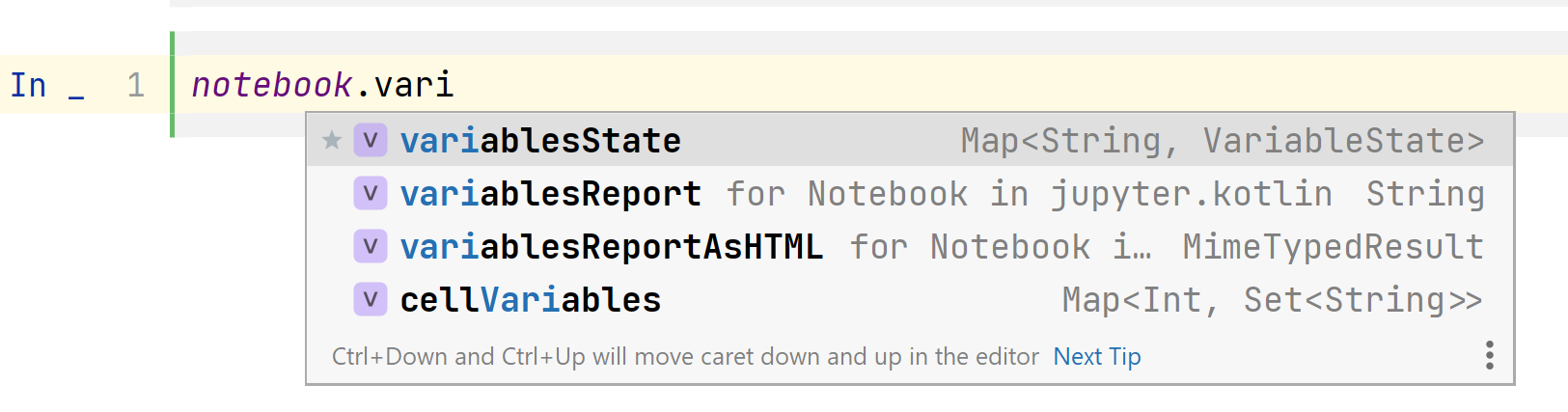
You can see the variables defined in the notebook in both plain text and HTML formats.
### Internal variables markers
To ignore some variables in the variable report, mark these variables as internal using the JupyterIntegration API:
```kotlin
USE {
markVariableInternal { prop ->
prop.name.startsWith("_")
}
}
```
### Typename rules for transitively loaded integration classes
As mentioned before, libraries can load other libraries transitively, either by executing the `%use` line magic as
a part of the initialization code or by including a dependency that contains an integration.
By default, all integration classes found in the dependencies are loaded. However, you can turn off the loading functionality of some integrations
by using typename rules to skip them. At the same time, the library can load its integration class forcefully by
specifying "accepting" as a typename rule. In this case, even if the typename is disabled by the loader library, the corresponding
class will be loaded.
#### Descriptor API
Here's an example of how to use typename rules via the Descriptor API:
```json5
{
"integrationTypeNameRules": [
"-:org.jetbrains.kotlinx.dataframe.**",
//"+:org.jetbrains.kotlinx.dataframe.**",
]
}
```
#### JupyterIntegration API
Here's an example of how to use typename rules via the JupyterIntegration API:
```kotlin
USE {
discardIntegrationTypeNameIf {
it.startsWith("org.jetbrains.kotlinx.dataframe.")
}
// acceptIntegrationTypeNameIf {
// it.startsWith("org.jetbrains.kotlinx.dataframe.")
// }
}
```
### Minimal kernel version supported by the library
You can define the minimal kernel version to be supported by the library integration.
In the JupyterIntegration API, it's also possible to set `notebook.kernelVersion`.
#### Descriptor API
Here's an example of how to define the minimal kernel version via the Descriptor API:
```json
{
"minKernelVersion": "0.11.0.1"
}
```
#### JupyterIntegration API
Here's an example of how to define the minimal kernel version via the JupyterIntegration API:
```kotlin
USE {
setMinimalKernelVersion("0.11.0.1")
}
```
### Library options
Library options are useful for different purposes:
* To extract some frequently updatable parts of the library descriptors (such as library versions).
* To assist the Renovate GitHub app to update library versions.
* To pass some values transitively in library loading so that libraries might know through what other libraries they were
loaded.
> **Note:** Give unique names for the options of your library because these options can override some other options, and it may lead to unexpected quirks.
#### Descriptor API
Here's an example of how to use library options via the Descriptor API.
Options ending with `-renovate-hint` are ignored in descriptors and shouldn't be visible:
```json
{
"properties": [
{
"name": "api",
"value": "4.4.1"
},
{
"name": "api-renovate-hint",
"value": "update: package=org.jetbrains.lets-plot:lets-plot-kotlin-kernel"
}
],
"dependencies": [
"org.company:library:$api"
]
}
```
#### JupyterIntegration API
Here's an example of how to use library options via the JupyterIntegration API:
```kotlin
USE {
addOption("api", "4.4.1")
}
```
Options in JupyterIntegration API could be only used when this library loads some other integration transitively,
and the integration class' constructor has two arguments, the second of which is of type `Map`.
All previously loaded options are put into the map and passed as an argument.
### Link to the library site
The library integration can have a link to the library's site.
These links are embedded into the README. Links can also be embedded into the `:help` command, but only for descriptors.
#### Descriptor API
Here's an example of adding links to the library site via the Descriptor API:
```json
{
"link": "https://github.com/Kotlin/kandy"
}
```
#### JupyterIntegration API
Here's an example of adding links to the library site via the JupyterIntegration API:
```kotlin
USE {
setWebsite("https://github.com/Kotlin/kandy")
}
```
### Library description
The library integration can have a description.
The description is embedded into the README and the `:help` command, but only for descriptors.
#### Descriptor API
Here's an example of adding a library description via the Descriptor API:
```json
{
"description": "Kotlin plotting DSL for Lets-Plot"
}
```
#### JupyterIntegration API
Here's an example of adding a library description via the JupyterIntegration API:
```kotlin
USE {
setDescription("Kotlin plotting DSL for Lets-Plot")
}
```
## Creating a library descriptor
To support a new `JVM` library for your Kotlin Kernel for notebooks and make it available via the `%use` line magic, you need to create a library descriptor for it.
For examples of library descriptors, see the [libraries repository](https://github.com/Kotlin/kotlin-jupyter-libraries).
A library descriptor is a `.json` file with the following fields:
- `properties`: a dictionary of properties that are used within the library descriptor. Library properties can be used in any part of the library descriptor as `$property`.
- `description`: a short library description used to generate a library list in the README.
- `link`: a link to the library website. This link will be displayed through the `:help` REPL command.
- `minKernelVersion`: a minimal version of the Kotlin kernel to be used with this descriptor.
- `repositories`: a list of Maven or Ivy repositories to search for dependencies.
- `dependencies`: a list of library dependencies.
- `imports`: a list of default imports for the library.
- `init`: a list of code snippets to be executed when the library is included.
- `initCell`: a list of code snippets to be executed before executing any cell.
- `shutdown`: a list of code snippets to be executed on the kernel shutdown. Any cleanup code should be placed here.
- `renderers`: a mapping from fully qualified names of types to be rendered to the Kotlin expression returning output value.
The source object is referenced as `$it`.
- `resources`: a list of JS/CSS resources. For examples, see [this descriptor](https://github.com/Kotlin/kotlin-jupyter/blob/master/src/test/testData/lib-with-resources.json).
- `integrationTypeNameRules`: a list of rules for integration classes that are about to be loaded transitively.
Each rule has the form `[+|-]:` where `+` or `-` denotes if this pattern is accepted or declined.
The pattern may consist of any characters. Special combinations are allowed. For example: `?`, any single character or no character;
`*`, any character sequence excluding dot; `**`, any character sequence.
> **Note:** All fields of the library descriptor are optional.
For the most relevant specification, see the [`org.jetbrains.kotlinx.jupyter.libraries.LibraryDescriptor` class](https://github.com/Kotlin/kotlin-jupyter/blob/master/jupyter-lib/shared-compiler/src/main/kotlin/org/jetbrains/kotlinx/jupyter/libraries/LibraryDescriptor.kt).
The name of the library JSON file should have the `.json` syntax, where `` is the argument for the `%use` line magic.
To register a new library descriptor:
1. **For private usage:** create it anywhere on your computer and reference it using file syntax.
2. **Alternative way for private usage:** create a descriptor in the `.jupyter_kotlin/libraries` folder and reference
it using the default syntax.
3. **For sharing with the community:** Commit it to the [libraries repository](https://github.com/Kotlin/kotlin-jupyter-libraries) and create a pull request.
If you are maintaining a library and want to update your library descriptor, create a pull request with your update. Once your request is accepted,
the new version of your library will become available to all Kotlin Jupyter users upon their next kernel startup,
provided they use the `%useLatestDescriptors` magic command. If they do not use this command, a kernel update will be necessary to access the updated library version.
## Integration using the Kotlin API
You can also add a Kotlin kernel integration to your library using a
[Gradle plugin](https://plugins.gradle.org/plugin/org.jetbrains.kotlin.jupyter.api). To do so, you must add the plugin dependency to your build script.
For `build.gradle`:
```groovy
plugins {
id "org.jetbrains.kotlin.jupyter.api" version ""
}
```
For `build.gradle.kts`:
```kotlin
plugins {
kotlin("jupyter.api") version ""
}
```
From the snippets above, `` is one of the published versions.
It's preferred to use the latest stable version.
This Gradle plugin adds the following dependencies to your project:
| Artifact | Gradle option to exclude/include | Enabled by default | Dependency scope | Method for adding dependency manually |
|:---------------------------------|:---------------------------------|:-------------------|:---------------------|:-----------------------------------------|
| `kotlin-jupyter-api` | `kotlin.jupyter.add.api` | yes | `compileOnly` | `addApiDependency(version: String?)` |
| `kotlin-jupyter-test-kit` | `kotlin.jupyter.add.testkit` | yes | `testImplementation` | `addTestKitDependency(version: String?)` |
You can turn on and off the dependency with its default version (version of the plugin)
by setting the corresponding Gradle option to `true` or `false`.
If the corresponding option is set to `false` (by default or in your setup), you
can still add the dependency manually by using the method from the `kotlinJupyter` extension:
```groovy
kotlinJupyter {
// Uses the default version
addApiDependency()
// Uses a custom artifact version
addApiDependency("0.10.0.1")
}
```
### Adding library integration using Gradle
In this scenario, you have to reference your implementations directly in your build script. Be aware
that this approach does not include any existence checks, so you need to ensure that all referenced
implementations are correctly defined.
The following example shows how to refer the `Integration` class in your buildscript.
For `build.gradle`:
```groovy
processJupyterApiResources {
libraryProducers = ["org.my.lib.Integration"]
}
```
For `build.gradle.kts`:
```kotlin
tasks.processJupyterApiResources {
libraryProducers = listOf("org.my.lib.Integration")
}
```
### Integration testing for the integration logic
You can automatically check if your library integrates correctly into the kernel. To achieve this, inherit your
test class from the `org.jetbrains.kotlinx.jupyter.testkit.JupyterReplTestCase` class and use its methods to execute cells.
Your library integration descriptors should be already in the classpath and will be loaded automatically by the test logic.
You don't need to use the `%use` line magic or the `DependsOn` annotation to switch on your library.
The artifact containing test templates is included automatically into the `testImplementation` configuration if you
use the Gradle plugin. You can turn this behavior off by setting the `kotlin.jupyter.add.testkit` Gradle property
to `false`. If you want to manually include this artifact in your build, see the instructions
[here](https://central.sonatype.com/artifact/org.jetbrains.kotlinx/kotlin-jupyter-test-kit?smo=true).
For examples of integration testing, see [`JupyterReplTestingTest` in
this repository](https://github.com/Kotlin/kotlin-jupyter/blob/master/jupyter-lib/test-kit-test/src/test/kotlin/org/jetbrains/kotlinx/jupyter/testkit/test/JupyterReplTestingTest.kt)
or [related tests in DataFrame](https://github.com/Kotlin/dataframe/tree/master/core/generated-sources/src/test/kotlin/org/jetbrains/kotlinx/dataframe/jupyter).
### Integration using other build systems
If you don't use Gradle as a build system, there is an alternative to integrate a library with the Kotlin Kernel for Jupyter notebooks:
1. Add the `org.jetbrains.kotlinx:kotlin-jupyter-api:` dependency as
a compile dependency. For configuration instructions for different build systems, see
[the documentation](https://search.maven.org/artifact/org.jetbrains.kotlinx/kotlin-jupyter-api/0.9.0-17/jar).
2. Add one or more integration classes. Integration classes are derived from the
`LibraryDefinitionProducer` or `LibraryDefinition` interfaces. In this scenario, you don't need the `@JupyterLibrary` annotation.
3. Add the file `META-INF/kotlin-jupyter-libraries/libraries.json` to the JAR
resources. This file should contain FQNs of all integration classes in the JSON form:
```json
{
"definitions": [],
"producers": [
{
"fqn": "org.jetbrains.kotlinx.jupyter.example.GettingStartedIntegration"
}
],
"descriptors": []
}
```
Classes derived from the `LibraryDefinition` interface should be added to the `definitions` array.
Classes derived from the `LibraryDefinitionProducer` interface should be added to the `producers` array.
Additionally, you're allowed to add full custom library descriptors to the `descriptors` array.
This is an advanced option that allows you to load additional dependencies or add additional imports using the
[library descriptor API](#creating-a-library-descriptor).
This can be particularly useful for libraries that cannot depend on the jupyter-api artifact but still want to modify
the kernel behavior when loaded.
For example:
```json
{
"definitions": [],
"producers": [],
"descriptors": [
{
"dependencies": [
"my.library:my-library-jupyter-integration:1.0.0"
],
"init": [
"DISPLAY(\"Implicitly loading Jupyter integration for MyLibrary...\")"
]
}
]
}
```
For more information, see:
* [Libraries repository](https://github.com/Kotlin/kotlin-jupyter-libraries)
* [Jupyter REPL testkit](https://github.com/Kotlin/kotlin-jupyter/blob/master/jupyter-lib/test-kit-test/src/test/kotlin/org/jetbrains/kotlinx/jupyter/testkit/test/JupyterReplTestingTest.kt)
* [DataFrame integration tests](https://github.com/Kotlin/dataframe/tree/master/core/generated-sources/src/test/kotlin/org/jetbrains/kotlinx/dataframe/jupyter)
* [Maven search testkit](https://search.maven.org/artifact/org.jetbrains.kotlinx/kotlin-jupyter-test-kit)