
Zlinter icon # Zlinter - Linter for Zig [![Zig support](https://img.shields.io/badge/Zig-0.14.x%20%7C%200.15.x%20%7C%200.16.x%20%7C%20master-%23f3ab20?logo=zig&style=flat)](http://github.com/kurtwagner/what-the-zig) [![linux](https://img.shields.io/github/actions/workflow/status/KurtWagner/zlinter/linux.yml?branch=master&label=linux&style=flat)](https://github.com/KurtWagner/zlinter/actions/workflows/linux.yml) [![windows](https://img.shields.io/github/actions/workflow/status/KurtWagner/zlinter/windows.yml?branch=master&label=windows&style=flat)](https://github.com/KurtWagner/zlinter/actions/workflows/windows.yml) [![Coverage Status](https://img.shields.io/coveralls/github/KurtWagner/zlinter/master?style=flat)](https://coveralls.io/github/KurtWagner/zlinter?branch=master) [![License: MIT](https://img.shields.io/badge/License-MIT-yellow.svg?style=flat)](https://opensource.org/licenses/MIT) An extendable and customizable **Zig linter** (with [AST explorer](https://kurtwagner.github.io/zlinter/explorer/)) that is integrated from source into your `build.zig`. A **linter** is a tool that automatically checks source code for style issues, bugs, or patterns that may lead to errors,


helping developers write cleaner and more reliable code.
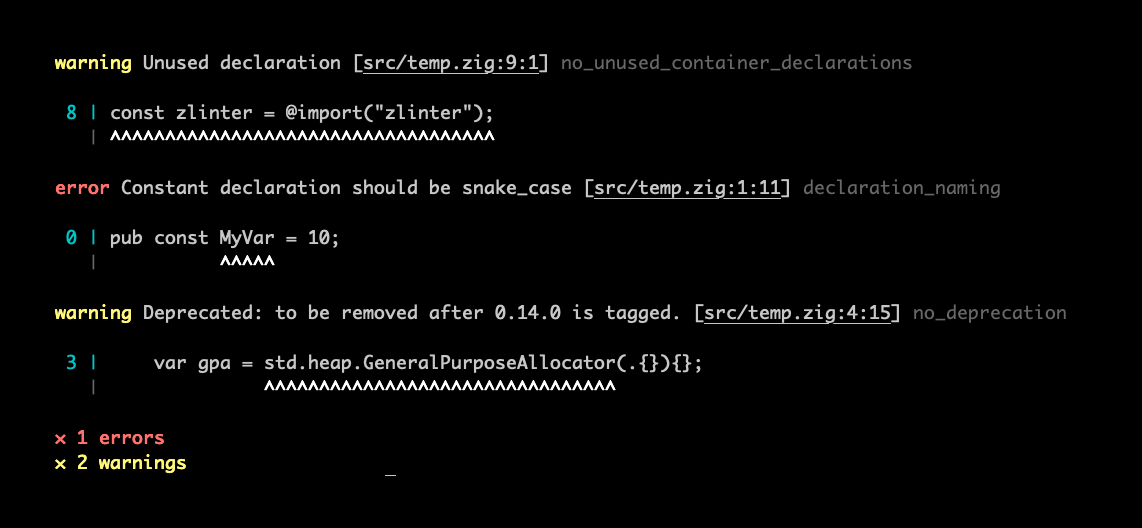
![Screenshot](./screenshot.png)
## Table of contents - [Getting Started](#getting-started) - [Autofix](#autofix) - [Custom Rules](#custom-rules) - [Custom Formatters](#custom-formatters) - [Built-in Rules](RULES.md) - [declaration_naming](RULES.md#declaration_naming) - [field_ordering](RULES.md#field_ordering) - [field_naming](RULES.md#field_naming) - [file_naming](RULES.md#file_naming) - [function_naming](RULES.md#function_naming) - [import_ordering](RULES.md#import_ordering) - [max_positional_args](RULES.md#max_positional_args) - [no_comment_out_code](RULES.md#no_comment_out_code) - [no_deprecated](RULES.md#no_deprecated) - [no_empty_block](RULES.md#no_empty_block) - [no_global_vars](RULES.md#no_global_vars) - [no_hidden_allocations](RULES.md#no_hidden_allocations) - [no_inferred_error_unions](RULES.md#no_inferred_error_unions) - [no_literal_args](RULES.md#no_literal_args) - [no_literal_only_bool_expression](RULES.md#no_literal_only_bool_expression) - [no_orelse_unreachable](RULES.md#no_orelse_unreachable) - [no_panic](RULES.md#no_panic) - [no_redundant_comptime](RULES.md#no_redundant_comptime) - [no_swallow_error](RULES.md#no_swallow_error) - [no_todo](RULES.md#no_todo) - [no_unsafe_undefined](RULES.md#no_unsafe_undefined) - [no_unused](RULES.md#no_unused) - [require_braces](RULES.md#require_braces) - [require_exhaustive_enum_switch](RULES.md#require_exhaustive_enum_switch) - [require_fmt](RULES.md#require_fmt) - [require_labeled_continue](RULES.md#require_labeled_continue) - [require_doc_comment](RULES.md#require_doc_comment) - [require_errdefer_dealloc](RULES.md#require_errdefer_dealloc) - [switch_case_ordering](RULES.md#switch_case_ordering) - [Configuration](#configuration) - [Paths](#configure-paths) - [Rules in build.zig](#configure-rules-in-buildzig) - [Rules by Directory](#configure-rules-by-directory) - [Disable with Comments](#disable-with-comments) - [Command-Line Arguments](#command-line-arguments) - [Optimization](#configure-optimization) - [Supported zig versions](#supported-zig-versions) - [Background](#background) - [Versioning](#versioning) - [Contributing](CONTRIBUTING.md) - [Release Notes](RELEASES.md) ## Getting started `zlinter` is not a standalone binary - it's built into your project's `build.zig`. This makes it flexible to each project's needs. Simply add the dependency and hook it up to a build step, like `zig build lint`: **1. Save dependency to your zig project:** For 0.14.x: ```shell zig fetch --save git+https://github.com/kurtwagner/zlinter#0.14.x ``` For 0.15.x: ```shell zig fetch --save git+https://github.com/kurtwagner/zlinter#0.15.x ``` For 0.16.x: ```shell zig fetch --save git+https://github.com/kurtwagner/zlinter#0.16.x ``` For master (0.17.x-dev): ```shell zig fetch --save git+https://github.com/kurtwagner/zlinter#master ``` **2. Configure `lint` step in your `build.zig`:** ```zig const zlinter = @import("zlinter"); // ... const lint_cmd = b.step("lint", "Lint source code."); lint_cmd.dependOn(step: { // Swap in and out whatever rules you see fit from RULES.md var builder = zlinter.builder(b, .{}); builder.addRule(.{ .builtin = .field_naming }, .{}); builder.addRule(.{ .builtin = .declaration_naming }, .{}); builder.addRule(.{ .builtin = .function_naming }, .{}); builder.addRule(.{ .builtin = .file_naming }, .{}); builder.addRule(.{ .builtin = .switch_case_ordering }, .{}); builder.addRule(.{ .builtin = .no_unused }, .{}); builder.addRule(.{ .builtin = .no_deprecated }, .{}); builder.addRule(.{ .builtin = .no_orelse_unreachable }, .{}); break :step builder.build(); }); ``` **3. Run linter:** Keep in mind the first run will be slower as the cache isn't warmed: ```shell zig build lint ``` You can also be specific with paths (see [command-line arguments](#command-line-arguments) for more options): ```shell zig build lint -- --include src/ file.zig ``` ### Alternative: Enable all built in rules If you just want to test out zlinter, you can also enable all rules and then selectively run rules from the command line. A lot of rules are quite pedantic so this is not recommended outside of testing zlinters rules for your project: 1. Enable all built in rules in `build.zig` ```zig const zlinter = @import("zlinter"); const lint_cmd = b.step("lint", "Lint source code."); lint_cmd.dependOn(step: { var builder = zlinter.builder(b, .{}); inline for (@typeInfo(zlinter.BuiltinLintRule).@"enum".field_values) |field_value| { builder.addRule(.{ .builtin = @enumFromInt(field_value) }, .{}); } break :step builder.build(); }); ``` 1. Selectively run rules: ```shell zig build lint -- --rule no_unused no_deprecated ``` ## Autofix Some linter rules support auto fixing some problems. > [!IMPORTANT] > **Auto fixing** is an **experimental feature** so only use it if you use source control - **always back up your code first!** For example, to auto fix unused declarations and field ordering issues, assuming your project has these rules configured: ```shell # First ensure you're working branch is clean (or back up your code!) $ git status # Then run the fix command (you may need to run this multiple times) $ zig build lint -- --rule field_ordering --rule no_unused --fix ``` It can sometimes require a multiple runs to completely resolve all fixable issues. i.e., run with `--fix` until it reports 0 fixes applied. ## Custom rules Bespoke rules can be added to your project. For example, maybe you really don't like cats, and refuse to let any `cats` exist in any identifier. See example rule [`no_cats`](./integration_tests/src/no_cats.zig), which is then integrated like builtin rules in your `build.zig`: ```zig builder.addRule(.{ .custom = .{ .name = "no_cats", .path = "src/no_cats.zig", }, }, .{}); ``` Alternatively, take a look at , which is a minimal custom rule example with accompanying zig project. ## Custom formatters Formatters control how lint results are printed out. At the moment, zlinter only ships with the built in [`DefaultFormatter`](./src/lib/formatters/DefaultFormatter.zig), so there is not yet a supported integration path for downstream projects to plug in custom formatters. That said, there are plenty of reasons someone may want to add another formatter, for example JSON, ZON, or XML output for other tools to consume. If that is something you need, contributions in this area are very welcome. Formatter related code lives under [`zlinter.formatters`](./src/lib/formatters.zig). The core interface is [`Formatter`](./src/lib/formatters/Formatter.zig), which receives lint results, file store access, and runtime context, and writes to the supplied writer. If you are interested in contributing a formatter, the existing [`DefaultFormatter`](./src/lib/formatters/DefaultFormatter.zig) is the best place to start. ## Configuration ### Configure paths The builder used in `build.zig` has a method `addPaths`, which can be used to add included and excluded files and directories. For example, ```zig builder.addPaths(.{ .include_dirs = &.{ b.path("engine-src"), b.path("src") }, .exclude_dirs = &.{ b.path("src/android") }, .exclude_files = &.{ b.path("engine-src/generated.zig") }, }); ``` would lint zig files under `engine-src/` and `src/` except for `engine-src/generated.zig` and any zig files under `src/android/`. ### Configure Rules in `build.zig` `addRule` accepts an anonymous struct representing the `Config` of the rule being added. These are the base configurations applied. For example, ```zig builder.addRule(.{ .builtin = .field_naming }, .{ .enum_field = .{ .warning = .snake_case }, .union_field = .off, .struct_field_that_is_type = .{ .@"error" = .title_case }, .struct_field_that_is_fn = .{ .@"error" = .camel_case }, }); builder.addRule(.{ .builtin = .no_deprecated }, .{ .severity = .warning, }); ``` where the `Config` structs are defined in the rule source files [`no_deprecated.Config`](./src/rules/no_deprecated.zig) and [`field_naming.Config`](./src/rules/field_naming.zig). ### Configure Rules by directory Rules configured in `build.zig` can be overridden for a directory and its descendant source files by adding a `zlinter.zon` file in that directory. For example, ```zig // src/lib/zlinter.zon .{ .rules = .{ .field_naming = .{ .enum_field = .off, }, }, } ``` would turn off `field_naming` for enum fields in `src/lib/` and any directories below it. Other rule configuration fields continue to use the base configuration from `build.zig`. This requires the rule to already be enabled and configured in your `build.zig`. ### Disable with comments #### Disable next line Disable all rules or an explicit set of rules for the next source code line. Syntax: ```shell zlinter-disable-next-line [rule_1] [rule_n] [- comment] ``` For example, ```zig // zlinter-disable-next-line no_deprecated - not updating so safe const a = this.is.deprecated(); ``` #### Disable current line Disable all rules or an explicit set of rules for the current source code line. Syntax: ```shell zlinter-disable-current-line [rule_1] [rule_n] [- comment] ``` For example, ```zig const a = this.is.deprecated(); // zlinter-disable-current-line ``` #### Disable multiple lines Disable all rules or an explicit set of rules for multiple source code lines. Syntax: ```shell zlinter-disable [rule_1] [rule_n] [- comment] zlinter-enable [rule_1] [rule_n] [- comment] ``` For example, to disable multiple lines for a given set of rules: ```zig // zlinter-disable rule_a rule_b - rationale var something = doSomethin(); var something_else = doSomethingElse(); // zlinter-disable rule_a rule_b ``` For example, to disable multiple lines for all rules: ```zig // zlinter-disable - rationale var something = doSomethin(); var something_else = doSomethingElse(); // zlinter-disable ``` If you omit `zlinter-enable`, all lines until EOF will be disabled. ### Command-Line Arguments ```shell zig build lint -- [--include ...] [--exclude ...] [--filter ...] [--rule ...] [--fix] [--quiet] [--max-warnings ] ``` - `--include` run the linter on these paths ignoring the includes and excludes defined in the `build.zig`, forcing these paths to be resolved and linted (if they exist). - `--exclude` exclude these paths from linting. This argument will be used in conjunction with the excludes defined in the `build.zig` unless used with `--include`. - `--filter` used to filter the run to a specific set of already resolved paths. Unlike `--include`, this leaves the includes and excludes defined in the `build.zig` as is. - `--quiet` only report errors (not warnings). - `--max-warnings` fail if there are more than this number of warnings. - `--fix` used to automatically fix some issues (e.g., removal of unused container declarations) - **Only use this feature if you use source control as it can result in loss of code!** For example ```shell zig build lint -- --include src/ android/ --exclude src/generated.zig --rule no_deprecated no_unused ``` - Will resolve all zig files under `src/` and `android/` but will exclude linting `src/generated.zig`; and - Only rules `no_deprecated` and `no_unused` will be run. ### Configure Optimization `zlinter.builder` accepts `.optimize` (defaults to `.ReleaseSafe`). For example, ```zig var builder = zlinter.builder(b, .{.optimize = .ReleaseFast }); ``` If your project is large it may be worth setting optimize to `.ReleaseFast`. Just keep in mind the first run may be slower as it builds the modules for the first time with the new optimisation. Since 0.16.x, `.Debug` is significantly slower to run as it uses the debug allocator. Unless you're working on zlinter or a custom rule, it should be avoided. ### Compile Units Large projects often have many compile units with overlapping module graphs. By default, `zlinter` uses executables first, then libraries, then tests, then object units, then test objects. This usually gives the linter the module/import context you expect without resolving every compile unit in the build, which is slower. Compiled units are used to resolve declarations from dependencies in your import graph. You can override that selection with explicit selectors. For example, to do all executables and a specific test: ```zig const exe = b.addExecutable(.{ .name = "my_app", .root_module = app_module, }); const unit_tests = b.addTest(.{ .name = "unit_tests", .root_module = test_module, }); var builder = zlinter.builder(b, .{}); builder.setCompileUnits(&.{ .exe, .{ .explicit = unit_tests }, }); ``` If you only want to context resolve a single executable and your project registers multiple, then you should: ```zig builder.setCompileUnits(&.{ .{ .explicit = your_exe }, }); ``` Use `.all` only when you intentionally want every discovered compile unit to supply context. It can be much slower for large projects, and may not provide much additional context resolution. ## Supported zig versions The plan is to support `master` (mostly because its an important exercise in keeping up to date with whats changing in zig) and the latest previous version. Currently, [`0.14.x`](https://github.com/KurtWagner/zlinter/tree/0.14.x), [`0.15.x`](https://github.com/KurtWagner/zlinter/tree/0.15.x), [`0.16.x`](https://github.com/KurtWagner/zlinter/tree/0.16.x) and [`master`](https://github.com/KurtWagner/zlinter/tree/master). Fixes and improvements to rules may be cherry-picked to older versions if there's no API compatibility issues. This may change once zig hits `1.x`. ## Background `zlinter` was written to be used across my personal projects. The main motivation was to have it integrated from source through a build step so that it can be 1. customized at build time (e.g., byo rules); and 2. versioned with your project's source control (no separate binary to juggle) I'm opening it up incase it's more generally useful, and happy to let it organically evolve around needs, if there's value in doing so. It uses `std.zig` and `std.Build.Configuration` to build and analyze zig source files. ## Versioning `zlinter` will: - follow the same semantic versioning as `zig`; - use branch `master` for `zig` `master` releases; and - use branch `0.14.x` for `zig` `0.14.x` releases. This may change, especially when `zig` is "stable" at `1.x`. If you have opinions on this, feel free to comment on [#20](https://github.com/KurtWagner/zlinter/issues/20).