# Multiplane
English · [简体中文](README.md)
A local, headless HTML video renderer for AI agents. **A shot is an ordinary web page**: the page implements `render(t)`, and the image depends only on time `t`. Multiplane captures frames with headless Chromium, applies post-processing such as supersampling, motion blur, and film grain, encodes video with FFmpeg, and checks whether a shot is deterministic.
> Version `0.3.8` (the latest version is on the [Releases page](https://github.com/LBEILC/Multiplane/releases)). The full test suite passes in CI on Windows, macOS and Linux; Windows has also been verified on a real machine. Interfaces may still change before 1.0.
The name comes from Disney's multiplane camera: flat artwork placed at different depths, photographed frame by frame with real depth of field. Here, this corresponds to layered web content, a 3D card layer, and accumulated depth of field.
## Features
- **No new framework to learn**. Shots use HTML, CSS, and JavaScript, which agents are well suited to write.
- **Lint before rendering**. `lint` runs without a browser in under a second. It flags wall-clock time, random numbers, CSS animations, remote resources, and other patterns that break determinism, with file, line, and column locations. Rendering commands run it automatically before starting.
- **Verifiable**. `verify` renders the same frames out of order, after page reloads, and with single and multiple processes, then compares them pixel by pixel. Mismatches include the affected times, regions, and diff images.
- **Motion blur respects hard cuts**. Each frame uses multiple time samples within the shutter interval, blended in linear light. Images on opposite sides of the shot's declared hard cut times, `cuts`, are never blurred together.
- **3D layer and accumulated depth of field** (optional, `multiplane/three`): place image cards in 3D space and accumulate multiple samples for real out-of-focus blur, combined with motion blur.
- **Machine-readable**. All commands support `--json` and emit an event stream with stable error codes. Each run has its own job directory, supports progress queries, and can be cancelled.
- **Stills too**. `stills` writes PNG frames at the times you choose, with the same supersampling, motion blur, depth of field and alpha as video. Use it to check frames, or to produce final images such as covers, posters and illustrations.
- **Deterministic**. The renderer itself introduces no wall-clock time or unseeded random numbers. The same input in the same environment produces identical pixels, backed by tests.
## What it looks like
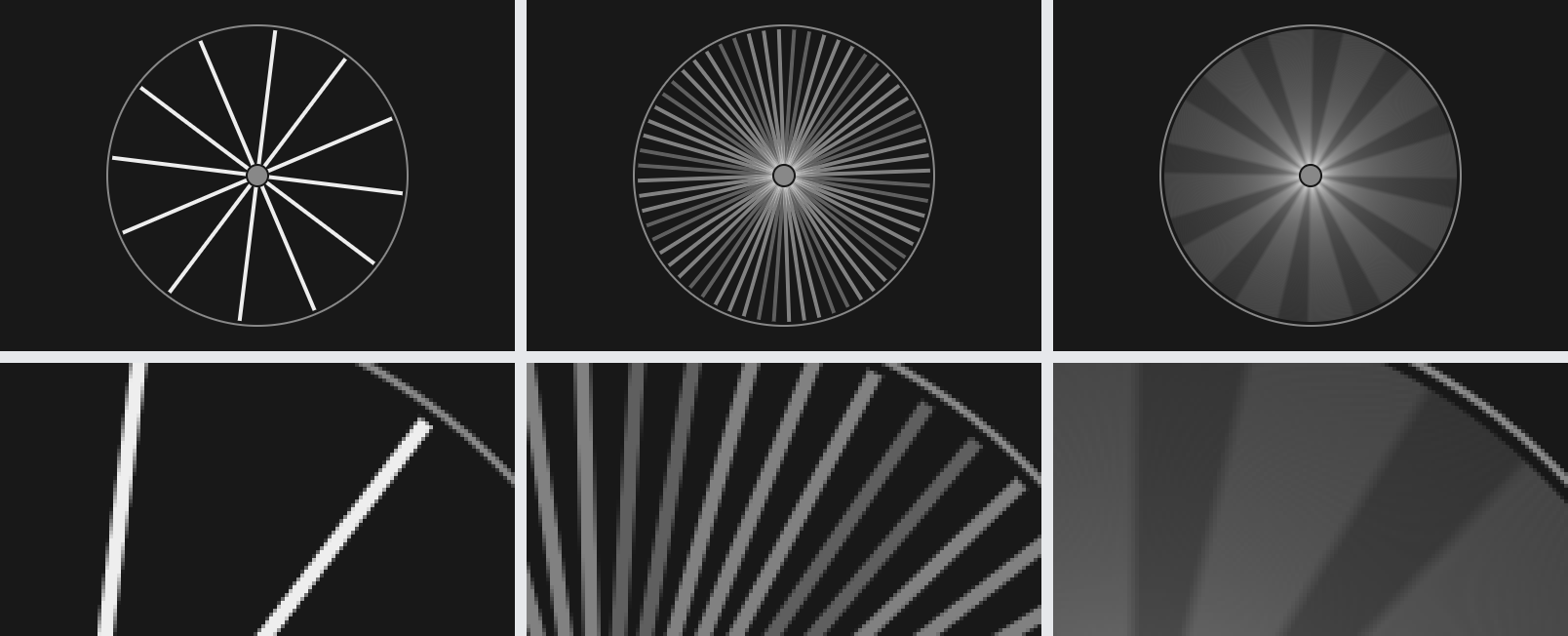
**Motion blur.** Left: no motion blur. Middle: a fixed 8 samples, so fast spinning spokes break into separate copies. Right: samples added automatically according to how far things move, giving a smooth streak. The bottom row is a close-up.
**Cuts stay clean.** The first frame after a cut. Left: the cut is not declared, and motion blur mixes in the colour and the circle from the shot before it. Right: the shot declares `cuts`, and the cut is clean.
**3D depth of field.** The same cards, focused on the foreground and on the background. The defocus is accumulated from many samples rather than blurred afterwards from a depth map, so foreground edges do not bleed and the background does not leak into foreground outlines. The bottom row is a close-up of the foreground card.
## Quick start
Requires Node.js 24 or later and FFmpeg with libx264 support.
```sh
npm install multiplane
npx playwright install chromium
npx multiplane doctor
npx multiplane render examples/animation.html --root node_modules/multiplane
```
The examples live inside the installed package, so `--root` points the resource root at the package; for safety, renders never serve files from under `node_modules`.
Recent npm versions do not run install scripts of dependencies, so the second command downloads the Chromium build that Playwright uses. To work from a clone of this repository instead, run `npm install` in it and render `examples/animation.html` directly.
Give your agent the usage skill with `npx multiplane skill install --host all` (Claude Code: `~/.claude/skills/multiplane`, Codex: `~/.agents/skills/multiplane`), or let the desktop app install it. Start a new agent session afterwards.
In a clone of this repository, `npm install` downloads that Chromium build itself, reusing it if already installed; in an offline environment, set `PLAYWRIGHT_SKIP_BROWSER_DOWNLOAD=1` to skip the download, then run `npx playwright install chromium` later. On Linux, Chromium also needs system libraries: run `npx playwright install-deps chromium` once (`doctor` tells you when they are missing).
### FFmpeg
Multiplane does not bundle FFmpeg. Install one that supports libx264:
| System | One way to get it |
|---|---|
| Windows | a build from the [official FFmpeg download page](https://ffmpeg.org/download.html) |
| macOS | `brew install ffmpeg` |
| Linux | your distribution's package, for example `sudo apt-get install ffmpeg` |
The licence of FFmpeg depends on the build you install. Then tell Multiplane where to find it using one of these methods, in priority order:
1. The command-line option `--ffmpeg `;
2. The environment variable `MULTIPLANE_FFMPEG`;
3. `ffmpeg` in the user config file (see "User config and job index" below);
4. The system PATH.
To save the path once for every project, run `npx multiplane config set ffmpeg `; it also checks the file and reports whether it is usable.
The default is software encoding with `x264`. With an NVIDIA GPU, use `--encoder nvenc-h264` or `--encoder nvenc-hevc`. `doctor` checks whether FFmpeg can run and supports the required encoders.
## Write a shot
```html
Example
```
There are only three requirements:
- Draw everything inside `#stage`, with fixed CSS width and height defining the frame dimensions;
- Make `render(t)` synchronous. The same `t` must always produce the same image;
- Use local files for fonts, images, and other assets, and finish loading them in `setup()` / `ready`.
For the full contract, patterns that break determinism, and 3D layer usage, see the agent instructions in [`skills/multiplane/SKILL.md`](skills/multiplane/SKILL.md). This file is also a skill that agents can load.
## Commands
| Command | Purpose |
|---|---|
| `multiplane lint ` | Static code checks without a browser |
| `multiplane render ` | Render to MP4 |
| `multiplane stills ` | Write PNG stills at given times plus a contact sheet; for checking frames or for final high-quality images |
| `multiplane verify ` | Run a determinism check |
| `multiplane inspect ` | Print a shot's duration, frame count, stage size, cuts and `meta` without rendering |
| `multiplane serve` | Serve shots on 127.0.0.1 for opening in a browser while writing them |
| `multiplane benchmark` | Measure rendering speed at different worker counts on this machine; later renders use the fastest |
| `multiplane doctor` | Check Node, the browser, GPU rasterization, FFmpeg, and optional three.js |
| `multiplane status ` | View job status |
| `multiplane cancel ` | Stop a job |
| `multiplane wait ` | Wait for a job to finish and print its events, for example after an agent session restarts |
| `multiplane resume ` | Continue an interrupted render from where it stopped |
| `multiplane config get\|set\|unset` | Read or change the user config |
| `multiplane skill status\|install\|remove` | Install, update or remove the agent skill for Claude Code and Codex |
Shot paths are relative to the resource root `--root` (the current directory by default). Each run has its own job directory, `out/jobs//`. Without `--out`, artifacts are written there (video, `stills/`, `verify/`), so runs do not overwrite each other. See `artifacts` in the result for the final paths. `--out` sets the output location. An existing target is rejected unless `--overwrite` is given. `render`, `stills`, and `verify` automatically run `lint` before starting and stop on errors. Use `--no-lint` to skip it. `npx multiplane --help` lists all options for that command.
`render` encodes in segments of about 10 seconds and keeps each one on disk as soon as it is done. If a render stops part way (the process is killed, the machine crashes or loses power, the browser keeps crashing, or you stop it), `multiplane resume ` skips the segments already encoded, renders the rest and joins them without re-encoding; the frames are identical to an uninterrupted render. A resume keeps all of the original job's options. It is refused (`resume_unavailable`, with the reason) when a file the shot loaded or the audio file has changed, or the Multiplane, Chromium or FFmpeg version, the raster mode or the encoder differs, so a film is never joined from mismatched parts; a different GPU or driver only produces a warning (`resume_renderer_changed`). New checkpoints track both requested resource paths and their resolved files: retargeting a symlink (including a project-root alias) to different content also prevents resume. `multiplane status` reports whether a job can be resumed and how many frames are done. See section 6.1 of the protocol.
A stuck browser does not stall a render forever. If a worker holds frames but delivers none for `max(120 seconds, 10 × the slowest frame so far)`, its browser is closed and relaunched, the frame is rendered again from scratch (with the same pixels), and a `worker_stalled` warning is reported. Each frame is retried at most twice; a third stall ends the job with `browser_crashed`. Segments already encoded are kept, so the job can be resumed.
Common `render` options:
| Option | Meaning |
|---|---|
| `--from` / `--to` | Render a range only (seconds, end time excluded) |
| `--fps` | Override the shot's frame rate |
| `--scale` | Output scale; for example, `2` outputs a 1920×1080 shot at 3840×2160 |
| `--draft` | Fast preview preset: capture at a scale of at most 0.5 and upscale, no motion blur, no grain. Lower quality by design; explicit options override it. Also available for `stills` |
| `--render-scale`, `--upscale` | Capture at a lower scale, then upscale (`lanczos` / `neighbor`); the capture scale must not exceed `--scale` |
| `--motion-blur`, `--shutter`, `--adaptive-blur` | Time samples per frame, shutter fraction, adaptive sampling |
| `--quality` | Quality preset: `draft` (same as `--draft`), `fast` (quicker), `standard` (default), `high` (rarely needed; see below). When the shot has motion blur, samples are added according to how far things move locally, up to 16 for `fast`, 32 for `standard` and 256 for `high`; see below |
| `--max-motion-blur` | Custom limit for adding samples, overriding the preset; set it equal to `--motion-blur` for a fixed count |
| `--grain` | Film grain intensity |
| `--no-post` | Disable all post-processing |
| `--workers` | Number of parallel browser processes; by default the count measured by `multiplane benchmark`, or an estimate from CPU, memory and resolution; see "Parallel workers" below |
| `--raster` | `gpu` (default) or `software` |
| `--format`, `--alpha` | Output format `mp4` (default), `webm` (VP9) or `mov` (ProRes 4444); `--alpha` keeps transparency (WebM and MOV only, also for `stills` and `verify`). See "Transparent video" below |
| `--encoder`, `--max-bitrate` | Encoder, bitrate limit (Mbps) |
| `--audio`, `--audio-offset` | Mix in one audio track with an offset (seconds) |
The shot's `post` values are defaults. Command-line options override them.
## Machine-readable output
With `--json`, stdout contains one JSON event per line (NDJSON). The last line is always the final result:
```json
{"schema":"multiplane/1","type":"result","command":"render","ts":"2026-10-11T09:30:09.120Z","ok":true,"code":null,"message":null,"artifacts":[{"path":"/abs/out/jobs/20261011-093000-animation-3f2a/animation.mp4","kind":"video","bytes":81234}],"elapsedMs":3120,"jobId":"20261011-093000-animation-3f2a","data":{"frames":24}}
```
- On failure, `ok` is `false`, `code` is a stable error code, and `hint` suggests a fix. Human-readable messages go to stderr.
- Exit codes: `0` success, `1` shot or check failure, `2` invalid arguments, `3` environment problem, `4` renderer internal error, `130` cancelled.
- Each run writes `events.jsonl` (the same event stream) and `status.json` (the latest snapshot) under `out/jobs//`, allowing other programs to show progress. Rendering also maintains a preview thumbnail, `preview.png`.
See [`docs/protocol.md`](https://github.com/LBEILC/Multiplane/blob/main/docs/protocol.md) for event types, fields, and all error codes.
## User config and job index
The renderer reads config and registers jobs in a user directory: `%USERPROFILE%\.multiplane` on Windows (`%APPDATA%\multiplane` up to 0.2.0; files there are copied over on first use), `~/Library/Application Support/multiplane` on macOS, and `~/.config/multiplane` on Linux. Override it with the environment variable `MULTIPLANE_HOME`.
- `config.json`: user defaults, with optional fields `ffmpeg`, `raster`, `encoder`, `workers`, and `jobsDir`. Priority: command-line options > environment variables > `config.json` > built-in defaults. Rendering never writes this file; `multiplane config` and the desktop app do. `doctor` and `config get` report its location and which fields take effect.
- `jobs.jsonl`: one line appended at the start and end of each job, allowing other programs to discover jobs across projects. The job directory's `status.json` is the authority for job status. Set `MULTIPLANE_NO_INDEX=1` to disable registration.
Read or write failures in this directory do not affect rendering; they only produce a warning. See section 8 of [`docs/protocol.md`](https://github.com/LBEILC/Multiplane/blob/main/docs/protocol.md) for the format.
## JS API
```js
import { inspectShot, lintShot, renderShot, stillsShot, verifyShot } from 'multiplane';
const result = await renderShot('examples/animation.html', {
workers: 2,
out: 'out/demo.mp4',
onEvent: event => { if (event.type === 'progress') console.error(event.done, event.total); },
});
```
The return value has the same structure as the `result` event, without `schema`, `type` and `ts`. Failures throw a `MultiplaneError` with a `code`.
## Transparent video
Render a shot with a transparent background to lay it over other footage:
```sh
npx multiplane render examples/alpha.html --format webm --alpha
npx multiplane render examples/alpha.html --format mov --alpha
npx multiplane stills examples/alpha.html --alpha --at 0,1
```
The page background becomes transparent; anything the shot paints itself, including a background colour on `#stage`, stays opaque, so leave `#stage` without a background for a fully transparent layer. A shot can make transparency its default with `post: { alpha: true }`.
- `webm` uses VP9 with alpha. Many players ignore VP9 alpha; to check it with FFmpeg, decode with `-c:v libvpx-vp9`, since the default VP9 decoder drops alpha.
- `mov` uses ProRes 4444, which most video editors read with alpha.
- Motion blur and scaling are computed on premultiplied colour, so moving edges do not pick up dark or coloured fringes. Before publishing, the renderer decodes the first and middle frames and checks that alpha survived encoding (at most 2/255 off per pixel).
- Your FFmpeg build needs `libvpx-vp9` for WebM and `prores_ks` for MOV; `doctor` reports both.
## Quality and motion blur
Motion blur averages several captures taken during the shutter time of each frame. With too few samples, fast-moving things break into separate copies; with many samples everywhere, rendering is slow. Multiplane picks the number of samples for each frame from how far things move locally:
- The shot decides **whether** there is motion blur: `post.motionBlur` above 1 turns it on and is the starting number of samples (at most 4 under `fast` and `standard`; an explicit `--motion-blur` still sets the start, and a limit no larger than the start keeps the shot's count fixed instead of dropping it to 4). The shot also sets `shutter` and grain.
- `--quality` decides **how good** it is: frames are captured at the starting count, the image is compared block by block between adjacent samples, and wherever something moved more than about 2 pixels (`fast`, `standard`) or 1 pixel (`high`), the count doubles, up to 16 (`fast`), 32 (`standard`) or 256 (`high`). Static frames use 1 sample and slow frames keep the starting count, so only fast frames take longer.
- The default `standard` is enough for iterating and for final videos. Use `fast` when speed matters more than the last bit of quality: it differs from `standard` only in its limit, so very fast frames show slightly more visible steps and render sooner. `high` takes several times longer on real shots for a gain you only see when zooming in; use it for stills that will be viewed up close or for extremely fast, thin motion. Use `--draft` to check composition.
- For full control, `--max-motion-blur` changes the limit, and setting it equal to `--motion-blur` gives a fixed count. A shot with `blurAt(t)` uses its own counts and is never raised.
- `blurSamples` in the result lists how many samples frames actually used.
## Parallel workers
`render` and `verify` split frames across several browser processes (`--workers`). More processes are not always faster: with GPU rasterization they all share one graphics card, and too many slow things down.
- **Measure once on your machine**: `multiplane benchmark` (about 2–3 minutes) renders an ordinary web page, a Canvas shot and a 3D shot with 1, 2, 4, 6, 8, 12, 16 and 24 processes, and keeps, for each kind, the smallest count within 95% of the fastest. Renders then use that count for the kind of shot whenever `--workers` and the config leave it unset.
- If memory runs out during the measurement, it stops at the largest count that fits and recommends from the counts measured; `doctor` notes the memory limit.
- Without a measurement, the count is estimated from CPU cores, free memory and output size, at most 12; shots that use the 3D layer or WebGL get at most 4 (WebGL browsers share one graphics card, and too many of them can slow the whole computer down). If you render 3D shots often, measure once first.
- After a change of computer, graphics card, browser or Multiplane version, `doctor` reports the measurement as outdated; run it again. The result is stored as `benchmark.json` in the user directory.
- `resources.workersSource` in the result says where the count came from: `option` (command line), `config`, `benchmark` or `estimate`.
- The worker count changes speed only, never pixels: a shot renders identically with any number of processes.
## Stills
`stills` is not only for checking frames. Each PNG goes through the same post-processing as the same frame of a video, so it can be the final deliverable: a cover, a poster, an illustration, an image for social media.
```sh
# One still each at 0, 1.5 and 3 seconds
npx multiplane stills shot.html --at 0,1.5,3 --out out/stills
# A cover: 2x supersampling (a 1920×1080 shot becomes 3840×2160), with motion blur
npx multiplane stills shot.html --at 2.4 --scale 2 --motion-blur 16 --out out/cover
# A PNG with a transparent background, for laying over other footage
npx multiplane stills shot.html --at 1 --alpha --out out/overlay
# One still every 0.5 seconds, to skim through the whole shot
npx multiplane stills shot.html --every 0.5
```
- Files are named `t-.png` (for example `t-2.40.png`), next to a contact sheet of all of them, `_sheet.png`.
- `--quality`, `--scale`, `--motion-blur`, `--max-motion-blur`, `--shutter`, `--grain` and `--alpha` work as they do for `render`, and so does depth of field in the 3D layer. Defaults the shot declares in `post` apply too.
- For visible motion blur in a still, pick a time during motion; at static times the sample count drops to 1 automatically and the image is as sharp as without blur.
- Add `--quality high` for stills that will be viewed up close; `--draft` is for checking composition only.
- With `--scale 2` the browser's `devicePixelRatio` is 2, so DOM, SVG and text are laid out and drawn at twice the resolution, but a `

 > Version `0.3.8` (the latest version is on the [Releases page](https://github.com/LBEILC/Multiplane/releases)). The full test suite passes in CI on Windows, macOS and Linux; Windows has also been verified on a real machine. Interfaces may still change before 1.0.
The name comes from Disney's multiplane camera: flat artwork placed at different depths, photographed frame by frame with real depth of field. Here, this corresponds to layered web content, a 3D card layer, and accumulated depth of field.
## Features
- **No new framework to learn**. Shots use HTML, CSS, and JavaScript, which agents are well suited to write.
- **Lint before rendering**. `lint` runs without a browser in under a second. It flags wall-clock time, random numbers, CSS animations, remote resources, and other patterns that break determinism, with file, line, and column locations. Rendering commands run it automatically before starting.
- **Verifiable**. `verify` renders the same frames out of order, after page reloads, and with single and multiple processes, then compares them pixel by pixel. Mismatches include the affected times, regions, and diff images.
- **Motion blur respects hard cuts**. Each frame uses multiple time samples within the shutter interval, blended in linear light. Images on opposite sides of the shot's declared hard cut times, `cuts`, are never blurred together.
- **3D layer and accumulated depth of field** (optional, `multiplane/three`): place image cards in 3D space and accumulate multiple samples for real out-of-focus blur, combined with motion blur.
- **Machine-readable**. All commands support `--json` and emit an event stream with stable error codes. Each run has its own job directory, supports progress queries, and can be cancelled.
- **Stills too**. `stills` writes PNG frames at the times you choose, with the same supersampling, motion blur, depth of field and alpha as video. Use it to check frames, or to produce final images such as covers, posters and illustrations.
- **Deterministic**. The renderer itself introduces no wall-clock time or unseeded random numbers. The same input in the same environment produces identical pixels, backed by tests.
## What it looks like
**Motion blur.** Left: no motion blur. Middle: a fixed 8 samples, so fast spinning spokes break into separate copies. Right: samples added automatically according to how far things move, giving a smooth streak. The bottom row is a close-up.
 **Cuts stay clean.** The first frame after a cut. Left: the cut is not declared, and motion blur mixes in the colour and the circle from the shot before it. Right: the shot declares `cuts`, and the cut is clean.
 **3D depth of field.** The same cards, focused on the foreground and on the background. The defocus is accumulated from many samples rather than blurred afterwards from a depth map, so foreground edges do not bleed and the background does not leak into foreground outlines. The bottom row is a close-up of the foreground card.
 ## Quick start
Requires Node.js 24 or later and FFmpeg with libx264 support.
```sh
npm install multiplane
npx playwright install chromium
npx multiplane doctor
npx multiplane render examples/animation.html --root node_modules/multiplane
```
The examples live inside the installed package, so `--root` points the resource root at the package; for safety, renders never serve files from under `node_modules`.
Recent npm versions do not run install scripts of dependencies, so the second command downloads the Chromium build that Playwright uses. To work from a clone of this repository instead, run `npm install` in it and render `examples/animation.html` directly.
Give your agent the usage skill with `npx multiplane skill install --host all` (Claude Code: `~/.claude/skills/multiplane`, Codex: `~/.agents/skills/multiplane`), or let the desktop app install it. Start a new agent session afterwards.
In a clone of this repository, `npm install` downloads that Chromium build itself, reusing it if already installed; in an offline environment, set `PLAYWRIGHT_SKIP_BROWSER_DOWNLOAD=1` to skip the download, then run `npx playwright install chromium` later. On Linux, Chromium also needs system libraries: run `npx playwright install-deps chromium` once (`doctor` tells you when they are missing).
### FFmpeg
Multiplane does not bundle FFmpeg. Install one that supports libx264:
| System | One way to get it |
|---|---|
| Windows | a build from the [official FFmpeg download page](https://ffmpeg.org/download.html) |
| macOS | `brew install ffmpeg` |
| Linux | your distribution's package, for example `sudo apt-get install ffmpeg` |
The licence of FFmpeg depends on the build you install. Then tell Multiplane where to find it using one of these methods, in priority order:
1. The command-line option `--ffmpeg