[](https://jetc.dev/issues/150.html)
# Fiberglass
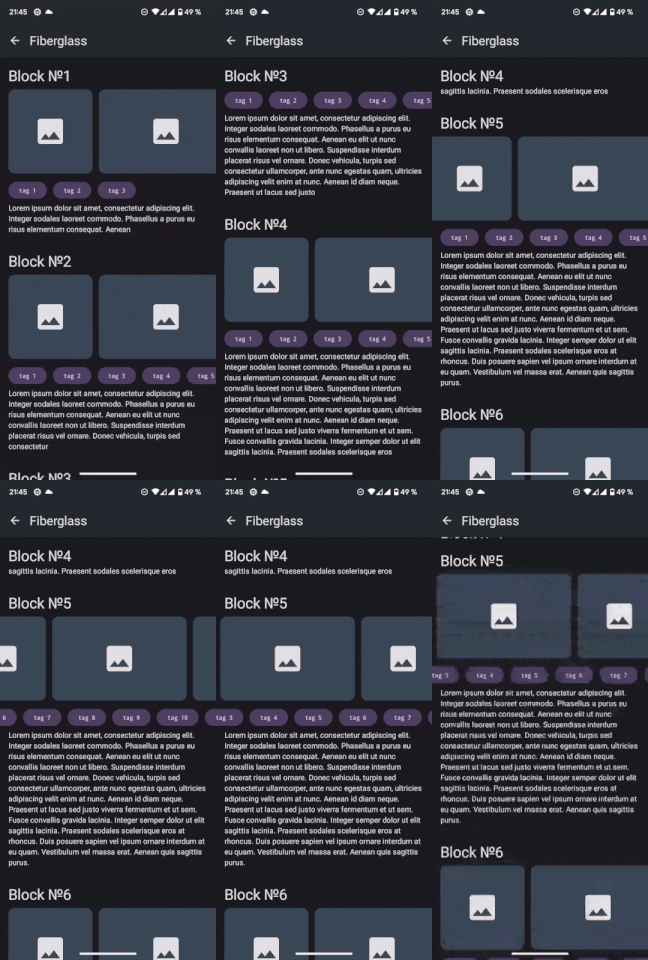 A tool for building complex screens based on simple blocks. Built on top of the following components:
* [Column]
* [LazyColumn]
* [Row]
* [LazyRow]
* [FlowRow]
* [FlowColumn]
* [LazyHorizontalGrid]
* [LazyVerticalGrid]
* [LazyHorizontalStaggeredGrid]
* [LazyVerticalStaggeredGrid]
Let’s imagine that you need to draw a screen, but you don’t know its content. You don’t know how many elements, sections, banners, or cards will be on the screen. It all depends on the data set received from the server.
In such a situation, the solution to the problem is the standardization of the screen components. We define valid screen items, prepare a slot for each item, and convert the response from the server into a list of items in the order we need. Items will define the data required for the components, and slots will define the UI to display this data.
As a result, we will get a set of blocks from which we can build complex screens without code duplication.
FiberglassColumn and FiberglassRow are great for small and not very complex cases or blocks. FiberglassLazyColumn and FiberglassLazyRow are more universal, and screens of any complexity can be built on their basis.
## Using in your projects
Android only:
```kotlin
dependencies {
implementation("ru.ldralighieri.composites:composites-fiberglass:0.6.0")
}
```
Multiplatform:
```kotlin
kotlin {
sourceSets {
commonMain.dependencies {
implementation("ru.ldralighieri.composites:composites-fiberglass:0.6.0")
}
}
}
```
Configure `google()` and `mavenCentral()` as described in the [root README](../README.md#using-in-your-projects).
The Paging overload of `FiberglassLazyColumn` is available only on Android.
## Model state and stability
`FiberglassItem` and `FiberglassStickyHeaderItem` are open interfaces and do not promise Compose
stability for their implementations.
## Example
List of items:
```kotlin
data class SpacerItem(override val id: String, val height: Int) : FiberglassItem
data class TitleItem(override val id: String, val title: String) : FiberglassItem
data class TextItem(override val id: String, val text: String) : FiberglassItem
```
List of slots:
```kotlin
fun spacerItemSlot(): FiberglassLazyItemSlot = { _, item ->
Spacer(modifier = Modifier.height((item as SpacerItem).height.dp))
}
fun titleItemSlot(): FiberglassLazyItemSlot = { _, item ->
Text(
text = (item as TitleItem).title,
modifier = Modifier.padding(horizontal = 16.dp),
style = MaterialTheme.typography.titleMedium
)
}
fun textItemSlot(): FiberglassLazyItemSlot = { _, item ->
Text(
text = (item as TextItem).text,
modifier = Modifier.padding(horizontal = 16.dp),
style = MaterialTheme.typography.bodyMedium,
)
}
```
Composite:
```kotlin
@Composable
private fun FiberglassColumnContent() {
val items: List = remember {
buildList {
val count = 4
repeat(count) {
val number = it + 1
add(TitleItem(id = "title:$number", title = "Block №$number"))
add(TextItem(id = "text:$number", text = "A block built from reusable items."))
if (number < count) add(SpacerItem(id = "spacer:$number", height = 16))
}
}
}
FiberglassLazyColumn(
items = items,
itemSlots = mapOf(
SpacerItem::class to spacerItemSlot(),
TitleItem::class to titleItemSlot(),
TextItem::class to textItemSlot()
),
modifier = Modifier.fillMaxSize(),
contentPadding = PaddingValues(vertical = 16.dp)
)
}
```
A more complex example can be found in the [demo application][demo]
[Column]: https://developer.android.com/reference/kotlin/androidx/compose/foundation/layout/package-summary#Column(androidx.compose.ui.Modifier,androidx.compose.foundation.layout.Arrangement.Vertical,androidx.compose.ui.Alignment.Horizontal,kotlin.Function1)
[LazyColumn]: https://developer.android.com/reference/kotlin/androidx/compose/foundation/lazy/package-summary#LazyColumn(androidx.compose.ui.Modifier,androidx.compose.foundation.lazy.LazyListState,androidx.compose.foundation.layout.PaddingValues,kotlin.Boolean,androidx.compose.foundation.layout.Arrangement.Vertical,androidx.compose.ui.Alignment.Horizontal,androidx.compose.foundation.gestures.FlingBehavior,kotlin.Boolean,kotlin.Function1)
[Row]: https://developer.android.com/reference/kotlin/androidx/compose/foundation/layout/package-summary#Row(androidx.compose.ui.Modifier,androidx.compose.foundation.layout.Arrangement.Horizontal,androidx.compose.ui.Alignment.Vertical,kotlin.Function1)
[LazyRow]: https://developer.android.com/reference/kotlin/androidx/compose/foundation/lazy/package-summary#LazyRow(androidx.compose.ui.Modifier,androidx.compose.foundation.lazy.LazyListState,androidx.compose.foundation.layout.PaddingValues,kotlin.Boolean,androidx.compose.foundation.layout.Arrangement.Horizontal,androidx.compose.ui.Alignment.Vertical,androidx.compose.foundation.gestures.FlingBehavior,kotlin.Boolean,kotlin.Function1)
[FlowRow]: https://developer.android.com/reference/kotlin/androidx/compose/foundation/layout/package-summary#FlowRow(androidx.compose.ui.Modifier,androidx.compose.foundation.layout.Arrangement.Horizontal,androidx.compose.foundation.layout.Arrangement.Vertical,kotlin.Int,kotlin.Function1)
[FlowColumn]: https://developer.android.com/reference/kotlin/androidx/compose/foundation/layout/package-summary#FlowColumn(androidx.compose.ui.Modifier,androidx.compose.foundation.layout.Arrangement.Vertical,androidx.compose.foundation.layout.Arrangement.Horizontal,kotlin.Int,kotlin.Function1)
[LazyHorizontalGrid]: https://developer.android.com/reference/kotlin/androidx/compose/foundation/lazy/grid/package-summary#LazyHorizontalGrid(androidx.compose.foundation.lazy.grid.GridCells,androidx.compose.ui.Modifier,androidx.compose.foundation.lazy.grid.LazyGridState,androidx.compose.foundation.layout.PaddingValues,kotlin.Boolean,androidx.compose.foundation.layout.Arrangement.Horizontal,androidx.compose.foundation.layout.Arrangement.Vertical,androidx.compose.foundation.gestures.FlingBehavior,kotlin.Boolean,kotlin.Function1)
[LazyVerticalGrid]: https://developer.android.com/reference/kotlin/androidx/compose/foundation/lazy/grid/package-summary#LazyVerticalGrid(androidx.compose.foundation.lazy.grid.GridCells,androidx.compose.ui.Modifier,androidx.compose.foundation.lazy.grid.LazyGridState,androidx.compose.foundation.layout.PaddingValues,kotlin.Boolean,androidx.compose.foundation.layout.Arrangement.Vertical,androidx.compose.foundation.layout.Arrangement.Horizontal,androidx.compose.foundation.gestures.FlingBehavior,kotlin.Boolean,kotlin.Function1)
[LazyHorizontalStaggeredGrid]: https://developer.android.com/reference/kotlin/androidx/compose/foundation/lazy/staggeredgrid/package-summary#LazyHorizontalStaggeredGrid(androidx.compose.foundation.lazy.staggeredgrid.StaggeredGridCells,androidx.compose.ui.Modifier,androidx.compose.foundation.lazy.staggeredgrid.LazyStaggeredGridState,androidx.compose.foundation.layout.PaddingValues,kotlin.Boolean,androidx.compose.foundation.layout.Arrangement.Vertical,androidx.compose.ui.unit.Dp,androidx.compose.foundation.gestures.FlingBehavior,kotlin.Boolean,kotlin.Function1)
[LazyVerticalStaggeredGrid]: https://developer.android.com/reference/kotlin/androidx/compose/foundation/lazy/staggeredgrid/package-summary#LazyVerticalStaggeredGrid(androidx.compose.foundation.lazy.staggeredgrid.StaggeredGridCells,androidx.compose.ui.Modifier,androidx.compose.foundation.lazy.staggeredgrid.LazyStaggeredGridState,androidx.compose.foundation.layout.PaddingValues,kotlin.Boolean,androidx.compose.ui.unit.Dp,androidx.compose.foundation.layout.Arrangement.Horizontal,androidx.compose.foundation.gestures.FlingBehavior,kotlin.Boolean,kotlin.Function1)
[demo]: https://github.com/LDRAlighieri/Composites/blob/main/shared/src/commonMain/kotlin/ru/ldralighieri/composites/shared/ui/fiberglass/FiberglassRootScreen.kt
[Compose stability contract]: https://developer.android.com/reference/kotlin/androidx/compose/runtime/Stable
A tool for building complex screens based on simple blocks. Built on top of the following components:
* [Column]
* [LazyColumn]
* [Row]
* [LazyRow]
* [FlowRow]
* [FlowColumn]
* [LazyHorizontalGrid]
* [LazyVerticalGrid]
* [LazyHorizontalStaggeredGrid]
* [LazyVerticalStaggeredGrid]
Let’s imagine that you need to draw a screen, but you don’t know its content. You don’t know how many elements, sections, banners, or cards will be on the screen. It all depends on the data set received from the server.
In such a situation, the solution to the problem is the standardization of the screen components. We define valid screen items, prepare a slot for each item, and convert the response from the server into a list of items in the order we need. Items will define the data required for the components, and slots will define the UI to display this data.
As a result, we will get a set of blocks from which we can build complex screens without code duplication.
FiberglassColumn and FiberglassRow are great for small and not very complex cases or blocks. FiberglassLazyColumn and FiberglassLazyRow are more universal, and screens of any complexity can be built on their basis.
## Using in your projects
Android only:
```kotlin
dependencies {
implementation("ru.ldralighieri.composites:composites-fiberglass:0.6.0")
}
```
Multiplatform:
```kotlin
kotlin {
sourceSets {
commonMain.dependencies {
implementation("ru.ldralighieri.composites:composites-fiberglass:0.6.0")
}
}
}
```
Configure `google()` and `mavenCentral()` as described in the [root README](../README.md#using-in-your-projects).
The Paging overload of `FiberglassLazyColumn` is available only on Android.
## Model state and stability
`FiberglassItem` and `FiberglassStickyHeaderItem` are open interfaces and do not promise Compose
stability for their implementations.
## Example
List of items:
```kotlin
data class SpacerItem(override val id: String, val height: Int) : FiberglassItem
data class TitleItem(override val id: String, val title: String) : FiberglassItem
data class TextItem(override val id: String, val text: String) : FiberglassItem
```
List of slots:
```kotlin
fun spacerItemSlot(): FiberglassLazyItemSlot = { _, item ->
Spacer(modifier = Modifier.height((item as SpacerItem).height.dp))
}
fun titleItemSlot(): FiberglassLazyItemSlot = { _, item ->
Text(
text = (item as TitleItem).title,
modifier = Modifier.padding(horizontal = 16.dp),
style = MaterialTheme.typography.titleMedium
)
}
fun textItemSlot(): FiberglassLazyItemSlot = { _, item ->
Text(
text = (item as TextItem).text,
modifier = Modifier.padding(horizontal = 16.dp),
style = MaterialTheme.typography.bodyMedium,
)
}
```
Composite:
```kotlin
@Composable
private fun FiberglassColumnContent() {
val items: List = remember {
buildList {
val count = 4
repeat(count) {
val number = it + 1
add(TitleItem(id = "title:$number", title = "Block №$number"))
add(TextItem(id = "text:$number", text = "A block built from reusable items."))
if (number < count) add(SpacerItem(id = "spacer:$number", height = 16))
}
}
}
FiberglassLazyColumn(
items = items,
itemSlots = mapOf(
SpacerItem::class to spacerItemSlot(),
TitleItem::class to titleItemSlot(),
TextItem::class to textItemSlot()
),
modifier = Modifier.fillMaxSize(),
contentPadding = PaddingValues(vertical = 16.dp)
)
}
```
A more complex example can be found in the [demo application][demo]
[Column]: https://developer.android.com/reference/kotlin/androidx/compose/foundation/layout/package-summary#Column(androidx.compose.ui.Modifier,androidx.compose.foundation.layout.Arrangement.Vertical,androidx.compose.ui.Alignment.Horizontal,kotlin.Function1)
[LazyColumn]: https://developer.android.com/reference/kotlin/androidx/compose/foundation/lazy/package-summary#LazyColumn(androidx.compose.ui.Modifier,androidx.compose.foundation.lazy.LazyListState,androidx.compose.foundation.layout.PaddingValues,kotlin.Boolean,androidx.compose.foundation.layout.Arrangement.Vertical,androidx.compose.ui.Alignment.Horizontal,androidx.compose.foundation.gestures.FlingBehavior,kotlin.Boolean,kotlin.Function1)
[Row]: https://developer.android.com/reference/kotlin/androidx/compose/foundation/layout/package-summary#Row(androidx.compose.ui.Modifier,androidx.compose.foundation.layout.Arrangement.Horizontal,androidx.compose.ui.Alignment.Vertical,kotlin.Function1)
[LazyRow]: https://developer.android.com/reference/kotlin/androidx/compose/foundation/lazy/package-summary#LazyRow(androidx.compose.ui.Modifier,androidx.compose.foundation.lazy.LazyListState,androidx.compose.foundation.layout.PaddingValues,kotlin.Boolean,androidx.compose.foundation.layout.Arrangement.Horizontal,androidx.compose.ui.Alignment.Vertical,androidx.compose.foundation.gestures.FlingBehavior,kotlin.Boolean,kotlin.Function1)
[FlowRow]: https://developer.android.com/reference/kotlin/androidx/compose/foundation/layout/package-summary#FlowRow(androidx.compose.ui.Modifier,androidx.compose.foundation.layout.Arrangement.Horizontal,androidx.compose.foundation.layout.Arrangement.Vertical,kotlin.Int,kotlin.Function1)
[FlowColumn]: https://developer.android.com/reference/kotlin/androidx/compose/foundation/layout/package-summary#FlowColumn(androidx.compose.ui.Modifier,androidx.compose.foundation.layout.Arrangement.Vertical,androidx.compose.foundation.layout.Arrangement.Horizontal,kotlin.Int,kotlin.Function1)
[LazyHorizontalGrid]: https://developer.android.com/reference/kotlin/androidx/compose/foundation/lazy/grid/package-summary#LazyHorizontalGrid(androidx.compose.foundation.lazy.grid.GridCells,androidx.compose.ui.Modifier,androidx.compose.foundation.lazy.grid.LazyGridState,androidx.compose.foundation.layout.PaddingValues,kotlin.Boolean,androidx.compose.foundation.layout.Arrangement.Horizontal,androidx.compose.foundation.layout.Arrangement.Vertical,androidx.compose.foundation.gestures.FlingBehavior,kotlin.Boolean,kotlin.Function1)
[LazyVerticalGrid]: https://developer.android.com/reference/kotlin/androidx/compose/foundation/lazy/grid/package-summary#LazyVerticalGrid(androidx.compose.foundation.lazy.grid.GridCells,androidx.compose.ui.Modifier,androidx.compose.foundation.lazy.grid.LazyGridState,androidx.compose.foundation.layout.PaddingValues,kotlin.Boolean,androidx.compose.foundation.layout.Arrangement.Vertical,androidx.compose.foundation.layout.Arrangement.Horizontal,androidx.compose.foundation.gestures.FlingBehavior,kotlin.Boolean,kotlin.Function1)
[LazyHorizontalStaggeredGrid]: https://developer.android.com/reference/kotlin/androidx/compose/foundation/lazy/staggeredgrid/package-summary#LazyHorizontalStaggeredGrid(androidx.compose.foundation.lazy.staggeredgrid.StaggeredGridCells,androidx.compose.ui.Modifier,androidx.compose.foundation.lazy.staggeredgrid.LazyStaggeredGridState,androidx.compose.foundation.layout.PaddingValues,kotlin.Boolean,androidx.compose.foundation.layout.Arrangement.Vertical,androidx.compose.ui.unit.Dp,androidx.compose.foundation.gestures.FlingBehavior,kotlin.Boolean,kotlin.Function1)
[LazyVerticalStaggeredGrid]: https://developer.android.com/reference/kotlin/androidx/compose/foundation/lazy/staggeredgrid/package-summary#LazyVerticalStaggeredGrid(androidx.compose.foundation.lazy.staggeredgrid.StaggeredGridCells,androidx.compose.ui.Modifier,androidx.compose.foundation.lazy.staggeredgrid.LazyStaggeredGridState,androidx.compose.foundation.layout.PaddingValues,kotlin.Boolean,androidx.compose.ui.unit.Dp,androidx.compose.foundation.layout.Arrangement.Horizontal,androidx.compose.foundation.gestures.FlingBehavior,kotlin.Boolean,kotlin.Function1)
[demo]: https://github.com/LDRAlighieri/Composites/blob/main/shared/src/commonMain/kotlin/ru/ldralighieri/composites/shared/ui/fiberglass/FiberglassRootScreen.kt
[Compose stability contract]: https://developer.android.com/reference/kotlin/androidx/compose/runtime/Stable