

한국어 / 中文(简体) / 中文(繁体) / 日本語 / English
## 미리 보기 Link: [https://songlh.top/paint-board/](https://songlh.top/paint-board/) Docs: [https://songlh.top/paint-board-docs/](https://songlh.top/paint-board-docs/)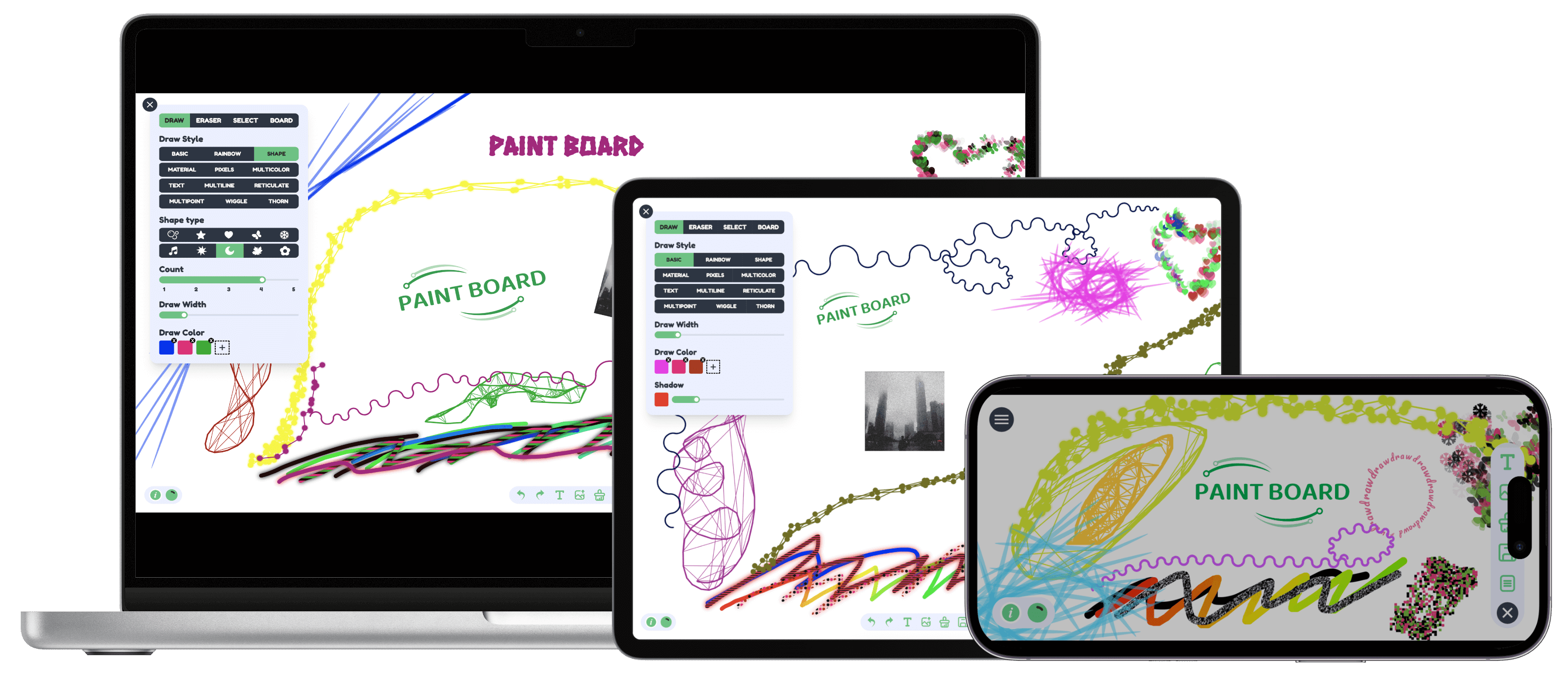
 ## 빠른 시작
```
git clone https://github.com/LHRUN/paint-board.git
cd paint-board
pnpm install
pnpm dev
```
### Docker
1. Clone source code repository
```sh
git clone https://github.com/LHRUN/paint-board.git
cd paint-board
```
2. Build a Docker image with the name `paint-board`.
```sh
docker build -t paint-board .
```
3. Start a docker container.
```sh
docker run -d -p 8080:80 --name paint-board paint-board
```
4. Accessed by opening `http://localhost:8080/paint-board/` in your browser.
## 브라우저 지원
최신 버전의 Google 크롬을 사용하는 것이 좋으며, 최소 지원 버전은 다음과 같습니다.
| [
## 빠른 시작
```
git clone https://github.com/LHRUN/paint-board.git
cd paint-board
pnpm install
pnpm dev
```
### Docker
1. Clone source code repository
```sh
git clone https://github.com/LHRUN/paint-board.git
cd paint-board
```
2. Build a Docker image with the name `paint-board`.
```sh
docker build -t paint-board .
```
3. Start a docker container.
```sh
docker run -d -p 8080:80 --name paint-board paint-board
```
4. Accessed by opening `http://localhost:8080/paint-board/` in your browser.
## 브라우저 지원
최신 버전의 Google 크롬을 사용하는 것이 좋으며, 최소 지원 버전은 다음과 같습니다.
| [ ](http://godban.github.io/browsers-support-badges/)Edge | [
 ](http://godban.github.io/browsers-support-badges/)Firefox | [
 ](http://godban.github.io/browsers-support-badges/)Chrome | [
 ](http://godban.github.io/browsers-support-badges/)Safari |
| :--: | :--: | :--: | :--: |
| 80+ | 80+ | 70+ | 16.4+ |
## 문의하기
제안이나 좋은 아이디어가 있으시면 언제든지 저에게 연락해 주세요!
+ Email: song.lhlh@gmail.com
+ Telegram: https://t.me/longhao_song
+ WeChat: August8_L
## Contributing
페인트보드에 기여해 주셔서 감사합니다. 버그를 발견하여 수정하고 싶으시면 먼저 이슈로 제출해 주세요. 새로운 기능 추가에 대해서는 토론을 통해 또는 위에 제공된 연락처로 직접 문의해 주시고, 아래의 기여 가이드라인을 읽어보신 후 기여해 주세요. 여러분의 지원에 감사드립니다!
[Contribution Guidelines](./CONTRIBUTING.md)
## Document
+ After refactoring with Fabric.js
- [Exploring the Canvas Series: combined with Transformers.js to achieve intelligent image processing](https://songlh.top/2024/11/23/Exploring-the-Canvas-Series-combined-with-Transformers-js-to-achieve-intelligent-image-processing/)
- [Exploring the Canvas Series: The Art of Time Reversal in the Canvas](https://songlh.top/2024/01/10/Exploring-the-Canvas-Series-The-Art-of-Time-Reversal-in-the-Canvas/)
- [Exploring the Canvas Series: Creative Brushes Part 1](https://songlh.top/2024/04/14/Exploring-the-Canvas-Series-Creative-Brushes-Part-1/)
- [Exploring the Canvas Series: Creative Brushes Part 2](https://songlh.top/2024/04/15/Exploring-the-Canvas-Series-Creative-Brushes-Part-2/)
- [Exploring the Canvas Series: Creative Brushes Part 3](https://songlh.top/2024/04/16/Exploring-the-Canvas-Series-Creative-Brushes-Part-3/)
- writing...
+ Before refactoring with Fabric.js
- [Canvas Artistry:Mastering Selection, Dragging, and Scaling](https://songlh.top/2023/11/30/Canvas-Artistry1)
- [Canvas Artistry:Drawing magic with multiple effects](https://songlh.top/2023/12/01/Canvas-Artistry2)
## License
MIT License. See the [LICENSE](https://github.com/LHRUN/paint-board/blob/main/LICENSE) file.
](http://godban.github.io/browsers-support-badges/)Safari |
| :--: | :--: | :--: | :--: |
| 80+ | 80+ | 70+ | 16.4+ |
## 문의하기
제안이나 좋은 아이디어가 있으시면 언제든지 저에게 연락해 주세요!
+ Email: song.lhlh@gmail.com
+ Telegram: https://t.me/longhao_song
+ WeChat: August8_L
## Contributing
페인트보드에 기여해 주셔서 감사합니다. 버그를 발견하여 수정하고 싶으시면 먼저 이슈로 제출해 주세요. 새로운 기능 추가에 대해서는 토론을 통해 또는 위에 제공된 연락처로 직접 문의해 주시고, 아래의 기여 가이드라인을 읽어보신 후 기여해 주세요. 여러분의 지원에 감사드립니다!
[Contribution Guidelines](./CONTRIBUTING.md)
## Document
+ After refactoring with Fabric.js
- [Exploring the Canvas Series: combined with Transformers.js to achieve intelligent image processing](https://songlh.top/2024/11/23/Exploring-the-Canvas-Series-combined-with-Transformers-js-to-achieve-intelligent-image-processing/)
- [Exploring the Canvas Series: The Art of Time Reversal in the Canvas](https://songlh.top/2024/01/10/Exploring-the-Canvas-Series-The-Art-of-Time-Reversal-in-the-Canvas/)
- [Exploring the Canvas Series: Creative Brushes Part 1](https://songlh.top/2024/04/14/Exploring-the-Canvas-Series-Creative-Brushes-Part-1/)
- [Exploring the Canvas Series: Creative Brushes Part 2](https://songlh.top/2024/04/15/Exploring-the-Canvas-Series-Creative-Brushes-Part-2/)
- [Exploring the Canvas Series: Creative Brushes Part 3](https://songlh.top/2024/04/16/Exploring-the-Canvas-Series-Creative-Brushes-Part-3/)
- writing...
+ Before refactoring with Fabric.js
- [Canvas Artistry:Mastering Selection, Dragging, and Scaling](https://songlh.top/2023/11/30/Canvas-Artistry1)
- [Canvas Artistry:Drawing magic with multiple effects](https://songlh.top/2023/12/01/Canvas-Artistry2)
## License
MIT License. See the [LICENSE](https://github.com/LHRUN/paint-board/blob/main/LICENSE) file.