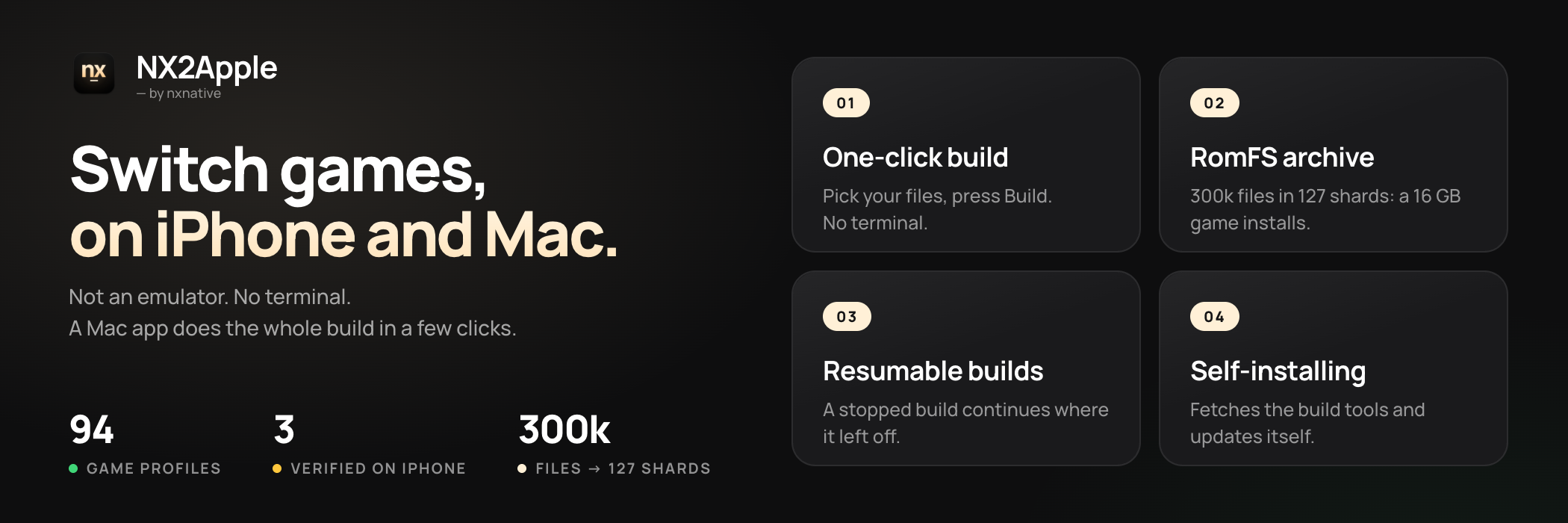
**Your Switch games, running on your iPhone.**
**Not an emulator. No terminal. A macOS app does the whole build in a few clicks.**
[](https://github.com/LNPANDY/NX2Apple/stargazers)
[](https://github.com/LNPANDY/NX2Apple/network/members)
[](https://github.com/LNPANDY/NX2Apple/issues)
[](LICENSE)
[](docs/badges/games.json)
[](docs/badges/verified.json)
[](README.md)
[](README.zh-CN.md)
#### 🆕 Latest highlights
- **Guided first run** — a setup wizard walks a new player through Xcode, keys and games; the build tools and a Python ship inside the app, so nobody installs Homebrew.
- **Saves that follow you** — Mac ⇄ iPhone saves sync through one iCloud Drive folder, a deleted app reinstalls in seconds, and a free Apple ID's 7-day signature renews in place.
- **Console mode** — plug in a controller, press Select: the library goes full screen, controller-first, like a Switch home menu.
Every release is in the [changelog](CHANGELOG.md). 中文用户请看这里:[简体中文 README](README.zh-CN.md)。
---
## What NX2Apple is
NX2Apple runs Nintendo Switch games on your Mac and iPhone from your own game dumps. It is not an
emulator: the game's own code runs natively on Apple silicon, and Metal draws it. A Mac app, the
launcher, does the build in a few clicks (unpack, rewrite, translate the shaders, pack) and then
keeps your games in a library you start with **Play**, the way a Switch does.
It is a community fork of **[nxnative](https://github.com/seedds/nxnative)**, which does the actual
work (the code rewriter, the Horizon host, NVN on Metal and every game's profile); this fork adds the
launcher and a short list of patches, and follows nxnative every day.
## Requirements
- **An Apple silicon Mac.** The launcher opens on **macOS 13 or later**. Building needs Xcode with
the iOS SDK, and NVN games need [Xcode](https://apps.apple.com/app/xcode/id497799835) 27.1 (macOS 26.6
or later) unless built with `--allow-other-metal`.
- **Your own game dumps** (NSP or XCI) and **your own `prod.keys`** from your own console. Nothing is
bundled, downloaded or looked up for you. The same `prod.keys` opens every one of your games; a
current dump covers all retail titles.
- For an iPhone: iOS 26 or later and a recent phone. Older devices are untested.
The app carries its own build tools and Python, so no Homebrew and no Python install; the .NET SDK 10
is the one tool it still installs for you. The launcher's dependency page checks each requirement and
installs what it can with one click.
## Install
1. **Download the app**: `NS-Port-Builder-macOS-arm64.zip` from the
[latest release](https://github.com/LNPANDY/NX2Apple/releases/latest). Unzip it.
2. **Open it once with right-click, then Open.** The app is not signed with a paid Apple developer
certificate, so macOS asks before the first start; after that it opens normally.
3. **Follow the setup.** The launcher fetches the project it builds with (a **Download repository**
button on the setup page, a shallow clone into `~/NX2Apple`; if GitHub is slow, the page shows the
manual ZIP route), checks the tools above and updates itself later. You never need git.
4. **Build a game.** Pick the game's folder (or its base game, update, DLC and `prod.keys` one by
one), choose **This Mac** or **iPhone / iPad**, and press build. The page shows the real stages and
the time left, and a stopped build continues where it left off. An iPhone build ends with the three
steps to put the app on the phone.
Building by hand from a terminal is in [BUILDING.md](BUILDING.md).
## How to play
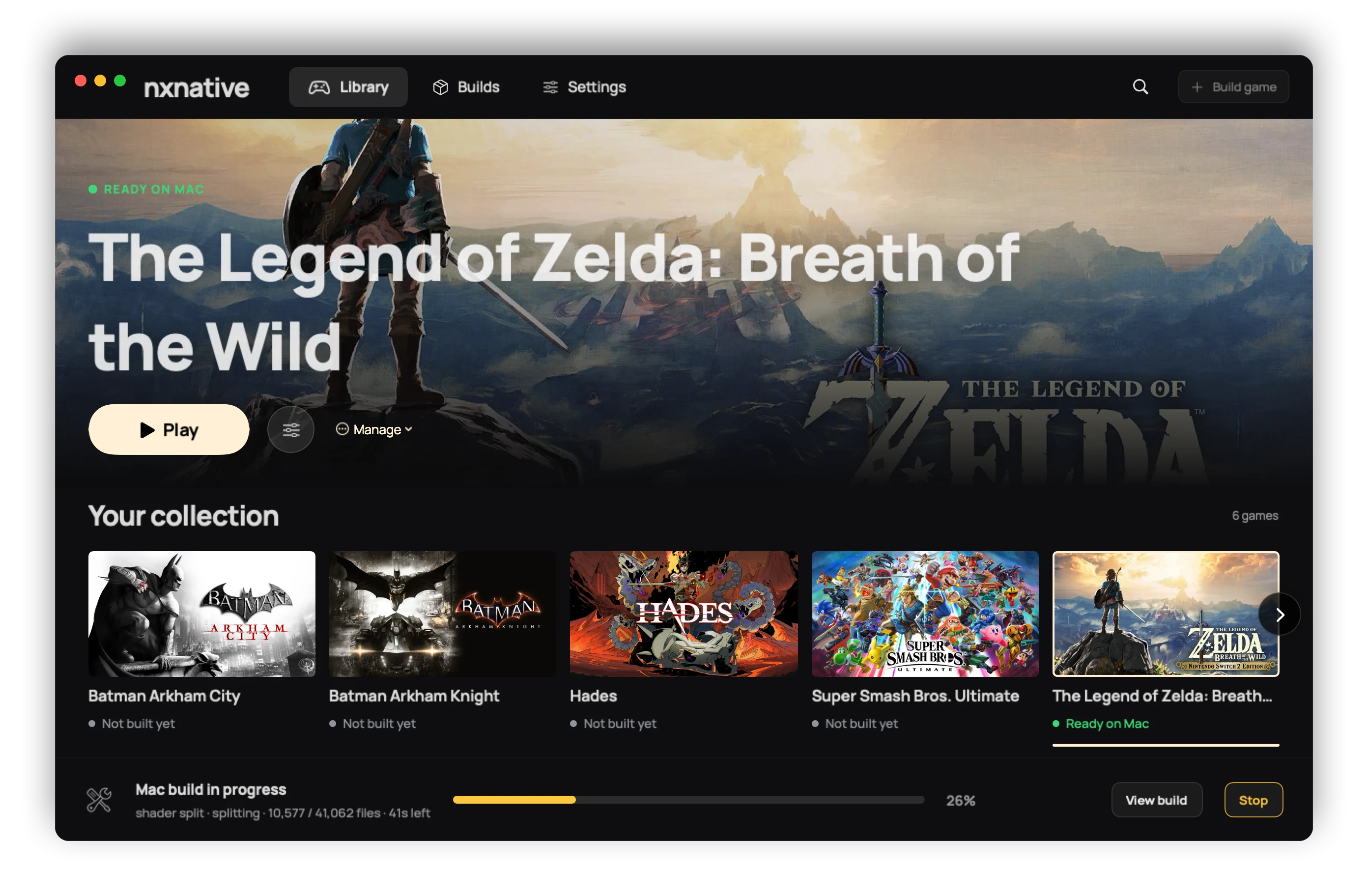
**On the Mac**, a finished game appears in the library with its key art. **Play** starts it.
**Launch options** (per game, kept across rebuilds) set the frame rate, console mode (docked or
handheld), render scale and upscaling, game language, controls and more; what each does is in
[docs/settings.md](docs/settings.md). A controller drives the launcher as well as the games.
**On the iPhone**, the app shows the same settings before the game starts; tap **Play**. Touch
controls come in a 2D and a 3D layout (tap the button at the top centre), and a connected controller
(Xbox, PlayStation, Switch Pro, MFi) replaces them. [docs/playing.md](docs/playing.md) covers touch,
rumble and motion. Short stutters the first time a scene appears are normal: the app compiles
graphics for it once and remembers them. The game's data (`romfs.img`) can live on an external drive
that the Files app picks.
**Game language.** English is the default. On the Mac, use the **Game language** row of Launch
options. For anything the sheet lacks, write an `env.txt` of `KEY=VALUE` lines (for example
`DM_LANG=zh-Hans`) in one of two places: `~/Library/Application Support/nxnative//env.txt`
wins and survives rebuilds; `<App>.app/Contents/Resources/dm/env.txt` is the app's own. A Mac app
built before the language row existed needs one rebuild to get it. On the iPhone, the same lines go
in `Documents/env.txt` (`DM_FPS_TARGET=30` caps the frame rate to save battery, `DM_OPMODE=0` picks
handheld mode).
**Saves and logs.** A Mac game in a library folder keeps its saves and its log beside the app
(`log/<title ID>.log`); otherwise they are in `~/Library/Application Support/nxnative/<title ID>/` and
`~/Library/Logs/nxnative/<title ID>.log`. On the iPhone they are in the Files app under the app's
name: `save/` and `log.txt` (the previous run is `log.prev.txt`).
**Reporting a bug.** Use the [issue forms](https://github.com/LNPANDY/NX2Apple/issues/new/choose)
(game problem, build problem, launcher problem). Each asks for the game and its title ID, your
versions and device, **Settings > Copy diagnostics** and the game's log; [CONTRIBUTING.md](CONTRIBUTING.md)
says why. A report with the full `log.txt` is looked at first. Never attach keys, game files or
anything extracted from a game.
## Games
94 games have a profile. Three are verified end to end on this fork (built, installed and played on a
phone), 45 more are reported playable on an iPhone upstream, and the rest have a profile that has not
been tried on a phone yet. A few of them:
| | Game | Where it runs | Status |
|---|---|---|---|
| <img src="docs/images/zelda-tears-of-the-kingdom.jpg" width="96" alt=""> | The Legend of Zelda: Tears of the Kingdom | Mac and iPhone | **Verified here**: 304,243 files, byte-checked; ~17 GB |
| <img src="docs/images/hades-ii.jpg" width="96" alt=""> | Hades II | Mac and iPhone | **Verified here** |
| <img src="docs/images/animal-crossing-new-horizons.jpg" width="96" alt=""> | Animal Crossing: New Horizons | iPhone | **Verified here**: runs smoothly |
| <img src="docs/images/super-mario-odyssey.jpg" width="96" alt=""> | Super Mario Odyssey | iPhone | Reported playable upstream |
| <img src="docs/images/zelda-breath-of-the-wild.jpg" width="96" alt=""> | The Legend of Zelda: Breath of the Wild | iPhone | Reported playable upstream; 60 fps with 1.9.0 |
| <img src="docs/images/mario-kart-8-deluxe.jpg" width="96" alt=""> | Mario Kart 8 Deluxe | iPhone | Reported playable upstream |
**[GAMES.md](GAMES.md)** (中文: [GAMES.zh-CN.md](GAMES.zh-CN.md)) has the screenshot gallery with each
game's install size, and the full table with the update version each game needs: the update NSP's
display version must match the profile's, or the build says so.
## Limitations
- **Only the games with a profile.** A title outside the list needs bring-up work of its own; the
place to start is [docs/agents](docs/agents/README.md), upstream's guide for another Switch title.
- **Big games on an iPhone hit a memory limit.** Without the Increased Memory Limit entitlement iOS
gives the app about 3.4 GB, which is not enough for Tears of the Kingdom. The app requests it, and
AltStore Classic 2.2+, Impactor and Xcode with a Personal Team keep it; SideStore with a free Apple
ID needs a one-time App ID fix, and Sideloadly drops it ([the steps](dm/ios/ENTITLEMENTS.md)). The
full measurements are in [GAMES.md](GAMES.md#verified-on).
- **Unsigned apps.** The launcher and the iPhone builds are not signed for you; you sideload them.
- **Your own files.** No game data, firmware or keys are included or downloaded.
- **Older shard archives are not read any more.** The first iPhone builds packed Tears of the Kingdom
into a RomFS shard archive (`romfs.idx`); the build writes a single `romfs.img` now. An iPhone
that still holds an old archive needs the game data sent again once, as a `romfs.img` through the launcher.
## For developers
- **Build from source:** [BUILDING.md](BUILDING.md). **Report or fix something:** [CONTRIBUTING.md](CONTRIBUTING.md).
- **What this fork changes in upstream:** the engine (`dm/`, `scripts/`, `docs/`, `ref/`,
`AGENTS.md`) is nxnative at a pinned commit plus a queue of patches, each saying why the fork
carries it. [patches/README.md](patches/README.md) explains it, and
`python3 scripts/patches.py status` lists what is carried. A daily job moves the pin and opens a
pull request, or an issue naming the patch that no longer fits.
- **Another Switch game:** [docs/agents](docs/agents/README.md) (extraction, binary survey, bring-up).
- **Release history:** [CHANGELOG.md](CHANGELOG.md).
## Credits
**Community contributors** — this project's code is not one maintainer's output:
- **[v0lumehi](https://github.com/v0lumehi)** — **the Mac front end's launcher** (PR [#27](https://github.com/LNPANDY/NX2Apple/pull/27), 40 files): a game library with key art, per-game launch options, a real progress stream, and a Stop that ends the whole build's process group. The Mac app went from "a build form" to the first version of a launcher that opens like a Switch.
- **[m1guelpf](https://github.com/m1guelpf)** (Miguel Piedrafita) — two HLE fixes (PRs [#24](https://github.com/LNPANDY/NX2Apple/pull/24) and [#26](https://github.com/LNPANDY/NX2Apple/pull/26)): the missing `EnableAlbumImageTakenNotification` and `CreateWithAdjustableSystemClock` entries plus their snapshot type byte — each would have read a null in games that call them, and each came with a test.
Want on this list? [Contributing](CONTRIBUTING.md#helping-with-games) says how to start; reports with a full log and fixes with a test move fastest.
All of the engine work is other people's. This repository adds the launcher and the patch queue on top:
- **[nxnative](https://github.com/seedds/nxnative)** (MIT) — the native-execution toolchain this
repository is built from: the NSO rewriter, the Horizon host layer, NVN-on-Metal, the per-game
profiles and the iOS shell.
- **[d2r-mobile](https://github.com/jhaizhou-ops/d2r-mobile)** (MIT) — the original native-execution
approach that nxnative grew out of.
- **Ryujinx** (MIT) — the shader translator that turns Maxwell shaders into SPIR-V.
- **[Atmosphère](https://github.com/Atmosphere-NX/Atmosphere)** — the reference for Horizon's
synchronization semantics.
- **[LibHac](https://github.com/Thealexbarney/LibHac)** — reads NSPs and layers updates in
`nx_extract`.
- **[SPIRV-Cross](https://github.com/KhronosGroup/SPIRV-Cross)** — SPIR-V to Metal Shading Language.
- **yuzu**, **deko3d**, **libvpx**, **stb_vorbis**, **libdeflate** — see upstream's acknowledgement
list for what each contributes.
`dm/third_party` ships other projects with their licenses ([list](dm/third_party/README.md)).
## Legal
**What this project is.** A build tool for games you already own. It reads dumps you made of your
own cartridges and purchases, on your own machine, and produces a package for your own device.
Nothing in this repository, in the app, or in any release contains or distributes Nintendo's code,
art, text, data, shaders, firmware, keys or any other copyrighted material.
**What it cannot do.** The pipeline has no source of games or keys: it requires the user's own
`prod.keys` and their own NSP/XCI dumps, and it talks to no server. It does not bypass, strip or
redistribute any protection — LibHac opens the user's own dumps with the user's own keys, the same
operation a console performs on a cartridge.
**Trademarks.** Not affiliated with, sponsored by or endorsed by Nintendo. "Nintendo Switch" and
game titles are trademarks of Nintendo Co., Ltd.; all other trademarks belong to their respective
owners.
**Your responsibility.** Laws on making a personal backup copy differ by country; some places do
not allow it at all. You are responsible for knowing and following the law where you live, and for
never distributing game files, keys or the packages built from them — the project's outputs are for
personal use on your own hardware only. If you enjoy a game, buy it.
**Takedowns.** If you believe anything in this repository infringes your rights, open an issue or
contact the maintainer directly; valid claims will be actioned promptly, up to removing content or
the repository.
**No warranty.** The software is provided "as is" under the licenses in [LICENSE](LICENSE) (this
fork adds to upstream's; see the credits) — without warranty of any kind, express or implied. Use
it at your own risk.

 #### 🆕 Latest highlights
- **Guided first run** — a setup wizard walks a new player through Xcode, keys and games; the build tools and a Python ship inside the app, so nobody installs Homebrew.
- **Saves that follow you** — Mac ⇄ iPhone saves sync through one iCloud Drive folder, a deleted app reinstalls in seconds, and a free Apple ID's 7-day signature renews in place.
- **Console mode** — plug in a controller, press Select: the library goes full screen, controller-first, like a Switch home menu.
Every release is in the [changelog](CHANGELOG.md). 中文用户请看这里:[简体中文 README](README.zh-CN.md)。
#### 🆕 Latest highlights
- **Guided first run** — a setup wizard walks a new player through Xcode, keys and games; the build tools and a Python ship inside the app, so nobody installs Homebrew.
- **Saves that follow you** — Mac ⇄ iPhone saves sync through one iCloud Drive folder, a deleted app reinstalls in seconds, and a free Apple ID's 7-day signature renews in place.
- **Console mode** — plug in a controller, press Select: the library goes full screen, controller-first, like a Switch home menu.
Every release is in the [changelog](CHANGELOG.md). 中文用户请看这里:[简体中文 README](README.zh-CN.md)。
 It is a community fork of **[nxnative](https://github.com/seedds/nxnative)**, which does the actual
work (the code rewriter, the Horizon host, NVN on Metal and every game's profile); this fork adds the
launcher and a short list of patches, and follows nxnative every day.
## Requirements
- **An Apple silicon Mac.** The launcher opens on **macOS 13 or later**. Building needs Xcode with
the iOS SDK, and NVN games need [Xcode](https://apps.apple.com/app/xcode/id497799835) 27.1 (macOS 26.6
or later) unless built with `--allow-other-metal`.
- **Your own game dumps** (NSP or XCI) and **your own `prod.keys`** from your own console. Nothing is
bundled, downloaded or looked up for you. The same `prod.keys` opens every one of your games; a
current dump covers all retail titles.
- For an iPhone: iOS 26 or later and a recent phone. Older devices are untested.
The app carries its own build tools and Python, so no Homebrew and no Python install; the .NET SDK 10
is the one tool it still installs for you. The launcher's dependency page checks each requirement and
installs what it can with one click.
## Install
1. **Download the app**: `NS-Port-Builder-macOS-arm64.zip` from the
[latest release](https://github.com/LNPANDY/NX2Apple/releases/latest). Unzip it.
2. **Open it once with right-click, then Open.** The app is not signed with a paid Apple developer
certificate, so macOS asks before the first start; after that it opens normally.
3. **Follow the setup.** The launcher fetches the project it builds with (a **Download repository**
button on the setup page, a shallow clone into `~/NX2Apple`; if GitHub is slow, the page shows the
manual ZIP route), checks the tools above and updates itself later. You never need git.
4. **Build a game.** Pick the game's folder (or its base game, update, DLC and `prod.keys` one by
one), choose **This Mac** or **iPhone / iPad**, and press build. The page shows the real stages and
the time left, and a stopped build continues where it left off. An iPhone build ends with the three
steps to put the app on the phone.
Building by hand from a terminal is in [BUILDING.md](BUILDING.md).
## How to play
**On the Mac**, a finished game appears in the library with its key art. **Play** starts it.
**Launch options** (per game, kept across rebuilds) set the frame rate, console mode (docked or
handheld), render scale and upscaling, game language, controls and more; what each does is in
[docs/settings.md](docs/settings.md). A controller drives the launcher as well as the games.
**On the iPhone**, the app shows the same settings before the game starts; tap **Play**. Touch
controls come in a 2D and a 3D layout (tap the button at the top centre), and a connected controller
(Xbox, PlayStation, Switch Pro, MFi) replaces them. [docs/playing.md](docs/playing.md) covers touch,
rumble and motion. Short stutters the first time a scene appears are normal: the app compiles
graphics for it once and remembers them. The game's data (`romfs.img`) can live on an external drive
that the Files app picks.
**Game language.** English is the default. On the Mac, use the **Game language** row of Launch
options. For anything the sheet lacks, write an `env.txt` of `KEY=VALUE` lines (for example
`DM_LANG=zh-Hans`) in one of two places: `~/Library/Application Support/nxnative/
It is a community fork of **[nxnative](https://github.com/seedds/nxnative)**, which does the actual
work (the code rewriter, the Horizon host, NVN on Metal and every game's profile); this fork adds the
launcher and a short list of patches, and follows nxnative every day.
## Requirements
- **An Apple silicon Mac.** The launcher opens on **macOS 13 or later**. Building needs Xcode with
the iOS SDK, and NVN games need [Xcode](https://apps.apple.com/app/xcode/id497799835) 27.1 (macOS 26.6
or later) unless built with `--allow-other-metal`.
- **Your own game dumps** (NSP or XCI) and **your own `prod.keys`** from your own console. Nothing is
bundled, downloaded or looked up for you. The same `prod.keys` opens every one of your games; a
current dump covers all retail titles.
- For an iPhone: iOS 26 or later and a recent phone. Older devices are untested.
The app carries its own build tools and Python, so no Homebrew and no Python install; the .NET SDK 10
is the one tool it still installs for you. The launcher's dependency page checks each requirement and
installs what it can with one click.
## Install
1. **Download the app**: `NS-Port-Builder-macOS-arm64.zip` from the
[latest release](https://github.com/LNPANDY/NX2Apple/releases/latest). Unzip it.
2. **Open it once with right-click, then Open.** The app is not signed with a paid Apple developer
certificate, so macOS asks before the first start; after that it opens normally.
3. **Follow the setup.** The launcher fetches the project it builds with (a **Download repository**
button on the setup page, a shallow clone into `~/NX2Apple`; if GitHub is slow, the page shows the
manual ZIP route), checks the tools above and updates itself later. You never need git.
4. **Build a game.** Pick the game's folder (or its base game, update, DLC and `prod.keys` one by
one), choose **This Mac** or **iPhone / iPad**, and press build. The page shows the real stages and
the time left, and a stopped build continues where it left off. An iPhone build ends with the three
steps to put the app on the phone.
Building by hand from a terminal is in [BUILDING.md](BUILDING.md).
## How to play
**On the Mac**, a finished game appears in the library with its key art. **Play** starts it.
**Launch options** (per game, kept across rebuilds) set the frame rate, console mode (docked or
handheld), render scale and upscaling, game language, controls and more; what each does is in
[docs/settings.md](docs/settings.md). A controller drives the launcher as well as the games.
**On the iPhone**, the app shows the same settings before the game starts; tap **Play**. Touch
controls come in a 2D and a 3D layout (tap the button at the top centre), and a connected controller
(Xbox, PlayStation, Switch Pro, MFi) replaces them. [docs/playing.md](docs/playing.md) covers touch,
rumble and motion. Short stutters the first time a scene appears are normal: the app compiles
graphics for it once and remembers them. The game's data (`romfs.img`) can live on an external drive
that the Files app picks.
**Game language.** English is the default. On the Mac, use the **Game language** row of Launch
options. For anything the sheet lacks, write an `env.txt` of `KEY=VALUE` lines (for example
`DM_LANG=zh-Hans`) in one of two places: `~/Library/Application Support/nxnative/