🤖 AppAgent‑Pro
Paper•
Demo Video •
License


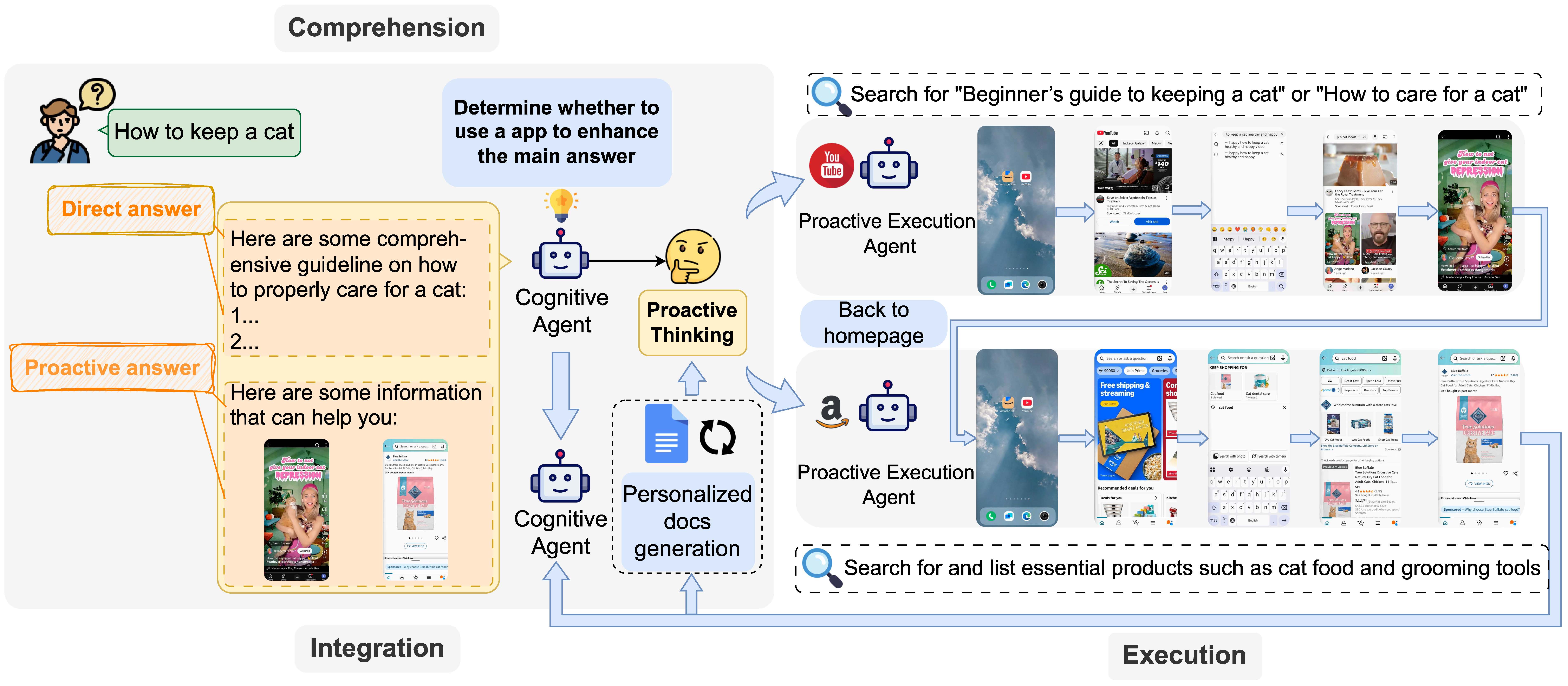
**AppAgent-Pro** is a proactive GUI AI agent system that goes beyond text-based answers. Built as an enhancement to the original [AppAgent](https://github.com/TencentQQGYLab/AppAgent), it can **proactively interact with Android apps (YouTube, Amazon) via ADB**, decide whether external information is needed, and combine retrieved results with LLM-generated responses with exquisite GUI webpage.
Unlike traditional assistants that passively respond with pretrained knowledge, **AppAgent-Pro** functions as a **proactive multimodal mobile agent** with real-world execution capabilities. It follows a unified, end-to-end pipeline of:
### 🧠 Comprehension → Execution → Integration
1. **Comprehension** — Upon receiving a user query, GPT-4o is used to generate an initial answer and infer potential sub-tasks. This step leverages LLM reasoning to form a high-level plan. The agent proactively assesses whether external information is needed, determines which app(s) to launch (YouTube, Amazon), and formulates actionable sub-tasks for each.
2. **Execution** — It then simulates real human interactions on mobile apps (clicking, swiping, entering text) via ADB, executing the sub-tasks and collecting content such as screenshots, product details, or video metadata.
3. **Integration** — Finally, the agent merges the LLM-generated textual answer with the app-acquired content to produce a structured, enriched response — delivering a truly **proactive, context-aware output**.
> 🎯 This enables AppAgent-Pro to act not only as a language model, but as a real-world **task executor** — bridging LLM cognition with interactive app control.
---
## 🎬 Strategy Comparison Demo
We demonstrate how AppAgent-Pro handles three different scenarios depending on the complexity of the query and the need for external resources.
### ✅ Scenario 1: **No External App Needed**
The query is simple and can be answered entirely using the LLM’s internal knowledge.
> 🧠 _“How many hours are there in one day?” → No sub-tasks needed._
- **Video Demonstration**
---
### ✅ Scenario 2: **One External App Used**
The agent chooses to enhance the answer using one external app (e.g., YouTube).
> 🎥 _“How to upload a video on Youtube?” → Add a YouTube video tutorial._
- **Video Demonstration**
---
### ✅ Scenario 3: **Two External Apps Used**
The agent enhances its response with **both** YouTube and Amazon.
> 🐈 _“How to keep a cat?” → Add product picture (Amazon) and assembly guide videos (YouTube)._
- **Video Demonstration**
---
## ⚡ Quick Start
### ⚙️ Step 1: Prerequisites
1. Install [ADB](https://developer.android.com/tools/adb) on your PC.
2. Enable **USB debugging** on your Android device (in Developer Options).
3. Connect your device via USB.
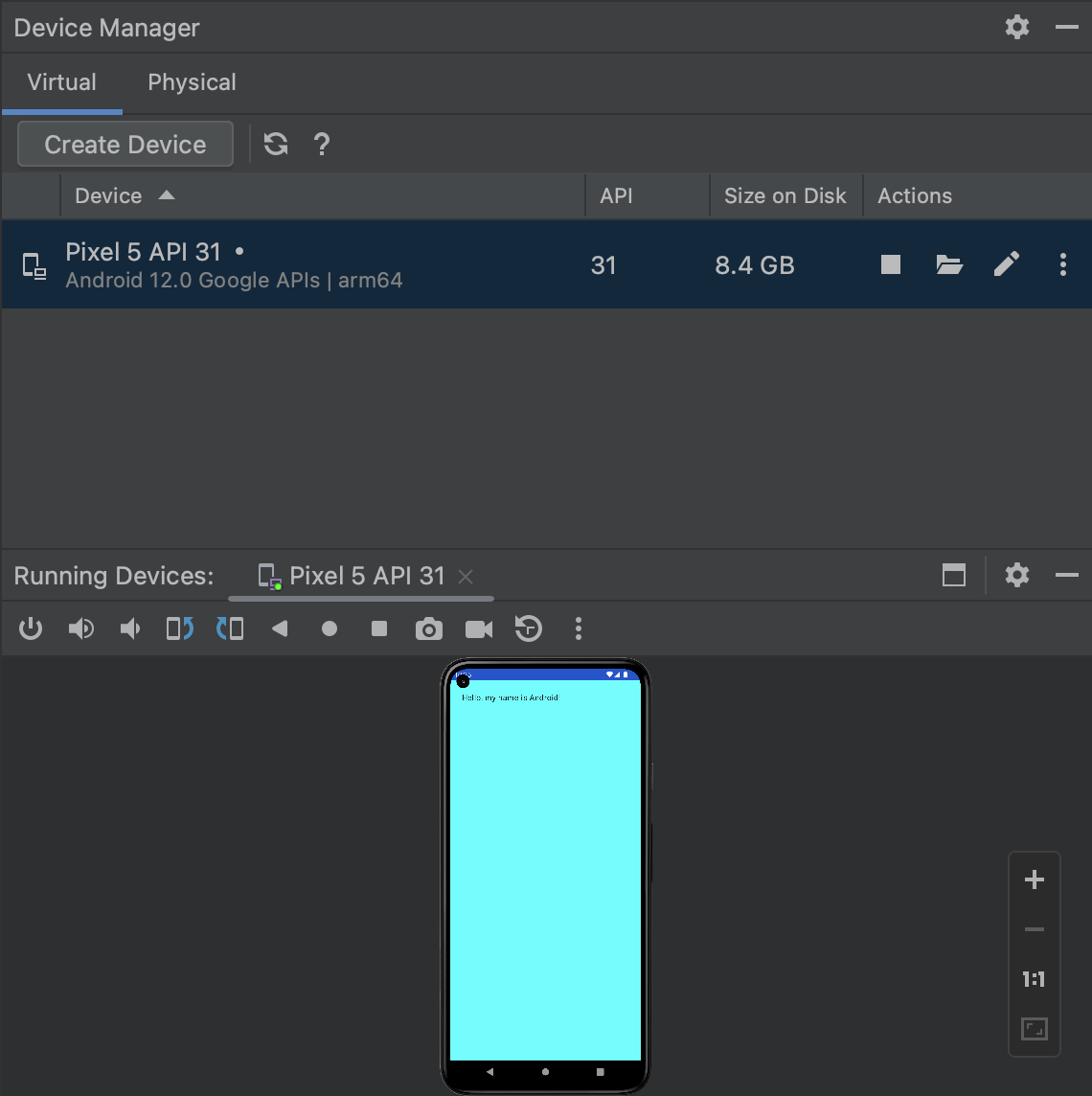
4. (Optional) No real device? Use the Android Studio emulator and install apps via APK drag-and-drop.
 5. Clone this repo and install dependencies:
```bash
cd AppAgent-Pro
pip install -r requirements.txt
```
---
### ⚙️ Step 2: Configure the Agent
Edit `config.yaml` with:
- 🔑 `openai_api_key`: Your OpenAI key with GPT-4o access.
- 🌐 `openai_base`: (Optional) Base URL if using a proxy.
- ⏱️ `request_interval`: Seconds between API calls.
- 📜 `AUTO_DOC`:If set to `true`, the system will automatically generate a document after each sub-task finishes.
---
### 🔍 Step 3: Exploration Phase
AppAgent-Pro needs to understand how to interact with the target apps.
#### 🧑🏫 Option 1: Human Demonstration (Recommended)
You show the agent how to operate the app.
```bash
python learn.py
```
#### 🤖 Option 2: Autonomous Exploration
The agent explores app UI on its own.
```bash
python learn.py
```
---
### 🚀 Step 4: Deployment Phase
Once exploration is done, launch the demo web app:
```bash
streamlit run ./scripts/run_demo.py
```
AppAgent-Pro will decide which apps to use (if any), generate sub-tasks, and present a unified response including external resources.
---
## 📃 License
This project is licensed under the **MIT License**. See [LICENSE](./LICENSE) for full details.
5. Clone this repo and install dependencies:
```bash
cd AppAgent-Pro
pip install -r requirements.txt
```
---
### ⚙️ Step 2: Configure the Agent
Edit `config.yaml` with:
- 🔑 `openai_api_key`: Your OpenAI key with GPT-4o access.
- 🌐 `openai_base`: (Optional) Base URL if using a proxy.
- ⏱️ `request_interval`: Seconds between API calls.
- 📜 `AUTO_DOC`:If set to `true`, the system will automatically generate a document after each sub-task finishes.
---
### 🔍 Step 3: Exploration Phase
AppAgent-Pro needs to understand how to interact with the target apps.
#### 🧑🏫 Option 1: Human Demonstration (Recommended)
You show the agent how to operate the app.
```bash
python learn.py
```
#### 🤖 Option 2: Autonomous Exploration
The agent explores app UI on its own.
```bash
python learn.py
```
---
### 🚀 Step 4: Deployment Phase
Once exploration is done, launch the demo web app:
```bash
streamlit run ./scripts/run_demo.py
```
AppAgent-Pro will decide which apps to use (if any), generate sub-tasks, and present a unified response including external resources.
---
## 📃 License
This project is licensed under the **MIT License**. See [LICENSE](./LICENSE) for full details.