Atlas Cloud gives developers one unified API for building with language, image, and video AI. Connect once to explore 300+ curated models across every modality—without maintaining separate integrations for each provider. From LLM-powered agents to image and video generation, Atlas Cloud makes it easier to experiment, compare models, and bring multimodal AI into production.
## What's New
- **`1.6`**: Introduces the new Learning Mode—turn any topic and reference materials into a personalized learning project with structured outlines, knowledge points, flashcards, and an interactive knowledge map. Built-in FSRS spaced repetition and Anki `.apkg` import help turn knowledge into a sustainable review workflow.
- **`1.5`**: Introduces a new Agent runtime that turns AI from Q&A into active collaboration—with full tool calling, MCP, Skills, desktop Bash, subagents, and web search—plus smarter long-session context and memory, refreshed hybrid RAG, focus/PDF awareness, and multi-window chat with background Agents.
## Highlights
| A Complete Agent Experience, Across Devices | Turn Vault Knowledge into Lasting Mastery |
|:--:|:--:|
| 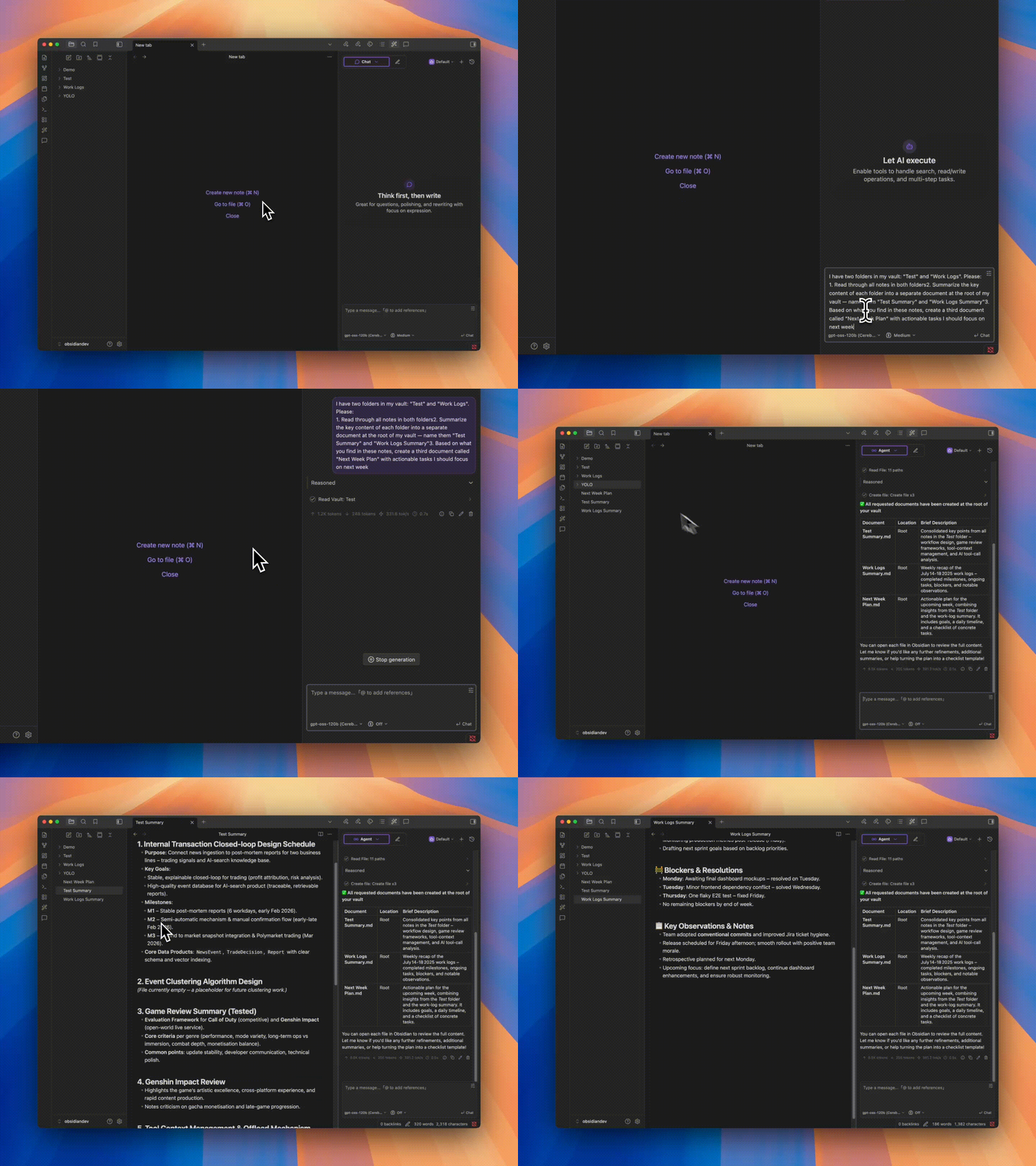 | 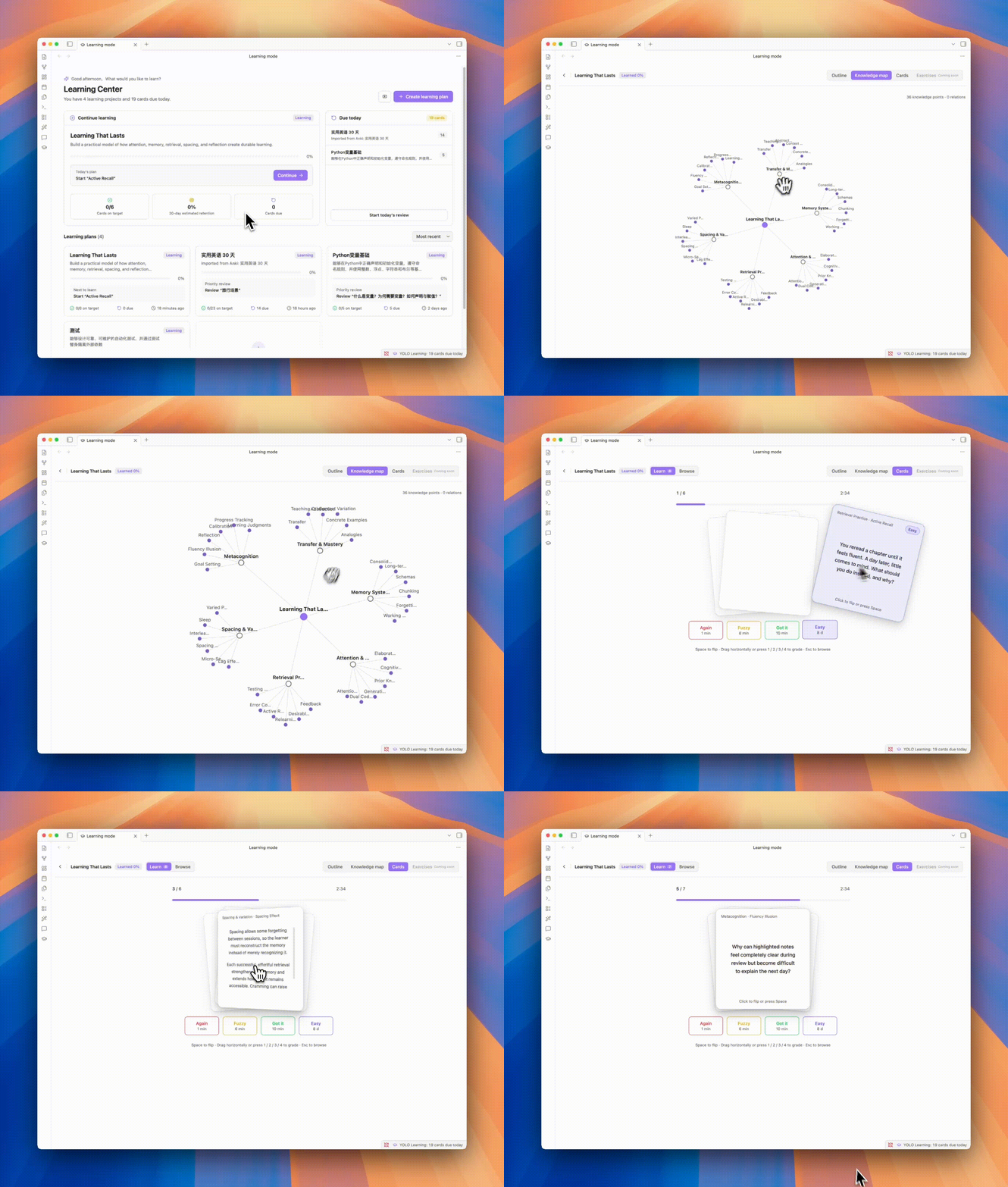 |
| Go beyond answers. YOLO understands and works directly with your Vault, calls tools and MCP servers, and uses Skills to get real work done your way. | Turn topics and source material into a personal learning system, then use flashcards and FSRS-powered review to move from saved notes to lasting knowledge. |
## Features
Beyond the core capabilities above, YOLO also provides:
| Feature | Description |
|---------|-------------|
| 🔌 External Agent Support | Connect MCP clients such as Hermes and OpenClaw to YOLO's Vault search, or delegate tasks to a configured YOLO Agent |
| ⚡ Quick Ask & Smart Space | Ask, edit, and continue writing without leaving the editor |
| 🔎 Vault RAG | Retrieve across your Vault for answers grounded in your own notes |
| 🪟 Multi-Window Chat | Run different tasks and contexts in parallel across independent chat windows |
| 🧠 Memory System | Lets YOLO remember preferences, habits, and long-term context for more consistent conversations |
| 🪡 Cursor Chat | One-click context addition, conversation at your fingertips |
| ⌨️ Tab Completion | Real-time AI-powered completion for smoother, more natural writing |
| 🎛️ Multi-Model Support | OpenAI, Claude, Gemini, DeepSeek and other mainstream models, freely switch |
| 🌍 i18n | Native multi-language support |
## Quick Start
1. Open Obsidian Settings → Community Plugins → Browse → Search **"YOLO"**
2. Install and enable
3. Configure your API key in plugin settings, or use your own ChatGPT OAuth / Gemini OAuth:
- [OpenAI](https://platform.openai.com/api-keys) / [Anthropic](https://console.anthropic.com/settings/keys) / [Gemini](https://aistudio.google.com/apikey) / [Groq](https://console.groq.com/keys)
4. Open the sidebar to start chatting — or try Quick Ask by typing `@` in the editor
## Installation
### Community Plugin Store (Recommended)
See Quick Start above.
### Manual Installation
1. Go to [Releases](https://github.com/Lapis0x0/obsidian-yolo/releases) and download the latest `main.js`, `manifest.json`, `styles.css`
2. Create folder: `/.obsidian/plugins/obsidian-yolo/`
3. Copy files to that folder, then enable the plugin in Obsidian Settings
> [!WARNING]
> YOLO cannot coexist with [Smart Composer](https://github.com/glowingjade/obsidian-smart-composer). Please disable or uninstall Smart Composer before using YOLO.
## Roadmap
- [x] Better and stronger Vault AI search
- [x] Background Agent (long-running task automation)
- [x] Multi-Agent orchestration (via subagents)
- [x] Learning Mode — a dedicated study view
- [ ] Annotation Mode — real-time AI annotations and suggestions on notes
- [ ] Built-in assistant — a corner-pinned helper for config/agents, with auto-compaction and scheduled tasks
- [ ] Better AI whiteboard
- [ ] Voice input & meeting notes
## Feedback & Issues
Hit a bug, something confusing, or have an idea? Open an issue:
🐛 [Report a bug](https://github.com/Lapis0x0/obsidian-yolo/issues/new?template=bug_report.yml) · ✨ [Request a feature](https://github.com/Lapis0x0/obsidian-yolo/issues/new?template=feature_request.yml)
What helps:
- Bug reports with a clear reproduction (Obsidian version, OS, plugin version, what you did, what happened)
- "I tried X and got Y" reports — UX papercuts, confusing wording, broken docs, outdated translations
- Concrete feature ideas tied to a real use case ("when I do A, I want B because C")
Please search existing issues first to avoid duplicates.
## Contributing
All forms of contribution are welcome — bug reports, documentation improvements, feature enhancements.
**Please open an issue first to discuss feasibility and implementation for major features.**
See [CONTRIBUTING.md](./CONTRIBUTING.md) for the full guide: what we welcome, AI-assisted PR policy, size guidelines, and dev setup.
## Acknowledgments
Thanks to [Smart Composer](https://github.com/glowingjade/obsidian-smart-composer) for the original work — without them, there would be no YOLO.
Special thanks to [Kilo Code](https://kilo.ai) for their sponsorship. Kilo is an open-source AI coding assistant platform with 500+ AI models, helping developers build and iterate faster.
## Support
If you find YOLO valuable, consider supporting the project:
Development logs are regularly updated on the [blog](https://www.lapis.cafe).
## License
[MIT License](LICENSE)
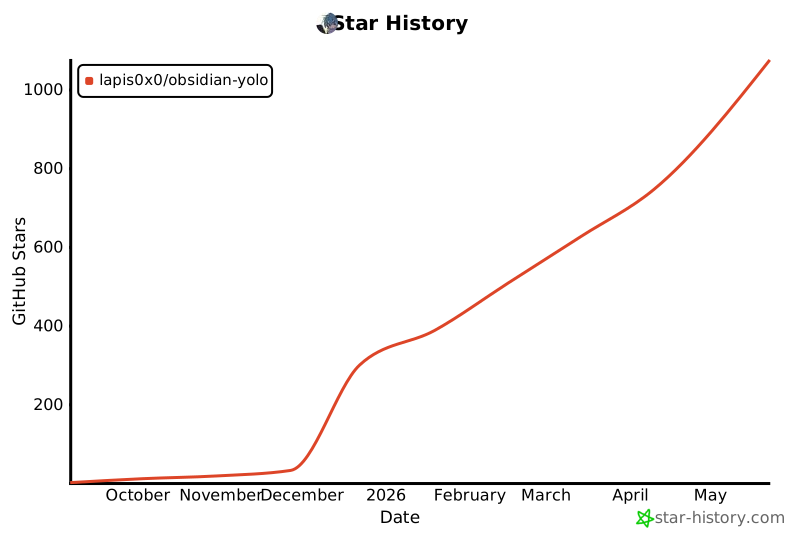
## Star History
[](https://star-history.com/#Lapis0x0/obsidian-yolo&Type=Date)








