# Video-Streaming-via-CDN
This project is Assignment2 of UMich [EECS489 Computer Networks](https://github.com/mosharaf/eecs489).
[Here](https://drive.google.com/file/d/1m1jUI4Uja0fj80q8r-Kao4Mtv_rSVhxy/view?usp=sharing) is the VM setup enviornment. This VM includes mininet, Apache, and all the files we will be streaming in this project. Both the username and password for this VM are `proj2`.
### Introduction
In this project, we implemented DNS load balancing, and an HTTP proxy server to stream video at high bit rates from the best video server to a given client.
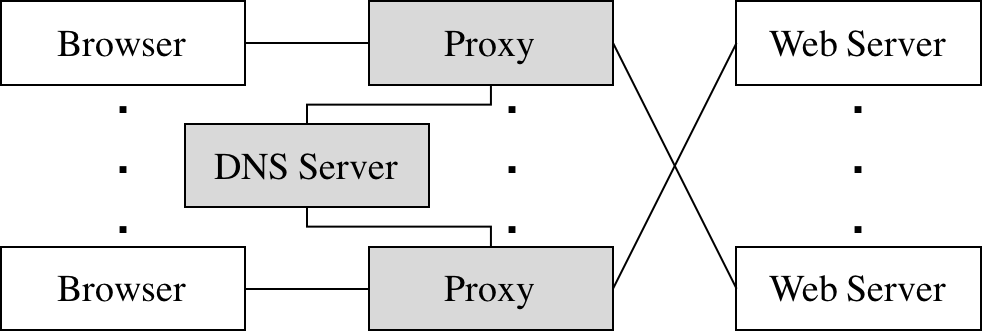 We wrote the gray-shaded components in the figure above.
- We used an off-the-shelf web browser (Firefox) to play videos served via proxy.
- Rather than modify the video player itself, we implemented adaptive bitrate selection in an HTTP proxy. The player requests chunks with standard HTTP GET requests; the proxy intercepts these and modify them to retrieve appropriate bitrate.The proxy can estimate each stream's throughput once per chunk. Note the start time of each chunk request and the end time when it has finished receiving the chunk from the server. Given the size of the chunk, you can now compute the throughput by dividing chunk size by time window. Each video is a sequence of chunks. To smooth the throughput estimation, we used an exponentially-weighted moving average (EWMA). Every time making a new measurement, the current throughput estimate is updated as follows:`T_cur = alpha * T_new + (1 - alpha) * T_cur`. Once the proxy has calculated the connection's current throughput, it should select the highest offered bitrate the connection can support. For this project, we say a connection can support a bitrate if the average throughput is at least 1.5 times the bitrate.
- We implemented a simple DNS which can respond to each request with the “best” server for that particular client in two different ways: round-robin and geographic distance. In order to communicate with proxy, we wrote an accompanying DNS resolution library.
- Video content is served from an off-the-shelf web server (Apache).
- We run multiple instances of Apache on different IP addresses to simulate a CDN with several content servers, and launched multiple instances of our proxy to simulate multiple clients.
### Steps to run in Ubuntu:
1. Start topo on mininet `sudo python topo.py`
2. Open hosts on mininet `xterm h1 h2 h3 h4`
3. Start server python `start_server.py `
4. Start nameserver `./nameserver [--geo|--rr] `
5. Start miProxy `./miProxy --dns `
6. Start firfox python `launch_firefox.py `
7. In firefox opened by python, go to the URL `http://:/index.html`
### Logging
- miProxy can create a log of its activity in a very particular format. If the log specified by the user shares the same name and path, miProxy overwrites the log. After each request, it appends the following line to the log:` `
- DNS server can log its activity in a specific format. If the log specified by the user shares the same name and path, your DNS server overwrites the log. After each valid DNS query it services, it appends the following line to the log: ` `
We wrote the gray-shaded components in the figure above.
- We used an off-the-shelf web browser (Firefox) to play videos served via proxy.
- Rather than modify the video player itself, we implemented adaptive bitrate selection in an HTTP proxy. The player requests chunks with standard HTTP GET requests; the proxy intercepts these and modify them to retrieve appropriate bitrate.The proxy can estimate each stream's throughput once per chunk. Note the start time of each chunk request and the end time when it has finished receiving the chunk from the server. Given the size of the chunk, you can now compute the throughput by dividing chunk size by time window. Each video is a sequence of chunks. To smooth the throughput estimation, we used an exponentially-weighted moving average (EWMA). Every time making a new measurement, the current throughput estimate is updated as follows:`T_cur = alpha * T_new + (1 - alpha) * T_cur`. Once the proxy has calculated the connection's current throughput, it should select the highest offered bitrate the connection can support. For this project, we say a connection can support a bitrate if the average throughput is at least 1.5 times the bitrate.
- We implemented a simple DNS which can respond to each request with the “best” server for that particular client in two different ways: round-robin and geographic distance. In order to communicate with proxy, we wrote an accompanying DNS resolution library.
- Video content is served from an off-the-shelf web server (Apache).
- We run multiple instances of Apache on different IP addresses to simulate a CDN with several content servers, and launched multiple instances of our proxy to simulate multiple clients.
### Steps to run in Ubuntu:
1. Start topo on mininet `sudo python topo.py`
2. Open hosts on mininet `xterm h1 h2 h3 h4`
3. Start server python `start_server.py `
4. Start nameserver `./nameserver [--geo|--rr] `
5. Start miProxy `./miProxy --dns `
6. Start firfox python `launch_firefox.py `
7. In firefox opened by python, go to the URL `http://:/index.html`
### Logging
- miProxy can create a log of its activity in a very particular format. If the log specified by the user shares the same name and path, miProxy overwrites the log. After each request, it appends the following line to the log:` `
- DNS server can log its activity in a specific format. If the log specified by the user shares the same name and path, your DNS server overwrites the log. After each valid DNS query it services, it appends the following line to the log: ` `