# YOLOLite – Lightweight YOLO for PyTorch (ONNX export)
YoloLite is an anchor-free object detection and instance segmentation framework designed specifically for CPU and edge inference environments.
To see a summary for all the 8 datasets tested please visit [BENCHMARK](BENCHMARK.md), to recreate the benchmark see benchmark.py.
More tests will be carried out.
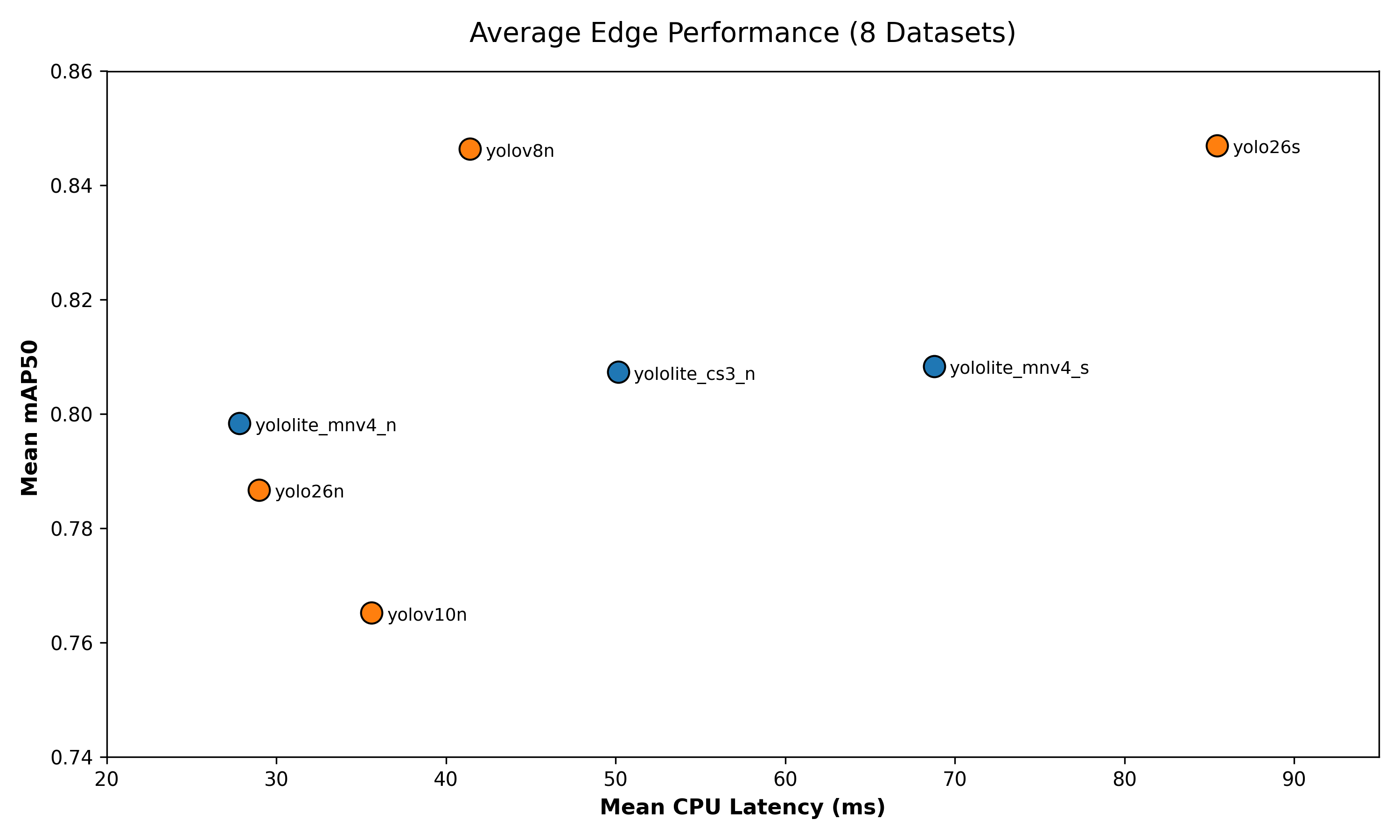
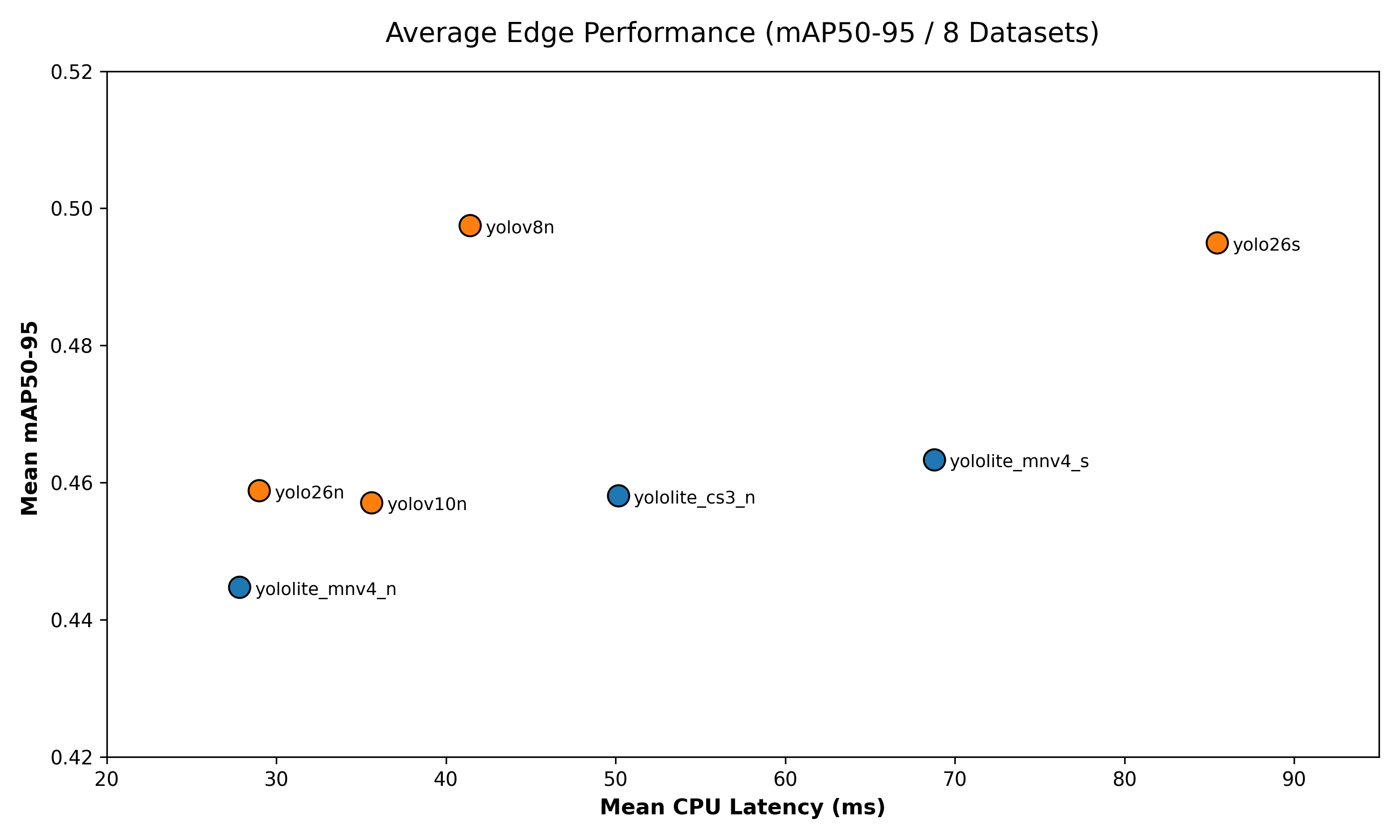
### Key Specifications
* **CPU Latency:** ~25-30ms per frame on standard CPUs (post-ONNX export).
* **Instance Segmentation:** Native support, models trained via COCOminitrain.
* **Permissive License:** 100% Apache 2.0. No AGPL dependencies, suitable for closed-source and commercial automation pipelines.
* **Modular Pipeline:** Predictable outputs using standard Python dictionaries and Numpy arrays.
---
### ⚠️ Repository Notice (V1 vs V2)
Version 2 has been refactored into a standalone package. **You no longer need to clone this repository to use the framework. However there are differences between the two, make sure to validate before swapping** The source code for V1 remains here for historical reference, but all active usage should be done via pip.
from yololite import YoloLite
model = YoloLite(r"yololite_mnv4_n.pt")
# Training pipeline (supports native optimizations like frozen backbone and cosine LR)
model.train(
data="data.yaml",
epochs=20,
batch=8,
accumulate=4,
warmup=3,
freeze_backbone=5
)
# Inference
results = model.predict(source="image.jpg")[0]
print(results['boxes']) # xyxy (np.ndarray)
print(results['masks']) # Segmentation masks (np.ndarray | None)
print(results['speed']) # Profiling data in ms
More updates will come shortly.
[BENCHMARK](BENCHMARK.md)
[Evaluation](MODEL_EVALUATION.md)
🔥 TL;DR – Benchmark Summary
This repo focuses on ultra-fast, CPU-friendly object detection models for real industrial use.
- edge_n (0.55M params) delivers ~0.62 mAP@0.5 while running at ~24 ms @640px and ~9 ms @320px, reaching 100–200+ FPS on CPU.
- edge_m (2.95M params) reaches YOLOv5-level accuracy with 3× fewer parameters.
- Extreme edge mode (320px + P2) shows real-time CPU performance above 100 FPS with stable accuracy on small-object datasets.
- yololite_n/m achieve the highest accuracy (0.69–0.70 mAP) but are GPU-oriented and not the primary focus.
Overall: edge models provide the best accuracy-to-latency ratio for CPU deployments, making them ideal for Raspberry Pi, industrial PCs, embedded systems, and automation pipelines.
 ## Dataset and training
Construct yaml as follow:
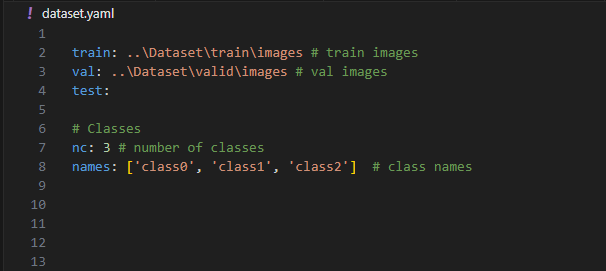
Expected structure of dataset:
dataset --
--train
--images
-- image1.jpg
...
--labels
--image1.txt #Yoloformat
...
--valid
--images
--labels
--test
--images
--labels
--model, type=str, required=True, help="Path to model.yaml"
--train, default="configs/train/standard_train.yaml", type=str, required=False, help="Path to train.yaml"
--data, type=str, required=True, help="Path to data.yaml"
--epochs, type=int, default=200
--batch_size, type=int, default=16
--device, type=str, default=0 "0", "cpu"
--img_size, type=int, default=640
--workers, type=int, default=4
--augment, default=True, action=argparse.BooleanOptionalAction swap with --no--augment
--use_p6, default=False, action=argparse.BooleanOptionalAction #adds p6 head
--use_p2, default=False, action=argparse.BooleanOptionalAction #adds p2 head
--use_resize, default=False, action=argparse.BooleanOptionalAction, help = "Uses resize instead of letterbox"
--resume, type=str, default=None, help="Resume training from last checkpoint if available set path to checkpoint"
--lr, type=float, default=None, help="Override learning rate if set"
--save_every", type=int, default=25, help="Save every x epoch"
--save_by, type=str, default='AP', help="Save best model by coco evaluation, viable settings [AP50, AP75, AP, AR, APS, APM, APL]"
pip install -r requirements.txt
python tools/train.py --model configs/your_model.yaml --data dataset.yaml --epochs 100 --img_size 640
To resume training:
LR is by default 0.001, when resuming training you might want to lower it with --lr
python tools/train.py --model "runs/train/1/merged_config" --data "path_to_dataset.yaml" --resume "runs/train/1/best_model_state.pt" --lr 0.0001
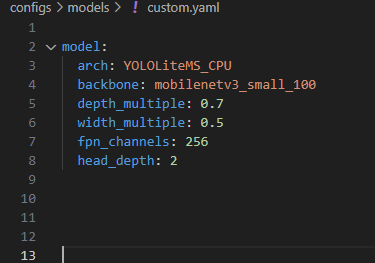
To create a custom model use the custom.yaml template and choose any backbone available in timm:
- backbone: any
- depth_multiple: 0.7 / float
- width_multiple: 0.5 / float
- fpn_channels: 256 /int divisible with 8/32
- head_depth: 2 /int
## Evaluate
To evaluate you model on test images or new, unseen images use the tools/evaluate.py scrip
--weights, required=True, help="Path to model weights
--test_folder, required=True, help="path to test/val folder containing images and labels"
--img_size", type=int, default=0, help="Override of meta.img_size"
--device", default="0"
--batch_size", type=int, default=8
--no_letterbox", action="store_true", help="ses resize instead of letterbox
!python tools/evaluate.py --weights "path/to/model.pt --test_folder "path/to/test/folder"
## Inference
To test trained models inference use tools/infer.py:
Image gets saved to runs/infer/x
--weights, required=True, help="Path to checkpoint (.pt/.pth)"
--img, default=None, help="Picture"
--img_dir, default=None, help="Folder with images (jpg/png)"
--img_size, type=int, default=0, help="Override meta.img_size (0 = use meta)
--device, default="0"
--conf, type=float, default=0.25
--iou, type=float, default=0.50
--max_det, type=int, default=300
--save_txt, action="store_true", help="Saves YOLO-format txt per img"
python tools/infer.py --weights runs/train/1/best_model_state.pt --img "image1.jpg"
## Export to onnx
--weights", required=True, help="Path to checkpoint (.pt/.pth)
--out", Default: runs/export//model.onnx|_decoded.onnx
--img-size", type=int, default=640
--device", default="cpu", help="'cpu' '0'
--opset", type=int, default=17
--simplify", action="store_true", help="onnxsim after export"
--dynamic-batch", action="store_true", help="Dynamic batch-dimension
--dynamic-shape", action="store_true", help="Dynamisk H/W (only format=raw)
--format", choices=["raw", "decoded"], default="decoded" help="raw = per lvl; decoded = boxes/obj/cls (no NMS)")
--verbose", action="store_true", help="More print"
python export/export_onnx.py --weights runs/train/1/best_model_state.pt --img-size 640 --device cpu --simplify
## Test inference speed:
Prints:
=== Inference timing (ms) ===
pre_ms mean 24.27 | std 0.00 | p50 24.27 | p90 24.27 | p95 24.27
infer_ms mean 58.78 | std 0.00 | p50 58.78 | p90 58.78 | p95 58.78
post_ms mean 1.17 | std 0.00 | p50 1.17 | p90 1.17 | p95 1.17
total_ms mean 84.23 | std 0.00 | p50 84.23 | p90 84.23 | p95 84.23
Throughput ≈ 11.87 img/s
--model", required=True, help="Path till decoded .onnx"
--img", default=None
--img_dir", default=None
--img_size", type=int, default=640, help="Must match ONNX decoded img_size"
--conf", type=float, default=0.30
--iou", type=float, default=0.30
--max_det", type=int, default=300
--no_letterbox", action="store_true"
--save_txt", action="store_true"
--names", default=None, help="class1,class2,class3 etc or classes.txt
--providers", default="cpu", choices=["cpu","cuda","tensorrt"]
--warmup, type=int, default=10
--runs, type=int, default=1,
--intra, type=int, default=0, help="intra_op_num_threads (0=auto)"
--inter, type=int, default=0, help="inter_op_num_threads (0=auto)"
python export/infer_onnx.py --model runs/export/1/model_decoded.onnx --img image1.jpg --img_size 640