# LiveBench

🏆 Leaderboard •
💻 Data •
📝 Paper
LiveBench appeared as a [Spotlight Paper](https://openreview.net/forum?id=sKYHBTAxVa) in ICLR 2025.
Top models as of 30th September 2024 (for a full up-to-date leaderboard, see [here](https://livebench.ai/)):
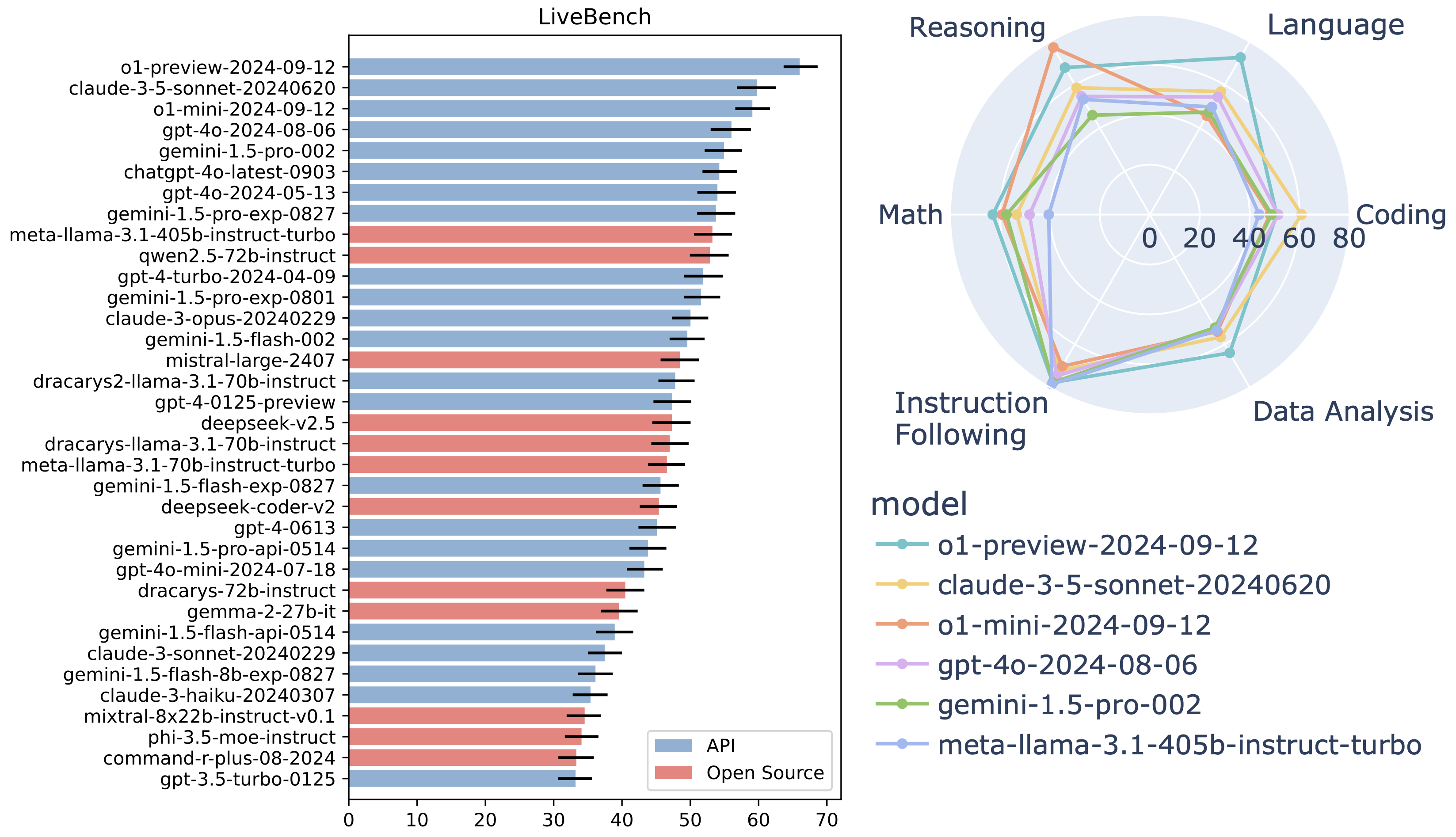
Please see the [changelog](changelog.md) for details about each LiveBench release.
## Table of Contents
- [Introduction](#introduction)
- [Installation Quickstart](#installation-quickstart)
- [Usage](#usage)
- [Data](#data)
- [Adding New Questions](#adding-new-questions)
- [Evaluating New Models and Configuring API Parameters](#evaluating-new-models-and-configuring-api-parameters)
- [Documentation](#documentation)
- [Citation](#citation)
## Introduction
Introducing LiveBench: a benchmark for LLMs designed with test set contamination and objective evaluation in mind.
LiveBench has the following properties:
* LiveBench is designed to limit potential contamination by releasing new questions monthly, as well as having questions based on recently-released datasets, arXiv papers, news articles, and IMDb movie synopses.
* Each question has verifiable, objective ground-truth answers, allowing hard questions to be scored accurately and automatically, without the use of an LLM judge.
* LiveBench currently contains a set of 18 diverse tasks across 6 categories, and we will release new, harder tasks over time.
**We will evaluate your model!** Open an [issue](https://github.com/LiveBench/LiveBench/issues) or email us at [livebench@livebench.ai](mailto:livebench@livebench.ai)!
## Installation Quickstart
We recommend using a virtual environment to install LiveBench.
```bash
python -m venv .venv
source .venv/bin/activate
```
To generate answers with API models (i.e. with `gen_api_answer.py`), conduct judgments, and show results:
```bash
cd LiveBench
pip install -e .
```
To score results on the coding tasks (code_completion and code_generation), you will also need to install the required dependencies:
```bash
cd livebench/code_runner
pip install -r requirements_eval.txt
```
Note that, to evaluate the agentic coding questions, you will need docker installed and available (i.e. the command `docker --version` should work).
This will be checked prior to such tasks being run.
**Note about local models**: Local model inference is unmaintained. We highly recommend serving your model on an OpenAI compatible API using [vllm](https://github.com/vllm-project/vllm) and performing inference using `run_livebench.py`.
Our repo contains code from [LiveCodeBench](https://github.com/LiveCodeBench/LiveCodeBench) and [IFEval](https://github.com/Rohan2002/IFEval?tab=readme-ov-file).
## Usage
```bash
cd livebench
```
### Running Evaluations
The simplest way to run LiveBench inference and scoring is using the `run_livebench.py` script, which handles the entire evaluation pipeline including generating answers, scoring them, and showing results.
Basic usage:
```bash
python run_livebench.py --model gpt-4o --bench-name live_bench/coding --livebench-release-option 2024-11-25
```
Some common options:
- `--bench-name`: Specify which subset(s) of questions to use (e.g. `live_bench` for all questions, `live_bench/coding` for coding tasks only)
- `--model`: The model to evaluate
- `--max-tokens`: Maximum number of tokens in model responses (defaults to 4096 unless overriden for specific models)
- `--api-base`: Custom API endpoint for OpenAI-compatible servers
- `--api-key-name`: Environment variable name containing the API key (defaults to OPENAI_API_KEY for OpenAI models)
- `--api-key`: Raw API key value
- `--parallel-requests`: Number of concurrent API requests (for models with high rate limits)
- `--resume`: Continue from a previous interrupted run
- `--retry-failures`: Retry questions that failed in previous runs
- `--livebench-release-option`: Evaluate questions from a specific LiveBench release
Run `python run_livebench.py --help` to see all available options.
When this is finished, follow along with [Viewing Results](#viewing-results) to view results.
**Note: The current LiveBench release is 2025-04-25; however, not all questions for this release are public on Huggingface. In order to evaluate all categories, you will need to pass `--livebench-release-option 2024-11-25` to all scripts to use the most recent public questions.**
**Note: Evaluation of the agentic coding tasks require the building of task-specific Docker images. Storing all of these images may take up to 150GB. Images are needed both for inference and evaluation. In the future we will work on optimizing the evaluation process for this task to minimize storage requirements.**
#### Parallel Evaluation Options
LiveBench provides two different arguments for parallelizing evaluations, which can be used independently or together:
- `--mode parallel`: Runs separate tasks/categories in parallel by creating multiple tmux sessions. Each category or task runs in its own terminal session, allowing simultaneous evaluation across different benchmark subsets. This also parallelizes the ground truth evaluation phase. By default, this will create one session for each category; if `--bench-name` is supplied, there will be one session for each value of `--bench-name`.
- `--parallel-requests`: Sets the number of concurrent questions to be answered within a single task evaluation instance. This controls how many API requests are made simultaneously for a specific task.
**When to use which option:**
- **For high rate limits (e.g., commercial APIs with high throughput):**
- Use both options together for maximum throughput when evaluating the full benchmark.
- For example: `python run_livebench.py --model gpt-4o --bench-name live_bench --mode parallel --parallel-requests 10`
- **For lower rate limits:**
- When running the entire LiveBench suite, `--mode parallel` is recommended to parallelize across categories, even if `--parallel-requests` must be kept low.
- For small subsets of tasks, `--parallel-requests` may be more efficient as the overhead of creating multiple tmux sessions provides less benefit.
- Example for lower rate limits on full benchmark: `python run_livebench.py --model claude-3-5-sonnet --bench-name live_bench --mode parallel --parallel-requests 2`
- **For single task evaluation:**
- When running just one or two tasks, use only `--parallel-requests`: `python run_livebench.py --model gpt-4o --bench-name live_bench/coding --parallel-requests 10`
Note that `--mode parallel` requires tmux to be installed on your system. The number of tmux sessions created will depend on the number of categories or tasks being evaluated.
### Viewing Results
You can view the results of your evaluations using the `show_livebench_result.py` script:
```bash
python show_livebench_result.py --bench-name --model-list --question-source --livebench-release-option 2024-11-25
```
`` is a space-separated list of model IDs to show. For example, to show the results of gpt-4o and claude-3-5-sonnet on coding tasks, run:
```bash
python show_livebench_result.py --bench-name live_bench/coding --model-list gpt-4o claude-3-5-sonnet
```
Multiple `--bench-name` values can be provided to see scores on specific subsets of benchmarks:
```bash
python show_livebench_result.py --bench-name live_bench/coding live_bench/math --model-list gpt-4o
```
If no `--model-list` argument is provided, all models will be shown. The `--question-source` argument defaults to `huggingface` but should match what was used during evaluation, as should `--livebench-release-option`.
The leaderboard will be displayed in the terminal. You can also find the breakdown by category in `all_groups.csv` and by task in `all_tasks.csv`.
### Error Checking
The `scripts/error_check.py` script will print out questions for which a model's output is `$ERROR$`, which indicates repeated API call failures.
You can use the `scripts/rerun_failed_questions.py` script to rerun the failed questions, or run `run_livebench.py` as normal with the `--resume` and `--retry-failures` arguments.
By default, LiveBench will retry API calls three times and will include a delay in between attempts to account for rate limits. If the errors seen during evaluation are due to rate limits, you may need to switch to `--mode single` or `--mode sequential` and decrease the value of `--parallel-requests`. If after multiple attempts, the model's output is still `$ERROR$`, it's likely that the question is triggering some content filter from the model's provider (Gemini models are particularly prone to this, with an error of `RECITATION`). In this case, there is not much that can be done. We consider such failures to be incorrect responses.
## Data
The questions for each of the categories can be found below:
- [Reasoning](https://huggingface.co/datasets/livebench/reasoning)
- [Math](https://huggingface.co/datasets/livebench/math)
- [Coding](https://huggingface.co/datasets/livebench/coding)
- [Language](https://huggingface.co/datasets/livebench/language)
- [Data Analysis](https://huggingface.co/datasets/livebench/data_analysis)
- [Instruction Following](https://huggingface.co/datasets/livebench/instruction_following)
Also available are the [model answers](https://huggingface.co/datasets/livebench/model_answer) and the [model judgments](https://huggingface.co/datasets/livebench/model_judgment).
To download the `question.jsonl` files (for inspection) and answer/judgment files from the leaderboard, use
```bash
python download_questions.py
python download_leaderboard.py
```
Questions will be downloaded to `livebench/data//question.jsonl`.
## Evaluating New Questions
If you want to create your own set of questions, or try out different prompts, etc, follow these steps:
- Create a `question.jsonl` file with the following path (or, run `python download_questions.py` and update the downloaded file): `livebench/data/live_bench///question.jsonl`. For example, `livebench/data/reasoning/web_of_lies_new_prompt/question.jsonl`. Here is an example of the format for `question.jsonl` (it's the first few questions from [web_of_lies_v2](https://huggingface.co/datasets/livebench/reasoning)):
```jsonl
{"question_id": "0daa7ca38beec4441b9d5c04d0b98912322926f0a3ac28a5097889d4ed83506f", "category": "reasoning", "ground_truth": "no, yes, yes", "turns": ["In this question, assume each person either always tells the truth or always lies. Tala is at the movie theater. The person at the restaurant says the person at the aquarium lies. Ayaan is at the aquarium. Ryan is at the botanical garden. The person at the park says the person at the art gallery lies. The person at the museum tells the truth. Zara is at the museum. Jake is at the art gallery. The person at the art gallery says the person at the theater lies. Beatriz is at the park. The person at the movie theater says the person at the train station lies. Nadia is at the campground. The person at the campground says the person at the art gallery tells the truth. The person at the theater lies. The person at the amusement park says the person at the aquarium tells the truth. Grace is at the restaurant. The person at the aquarium thinks their friend is lying. Nia is at the theater. Kehinde is at the train station. The person at the theater thinks their friend is lying. The person at the botanical garden says the person at the train station tells the truth. The person at the aquarium says the person at the campground tells the truth. The person at the aquarium saw a firetruck. The person at the train station says the person at the amusement park lies. Mateo is at the amusement park. Does the person at the train station tell the truth? Does the person at the amusement park tell the truth? Does the person at the aquarium tell the truth? Think step by step, and then put your answer in **bold** as a list of three words, yes or no (for example, **yes, no, yes**). If you don't know, guess."], "task": "web_of_lies_v2"}
```
- If adding a new task, create a new scoring method in the `process_results` folder. If it is similar to an existing task, you can copy that task's scoring function. For example, `livebench/process_results/reasoning/web_of_lies_new_prompt/utils.py` can be a copy of the `web_of_lies_v2` scoring method.
- Add the scoring function to `gen_ground_truth_judgment.py` [here](https://github.com/LiveBench/LiveBench/blob/93e3a7d4fa5bb164ef4cb58f67683e4e54554af9/livebench/gen_ground_truth_judgment.py#L124).
- Run and score models using `--question-source jsonl` and specifying your task. For example:
```bash
python gen_api_answer.py --bench-name live_bench/reasoning/web_of_lies_new_prompt --model claude-3-5-sonnet --question-source jsonl
python gen_ground_truth_judgment.py --bench-name live_bench/reasoning/web_of_lies_new_prompt --question-source jsonl
python show_livebench_result.py --bench-name live_bench/reasoning/web_of_lies_new_prompt
```
## Evaluating New Models and Configuring API Parametersdee
Any API-based model for which there is an OpenAI compatible endpoint should work out of the box using the `--api-base` and `--api-key` (or `--api-key-name`) arguments. If you'd like to override the name of the model for local files (e.g. saving it as `deepseek-v3` instead of `deepseek-chat`), use the `--model-display-name` argument. You can also override values for temperature and max tokens using the `--force-temperature` and `--max-tokens` arguments, respectively.
If you'd like to have persistent model configuration without needing to specify command-line arguments, you can create a model configuration document in a yaml file in `livebench/model/model_configs`. See the other files there for examples of the necessary format. Important values are `model_display_name`, which determines the answer .jsonl file name and model ID used for other scripts, and `api_name`, which provides a mapping between API providers and names for the model in that API. For instance, Deepseek R1 can be evaluated using the Deepseek API with a name of `deepseek-reasoner` and the Together API with a name of `deepseek-ai/deepseek-r1`. `api_kwargs` allows you to set overrides for parameters such as temperature, max tokens, and top p, for all providers or for specific ones. Once this is set, you can use `--model ` with the `model_display_name` value you put in the yaml document when running `run_livebench.py`.
When performing inference, use the `--model-provider-override` argument to override the provider you'd like to use for the model.
We have also implemented inference for Anthropic, Cohere, Mistral, Together, and Google models, so those should also all work immediately either by using `--model-provider-override` or adding a new entry to the appropriate configuration file.
If you'd like to use a model with a new provider that is not OpenAI-compatible, you will need to implement a new completions function in `completions.py` and add it to `get_api_function` in that file; then, you can use it in your model configuration.
## Documentation
Here, we describe our dataset documentation. This information is also available in our paper.
- [Author Responsibility](docs/AUTHOR_RESPONSIBILITY.md)
- [Code of Conduct](docs/CODE_OF_CONDUCT.md)
- [Contributing](docs/CONTRIBUTING.md)
- [Datasheet for LiveBench](docs/DATASHEET.md)
- [Maintenance Plan](docs/MAINTENANCE_PLAN.md)
## Citation
```bibtex
@inproceedings{livebench,
title={LiveBench: A Challenging, Contamination-Free {LLM} Benchmark},
author={Colin White and Samuel Dooley and Manley Roberts and Arka Pal and Benjamin Feuer and Siddhartha Jain and Ravid Shwartz-Ziv and Neel Jain and Khalid Saifullah and Sreemanti Dey and Shubh-Agrawal and Sandeep Singh Sandha and Siddartha Venkat Naidu and Chinmay Hegde and Yann LeCun and Tom Goldstein and Willie Neiswanger and Micah Goldblum},
booktitle={The Thirteenth International Conference on Learning Representations},
year={2025},
}
```