# Daily-Omni: Towards Audio-Visual Reasoning with Temporal Alignment across Modalities
This is the official repository of Daily-Omni: Towards Audio-Visual Reasoning with Temporal Alignment across Modalities
[[📖 arXiv Paper](https://arxiv.org/abs/2505.17862)]
[[💻 Project Page](https://lliar-liar.github.io/Daily-Omni/)]
[[📊 Dataset](https://huggingface.co/datasets/liarliar/Daily-Omni)]
[[🏆 Leaderboard](https://lliar-liar.github.io/Daily-Omni/#leaderboard)]
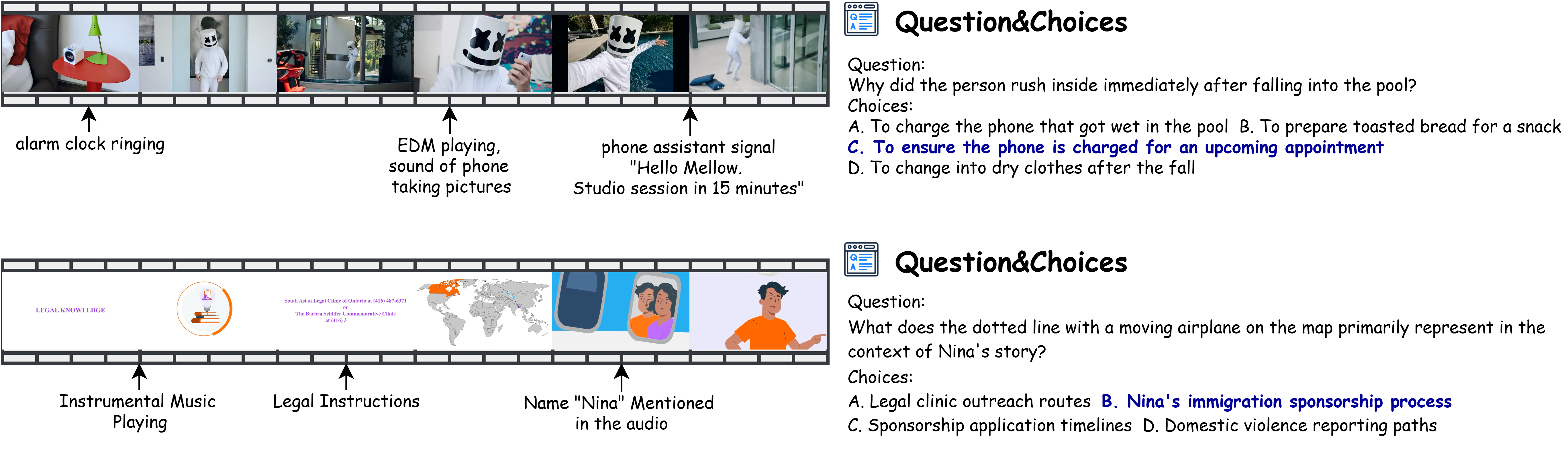
## News
- [2026-04-27] Added NVIDIA Nemotron 3 Nano Omni 30B A3B to the leaderboard as the current top evaluated open-weight omni-modal model.
- [2026-03-11] Updated the arXiv paper and refreshed the Leaderboard with new results.
## Leaderboard
Performance comparison of MLLMs on Daily-Omni. Random guess accuracy is 25%.
Abbreviations:
- `AV Align`: audio-visual alignment
- `Comp.`: comparative
- `Ctx. Und.`: context understanding
- `Evt. Seq.`: event sequence
- `Infer.`: inference
- `Reas.`: reasoning
- `30s` / `60s`: duration-based subsets
Closed-source models are marked with `(Closed)` and open-source models with `(Open)`.
### Omni-Modal Language Models (With Visual and Audio)
| Methods | AV Align | Comparison | Context Understanding | Event Sequence | Inference | Reasoning | 30s | 60s | Avg |
| --- | ---: | ---: | ---: | ---: | ---: | ---: | ---: | ---: | ---: |
| NVIDIA Nemotron 3 Nano Omni 30B A3B (Open) | 67.65 | 83.21 | 65.80 | 73.53 | 83.77 | 80.57 | 74.81 | 74.18 | 74.52 |
| Qwen3-Omni-30B-A3B-Thinking (Open) | 65.97 | 80.92 | 65.80 | 71.57 | 85.06 | 80.57 | 76.04 | 70.73 | 73.60 |
| Gemini 2.5 Flash (Closed) | 73.82 | 66.41 | 72.04 | 68.03 | 78.67 | 81.87 | 69.86 | 77.09 | 73.06 |
| Qwen3-Omni-30B-A3B-Instruct (Open) | 66.81 | 80.92 | 64.77 | 66.34 | 81.17 | 81.14 | 71.87 | 71.82 | 71.85 |
| Gemini 2.0 Flash (Closed) | 62.18 | 73.28 | 63.73 | 63.72 | 76.62 | 75.43 | 67.23 | 68.55 | 67.84 |
| Qwen2.5-Omni-7B-Instruct (Open) | 48.32 | 69.47 | 58.55 | 58.17 | 76.62 | 73.14 | 64.61 | 59.09 | 62.07 |
| Gemini 2.5 Flash Lite (Closed) | 57.56 | 68.70 | 56.48 | 52.61 | 79.22 | 69.71 | 63.52 | 60.00 | 61.90 |
| Daily-Omni-Baseline-Qwen2.5 (Open) | 51.68 | 68.70 | 60.10 | 53.92 | 78.57 | 71.43 | 63.99 | 59.27 | 61.82 |
| Gemini 2.0 Flash Lite (Closed) | 55.04 | 64.89 | 58.03 | 54.25 | 74.03 | 72.00 | 62.44 | 60.00 | 61.32 |
| Qwen2.5-Omni-3B-Instruct (Open) | 50.84 | 69.47 | 53.89 | 53.92 | 75.97 | 70.29 | 62.60 | 57.45 | 60.23 |
| Ola (7B) (Open) | 40.34 | 61.07 | 40.41 | 43.46 | 63.64 | 69.71 | 51.47 | 49.82 | 50.71 |
| VideoLLaMA2 (7B) (Open) | 35.71 | 35.88 | 35.75 | 31.70 | 40.91 | 34.29 | 38.02 | 31.82 | 35.17 |
| Unified-IO-2 XL (3B) (Open) | 30.25 | 30.53 | 25.39 | 29.08 | 33.12 | 21.71 | 28.13 | 28.55 | 28.32 |
| Unified-IO-2 XXL (8B) (Open) | 25.63 | 31.30 | 26.42 | 25.82 | 35.06 | 29.71 | 26.74 | 30.00 | 28.24 |
| Unified-IO-2 L (1B) (Open) | 27.31 | 22.90 | 26.42 | 27.78 | 29.87 | 29.14 | 27.67 | 27.09 | 27.40 |
### Omni-Modal Language Models (Visual Only)
| Methods | AV Align | Comp. | Ctx. Und. | Evt. Seq. | Infer. | Reas. | 30s | 60s | Avg |
| --- | ---: | ---: | ---: | ---: | ---: | ---: | ---: | ---: | ---: |
| Qwen3-Omni-30B-A3B-Instruct (Open) | 47.90 | 67.18 | 56.48 | 53.92 | 70.78 | 61.14 | 57.96 | 57.64 | 57.81-14.0 |
| Qwen3-Omni-30B-A3B-Thinking (Open) | 44.96 | 64.89 | 55.96 | 59.48 | 67.53 | 60.00 | 56.26 | 59.45 | 57.73-15.9 |
| Gemini 2.0 Flash (Closed) | 39.08 | 64.12 | 56.48 | 56.21 | 67.53 | 62.29 | 56.57 | 55.45 | 56.06-11.8 |
| Gemini 2.0 Flash Lite (Closed) | 43.70 | 58.02 | 53.89 | 45.10 | 64.29 | 60.57 | 53.01 | 51.64 | 52.38-8.9 |
| Qwen2.5-Omni-7B-Instruct (Open) | 34.45 | 58.78 | 47.67 | 49.67 | 62.99 | 54.86 | 48.69 | 51.09 | 49.79-12.3 |
| Qwen2.5-Omni-3B-Instruct (Open) | 37.39 | 51.91 | 44.56 | 41.18 | 64.29 | 48.00 | 46.52 | 45.64 | 46.12-14.1 |
| Gemini 2.5 Flash (Closed) | 37.55 | 37.21 | 40.43 | 44.78 | 57.05 | 53.29 | 42.35 | 47.46 | 44.61-28.5 |
| Gemini 2.5 Flash Lite (Closed) | 36.97 | 45.80 | 37.31 | 39.54 | 59.74 | 47.43 | 44.67 | 41.27 | 43.11-18.8 |
### Omni-Modal Language Models (Audio Only)
| Methods | AV Align | Comp. | Ctx. Und. | Evt. Seq. | Infer. | Reas. | 30s | 60s | Avg |
| --- | ---: | ---: | ---: | ---: | ---: | ---: | ---: | ---: | ---: |
| Qwen3-Omni-30B-A3B-Instruct (Open) | 54.20 | 69.47 | 51.81 | 51.63 | 74.03 | 78.86 | 63.37 | 58.18 | 60.99-10.9 |
| Qwen3-Omni-30B-A3B-Thinking (Open) | 54.62 | 67.94 | 49.22 | 51.31 | 77.27 | 77.71 | 65.22 | 55.27 | 60.65-13.0 |
| Gemini 2.5 Flash (Closed) | 46.64 | 55.73 | 44.56 | 42.48 | 70.78 | 78.86 | 55.64 | 52.18 | 54.05-19.0 |
| Gemini 2.5 Flash Lite (Closed) | 42.02 | 61.83 | 41.97 | 45.10 | 68.83 | 65.14 | 54.25 | 48.91 | 51.80-10.1 |
### Visual Language Models (Visual Only)
| Methods | AV Align | Comp. | Ctx. Und. | Evt. Seq. | Infer. | Reas. | 30s | 60s | Avg |
| --- | ---: | ---: | ---: | ---: | ---: | ---: | ---: | ---: | ---: |
| Qwen3-VL-30B-A3B-Instruct (Open) | 47.48 | 68.70 | 52.33 | 55.88 | 67.53 | 61.14 | 57.34 | 57.27 | 57.31 |
| Qwen3-VL-8B-Instruct (Open) | 44.54 | 63.36 | 50.78 | 59.80 | 69.48 | 58.86 | 56.41 | 57.27 | 56.81 |
| GPT-4o (Closed) | 47.90 | 62.60 | 52.33 | 52.61 | 66.23 | 66.29 | 55.64 | 57.45 | 56.47 |
| Qwen3-VL-4B-Instruct (Open) | 43.70 | 61.07 | 54.40 | 53.27 | 68.18 | 58.86 | 54.40 | 56.00 | 55.14 |
| Qwen2.5-VL-7B-Instruct (Open) | 36.97 | 46.56 | 33.68 | 37.91 | 51.95 | 44.00 | 39.26 | 42.36 | 40.68 |
| Qwen2.5-VL-3B-Instruct (Open) | 35.71 | 43.51 | 34.72 | 33.66 | 43.51 | 39.43 | 37.71 | 37.09 | 37.43 |
### Audio Language Models (Audio Only)
| Methods | AV Align | Comp. | Ctx. Und. | Evt. Seq. | Infer. | Reas. | 30s | 60s | Avg |
| --- | ---: | ---: | ---: | ---: | ---: | ---: | ---: | ---: | ---: |
| Audio Flamingo 3 (7B) (Open) | 40.76 | 55.73 | 43.01 | 40.52 | 65.58 | 68.00 | 50.23 | 49.45 | 49.87 |
| Qwen2-Audio (7B) (Open) | 28.99 | 35.88 | 27.46 | 32.03 | 33.77 | 33.14 | 31.22 | 31.82 | 31.50 |
### Textual Language Models (Without Visual and Audio)
| Methods | AV Align | Comp. | Ctx. Und. | Evt. Seq. | Infer. | Reas. | 30s | 60s | Avg |
| --- | ---: | ---: | ---: | ---: | ---: | ---: | ---: | ---: | ---: |
| GPT-4o (Closed) | 33.19 | 43.51 | 28.50 | 30.39 | 44.81 | 46.86 | 36.48 | 36.18 | 36.34 |
| Deepseek-V3 (671B) (Open) | 31.93 | 41.22 | 29.02 | 29.41 | 44.81 | 46.29 | 35.24 | 36.00 | 35.59 |
| Qwen2.5-14B-Instruct (Open) | 30.25 | 39.69 | 27.98 | 28.43 | 42.21 | 42.86 | 32.15 | 35.82 | 33.83 |
## Requirements
To install requirements:
```setup
pip install -r requirements.txt
```
To test our benchmark, you should download `Videos.tar` and 'qa.json' from [Huggingface](https://huggingface.co/datasets/liarliar/Daily-Omni/tree/main) to this directory and extract the `Videos/` folder and `qa.json` to this directory.
## QA Generation

>📋 We provide script to reproduce our Daily-Omni QA Generation pipeline. Run the following command to generate QA pairs.
To run the script, first you should revise the `config.py` file to set the parameters:
- Set the api keys, base_urls and model_name. You can create api keys from the following links: [Gemini](https://aistudio.google.com/apikey), [OpenAI](https://platform.openai.com/account/api-keys), [Deepseek](https://platform.deepseek.com/api_keys), [Aliyun](https://bailian.console.aliyun.com/?tab=model#/api-key)
- Set `BASE_DIR` and `CSV_PATH` to the Video Folder you want to annotate and the path to the csv file that records the videos. You can use `example_videos` and `example_metadata.csv` as templetes.
- Set `MAX_WORKERS_PROCESSES` to the number of processes you want to use to run the pipeline. You can set `execution_mode` in `run_pipeline.py` to choose the execution mode if your api key has parallel requests limitation.
- Set `run_pipeline_flags` in `run_pipeline.py` to choose which part of the pipeline you want to run.
Test the pipeline with:
```train
python run_pipeline.py
```
## Test Daily-Omni
### Model with api
>📋To test the benchmark on third party models(Gemini, GPT-4o, Deepseek) with api and reproduce the results, you can use the script provided in `test_model_api/`
```eval
python test_model_api/test_model.py --model --mode --max_items
```
You can check the model options in `test_model_api/test_config.py`
### Model running locally
>📋To test the benchmark on third party models(Qwen2.5-Omni, Qwen2.5-VL, VideoLLaMA2, Ola, Unified-IO 2) with local machines, check the code in `test_model/`
All local `test_model/*/testmodel.py` scripts now use a unified modality argument:
```bash
--input_mode {all,visual,audio}
```
The default is `--input_mode all`.
- `all`: video + audio
- `visual`: video only
- `audio`: audio only
`--use_audio_in_video` has been removed. For scripts that save per-item JSONL results, raw model output is saved by default.
#### Qwen2.5-Omni
You should install the dependencies with instructions from the [official Qwen2.5-Omni repo](https://github.com/QwenLM/Qwen2.5-Omni)
Run the test script with the following command:
```python
python test_model/Qwen2.5-Omni/testmodel.py --video_base_dir VIDEO_BASE_DIR --json_file_path JSON_FILE_PATH --model_name_or_path MODEL_NAME_OR_PATH --processor_name_or_path PROCESSOR_NAME_OR_PATH --input_mode all
```
You can switch modality with `--input_mode all|visual|audio`.
#### Qwen2.5-VL
You should install the dependencies with instructions from the [official Qwen2.5-VL repo](https://github.com/QwenLM/Qwen2.5-VL)
Run the test script with the following command:
```python
python test_model/Qwen2.5-VL/testmodel.py --video_base_dir VIDEO_BASE_DIR --json_file_path JSON_FILE_PATH --model_name_or_path MODEL_NAME_OR_PATH --processor_name_or_path PROCESSOR_NAME_OR_PATH --input_mode all
```
Qwen2.5-VL is visual-only. `--input_mode all` will fall back to `visual`, and `audio` is not supported.
#### Qwen3-VL
You should install the dependencies with instructions from the [official Qwen3-VL repo](https://github.com/QwenLM/Qwen3-VL)
Run the test script with the following command:
```python
python test_model/Qwen3-VL/testmodel.py --video_base_dir VIDEO_BASE_DIR --json_file_path JSON_FILE_PATH --model_name_or_path MODEL_NAME_OR_PATH --input_mode all --batch_size 8
```
Qwen3-VL is visual-only. `--input_mode all` will fall back to `visual`, and `audio` is not supported.
#### VideoLLaMA2
You should install the dependencies with instructions from the [official VideoLLaMA2 repo](https://github.com/DAMO-NLP-SG/VideoLLaMA2)
Run the test script with the following command:
```python
python test_model/VideoLLaMA2-av/testmodel.py --video_base_dir VIDEO_BASE_DIR --json_file_path JSON_FILE_PATH --input_mode all
```
#### Unified-IO 2
You should install the dependencies with instructions from the [official Unified-IO 2 repo](https://github.com/allenai/unified-io-2.pytorch)
Run the test script with the following command:
```python
python test_model/unified-io-2.pytorch/testmodel.py --video_base_dir VIDEO_BASE_DIR --json_file_path JSON_FILE_PATH --model MODEL_NAME --input_mode all
```
`unified-io-2.pytorch` currently only supports `--input_mode all`.
#### Ola
You should install the dependencies with instructions from the [official Ola repo](https://github.com/Ola-Omni/Ola)
Run the test script with the following command:
```python
python test_model/Ola/inference/testmodel.py --video_base_dir VIDEO_BASE_DIR --json_file_path JSON_FILE_PATH
```
Ola currently uses its own script interface and is not aligned to the unified `--input_mode` CLI above.
### Subsampling stability test
Use `run_subsampling_stability.sh` to run subsampling stability evaluation for the current model set.
```bash
./run_subsampling_stability.sh
```
What it does:
- Runs per-item evaluation first and saves `*_items.jsonl` for each model.
- Samples `20,40,60,80,100%` of questions by default.
- Uses all QA belonging to the sampled videos to compute accuracy.
- Repeats the experiment `R` times and reports `mean ± std` and `median [p5, p95]`.
Default model set:
- `Qwen/Qwen2.5-Omni-7B-Instruct`
- `Qwen/Qwen3-Omni-30B-A3B-Instruct`
- `gemini-2.5-flash`
- `gemini-2.5-flash-lite`
Useful environment variables:
- `QWEN_INPUT_MODE` / `QWEN25_INPUT_MODE`: modality, default `all`
- `STABILITY_REPEATS`: repeat count, default `200`
- `SUBSAMPLE_PCTS`: comma-separated percentages, default `20,40,60,80,100`
- `INCLUDE_QWEN_THINKING=1`: include `Qwen3-Omni-30B-A3B-Thinking`
- `GEMINI_API_KEY_1` and `GEMINI_API_KEY_2`: Gemini API keys
Outputs are written to `runs/subsampling_stability_/`, including per-item JSONL, `stability_repeat_results.csv`, `stability_summary.csv`, and `stability_summary.txt`.
## Test Daily-Omni Agent
.png)
> We provide a script to test Daily-Omni Agent on Daily-Omni benchmark.
For efficiency, we used the API provided by Bailian Aliyun for Qwen2.5-VL and Qwen2.5, while Qwen2-Audio was deployed locally. According to the [official documentation](https://help.aliyun.com/zh/model-studio/model-user-guide/), qwen2.5-vl-7b-instruct and qwen2.5-14b-instruct provided by Bailian Aliyun are identical to their open-source counterparts. Our code implements direct passing of local_video_path to the Qwen2.5-VL API. **However, this functionality might require you to contact Aliyun customer service to enable.** If direct path input is not activated, you can alternatively pass a list of video frames, though this may result in suboptimal performance.
To run the agent, you need to setup a new environment for Qwen2-Audio according to the instructions in the [official repository](https://github.com/QwenLM/Qwen2-Audio).
Then, launch the Qwen2-Audio server locally with running:
```python
python baseline/qwen_audio.py
```
Segment the video and audio clips:
```python
python baseline/segment_av.py
```
Run Daily-Omni Agent on Daily-Omni benchmark with the following command:
```python
python baseline/base_model.py
```
This script will automatically evaluate the performance of the model on the Daily-Omni benchmark.
## Citation
```bibtex
@misc{zhou2026dailyomniaudiovisualreasoningtemporal,
title={Daily-Omni: Towards Audio-Visual Reasoning with Temporal Alignment across Modalities},
author={Ziwei Zhou and Rui Wang and Zuxuan Wu and Yu-Gang Jiang},
year={2026},
eprint={2505.17862},
archivePrefix={arXiv},
primaryClass={cs.AI},
url={https://arxiv.org/abs/2505.17862},
}
```