# Bevy Aseprite Ultra
[](./LICENSE)
[](https://crates.io/crates/bevy_aseprite_ultra)
The ultimate bevy aseprite plugin. This plugin allows you to import aseprite files into bevy, with 100% unbreakable
hot reloading. You can also import static sprites from an aseprite atlas type file using slices with functional pivot offsets!
| Bevy Version | Plugin Version |
| -----------: | -------------: |
| 0.19 | 0.9.0 |
| 0.18 | 0.8.1 |
| 0.17 | 0.7.0 |
| 0.16 | 0.6.1 |
| 0.15 | 0.4.1 |
| 0.14 | 0.2.4 |
| 0.13 | 0.1.0 |
## Supported aseprite features
- Animations
- Tags
- Frame duration, repeat, and animation direction
- Layer visibility
- Blend modes
- Static slices and pivot offsets
## Features in bevy
- Hot reload anything, anytime, anywhere!
- Full control over animations using Components.
- One shot animations and events when they finish.
- Static sprites with slices. Use aseprite for all your icon and UI needs!
- Render to custom material and write shaders ontop.
- Asset processor which converts the aseprite file to a custom format.
(hot reloading requires the `file_watcher` feature in bevy)
## Examples
```bash
cargo run --example slices
cargo run --example animations
cargo run --example ui
cargo run --example asset_processing --features asset_processing
cargo run --example 3d --features 3d
```
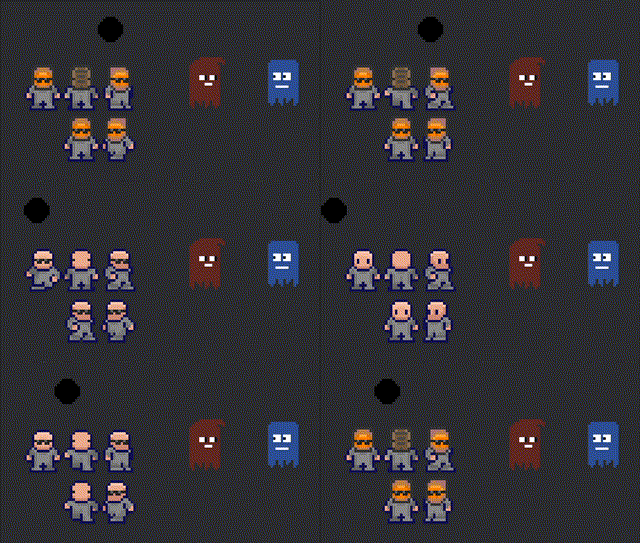
character animation by [Benjamin](https://github.com/headcr4sh)
---
```rust
use bevy::prelude::*;
use bevy_aseprite_ultra::prelude::*;
...
// Load an animation from an aseprite file
fn spawn_demo_animation(mut cmd : Commands, server : Res){
cmd.spawn((
AseAnimation {
aseprite: server.load("player.aseprite"),
animation: Animation::tag("walk-right")
.with_repeat(AnimationRepeat::Count(1))
.with_speed(2.)
// Aseprite provides a repeat config per tag, which is beeing ignored on purpose.
.with_repeat(AnimationRepeat::Count(42))
// The direction is provided by the asperite config for the tag, but can be overwritten.
.with_direction(AnimationDirection::PingPong)
// you can also chain finite animations, loop animations will never finish
.with_then("walk-left", AnimationRepeat::Count(4))
.with_then("walk-up", AnimationRepeat::Loop),
},
// The Render target. There are default impls for Sprite, Ui and 3D.
// You may also define your own. Checkout the examples.
Sprite {
flip_x: true,
..default()
},
));
}
// Load a static slice from an aseprite file
// create for any static atlas with marked regions aka slices.
fn spawn_demo_static_slice(mut cmd : Commands, server : Res){
cmd.spawn((
AseSlice {
name: "ghost_red".into(),
aseprite: server.load("ball.aseprite"),
},
Sprite::default(),
));
}
// animation events
// this is useful for one shot animations like explosions
fn despawn_on_finish(mut events: EventReader, mut cmd : Commands){
for event in events.read() {
match event {
AnimationEvents::Finished(entity) => cmd.entity(*entity).despawn_recursive(),
// you can also listen for loop cycle repeats
AnimationEvents::LoopCycleFinished(_entity) => (),
};
}
}
```
## Bevy Ui
Nothing to changes. Just add the animation/slice together with an `ImageNode`.
```rust
// animations in bevy ui
cmd.spawn((
Button,
ImageNode::default(), // RenderTarget
AseAnimation {
aseprite: server.load("player.aseprite"),
animation: Animation::tag("walk-right"),
},
));
// slices in bevy ui
cmd.spawn((
Node {
width: Val::Px(100.),
height: Val::Px(100.),
border: UiRect::all(Val::Px(5.)),
..default()
},
ImageNode::default(), // RenderTarget
AseSlice {
name: "ghost_red".into(),
aseprite: server.load("ghost_slices.aseprite"),
},
));
```
## Enable Asset Processing
Simply enable asset processing in your `AssetPlugin` like so:
```rust
App::new()
.add_plugins(DefaultPlugins.set(AssetPlugin {
mode: AssetMode::Processed,
..Default::default(),
}))
.run();
```
Then run with the feature `asset_processing` enabled, e.g.:
```
cargo run --features asset_processing
```
Then load your aseprite files in code as usual!