# Trade Journal Broker sync, deep analytics, a P&L calendar, trade replay, prop firm tracking, daily journaling with voice dictation, and AI reflection. Run it locally, or use it free inside LuxAlgo. Trade Journal is a [LuxAlgo](https://luxalgo.com) open-source project. [](https://www.npmjs.com/package/@luxalgo/journal-core) [](LICENSE) [](packages/core/src/types.ts) [](#quickstart) [Homepage](https://www.luxalgo.com/trade-journal/) · [Quickstart](#quickstart) · [Features](#features) · [Screenshots](#screenshots) · [How it works](#how-it-works) · [Migrate](#migrating-from-tradezella-or-tradervue) · [Edge Score](docs/edge-score.md) · [Contributing](CONTRIBUTING.md)
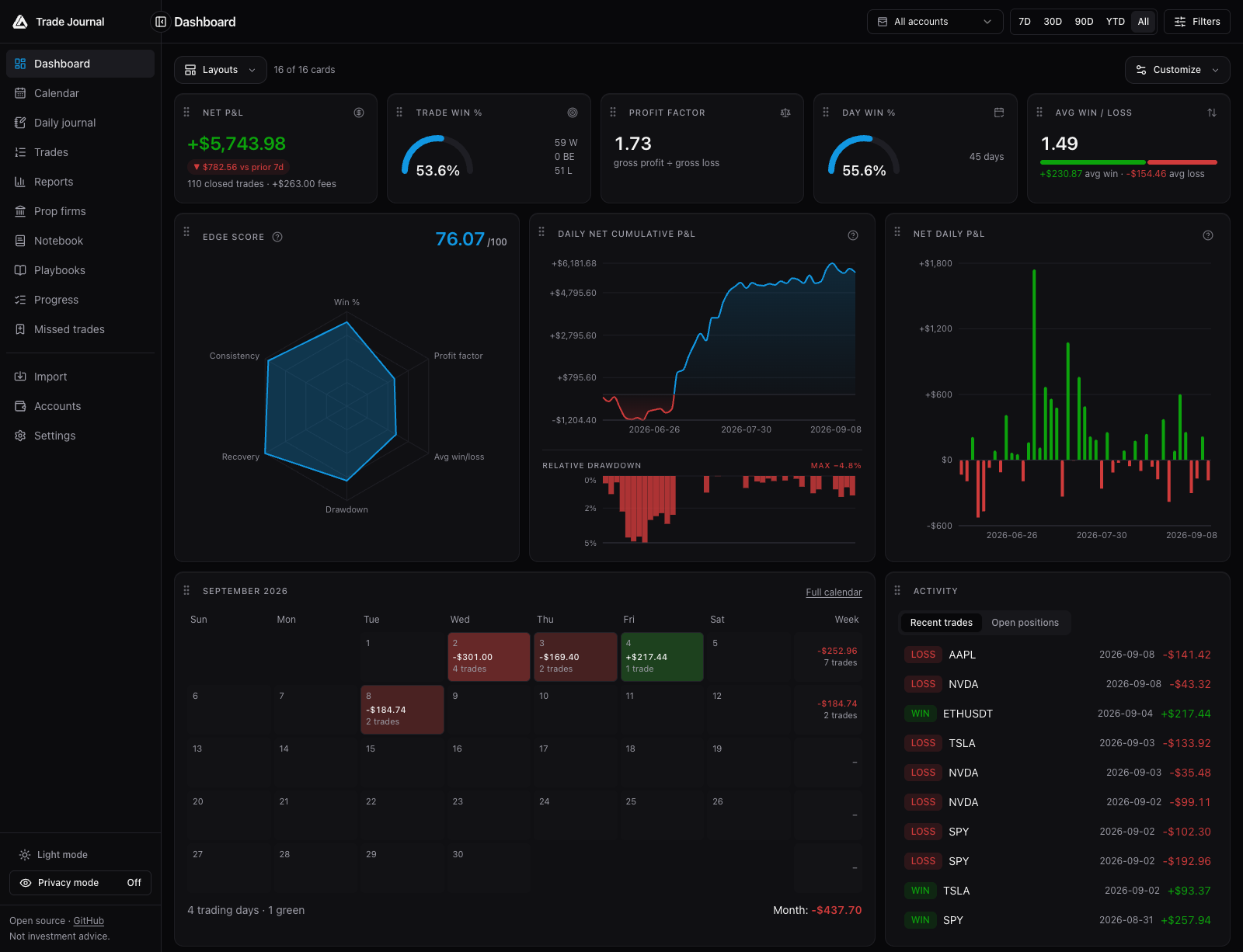 _Dashboard with generated demo data. All screenshots below use synthetic records, not a real trading account._
> ⚠️ **Early release.** APIs and schema may still move before 1.0. Parser validation varies by format, from synthetic fixtures to cross-checked field sources; per-format status lives in [docs/importers.md](docs/importers.md).
## Quickstart
> **Prefer not to self-host?** A free hosted journal is available inside [LuxAlgo](https://app.luxalgo.com), alongside [Vela](https://vela.luxalgo.com/chart), LuxAlgo's next-generation charting platform. Everything below is for running your own copy; this README describes the code in this checkout. See the [platform announcement](https://www.luxalgo.com/blog/luxalgo-charting-platform/) for hosted product context.
```bash
git clone https://github.com/LuxAlgo/trade-journal
cd trade-journal
pnpm install --frozen-lockfile
pnpm dev
# http://localhost:3000
```
Requirements: **Node 22+** and **pnpm 11.0.8** (the version pinned in `package.json`). First run creates the SQLite database and applies additive schema upgrades automatically. No migration tool, no setup wizard, no account. With the commands above, local data lives in `apps/web/data/`.
For smooth everyday use or UI reviews, stop the development server and run `pnpm preview`.
This builds the app once, then serves the optimized production version at the same address,
using the same local data. Unlike `pnpm dev`, it does not compile each page on its first
visit or hot-reload code edits. After code changes, stop it and rerun `pnpm preview` to
rebuild; use `pnpm start` to reuse an existing build. Switch back to `pnpm dev` when editing.
Run only one mode at a time, since development and production share the build directory.
### Try it with demo data
On an empty dashboard, choose **Load demo data** to create a separate demo account with about 90 days of generated trades. You can remove that account later in **Accounts**.
To try statement import, use [`docs/samples/demo-trades-tradingview.csv`](docs/samples/demo-trades-tradingview.csv) in **Import → File upload**. It contains synthetic TradingView paper-trading fills across 13 symbols, from March 2025 through September 2026. Review the detected format, timezone, warnings, and preview before importing.
The **Prop firms** page has its own **Load demo data** button: a read-only simulation of fictional firms, evaluation costs, and payouts. That preview stays in browser memory and does not write financial records.
### Docker
```bash
docker compose up -d
# http://localhost:3000, data persisted in ./data on the host
```
### Configuration (all optional)
| Env var | Effect |
| -------------------- | -------------------------------------------------------------------------------------------------------- |
| `JOURNAL_PASSWORD` | Require a password; recommended when accessible beyond localhost |
| `JOURNAL_SECRET` | Encryption key source for credentials at rest (default: generated key file in the data dir) |
| `JOURNAL_DATA_DIR` | Database, attachments, and local encryption key directory (default `./data` relative to the app process) |
| `ANTHROPIC_API_KEY` | Anthropic AI key via env instead of the Settings page |
| `OPENAI_API_KEY` | OpenAI AI key via env instead of the Settings page |
| `ANTHROPIC_BASE_URL` | Send Anthropic requests through a gateway or proxy (default `https://api.anthropic.com/v1`) |
| `OPENAI_BASE_URL` | Send OpenAI requests through a gateway or proxy (default `https://api.openai.com/v1`) |
Set these in the process environment or in `apps/web/.env.local` for local Next.js runs; the root [`.env.example`](.env.example) documents the optional values. For Docker, configure the service environment in [`docker-compose.yml`](docker-compose.yml).
For AI, open **Settings → AI**, select **Anthropic** or **OpenAI**, enter your API key, and choose **Save AI settings**. OpenAI defaults to `gpt-4.1-mini`; you can enter another text model ID available to your account. Each provider keeps its own encrypted key and model choice. Existing Anthropic settings continue to work. An OpenAI-only environment setup selects OpenAI automatically; with both keys present, Anthropic remains the default until you save a provider choice. Environment keys override saved keys and must be changed on the server. Saving settings does not make a model request or verify account access.
To use a local or third-party model, select **OpenAI-compatible** and enter the server's API URL, a model ID, and an API key only if the server requires one: for example `http://localhost:11434/v1` for Ollama or `https://openrouter.ai/api/v1` for OpenRouter. The journal server sends Chat Completions requests to that URL, so it must be reachable from there. In Docker, `localhost` is the container itself; use `http://host.docker.internal:11434/v1` instead (on Linux, also add `extra_hosts: ["host.docker.internal:host-gateway"]` to the service and make sure the model server listens beyond `127.0.0.1`). A saved key is only sent to the URL it was saved with, so saving a different URL removes it. AI statement parsing on the Import page stays on Anthropic and OpenAI, which accept PDFs and strict structured output.
Deploy anywhere a Node process and a persistent disk exist: Docker, Railway, Fly.io, a small VPS. Serverless platforms without a disk need an external database, which this release does not support. SQLite on disk is the point.
Optional historical market data powers estimated MAE/MFE and candle replay on closed trades, with Vela™ rendering the charts. Configure a connection or upload candle CSVs in **Settings → Market data**. No provider is enabled or selected by default. See [Market data and replay](#market-data-and-replay) below and the [market data guide](docs/market-data.md) for setup, calculation definitions, and coverage limits.
The **Prop firms** sidebar tracks evaluation/reset costs, refunds, payout requests, and actual receipts across your own firms and accounts. It includes cash ROI, partial payouts, reversals, renewal reminders, attachments, and generic CSV import/export. See [Prop firm tracking](#prop-firm-tracking) below and the [prop firm guide and research](docs/prop-firms.md) for workflows and metric definitions.
### Add a trade manually
Choose **Add trade** on the dashboard to open the entry form. Select or create a manual account, enter the symbol, and add your buy and sell executions with their date, time, quantity, price, and optional fee. Save an entry alone for an open position, or include the exit for a closed trade. Use **Add execution** for partial fills or additional legs. Dates and times use your device's timezone.
The optional **Notes** field supports Markdown and saves with the trade. When adding fills to an existing position, new notes append to its existing notes. After saving, the dashboard refreshes automatically. The same form is available under **Import → Manual**.
### Combine accounts in a reporting currency
Choose each account's currency from the dropdown when creating it. The dashboard and calendar use that currency for native amounts. To combine accounts with different currencies, open **Settings → Currency conversion**, choose a reporting currency, enter your own baseline rates, and enable conversion. Each rate means **1 unit of the account currency = the entered amount in the reporting currency**; the reporting currency itself always has a rate of 1.
Conversion works entirely offline and uses no rate service or API key. Saved rates apply consistently to P&L, fees, starting balances, charts, drawdown and other monetary metrics. These are fixed-rate trading-performance figures, not live FX valuations or broker conversion amounts. Updating rates recalculates displayed history; original records remain unchanged, and trade details and reports continue using their original account data. Until all required rates are saved, mixed-currency dashboard and calendar selections show separate currency totals rather than a combined amount.
## Why this exists
A trade journal is two things: a **verified record** of what you actually did, and the **reflection** that turns that record into better trading. Trade Journal keeps the record on your own machine and opens the reflection layer to any tool you choose, including your own AI.
- **You control your connections.** Broker, market-data, and saved AI credentials are encrypted at rest with AES-256-GCM. Your server uses them to contact the provider you configure, without a LuxAlgo credential proxy.
- **Your numbers are auditable.** The [Edge Score](docs/edge-score.md) is a documented, versioned formula, not a proprietary black box. Every metric is open source and unit-tested.
- **Your journal is portable.** Export trades as CSV, journal records as JSON, and reviews as PDF or PNG. Back up the data directory to retain attachments and the full local state; see [Export and backup](#export-and-backup).
## How it works
One primitive drives everything: a raw **execution** (a fill). Executions come in from broker sync, statement imports, or manual entry; the round-trip engine turns them into trades; every surface reads from there.
```mermaid
flowchart LR
BS["Broker sync (broker-sdk)"] --> EX["Executions (deduped fills)"]
IM["16 documented statement formats + CSV mapper"] --> EX
MN["Manual entry"] --> EX
EX --> RT["Round-trip engine (FIFO / LIFO / WAVG)"]
RT --> D["Dashboard + calendar"]
RT --> J["Daily journal + voice"]
RT --> R["Reports + Edge Score"]
RT --> AI["AI reflection"]
MD["Optional provider / candle CSV"] --> TR["Trade replay + estimated MAE/MFE"]
RT --> TR
PC["Manual prop entries / cash CSV"] --> PF["Prop firm cash ledger"]
```
## Features
| | |
| ------------------------ | --------------------------------------------------------------------------------------------------------------------------------------------------------------------------------------------------------------------------------------------------------------------------------------------------------------------------------------------------------------------------------------------------------------------------------------------------------------------------------------------------------------------------------------------------------------- |
| **Broker sync** | Read-only sync via [`@luxalgo/broker-sdk`](https://github.com/LuxAlgo/broker-sdk): Alpaca, Binance, Bybit, Coinbase, Kraken, OKX, Tradier, IBKR Flex, Hyperliquid, Questrade, Topstep, Trading212, Webull, Crypto.com, E*TRADE, Public, Charles Schwab, TradeStation, tastytrade, Robinhood Crypto, Gemini, and KuCoin. Connect forms render straight from SDK metadata. |
| **Statement import** | **16 documented formats**, auto-detected: **TradeZella** and **Tradervue** (CSV migration), TradingView (paper and strategy exports), MetaTrader 4 and 5, ThinkorSwim, IBKR (activity + Flex), NinjaTrader, Tradovate, TopstepX, Webull, DAS Trader, XTB, plus a column mapper for any other CSV. Matching execution records dedupe within an account; review warnings and skipped rows before committing an import. Have an export we don't recognize? Open an issue with an anonymized sample; real files are the most useful contribution this repo can get. |
| **Round-trip engine** | Flat-to-flat position cycles from raw fills. FIFO / LIFO / weighted-average per account. Partial fills, scale-ins, flips, futures multipliers. Annotations survive rebuilds. |
| **Analytics** | Net/gross P&L, win and day-win rates, profit factor, expectancy, R multiples, streaks, drawdown and recovery, profit concentration, duration/time-of-day/weekday performance, per-symbol/tag/mistake/playbook breakdowns. Advanced filters on every dimension, comparison groups, and a two-way cross-analysis matrix. Reports also include rolling performance trends and a trade explorer scatter plot, with saved MAE/MFE estimates where available. |
| **Dashboard** | P&L calendar with weekly totals, cumulative and daily P&L, gauges, the open **Edge Score v2** radar, open positions, time-of-day performance. Drag cards to rearrange, hide what you don't use, save named layouts. Calendar insights highlight daily patterns. Light/dark themes, a collapsible sidebar, and mobile navigation support smaller screens. |
| **Trade pages** | Charted on [Vela](https://www.npmjs.com/package/@luxalgo/vela) with entry/exit markers and P&L labels: fill paths from recorded executions, optional user-selected market candles, and trade replay. Estimated MAE/MFE, running P&L, executions, ratings, stops/targets, tags, mistakes. |
| **Daily journal** | Day stats, intraday P&L curve, autosaving Markdown notes with templates and attachments (images, PDFs). Type them or **dictate** them with browser speech recognition (no journal API key required; browser support and speech processing vary). |
| **Notebook & playbooks** | Folders, search, tags, trade links; named setups with rule checklists scored per trade, with adherence and followed-vs-broken performance in Reports. |
| **AI reflection** | Bring your own Anthropic or OpenAI API key, or use any OpenAI-compatible server such as Ollama: session recaps, per-trade critiques, "ask your journal" over your own aggregates. Key encrypted at rest; requests go from your server to the model, nowhere else. |
| **Routines & misses** | Pre-, during- and post-session routines with weekday schedules and a 13-week history; a missed-opportunity log kept out of your trading metrics. |
| **Journal defaults** | Configure breakeven tolerance, plus fee and stop/target rules per account and symbol; set timezone and contract multipliers for consistent calculations. |
| **Prop firms** | Evaluation and reset expenses, refunds, payout requests, partial receipts, reversals, cash ROI, account phases, renewal reminders, attachments, and generic cash CSV import/export. Separate from trade P&L. |
| **Privacy & export** | Privacy mode masks every monetary value (charts keep their shape) and persists across tabs. Trades export to CSV, reviews to PDF or PNG, and journal records to JSON; credentials, candle datasets, and attachment binaries are excluded from that export. |
IBKR broker sync and uploaded Flex XML statements use **Settings → General →
Default import timezone** for Flex timestamps without an offset. Existing synced accounts with unknown or different
timezone provenance require recovery into a separate account; see
[IBKR timezone recovery](docs/importers.md#ibkr-broker-sync-and-timezone-recovery).
Webull sync reads about a year of order history, and Binance futures sync the last three months. A
synced fill that closes a position opened before that history is skipped, or kept only for the part
the history covers, and the sync reports it, rather than showing a position that never existed.
Webull options that expired while held close at 0 at the 4pm New York expiry. In Binance hedge mode,
a long and a short held at once on one symbol stay separate trades. A Binance quarterly contract held
to delivery stays open, because delivery leaves no fill.
## Screenshots
Captured from the local app with generated demo trades and fictional prop firm records. Expand a view to inspect it at full width.
_Dashboard with generated demo data. All screenshots below use synthetic records, not a real trading account._
> ⚠️ **Early release.** APIs and schema may still move before 1.0. Parser validation varies by format, from synthetic fixtures to cross-checked field sources; per-format status lives in [docs/importers.md](docs/importers.md).
## Quickstart
> **Prefer not to self-host?** A free hosted journal is available inside [LuxAlgo](https://app.luxalgo.com), alongside [Vela](https://vela.luxalgo.com/chart), LuxAlgo's next-generation charting platform. Everything below is for running your own copy; this README describes the code in this checkout. See the [platform announcement](https://www.luxalgo.com/blog/luxalgo-charting-platform/) for hosted product context.
```bash
git clone https://github.com/LuxAlgo/trade-journal
cd trade-journal
pnpm install --frozen-lockfile
pnpm dev
# http://localhost:3000
```
Requirements: **Node 22+** and **pnpm 11.0.8** (the version pinned in `package.json`). First run creates the SQLite database and applies additive schema upgrades automatically. No migration tool, no setup wizard, no account. With the commands above, local data lives in `apps/web/data/`.
For smooth everyday use or UI reviews, stop the development server and run `pnpm preview`.
This builds the app once, then serves the optimized production version at the same address,
using the same local data. Unlike `pnpm dev`, it does not compile each page on its first
visit or hot-reload code edits. After code changes, stop it and rerun `pnpm preview` to
rebuild; use `pnpm start` to reuse an existing build. Switch back to `pnpm dev` when editing.
Run only one mode at a time, since development and production share the build directory.
### Try it with demo data
On an empty dashboard, choose **Load demo data** to create a separate demo account with about 90 days of generated trades. You can remove that account later in **Accounts**.
To try statement import, use [`docs/samples/demo-trades-tradingview.csv`](docs/samples/demo-trades-tradingview.csv) in **Import → File upload**. It contains synthetic TradingView paper-trading fills across 13 symbols, from March 2025 through September 2026. Review the detected format, timezone, warnings, and preview before importing.
The **Prop firms** page has its own **Load demo data** button: a read-only simulation of fictional firms, evaluation costs, and payouts. That preview stays in browser memory and does not write financial records.
### Docker
```bash
docker compose up -d
# http://localhost:3000, data persisted in ./data on the host
```
### Configuration (all optional)
| Env var | Effect |
| -------------------- | -------------------------------------------------------------------------------------------------------- |
| `JOURNAL_PASSWORD` | Require a password; recommended when accessible beyond localhost |
| `JOURNAL_SECRET` | Encryption key source for credentials at rest (default: generated key file in the data dir) |
| `JOURNAL_DATA_DIR` | Database, attachments, and local encryption key directory (default `./data` relative to the app process) |
| `ANTHROPIC_API_KEY` | Anthropic AI key via env instead of the Settings page |
| `OPENAI_API_KEY` | OpenAI AI key via env instead of the Settings page |
| `ANTHROPIC_BASE_URL` | Send Anthropic requests through a gateway or proxy (default `https://api.anthropic.com/v1`) |
| `OPENAI_BASE_URL` | Send OpenAI requests through a gateway or proxy (default `https://api.openai.com/v1`) |
Set these in the process environment or in `apps/web/.env.local` for local Next.js runs; the root [`.env.example`](.env.example) documents the optional values. For Docker, configure the service environment in [`docker-compose.yml`](docker-compose.yml).
For AI, open **Settings → AI**, select **Anthropic** or **OpenAI**, enter your API key, and choose **Save AI settings**. OpenAI defaults to `gpt-4.1-mini`; you can enter another text model ID available to your account. Each provider keeps its own encrypted key and model choice. Existing Anthropic settings continue to work. An OpenAI-only environment setup selects OpenAI automatically; with both keys present, Anthropic remains the default until you save a provider choice. Environment keys override saved keys and must be changed on the server. Saving settings does not make a model request or verify account access.
To use a local or third-party model, select **OpenAI-compatible** and enter the server's API URL, a model ID, and an API key only if the server requires one: for example `http://localhost:11434/v1` for Ollama or `https://openrouter.ai/api/v1` for OpenRouter. The journal server sends Chat Completions requests to that URL, so it must be reachable from there. In Docker, `localhost` is the container itself; use `http://host.docker.internal:11434/v1` instead (on Linux, also add `extra_hosts: ["host.docker.internal:host-gateway"]` to the service and make sure the model server listens beyond `127.0.0.1`). A saved key is only sent to the URL it was saved with, so saving a different URL removes it. AI statement parsing on the Import page stays on Anthropic and OpenAI, which accept PDFs and strict structured output.
Deploy anywhere a Node process and a persistent disk exist: Docker, Railway, Fly.io, a small VPS. Serverless platforms without a disk need an external database, which this release does not support. SQLite on disk is the point.
Optional historical market data powers estimated MAE/MFE and candle replay on closed trades, with Vela™ rendering the charts. Configure a connection or upload candle CSVs in **Settings → Market data**. No provider is enabled or selected by default. See [Market data and replay](#market-data-and-replay) below and the [market data guide](docs/market-data.md) for setup, calculation definitions, and coverage limits.
The **Prop firms** sidebar tracks evaluation/reset costs, refunds, payout requests, and actual receipts across your own firms and accounts. It includes cash ROI, partial payouts, reversals, renewal reminders, attachments, and generic CSV import/export. See [Prop firm tracking](#prop-firm-tracking) below and the [prop firm guide and research](docs/prop-firms.md) for workflows and metric definitions.
### Add a trade manually
Choose **Add trade** on the dashboard to open the entry form. Select or create a manual account, enter the symbol, and add your buy and sell executions with their date, time, quantity, price, and optional fee. Save an entry alone for an open position, or include the exit for a closed trade. Use **Add execution** for partial fills or additional legs. Dates and times use your device's timezone.
The optional **Notes** field supports Markdown and saves with the trade. When adding fills to an existing position, new notes append to its existing notes. After saving, the dashboard refreshes automatically. The same form is available under **Import → Manual**.
### Combine accounts in a reporting currency
Choose each account's currency from the dropdown when creating it. The dashboard and calendar use that currency for native amounts. To combine accounts with different currencies, open **Settings → Currency conversion**, choose a reporting currency, enter your own baseline rates, and enable conversion. Each rate means **1 unit of the account currency = the entered amount in the reporting currency**; the reporting currency itself always has a rate of 1.
Conversion works entirely offline and uses no rate service or API key. Saved rates apply consistently to P&L, fees, starting balances, charts, drawdown and other monetary metrics. These are fixed-rate trading-performance figures, not live FX valuations or broker conversion amounts. Updating rates recalculates displayed history; original records remain unchanged, and trade details and reports continue using their original account data. Until all required rates are saved, mixed-currency dashboard and calendar selections show separate currency totals rather than a combined amount.
## Why this exists
A trade journal is two things: a **verified record** of what you actually did, and the **reflection** that turns that record into better trading. Trade Journal keeps the record on your own machine and opens the reflection layer to any tool you choose, including your own AI.
- **You control your connections.** Broker, market-data, and saved AI credentials are encrypted at rest with AES-256-GCM. Your server uses them to contact the provider you configure, without a LuxAlgo credential proxy.
- **Your numbers are auditable.** The [Edge Score](docs/edge-score.md) is a documented, versioned formula, not a proprietary black box. Every metric is open source and unit-tested.
- **Your journal is portable.** Export trades as CSV, journal records as JSON, and reviews as PDF or PNG. Back up the data directory to retain attachments and the full local state; see [Export and backup](#export-and-backup).
## How it works
One primitive drives everything: a raw **execution** (a fill). Executions come in from broker sync, statement imports, or manual entry; the round-trip engine turns them into trades; every surface reads from there.
```mermaid
flowchart LR
BS["Broker sync (broker-sdk)"] --> EX["Executions (deduped fills)"]
IM["16 documented statement formats + CSV mapper"] --> EX
MN["Manual entry"] --> EX
EX --> RT["Round-trip engine (FIFO / LIFO / WAVG)"]
RT --> D["Dashboard + calendar"]
RT --> J["Daily journal + voice"]
RT --> R["Reports + Edge Score"]
RT --> AI["AI reflection"]
MD["Optional provider / candle CSV"] --> TR["Trade replay + estimated MAE/MFE"]
RT --> TR
PC["Manual prop entries / cash CSV"] --> PF["Prop firm cash ledger"]
```
## Features
| | |
| ------------------------ | --------------------------------------------------------------------------------------------------------------------------------------------------------------------------------------------------------------------------------------------------------------------------------------------------------------------------------------------------------------------------------------------------------------------------------------------------------------------------------------------------------------------------------------------------------------- |
| **Broker sync** | Read-only sync via [`@luxalgo/broker-sdk`](https://github.com/LuxAlgo/broker-sdk): Alpaca, Binance, Bybit, Coinbase, Kraken, OKX, Tradier, IBKR Flex, Hyperliquid, Questrade, Topstep, Trading212, Webull, Crypto.com, E*TRADE, Public, Charles Schwab, TradeStation, tastytrade, Robinhood Crypto, Gemini, and KuCoin. Connect forms render straight from SDK metadata. |
| **Statement import** | **16 documented formats**, auto-detected: **TradeZella** and **Tradervue** (CSV migration), TradingView (paper and strategy exports), MetaTrader 4 and 5, ThinkorSwim, IBKR (activity + Flex), NinjaTrader, Tradovate, TopstepX, Webull, DAS Trader, XTB, plus a column mapper for any other CSV. Matching execution records dedupe within an account; review warnings and skipped rows before committing an import. Have an export we don't recognize? Open an issue with an anonymized sample; real files are the most useful contribution this repo can get. |
| **Round-trip engine** | Flat-to-flat position cycles from raw fills. FIFO / LIFO / weighted-average per account. Partial fills, scale-ins, flips, futures multipliers. Annotations survive rebuilds. |
| **Analytics** | Net/gross P&L, win and day-win rates, profit factor, expectancy, R multiples, streaks, drawdown and recovery, profit concentration, duration/time-of-day/weekday performance, per-symbol/tag/mistake/playbook breakdowns. Advanced filters on every dimension, comparison groups, and a two-way cross-analysis matrix. Reports also include rolling performance trends and a trade explorer scatter plot, with saved MAE/MFE estimates where available. |
| **Dashboard** | P&L calendar with weekly totals, cumulative and daily P&L, gauges, the open **Edge Score v2** radar, open positions, time-of-day performance. Drag cards to rearrange, hide what you don't use, save named layouts. Calendar insights highlight daily patterns. Light/dark themes, a collapsible sidebar, and mobile navigation support smaller screens. |
| **Trade pages** | Charted on [Vela](https://www.npmjs.com/package/@luxalgo/vela) with entry/exit markers and P&L labels: fill paths from recorded executions, optional user-selected market candles, and trade replay. Estimated MAE/MFE, running P&L, executions, ratings, stops/targets, tags, mistakes. |
| **Daily journal** | Day stats, intraday P&L curve, autosaving Markdown notes with templates and attachments (images, PDFs). Type them or **dictate** them with browser speech recognition (no journal API key required; browser support and speech processing vary). |
| **Notebook & playbooks** | Folders, search, tags, trade links; named setups with rule checklists scored per trade, with adherence and followed-vs-broken performance in Reports. |
| **AI reflection** | Bring your own Anthropic or OpenAI API key, or use any OpenAI-compatible server such as Ollama: session recaps, per-trade critiques, "ask your journal" over your own aggregates. Key encrypted at rest; requests go from your server to the model, nowhere else. |
| **Routines & misses** | Pre-, during- and post-session routines with weekday schedules and a 13-week history; a missed-opportunity log kept out of your trading metrics. |
| **Journal defaults** | Configure breakeven tolerance, plus fee and stop/target rules per account and symbol; set timezone and contract multipliers for consistent calculations. |
| **Prop firms** | Evaluation and reset expenses, refunds, payout requests, partial receipts, reversals, cash ROI, account phases, renewal reminders, attachments, and generic cash CSV import/export. Separate from trade P&L. |
| **Privacy & export** | Privacy mode masks every monetary value (charts keep their shape) and persists across tabs. Trades export to CSV, reviews to PDF or PNG, and journal records to JSON; credentials, candle datasets, and attachment binaries are excluded from that export. |
IBKR broker sync and uploaded Flex XML statements use **Settings → General →
Default import timezone** for Flex timestamps without an offset. Existing synced accounts with unknown or different
timezone provenance require recovery into a separate account; see
[IBKR timezone recovery](docs/importers.md#ibkr-broker-sync-and-timezone-recovery).
Webull sync reads about a year of order history, and Binance futures sync the last three months. A
synced fill that closes a position opened before that history is skipped, or kept only for the part
the history covers, and the sync reports it, rather than showing a position that never existed.
Webull options that expired while held close at 0 at the 4pm New York expiry. In Binance hedge mode,
a long and a short held at once on one symbol stay separate trades. A Binance quarterly contract held
to delivery stays open, because delivery leaves no fill.
## Screenshots
Captured from the local app with generated demo trades and fictional prop firm records. Expand a view to inspect it at full width.
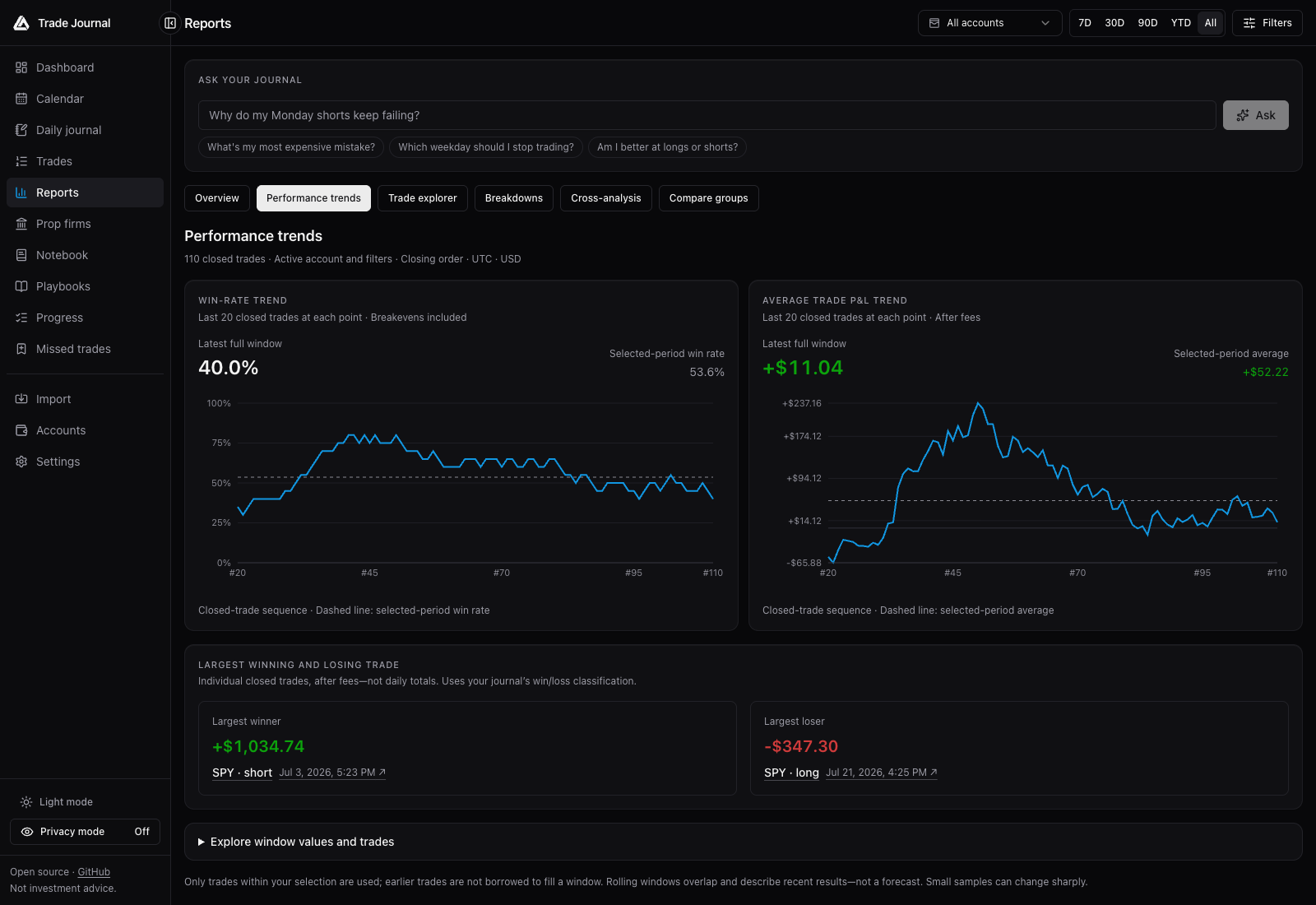 Compare recent rolling results with the full trading history. Reports also offer a trade explorer, breakdowns, comparison groups, and cross-analysis.
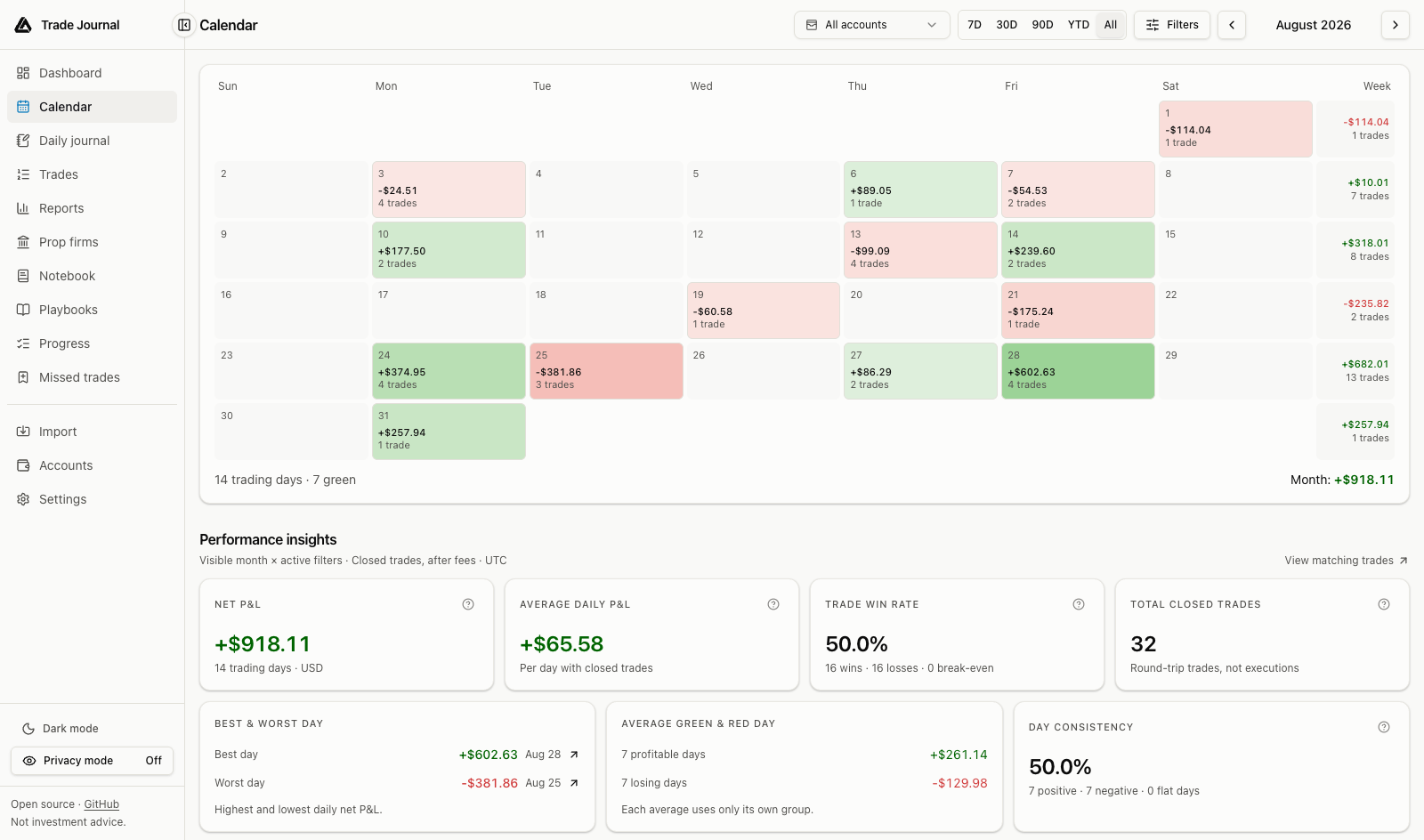 Review trading days and weekly totals, then open a day to inspect its trades and journal.
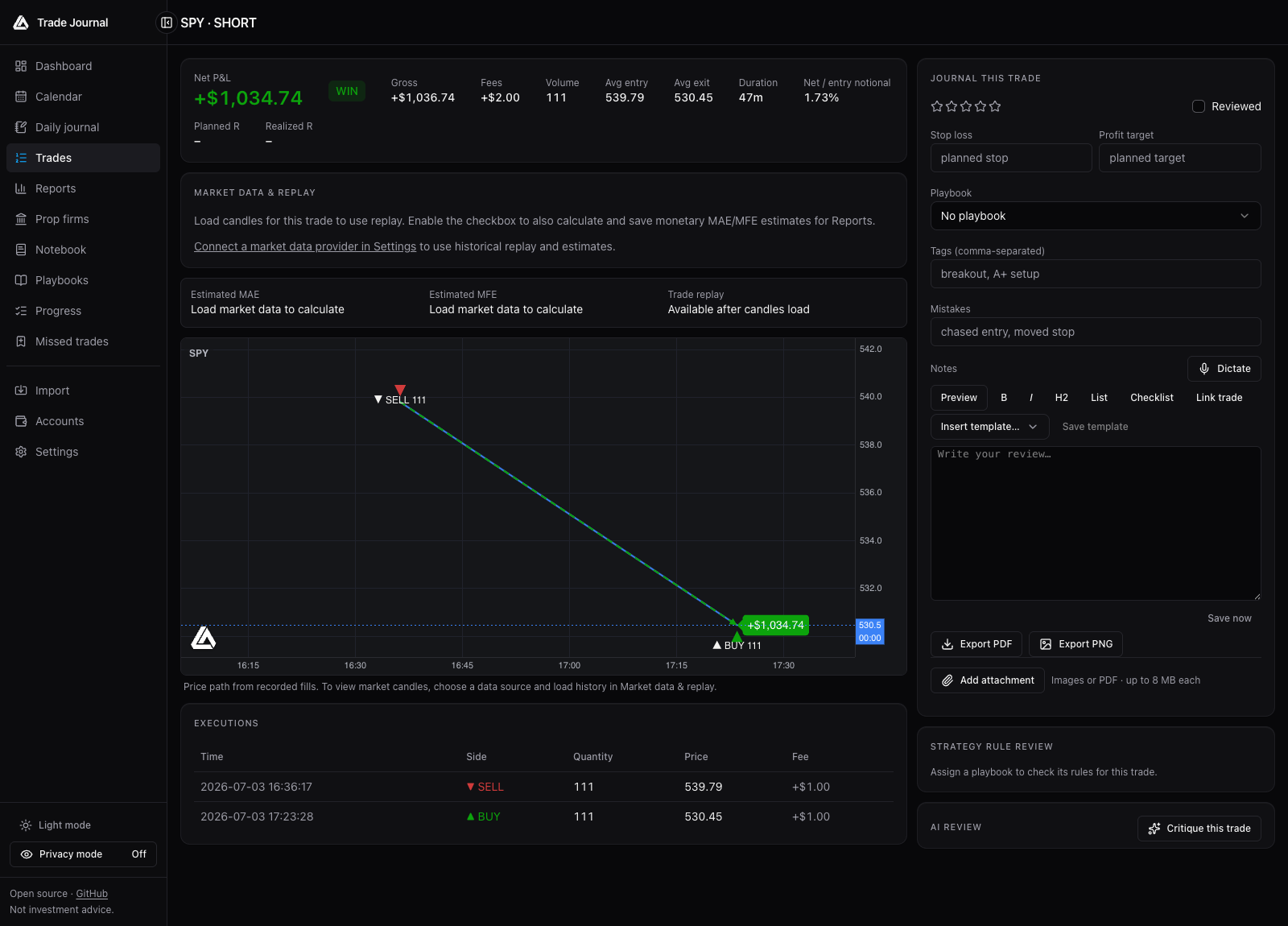 This chart shows a path between generated execution prices. Provider candles and replay are separate, optional inputs; no live market history is pictured here.
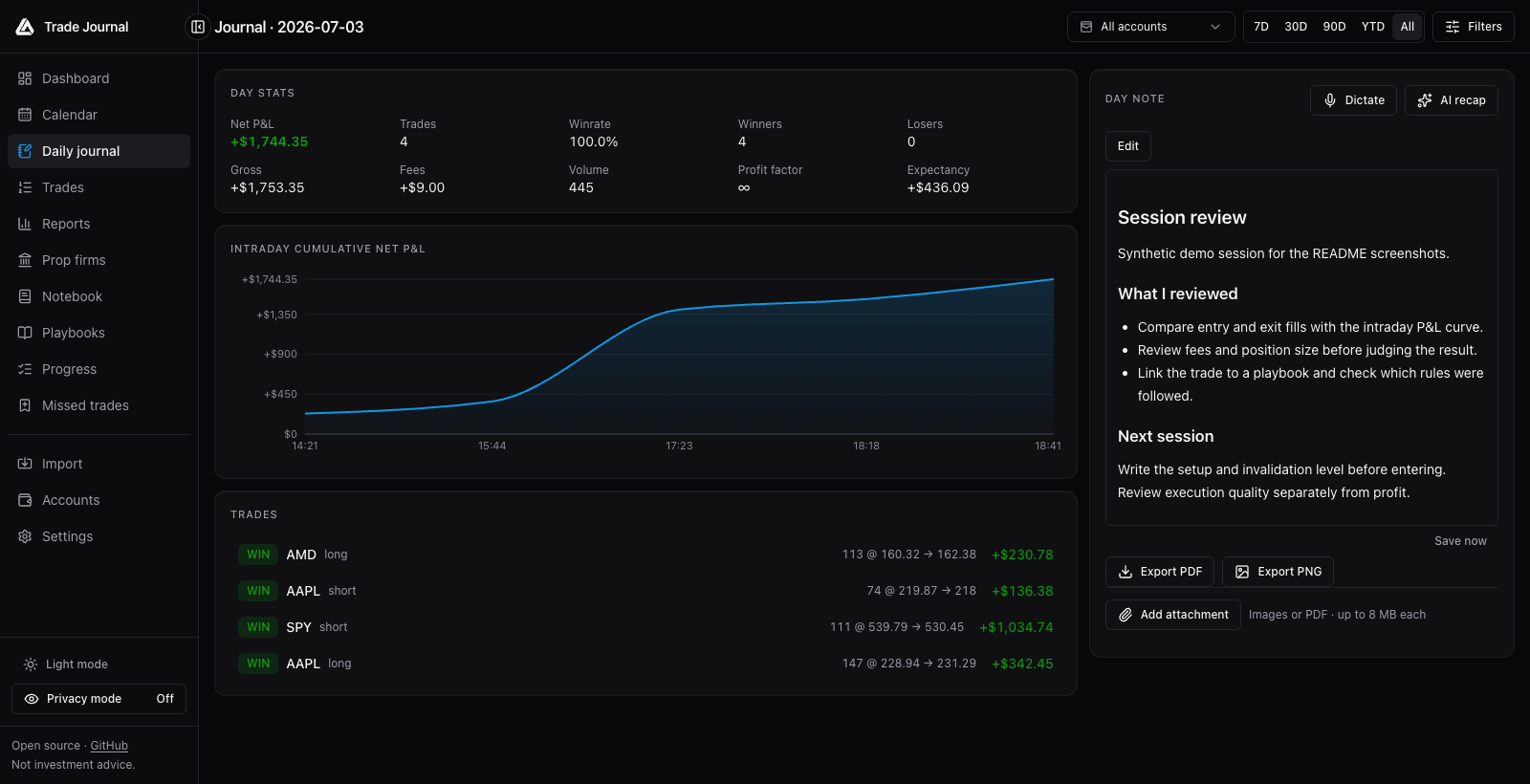 Keep notes, templates, attachments, and linked trades together with the day's results.
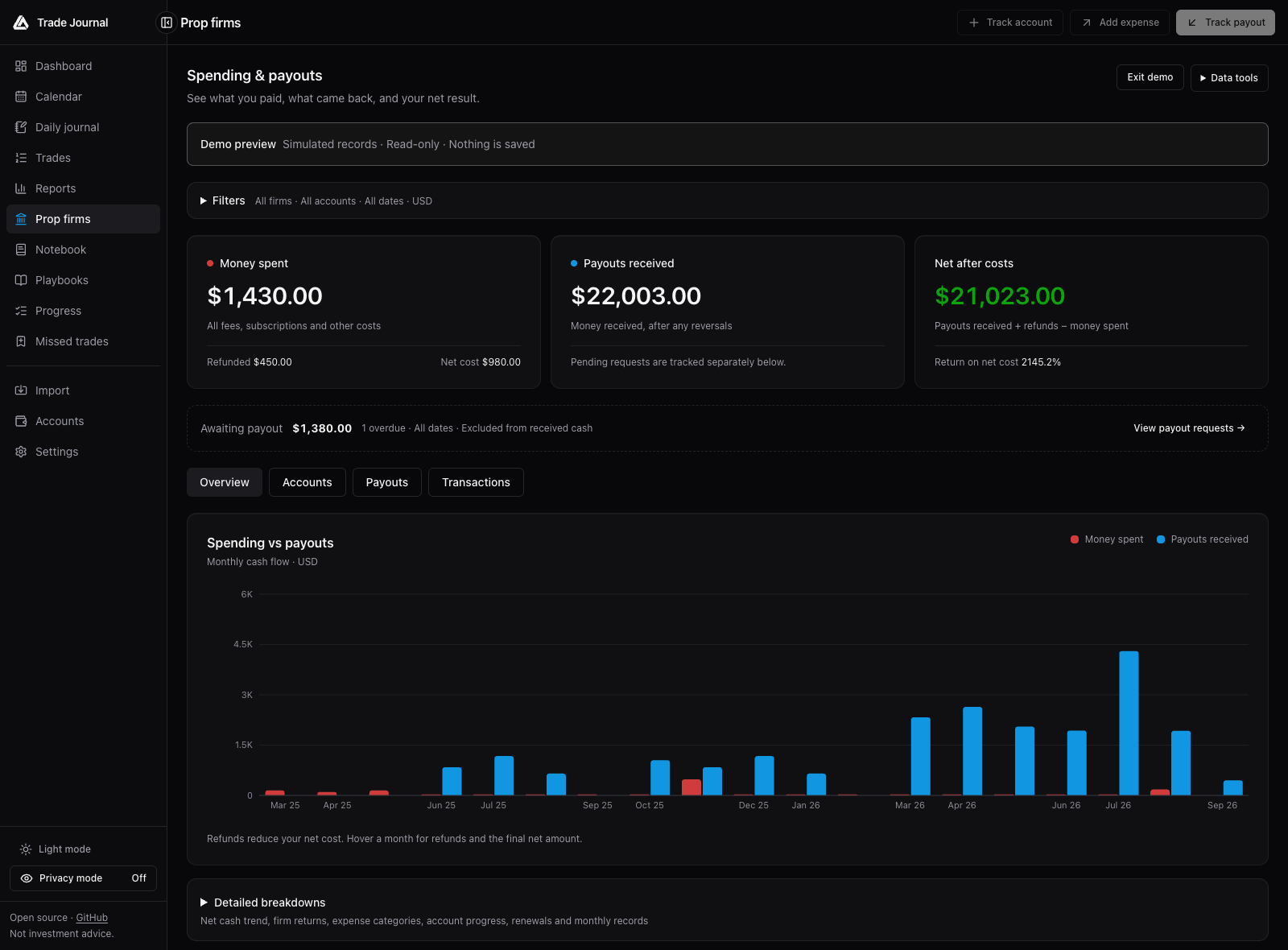 A separate cash ledger tracks what you spent and actually received, with pending payouts shown separately.