English | 繁體中文

Lynavo Drive
A high-performance, local-LAN incremental media sync tool from mobile (iOS / Android) to desktop (macOS / Windows).







Product Preview •
Key Features •
Developer Quick Start •
OSS Boundaries •
Contributing
---
## Project Status
Lynavo Drive is implemented and open for community source builds and
contributions. This repository provides one public local source-build and
package-verification path; it does not publish official signed installers,
mobile store builds, auto-updates, or hosted services.
| Surface | Current OSS scope |
| ------------ | -------------------------------------------------------------- |
| Desktop | macOS and Windows application runtime |
| Mobile | iOS and Android application runtime |
| Linux | Local source-build and package verification only |
| Network | Foreground sync over the same LAN |
| Distribution | Community source builds and locally produced packages/binaries |
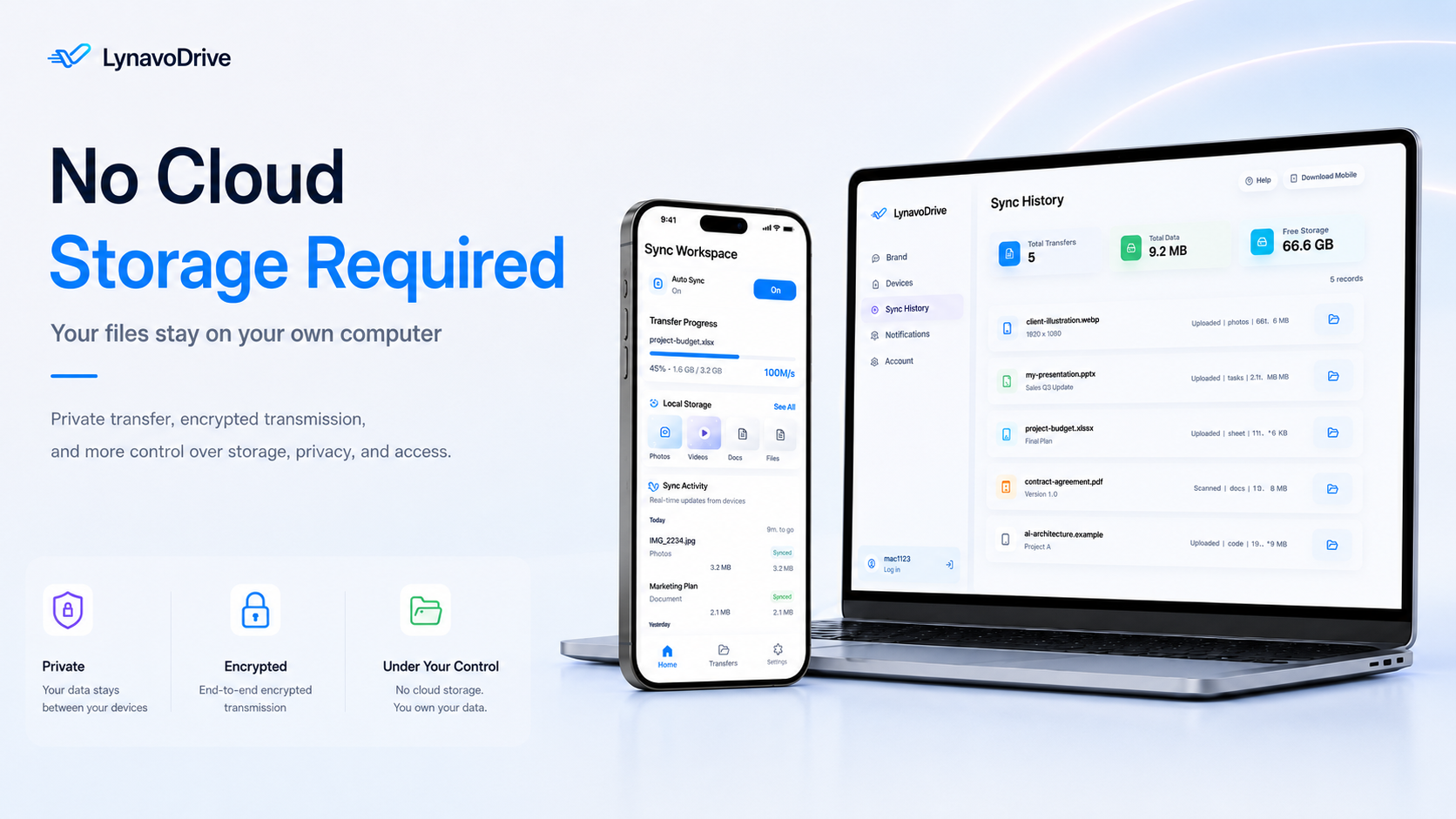
## 📸 Product Preview
## ✨ Key Features
- **Automatic incremental media sync**: Scans the mobile photo library and
queues unsynced photos and videos without manual file selection.
- **Local discovery and pairing**: Finds desktops through mDNS on the same LAN,
then pairs with a QR code or six-digit pairing code.
- **Resumable serial transfers**: Uploads one file per phone at a time and
continues unfinished queue items after foreground LAN reconnection.
- **Read-only queue and history**: Shows transfer progress, completed files, and
completion-day statistics without delete, skip, or reorder controls.
- **Shared-file access**: Lets mobile users browse and download files exposed by
the desktop's local shared directories. This is separate from automatic media
upload.
- **Local diagnostics**: Exports desktop and mobile diagnostics without relying
on a hosted diagnostics service.
## 🛡️ OSS Boundaries
> [!IMPORTANT]
> **Local-LAN Open-Source Core**
>
> - Foreground automatic sync works without sign-in or an account service.
> - The upload set comes only from the mobile photo-library scan and local
> pending queue; there is no manual file-selection fallback.
> - The queue is read-only, and each phone uploads one file at a time.
> - Missing non-OSS modules or account-service state do not block foreground LAN
> pairing and sync.
> [!WARNING]
> **Not Included In This Repository**
>
> - Remote access, cloud relay, tunnel credentials, official accounts, and silent
> background continuation are unavailable and remain disabled.
> - Official signing, notarization, mobile store distribution, package upload,
> and auto-update infrastructure are not provided.
> - The source package does not redistribute Apple Bonjour for Windows. It uses
> a locally installed/configured Bonjour runtime when available, otherwise the
> zeroconf-compatible fallback.
> - Linux remains a local build and package-verification target, not a supported
> desktop user surface.
## 🚀 Developer Quick Start
This is a contributor workflow, not an end-user installer. See the
[release playbook](./docs/release/release-playbook.md) for local package builds
and platform-specific verification.
```bash
# 1. Enable the repository's pinned pnpm version and install dependencies
corepack enable
pnpm install --frozen-lockfile
# 2. Build shared packages
pnpm --filter @lynavo-drive/contracts build
pnpm --filter @lynavo-drive/design-tokens build
# 3. Start desktop development mode
pnpm dev:desktop
```
The Electron window opens automatically, and the desktop app starts the sidecar.
To run a mobile client, keep the desktop running and use another terminal:
```bash
# Start Metro
pnpm dev:mobile
# Then launch one platform from another terminal
pnpm --filter @lynavo-drive/mobile ios
# or
pnpm dev:mobile:android
```
Platform prerequisites still apply: iOS requires macOS, Xcode, and CocoaPods;
Android requires Android Studio plus the Android SDK/NDK.
Pair the applications:
1. Keep the phone and desktop on the same LAN.
2. Open Lynavo Drive on the desktop and set or view the six-digit pairing code.
3. On mobile, discover the desktop and scan its QR code or enter the pairing
code.
4. Keep the mobile app in the foreground for OSS automatic LAN sync.
## ❓ FAQs & Troubleshooting
🔍 View Troubleshooting Guide & Common FAQs
### 1. The mobile app cannot find my desktop client (mDNS discovery failure)
- **Check Network**: Ensure both mobile and desktop are on the same local LAN.
- **Windows Firewall**: Verify that Windows Defender Firewall allows incoming traffic for ports `39593` (TCP/LMUP file transport) and `39594` (HTTP API).
- **Bonjour Runtime**: The OSS build doesn't redistribute Apple Bonjour. Ensure Bonjour is installed on Windows, or rely on the zeroconf-compatible fallback.
### 2. Why are some of my iCloud photos stuck/not transferring?
- Photos marked with `iCloud` must be exported from the Apple Photos cloud repository before transfer.
- While in `cloud_downloading` or `preparing` states, the phone is downloading the high-res original asset to local storage. Transfer begins automatically once complete.
### 3. Can I manually select which photos/videos to sync?
- No. Automatic upload is driven by the mobile photo-library scan and strictly
read-only pending queue. Checkbox picking is not part of the OSS workflow.
### 4. What happens when the desktop sleeps or connection drops?
- LAN transfers will interrupt. With the mobile app in the foreground, the
unfinished queue continues after the desktop wakes and LAN connectivity is
restored.
- The OSS runtime does not provide silent background continuation.
- Enable _"Prevent computer from sleeping while syncing"_ in the desktop app settings for uninterrupted transfers.
## 🛠️ Tech Stack
| Layer | Technology |
| -------------- | ---------------------------------------------------------- |
| Monorepo | pnpm 10 + turborepo 2.8 |
| Desktop | Electron 41 + electron-vite 5 + electron-builder 26 |
| Desktop UI | React 18.3 + zustand 5 + Tailwind CSS v4 |
| Mobile | React Native 0.84.1 + React 19 (iOS / Android) |
| iOS Native | Swift `SyncEngine` + BGTask + PhotoKit + Network.framework |
| Android Native | Kotlin bridge + NativeSyncEngine / MediaStore / NsdManager |
| Sidecar | Go 1.25.6 + SQLite + WebSocket |
| Shared | `@lynavo-drive/contracts` + `@lynavo-drive/design-tokens` |
| Test | vitest 4.1 + jest + `go test` |
## 🏗️ Architecture Overview
```text
Mobile (RN UI on iOS / Android)
├── iOS: Swift SyncEngine
└── Android: Kotlin NativeSyncEngine
├── Bonjour/mDNS discover
├── LMUP/TCP :39593
└── Presence/HTTP :39594
│
▼
Desktop (Electron + Go sidecar, macOS / Windows)
├── Electron: UI shell, window, bridge, sidecar lifecycle
├── Sidecar HTTP API / WebSocket
├── LMUP file receiver
├── SQLite
└── Filesystem / shared directory detection
```
## ⚙️ Prerequisites
- **macOS or Windows** (desktop currently supports macOS / Windows; Linux is
only for local build / package verification; iOS builds still require macOS +
Xcode)
- **Node.js** >= 22.12.0
- **pnpm** >= 10
- **Go** >= 1.25.6 (sidecar development and tests)
📱 View Mobile & Platform-Specific SDK Requirements
- **Xcode + CocoaPods** (iOS builds and device debugging, macOS only)
- **Android Studio + Android SDK / NDK** (Android builds and debugging)
## 💻 Common Commands
🛠️ View Developer Command Reference
```bash
# Desktop
pnpm dev:desktop
pnpm build:desktop
pnpm package:desktop # macOS local DMG
pnpm package:desktop:win # Windows NSIS + zip (default desktop Windows package, no release profile)
# Mobile
pnpm dev:mobile
pnpm build:mobile
pnpm dev:mobile:android
pnpm build:mobile:android # Android Debug build (assembleDebug)
# Sidecar
pnpm dev:sidecar
pnpm build:sidecar
pnpm test:sidecar
# Full repository validation
pnpm build
pnpm test
pnpm typecheck
pnpm format:check
pnpm check
```
## 📦 OSS Build & Package Verification
This OSS repository keeps contributor-local source-build paths and
GitHub-hosted, secret-free unsigned build/package verification. Hosted outputs
are verification artifacts, not official signed distributions. Linux remains
local verification only and is not a supported desktop user surface.
🔬 View Verification & Build Pipelines
```bash
# Inspect the local build / package commands that would run
pnpm release --profile review --targets ios,android,mac,win,linux --dry-run
# Local iOS / Android Debug / Desktop build verification
pnpm build:mobile
pnpm build:mobile:ios:release
pnpm build:mobile:android
pnpm package:desktop
# Android Release source-build verification
pnpm release --profile review --targets android --dry-run
pnpm release --profile review --targets android
# Local desktop platform package
pnpm package:desktop
# Linux package verification (Linux host, one arch per run)
pnpm --filter @lynavo-drive/desktop package:linux -- --arch=x64
pnpm --filter @lynavo-drive/desktop package:linux -- --arch=arm64
```
`release` profiles only inject `LYNAVO_RELEASE_CHANNEL` and local build
configuration, and only select local build/package commands.
GitHub-hosted workflows may invoke these commands using public source and no
repository secrets. Third-party or external build services, code signing,
notarization, store upload, auto-update, and private distribution infrastructure
remain outside this OSS baseline.
The `OSS Draft Release` workflow accepts stable tags matching `vX.Y.Z`, rebuilds
the complete verification set from that tagged commit, and creates or updates a
draft GitHub Release. Manual dispatch is build-only. Release files are unsigned
OSS build-verification outputs and include SHA-256 checksums; see the
[release playbook](./docs/release/release-playbook.md) for the exact asset list,
warnings, and maintainer procedure.
## 📁 Project Structure
📂 View Directory Structure Map
```text
lynavo-drive/
├── apps/
│ ├── desktop/ # Electron desktop app
│ │ └── src/
│ │ ├── main/ # Main process (window, IPC, sidecar lifecycle)
│ │ ├── preload/ # Preload bridge
│ │ └── renderer/ # React 18 UI
│ └── mobile/ # React Native iOS/Android app + native sync
│ ├── ios/ # Xcode project and Swift native modules
│ ├── android/ # Android project, Kotlin bridge, native sync
│ ├── src/ # RN screens and hooks
│ └── __tests__/ # RN tests
├── packages/
│ ├── contracts/ # Shared DTOs / constants / events / error codes
│ └── design-tokens/ # Shared design tokens
├── services/
│ └── sidecar-go/ # Go sidecar (TCP/HTTP/SQLite/mDNS)
└── docs/
├── architecture/ # Architecture, state machine, data model
├── operations/ # Troubleshooting, diagnostics, sidecar runbook
├── product/ # Product constraints, OSS boundaries, non-goals
├── release/ # OSS build and package verification playbook
└── testing/ # OSS verification matrix
```
## 🎯 Development Baseline
- Shared types, constants, event names, and port definitions come from
`@lynavo-drive/contracts`.
- The renderer does not access the sidecar, filesystem, or SQLite directly; all
access goes through the preload bridge / main process.
- The queue stays read-only. The UI cannot delete, reorder, or skip items.
- A given phone uploads only one file at a time.
- Guest/local foreground LAN sync is fail-open; remote access and background
continuation fail closed.
## 📄 Documentation Reference
- Development constraints and operating rules: [`AGENTS.md`](./AGENTS.md)
- System overview: [`docs/architecture/system-overview.md`](./docs/architecture/system-overview.md)
- Sync state machine: [`docs/architecture/sync-state-machine.md`](./docs/architecture/sync-state-machine.md)
- Data model and statistics semantics: [`docs/architecture/data-model.md`](./docs/architecture/data-model.md)
- Troubleshooting guide: [`docs/operations/troubleshooting.md`](./docs/operations/troubleshooting.md)
- Mobile diagnostics package: [`docs/operations/mobile-diagnostics.md`](./docs/operations/mobile-diagnostics.md)
- Sidecar runbook: [`docs/operations/sidecar-runbook.md`](./docs/operations/sidecar-runbook.md)
- Product constraints, OSS boundaries, and non-goals: [`docs/product/constraints.md`](./docs/product/constraints.md)
- OSS build verification playbook: [`docs/release/release-playbook.md`](./docs/release/release-playbook.md)
- OSS verification matrix: [`docs/testing/oss-verification-matrix.md`](./docs/testing/oss-verification-matrix.md)
- Security policy: [`SECURITY.md`](./SECURITY.md)
- Privacy notice: [`PRIVACY.md`](./PRIVACY.md)
- Contributing guide: [`CONTRIBUTING.md`](./CONTRIBUTING.md)
- Code of conduct: [`CODE_OF_CONDUCT.md`](./CODE_OF_CONDUCT.md)
- Third-party notices: [`THIRD_PARTY_NOTICES.md`](./THIRD_PARTY_NOTICES.md)
## 💡 Contributing
Community contributions are welcome. To get started:
1. **Fork the Repository**: Create a personal fork and clone it locally.
2. **Set Up the Workspace**: Follow the [Developer Quick Start](#-developer-quick-start) and install the toolchain required by the platform you plan to change.
3. **Verify Your Change**: Run focused tests first, then the applicable repository checks before submitting a pull request:
```bash
pnpm test
pnpm typecheck
pnpm format:check
pnpm gate:release
```
For detailed coding standards, project layouts, and process rules, check out our [Contributing Guidelines](./CONTRIBUTING.md) and [Code of Conduct](./CODE_OF_CONDUCT.md).
- [Browse existing issues](https://github.com/lynavo/lynavo-drive/issues)
- [Report a bug](https://github.com/lynavo/lynavo-drive/issues/new?labels=bug)
- [Request a feature](https://github.com/lynavo/lynavo-drive/issues/new?labels=enhancement)
- [Report a vulnerability privately](https://github.com/lynavo/lynavo-drive/security/advisories/new) instead of posting exploitable details in a public issue.
## ⚖️ License
GNU Affero General Public License v3.0. See [`LICENSE`](./LICENSE).