MCPJam
Hosted app ·
Docs ·
Website
[](https://www.npmjs.com/package/@mcpjam/inspector)
[](https://opensource.org/licenses/Apache-2.0)
[](https://discord.gg/JEnDtz8X6z)
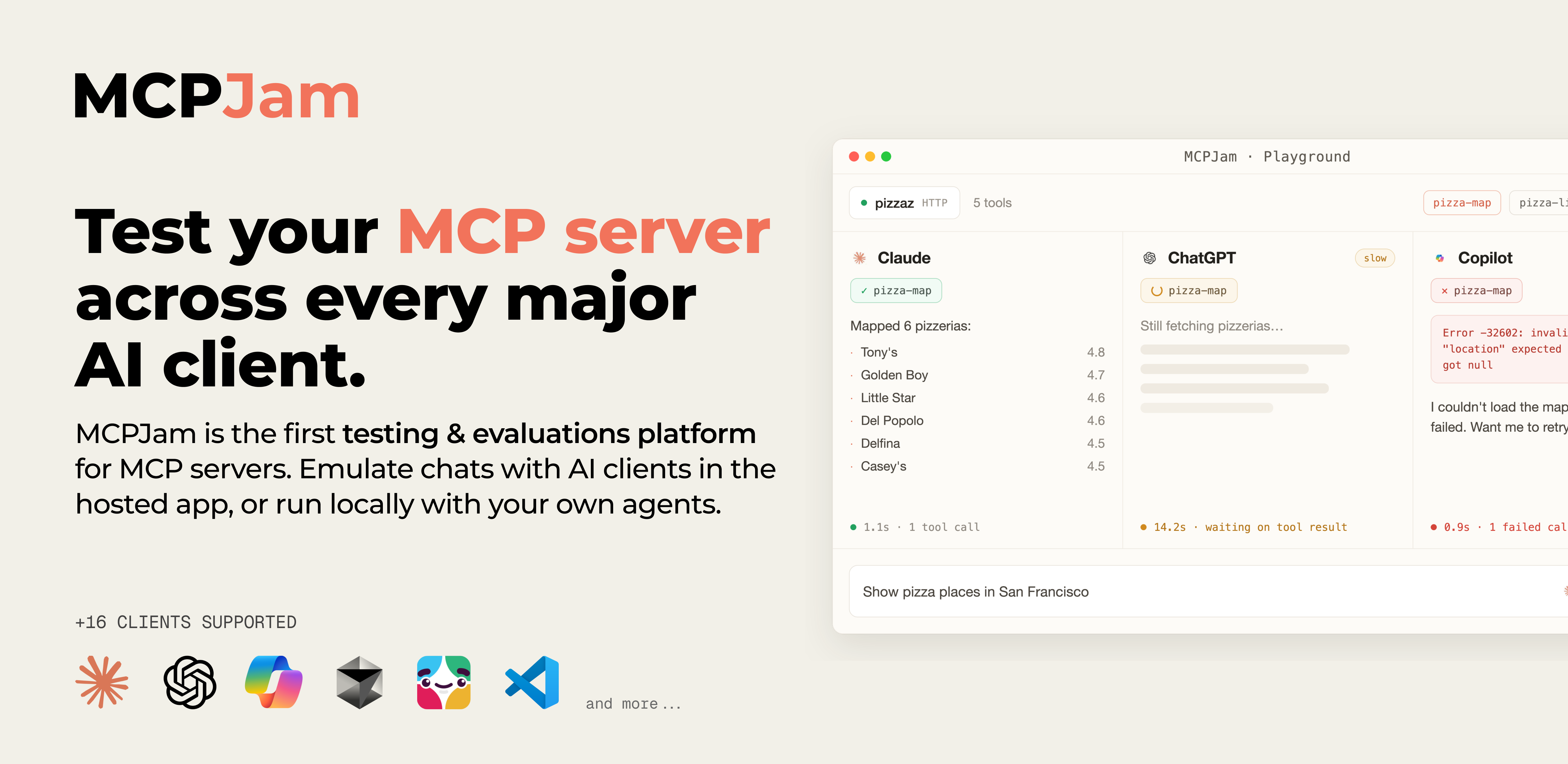
**MCPJam** is the open-source **testing & evaluations platform for MCP server developers** who ship. Interactively test tools, prompts, resources, and authorization across 16 client configurations and 170+ models. Run evals on test cases, get insights on what's breaking, and gate regressions to secure every deployment.
# 🚀 Quick start
Open the hosted app. No install needed.
👉 **[app.mcpjam.com](https://app.mcpjam.com)**
... or run MCPJam locally for HTTP/S and local STDIO servers:
```bash
npx @mcpjam/inspector@latest
```
# 👋🏽 Why MCPJam
Clients like ChatGPT, Claude, and Cursor all read your server differently. MCPJam catches those differences, shows where your server breaks, and tells you how to fix it:
- **Inspect & debug**: Explore your server's tools, resources, and prompts in one place. Test prompts from real LLMs, with full visibility & traces on every JSON-RPC message and OAuth exchange.
- **Cross-client evals**: Score agent behavior across 16 client configurations — ChatGPT, Claude, Cursor, Copilot, and more — to understand how your MCP integrations perform across all users. Track accuracy, latency, and tool-call performance over time.
- **Security & reliability**: Automate conformance & behavior checks in CI/CD to catch regressions before they reach production.
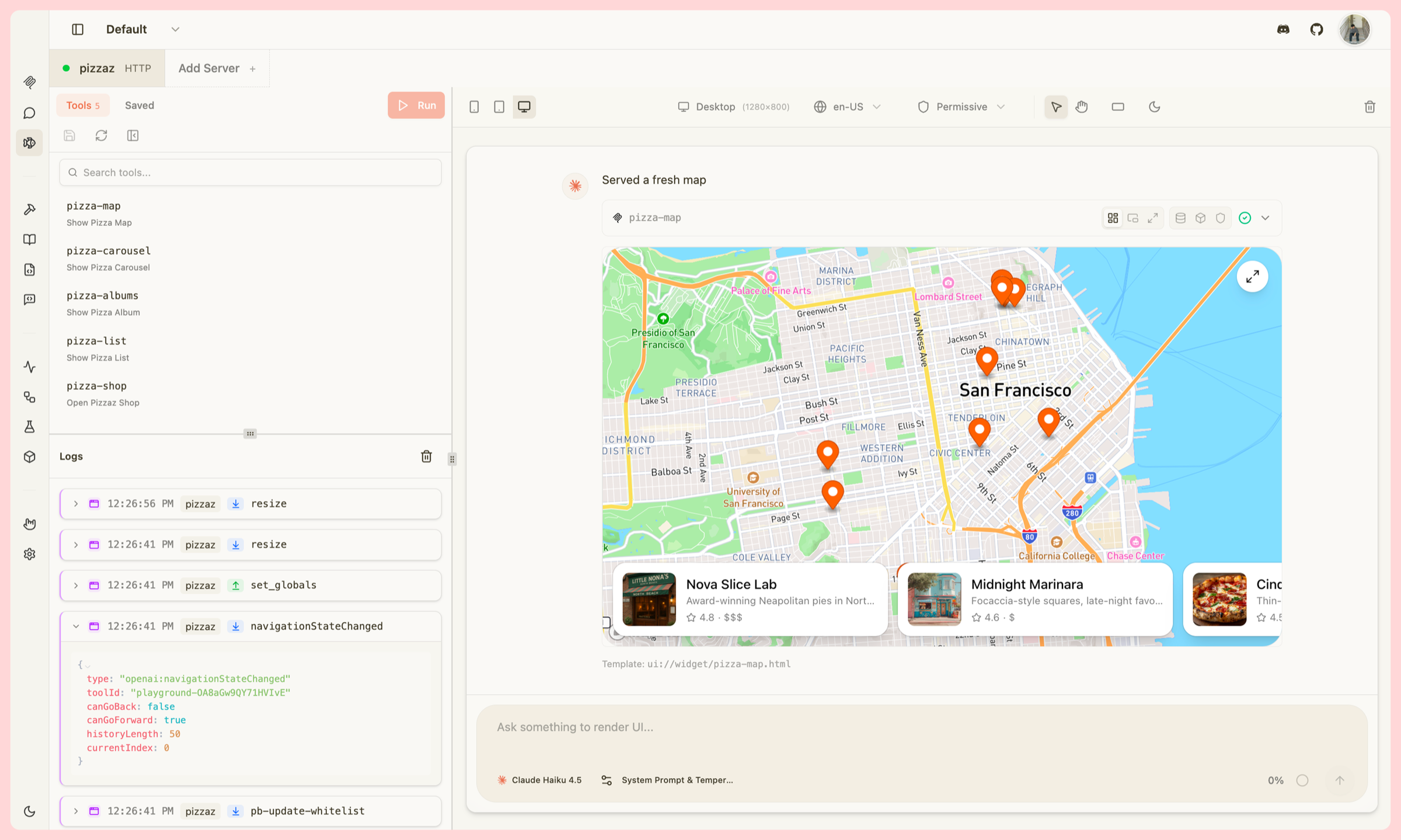
_Trace view: every tool call, agent step, and JSON-RPC message in one timeline._
# 🔨 Features
| Capability | What it does |
| -------------------- | ------------------------------------------------------------------------------------------------------------------------------------------------------------------------------------------------------------------ |
| **Playground** | Cross-client chat interface that emulates UIs, tool calls, and skills (with full traces). OpenAI Apps SDK and MCP app UIs, text tools, and a Chrome DevTools-style widget emulator. [Read more](https://docs.mcpjam.com/inspector/playground) |
| **OAuth Debugger** | Visualize your OAuth & EMA requests step-by-step to find the source of errors. Guided MCP OAuth conformance checks across protocol versions 03-26, 06-18, 11-25, and 2026-07-28; DCR, client pre-registration, and CIMD. [Read more](https://docs.mcpjam.com/inspector/guided-oauth) |
| **Server Debugging** | Manually run tools, resources, templates, prompts, and elicitation flows with full JSON-RPC logs. |
| **Skills** | Extend models with reusable behaviors in Playground. Local skills are read from your filesystem and never leave your machine; a project can also carry hosted skills, available on accounts where that is enabled. [Read more](https://docs.mcpjam.com/inspector/skills) |
| **Workspaces** | Shared server groups with real-time team sync, so everyone tests the same config. [Read more](https://docs.mcpjam.com/inspector/workspaces) |
| **Evals** | Test cases with expected tool calls, run across LLMs, with accuracy metrics over time. [Read more](https://docs.mcpjam.com/inspector/test-cases) |
| **CLI** | Probe servers, run doctor checks, exercise OAuth, and list tools/resources/prompts from your terminal. [Read more](https://docs.mcpjam.com/cli/overview) |
| **SDK** | Programmatically drive inspections, snapshot capabilities, and assert on tool/resource shapes from your own tests. [Read more](https://docs.mcpjam.com/sdk) |
| **CI/CD** | Run conformance, E2E tests, evals, and OAuth checks on every PR in GitHub Actions or any pipeline. [Read more](https://docs.mcpjam.com/cli/ci) |
---
## Playground
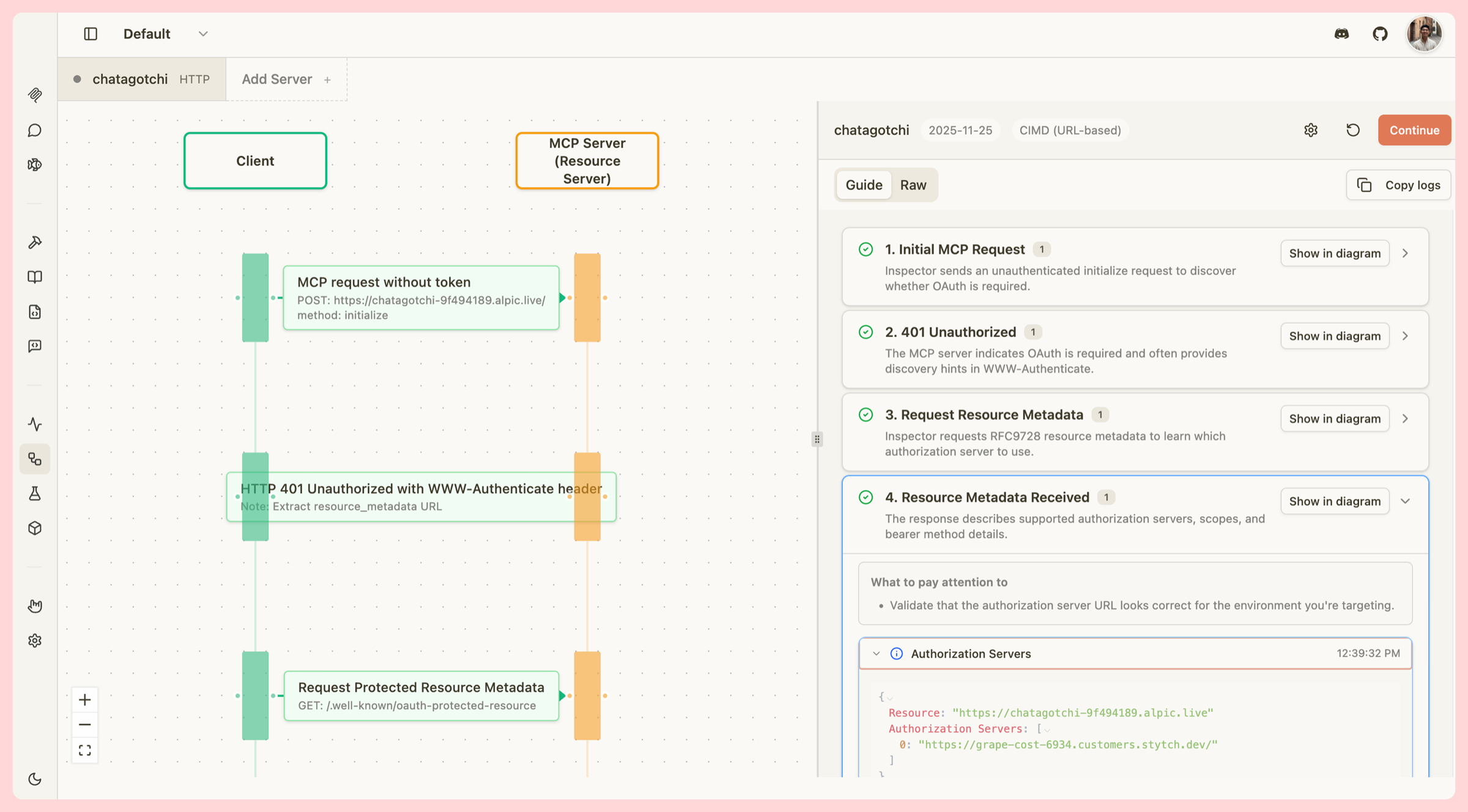
Debug your server against a model using tool calls or in-panel chat, with Chat, Trace, and Raw views. Supports the OpenAI Apps SDK and MCP app UIs, text tools, and a Chrome DevTools-style widget emulator so you can iterate on widgets locally.
- Invoke a tool to render its widget instantly, or drive your server with an LLM.
- Watch all JSON-RPC and `window.openai` messages in the logs.
- Switch the emulator between Desktop, Tablet, and Mobile.
- Test locale changes, CSP permissions, light/dark mode, hover & touch, and safe-area insets.
 ## OAuth Debugger
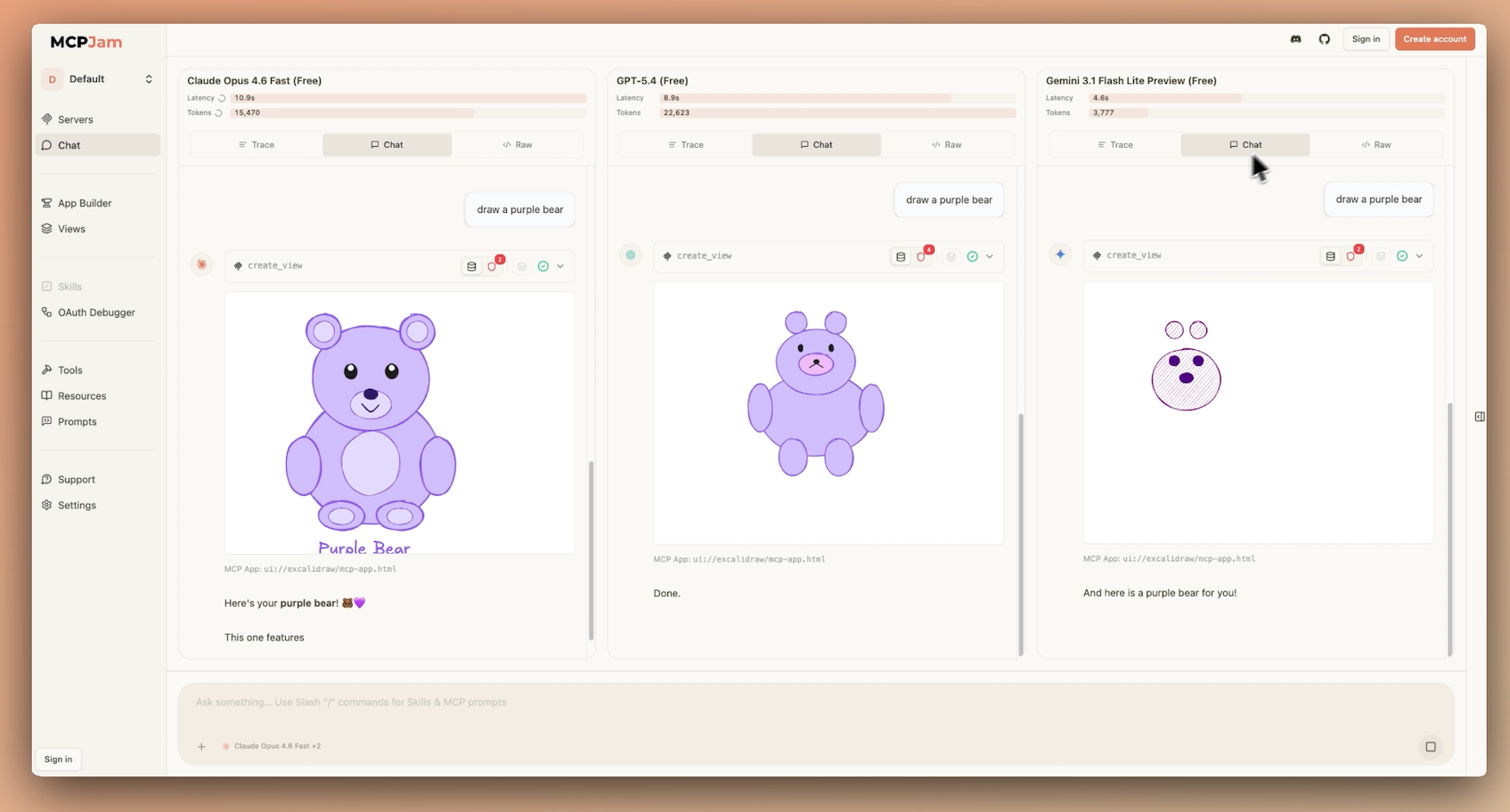
Guided MCP OAuth conformance checks with step-by-step explanations. Test against every version of the OAuth spec (2025-03-26, 2025-06-18, 2025-11-25, and the 2026-07-28 draft), with support for client pre-registration, Dynamic Client Registration (DCR), and Client ID Metadata Documents (CIMD).
## OAuth Debugger
Guided MCP OAuth conformance checks with step-by-step explanations. Test against every version of the OAuth spec (2025-03-26, 2025-06-18, 2025-11-25, and the 2026-07-28 draft), with support for client pre-registration, Dynamic Client Registration (DCR), and Client ID Metadata Documents (CIMD).
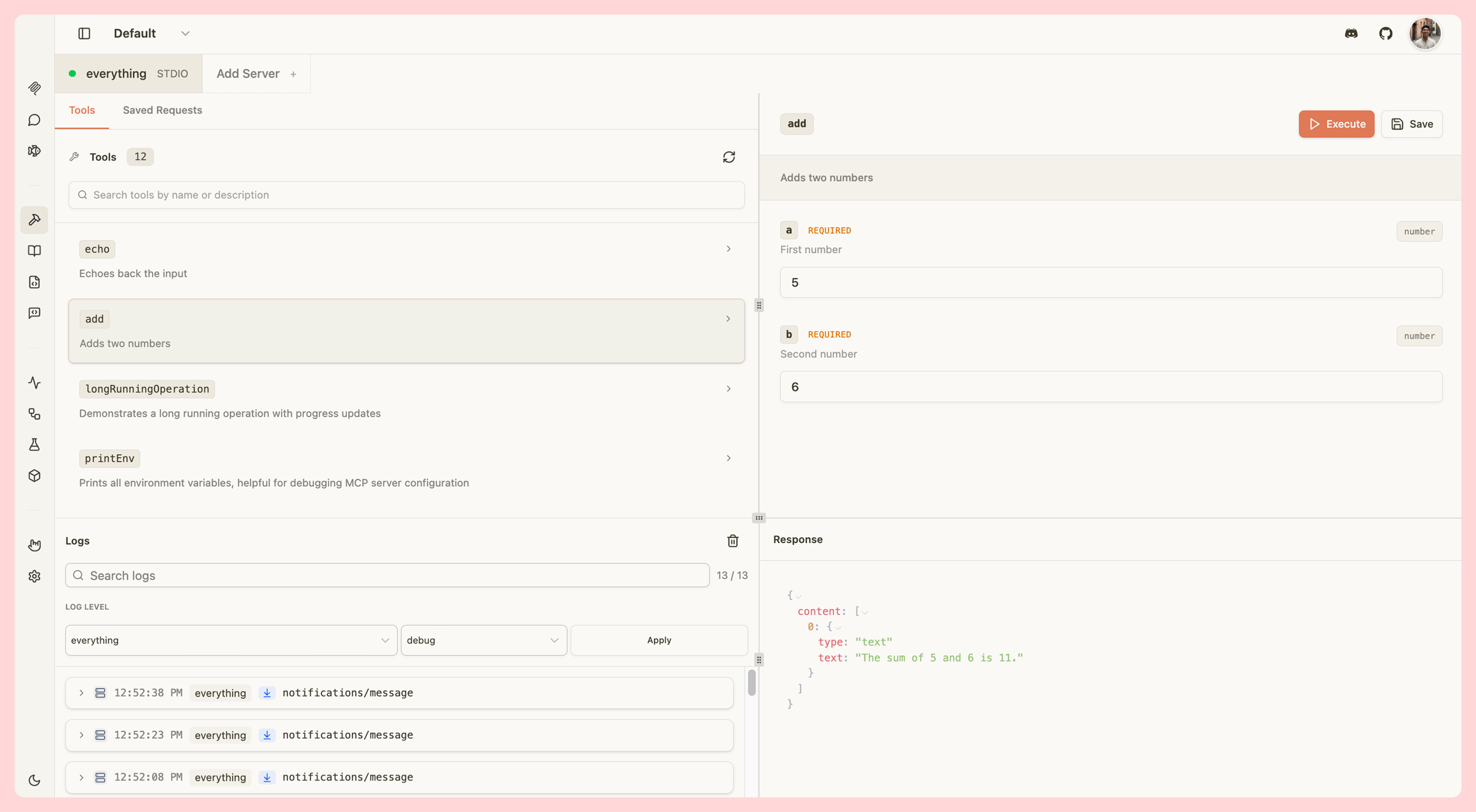
 ## Server Debugging
Everything you need to test an MCP server by hand: run tools, resources, resource templates, prompts, and elicitation flows with full JSON-RPC observability. Every feature of the original inspector, and more.
## Server Debugging
Everything you need to test an MCP server by hand: run tools, resources, resource templates, prompts, and elicitation flows with full JSON-RPC observability. Every feature of the original inspector, and more.
 ## Skills
Use Skills in Playground to extend models with reusable behaviors. Local skills are read from your filesystem and never leave your machine; a project can also carry hosted skills, available on accounts where that is enabled. [Read more](https://docs.mcpjam.com/inspector/skills)
## Workspaces
Group servers into shared workspaces with real-time team sync, so everyone on your team tests against the same configuration. [Read more](https://docs.mcpjam.com/inspector/workspaces)
## Evals
Define test cases with expected tool calls and run them across multiple LLMs. Track accuracy over time to catch regressions early and improve your server with every iteration. [Read more](https://docs.mcpjam.com/inspector/test-cases)
## CLI
Run MCPJam from the terminal for fast local dev loops and CI. Probe servers, run OAuth checks, inspect tools and resources, and execute evals without leaving your shell. [Read more](https://docs.mcpjam.com/cli/overview)
## SDK
Programmatic access to MCPJam for custom tooling, scripting, and integrations. Build your own workflows on top of MCPJam's inspection and evaluation primitives. [Read more](https://docs.mcpjam.com/sdk)
## CI/CD
Wire MCPJam into GitHub Actions, GitLab CI, or any CI system to run conformance, E2E tests, and evals on every PR — and catch MCP server regressions before they ship. [Read more](https://docs.mcpjam.com/cli/ci)
# 🔌 Install
MCPJam Inspector runs three ways: a hosted web app, a desktop app for Mac and Windows, or via your terminal. The web app is HTTPS-only and has no install. Terminal and Desktop support HTTP/S and local STDIO servers.
[](https://nodejs.org/)
[](https://www.typescriptlang.org/)
> Node.js 20+ is only required for the terminal install (`npx`). The hosted and desktop apps have no local runtime requirements.
**Hosted web app**: Open [app.mcpjam.com](https://app.mcpjam.com). No install, always latest, and you can share server links with teammates like a Google Doc. HTTPS server URLs only; no STDIO, tunneling, skills, or tasks (those need the local inspector). [Hosted docs](https://docs.mcpjam.com/hosted/overview)
**Desktop app**: Download the installer. Supports HTTP/S and local STDIO, no Node.js required.
[Install Mac](https://github.com/MCPJam/inspector/releases/latest/download/MCPJam.Inspector.dmg) · [Install Windows](https://github.com/MCPJam/inspector/releases/latest/download/MCPJam-Inspector-Setup.exe)
**Terminal**: Supports HTTP/S and local STDIO. Open the printed `localhost` URL after it starts.
```bash
npx @mcpjam/inspector@latest
```
**Docker**: There is no published image, so build one from source first. Bound to localhost for security. Available at `http://127.0.0.1:6274`. Always use `-p 127.0.0.1:6274:6274` (not `-p 6274:6274`) to keep the inspector local-only. On macOS/Windows, reach host MCP servers via `http://host.docker.internal:PORT`.
```bash
git clone https://github.com/MCPJam/inspector.git
cd inspector
docker build -t mcpjam/mcp-inspector:local -f mcpjam-inspector/Dockerfile .
docker run -p 127.0.0.1:6274:6274 mcpjam/mcp-inspector:local
```
# 👨💻 Contributing
We're grateful you're considering it. Read the [contributing guide](CONTRIBUTING.md) to get started, and come say hi in [Discord](https://discord.gg/JEnDtz8X6z).
# 🌍 Community & links
[Website](https://www.mcpjam.com/) · [Blog](https://www.mcpjam.com/blog) · [Pricing](https://www.mcpjam.com/pricing) · [Docs](https://docs.mcpjam.com/) · [Discord](https://discord.gg/JEnDtz8X6z) · [𝕏 (Twitter)](https://x.com/mcpjams) · [LinkedIn](https://www.linkedin.com/company/mcpjam)
# 📄 License
Licensed under the **Apache License 2.0**. See [LICENSE](LICENSE).
## Skills
Use Skills in Playground to extend models with reusable behaviors. Local skills are read from your filesystem and never leave your machine; a project can also carry hosted skills, available on accounts where that is enabled. [Read more](https://docs.mcpjam.com/inspector/skills)
## Workspaces
Group servers into shared workspaces with real-time team sync, so everyone on your team tests against the same configuration. [Read more](https://docs.mcpjam.com/inspector/workspaces)
## Evals
Define test cases with expected tool calls and run them across multiple LLMs. Track accuracy over time to catch regressions early and improve your server with every iteration. [Read more](https://docs.mcpjam.com/inspector/test-cases)
## CLI
Run MCPJam from the terminal for fast local dev loops and CI. Probe servers, run OAuth checks, inspect tools and resources, and execute evals without leaving your shell. [Read more](https://docs.mcpjam.com/cli/overview)
## SDK
Programmatic access to MCPJam for custom tooling, scripting, and integrations. Build your own workflows on top of MCPJam's inspection and evaluation primitives. [Read more](https://docs.mcpjam.com/sdk)
## CI/CD
Wire MCPJam into GitHub Actions, GitLab CI, or any CI system to run conformance, E2E tests, and evals on every PR — and catch MCP server regressions before they ship. [Read more](https://docs.mcpjam.com/cli/ci)
# 🔌 Install
MCPJam Inspector runs three ways: a hosted web app, a desktop app for Mac and Windows, or via your terminal. The web app is HTTPS-only and has no install. Terminal and Desktop support HTTP/S and local STDIO servers.
[](https://nodejs.org/)
[](https://www.typescriptlang.org/)
> Node.js 20+ is only required for the terminal install (`npx`). The hosted and desktop apps have no local runtime requirements.
**Hosted web app**: Open [app.mcpjam.com](https://app.mcpjam.com). No install, always latest, and you can share server links with teammates like a Google Doc. HTTPS server URLs only; no STDIO, tunneling, skills, or tasks (those need the local inspector). [Hosted docs](https://docs.mcpjam.com/hosted/overview)
**Desktop app**: Download the installer. Supports HTTP/S and local STDIO, no Node.js required.
[Install Mac](https://github.com/MCPJam/inspector/releases/latest/download/MCPJam.Inspector.dmg) · [Install Windows](https://github.com/MCPJam/inspector/releases/latest/download/MCPJam-Inspector-Setup.exe)
**Terminal**: Supports HTTP/S and local STDIO. Open the printed `localhost` URL after it starts.
```bash
npx @mcpjam/inspector@latest
```
**Docker**: There is no published image, so build one from source first. Bound to localhost for security. Available at `http://127.0.0.1:6274`. Always use `-p 127.0.0.1:6274:6274` (not `-p 6274:6274`) to keep the inspector local-only. On macOS/Windows, reach host MCP servers via `http://host.docker.internal:PORT`.
```bash
git clone https://github.com/MCPJam/inspector.git
cd inspector
docker build -t mcpjam/mcp-inspector:local -f mcpjam-inspector/Dockerfile .
docker run -p 127.0.0.1:6274:6274 mcpjam/mcp-inspector:local
```
# 👨💻 Contributing
We're grateful you're considering it. Read the [contributing guide](CONTRIBUTING.md) to get started, and come say hi in [Discord](https://discord.gg/JEnDtz8X6z).
# 🌍 Community & links
[Website](https://www.mcpjam.com/) · [Blog](https://www.mcpjam.com/blog) · [Pricing](https://www.mcpjam.com/pricing) · [Docs](https://docs.mcpjam.com/) · [Discord](https://discord.gg/JEnDtz8X6z) · [𝕏 (Twitter)](https://x.com/mcpjams) · [LinkedIn](https://www.linkedin.com/company/mcpjam)
# 📄 License
Licensed under the **Apache License 2.0**. See [LICENSE](LICENSE).