
Slides and other materials are available at
https://tinyurl.com/UseR2022

Do it yourself!
# Part 2: Hello model! We will think of a predictive model as a function that computes a certain prediction for certain input data. Usually, such a function is built automatically based on the data. ## Create a tree based model 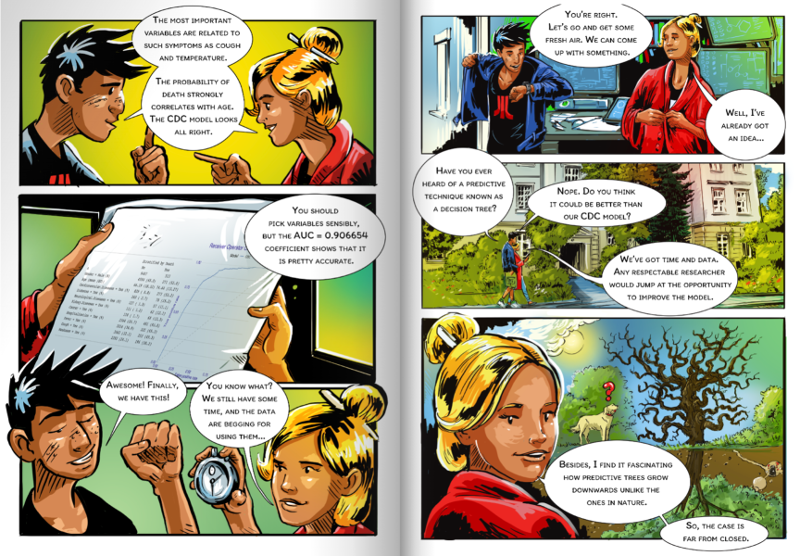 In Machine Learning, there are hundreds of algorithms available. Usually, this training boils down to finding parameters for some family of models. One of the most popular families of models is decision trees. Their great advantage is the transparency of their structure. We will begin building the model by constructing a decision tree. We will stepwise control the complexity of the model. [More info](https://cran.r-project.org/web/packages/partykit/vignettes/ctree.pdf) ```{r, warning=FALSE, message=FALSE, fig.width=9, fig.height=5} library("partykit") tree1 <- ctree(Death ~., covid_spring, control = ctree_control(maxdepth = 1)) plot(tree1) tree2 <- ctree(Death ~., covid_spring, control = ctree_control(maxdepth = 2)) plot(tree2) tree3 <- ctree(Death ~., covid_spring, control = ctree_control(maxdepth = 3)) plot(tree3) tree <- ctree(Death ~., covid_spring, control = ctree_control(alpha = 0.0001)) plot(tree) ``` ## Plant a forest  Decision trees are models that have low bias but high variance. In 2001, Leo Breiman proposed a new family of models, called a random forest, which averages scores from multiple decision trees trained on bootstrap samples of the data. The whole algorithm is a bit more complex but also very fascinating. You can read about it at https://tinyurl.com/RF2001. Nowadays a very popular, in a sense complementary technique for improving models is boosting, in which you reduce the model load at the expense of variance. This algorithm reduces variance at the expense of bias. Quite often it leads to a better model. We will train a random forest with the `ranger` library. At this stage we do not dig deep into the model, as we will treat it as a black box. ```{r, warning=FALSE, message=FALSE, fig.width=9, fig.height=5} library("ranger") forest <- ranger(Death ~., covid_spring, probability = TRUE) forest ``` ## Fit logistic regression with splines For classification problems, the first choice model is often logistic regression, which in R is implemented in the `glm` function. In this exercise, we will use a more extended version of logistic regression, in which transformations using splines are allowed. This will allow us to take into account also non-linear relationships between the indicated variable and the model target. Later, exploring the model, we will look at what relationship is learned by logistic regression with splines. We will train a logistic regression with splines with the `rms` library. `rcs` stands for linear tail-restricted cubic spline function. At this stage we do not dig deep into the model, as we will treat it as a black box. ```{r, warning=FALSE, message=FALSE, fig.width=9, fig.height=5} library("rms") lmr_rcs <- lrm(Death ~ Gender + rcs(Age, 3) + Cardiovascular.Diseases + Diabetes + Neurological.Diseases + Kidney.Diseases + Cancer, covid_spring) lmr_rcs ``` ## Wrap the model In R, we have many tools for creating models. The problem with them is that these tools are created by different people and return results in different structures. So in order to work uniformly with the models we need to package the model in such a way that it has a uniform interface. Different models have different APIs. **But you need One API to Rule Them All!** The `DALEX` library provides a unified architecture to explore and validate models using different analytical methods. [More info](http://ema.drwhy.ai/do-it-yourself.html#infoDALEX) A trained model can be turned into an explainer. Simpler functions can be used to calculate the performance of this model. But using explainers has an advantage that will be seen in all its beauty in just two pages. To work with different models uniformly, we will also wrap this one into an explainer. ```{r, warning=FALSE, message=FALSE} model_tree <- DALEX::explain(tree, data = covid_summer[,-8], y = covid_summer$Death == "Yes", type = "classification", label = "Tree", verbose = FALSE) predict(model_tree, covid_summer) |> head() ``` ```{r, warning=FALSE, message=FALSE} model_forest <- DALEX::explain(forest, data = covid_summer[,-8], y = covid_summer$Death == "Yes", type = "classification", label = "Forest", verbose = FALSE) predict(model_forest, covid_summer) |> head() ``` ```{r, warning=FALSE, message=FALSE} model_lmr_rcs <- DALEX::explain(lmr_rcs, data = covid_summer[,-8], y = covid_summer$Death == "Yes", type = "classification", label = "LMR", verbose = FALSE) predict(model_lmr_rcs, covid_summer) |> head() ``` ## Model performance The evaluation of the model performance for the classification is based on different measures than for the regression. For regression, commonly used measures are Mean squared error MSE $$MSE(f) = \frac{1}{n} \sum_{i}^{n} (f(x_i) - y_i)^2 $$ and Rooted mean squared error RMSE $$RMSE(f) = \sqrt{MSE(f, X, y)} $$ For classification, commonly used measures are Accuracy $$ACC(f) = (TP + TN)/n$$ Precision $$Prec(f) = TP/(TP + FP)$$ and Recall $$Recall(f) = TP/(TP + FN)$$ and F1 score $$F1(f) = 2\frac{Prec(f) * Recall(f) }{Prec(f) + Recall(f)}$$ In this problem we are interested in ranking of scores, so we will use the AUC measure (the area under the ROC curve). There are many measures for evaluating predictive models and they are located in various R packages (`ROCR`, `measures`, `mlr3measures`, etc.). For simplicity, in this example, we use only the AUC measure from the `DALEX` package. Pregnancy: Sensitivity and Specificity http://getthediagnosis.org/diagnosis/Pregnancy.htm https://en.wikipedia.org/wiki/Sensitivity_and_specificity For AUC the `cutoff` does not matter. But we set it to get nice precision and F1. [More info](http://ema.drwhy.ai/modelPerformance.html#modelPerformanceMethodBin) *Model performance* Model exploration starts with an assessment of how good is the model. The `DALEX::model_performance` function calculates a set of the most common measures for the specified model. ```{r, warning=FALSE, message=FALSE} library("DALEX") mp_forest <- model_performance(model_forest, cutoff = 0.1) mp_forest mp_tree <- model_performance(model_tree, cutoff = 0.1) mp_tree mp_lmr_rcs <- model_performance(model_lmr_rcs, cutoff = 0.1) mp_lmr_rcs ``` ### ROC Note: The model is evaluated on the data given in the explainer. Use `DALEX::update_data()` to specify another dataset. Note: The explainer knows whether the model is for classification or regression, so it automatically selects the right measures. It can be overridden if needed. The S3 generic `plot` function draws a graphical summary of the model performance. With the `geom` argument, one can determine the type of chart. [More info](http://ema.drwhy.ai/modelPerformance.html#fig:exampleROC) ```{r, warning=FALSE, message=FALSE, fig.width=4.5, fig.height=4.5} plot(mp_forest, geom = "roc") + DALEX::theme_ema() plot(mp_forest, mp_tree, mp_lmr_rcs, geom = "roc") + DALEX::theme_ema() ``` ## Your turn - Train random forest model, tree based model and regression based models for selected data (`covid_summer`, `titanic_imputed`, `happiness_train`, `fifa`) - Plot ROC (for classification tasks) - Calculate AUC (for classification tasks) or RMSE (for regression tasks) Example for titanic ``` head(titanic_imputed) tree <- ctree(survived ~., titanic_imputed) plot(tree) tree <- ctree(factor(survived) ~., titanic_imputed, control = ctree_control(alpha = 0.0001)) plot(tree) model_tree <- DALEX::explain(tree, data = titanic_imputed, y = titanic_imputed$survived == 1, type = "classification", label = "Tree", verbose = FALSE) mp <- model_performance(model_tree) mp plot(mp, geom = "roc") ```Do it yourself!
# *Part 3: Introduction to XAI*  We will devote the second day entirely to talking about methods for model exploration. [More info](http://ema.drwhy.ai/modelLevelExploration.html) 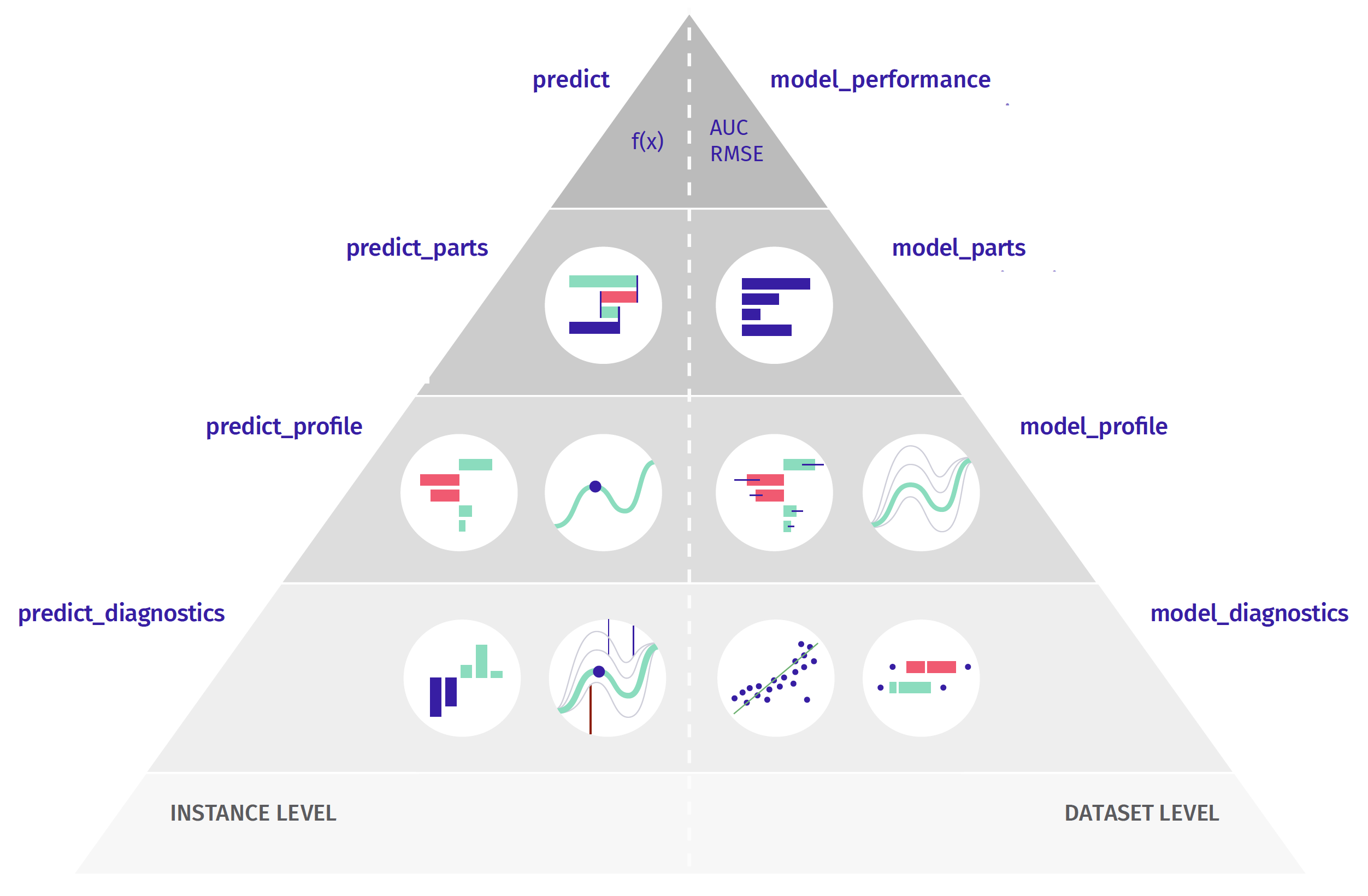 Some models have built-in methods for the assessment of Variable importance. For linear models, one can use standardized model coefficients or p-values. For random forest one can use out-of-bag classification error. For tree boosting models, one can use gain statistics. Yet, the problem with such measures is that not all models have build-in variable importance statistics (e.g. neural networks) and that scores between different models cannot be directly compared (how to compare gains with p-values). This is why we need a model agnostic approach that will be comparable between different models. The procedure described below is universal, model agnostic and does not depend on the model structure. The procedure is based on variable perturbations in the validation data. If a variable is important in a model, then after its permutation the model predictions should be less accurate. The permutation-based variable-importance of a variable $i$ is the difference between the model performance for the original data and the model performance measured on data with the permutated variable $i$ $$ VI(i) = L(f, X^{perm(i)}, y) - L(f, X, y) $$ where $L(f, X, y)$ is the value of loss function for original data $X$, true labels $y$ and model $f$, while $X^{perm(i)}$ is dataset $x$ with $i$-th variable permutated. Which performance measure should you choose? It's up to you. In the `DALEX` library, by default, RMSE is used for regression and 1-AUC for classification problems. But you can change the loss function by specifying the \verb:loss_function: argument. [More info](http://ema.drwhy.ai/featureImportance.html) ```{r, message=FALSE, warning=FALSE, fig.width=4.5, fig.height=3} mpart_forest <- model_parts(model_forest) mpart_forest plot(mpart_forest, show_boxplots = FALSE, bar_width=4) + DALEX:::theme_ema_vertical() + theme( axis.text = element_text(color = "black", size = 12, hjust = 0)) + ggtitle("Variable importance","") ``` ```{r, message=FALSE, warning=FALSE, fig.width=4.5, fig.height=3} mpart_forest <- model_parts(model_forest, type = "difference") mpart_forest plot(mpart_forest, show_boxplots = FALSE, bar_width=4) + DALEX:::theme_ema_vertical() + theme( axis.text = element_text(color = "black", size = 12, hjust = 0)) + ggtitle("Variable importance","") ``` ```{r, message=FALSE, warning=FALSE, fig.width=6, fig.height=7} mpart_forest <- model_parts(model_forest) mpart_tree <- model_parts(model_tree) mpart_lmr_rcs <- model_parts(model_lmr_rcs) plot(mpart_forest, mpart_tree, mpart_lmr_rcs, show_boxplots = FALSE, bar_width=4) + DALEX:::theme_ema_vertical() + theme( axis.text = element_text(color = "black", size = 12, hjust = 0)) + ggtitle("Variable importance","") + facet_wrap(~label, ncol = 1, scales = "free_y") plot(mpart_forest, mpart_tree, mpart_lmr_rcs, show_boxplots = FALSE, bar_width=4) + DALEX:::theme_ema_vertical() + theme( axis.text = element_text(color = "black", size = 12, hjust = 0)) + ggtitle("Variable importance","") ``` ## Your turn - Train random forest model, tree based model and regression based models for selected data (`covid_summer`, `titanic_imputed`, `happiness_train`, `fifa`) - Calculate and plot variable importance for one model. - Compare results for different models.Do it yourself!
# Time for BREAK !!! See you in 30 minutes!# Part 4: Instance level analysis - Break down + SHAP Once we calculate the model prediction, the question often arises which variables had the greatest impact on it. For linear models it is easy to assess the impact of individual variables because there is one coefficient for each variable. [More info](http://ema.drwhy.ai/InstanceLevelExploration.html) For tabular data, one of the most commonly used techniques for local variable attribution is Shapley values. **The key idea behind this method is to analyze the sequence of conditional expected values.** This way, we can trace how the conditional mean moves from the average model response to the model prediction for observation of interest $x^*$. Let's consider a sequence of expected values. \begin{flalign} \mu & = E \left[ f(X) \right], \\ \mu_{x_1} & = E \left[ f(X) | X_1 = x^{*}_1 \right], \\ \mu_{x_1,x_2} & = E \left[ f(X) | X_1 = x^{*}_1, X_2 = x^{*}_2 \right], \\ & ... \\ \mu_{x_1,x_2,...,x_p} & = E \left[ f(X) | X_1 = x^{*}_1, X_2 = x^{*}_2, ..., X_p = x^{*}_p \right] = f(x^*).\\ \end{flalign} By looking at consecutive differences $\mu_{x_1}-\mu$, $\mu_{x_1,x_2}-\mu_{x_1}$ and so on, one can calculate the added effects of individual variables. It sounds like a straightforward solution; however, there are two issues with this approach. One is that it is not easy to estimate the conditional expected value. In most implementations, it is assumed that features are independent, and then we can estimate $\mu_{K}$ as an average model response with variables in the set $K$ replaced by corresponding values from observation $x^*$. So the crude estimate would be $$ \widehat{\mu}_{K} = \frac 1n \sum_{i=1}^n f(x_1^o, x_2^o, ..., x_p^o), $$ where $x_j^o = x_j^*$ if $j \in K$ and $x_j^o = x_j^i$ if $j \not\in K$. The second issue is that these effects may depend on the order of conditioning. How to solve this problem? **The Shapley values method calculates attributions as an average of all** (or at least a large number of random) orderings, while the **Break-down method uses a single ordering determined with a greedy heuristic that prefers variables with the largest attribution at the beginning.** ```{r} Steve <- data.frame(Gender = factor("Male", c("Female", "Male")), Age = 76, Cardiovascular.Diseases = factor("Yes", c("No", "Yes")), Diabetes = factor("No", c("No", "Yes")), Neurological.Diseases = factor("No", c("No", "Yes")), Kidney.Diseases = factor("No", c("No", "Yes")), Cancer = factor("No", c("No", "Yes"))) predict(model_forest, Steve) Steve ``` It turns out that such attributions can be calculated for any predictive model. The most popular model agnostic method is Shapley values. They may be calculated with a `predict_parts()` function. [More info](http://ema.drwhy.ai/shapley.html) ```{r, message=FALSE, warning=FALSE, fig.width=9, fig.height=3.5} ppart_tree <- predict_parts(model_tree, Steve) plot(ppart_tree) ppart_forest <- predict_parts(model_forest, Steve, keep_distributions = TRUE) plot(ppart_forest, plot_distributions = TRUE) + ggtitle("Consecutive conditoning for Forest")+ DALEX:::theme_ema_vertical() + theme( axis.text = element_text(color = "black", size = 12, hjust = 0)) ppart_forest <- predict_parts(model_forest, Steve, type = "shap") plot(ppart_forest) ppart_tree <- predict_parts(model_tree, Steve, type = "shap") plot(ppart_tree) ppart_lmr_rcs <- predict_parts(model_lmr_rcs, Steve, type = "shap") plot(ppart_lmr_rcs) ppart_forest <- predict_parts(model_forest, Steve, type = "shap") pl1 <- plot(ppart_forest) + ggtitle("Shapley values for Ranger")+ DALEX:::theme_ema_vertical() + theme( axis.text = element_text(color = "black", size = 12, hjust = 0)) ppart_forest <- predict_parts(model_forest, Steve) pl2 <- plot(ppart_forest) + ggtitle("Break-down for Ranger")+ DALEX:::theme_ema_vertical() + theme( axis.text = element_text(color = "black", size = 12, hjust = 0)) library("patchwork") pl1 + (pl2 + scale_y_continuous("prediction", limits = c(0,0.4))) ``` The `show_boxplots` argument allows you to highlight the stability bars of the estimated attributions. Other possible values of the `type` argument are `oscillations`, `shap`, `break_down`, `break_down_interactions`. With `order` one can force a certain sequence of variables. By default, functions such as `model_parts`, `predict_parts`, `model_profiles` do not calculate statistics on the entire data set, but on `n_samples` of random cases, and the entire procedure is repeated `B` times to estimate the error bars. ## Your turn - Train random forest model, tree based model and regression based models for selected data (`covid_summer`, `titanic_imputed`, `happiness_train`, `fifa`) - Choose (or create) a single observation - Calculate and plot Break-down contributions and SHAP contributions for one model. - Compare results for different models.
Do it yourself!
# Part 5: Instance level analysis - variable profile *Profile for a single prediction* Ceteris Paribus (CP) is a Latin phrase for *"other things being equal"*. It is also a very useful technique for analysis of model behaviour for a single observation. CP profiles, sometimes called Individual Conditional Expectations (ICE), show how the model response would change for a~selected observation if a value for one variable was changed while leaving the other variables unchanged. While local variable attribution is a convenient technique for answering the question of **which** variables affect the prediction, the local profile analysis is a good technique for answering the question of **how** the model response depends on a particular variable. Or answering the question of **what if**... The `predict_profiles()` function calculated CP profiles for a selected observation, model and vector of variables (all continuous variables by default). [More info](http://ema.drwhy.ai/ceterisParibus.html) ```{r, message=FALSE, warning=FALSE} mprof_forest <- predict_profile(model_forest, Steve, "Age") plot(mprof_forest) ``` CP profiles can be visualized with the generic `plot()` function. For technical reasons, quantitative and qualitative variables cannot be shown in a single chart. So if you want to show the importance of quality variables you need to plot them separately. ```{r, message=FALSE, warning=FALSE} mprof_forest <- predict_profile(model_forest, variable_splits = list(Age=0:100), Steve) mprof_tree <- predict_profile(model_tree, variable_splits = list(Age=0:100), Steve) mprof_lmr_rcs <- predict_profile(model_lmr_rcs, variable_splits = list(Age=0:100), Steve) plot(mprof_forest) plot(mprof_forest, mprof_lmr_rcs, mprof_tree) mprof_forest <- predict_profile(model_forest, variables = "Age", Steve) pl1 <- plot(mprof_forest) + ggtitle("Ceteris paribus for Ranger")+ DALEX:::theme_ema() + scale_y_continuous("prediction", limits = c(0,0.55)) + theme( axis.text = element_text(color = "black", size = 12, hjust = 0)) mprof_forest2 <- predict_profile(model_forest, variables = "Cardiovascular.Diseases", Steve) pl2 <- plot(mprof_forest2, variable_type = "categorical", variables = "Cardiovascular.Diseases", categorical_type = "lines") + ggtitle("Ceteris paribus for Ranger")+ DALEX:::theme_ema() + scale_y_continuous("prediction", limits = c(0,0.55)) + theme( axis.text = element_text(color = "black", size = 12, hjust = 0)) library("patchwork") pl1 + pl2 plot(mprof_forest, mprof_lmr_rcs, mprof_tree) + ggtitle("Ceteris paribus for Steve")+ DALEX:::theme_ema() + theme( axis.text = element_text(color = "black", size = 12, hjust = 0)) ``` Local importance of variables can be measured as oscillations of CP plots. The greater the variability of the CP profile, the more important is the variable. Set `type = "oscillations"` in the `predict_parts` function. ## Your turn - Train random forest model, tree based model and regression based models for selected data (`covid_summer`, `titanic_imputed`, `happiness_train`, `fifa`) - Choose (or create) a single observation - Calculate and plot Ceteris-paribus profiles for one model. - Compare results for different models.Do it yourself!
# Part 6: Model level analysis - variable profile  Once we know which variables are important, it is usually interesting to determine the relationship between a particular variable and the model prediction. Popular techniques for this type of Explanatory Model Analysis are Partial Dependence (PD) and Accumulated Local Effects (ALE). PD profiles were initially proposed in 2001 for gradient boosting models but can be used in a model agnostic fashion. This method is based on an analysis of the average model response after replacing variable $i$ with the value of $t$. More formally, Partial Dependence profile for variable $i$ is a function of $t$ defined as $$ PD(i, t) = E\left[ f(x_1, ..., x_{i-1}, t, x_{i+1}, ..., x_p) \right], $$ where the expected value is calculated over the data distribution. The straightforward estimator is $$ \widehat{PD}(i, t) = \frac 1n \sum_{j=1}^n f(x^j_1, ..., x^j_{i-1}, t, x^j_{i+1}, ..., x^j_p). $$ Replacing $i$-th variable by value $t$ can lead to very strange observations, especially when $i$-th variable is correlated with other variables and we ignore the correlation structure. One solution to this are Accumulated Local Effects profiles, which average over the conditional distribution. The `model_profiles()` function calculates PD profiles for a specified model and variables (all by default). [More info](http://ema.drwhy.ai/partialDependenceProfiles.html) ```{r, message=FALSE, warning=FALSE} mprof_forest <- model_profile(model_forest, "Age") plot(mprof_forest) mgroup_forest <- model_profile(model_forest, variable_splits = list(Age = 0:100)) plot(mgroup_forest)+ DALEX:::theme_ema() + theme( axis.text = element_text(color = "black", size = 12, hjust = 0)) + ggtitle("PD profile","") ``` *Grouped partial dependence profiles* By default, the average is calculated for all observations. But with the argument `groups=` one can specify a factor variable in which CP profiles will be averaged. ```{r, message=FALSE, warning=FALSE} mgroup_forest <- model_profile(model_forest, variable_splits = list(Age = 0:100), groups = "Diabetes") plot(mgroup_forest)+ DALEX:::theme_ema() + theme( axis.text = element_text(color = "black", size = 12, hjust = 0)) + ggtitle("PD profiles for groups","") + ylab("") + theme(legend.position = "top") mgroup_forest <- model_profile(model_forest, variable_splits = list(Age = 0:100), groups = "Cardiovascular.Diseases") plot(mgroup_forest)+ DALEX:::theme_ema() + theme( axis.text = element_text(color = "black", size = 12, hjust = 0)) + ggtitle("PDP variable profile","") + ylab("") + theme(legend.position = "top") mgroup_forest <- model_profile(model_forest, "Age", k = 3, center = TRUE) plot(mgroup_forest)+ DALEX:::theme_ema() + theme( axis.text = element_text(color = "black", size = 12, hjust = 0)) + ggtitle("PD profiles for segments","") mgroup_forest <- model_profile(model_forest, "Age", groups = "Cardiovascular.Diseases") plot(mgroup_forest)+ DALEX:::theme_ema() + theme( axis.text = element_text(color = "black", size = 12, hjust = 0)) + ggtitle("Variable profile","") mgroup_forest <- model_profile(model_forest, variable_splits = list(Age = 0:100), groups = "Cardiovascular.Diseases") plot(mgroup_forest, geom = "profiles") plot(mgroup_forest, geom = "points") ``` ```{r, message=FALSE, warning=FALSE} mprof_forest <- model_profile(model_forest, variable_splits = list(Age=0:100)) mprof_tree <- model_profile(model_tree, variable_splits = list(Age=0:100)) mprof_lmr_rcs <- model_profile(model_lmr_rcs, variable_splits = list(Age=0:100)) ``` Profiles can be then drawn with the `plot()` function. ```{r, message=FALSE, warning=FALSE} plot(mprof_forest, mprof_lmr_rcs, mprof_tree) + ggtitle("","") + DALEX:::theme_ema() + theme( axis.text = element_text(color = "black", size = 12, hjust = 0), legend.position = "top") ``` If the model is additive, all CP profiles are parallel. But if the model has interactions, CP profiles may have different shapes for different observations. Defining the k argument allows to find and calculate the average in k segments of CP profiles. PDP profiles do not take into account the correlation structure between the variables. For correlated variables, the Ceteris paribus assumption may not make sense. The `model_profile` function can also calculate other types of aggregates, such as marginal profiles and accumulated local profiles. To do this, specify the argument `type=` for `"conditional"` or `"accumulated"`. ## Your turn - Train random forest model, tree based model and regression based models for selected data (`covid_summer`, `titanic_imputed`, `happiness_train`, `fifa`) - Calculate and plot Partial dependence profiles for one model. - Compare results for different models.Do it yourself!
# Extras We have made the model built for Covid data, along with the explanations described in this book, available at \url{https://crs19.pl/} webpage. After two months, tens of thousands of people used it. With proper tools the deployment of such a model is not difficult. To obtain a safe and effective model, it is necessary to perform a detailed Explanatory Model Analysis. However, we often don't have much time for it. That is why tools that facilitate fast and automated model exploration are so useful. One of such tools is `modelStudio`. It is a package that transforms an explainer into an HTML page with javascript based interaction. Such an HTML page is easy to save on a disk or share by email. The webpage has various explanations pre-calculated, so its generation may be time-consuming, but the model exploration is very fast, and the feedback loop is tight. Generating a `modelStudio` for an explainer is trivially easy. [More info](https://github.com/ModelOriented/modelStudio/blob/master/README.md) ```{r, eval=FALSE} library("modelStudio") ms <- modelStudio(model_forest, new_observation = Steve) ms ```  # Session info ```{r, warning=FALSE, message=FALSE} devtools::session_info() ```