# [CVPR2026] VoxTell: Free-Text Promptable Universal 3D Medical Image Segmentation
[](https://arxiv.org/abs/2511.11450)
[](https://github.com/MIC-DKFZ/VoxTell)
[](https://huggingface.co/mrokuss/VoxTell)
[](https://github.com/gomesgustavoo/voxtell-web-plugin)
[](https://github.com/CCI-Bonn/OHIF-AI)
[](https://github.com/lassoan/SlicerVoxTell)
[](https://github.com/MIC-DKFZ/napari-voxtell)
 This repository contains the official implementation of our paper:
### **VoxTell: Free-Text Promptable Universal 3D Medical Image Segmentation**
VoxTell is a **3D vision–language segmentation model** that directly maps free-form text prompts, from single words to full clinical sentences, to volumetric masks. By leveraging **multi-stage vision–language fusion**, VoxTell achieves state-of-the-art performance on anatomical and pathological structures across CT, PET, and MRI modalities, excelling on familiar concepts while generalizing to related unseen classes.
> **Authors**: Maximilian Rokuss*, Moritz Langenberg*, Yannick Kirchhoff, Fabian Isensee, Benjamin Hamm, Constantin Ulrich, Sebastian Regnery, Lukas Bauer, Efthimios Katsigiannopulos, Tobias Norajitra, Klaus Maier-Hein
> **Paper**: [](https://arxiv.org/abs/2511.11450)
---
## 📰 News
- **09/2026**: 📦 **v0.1.2** on PyPI: `pip install voxtell` now brings batch/folder inference, precomputed prompt embeddings, the remote inference server and fine-tuning, with lower memory use and many fixes
- **07/2026**: 🚀 New batch and folder inference for the CLI and Python API — text-prompt embeddings can be cached and reused across multiple images, with faster, more memory-efficient text encoding. 👉 [Getting Started](#-getting-started)
- **03/2026**: 🥇 First place on the [official ReXGroundingCT benchmark](https://rexrank.ai/ReXGroundingCT/index.html)
- **02/2026**: 📄 VoxTell was accepted at CVPR 2026!
- **02/2026**: 🎉 The community built a VoxTell web interface - thank you! 👉 [voxtell-web-plugin](https://github.com/gomesgustavoo/voxtell-web-plugin)
- **01/2026**: 🧩 Model checkpoint **v1.1** released and now available with official napari plugin 👉 [napari-voxtell](https://github.com/MIC-DKFZ/napari-voxtell)
- **12/2025**: 🚀 `VoxTell` launched with a **Python backend** and **PyPI package** (`pip install voxtell`)
## Overview
VoxTell is trained on a **large-scale, multi-modality 3D medical imaging dataset**, aggregating **158 public sources** with over **62,000 volumetric images**. The data covers:
- Brain, head & neck, thorax, abdomen, pelvis
- Musculoskeletal system and extremities
- Vascular structures, major organs, substructures, and lesions
This repository contains the official implementation of our paper:
### **VoxTell: Free-Text Promptable Universal 3D Medical Image Segmentation**
VoxTell is a **3D vision–language segmentation model** that directly maps free-form text prompts, from single words to full clinical sentences, to volumetric masks. By leveraging **multi-stage vision–language fusion**, VoxTell achieves state-of-the-art performance on anatomical and pathological structures across CT, PET, and MRI modalities, excelling on familiar concepts while generalizing to related unseen classes.
> **Authors**: Maximilian Rokuss*, Moritz Langenberg*, Yannick Kirchhoff, Fabian Isensee, Benjamin Hamm, Constantin Ulrich, Sebastian Regnery, Lukas Bauer, Efthimios Katsigiannopulos, Tobias Norajitra, Klaus Maier-Hein
> **Paper**: [](https://arxiv.org/abs/2511.11450)
---
## 📰 News
- **09/2026**: 📦 **v0.1.2** on PyPI: `pip install voxtell` now brings batch/folder inference, precomputed prompt embeddings, the remote inference server and fine-tuning, with lower memory use and many fixes
- **07/2026**: 🚀 New batch and folder inference for the CLI and Python API — text-prompt embeddings can be cached and reused across multiple images, with faster, more memory-efficient text encoding. 👉 [Getting Started](#-getting-started)
- **03/2026**: 🥇 First place on the [official ReXGroundingCT benchmark](https://rexrank.ai/ReXGroundingCT/index.html)
- **02/2026**: 📄 VoxTell was accepted at CVPR 2026!
- **02/2026**: 🎉 The community built a VoxTell web interface - thank you! 👉 [voxtell-web-plugin](https://github.com/gomesgustavoo/voxtell-web-plugin)
- **01/2026**: 🧩 Model checkpoint **v1.1** released and now available with official napari plugin 👉 [napari-voxtell](https://github.com/MIC-DKFZ/napari-voxtell)
- **12/2025**: 🚀 `VoxTell` launched with a **Python backend** and **PyPI package** (`pip install voxtell`)
## Overview
VoxTell is trained on a **large-scale, multi-modality 3D medical imaging dataset**, aggregating **158 public sources** with over **62,000 volumetric images**. The data covers:
- Brain, head & neck, thorax, abdomen, pelvis
- Musculoskeletal system and extremities
- Vascular structures, major organs, substructures, and lesions
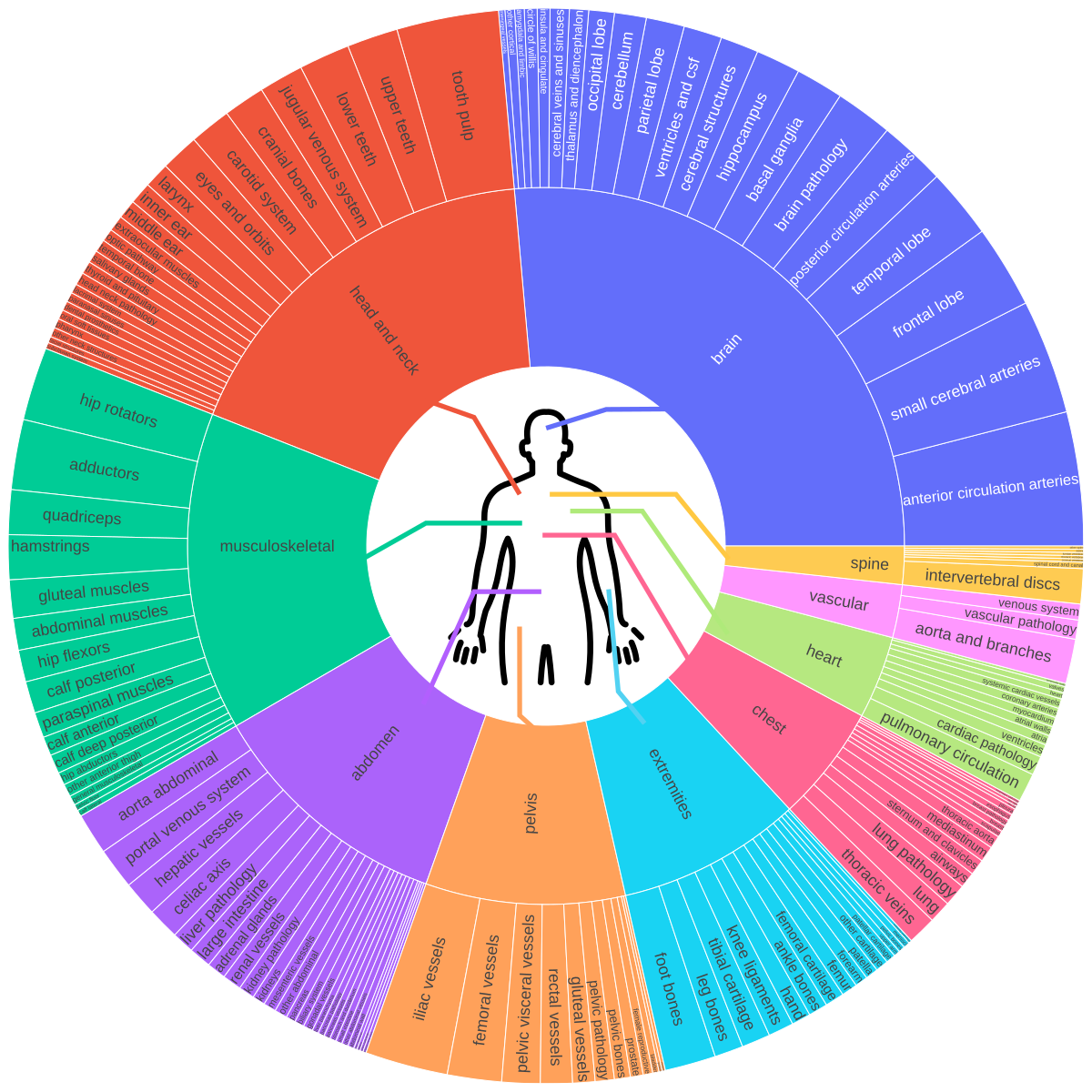 This rich semantic diversity enables **language-conditioned 3D reasoning**, allowing VoxTell to generate volumetric masks from flexible textual descriptions, from coarse anatomical labels to fine-grained pathological findings.
---
## Architecture
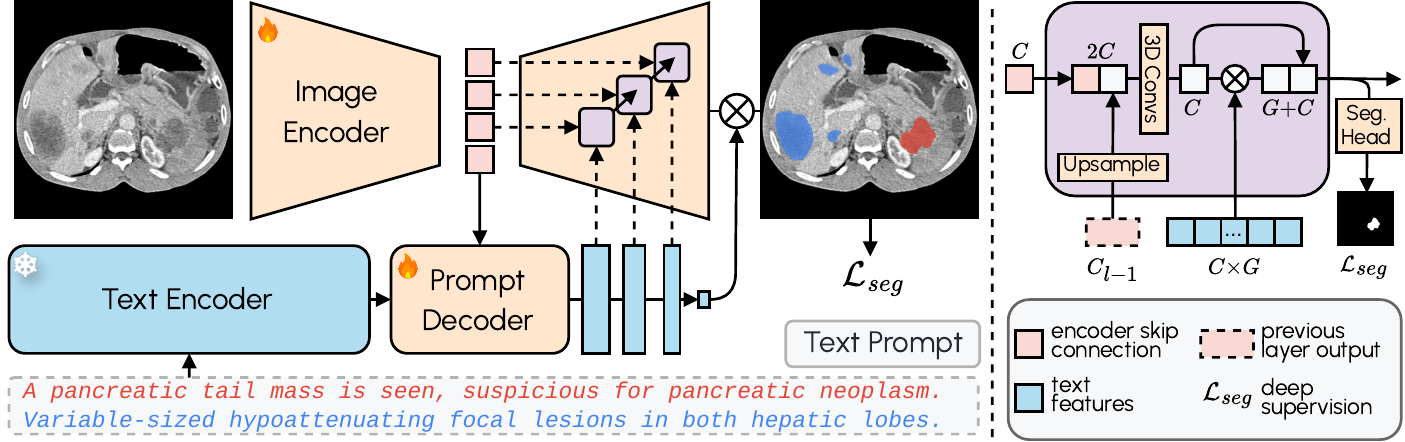
VoxTell combines **3D image encoding** with **text-prompt embeddings** and **multi-stage vision–language fusion**:
- **Image Encoder**: Processes 3D volumetric input into latent feature representations
- **Prompt Encoder**: We use the fozen [Qwen3-Embedding-4B](https://huggingface.co/Qwen/Qwen3-Embedding-4B) model to embed text prompts
- **Prompt Decoder**: Transforms text queries and image latents into multi-scale text features
- **Image Decoder**: Fuses visual and textual information at multiple resolutions using MaskFormer-style query-image fusion with deep supervision
This rich semantic diversity enables **language-conditioned 3D reasoning**, allowing VoxTell to generate volumetric masks from flexible textual descriptions, from coarse anatomical labels to fine-grained pathological findings.
---
## Architecture
VoxTell combines **3D image encoding** with **text-prompt embeddings** and **multi-stage vision–language fusion**:
- **Image Encoder**: Processes 3D volumetric input into latent feature representations
- **Prompt Encoder**: We use the fozen [Qwen3-Embedding-4B](https://huggingface.co/Qwen/Qwen3-Embedding-4B) model to embed text prompts
- **Prompt Decoder**: Transforms text queries and image latents into multi-scale text features
- **Image Decoder**: Fuses visual and textual information at multiple resolutions using MaskFormer-style query-image fusion with deep supervision
 ---
## 🛠 Installation
### 1. Create a Virtual Environment
VoxTell supports Python 3.10+ and works with Conda, pip, or any other virtual environment manager. Here's an example using Conda:
```bash
conda create -n voxtell python=3.12
conda activate voxtell
```
### 2. Install PyTorch
Install PyTorch compatible with your CUDA version. For example, for Ubuntu with a modern NVIDIA GPU:
```bash
pip install torch torchvision --index-url https://download.pytorch.org/whl/cu126
```
Any PyTorch >= 2.1.2 works except the 2.9.x series, which has a 3D-convolution memory
regression (also excluded by nnU-Net).
*For other configurations (macOS, CPU, different CUDA versions), please refer to the [PyTorch Get Started](https://pytorch.org/get-started/previous-versions/) page.*
### 3. Install VoxTell
Install the latest release from PyPI (you can also use [uv](https://docs.astral.sh/uv/)):
```bash
pip install voxtell
```
For the development version (the `main` branch, which may contain unreleased changes), install
directly from GitHub:
```bash
pip install git+https://github.com/MIC-DKFZ/VoxTell.git
```
For development, clone and install in editable mode:
```bash
git clone https://github.com/MIC-DKFZ/VoxTell
cd VoxTell
pip install -e .
```
---
## 🚀 Getting Started
👉 NEW: [Try VoxTell interactively in the napari viewer](https://github.com/MIC-DKFZ/napari-voxtell)
VoxTell downloads its default model (`voxtell_v1.1`) automatically on first use and caches it (in
the standard Hugging Face cache, `~/.cache/huggingface`), so the examples below work without any
setup.
To download a copy into a directory you control (e.g. to use a different or custom model), fetch
it with the Hugging Face `huggingface_hub` library:
```python
import os
from huggingface_hub import snapshot_download
MODEL_NAME = "voxtell_v1.1" # the default model
DOWNLOAD_DIR = "/home/user/temp" # where to put the model
local = snapshot_download("mrokuss/VoxTell", allow_patterns=f"{MODEL_NAME}/*", local_dir=DOWNLOAD_DIR)
model_path = os.path.join(local, MODEL_NAME) # e.g. "/home/user/temp/voxtell_v1.1"
```
Then point VoxTell at that directory with the `VOXTELL_MODEL` environment variable (or pass
`-m`/`model_dir` to override per run):
```bash
export VOXTELL_MODEL=/path/to/voxtell_v1.1 # a local model directory (e.g. add to ~/.bashrc)
```
Once a model has been downloaded it is cached, so subsequent runs work offline.
### Command-Line Interface (CLI)
VoxTell provides a convenient command-line interface for running predictions:
```bash
voxtell-predict -i input.nii.gz -o output_folder -p "liver" "spleen" "kidney"
```
**Single prompt:**
```bash
voxtell-predict -i case001.nii.gz -o output_folder -p "liver"
# Output: output_folder/case001_liver.nii.gz
```
**Multiple prompts (saves individual files by default):**
```bash
voxtell-predict -i case001.nii.gz -o output_folder -p "liver" "spleen" "right kidney"
# Outputs:
# output_folder/case001_liver.nii.gz
# output_folder/case001_spleen.nii.gz
# output_folder/case001_right_kidney.nii.gz
```
**Save combined multi-label file:**
```bash
voxtell-predict -i case001.nii.gz -o output_folder -p "liver" "spleen" --save-combined
# Output: output_folder/case001.nii.gz (multi-label: 1=liver, 2=spleen)
# ⚠️ WARNING: Overlapping structures will be overwritten by later prompts
```
#### CLI Options
| Argument | Short | Required | Description |
|----------|-------|----------|-------------|
| `--input` | `-i` | Yes (unless `--jobs`) | Input NIfTI file(s), or a single folder of NIfTI files |
| `--output` | `-o` | Yes | Path to output folder |
| `--model` | `-m` | No | Path to a local model directory. If omitted, uses `VOXTELL_MODEL` or downloads the default model (`voxtell_v1.1`) from Hugging Face |
| `--prompts` | `-p` | Yes (unless `--jobs`) | Text prompt(s) for segmentation, applied to every input image |
| `--jobs` | | No | Per-image prompts instead of `-i`/`-p`: a `.json` file or inline JSON list of `{"image": ..., "prompts": [...]}` |
| `--device` | | No | Device to use: `cuda` (default) or `cpu` |
| `--gpu` | | No | GPU device ID (default: 0) |
| `--save-combined` | | No | Save multi-label file instead of individual files |
| `--embeddings` | | No | Use a local precomputed-embeddings file (`.npz`) instead of auto-download |
| `--no-precomputed` | | No | Skip the automatic precomputed-embeddings download; embed every prompt with the backbone |
| `--list-embeddings` | | No | List the available precomputed prompts and exit |
| `--no-overwrite` | | No | Skip images whose outputs already exist |
| `--verbose` | | No | Enable verbose output |
> `--input` is **either** a single folder (all NIfTI files in it) **or** one or more NIfTI files
> (absolute or relative to the current directory) — not a mix. The text prompts are embedded once
> and reused across all images.
#### Batch / folder / list inference (same prompts)
```bash
# Every NIfTI in a folder
voxtell-predict -i images_folder -o output_folder -p "liver" "spleen"
# An explicit list of files
voxtell-predict -i a.nii.gz b.nii.gz c.nii.gz -o out -p "liver"
```
#### Different prompts per image
Use `--jobs` to bind each image to its own prompts (images come from the file, so `-i` is not used).
The *union* of all prompts across the jobs is embedded only once.
```bash
voxtell-predict --jobs jobs.json -o out
```
```json
// jobs.json
[
{"image": "a.nii.gz", "prompts": ["liver", "spleen"]},
{"image": "b.nii.gz", "prompts": ["tumor"]}
]
```
(For the same prompts on every image, use `-p` with `-i` instead.)
---
### Python API
For more control or integration into Python workflows, use the Python API:
```python
import torch
from voxtell.inference.predictor import VoxTellPredictor
from nnunetv2.imageio.nibabel_reader_writer import NibabelIOWithReorient
# Select device
device = torch.device("cuda:0" if torch.cuda.is_available() else "cpu")
# Load image
# Keep `props`: it stores the original affine/orientation and is required to save the masks correctly.
image_path = "/path/to/your/image.nii.gz"
img, props = NibabelIOWithReorient().read_images([image_path])
# Define text prompts
text_prompts = ["liver", "right kidney", "left kidney", "spleen"]
# Initialize predictor
predictor = VoxTellPredictor(
model_dir="/path/to/voxtell_model_directory", # optional; omit to use $VOXTELL_MODEL or auto-download
device=device,
)
# Run prediction
# Output shape: (num_prompts, x, y, z)
voxtell_seg = predictor.predict_single_image(img, text_prompts)
```
#### Optional: Save Results
Save the masks through the same reader:
```python
import os
import numpy as np
output_folder = "/path/to/output"
os.makedirs(output_folder, exist_ok=True)
writer = NibabelIOWithReorient()
# Option A - one 3D mask per prompt
for prompt, seg in zip(text_prompts, voxtell_seg):
out_path = os.path.join(output_folder, f"{prompt.replace(' ', '_')}.nii.gz")
writer.write_seg(seg, out_path, props)
# Option B - a single multi-label 3D file, where each prompt gets its own label
# value (1, 2, 3, ...). Overlapping structures are overwritten by later prompts.
combined = np.zeros_like(voxtell_seg[0], dtype=np.uint8)
for i, seg in enumerate(voxtell_seg):
combined[seg > 0] = i + 1 # label 1=first prompt, 2=second, ...
writer.write_seg(combined, os.path.join(output_folder, "combined.nii.gz"), props)
# Label legend: {i + 1: prompt for i, prompt in enumerate(text_prompts)}
```
For many images, the `voxtell-predict` CLI and `predictor.predict_from_files` /
`predict_from_jobs` (below) handle this saving for you.
#### Efficient batch / folder inference
To segment many images with the same prompts, use `predict_from_files`. The text prompts are
embedded **once** and reused across every image (a folder, a single file, or a list of files):
```python
predictor = VoxTellPredictor(device=device) # model auto-downloads (or set $VOXTELL_MODEL)
written = predictor.predict_from_files(
inputs="/path/to/images_folder", # folder, file, or list of files
output_folder="/path/to/output",
text_prompts=["liver", "spleen"],
save_combined=False, # one file per prompt (default)
)
```
For **different prompts per image**, use `predict_from_jobs` (the union of all prompts is embedded
once):
```python
predictor.predict_from_jobs(
jobs=[
{"image": "a.nii.gz", "prompts": ["liver", "spleen"]},
{"image": "b.nii.gz", "prompts": ["tumor"]},
],
output_folder="/path/to/output",
)
```
You can also embed prompts yourself and feed the embeddings into `predict_single_image` to reuse
them across custom loops:
```python
embeddings = predictor.embed_text_prompts(["liver", "spleen"])
seg = predictor.predict_single_image(img, text_embeddings=embeddings)
```
#### Precomputed text embeddings
Common prompts are precomputed and downloaded automatically from Hugging Face, skipping the Qwen3
backbone; anything uncovered is embedded on the fly. To override:
```python
VoxTellPredictor(embedding_bank="/path/to/embeddings.npz") # explicit local file
VoxTellPredictor(use_precomputed_embeddings=False) # always use the backbone
```
#### Optional: Visualize Results
You can visualize the segmentation results using [napari](https://napari.org/):
```bash
pip install napari[all]
```
> 💡 **Tip**
> If you work in napari already, the [napari-voxtell plugin](https://github.com/MIC-DKFZ/napari-voxtell) offers the fastest way to explore VoxTell results interactively.
```python
import napari
import numpy as np
# Create a napari viewer and add the original image
viewer = napari.Viewer()
viewer.add_image(img, name='Image')
# Add segmentation results as label layers for each prompt
for i, prompt in enumerate(text_prompts):
viewer.add_labels(voxtell_seg[i].astype(np.uint8), name=prompt)
# Run napari
napari.run()
```
## 🌐 Remote Inference Server
Run VoxTell as an HTTP server so a lightweight client (e.g. the
[napari-voxtell](https://github.com/MIC-DKFZ/napari-voxtell) plugin on a laptop) can drive
inference on a remote GPU machine. The client uploads a NIfTI once; the server reorients it,
runs sliding-window inference, streams per-patch progress, and returns the masks.
```bash
pip install "voxtell[server]"
# Bind to localhost (reach it over an SSH tunnel) - safe default for a single user
voxtell-server --host 127.0.0.1 --port 1527
# ...or expose it on a trusted LAN behind a static bearer token
voxtell-server --host 0.0.0.0 --port 1527 --api-key "$VOXTELL_API_KEY"
```
Model resolution matches `voxtell-predict` (`-m/--model` → `$VOXTELL_MODEL` → Hugging Face
download). From a laptop, forward the port with `ssh -N -L 1527:127.0.0.1:1527 workstation`
and point the client at `http://127.0.0.1:1527`. The client/server design is inspired by
MIC-DKFZ's [nnInteractive](https://github.com/MIC-DKFZ/nnInteractive) (Apache-2.0).
## 🎯 Fine-Tuning
Transfer VoxTell's pretrained image **encoder** into nnU-Net and fine-tune it for
multi-class segmentation. The image encoder is transferred and the image decoder
is trained from scratch.
**1. Preprocess your dataset** with standard nnU-Net:
```bash
export nnUNet_raw=/path/to/nnUNet_raw
export nnUNet_preprocessed=/path/to/nnUNet_preprocessed
export nnUNet_results=/path/to/nnUNet_results
nnUNetv2_plan_and_preprocess -d DATASET_ID --verify_dataset_integrity
```
**2. Fine-tune** (positional `dataset configuration fold`):
```bash
voxtell-finetune DATASET_ID 3d_fullres 0 \
-pretrained_weights /path/to/voxtell_model/fold_0/checkpoint_final.pth
```
Use `-tr VoxTellTrainer_noMirroring` for datasets whose labels distinguish left/right. The
CLI mirrors `nnUNetv2_train` (`--c` to resume, `--val` to validate, etc.), see the
[nnU-Net repository](https://github.com/MIC-DKFZ/nnUNet) for the full argument reference.
---
## Important: Image Orientation and Spacing
- ⚠️ **Image Orientation (Critical)**: For correct anatomical localization (e.g., distinguishing left from right), images **must be in RAS orientation**. VoxTell was trained on data reoriented using [this specific reader](https://github.com/MIC-DKFZ/nnUNet/blob/86606c53ef9f556d6f024a304b52a48378453641/nnunetv2/imageio/nibabel_reader_writer.py#L101). Orientation mismatches can be a source of error. An easy way to test for this is if a simple prompt like "liver" fails and segments parts of the spleen instead. Make sure your image metadata is correct.
- **Image Spacing**: The model does not resample images to a standardized spacing for faster inference. Performance may degrade on images with very uncommon voxel spacings (e.g., super high-resolution brain MRI). In such cases, consider resampling the image to a more typical clinical spacing (e.g., 1.5×1.5×1.5 mm³) before segmentation.
---
## 🗺️ Roadmap
- [x] **Paper Published**: [arXiv:2511.11450](https://arxiv.org/abs/2511.11450)
- [x] **Code Release**: Official implementation published
- [x] **PyPI Package**: Package downloadable via pip
- [x] **Model Release**: Public availability of pretrained weights
- [x] **Napari Plugin**: Integration into the napari viewer as a [plugin](https://github.com/MIC-DKFZ/napari-voxtell)
- [x] **Fine-Tuning**: Support and scripts for custom fine-tuning
---
## Citation
```bibtex
@inproceedings{rokuss2026voxtell,
title={Voxtell: Free-text promptable universal 3d medical image segmentation},
author={Rokuss, Maximilian and Langenberg, Moritz and Kirchhoff, Yannick and Isensee, Fabian and Hamm, Benjamin and Ulrich, Constantin and Regnery, Sebastian and Bauer, Lukas and Katsigiannopulos, Efthimios and Norajitra, Tobias and Maier-Hein, Klaus},
booktitle={Proceedings of the IEEE/CVF Conference on Computer Vision and Pattern Recognition},
pages={37538--37557},
year={2026}
}
```
---
## 📬 Contact
For questions, issues, or collaborations, please contact:
📧 maximilian.rokuss@dkfz-heidelberg.de / moritz.langenberg@dkfz-heidelberg.de
---
## 🛠 Installation
### 1. Create a Virtual Environment
VoxTell supports Python 3.10+ and works with Conda, pip, or any other virtual environment manager. Here's an example using Conda:
```bash
conda create -n voxtell python=3.12
conda activate voxtell
```
### 2. Install PyTorch
Install PyTorch compatible with your CUDA version. For example, for Ubuntu with a modern NVIDIA GPU:
```bash
pip install torch torchvision --index-url https://download.pytorch.org/whl/cu126
```
Any PyTorch >= 2.1.2 works except the 2.9.x series, which has a 3D-convolution memory
regression (also excluded by nnU-Net).
*For other configurations (macOS, CPU, different CUDA versions), please refer to the [PyTorch Get Started](https://pytorch.org/get-started/previous-versions/) page.*
### 3. Install VoxTell
Install the latest release from PyPI (you can also use [uv](https://docs.astral.sh/uv/)):
```bash
pip install voxtell
```
For the development version (the `main` branch, which may contain unreleased changes), install
directly from GitHub:
```bash
pip install git+https://github.com/MIC-DKFZ/VoxTell.git
```
For development, clone and install in editable mode:
```bash
git clone https://github.com/MIC-DKFZ/VoxTell
cd VoxTell
pip install -e .
```
---
## 🚀 Getting Started
👉 NEW: [Try VoxTell interactively in the napari viewer](https://github.com/MIC-DKFZ/napari-voxtell)
VoxTell downloads its default model (`voxtell_v1.1`) automatically on first use and caches it (in
the standard Hugging Face cache, `~/.cache/huggingface`), so the examples below work without any
setup.
To download a copy into a directory you control (e.g. to use a different or custom model), fetch
it with the Hugging Face `huggingface_hub` library:
```python
import os
from huggingface_hub import snapshot_download
MODEL_NAME = "voxtell_v1.1" # the default model
DOWNLOAD_DIR = "/home/user/temp" # where to put the model
local = snapshot_download("mrokuss/VoxTell", allow_patterns=f"{MODEL_NAME}/*", local_dir=DOWNLOAD_DIR)
model_path = os.path.join(local, MODEL_NAME) # e.g. "/home/user/temp/voxtell_v1.1"
```
Then point VoxTell at that directory with the `VOXTELL_MODEL` environment variable (or pass
`-m`/`model_dir` to override per run):
```bash
export VOXTELL_MODEL=/path/to/voxtell_v1.1 # a local model directory (e.g. add to ~/.bashrc)
```
Once a model has been downloaded it is cached, so subsequent runs work offline.
### Command-Line Interface (CLI)
VoxTell provides a convenient command-line interface for running predictions:
```bash
voxtell-predict -i input.nii.gz -o output_folder -p "liver" "spleen" "kidney"
```
**Single prompt:**
```bash
voxtell-predict -i case001.nii.gz -o output_folder -p "liver"
# Output: output_folder/case001_liver.nii.gz
```
**Multiple prompts (saves individual files by default):**
```bash
voxtell-predict -i case001.nii.gz -o output_folder -p "liver" "spleen" "right kidney"
# Outputs:
# output_folder/case001_liver.nii.gz
# output_folder/case001_spleen.nii.gz
# output_folder/case001_right_kidney.nii.gz
```
**Save combined multi-label file:**
```bash
voxtell-predict -i case001.nii.gz -o output_folder -p "liver" "spleen" --save-combined
# Output: output_folder/case001.nii.gz (multi-label: 1=liver, 2=spleen)
# ⚠️ WARNING: Overlapping structures will be overwritten by later prompts
```
#### CLI Options
| Argument | Short | Required | Description |
|----------|-------|----------|-------------|
| `--input` | `-i` | Yes (unless `--jobs`) | Input NIfTI file(s), or a single folder of NIfTI files |
| `--output` | `-o` | Yes | Path to output folder |
| `--model` | `-m` | No | Path to a local model directory. If omitted, uses `VOXTELL_MODEL` or downloads the default model (`voxtell_v1.1`) from Hugging Face |
| `--prompts` | `-p` | Yes (unless `--jobs`) | Text prompt(s) for segmentation, applied to every input image |
| `--jobs` | | No | Per-image prompts instead of `-i`/`-p`: a `.json` file or inline JSON list of `{"image": ..., "prompts": [...]}` |
| `--device` | | No | Device to use: `cuda` (default) or `cpu` |
| `--gpu` | | No | GPU device ID (default: 0) |
| `--save-combined` | | No | Save multi-label file instead of individual files |
| `--embeddings` | | No | Use a local precomputed-embeddings file (`.npz`) instead of auto-download |
| `--no-precomputed` | | No | Skip the automatic precomputed-embeddings download; embed every prompt with the backbone |
| `--list-embeddings` | | No | List the available precomputed prompts and exit |
| `--no-overwrite` | | No | Skip images whose outputs already exist |
| `--verbose` | | No | Enable verbose output |
> `--input` is **either** a single folder (all NIfTI files in it) **or** one or more NIfTI files
> (absolute or relative to the current directory) — not a mix. The text prompts are embedded once
> and reused across all images.
#### Batch / folder / list inference (same prompts)
```bash
# Every NIfTI in a folder
voxtell-predict -i images_folder -o output_folder -p "liver" "spleen"
# An explicit list of files
voxtell-predict -i a.nii.gz b.nii.gz c.nii.gz -o out -p "liver"
```
#### Different prompts per image
Use `--jobs` to bind each image to its own prompts (images come from the file, so `-i` is not used).
The *union* of all prompts across the jobs is embedded only once.
```bash
voxtell-predict --jobs jobs.json -o out
```
```json
// jobs.json
[
{"image": "a.nii.gz", "prompts": ["liver", "spleen"]},
{"image": "b.nii.gz", "prompts": ["tumor"]}
]
```
(For the same prompts on every image, use `-p` with `-i` instead.)
---
### Python API
For more control or integration into Python workflows, use the Python API:
```python
import torch
from voxtell.inference.predictor import VoxTellPredictor
from nnunetv2.imageio.nibabel_reader_writer import NibabelIOWithReorient
# Select device
device = torch.device("cuda:0" if torch.cuda.is_available() else "cpu")
# Load image
# Keep `props`: it stores the original affine/orientation and is required to save the masks correctly.
image_path = "/path/to/your/image.nii.gz"
img, props = NibabelIOWithReorient().read_images([image_path])
# Define text prompts
text_prompts = ["liver", "right kidney", "left kidney", "spleen"]
# Initialize predictor
predictor = VoxTellPredictor(
model_dir="/path/to/voxtell_model_directory", # optional; omit to use $VOXTELL_MODEL or auto-download
device=device,
)
# Run prediction
# Output shape: (num_prompts, x, y, z)
voxtell_seg = predictor.predict_single_image(img, text_prompts)
```
#### Optional: Save Results
Save the masks through the same reader:
```python
import os
import numpy as np
output_folder = "/path/to/output"
os.makedirs(output_folder, exist_ok=True)
writer = NibabelIOWithReorient()
# Option A - one 3D mask per prompt
for prompt, seg in zip(text_prompts, voxtell_seg):
out_path = os.path.join(output_folder, f"{prompt.replace(' ', '_')}.nii.gz")
writer.write_seg(seg, out_path, props)
# Option B - a single multi-label 3D file, where each prompt gets its own label
# value (1, 2, 3, ...). Overlapping structures are overwritten by later prompts.
combined = np.zeros_like(voxtell_seg[0], dtype=np.uint8)
for i, seg in enumerate(voxtell_seg):
combined[seg > 0] = i + 1 # label 1=first prompt, 2=second, ...
writer.write_seg(combined, os.path.join(output_folder, "combined.nii.gz"), props)
# Label legend: {i + 1: prompt for i, prompt in enumerate(text_prompts)}
```
For many images, the `voxtell-predict` CLI and `predictor.predict_from_files` /
`predict_from_jobs` (below) handle this saving for you.
#### Efficient batch / folder inference
To segment many images with the same prompts, use `predict_from_files`. The text prompts are
embedded **once** and reused across every image (a folder, a single file, or a list of files):
```python
predictor = VoxTellPredictor(device=device) # model auto-downloads (or set $VOXTELL_MODEL)
written = predictor.predict_from_files(
inputs="/path/to/images_folder", # folder, file, or list of files
output_folder="/path/to/output",
text_prompts=["liver", "spleen"],
save_combined=False, # one file per prompt (default)
)
```
For **different prompts per image**, use `predict_from_jobs` (the union of all prompts is embedded
once):
```python
predictor.predict_from_jobs(
jobs=[
{"image": "a.nii.gz", "prompts": ["liver", "spleen"]},
{"image": "b.nii.gz", "prompts": ["tumor"]},
],
output_folder="/path/to/output",
)
```
You can also embed prompts yourself and feed the embeddings into `predict_single_image` to reuse
them across custom loops:
```python
embeddings = predictor.embed_text_prompts(["liver", "spleen"])
seg = predictor.predict_single_image(img, text_embeddings=embeddings)
```
#### Precomputed text embeddings
Common prompts are precomputed and downloaded automatically from Hugging Face, skipping the Qwen3
backbone; anything uncovered is embedded on the fly. To override:
```python
VoxTellPredictor(embedding_bank="/path/to/embeddings.npz") # explicit local file
VoxTellPredictor(use_precomputed_embeddings=False) # always use the backbone
```
#### Optional: Visualize Results
You can visualize the segmentation results using [napari](https://napari.org/):
```bash
pip install napari[all]
```
> 💡 **Tip**
> If you work in napari already, the [napari-voxtell plugin](https://github.com/MIC-DKFZ/napari-voxtell) offers the fastest way to explore VoxTell results interactively.
```python
import napari
import numpy as np
# Create a napari viewer and add the original image
viewer = napari.Viewer()
viewer.add_image(img, name='Image')
# Add segmentation results as label layers for each prompt
for i, prompt in enumerate(text_prompts):
viewer.add_labels(voxtell_seg[i].astype(np.uint8), name=prompt)
# Run napari
napari.run()
```
## 🌐 Remote Inference Server
Run VoxTell as an HTTP server so a lightweight client (e.g. the
[napari-voxtell](https://github.com/MIC-DKFZ/napari-voxtell) plugin on a laptop) can drive
inference on a remote GPU machine. The client uploads a NIfTI once; the server reorients it,
runs sliding-window inference, streams per-patch progress, and returns the masks.
```bash
pip install "voxtell[server]"
# Bind to localhost (reach it over an SSH tunnel) - safe default for a single user
voxtell-server --host 127.0.0.1 --port 1527
# ...or expose it on a trusted LAN behind a static bearer token
voxtell-server --host 0.0.0.0 --port 1527 --api-key "$VOXTELL_API_KEY"
```
Model resolution matches `voxtell-predict` (`-m/--model` → `$VOXTELL_MODEL` → Hugging Face
download). From a laptop, forward the port with `ssh -N -L 1527:127.0.0.1:1527 workstation`
and point the client at `http://127.0.0.1:1527`. The client/server design is inspired by
MIC-DKFZ's [nnInteractive](https://github.com/MIC-DKFZ/nnInteractive) (Apache-2.0).
## 🎯 Fine-Tuning
Transfer VoxTell's pretrained image **encoder** into nnU-Net and fine-tune it for
multi-class segmentation. The image encoder is transferred and the image decoder
is trained from scratch.
**1. Preprocess your dataset** with standard nnU-Net:
```bash
export nnUNet_raw=/path/to/nnUNet_raw
export nnUNet_preprocessed=/path/to/nnUNet_preprocessed
export nnUNet_results=/path/to/nnUNet_results
nnUNetv2_plan_and_preprocess -d DATASET_ID --verify_dataset_integrity
```
**2. Fine-tune** (positional `dataset configuration fold`):
```bash
voxtell-finetune DATASET_ID 3d_fullres 0 \
-pretrained_weights /path/to/voxtell_model/fold_0/checkpoint_final.pth
```
Use `-tr VoxTellTrainer_noMirroring` for datasets whose labels distinguish left/right. The
CLI mirrors `nnUNetv2_train` (`--c` to resume, `--val` to validate, etc.), see the
[nnU-Net repository](https://github.com/MIC-DKFZ/nnUNet) for the full argument reference.
---
## Important: Image Orientation and Spacing
- ⚠️ **Image Orientation (Critical)**: For correct anatomical localization (e.g., distinguishing left from right), images **must be in RAS orientation**. VoxTell was trained on data reoriented using [this specific reader](https://github.com/MIC-DKFZ/nnUNet/blob/86606c53ef9f556d6f024a304b52a48378453641/nnunetv2/imageio/nibabel_reader_writer.py#L101). Orientation mismatches can be a source of error. An easy way to test for this is if a simple prompt like "liver" fails and segments parts of the spleen instead. Make sure your image metadata is correct.
- **Image Spacing**: The model does not resample images to a standardized spacing for faster inference. Performance may degrade on images with very uncommon voxel spacings (e.g., super high-resolution brain MRI). In such cases, consider resampling the image to a more typical clinical spacing (e.g., 1.5×1.5×1.5 mm³) before segmentation.
---
## 🗺️ Roadmap
- [x] **Paper Published**: [arXiv:2511.11450](https://arxiv.org/abs/2511.11450)
- [x] **Code Release**: Official implementation published
- [x] **PyPI Package**: Package downloadable via pip
- [x] **Model Release**: Public availability of pretrained weights
- [x] **Napari Plugin**: Integration into the napari viewer as a [plugin](https://github.com/MIC-DKFZ/napari-voxtell)
- [x] **Fine-Tuning**: Support and scripts for custom fine-tuning
---
## Citation
```bibtex
@inproceedings{rokuss2026voxtell,
title={Voxtell: Free-text promptable universal 3d medical image segmentation},
author={Rokuss, Maximilian and Langenberg, Moritz and Kirchhoff, Yannick and Isensee, Fabian and Hamm, Benjamin and Ulrich, Constantin and Regnery, Sebastian and Bauer, Lukas and Katsigiannopulos, Efthimios and Norajitra, Tobias and Maier-Hein, Klaus},
booktitle={Proceedings of the IEEE/CVF Conference on Computer Vision and Pattern Recognition},
pages={37538--37557},
year={2026}
}
```
---
## 📬 Contact
For questions, issues, or collaborations, please contact:
📧 maximilian.rokuss@dkfz-heidelberg.de / moritz.langenberg@dkfz-heidelberg.de