| **
[napari plugin](https://github.com/MIC-DKFZ/napari-nninteractive)
** | **
[MITK integration](https://www.mitk.org/)
** |
|-------------------|----------------------|
| [

](https://github.com/MIC-DKFZ/napari-nninteractive) | [

](https://www.mitk.org/) |
| **
[3D Slicer extension](https://github.com/coendevente/SlicerNNInteractive)
** | **
[ITK-SNAP extension](https://itksnap-dls.readthedocs.io/en/latest/quick_start.html)
** | **
[OHIF integration](https://github.com/CCI-Bonn/OHIF-AI)
** |
|-------------------------|-------------------------|-------------------------|
| [
](https://github.com/coendevente/SlicerNNInteractive) | [
](https://itksnap-dls.readthedocs.io/en/latest/quick_start.html) | [

](https://github.com/CCI-Bonn/OHIF-AI) |
 # Python backend for `nnInteractive: Redefining 3D Promptable Segmentation`
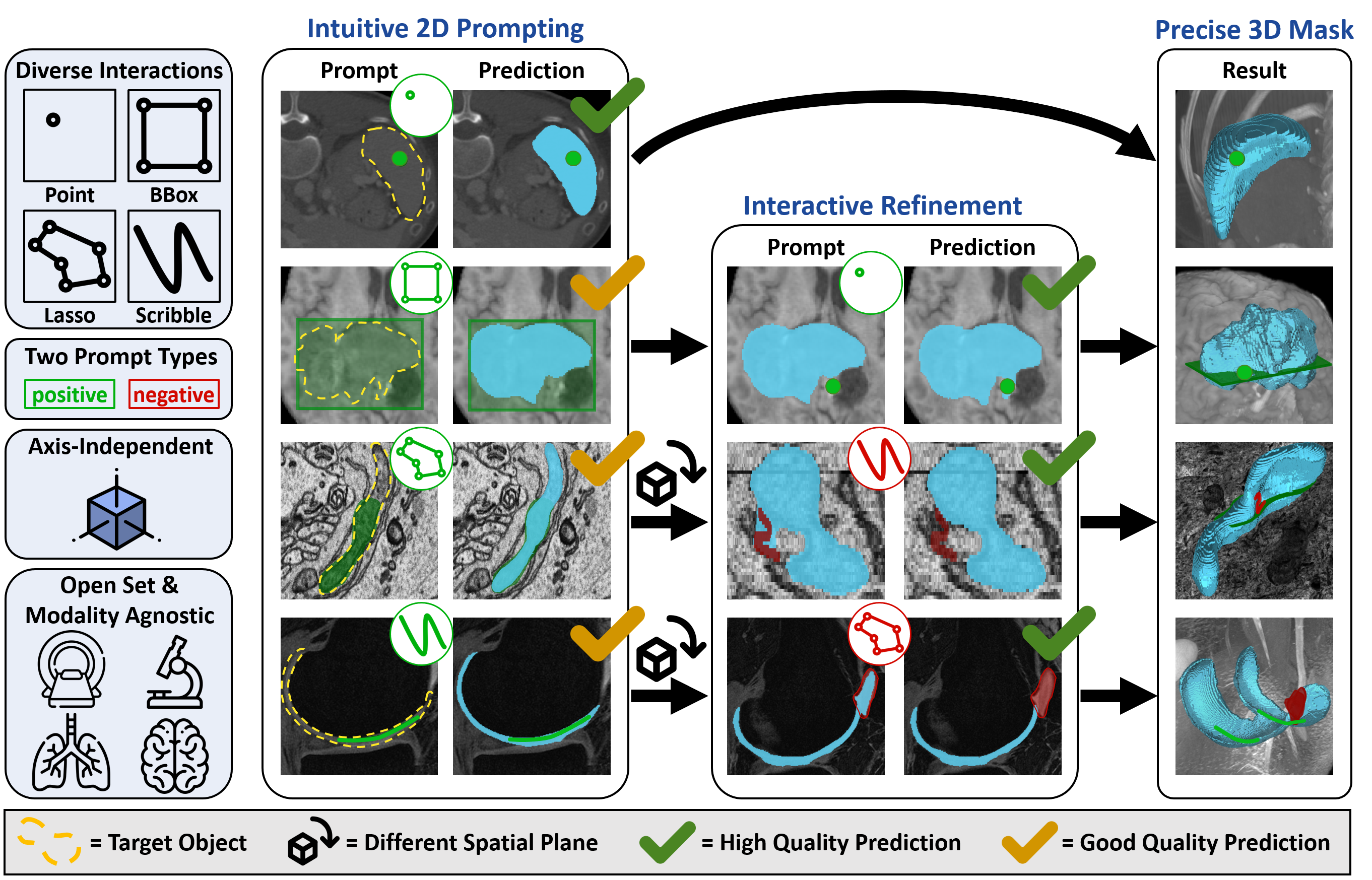
This repository provides the official Python backend for `nnInteractive`, a state-of-the-art framework for 3D promptable segmentation. It is designed for seamless integration into Python-based workflows—ideal for researchers, developers, and power users working directly with code.
`nnInteractive` is also available through graphical viewers (GUI) for those who prefer a visual workflow.
### Recommended integrations (developed and maintained by our team)
# Python backend for `nnInteractive: Redefining 3D Promptable Segmentation`
This repository provides the official Python backend for `nnInteractive`, a state-of-the-art framework for 3D promptable segmentation. It is designed for seamless integration into Python-based workflows—ideal for researchers, developers, and power users working directly with code.
`nnInteractive` is also available through graphical viewers (GUI) for those who prefer a visual workflow.
### Recommended integrations (developed and maintained by our team)
 ## Installation
nnInteractive ships as **two pip packages — install only what you need:**
- **`nninteractive-client`** — lightweight remote client that drives a remote
`nninteractive-server` (via `nnInteractiveRemoteInferenceSession`). **No PyTorch, no GPU** —
only `numpy` / `httpx` / `blosc2`. Ideal for a GUI or thin client.
- **`nnInteractive`** — the full stack: the local inference engine *and* the official
server. Needs **PyTorch and an NVIDIA GPU** (10 GB VRAM recommended; small objects work with
\<6 GB). It depends on `nninteractive-client`, so it includes the remote client too.
Both expose the same `nnInteractive` import namespace, so client code is identical either way.
##### 1. Create a virtual environment
nnInteractive supports Python 3.10+ and works with Conda, pip, or any other virtual environment. Here’s an example using Conda:
```
conda create -n nnInteractive python=3.12
conda activate nnInteractive
```
##### 2a. Lightweight remote client (no PyTorch, no GPU)
If this machine only needs to *talk to* a remote `nninteractive-server`, install just the client:
```bash
pip install nninteractive-client
```
That's it — no PyTorch step required. You can upgrade to the full stack later with
`pip install nnInteractive` (no uninstall needed); using a full-only feature (local inference,
the server) from a client-only install raises a clear error telling you to do so.
##### 2b. Full stack (local inference + server, needs an NVIDIA GPU)
**First** install the correct PyTorch for your system — PyTorch is only needed for this full
install. Go to the [PyTorch homepage](https://pytorch.org/get-started/locally/) and pick the
right configuration. For Ubuntu with an NVIDIA GPU and up-to-date drivers, pick 'stable',
'Linux', 'Pip', 'Python', 'CUDA 12.6' (use an older CUDA if your drivers are older):
```
pip3 install torch torchvision --index-url https://download.pytorch.org/whl/cu126
```
**Then** install nnInteractive (this also pulls in the remote client):
```bash
pip install nnInteractive
```
##### Editable / development install (from source)
This repository builds **two distributions that share the `nnInteractive` import namespace**
(via [PEP 420 namespace packages](https://peps.python.org/pep-0420/)):
- **`nninteractive-client`** — the torch-free remote client (`nnInteractive.inference.remote`),
with its source under `client/`;
- **`nnInteractive`** — the full local + server stack, which **depends on** `nninteractive-client`.
Because of that, an editable checkout means installing **both, client first**:
```bash
git clone https://github.com/MIC-DKFZ/nnInteractive
cd nnInteractive
# Recommended: clean slate first, so an older pre-split install can't shadow the
# namespace packages (see the first gotcha below).
pip uninstall -y nnInteractive nninteractive-client
pip install -e ./client # nninteractive-client (torch-free wire client)
pip install -e . # nnInteractive (full stack; depends on the client)
```
**Order matters:** installing the editable client *first* satisfies the full package's
dependency from your working tree, so `pip install -e .` will not try to download
`nninteractive-client` from PyPI. If you only develop the remote client, `pip install -e ./client`
on its own is enough (and stays torch-free).
> [!IMPORTANT]
> Two consequences of the namespace-package split that can bite during development:
> - **Do not leave an old, pre-split `nnInteractive` installed.** A monolithic install ships a
> real `nnInteractive/__init__.py`, which makes `nnInteractive` a *regular* package and
> **shadows** the editable namespace portions — `import nnInteractive.inference.remote` then
> fails even though your editable install succeeded. The `pip uninstall` above avoids this.
> - **Editable installs only take effect at interpreter startup.** They work via an import
> finder registered in a `.pth` file that Python reads when it starts, *not* when you run
> `pip`. After an editable (re)install, **restart any already-running interpreter** (a Slicer
> Python console, a Jupyter kernel, …) — otherwise it won't see the package, and
> `importlib.invalidate_caches()` will not help.
## Getting Started
Here is a minimalistic script that covers the core functionality of nnInteractive:
```python
import os
import torch
import SimpleITK as sitk
# --- Download / locate the trained model weights (~400MB) ---
# License reminder: The official nnInteractive checkpoint is licensed under
# Creative Commons Attribution Non Commercial Share Alike 4.0 (CC BY-NC-SA 4.0).
# See the License section of this readme!
#
# nnInteractive ships a small model-management API. It fetches the list of available
# models from Hugging Face (MIC-DKFZ/nnInteractive), downloads only the selected one,
# reuses it on later runs, and works offline once a model has been downloaded. Models
# are stored under $NNINTERACTIVE_MODEL_DIR (default: ~/.nninteractive).
from nnInteractive.model_management import ensure_model_available, get_default_model_id
# Use the recommended model — i.e. the manifest's default. Don't hard-code a version here, so you
# automatically track whatever is currently recommended:
model_id = get_default_model_id() # resolves to the recommended id, e.g. "nnInteractive_v1.0"
# To pin a specific model instead, set its id by name (see the ids from
# `nninteractive-available-models` or nnInteractive.model_management.list_models()):
# model_id = "nnInteractive_v1.0"
# Resolve the id to a local folder: downloads on first use, reuses it afterwards (offline-friendly).
model_path = ensure_model_available(model_id)
# ...later passed to the session via session.initialize_from_trained_model_folder(str(model_path)).
# --- Initialize Inference Session ---
from nnInteractive.inference.inference_session import nnInteractiveInferenceSession
session = nnInteractiveInferenceSession(
device=torch.device("cuda:0"), # Set inference device
use_torch_compile=False, # Compiles the net for faster predictions. The one-time (slow) compile
# is paid during initialize_from_trained_model_folder() below (it warms
# up automatically), NOT on your first prompt. Worth it for long-lived
# processes (the server enables it by default) or longer sessions.
verbose=False,
torch_n_threads=os.cpu_count(), # Use available CPU cores, cap this if your system has a gigantic CPU (64+ cores)
do_autozoom=True, # Enables AutoZoom for better patching
)
# Load the trained model
session.initialize_from_trained_model_folder(str(model_path))
# --- Load Input Image (Example with SimpleITK) ---
# DO NOT preprocess the image in any way. Give it to nnInteractive as it is! DO NOT apply level window, DO NOT normalize
# intensities and never ever convert an image with higher precision (float32, uint16, etc) to uint8!
# The ONLY instance where some preprocesing makes sense is if your original image is too large to be reasonably used.
# This may be the case, for example, for some microCT images. In this case you can consider downsampling.
input_image = sitk.ReadImage("FILENAME")
img = sitk.GetArrayFromImage(input_image)[None] # Ensure shape (1, x, y, z)
# Validate input dimensions
if img.ndim != 4:
raise ValueError("Input image must be 4D with shape (1, x, y, z)")
session.set_image(img)
# --- Define Output Buffer ---
target_tensor = torch.zeros(img.shape[1:], dtype=torch.uint8) # Must be 3D (x, y, z)
session.set_target_buffer(target_tensor)
# --- Interacting with the Model ---
# Interactions can be freely chained and mixed in any order. Each interaction refines the
# segmentation, and the model writes the updated mask straight into your target buffer
# (in place) after every interaction — you never have to fetch anything back.
#
# Normally you just read the target buffer directly (see "Retrieve Results" below). The only
# reason to look at the return value is if you must propagate the update into your OWN structure
# (a GUI's label layer, a separate array, ...) and want to avoid copying the whole volume every
# time: each add_*_interaction(..., run_prediction=True) RETURNS the bounding box of the region it
# changed, as [[x1, x2], [y1, y2], [z1, z2]] in target-buffer coordinates (None if nothing changed
# / run_prediction=False), so you can copy just that sub-volume.
# Example: Add a **positive** point interaction
# POINT_COORDINATES should be a tuple (x, y, z) specifying the point location.
changed_bbox = session.add_point_interaction(POINT_COORDINATES, include_interaction=True)
# Only needed if you mirror the result elsewhere (otherwise ignore it and read target_tensor):
# if changed_bbox is not None:
# (x1, x2), (y1, y2), (z1, z2) = changed_bbox
# my_label_volume[x1:x2, y1:y2, z1:z2] = target_tensor[x1:x2, y1:y2, z1:z2]
# Example: Add a **negative** point interaction
# To make any interaction negative set include_interaction=False
session.add_point_interaction(POINT_COORDINATES, include_interaction=False)
# Example: Add a bounding box interaction
# BBOX_COORDINATES must be specified as [[x1, x2], [y1, y2], [z1, z2]] (half-open intervals).
# Note: nnInteractive pre-trained models currently only support **2D bounding boxes**.
# This means that **one dimension must be [d, d+1]** to indicate a single slice.
# Example of a 2D bounding box in the axial plane (XY slice at depth Z)
# BBOX_COORDINATES = [[30, 80], [40, 100], [10, 11]] # X: 30-80, Y: 40-100, Z: slice 10
session.add_bbox_interaction(BBOX_COORDINATES, include_interaction=True)
# Example: Add a scribble interaction
# - Background must be 0, and scribble must be 1.
# - Use session.preferred_scribble_thickness for optimal results.
#
# ✅ RECOMMENDED (v2): pass a small 2D crop plus its location.
# Scribbles live on a single axis-aligned slice, so one of the three bbox
# dimensions is always size 1 and the in-plane extent typically covers only
# a small region. The cropped array is ORDERS OF MAGNITUDE
# smaller than a full-volume mask for typical annotations, which makes this
# path dramatically faster. Please prefer this
# form in new integrations.
#
# SCRIBBLE_CROP.shape must equal the bbox size. INTERACTION_BBOX uses
# half-open intervals [[x1,x2],[y1,y2],[z1,z2]] in original-image coordinates.
# Example: a scribble drawn on axial slice z=64, covering x∈[100,140), y∈[80,150):
# SCRIBBLE_CROP =
## Installation
nnInteractive ships as **two pip packages — install only what you need:**
- **`nninteractive-client`** — lightweight remote client that drives a remote
`nninteractive-server` (via `nnInteractiveRemoteInferenceSession`). **No PyTorch, no GPU** —
only `numpy` / `httpx` / `blosc2`. Ideal for a GUI or thin client.
- **`nnInteractive`** — the full stack: the local inference engine *and* the official
server. Needs **PyTorch and an NVIDIA GPU** (10 GB VRAM recommended; small objects work with
\<6 GB). It depends on `nninteractive-client`, so it includes the remote client too.
Both expose the same `nnInteractive` import namespace, so client code is identical either way.
##### 1. Create a virtual environment
nnInteractive supports Python 3.10+ and works with Conda, pip, or any other virtual environment. Here’s an example using Conda:
```
conda create -n nnInteractive python=3.12
conda activate nnInteractive
```
##### 2a. Lightweight remote client (no PyTorch, no GPU)
If this machine only needs to *talk to* a remote `nninteractive-server`, install just the client:
```bash
pip install nninteractive-client
```
That's it — no PyTorch step required. You can upgrade to the full stack later with
`pip install nnInteractive` (no uninstall needed); using a full-only feature (local inference,
the server) from a client-only install raises a clear error telling you to do so.
##### 2b. Full stack (local inference + server, needs an NVIDIA GPU)
**First** install the correct PyTorch for your system — PyTorch is only needed for this full
install. Go to the [PyTorch homepage](https://pytorch.org/get-started/locally/) and pick the
right configuration. For Ubuntu with an NVIDIA GPU and up-to-date drivers, pick 'stable',
'Linux', 'Pip', 'Python', 'CUDA 12.6' (use an older CUDA if your drivers are older):
```
pip3 install torch torchvision --index-url https://download.pytorch.org/whl/cu126
```
**Then** install nnInteractive (this also pulls in the remote client):
```bash
pip install nnInteractive
```
##### Editable / development install (from source)
This repository builds **two distributions that share the `nnInteractive` import namespace**
(via [PEP 420 namespace packages](https://peps.python.org/pep-0420/)):
- **`nninteractive-client`** — the torch-free remote client (`nnInteractive.inference.remote`),
with its source under `client/`;
- **`nnInteractive`** — the full local + server stack, which **depends on** `nninteractive-client`.
Because of that, an editable checkout means installing **both, client first**:
```bash
git clone https://github.com/MIC-DKFZ/nnInteractive
cd nnInteractive
# Recommended: clean slate first, so an older pre-split install can't shadow the
# namespace packages (see the first gotcha below).
pip uninstall -y nnInteractive nninteractive-client
pip install -e ./client # nninteractive-client (torch-free wire client)
pip install -e . # nnInteractive (full stack; depends on the client)
```
**Order matters:** installing the editable client *first* satisfies the full package's
dependency from your working tree, so `pip install -e .` will not try to download
`nninteractive-client` from PyPI. If you only develop the remote client, `pip install -e ./client`
on its own is enough (and stays torch-free).
> [!IMPORTANT]
> Two consequences of the namespace-package split that can bite during development:
> - **Do not leave an old, pre-split `nnInteractive` installed.** A monolithic install ships a
> real `nnInteractive/__init__.py`, which makes `nnInteractive` a *regular* package and
> **shadows** the editable namespace portions — `import nnInteractive.inference.remote` then
> fails even though your editable install succeeded. The `pip uninstall` above avoids this.
> - **Editable installs only take effect at interpreter startup.** They work via an import
> finder registered in a `.pth` file that Python reads when it starts, *not* when you run
> `pip`. After an editable (re)install, **restart any already-running interpreter** (a Slicer
> Python console, a Jupyter kernel, …) — otherwise it won't see the package, and
> `importlib.invalidate_caches()` will not help.
## Getting Started
Here is a minimalistic script that covers the core functionality of nnInteractive:
```python
import os
import torch
import SimpleITK as sitk
# --- Download / locate the trained model weights (~400MB) ---
# License reminder: The official nnInteractive checkpoint is licensed under
# Creative Commons Attribution Non Commercial Share Alike 4.0 (CC BY-NC-SA 4.0).
# See the License section of this readme!
#
# nnInteractive ships a small model-management API. It fetches the list of available
# models from Hugging Face (MIC-DKFZ/nnInteractive), downloads only the selected one,
# reuses it on later runs, and works offline once a model has been downloaded. Models
# are stored under $NNINTERACTIVE_MODEL_DIR (default: ~/.nninteractive).
from nnInteractive.model_management import ensure_model_available, get_default_model_id
# Use the recommended model — i.e. the manifest's default. Don't hard-code a version here, so you
# automatically track whatever is currently recommended:
model_id = get_default_model_id() # resolves to the recommended id, e.g. "nnInteractive_v1.0"
# To pin a specific model instead, set its id by name (see the ids from
# `nninteractive-available-models` or nnInteractive.model_management.list_models()):
# model_id = "nnInteractive_v1.0"
# Resolve the id to a local folder: downloads on first use, reuses it afterwards (offline-friendly).
model_path = ensure_model_available(model_id)
# ...later passed to the session via session.initialize_from_trained_model_folder(str(model_path)).
# --- Initialize Inference Session ---
from nnInteractive.inference.inference_session import nnInteractiveInferenceSession
session = nnInteractiveInferenceSession(
device=torch.device("cuda:0"), # Set inference device
use_torch_compile=False, # Compiles the net for faster predictions. The one-time (slow) compile
# is paid during initialize_from_trained_model_folder() below (it warms
# up automatically), NOT on your first prompt. Worth it for long-lived
# processes (the server enables it by default) or longer sessions.
verbose=False,
torch_n_threads=os.cpu_count(), # Use available CPU cores, cap this if your system has a gigantic CPU (64+ cores)
do_autozoom=True, # Enables AutoZoom for better patching
)
# Load the trained model
session.initialize_from_trained_model_folder(str(model_path))
# --- Load Input Image (Example with SimpleITK) ---
# DO NOT preprocess the image in any way. Give it to nnInteractive as it is! DO NOT apply level window, DO NOT normalize
# intensities and never ever convert an image with higher precision (float32, uint16, etc) to uint8!
# The ONLY instance where some preprocesing makes sense is if your original image is too large to be reasonably used.
# This may be the case, for example, for some microCT images. In this case you can consider downsampling.
input_image = sitk.ReadImage("FILENAME")
img = sitk.GetArrayFromImage(input_image)[None] # Ensure shape (1, x, y, z)
# Validate input dimensions
if img.ndim != 4:
raise ValueError("Input image must be 4D with shape (1, x, y, z)")
session.set_image(img)
# --- Define Output Buffer ---
target_tensor = torch.zeros(img.shape[1:], dtype=torch.uint8) # Must be 3D (x, y, z)
session.set_target_buffer(target_tensor)
# --- Interacting with the Model ---
# Interactions can be freely chained and mixed in any order. Each interaction refines the
# segmentation, and the model writes the updated mask straight into your target buffer
# (in place) after every interaction — you never have to fetch anything back.
#
# Normally you just read the target buffer directly (see "Retrieve Results" below). The only
# reason to look at the return value is if you must propagate the update into your OWN structure
# (a GUI's label layer, a separate array, ...) and want to avoid copying the whole volume every
# time: each add_*_interaction(..., run_prediction=True) RETURNS the bounding box of the region it
# changed, as [[x1, x2], [y1, y2], [z1, z2]] in target-buffer coordinates (None if nothing changed
# / run_prediction=False), so you can copy just that sub-volume.
# Example: Add a **positive** point interaction
# POINT_COORDINATES should be a tuple (x, y, z) specifying the point location.
changed_bbox = session.add_point_interaction(POINT_COORDINATES, include_interaction=True)
# Only needed if you mirror the result elsewhere (otherwise ignore it and read target_tensor):
# if changed_bbox is not None:
# (x1, x2), (y1, y2), (z1, z2) = changed_bbox
# my_label_volume[x1:x2, y1:y2, z1:z2] = target_tensor[x1:x2, y1:y2, z1:z2]
# Example: Add a **negative** point interaction
# To make any interaction negative set include_interaction=False
session.add_point_interaction(POINT_COORDINATES, include_interaction=False)
# Example: Add a bounding box interaction
# BBOX_COORDINATES must be specified as [[x1, x2], [y1, y2], [z1, z2]] (half-open intervals).
# Note: nnInteractive pre-trained models currently only support **2D bounding boxes**.
# This means that **one dimension must be [d, d+1]** to indicate a single slice.
# Example of a 2D bounding box in the axial plane (XY slice at depth Z)
# BBOX_COORDINATES = [[30, 80], [40, 100], [10, 11]] # X: 30-80, Y: 40-100, Z: slice 10
session.add_bbox_interaction(BBOX_COORDINATES, include_interaction=True)
# Example: Add a scribble interaction
# - Background must be 0, and scribble must be 1.
# - Use session.preferred_scribble_thickness for optimal results.
#
# ✅ RECOMMENDED (v2): pass a small 2D crop plus its location.
# Scribbles live on a single axis-aligned slice, so one of the three bbox
# dimensions is always size 1 and the in-plane extent typically covers only
# a small region. The cropped array is ORDERS OF MAGNITUDE
# smaller than a full-volume mask for typical annotations, which makes this
# path dramatically faster. Please prefer this
# form in new integrations.
#
# SCRIBBLE_CROP.shape must equal the bbox size. INTERACTION_BBOX uses
# half-open intervals [[x1,x2],[y1,y2],[z1,z2]] in original-image coordinates.
# Example: a scribble drawn on axial slice z=64, covering x∈[100,140), y∈[80,150):
# SCRIBBLE_CROP =