# C
> An esoteric programming language that looks like Chess notation
## Brief
**C** is an esoteric programming language inspired by algebraic chess notation. It lets you write programs that look almost indistinguishable from a chess game, but instead of playing a game, you're placing and manipulating data on a 8x8 grid. It uses a single 5-bit data type (called a _piece_) for all your needs, represented using base 32 encoding. It supports variables, functions, function calling, error handlers, and a number of (hyper)operations. Enjoy!
## Try it online
[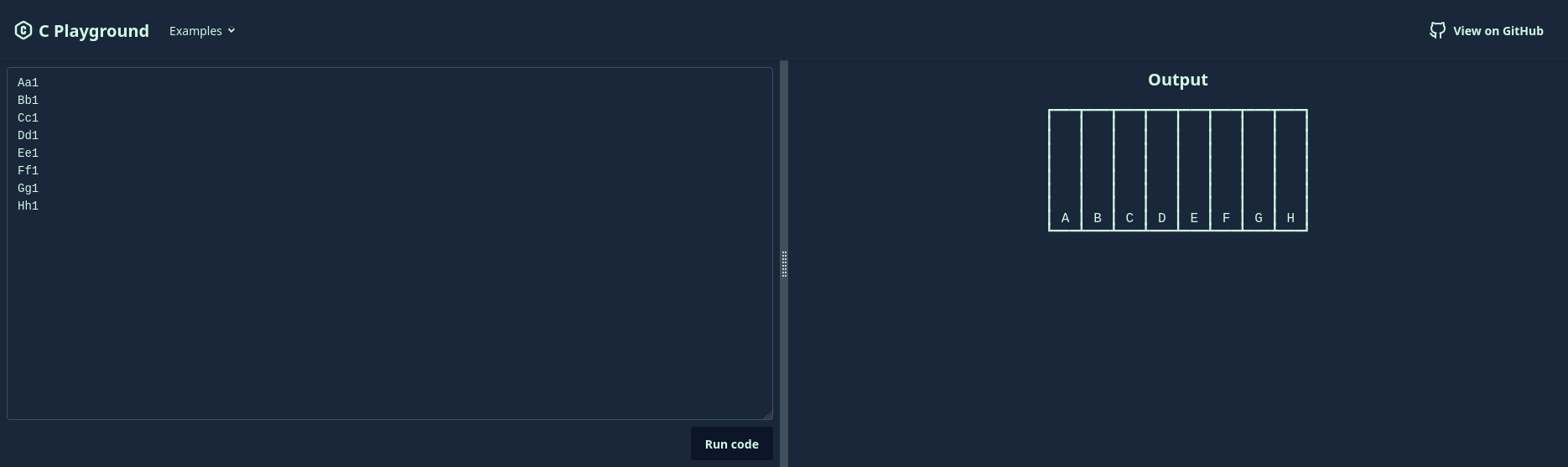](https://c-playground.netlify.app/)
- Run C in your browser with the C Playground: **[🌎 https://c-playground.netlify.app/](https://c-playground.netlify.app/)**
See [playground/README.md](playground/README.md) for more information about the C Playground.
## Specification
- Program memory is laid out in an 8x8 grid (called the _board_), like a chessboard.
- Each square holds a single 5-bit value (called a _piece_) canonically represented as a single [RFC 4648 base-32](https://datatracker.ietf.org/doc/html/rfc4648#section-6) digit (printable character)
- Programs are made up of instructions separated by whitespace.
- Each instruction is a few ASCII characters that describes an operation to perform, data to be written to a square, or another kind of action.
### Values
Many programming languages work with bytes (8-bit values) as their native unit of data. C works with 5-bit values, and each 5-bit value is called a _piece_. When written down, a piece is canonically represented as a single [RFC 4648 base-32](https://datatracker.ietf.org/doc/html/rfc4648#section-6) character. This notation starts at `A` for 0, going up to `Z` to represent 25, and then uses the digits `2` to `7` to represent values 26 to 31.
The following table, copied [from Wikipedia](https://en.wikipedia.org/wiki/Base32#Base_32_Encoding_per_%C2%A76), shows the mapping of denary (base-10) values to their RFC 4648 base-32 representations.
| Value | Symbol | Value | Symbol | Value | Symbol | Value | Symbol |
| ----- | ------ | ----- | ------ | ----- | ------ | ----- | ------ |
| 0 | **A** | 8 | **I** | 16 | **Q** | 24 | **Y** |
| 1 | **B** | 9 | **J** | 17 | **R** | 25 | **Z** |
| 2 | **C** | 10 | **K** | 18 | **S** | 26 | **2** |
| 3 | **D** | 11 | **L** | 19 | **T** | 27 | **3** |
| 4 | **E** | 12 | **M** | 20 | **U** | 28 | **4** |
| 5 | **F** | 13 | **N** | 21 | **V** | 29 | **5** |
| 6 | **G** | 14 | **O** | 22 | **W** | 30 | **6** |
| 7 | **H** | 15 | **P** | 23 | **X** | 31 | **7** |
Throughout this document, values will often be written in RFC 4648 base-32. This will be indicated by a subscript 32, e.g. F32 to represent the value 5.
In case you're wondering how pieces relate to other units of data such as bytes, here's a "helpful" bulleted list:
- 1 bit = **1** bit
- 1 nibble = **4** bits
- 1 piece = **5** bits
- 1 byte = **8** bits
- In Windows terminology, 1 WORD = **16** bits
#### Data types
Fortunately, you only need to learn about one data type to code in C.
##### Integers
C considers integers to be the best data type, and idiomatic C programs will reflect this ideal in their documentation. Naturally, C stores integers on the board as unsigned pieces, giving each integer a range of 0 to 31.
#### Empty square
When a C program is executed, all squares start as empty. This state is not truly a data type, but rather the lack of any data. It's different to a value of zero. You can think of it as `None` in Python, or perhaps `undefined` in JavaScript.
Once a square has had a piece placed on it, it can't become empty again (unless the piece is thrown off due to an exception being thrown).
Most operations will fail with a `NullPointerException` if you attempt to perform it on an empty square.
##### Booleans
Boolean values are represented in C as integers. 0 is equivalent to `false`, and `1` is equivalent to `true`.
For the purposes of [boolean operations](#boolean-operations), the value 0 is considered falsy and any other value is considered truthy.
##### Floating-point numbers
C does not support floating-point numbers. Instead, you should use the superior integer data type.
##### Characters and strings
Characters and strings are not supported yet.
Strings carry a variety of complications, including localization, normalization, and delocalisation. It is suggested to use integers for input and output instead.
Characters may be defined as a data type in a future version of C. They will likely be stored as two pieces per character, using the UTF-10 Unicode encoding that will be specific to C.
### Referencing board squares
Board squares (equivalent to memory locations) are referenced using coordinates in the same way as algebraic chess notation. Two characters are used:
1. A lowercase letter (`a`-`z`) to specify the file (column).
2. A non-zero digit (`1`-`9`) to specify the rank (row).
By default, the board has 8 files and 8 ranks, so the valid squares are from `a1` to `h8`. Implementations may support extended board sizes as an opt-in feature.
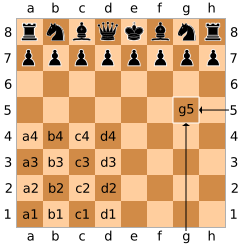
Example: `g5` would represent the square highlighted in the diagram below.
[](https://en.wikipedia.org/wiki/File:SCD_algebraic_notation.svg)
### Writing data to the board
#### Placing pieces
The simplest kind of write instruction is to place a single piece of data on a single empty square. It consists of 3 characters:
1. The first character is the data to be placed (written) on the square, written as a base-32 digit (see above).
2. The next two characters are a [reference](#referencing-board-squares) to the square to place the data.
Example: `Be5` would place B32 (i.e. 1 in decimal) to the square `e5`.
Attempting to place data on a square that already has data (without indicating a capture as below) will result in a crash (of the pieces, and of the program).
#### Capturing pieces
If you wish to overwrite the data that already exists on a square, you must use a capture instruction. It is similar to placing a piece, except that an "x" is inserted immediately before the square reference. It consists of 4 characters:
1. The first character is the new data to be placed on the square (overwriting what was already there)
2. The second character must be an `x` so that the data can be overwritten.
3. The next two characters are a [reference](#referencing-board-squares) to the square that should have its data overwritten.
Example: `Nxe4` would replace the data on the square `e4` with N32 (i.e. 21).
Performing a capture instruction on an empty square is currently undefined behaviour.
### Named memory locations (variables)
You can give a board square a name by adding it before a [place](#placing-pieces) or [capture](#capturing-pieces) instruction, separated by a dot. Names can be as long as you wish, and may contain any characters from any version of the Unicode standard (including past and future versions), apart from [reserved characters](#reserved-characters). They are case-sensitive and also normalisation-sensitive (so canonically-equivalent names do not refer to each other).
A single square could have multiple names (by attaching a second name to a capture instruction).
You can't do anything with named memory locations (you still have to refer to the square using its coordinates). They can serve one of the following two purposes:
- One of the principles of idiomatic C is source code that looks like a chess game. To help achieve this, numerical variable names may be attached to place/capture operations, to look like turn numbers in a chess game. Examples: `1.Nf3`, `4.Ba4`, `12.cxb5`
- If you would like to peruse the non-idiomatic ideal of "maintainability", attaching human-readable variable names to your place operations might make your code more readable. Examples: `zero.Ah1`, `total.Ba1`, `Player's_score.Ia4`
If you try to define a variable with a name that is already in use, it will work. The old variable will be gone and the new one will begin to exist.
Example: `score.Ah8` would place the piece the value A32 (i.e. zero) on the square `h8` (top-right corner) and give it the name `score`.
### Operations
Arithmetic operations are performed by specifying one square reference, an operator, and then another square reference. As such, it's a sandwich with square references as the bread and an operator as the filling. Scrumptious!
The result of the operation is always written to the square that held the first operand (the previous piece gets captured).
Arithmetic operation instructions consist of 5 or more characters, depending on the length of the filling:
1. The first two characters are a [reference](#referencing-board-squares) to the square that contains the first operand.
2. Next is the operator, which is usually one character, but may be up to 6 characters. See below for valid operators.
3. The last two characters are a [reference](#referencing-board-squares) to the square that contains the second operand.
#### Errors with operations
If performing an operation would result in an integer overflow, an `IntegerOverflowException` will be thrown. Since this response is analogous to a piece being thrown off the board, the data stored in the first square will be removed and become inaccessible. The data in the second square will remain intact. Because of this, best practice is to always perform operations on your least valuable pieces.
Most operations (apart from [boolean operations](#boolean-operations)) will throw a `NullPointerException` if used with an empty square. This will have similar consequences to an `IntegerOverflowException`, in the sense that the piece (if it exists) in the first square will be thrown off the board. Be careful.
#### Arithmetic operators
If either square doesn't contain any data, a `NullPointerException` will be thrown, throwing the first piece off the board.
| Operator | Action |
| -------- | ------ |
| `+` | Adds the two operands. In simpler terms, it's repeated succession. |
| `-` | Subtracts the second operand from the first, i.e. `first - second`. Essentially, it's addition where the second operand is negated. |
| `*` | Multiplies the two operands together. Implementations may choose to use a times table to optimise this. |
| `/` | Divides of the first operand by the second. As is typical for a language named C, this is integer division. |
| `%` | First operand modulus-ed by the second operand. It's the remainder from a `/` operation. |
| `**` | Exponentiation. Raises the first operand to the power of the second operand. |
| `***` | First operand tetrated to the second operand. For clarity, it's the forth hyperoperation. |
| `log` | Logarithm of the first operand to the base of the second operand. Throws an exception if the result is not an integer. |
| `throot` | Finds the _n_th root of the second operand, where _n_ is the first operand. Note that the order of operands for this operation is reversed compared to the others. This was an intentional irrational decision by the designers of C. |
#### Bitwise operations
If either square doesn't contain any data, a `NullPointerException` will be thrown, throwing the first piece off the board.
| Operator | Action |
| -------- | ------------------------------------------------------------ |
| `&` | Bitwise AND. |
| `\|` | Bitwise OR. |
| `^` | Bitwise XOR. |
| `<<` | Binary-shifts the first operand left by the second operand. |
| `>>` | Binary-shifts the first operand right by the second operand. |
The bitwise NOT operator is not available, but you can get a close approximation by negating the value.
#### Boolean operations
Boolean operations are the only operations that can work with empty squares.
| Operator | Action |
| -------- | ------------------------------------------------------------------------------------------------------------------------- |
| `&&` | If the first operand is truthy, results in the second operand. Otherwise, results in a 0. |
| `\|\|` | If the first operand is truthy, nothing changes. Otherwise, results in the second operand (or 0 if it's an empty square). |
The boolean not (`!`) operator is not available - sorry about that. Try writing your non-existent if statements the other way around instead.
#### Equality checks
If either square doesn't contain any data, a `NullPointerException` will be thrown, throwing the first piece off the board.
| Operator | Action |
| -------- | -------------------------------------------------------------------------------- |
| `==` | Results in a `1` if the two operands are equal. Otherwise, results in a `0`. |
| `!=` | Results in a `1` if the two operands are not equal. Otherwise, results in a `0`. |
Both equality check operations are "strict" in the JavaScript sense. Imprecise equality checks are not required because all values are integers.
You cannot check equality between a piece and an empty square, or two empty squares. To check if a square is empty, try using a [boolean operation](#boolean-operations) with a known-empty square.
#### Comparison operators
If either square doesn't contain any data, a `NullPointerException` will be thrown, throwing the first piece off the board.
I think by now you're getting the gist of how these tables work.
| Operator | Action |
| -------- | ------------------------------------------------------------------------------------------------------------------ |
| `<` | Results in a `1` if the first operand is less than the second operand. Otherwise, results in a `0`. |
| `<=` | Results in a `1` if the first operand is less than or equal to the second operand. Otherwise, results in a `0`. |
| `>` | Results in a `1` if the first operand is greater than the second operand. Otherwise, results in a `0`. |
| `>=` | Results in a `1` if the first operand is greater than or equal to the second operand. Otherwise, results in a `0`. |
There is no `<>` operator. Use `!=` and stop pretending to be writing XML or whatever.
#### Operation examples
- `e4+f5` would add the values in the squares `e4` and `f5`, and write the result to `e4`, overwriting the previous contents of `e4`.
- `Ba1 a1logb1` would take the base-2 logarithm of the value in `b1`, writing the result to `a1`.
### Functions
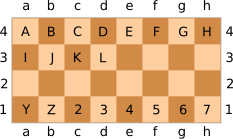
Functions are identified by a 5-bit identifier (for the purpose of defining the function) which maps to a square on an imaginary 8x4 board (with square references `a1` to `h4`). The function's square reference is used when calling it.
Functions can currently only one operation. They're most useful when you need to perform an operation on the same two squares multiple times in a program.
#### Defining functions
A function definition instruction consists of a function identifier, a dot, and then an operation instruction. This means it is 7 or more characters long. A detailed description of the syntax is as follows:
1. The first character is the function identifier, which is a single base-32 digit (`A` to `7`)
2. The second character is a dot (`.`)
3. The following instructions must be a valid [operation instruction](#operations) (usually 5 or 6 characters, sometimes more).
It is recommended to start off by using the identifiers from `2` to `7` for your functions. This makes the source code look closer to algebraic chess notation, which is one of the goals for idiomatic C.
#### Calling functions
A function call instruction simply consists of the function's square reference (of the square on the imaginary board that the function sits on) and nothing else. If you're used to algebraic chess notation, it looks like a pawn move. Here's the spec:
1. The first character specifies the file of the function's (imaginary) square, `a` to `h`.
2. The second character specifies the rank of the function's (imaginary) square, `1` to `4`.
The diagram below shows how the function identifiers (the characters on the squares) can also be represented by a file and rank reference. For example, function `2` would be represented by the square `c1`.
#### Function example
This program sets up two squares (`a1` and `a2`) with a value of B32 (i.e. 1), defines the function `A` (A for add) to add the value of `a2` onto `a1`, and then calls the function twice. This should result in the `a1` square containing a value of D32 (i.e. 1 + 1 + 1 = 3).
```c
Ba1
Ba2
A.a1+a2
a4
a4
```
#### Details about functions
Functions are not variables, and cannot be treated as such. They do not exist on the board, so do not be fooled into holding them to a higher regard than they should be. Also note that a function can have the same identifier as a variable – this is allowed (and even recommended) because they will not interact.
You cannot have two functions with the same identifier. Defining a function with an identifier that is already in use will overwrite the old function. Be careful not to do this accidentally.
Functions are only evaluated when called. This means if you define a function that uses an invalid operator, it will only throw an exception when you first call it.
When a function is called, all the normal rules of an [operation instruction](#operations) apply. This means a function call can potentially lead to pieces and/or exceptions being thrown if a problem occurs.
### Error handling
Exceptions are thrown if some sort of error occurs while a C program is running. By default, an exception will cause program execution to finish, but most exceptions allow this to be prevented by registering an exception handler before the exception is thrown. This specifies a function to be run if the exception is thrown.
There are some limitations to exception handlers:
- Some exceptions have adverse side affects when thrown, throwing pieces off the board. These side effects still happen, even if the exception is handled.
- This affects `IntegerOverflowException`s and `NullPointerException`s
- Some exceptions result in a crash, which means the program immediately crashes. These can't be handled.
- Any exceptions that this applies to will have their name end with "`Crash`".
- Currently, the only crash exception is a `PieceCollisionCrash`.
A full list of exceptions and their numerical IDs can be found in the [reference section](#exceptions).
#### Registering exception handlers
An exception handler registration instruction contains the ID of the exception to catch, a reference to a function to be run, and a plus symbol to mark the instruction as an exception handler registration. It contains 4 characters in total. The syntax is as follows:
1. The first character is the base-32 identifier of the exception type that should be caught.
2. The next two characters are the square reference of the function that shall be run if the exception is thrown. These two characters are the same as a [function call instruction](#calling-functions).
3. The forth character is a plus sign (`+`).
#### Exception handling example
In the example code below:
1. The first line defines a function `E` (square ref `e4`) that adds `a1` to `b1`
2. The second line registers the function from above as an exception handler for `MemoryAccessViolation`s
3. The third and forth lines place a value of B32 (i.e. 1) on the squares `a1` and `b1`, respectively
4. The fifth line attempts to place a piece on `j3`, which is outside the default 8x8 board. This throws a `MemoryAccessViolation` exception.
The exception caused by the last line gets caught, so `b1+a1` runs, which results in the value at `b1` being updated to C32.
```c
E.b1+a1
Fe4+
Ba1
Bb1
Aj3
```
#### Recursive exception handling
An exception may occur during the handling of an exception. This will cause an exception handler to be run (if one exists) as normal.
- I call this _exceptions in exceptions **in exceptions**_.
- Idea: You could probably create loops using this mechanic. If you want.
#### Details about exceptions
> **Tip:** Ensure you're using the base-32 ID for the exception type. Accidentally using the base-10 ID will likely either fail silently or attach a handler to the wrong exception type.
- Exception handlers are registered once and will then be run each time an exception (of the specified type) is thrown.
- Each exception handler can only handle one exception type.
- You can have multiple exception handlers for one exception type. They will be run in the order they were registered.
The function that the exception handler references is only evaluated when an exception is thrown. This means:
- You can define the function that the exception handler refers to after registering the handler (although this isn't recommended).
- Another exception (a `MissingHandlerFunctionException`) will be thrown if a handler is called and it links to a non-existent function.
- This could cause an infinite loop if e.g. you register a non-existent function to be called to handle `MissingHandlerFunctionException`s.
- This behaviour is kept because it may provide a useful way to implement `while` loops. Or it might just be incredibly annoying, so this behaviour will likely be re-evaluated in a future version of C.
Not all possible base-32 digits correspond to an actual exception type. Be aware that:
- Future versions of C may add new exceptions that use previously unmapped IDs.
- Registering an exception handler for an ID that doesn't correspond to an exception type will simply do nothing.
### Garbage collection
C has garbage collection. Any pieces that get thrown off the board will be re-thrown into a black sack and left by the kerbside. Implementations must perform garbage collection at least once weekly, except during Christmas.
### Reference
#### Exceptions
| Exception name | ID (base-10) | ID (base-32) | Throws pieces? | Crash? |
| --------------------------------- | ------------ | ------------ | -------------- | ------ |
| `NullPointerException` | 1 | B | ⚠️ Yes | No |
| `SevereNullPointerException` | 2 | C | No | No |
| `IntegerOverflowException` | 3 | D | ⚠️ Sometimes | No |
| `DivisionByZeroException` | 4 | E | No | No |
| `MemoryAccessViolation` | 5 | F | No | No |
| `PieceCollisionCrash` | 6 | G | No | 💥 Yes |
| `InternalErrorException` | 7 | H | No | No |
| `MissingHandlerFunctionException` | 9 | J | No | No |
| Any syntax error | 30 | 6 | No | No |
| Unknown exception | 31 | 7 | No | No |
Explanations for the table headings:
- **Throws pieces?** – Whether this exception will cause a piece to be thrown off the board if it gets thrown while performing an operation.
- `NullPointerException`s will always throw pieces off the board.
- `IntegerOverflowException`s will only throw pieces off the board if the exception occurred while executing an operation. If it occurs in another context, it will not throw a piece off the board.
- **Crash?** – Whether this exception will crash the program immediately without any chance to catch it.
- Currently, a `PieceCollisionCrash` is the only type of crash.
#### Reserved characters
These are characters that cannot be used in names.
- Any whitespace character
- `.`
## AI usage statement
The code in this project has primarily been written by me, but I have used GitHub Copilot's inline completions and next edit suggestions.
In the documentation, I have used inline completions very minimally.
I have used ChatGPT for low-impact research, such as asking how other languages name their errors.
## Licence
### Code licence
Code in the [interpreter](./interpreter) and [playground](./playground) folders is licensed under the MIT License, as shown below.
---
Permission is hereby granted, free of charge, to any person obtaining a copy of this software and associated documentation files (the “Software”), to deal in the Software without restriction, including without limitation the rights to use, copy, modify, merge, publish, distribute, sublicense, and/or sell copies of the Software, and to permit persons to whom the Software is furnished to do so, subject to the following conditions:
The above copyright notice and this permission notice shall be included in all copies or substantial portions of the Software.
THE SOFTWARE IS PROVIDED “AS IS”, WITHOUT WARRANTY OF ANY KIND, EXPRESS OR IMPLIED, INCLUDING BUT NOT LIMITED TO THE WARRANTIES OF MERCHANTABILITY, FITNESS FOR A PARTICULAR PURPOSE AND NONINFRINGEMENT. IN NO EVENT SHALL THE AUTHORS OR COPYRIGHT HOLDERS BE LIABLE FOR ANY CLAIM, DAMAGES OR OTHER LIABILITY, WHETHER IN AN ACTION OF CONTRACT, TORT OR OTHERWISE, ARISING FROM, OUT OF OR IN CONNECTION WITH THE SOFTWARE OR THE USE OR OTHER DEALINGS IN THE SOFTWARE.
---
### Documentation licence
The C specification in this file is © MMK21 2025, licensed under [Creative Commons Attribution-ShareAlike 4.0](https://creativecommons.org/licenses/by-sa/4.0/).
