# Macro Deck
[](https://github.com/Macro-Deck-App/Macro-Deck/actions/workflows/ci.yml)
[](LICENSE)
[](https://www.bestpractices.dev/projects/15331)
[](https://discord.gg/FNndKDN8py)

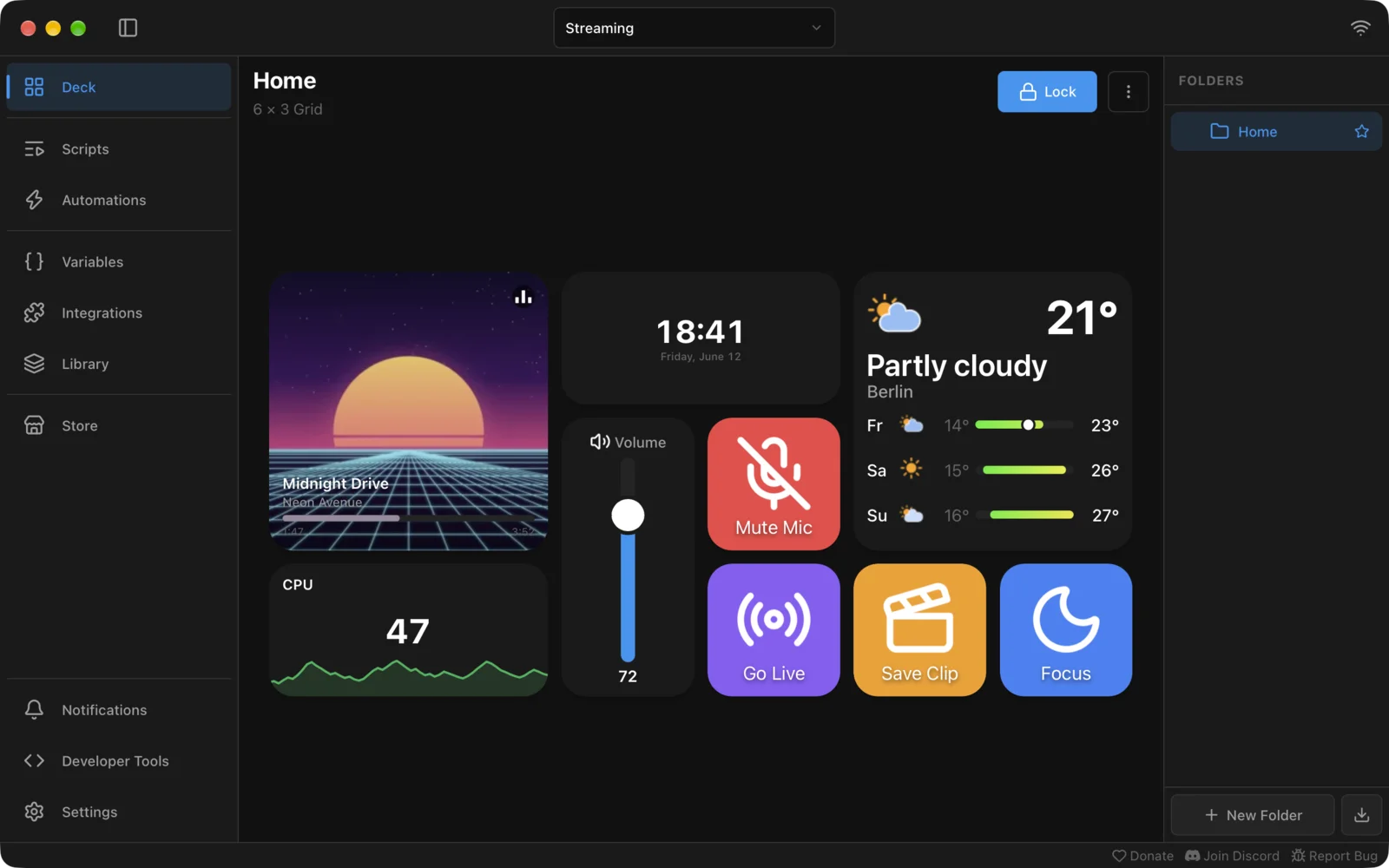
Macro Deck is the open-source macro pad for Windows, macOS and Linux that lets you create fully customizable control surfaces for your workflows. Organize your setup into profiles and folders, then fill them with interactive widgets such as action buttons, sliders, media controls, weather displays and more.
Use Macro Deck from your phone, tablet or compatible hardware to control applications, services and devices from one place.
Macro Deck 3 is currently under active development and may contain incomplete or unstable functionality.
## Platforms
The Macro Deck host runs on:
- Windows
- macOS
- Linux
### Debian and Ubuntu
Macro Deck is available from its APT repository for 64-bit x86 systems:
```bash
sudo install -d -m 0755 /etc/apt/keyrings
sudo curl -fsSLo /etc/apt/keyrings/macro-deck.asc https://packages.macro-deck.app/gpg.asc
sudo tee /etc/apt/sources.list.d/macro-deck.sources > /dev/null <<'EOF'
Types: deb
URIs: https://packages.macro-deck.app
Suites: stable
Components: main
Architectures: amd64
Signed-By: /etc/apt/keyrings/macro-deck.asc
EOF
sudo apt update
sudo apt install macro-deck
```
Updates then arrive with `sudo apt upgrade`. Use `Suites: beta` to receive prereleases as well. The
stable suite carries packages from the first stable Macro Deck 3 release on.
## What makes Macro Deck different
### Flexible by design
Create multiple profiles, organize them using folders and build your control surfaces from interactive widgets. Widgets can be simple action buttons or richer controls and displays such as sliders, media players, weather information and more.
Automate workflows and control supported applications, services and devices through built-in integrations, or extend Macro Deck with plugins using the public plugin SDK and protocol.
### Web-based architecture
Macro Deck is built around a web-based architecture. Configure and control your setup from any modern browser on your network, including browser-based game overlays.
The web client can be used directly as a macro pad without installing a native companion app. With HTTPS enabled, it can also be installed as a PWA, providing an alternative for devices where a native companion app is not available.
Native companion apps and compatible hardware can connect to the same Macro Deck host.
### Companion app
The Macro Deck companion app is optional. It is a native alternative to the web client that offers better performance and additional features.
The companion app is available for a one-time license fee. Buying it directly supports the ongoing development of Macro Deck.
| Platform | Download |
| --- | --- |
| Android | [Get it on Google Play](https://play.google.com/store/apps/details?id=app.macrodeck.companion) |
| iOS | [Download on the App Store](https://apps.apple.com/app/id6810664560) |
### Security-first plugin ecosystem
Content distributed through the official Macro Deck Store is reviewed before publication. Plugins, icon packs, templates and other submitted content are checked for potentially harmful behavior, unexpected data access and other security risks before they are accepted.
Approved packages are hosted by Macro Deck infrastructure and cryptographically signed by the Store. Macro Deck verifies this signature during installation and clearly warns when a plugin or other package does not originate from the trusted Store distribution path.
Because the Store distributes the reviewed package itself rather than relying on a developer-controlled download, an approved package cannot be silently replaced or modified by its developer without going through the Store process again.
Manual installation and development of third-party plugins remain possible, but packages outside the trusted Store distribution path are clearly distinguishable from Store-signed packages.
## Developing for Macro Deck
[](https://www.nuget.org/packages/MacroDeck.Sdk)
Macro Deck provides a public plugin SDK, tooling and documentation for building plugins and integrations.
- [Developer documentation](https://docs.macro-deck.app/)
- [Plugin template](https://github.com/Macro-Deck-App/Macro-Deck-Plugin-Template)
- [Agent skills for coding agents](https://github.com/Macro-Deck-App/Macro-Deck-Skills)
- [Engineering documentation](engineering/README.md)
- [Development setup](engineering/development/setup.md)
## Contributing and community
Contributions and feedback are welcome. Please read the [contribution guidelines](CONTRIBUTING.md) before submitting changes.
- [GitHub issues](https://github.com/Macro-Deck-App/Macro-Deck/issues)
- [Discord community](https://discord.macro-deck.app/)
- [Macro Deck website](https://macro-deck.app/)
## License
Macro Deck is open-source software licensed under the [Apache License 2.0](LICENSE). See [NOTICE](NOTICE) for additional legal notices and [THIRD-PARTY-NOTICES](THIRD-PARTY-NOTICES) for the third-party components Macro Deck includes and their licenses.
## Trademarks and branding
The Macro Deck name, logo and branding assets are not covered by the Apache License 2.0. They are licensed
exclusively to the Macro Deck project. Forks and other derived products must use their own name and branding
and replace the logo, icons and other branding assets. See [NOTICE](NOTICE).
## Special thanks
JetBrains provides licenses used for Macro Deck development.