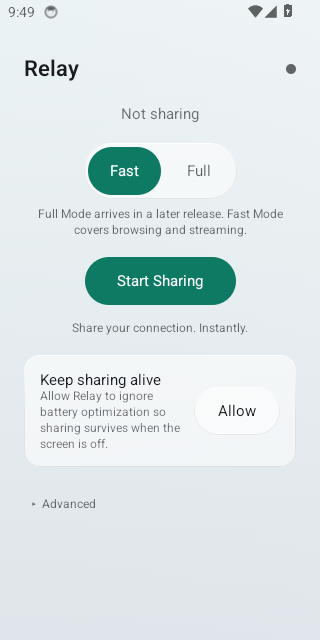
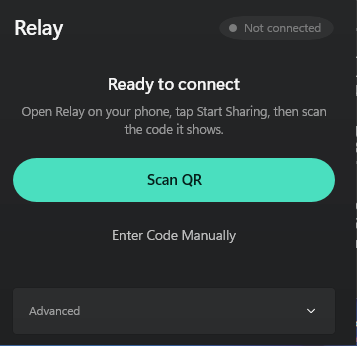
Relay on Android     Relay on Windows # Relay ⚡ ### **Share your phone's internet with your PC.** ### **Scan a QR code. That's the entire setup.**
[![Download for Windows](https://img.shields.io/badge/Download-Windows-0078D4?style=for-the-badge)](https://github.com/Mahdi-mortazavi/relay/releases/latest/download/Relay-Setup-x64.exe)   [![Download for Android](https://img.shields.io/badge/Download-Android-3DDC84?style=for-the-badge)](https://github.com/Mahdi-mortazavi/relay/releases/latest/download/Relay-android-arm64-v8a.apk) Always the newest release · [all files & notes](https://github.com/Mahdi-mortazavi/relay/releases/latest)


[![CI](https://github.com/Mahdi-mortazavi/relay/actions/workflows/ci.yml/badge.svg)](https://github.com/Mahdi-mortazavi/relay/actions/workflows/ci.yml) [![E2E device lab](https://github.com/Mahdi-mortazavi/relay/actions/workflows/e2e.yml/badge.svg)](https://github.com/Mahdi-mortazavi/relay/actions/workflows/e2e.yml) [![Release](https://img.shields.io/github/v/release/Mahdi-mortazavi/relay?sort=semver&color=4ADFBF&label=release)](https://github.com/Mahdi-mortazavi/relay/releases/latest) [![License](https://img.shields.io/badge/license-Apache--2.0-blue.svg)](LICENSE) **🌍 [English](README.md) · [فارسی](README.fa.md)**

--- ## 📥 Download | | File | Who it's for | |---|---|---| | **Windows** | [**Relay-Setup-x64.exe**](https://github.com/Mahdi-mortazavi/relay/releases/latest/download/Relay-Setup-x64.exe) | Windows 10/11. Installs for you alone — no admin prompt. | | Windows 32-bit | [Relay-Setup-x86.exe](https://github.com/Mahdi-mortazavi/relay/releases/latest/download/Relay-Setup-x86.exe) | Only if you know you need it. | | **Android** | [**Relay-android-arm64-v8a.apk**](https://github.com/Mahdi-mortazavi/relay/releases/latest/download/Relay-android-arm64-v8a.apk) | Android 8.0+. Almost every phone since 2017. | | Android (any device) | [Relay-android-universal.apk](https://github.com/Mahdi-mortazavi/relay/releases/latest/download/Relay-android-universal.apk) | Bigger, works everywhere. Use this if the one above says *"app not compatible"*. | | Checksums | [SHA256SUMS.txt](https://github.com/Mahdi-mortazavi/relay/releases/latest/download/SHA256SUMS.txt) | `sha256sum -c SHA256SUMS.txt` | **The current version is `1.8.0`, and it is the only release on this repository.** Older releases have been removed on purpose. Every link above always points at the newest one, and both apps now show their version under **Advanced** — so if the phone and the PC ever seem to disagree, check those two numbers first. They should match, and if they don't, that is the whole explanation. The two Android files are the **same app**, built in the same run, differing only in which CPU architectures they carry. They cannot behave differently. If one seems to, it is an older copy — uninstall and reinstall from the links above. Windows warns on first run because the installer isn't code-signed yet — **More info → Run anyway**. If Android says *"App not installed"*, [this page](docs/install-troubleshooting.md) covers every cause I've seen. --- ## 🚀 How to use it **On your phone** 1. Turn on your hotspot — or put the phone and the PC on the same Wi-Fi. 2. Open Relay and tap **Start Sharing**. 3. The screen shows a QR code and a **two-digit number**. **On your PC** 4. Open Relay. It lists the phones sharing right now, each with the code it is showing — click yours. Or click **Scan QR** and hold the phone up to your webcam, or **Enter the 2-digit code** and type those two digits. 5. Approve the request that appears on your phone. That's it — your browser, your apps, everything goes through the phone. Press **Disconnect** when you're done and Windows goes back exactly as it was.
Why Windows asks for permission once
Relay carries **everything** — browsing, downloads, video calls, games. TCP and UDP both, because it builds a real WireGuard tunnel rather than a proxy that only some apps honour. A tunnel needs a network adapter, and Windows only creates one with your permission. So the first time you connect, you get a **UAC prompt** — click **Yes**. Only the small tunnel process gets that permission, never the whole app, and it lasts exactly as long as the connection. Relay itself installs for you alone and never asks for admin anywhere else. There used to be a second mode that skipped this prompt. It only carried TCP, so games and calls silently didn't work, and it did it by editing a Windows-wide proxy setting that Relay then had to put back correctly every time — including after a crash. One clear prompt is a better trade than a setting that can be left broken. ([ADR-0009](docs/adr/0009-full-mode-only-and-code-pairing.md))
If something goes wrong
Relay tries to tell you what actually happened instead of showing "connection failed". Every error has a name and a next step — the full list is in [docs/errors.md](docs/errors.md). **First check: the version number.** Both apps show it under **Advanced**. Two different versions is the single most common cause of "these two don't work together", and until 1.8.0 the Windows app reported its version wrongly, so nobody could see it. **Browsers should just work** — no extension, no manual proxy entry. If you previously needed something like SwitchyOmega to get Chrome through Relay, that was a bug in how Relay described the proxy to Windows, and 1.8.0 fixes it. Turn the extension off. Both apps keep a local log you can read and share (**Advanced → Logs**). Nothing is ever uploaded on its own.
--- ## 💡 Why I built this I kept ending up in the same place: laptop with no internet, phone with plenty. Windows hotspot refuses to start. USB tethering needs a driver. Third-party apps want a subscription, an account, and permission to see everything. The connection was always right there. The problem was never the network — it was the setup. So Relay has no accounts, no servers, no telemetry, no subscription. Your traffic goes phone → PC over your own Wi-Fi and touches nothing of mine. **Scan a code and it works**, and when it doesn't, it tells you why. --- ## 🔐 Honest about security Your traffic travels inside **WireGuard**, with keys that are made fresh for one session and thrown away when you stop sharing. Nothing is written to disk, and nothing leaves your two devices. The interesting question is not the tunnel, it's who gets to use it. The two-digit code is **not a password** — ninety numbers never could be. It only picks your phone out of the ones nearby. **What keeps strangers out is you:** when a computer asks for the keys, your phone stops and asks you first, showing which computer is asking. Nobody gets in while your phone is in your pocket — no answer within a minute counts as no. Scanning the QR skips that question, because holding your phone up to a camera already answered it. The full threat model is in [SECURITY.md](SECURITY.md) — including what Relay does *not* protect you from. --- ## 🧪 How it's tested Every commit installs the real app on real Android images (API 30–36) and drives it through its own UI: start sharing, show a QR, let a laptop pair by code, answer the prompt, stop. The Windows client's own code runs against a **live phone** over `adb`. The real installer is installed, launched and uninstalled. The tunnel is brought up on a real WinTun adapter and a real WireGuard handshake is verified across it — and the client refuses to report "connected" until that handshake actually happens. Then the *published* APK is installed on Android 11 through 16 — because a release nobody can install is not a release. What hardware still has to prove is written down in [docs/testing.md](docs/testing.md), not hidden. --- ## 🗺️ Status | | | |:---|:---| | 🚀 WireGuard tunnel, TCP + UDP | ✅ **Shipping** — both platforms | | 🔢 Pair by QR **or** two-digit code | ✅ **Shipping** | | 🔄 Auto-reconnect, actionable errors, EN + FA | ✅ **Shipping** | | ✍️ Signed Windows installer | 🔨 Planned | | 🍎 macOS client | 💭 Later | Detail in [`docs/roadmap.md`](docs/roadmap.md) · [CHANGELOG](CHANGELOG.md) ---
## 👋 Meet the developer Mahdi Mortazavi ### **Mahdi Mortazavi** · مهدی مرتضوی **Full-Stack Developer × Product Builder × Problem Solver** 📍 Iran
I'm Mahdi. I don't build demos — I build the thing I needed, then keep working on it until it's good enough to hand to someone else. Relay is exactly that. It began as my own frustration with a laptop that had no internet and a phone that did. Now it runs a device lab on every commit, ships on two platforms, and tells you the truth about what it can't do yet. **That last part is the standard I hold my work to** — I'd rather write down a limitation than let you discover it. If Relay is useful to you, a ⭐ genuinely helps. If it breaks, [tell me](https://github.com/Mahdi-mortazavi/relay/issues/new/choose) — I read everything.
### 💬 Let's talk [![Telegram Community](https://img.shields.io/badge/Community-Startup_Legend-26A5E4?style=for-the-badge&logo=telegram&logoColor=white)](https://t.me/Startup_legend) [![Telegram](https://img.shields.io/badge/Telegram-@Mahdi__mortazavi1-26A5E4?style=for-the-badge&logo=telegram&logoColor=white)](https://t.me/Mahdi_mortazavi1)   [![Email](https://img.shields.io/badge/Email-Get_in_touch-EA4335?style=for-the-badge&logo=gmail&logoColor=white)](mailto:Mahdi.mortazavi.135@gmail.com) [![GitHub](https://img.shields.io/badge/GitHub-@Mahdi--mortazavi-181717?style=for-the-badge&logo=github&logoColor=white)](https://github.com/Mahdi-mortazavi)   [![Website](https://img.shields.io/badge/Website-mahdi--mortazavi.github.io-4ADFBF?style=for-the-badge&logo=googlechrome&logoColor=white)](https://mahdi-mortazavi.github.io) **🚀 [Startup Legend](https://t.me/Startup_legend)** — my community, where I share what I'm building, what broke, and what I learned fixing it.


--- ## 🛠️ For developers Two apps and one shared contract. Android is Kotlin + Compose; Windows is .NET 8 + WinUI 3; Full Mode's tunnel is Go (`wg/`), used by both ends. There is **no local build required** — CI is the build system (ADR-0004). Push and the pipeline builds, tests on real devices, and can cut a release. ``` android/ Kotlin + Compose windows/ .NET 8 + WinUI 3 wg/ WireGuard endpoint (Go) shared/ the cross-platform contract docs/ architecture, ADRs, testing, errors ``` Start with [`docs/architecture.md`](docs/architecture.md) and the [ADRs](docs/adr/) — every significant decision is written down with the reasoning that produced it. [`CONTRIBUTING.md`](CONTRIBUTING.md) has the rest.

**Made in Iran 🇮🇷 · [Apache-2.0](LICENSE)** "WireGuard" is a registered trademark of Jason A. Donenfeld.


