
 *Alternative*
- Download latest *SwiftPlantUML* package from the [Releases](https://github.com/MarcoEidinger/SwiftPlantUML-Xcode-Extension/releases).
- Copy *SwiftPlantUML* to your *Applications* folder.
## Enable Extension
- Launch *SwiftPlantUML*.
*Alternative*
- Download latest *SwiftPlantUML* package from the [Releases](https://github.com/MarcoEidinger/SwiftPlantUML-Xcode-Extension/releases).
- Copy *SwiftPlantUML* to your *Applications* folder.
## Enable Extension
- Launch *SwiftPlantUML*.
 - To use in **Xcode**: enable extension in System Preferences > Extensions > Xcode Source Editor > select SwiftPlantUML
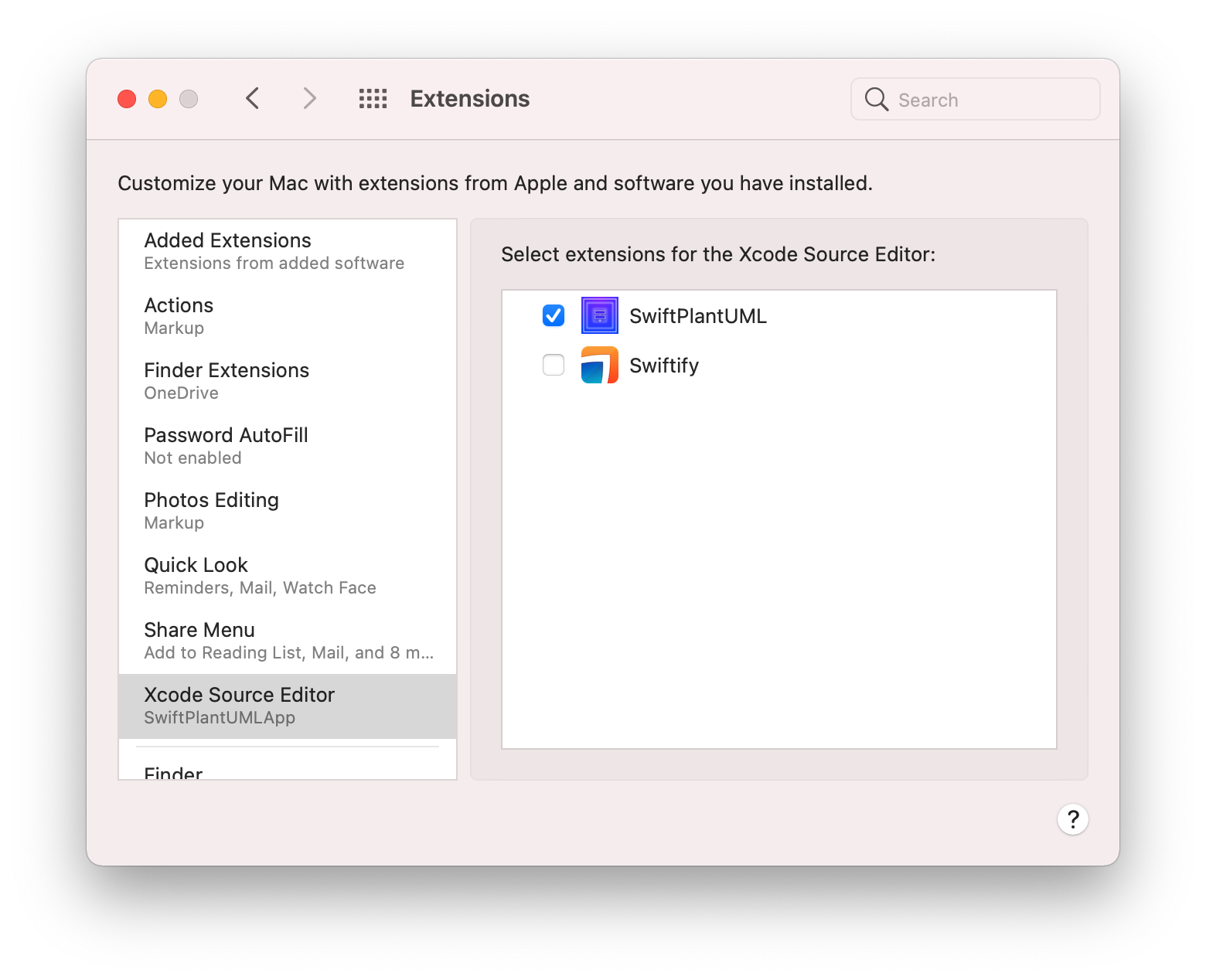
- To use in **Finder**: enable extension in System Preferences > Extensions > Finder > select Open Swift Class Diagram

## Configure
*Optional*:
- To use in **Xcode**: enable extension in System Preferences > Extensions > Xcode Source Editor > select SwiftPlantUML

- To use in **Finder**: enable extension in System Preferences > Extensions > Finder > select Open Swift Class Diagram

## Configure
*Optional*:


 ## Troubleshooting
### The command "Open editable diagram in browser" is still busy
Xcode Source Code Extension initialization might take up ~ 30 seconds on initial launch.
If the prompt does not appear within 60 seconds

then check for a crash report related to XPC service in Console app of your MacOS.
## Troubleshooting
### The command "Open editable diagram in browser" is still busy
Xcode Source Code Extension initialization might take up ~ 30 seconds on initial launch.
If the prompt does not appear within 60 seconds

then check for a crash report related to XPC service in Console app of your MacOS.
 If you see such crash report related to `fatal error: Loading sourcekitd.framework/Versions/A/sourcekitd failed` please check the installation path of Xcode. If it's installed under `/Applications/Xcode.app`, please run:
```
sudo xcode-select -s /Applications/Xcode.app/Contents/Developer
```
If it's installed elsewhere, please replace the `/Applications/Xcode.app` path in the command above with the location where you've installed Xcode.
## Technical Details
This Source Editor Extension makes use of XPC service to run the app sandboxed and use `SwiftPlantUML` (and its dependency `SourceKitten`). Source Editor Extensions using `SourceKitten` (either directly or indirectly) have to either run in a non-sandboxed app (and could not be distributed via the App Store) or use XPC service to outsource the use of `SourceKitten` to a different process.
# Acknowledgements
These awesome blog posts helped me to dive into Xcode Source Editor Extensions and XPC services
- https://www.vadimbulavin.com/xcode-source-editor-extension-tutorial/
- https://nshipster.com/xcode-source-extensions/
- https://ilya.puchka.me/xcode-source-editor-extension-superpowered-with-sourcekitten/
- https://www.objc.io/issues/14-mac/xpc/
If you see such crash report related to `fatal error: Loading sourcekitd.framework/Versions/A/sourcekitd failed` please check the installation path of Xcode. If it's installed under `/Applications/Xcode.app`, please run:
```
sudo xcode-select -s /Applications/Xcode.app/Contents/Developer
```
If it's installed elsewhere, please replace the `/Applications/Xcode.app` path in the command above with the location where you've installed Xcode.
## Technical Details
This Source Editor Extension makes use of XPC service to run the app sandboxed and use `SwiftPlantUML` (and its dependency `SourceKitten`). Source Editor Extensions using `SourceKitten` (either directly or indirectly) have to either run in a non-sandboxed app (and could not be distributed via the App Store) or use XPC service to outsource the use of `SourceKitten` to a different process.
# Acknowledgements
These awesome blog posts helped me to dive into Xcode Source Editor Extensions and XPC services
- https://www.vadimbulavin.com/xcode-source-editor-extension-tutorial/
- https://nshipster.com/xcode-source-extensions/
- https://ilya.puchka.me/xcode-source-editor-extension-superpowered-with-sourcekitten/
- https://www.objc.io/issues/14-mac/xpc/