# Mengshen Pinyin Font(萌神拼音字体)
支持多音字的 OSS 拼音字体及其制作工具。
OpenSource Pinyin font and creation tool that supports homographs (多音字).
[](https://github.com/MaruTama/Mengshen-pinyin-font/releases/tag/v20260721-150022)

> 日本語版: [README_ja.md](./README_ja.md)
----
## 目录 / Contents
- [字体预览 / Font Preview](#字体预览--font-preview)
- [特点 / Features](#特点--features)
- [字体变体 / Font Variants](#字体变体--font-variants)
- [下载 / Download](#下载--download)
- [安装方法 / Installation](#安装方法--installation)
- [使用示例 / Use Cases](#使用示例--use-cases)
- [多音字原理 / How Homographs Work](#多音字原理--how-homographs-work)
- [平台兼容性 / OS Compatibility](#平台兼容性--os-compatibility)
- [指南 / Guides](#指南--guides)
- [支持的多音字列表 / Homograph List](#支持的多音字列表--homograph-list)
- [构建字体 / Building the Fonts](#构建字体--building-the-fonts)
- [网页应用 / Web App](#网页应用--web-app)
- [关于项目 / About](#关于项目--about)
- [致谢 / Acknowledgments](#致谢--acknowledgments)
- [打赏 / Donate](#打赏--donate)
----
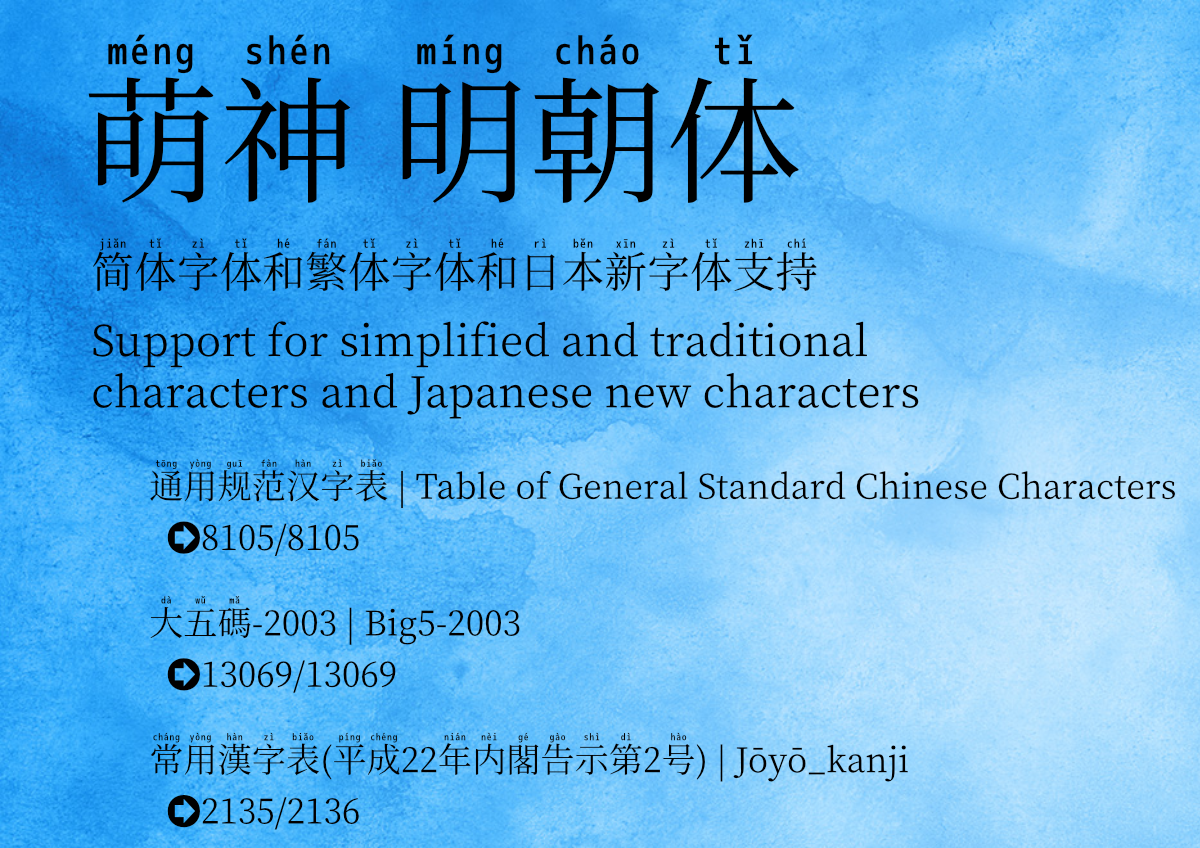
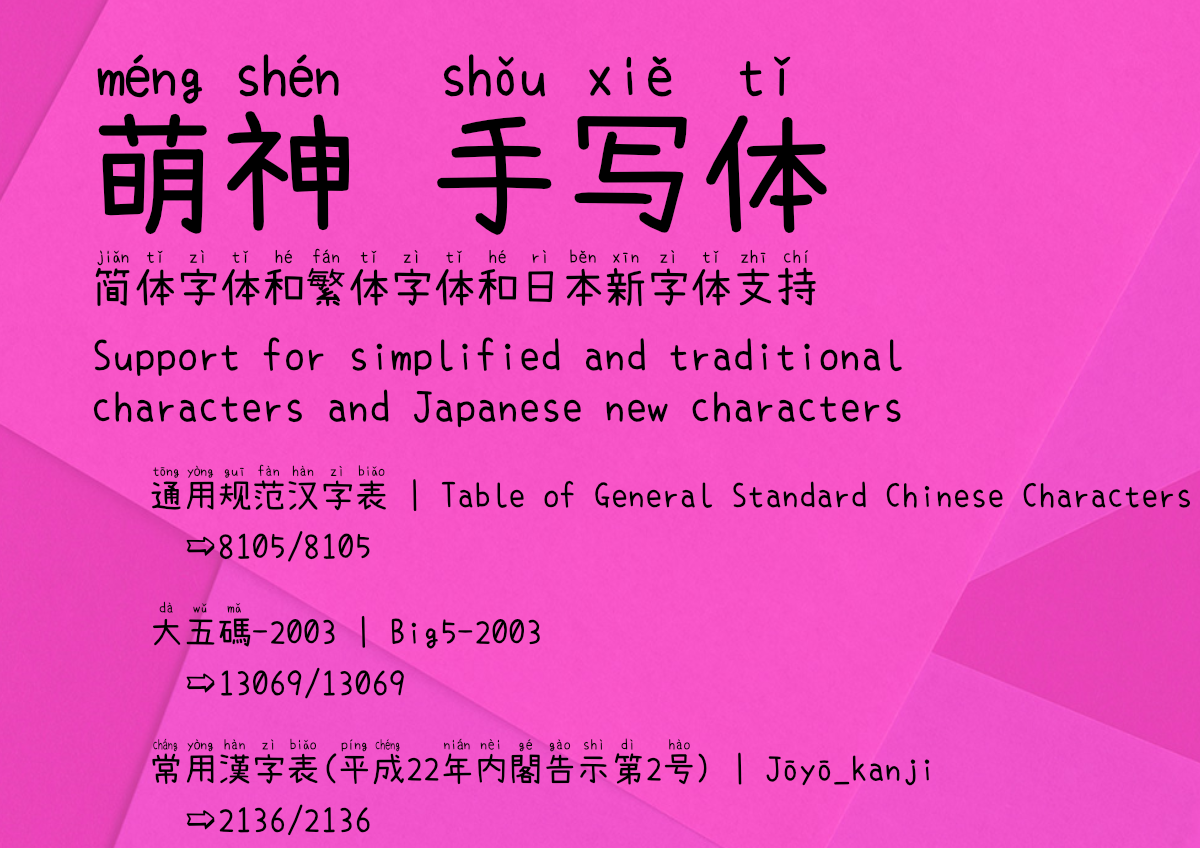
## 字体预览 / Font Preview
----
## 特点 / Features
支持日语、简体中文、繁体中文显示的字体。
简体字和繁体字自动标注拼音。
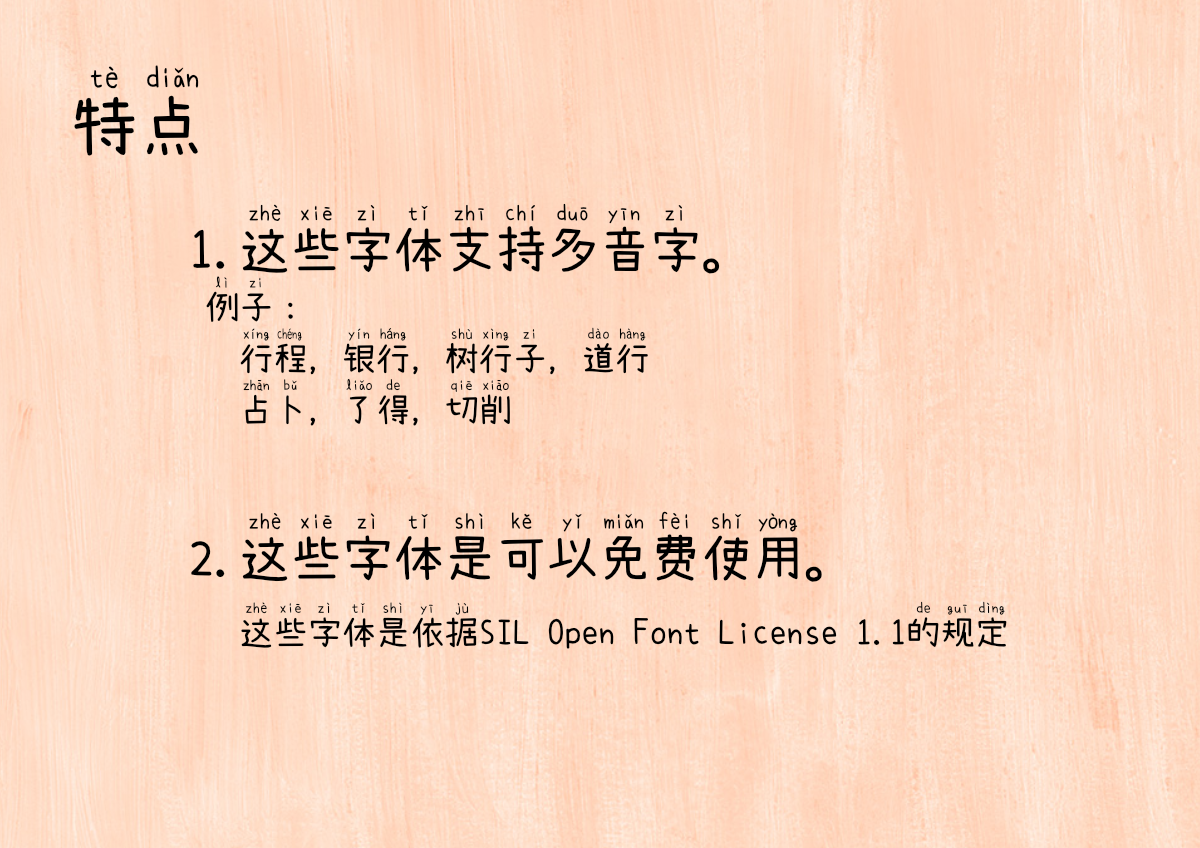
多音字(同一汉字有多个读音)根据上下文自动切换读音。
主要面向中文、日语学习者。
A font that displays Japanese, Simplified Chinese, and Traditional Chinese characters.
Pinyin is automatically annotated for Simplified and Traditional Chinese characters.
Homographs (多音字) — characters with multiple readings — are automatically switched based on context.
Intended for learners of Chinese and Japanese.
- 16,026个汉字自动标注拼音 / Automatic pinyin for 16,026 characters
- 多音字根据上下文自动切换 / Context-aware homograph (多音字) switching
- 支持通过 IVS 手动切换 / Manual switching via Unicode IVS
- 支持简体字、繁体字、日语汉字、平假名、片假名 / Simplified, Traditional, Japanese, Hiragana, Katakana
- 两种风格(宋体、手写体) / Two styles (Serif, Handwritten)
----
## 字体变体 / Font Variants
| 变体 / Variant | 风格 / Style | 基础字体 / Based on |
| :-: | :-: | :-: |
| Mengshen-HanSerif | 宋体 / Serif | Source Han Serif + M+ M Type-1 |
| Mengshen-Handwritten | 手写体 / Handwritten | Xiaolai Font + SetoFontSP |
----
## 下载 / Download
**[Download/下载](https://github.com/MaruTama/Mengshen-pinyin-font/releases)**
----
## 安装方法 / Installation
- [macOS](https://support.apple.com/en-us/HT201749)
- [Windows](https://support.microsoft.com/en-us/help/314960/how-to-install-or-remove-a-font-in-windows)
- [Linux/Unix-based systems](https://github.com/adobe-fonts/source-code-pro/issues/17#issuecomment-8967116)
- [Android](./docs/HOW_TO_APPLY_FONT_ON_ANDROOID.md)
----
## 使用示例 / Use Cases
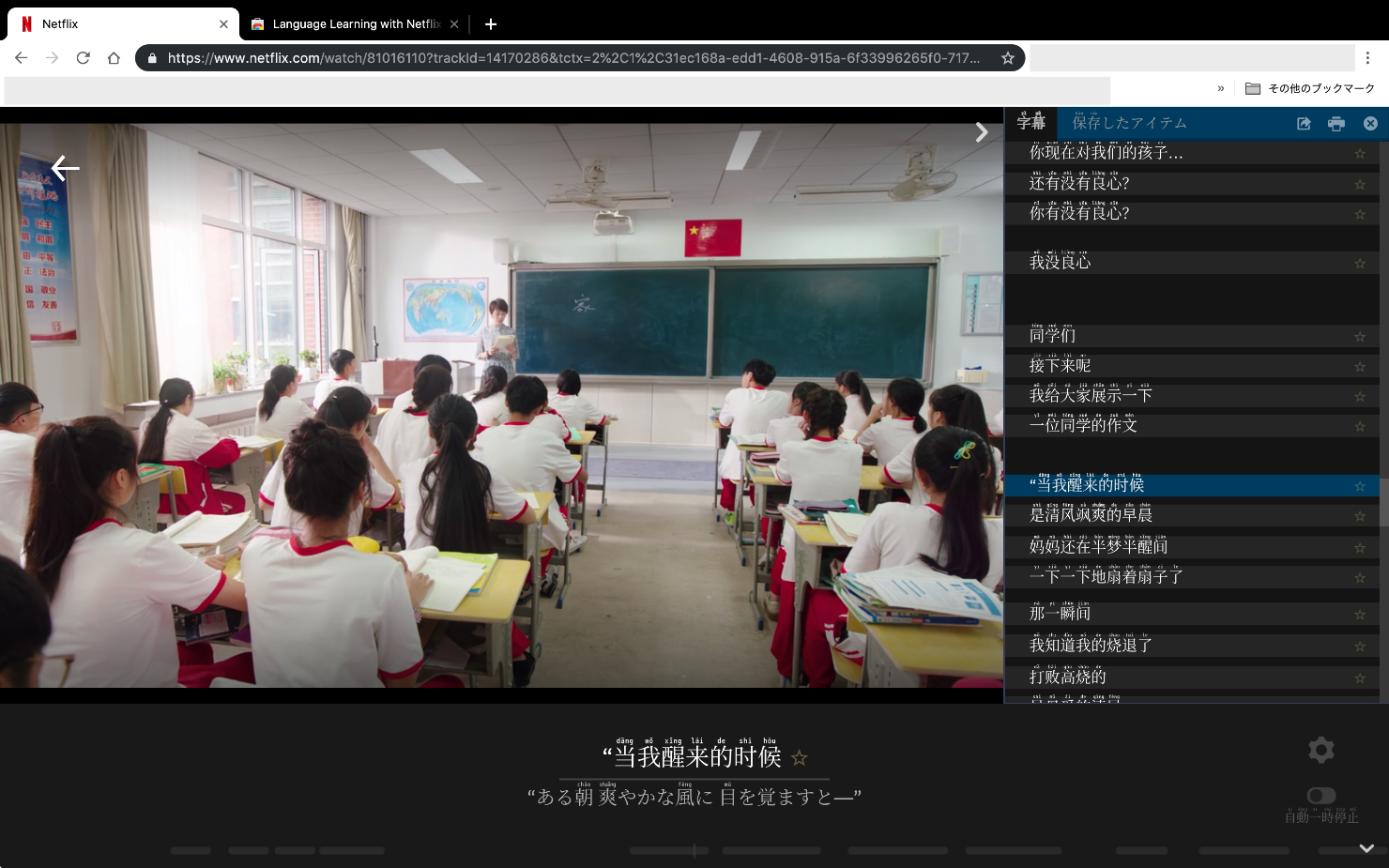
可在微博、Netflix、歌词、新闻、MS Word 等场景中使用。
You can use this font in Weibo, Netflix, Lyrics, News, MS Word, and more.
与 [Language Learning with Netflix](https://chrome.google.com/webstore/detail/language-learning-with-ne/hoombieeljmmljlkjmnheibnpciblicm?hl=en) 配合使用,可在字幕中同时显示汉字和拼音。
Combined with [Language Learning with Netflix](https://chrome.google.com/webstore/detail/language-learning-with-ne/hoombieeljmmljlkjmnheibnpciblicm?hl=en), Chinese subtitles can be shown with pinyin annotations.
- [Microsoft Word 设置 / Word Setup](./docs/MICROSOFT_WORD_SETUP.md)
----
## 多音字原理 / How Homographs Work
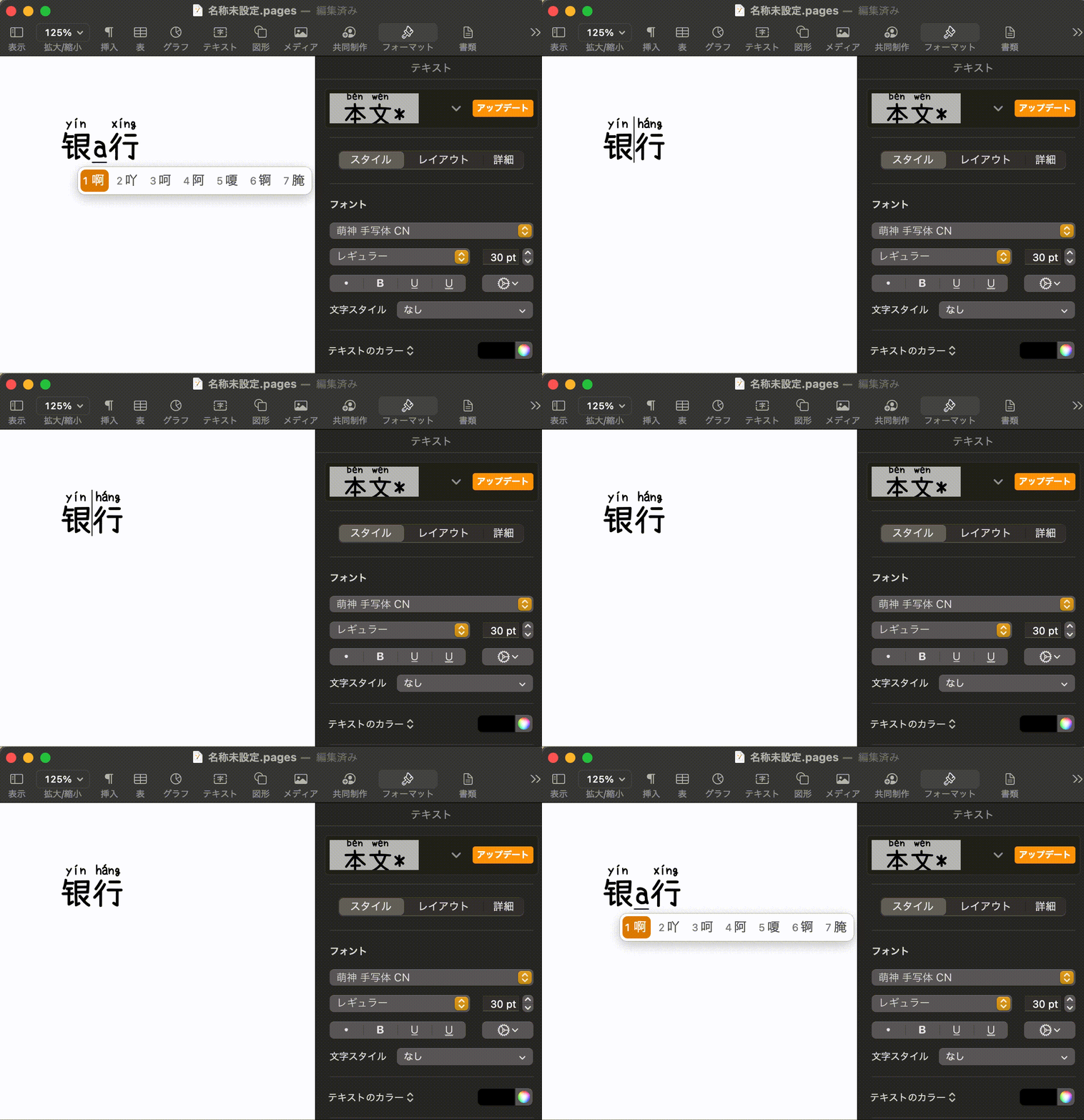
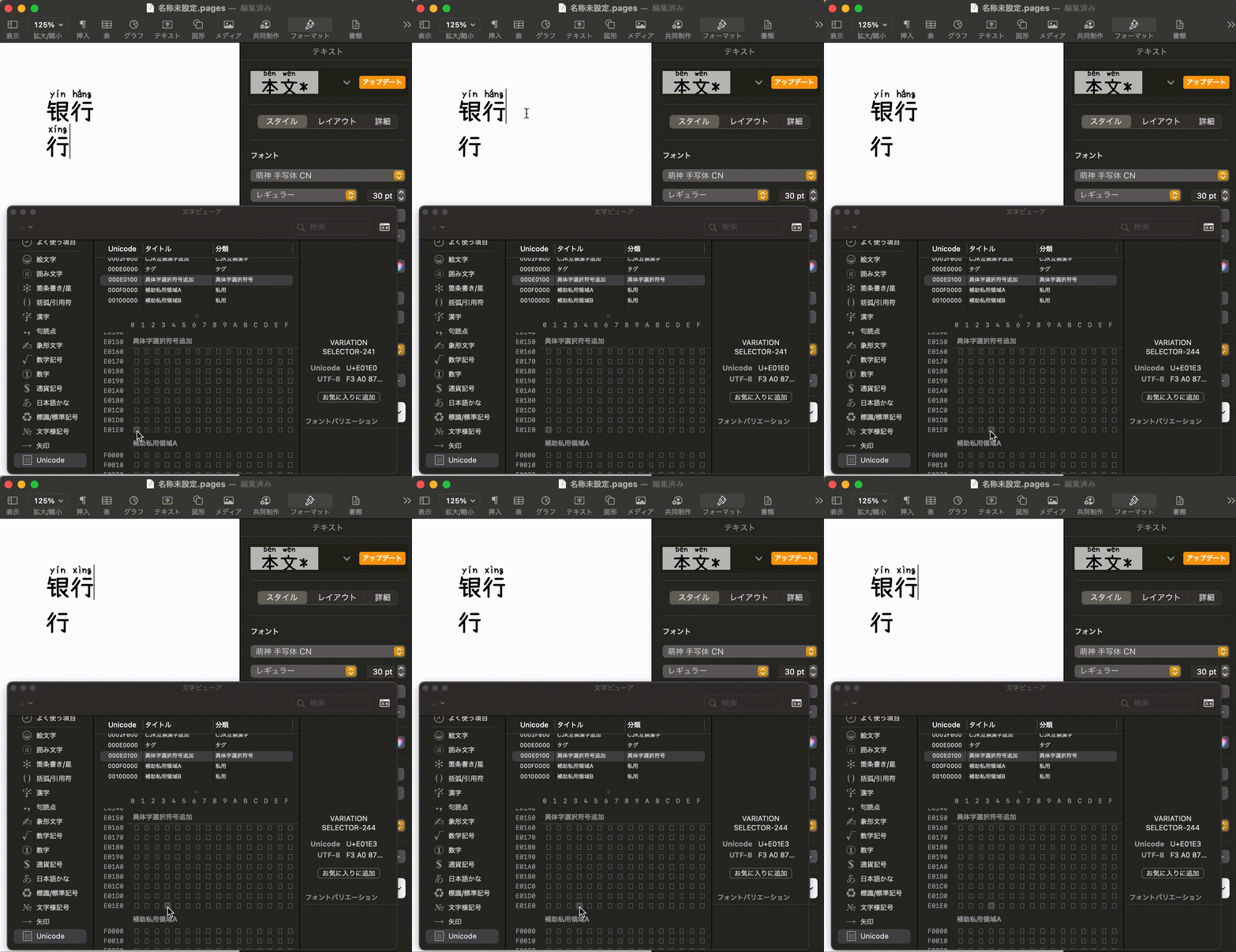
为支持多音字,本字体实现了 OpenType 的上下文替换功能(GSUB 表的 "rclt" 特性)。
也可通过 Unicode IVS(表意文字变体选择器)手动切换读音。
详情请参阅 [IVS 设置指南](./docs/IVS_SETUP_GUIDE.md)。
To support homographs (多音字), contextual replacement via OpenType GSUB ("rclt" feature) is implemented.
You can also manually switch readings using Unicode IVS (Ideographic Variant Selector).
See the [IVS Setup Guide](./docs/IVS_SETUP_GUIDE.md) for details.
----
## 平台兼容性 / OS Compatibility
|Platform|Automatic pinyin switching (Contextual Replacement)|Manual pinyin switching (IVS)|Notes|
|:-:|:-:|:-:|:-:|
|Windows|||[IME Pad for IVS](./docs/IVS_SETUP_GUIDE.md)|
|Mac|||[Character Viewer for IVS](./docs/IVS_SETUP_GUIDE.md)|
|Android|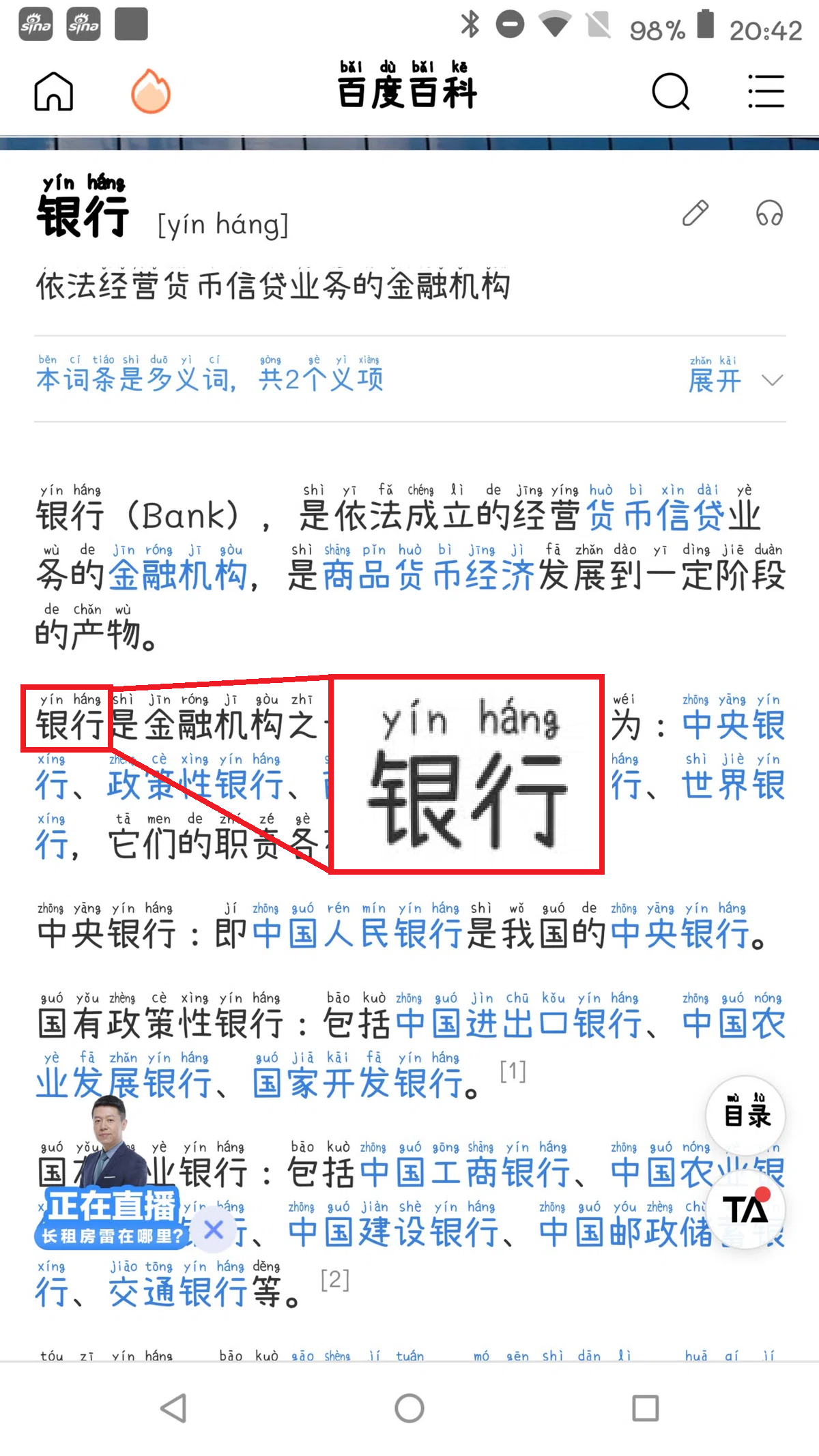|-|・[zFont Setup Guide](./docs/HOW_TO_APPLY_FONT_ON_ANDROOID.md) ・[Magisk module](https://github.com/MaruTama/magisk-module-mengshen-font) (root required, IVS works in Chrome only)|
----
## 指南 / Guides
| 文档 / Document | English |
| :-: | :-: |
| 字体构建指南 / Build Guide | [English](./docs/HOW_TO_MAKE_EN.md) |
| IVS 手动切换指南 / IVS Setup | [English](./docs/IVS_SETUP_GUIDE.md) |
| Word 设置 / Word Setup | [English](./docs/MICROSOFT_WORD_SETUP.md) |
| Android 安装 / Android Install | [English](./docs/HOW_TO_APPLY_FONT_ON_ANDROOID.md) |
----
## 支持的多音字列表 / Homograph List
- [Homograph List](./docs/DUOYINZI_DICTIONARY.md)
----
## 构建字体 / Building the Fonts
```bash
# Docker 构建(推荐) / Docker generation (recommended)
docker-compose -f docker/docker-compose.yml up pipeline-han-serif
docker-compose -f docker/docker-compose.yml up pipeline-handwritten
```
详情请参阅 [构建指南(日语)](./docs/HOW_TO_MAKE_JP.md) / [Build Guide (English)](./docs/HOW_TO_MAKE_EN.md)。
----
## 网页应用 / Web App
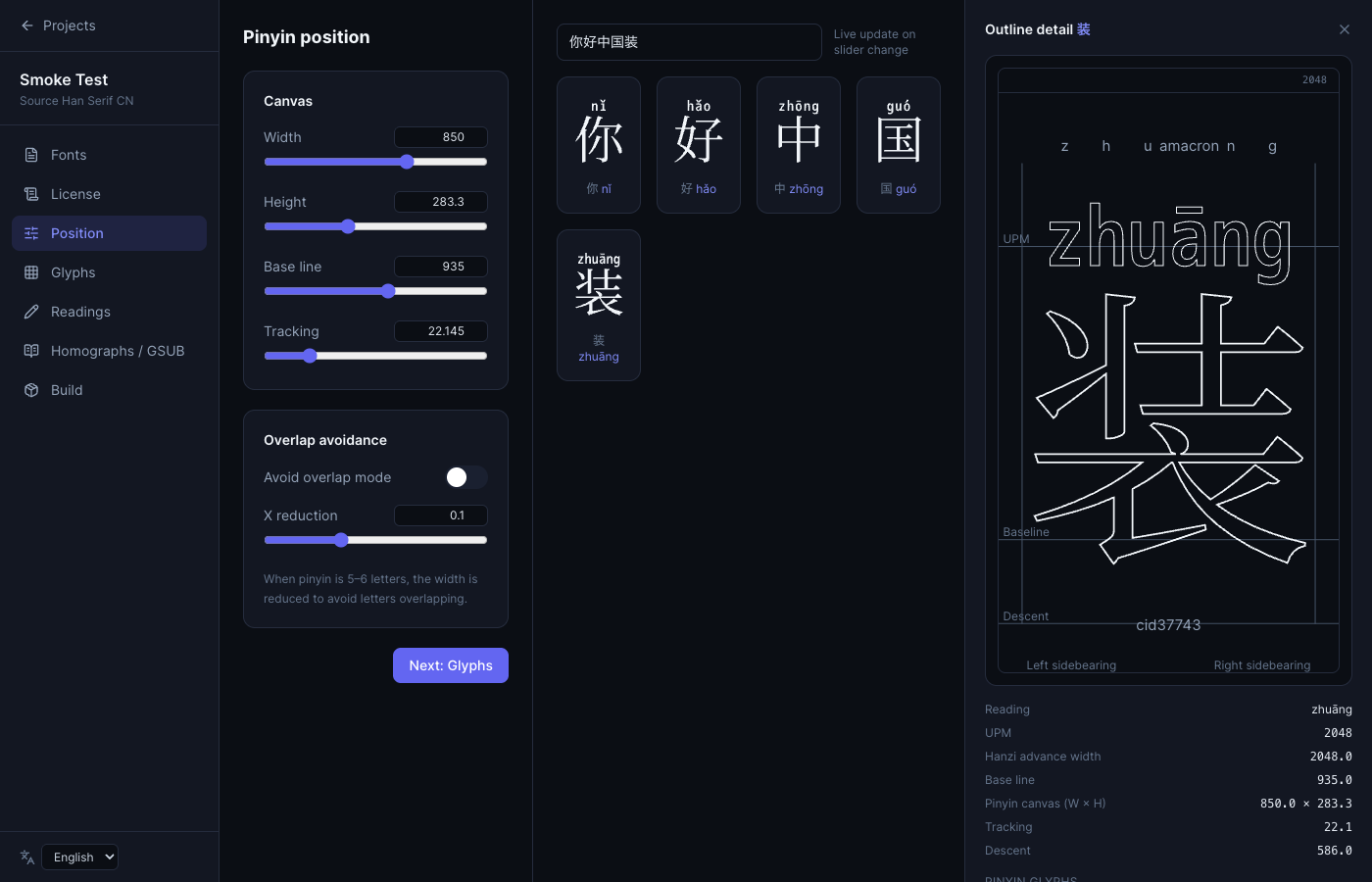
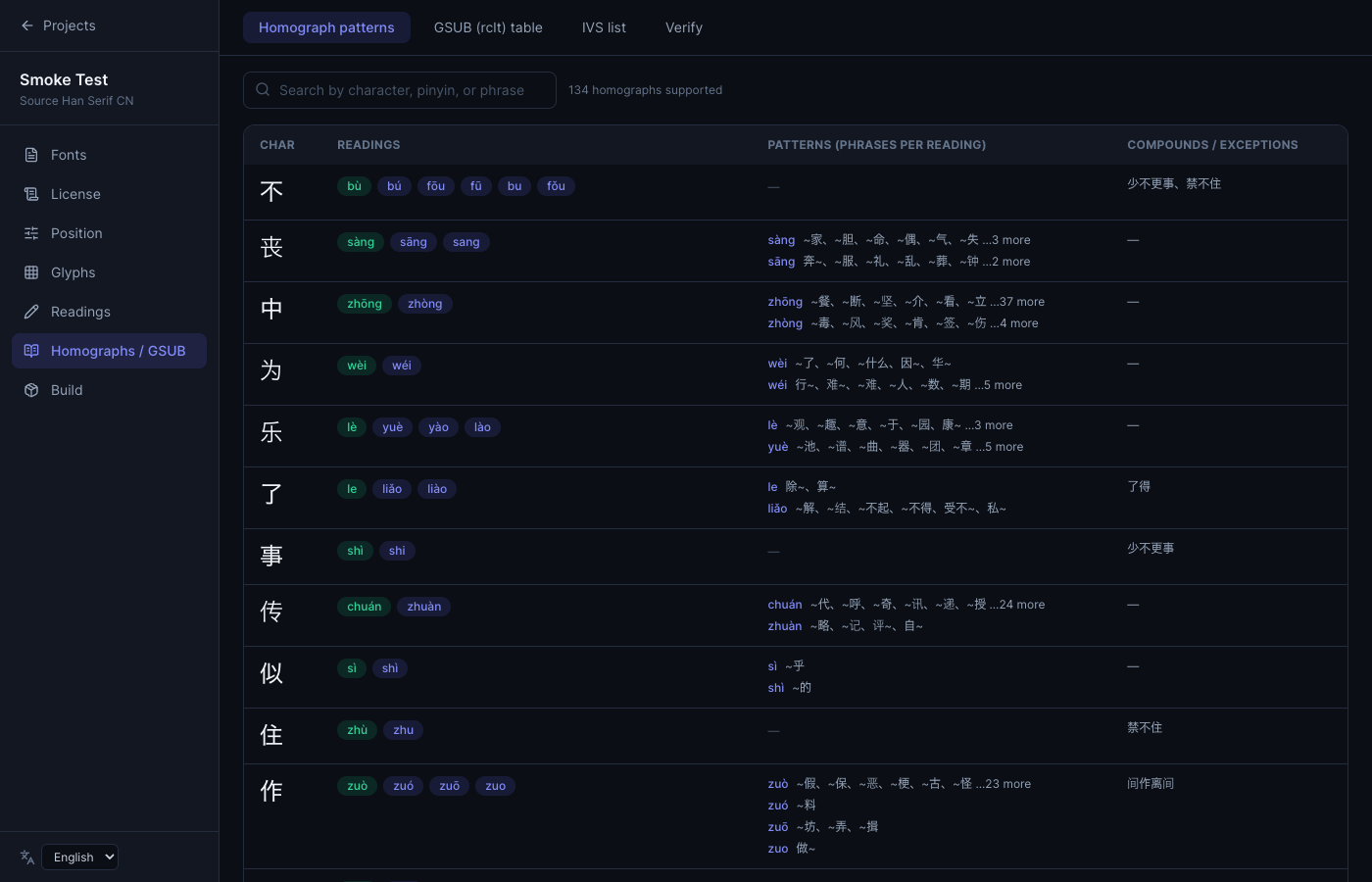
除了命令行构建方式,本仓库还提供本地网页应用 **Mengshen Font Studio**:
可在浏览器中选择字体、确认许可、调整拼音位置(附实时预览)、浏览字形、
查看/验证多音字与 GSUB 表、编辑各字读音,并生成 TTF 文件下载,全程无需使用命令行。
As an alternative to the CLI build, this repo also ships a local web app,
**Mengshen Font Studio**: select fonts, review the license, adjust pinyin
position with a live preview, browse glyphs, inspect/verify homographs and
the GSUB table, edit per-character readings, and export a TTF — all from
the browser, no command line required.
```bash
pip install -e ".[webapp]"
./scripts/webapp.sh
```
浏览器打开 。详情请参阅 [webapp/README.md](./webapp/README.md)。
Open in your browser. See [webapp/README.md](./webapp/README.md) for details.
----
## 关于项目 / About
我们是一个致力于学习和推广中文的团队。
We are a group dedicated to learning and promoting the Chinese language.
- [萌神PROJECT](https://mengshen-project.com/)
- [「萌神フォント」誕生しました!](https://note.com/geekzhongwen/n/n7a6f26a885d1)
- [「萌神フォント」Ver.2ができました!](https://note.com/geekzhongwen/n/nf9552d4bdf66)
- [メイカーのための中国語入門 フォント指定だけで拼音がつく萌神フォント開発秘話編](https://booth.pm/ja/items/1888270)
----
## 致谢 / Acknowledgments
Thank you to the following people and repositories.
- [@NightFurySL2001](https://github.com/NightFurySL2001)-san
- [@lanyizi](https://github.com/lanyizi)-san
- [BPMF IVS](https://github.com/ButTaiwan/bpmfvs)
- [kose-font](https://github.com/lxgw/kose-font)
- [SetoFontSP](https://ja.osdn.net/projects/setofont/releases/p14368)
- [Source-Han-TrueType](https://github.com/Pal3love/Source-Han-TrueType)
- [M+ M Type-1](https://mplus-fonts.osdn.jp/about.html)
----
## 打赏 / Donate
[点击进入打赏页面](./docs/DONATE.md)