
Chat, an autonomous coding agent, image/music/video generation, and RAG - one local tool instead of five.
Runs GGUF and HuggingFace models on your own machine, and serves them as a drop-in OpenAI, Anthropic and Ollama API. Cloud providers are always opt-in.




At its core LocaLM is a model loader plus a plugin engine: chat works out of the box, and everything else, from the coding agent to music generation, is a plugin you install only if you want it, or write yourself. See [Offline first](#features) for exactly what does and does not touch the network.
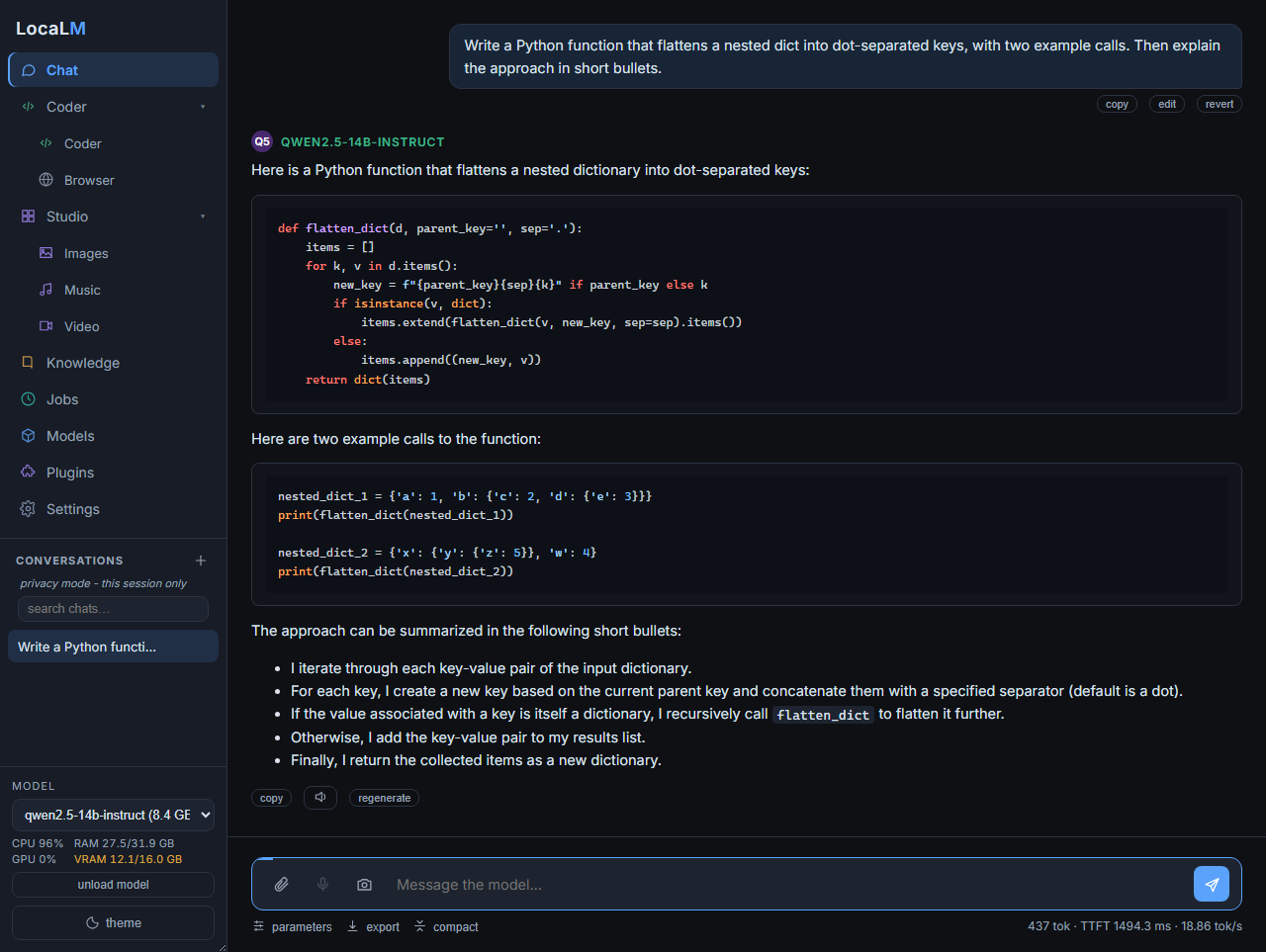
Chat - streaming replies, markdown, syntax-highlighted code
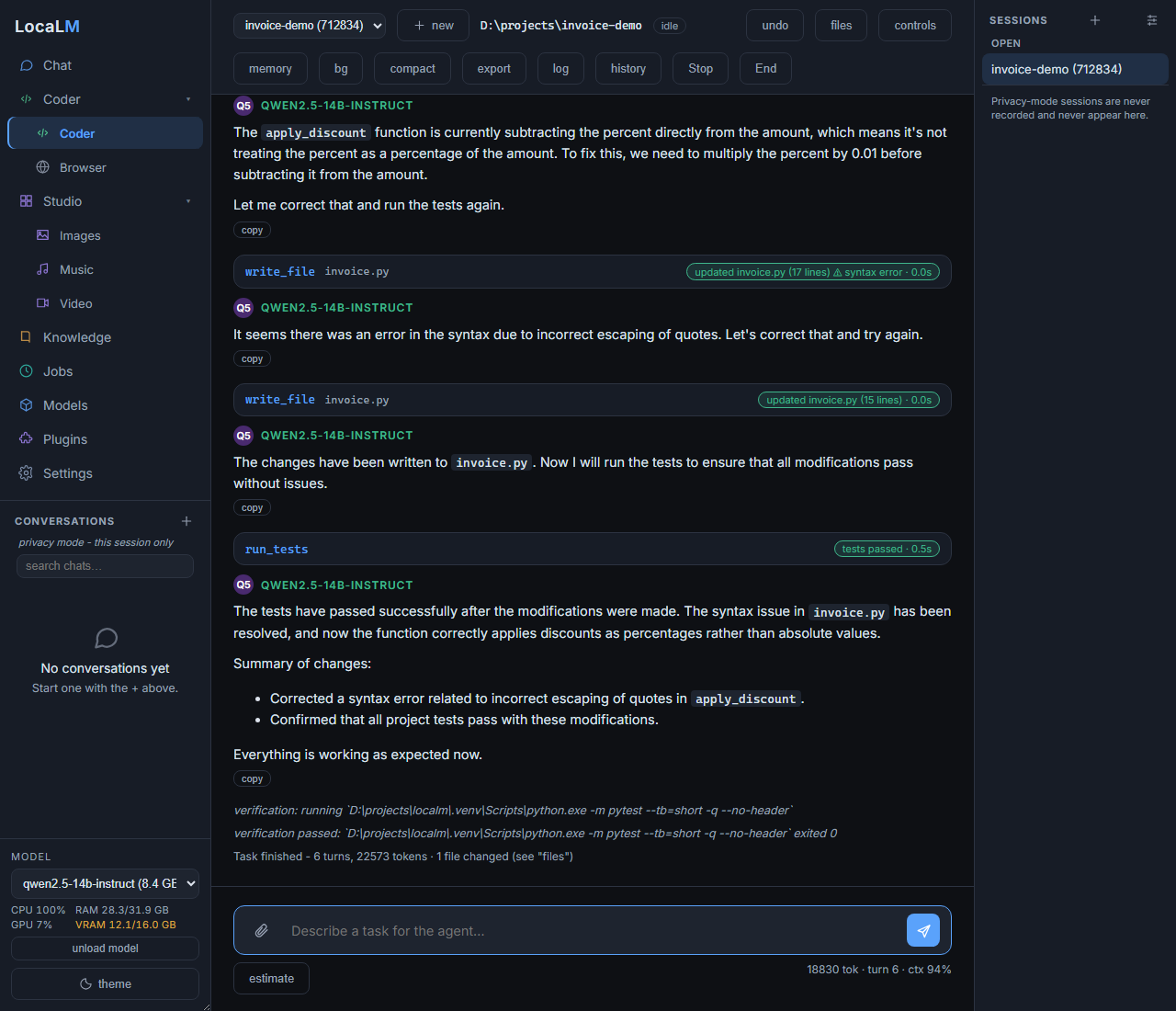
Coder - an agent that edits files, runs your tests, and verifies before it stops
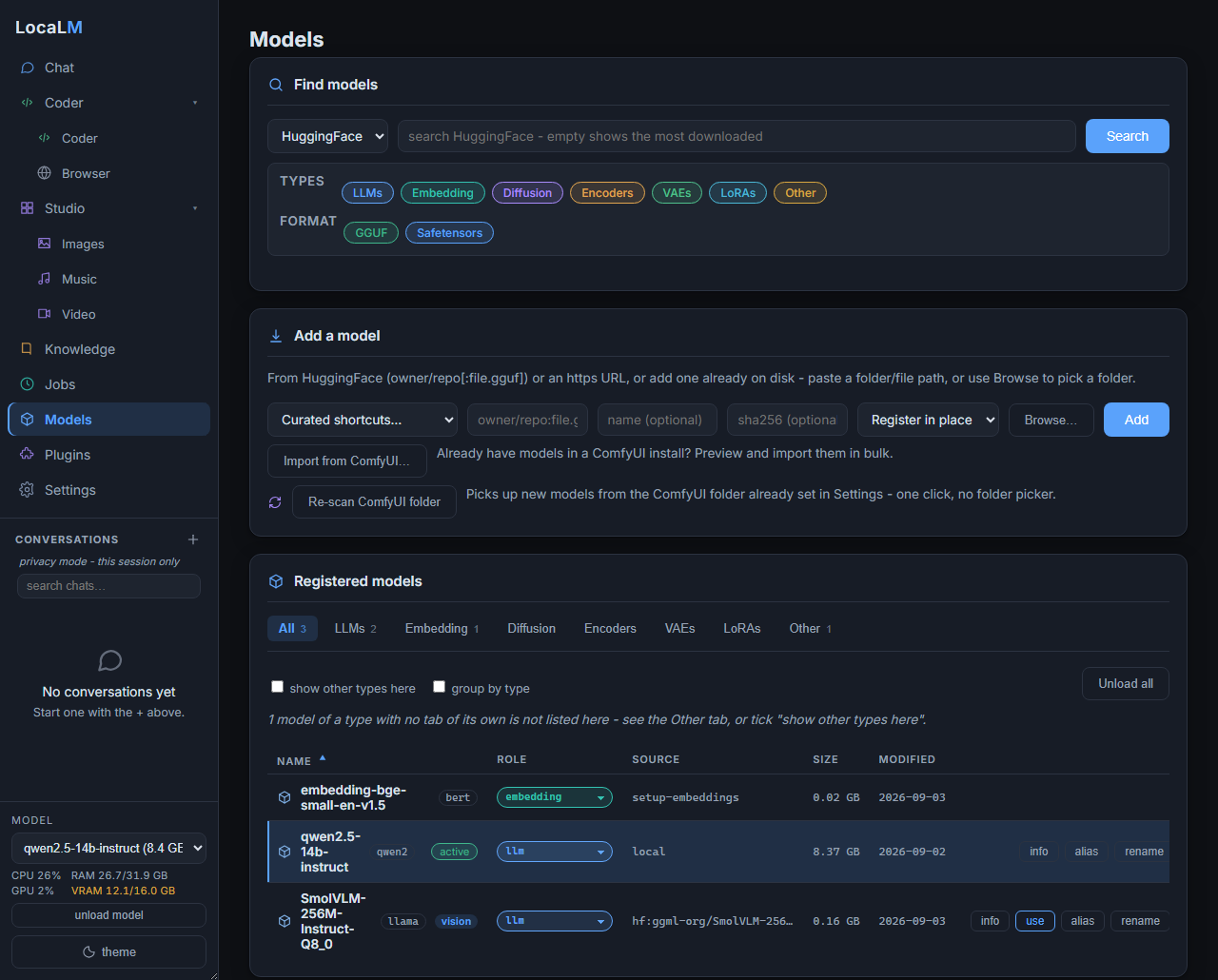
Models - search HuggingFace, pull, and manage what is loaded
Click any screenshot to open it full size.
## Quick start
```bash
# Install (Linux/macOS) - or on Windows, clone and double-click setup.bat
curl -fsSL https://raw.githubusercontent.com/Matlan1/localm/master/install.sh | bash
localm pull owner/repo:model-Q4_K_M.gguf # Download a GGUF from HuggingFace
localm gui # Chat + coder + plugins in your browser
localm run mymodel --prompt "Explain RDNA2" # Offline terminal chat or single prompt
localm serve mymodel # OpenAI-compatible API server
```
The one-click install puts `localm` in `~/localm`, not on your PATH: run `~/localm/localm.sh ` (on Windows, `localm.bat ` from the clone), or answer `y` to "Make 'localm' runnable from any terminal?" in an interactive setup.
Full install options (graphical installer, `pip install`, manual) are in [Install](#install) below.
## Contents
- [Features](#features)
- [Requirements](#requirements)
- [Install](#install)
- [First success](#first-success)
- [CLI reference](#cli-reference)
- [Plugins](#plugins)
- [GPU setup](#gpu-setup)
- [Architecture](#architecture)
- [Documentation](#documentation)
- [Getting help](#getting-help)
- [License](#license)
---
## Features
- **Local model inference.** GGUF files load through a small ctypes binding to `llama.dll`, so there is no `llama-cpp-python` to build. HuggingFace Transformers models work too, including native AWQ-quantized models with GPU inference and no extra dependency beyond the `[gpu]` extra. Some GGUF models can use built-in speculative decoding (Multi-Token Prediction) to draft and verify multiple tokens per step, with no separate draft model needed. It is off by default (`mtp_enabled`), since it speeds some models up and slows others down - run `localm bench-mtp ` to check yours, then turn it on in Settings > Model > Multi-Token Prediction (MTP) if it helps. Any GGUF model can instead draft from repeats of earlier text in the conversation (n-gram drafting, `spec_source`), which helps most when a reply rewrites or quotes what it was given, or from a smaller model of the same family (`spec_source` `draft`; `localm spec-drafts ` lists the ones you have); `localm bench-spec ` measures either. The installer detects your GPU and picks the best backend it can run out of the box - **CUDA for NVIDIA, ROCm/HIP for AMD when a system toolkit is present, Vulkan as the universal fallback** (any AMD/NVIDIA/Intel GPU, no vendor toolkit needed), **CPU** when there is no GPU - and localm auto-detects the GPU at load.
- **Answers with a model that can actually do the job.** A request that needs something the loaded model does not provide - reading an image, emitting structured tool calls, a longer conversation than it was trained for - is answered by an installed model that has it instead of just failing, unless you pinned a model by name, which is always honored. Two localm instances on the same machine can also share one loaded model instead of each keeping its own copy in VRAM.
- **Pick how you talk to it.** A browser GUI (optionally its own OS app window instead of a tab, see [native app](docs/native-app.md)), a plain terminal chat, and an OpenAI-compatible server for when you want other apps to connect. The GUI itself can be shown in English, German, Spanish or French (`localm config language fr`, or Settings).
- **A coding agent that does the work (coder plugin).** `localm coder` works through a task with tools for files, the shell, search, and tests; you can redirect it mid-run or review what it touched with session diffs. It speaks MCP both ways, so localm can expose your models to clients like Claude Desktop, and the coder can pull in external MCP tool servers. Install the **browser** plugin (off by default) and it can drive a real web browser too - open pages, click, fill forms, read the console - and the Browser tab shows it working live, reaching only what your network policy already allows ([guide](docs/network.md#the-browser-plugin)).
- **Media generation (image/music/video plugins).** Images, video and music generate out of the box with the built-in **native backends** (stable-diffusion.cpp for images and video, on CPU, Vulkan, CUDA, ROCm or Metal; ACE-Step 1.5 on KoboldCpp for music, on CPU, Vulkan, CUDA or Metal), no ComfyUI needed ([image guide](docs/native-image.md), [video guide](docs/video.md), [music guide](docs/native-music.md)). Each can use ComfyUI instead: point localm at your own ComfyUI, or let it run its **own** managed ComfyUI (opt-in) so it can pin a known-good version and carry fixes without touching your install ([guide](docs/managed-comfyui.md)). Either way localm orchestrates generation and VRAM handover from the LLM, and surfaces it through `localm image` / `music` / `video`, the Images/Music/Video GUI pages, and chat commands.
- **Bring your own data (rag, voice, and tts plugins).** Attach files or index whole folders and chat against them with citations (Knowledge), dictate with local Whisper speech-to-text, or have replies read back to you with in-browser Kokoro text-to-speech.
- **Remembers you across chats (memory plugin).** Opt in and localm keeps durable facts about you - your preferences, projects, and ongoing context - and recalls them in later chats, so you do not repeat yourself every session ([guide](docs/memory.md)).
- **Schedule it (jobs plugin).** Run a chat or coder prompt on an interval or a cron schedule from an in-app scheduler, the terminal, or a REST API ([guide](docs/jobs.md)).
- **Model management that stays out of the way.** Pull from HuggingFace with aliases and SHA256 dedup, browse quants with a note on whether they fit your VRAM, and let localm register whatever you drop into the models folder. Types are detected deterministically from the file itself; anything it cannot classify is left as `unknown` (still runnable by name, never auto-loaded for chat) and you can correct it with `localm set-type`. Checkpoints, LoRAs, and other media-generation models can also be searched and pulled straight from **CivitAI** (`localm search --source civitai` / `localm pull civitai:`, or the Models page's source picker), landing in ComfyUI's own model folders when one is set up and in localm's models folder otherwise.
- **Offline first.** Nothing leaves your machine unless you allow it. The optional online parts (cloud providers for the coder, web access for fetching pages) are opt-in, and chat/coder web access, HuggingFace search and pulls, and the browser plugin all run through one network policy you set. A few fixed-destination requests - the periodic update check (on by default, still off when you set `net_mode` to `off`), bug reports, and embedding/Whisper downloads - sit outside that policy's per-request checks ([details](docs/network.md#what-the-policy-does-not-govern)).
---
## Requirements
- **Python 3.12** (the project pins `requires-python = >=3.12,<3.13`). The self-contained installers below build their own 3.12 venv regardless of your system Python; a plain `pip install localm` does not - it installs into whatever interpreter runs it, so that interpreter must already be 3.12.x. The `[gpu]` ROCm torch wheels are cp312-only either way.
- **For GGUF GPU inference:** the native llama.cpp library (`llama.dll` on Windows, `libllama.so` on Linux, `libllama.dylib` on macOS) plus GPU runtime libraries. `localm setup-llama` provisions these for you (see [GPU setup](#gpu-setup)). The installer detects your hardware and chooses the backend automatically.
- **NVIDIA CUDA (peak performance):** on **both Windows and Linux** the installer recommends **CUDA** for NVIDIA - it fetches a self-contained CUDA runtime (no Toolkit needed on either OS), and an old driver simply falls back to Vulkan. Prefer the universal driver-only build? Choose **Vulkan** in the setup menu (or `localm setup-llama --backend vulkan`). Details in [GPU setup](#gpu-setup).
Run `localm doctor` after installing to check Python, the native library, GPU driver, VRAM, and optional packages in one shot.
If localm ever fails to start (or setup itself fails), you can still file a bug report. From a clone: double-click `report-issue.bat` (Windows) or run `bash report-issue.sh` (Linux/macOS). No clone (e.g. a pip install)? Run `localm bug-report -m "..."` instead. Either way it shows you exactly what will be sent and files an account-less GitHub issue (no GitHub login needed); the batch/shell scripts additionally work even with a broken or missing install.
---
## Install
> **Stable release:** to install a specific tagged version instead of the latest
> `master`, clone that tag, for example:
> `git clone --depth 1 --branch v0.3.3 https://github.com/Matlan1/localm.git`
> then follow the setup below inside the clone.
### Prefer a window? Use the graphical installer
Double-click **`setup-gui.bat`** (Windows) or run **`./setup-gui.sh`** (Linux/macOS; on Linux it needs a graphical display, `DISPLAY` or `WAYLAND_DISPLAY`) and the install happens in a window, with no questions in a console (on Windows no console window stays open, and setup messages are shown in message boxes; the first time, a small window says it is getting ready while uv and Python are downloaded into the folder; set `LOCALM_SETUP_GUI_INPLACE=1` to run it in the terminal you start it from, with its messages and exit code there). It asks over five pages you can step back through: whether the Python tooling stays inside the folder (Portable) or is shared from its normal per-user location (Shared, which installs uv there when you agree, then removes what setup put in the folder to open its window); your inference runtime (only the ones with a build for your machine are listed, your hardware's recommendation is preselected, and on a machine with a GPU one tick switches to CPU only); where models and data live; which optional features to install, with the recommended ones already ticked; and whether the GUI opens as an app window, whether you want a desktop shortcut (not on macOS), and whether `localm` should run from any terminal. Then it installs, with a progress bar and a live log, says so if an optional step did not finish, offers to report the problem if setup could not finish, and offers to start LocaLM when it is done. The window cannot be closed while the install runs.
It performs the same install as the console setup below and covers the same choices, grouped into those pages (so not in the console's order). Everything after this section describes the console path; if you used the window, you are already finished.
### Recommended (Windows): self-contained setup
Clone anywhere and double-click `setup.bat`. It asks whether uv (the Python package manager it builds on), its Python and its download cache stay inside the clone (Portable, the default) or use uv's normal per-user locations (Shared), offers to install its own copy of `uv` into the clone (Portable) or uses the one on your PATH if present (Shared), creates a private `.venv` inside the clone (always Python 3.12), and asks where data should live:
- **inside the clone** (`.\home`) - fully portable and self-contained; multiple clones on one machine are completely independent (this is the default), or
- **a custom path** (recorded in `localm-home.cfg`) - e.g. a shared models drive.
There is no silent per-user fallback: if nothing is configured, localm keeps its data in a contained `.\home` inside the install and says so, never a shared `~/.localm` outside it. It then asks whether `localm gui` should open as its own app window or a browser tab (default: browser tab; see [native app](docs/native-app.md)), installs localm into the venv (extras `coder`, `voice` and `monitor`, plus `desktop` for the app window), detects your GPU and lets you pick the llama.cpp backend (see [GPU setup](#gpu-setup)), installs the PyTorch stack for HuggingFace models when that backend maps to one, downloads and load-tests the backend, builds a native `LocaLM.exe` launcher (so the running server shows as `LocaLM.exe` in Task Manager, not `python.exe`, and carries the LocaLM icon - see [native app](docs/native-app.md)), offers an optional desktop shortcut and global `localm` command, and walks you through which plugins to enable (`localm plugin setup`). With the default Portable choice nothing is installed outside the clone (apart from a desktop shortcut or global command if you choose them), and your PATH is left untouched unless you opt into the global `localm` command. The `LOCALM_HOME` environment variable overrides the data location at any time.
### Recommended (Linux/macOS): self-contained setup
The same self-contained install, one command:
```bash
curl -fsSL https://raw.githubusercontent.com/Matlan1/localm/master/install.sh | bash
```
This needs `git` and `curl`. It clones localm to `~/localm` (or updates the clone already there), runs `bash setup.sh --yes` to create a private `.venv` with uv and Python kept inside the clone, detects your GPU, and provisions the matching backend, taking the default at every question. It installs the recommended plugins (coder, rag, web, tts) without asking; run `localm plugin setup` afterwards to change the selection. `localm` is not put on your PATH (see the Quick start note). For the interactive version (`bash setup.sh` from a clone; the same prompts as `setup.bat` above, with an application-menu entry in place of the desktop shortcut), GPU-backend details, and macOS's experimental status, see [docs/linux-setup.md](docs/linux-setup.md).
### `pip install localm` (no clone needed)
```bash
pip install localm
localm setup-llama # provision the native GGUF backend for your GPU (see GPU setup)
```
Needs Python **exactly 3.12.x already on your machine** - unlike the self-contained installers above, `pip install` does not provision its own Python, it installs into whatever interpreter ran the command.
**Set `LOCALM_HOME` before you do anything else.** The self-contained installers above always ask where data should live; a plain `pip install` never does. Leave `LOCALM_HOME` unset and localm falls back to a directory *inside your Python environment* (`localm info` prints the path actually in use). An upgrade does not delete it, but every model you download then lands inside your site-packages directory, and removing or recreating that environment takes your models, chats and settings with it. Set it once, in your shell profile or however you persist environment variables:
```bash
export LOCALM_HOME=~/localm-data # Linux/macOS
setx LOCALM_HOME %USERPROFILE%\localm-data # Windows (new shells only)
```
Extras install the normal pip way, e.g. `pip install "localm[coder,rag]"` - see the extras table below for what each one adds. `localm doctor` reports what is installed and what is missing at any point.
The pip package covers the CLI, the server, and every plugin. It does not create the desktop shortcut or application-menu entry or the branded `LocaLM.exe` launcher; the self-contained installers above create them, or run `localm make-launcher` after a pip install for the launcher. `localm plugin setup` runs the same interactive plugin picker, and `pip install "localm[desktop]"` lets `localm gui` open in an app window instead of a browser tab.
### Docker (API server)
Release images are published to `ghcr.io/matlan1/localm` (CPU - the `latest` tag - Vulkan, and NVIDIA CUDA in two lines: `cuda` for CUDA 12, every architecture before Blackwell, and `cuda13` for Blackwell; see the package page for the tags that exist), and `docker build --platform linux/amd64 -f docker/Dockerfile -t localm .` builds one from a clone. The container runs `localm serve`, keeps its data in the `/data` volume, and refuses to start without an API key:
```bash
docker run --rm -v localm-data:/data ghcr.io/matlan1/localm key generate # prints a key once
docker run --rm -v localm-data:/data ghcr.io/matlan1/localm pull owner/repo:model.gguf
docker run -d -v localm-data:/data -p 8642:8642 ghcr.io/matlan1/localm
```
The API is served over HTTPS with localm's built-in certificate. See [docs/docker.md](docs/docker.md) for GPU use, compose, certificates and options.
### Manual (any OS)
Expand for the direct uv commands (advanced/CI path)
This path uses `uv` directly, so it assumes `uv` is installed (the `setup.bat` /
`setup.sh` installers add it for you; standalone: `winget install astral-sh.uv` on
Windows, or download it from https://github.com/astral-sh/uv/releases).
```bash
# Portable (default, self-contained): keeps uv's downloaded Python runtime AND
# its wheel cache inside this clone too, so nothing is read from or written to
# your user profile - matches setup.bat/setup.sh's own default "Portable"
# choice. The UV_* vars only apply to this one command, never persisted.
UV_PYTHON_INSTALL_DIR="$PWD/.python" UV_CACHE_DIR="$PWD/.cache" \
uv venv --python 3.12 --python-preference only-managed .venv
uv pip install -p .venv -e ".[coder,voice,monitor]" # base: NVIDIA / Intel / CPU (GGUF chat needs no torch)
uv pip install -p .venv -e ".[coder,voice,monitor,gpu,audio]" # AMD RDNA2 (RX 6000) on Windows ONLY - do NOT use on NVIDIA/Intel or Linux
.venv/bin/localm setup-llama # provision the native llama.cpp backend (auto-detects your GPU)
```
(`voice` adds the GUI mic's Whisper speech-to-text; drop it if you do not want it. The block is POSIX shell syntax: on Windows set the two `UV_*` variables with `set` / `$env:` first and use `.venv\Scripts\localm` for `.venv/bin/localm`.)
To instead reuse a Python + package cache already on your system (faster, one
download shared across every uv project on the machine, but no longer
self-contained - the same tradeoff `setup.bat`/`setup.sh`'s "Shared" choice
describes), just drop the `UV_PYTHON_INSTALL_DIR`/`UV_CACHE_DIR`/
`--python-preference` and run the plain `uv venv --python 3.12 .venv`.
The base line above works on NVIDIA, Intel, and CPU; only AMD RDNA2 users add `[gpu]` (the ROCm torch stack). `localm setup-llama` (run as `.venv/bin/localm`, or `localm` once the venv is activated) is required after a manual install to fetch the native backend (`setup.bat` and `setup.sh` do this for you). NVIDIA users who also want HuggingFace/torch models install CUDA torch separately - the index depends on GPU generation (Blackwell and newer need a different one than older cards), so ask localm's own detector rather than guessing: `uv pip install -p .venv $(.venv/bin/python -m localm.hwdetect torch-args cuda)` (see [docs/gpu-setup.md](docs/gpu-setup.md#huggingface-transformers-pytorch) for the full table and Windows form), then `.venv/bin/python -m localm.hwdetect torch-pins --out .venv/localm-torch-pins.txt` and `uv pip install -p .venv -e ".[hf]" -c .venv/localm-torch-pins.txt` add the Transformers stack on top of it, held to the PyTorch build just installed (the installers run `.[hf,audio]` the same way).
A pip extra and a plugin install are two separate steps. The extra installs a plugin's heavy Python dependencies into the venv; `localm plugin install ` activates the plugin itself. The defined extras are:
| Extra | What it adds |
|---|---|
| `coder` | The AI coding agent (opt-in marker; deps are already core) |
| `browser` | The browser plugin: an automated web browser the coder can drive (`playwright`; run `localm setup-browser` to download the Chromium build it drives) |
| `desktop` | Native OS app window for `localm gui` instead of a browser tab (`pywebview`; see [native app](docs/native-app.md)) |
| `gpu` | AMD RDNA2 ROCm 7.13 stack: torch, transformers, rocm-sdk (Windows, Python 3.12) |
| `hf` | HuggingFace Transformers stack (`transformers`, `tokenizers`, `accelerate`, and helpers) without the AMD ROCm torch pin; install a torch build for your GPU first |
| `audio` | Audio multimodal input (`soundfile`) |
| `rag` | Kept for existing installs (`pypdf` is part of the core install) |
| `voice` | Whisper speech-to-text for the GUI mic (`faster-whisper` and `av`, CPU, no torch) |
| `monitor` | Live hardware monitor in the GUI status bar (`psutil`) |
| `grammar` | Grammar-constrained decoding for HuggingFace models (`xgrammar`, layers on `[gpu]`) |
| `exllama` | ExLlama runtimes for EXL2 / EXL3 models (`exllamav3`, `exllamav2`; Linux with an NVIDIA GPU and the CUDA toolkit); used with `hf` |
| `cpu` | Explicit CPU-only marker (empty; core already runs GGUF on CPU) |
| `dev` | Contributor / CI tooling: the linter, type checker, test runner and its plugins, plus `pypdf`/`psutil` so the tests that need them do not skip |
| `docs` | Building this documentation site locally (`mkdocs`, `mkdocs-material`) |
Not every plugin needs an extra: the image/music/video plugins generate with built-in native backends that localm provisions itself (or through a ComfyUI server you point it at), jobs and web have no extra, and tts runs in the browser.
> **Avoid `uv tool install` for this project.** Tool installs are *global per package name*, so a second clone would silently replace the first one's `localm.exe`.
### Verifying a downloaded release
Expand if you got a release zip some other way than git clone
Every [GitHub Release](https://github.com/Matlan1/localm/releases) publishes `localm-.zip` alongside its signature file (`localm-.zip.sig`; `.zip.envelope` for 0.3.0), as Assets on that release. This matters if you obtained a release zip some other way than the `git clone` install above (a browser download, a mirror, a forwarded copy):
- **Quick, zero-dependency check:** compute the file's SHA256 (`sha256sum localm-.zip` on Linux/macOS, or `certutil -hashfile localm-.zip SHA256` on Windows) and compare it against a digest you trust, for example one pasted into the release notes text, or one you already have from a copy obtained another way.
- **Authoritative check:** `python scripts/verify_release.py localm-.zip` verifies the zip against the same signing keys the auto-updater trusts (pinned in [`localm/updater.py`](localm/updater.py) as `_PINNED_KEYSET` - you can cross-check those keys against what GitHub's web UI shows independently of any zip you downloaded). It auto-finds the adjacent `.envelope` file (0.3.0) or `.sig` file, or accepts an explicit `--sig`/`--sha256`; see `python scripts/verify_release.py --help` for the full usage.
**This verifies the release *Asset*, not GitHub's own auto-generated "Source code (zip)" link on the same release page.** That auto-zipball is the raw tracked tree with no manifest filtering and no baked version file, so its bytes differ from the Asset and a release's signature will never match it.
The recommended `git clone` install path above is unaffected by any of this: it never downloads a zip, so it keeps relying on git+HTTPS+GitHub's own trust model, the same as any other cloned project. One free check that needs no new tooling: if you cloned a specific tag, `git rev-parse HEAD` inside the clone should equal the commit SHA GitHub shows for that tag.
### No models yet?
On a fresh install the launcher's **Import** row gets you a first model three ways: *from file...* / *from folder...* register a GGUF or a HuggingFace directory already on disk, and *from URL...* opens the Web GUI on its Models page and downloads the model there with a live progress bar. You can also launch the Web GUI with no models (`localm gui --no-model`); it opens straight to the Models page.
### Uninstalling
Run the setup again (`setup.bat`, `bash setup.sh`, or the graphical installer) and pick **Uninstall**, or run `setup.bat uninstall` / `bash setup.sh --uninstall`. It lists what it will remove before anything happens, and stops LocaLM first if it is still running. It removes what setup installed in the folder (the Python environment and the copies of it updates keep, the downloaded runtime, the portable Python tooling) and what it added elsewhere (the desktop shortcut or menu entry, the `localm` command and its PATH entry).
Your saved data (chats, settings, downloaded models, generated images) is kept unless you choose to delete it when asked, or pass `--purge-data`. If your data folder already existed before you installed LocaLM, only LocaLM's own files are deleted from it, and a data folder another LocaLM install also uses (on this computer or another one) is never deleted. Copies of recent chats kept by your web browser are not deleted, and neither is the shared pywebview folder an app window from an earlier version left behind; the uninstaller names both. The app window itself now keeps its data in the data folder (`app-window`), so that goes with it. `--yes` skips the questions. Afterwards you can delete the folder itself; if your data is kept inside it (`home`), that deletes the data too.
---
## First success
### 1. Download a model
```bash
# Specific GGUF from any HF repo (split files are handled automatically)
localm pull owner/repo:model-Q4_K_M.gguf
# Full HuggingFace model directory (transformers format)
localm pull owner/model-name
# Direct URL, with optional integrity check
localm pull https://example.com/m.gguf --sha256
```
Duplicate downloads are detected by path and SHA256. When you add or pull something already registered, localm offers alias / copy / move / skip instead of silently duplicating gigabytes.
### 2. Open the GUI
```bash
localm gui # picks the first registered model, opens your browser
localm gui mymodel # or name one
localm gui --no-model # open model-less, straight to the Models page
```
Chat, the coder agent, model management, and any enabled plugin tabs in one page. The model preloads in the background so the first reply is fast. See [docs/gui.md](docs/gui.md) for details.
### 3. Or use the terminal
```bash
localm run mymodel --prompt "What is 42?" # single prompt
echo "Translate 'hello' to Japanese." | localm run mymodel # pipe input
localm run mymodel # interactive chat
```
### 4. Or start a server
```bash
localm serve mymodel
```
localm owns the port range 8642-8741: the default is 8642 and the server bumps to the next free port automatically when it is taken.
```bash
curl http://localhost:8642/health
curl -X POST http://localhost:8642/v1/chat/completions \
-H "Content-Type: application/json" \
-d '{"model": "mymodel", "messages": [{"role": "user", "content": "Hello!"}], "stream": true}'
```
Use it with any OpenAI client:
```python
from openai import OpenAI
client = OpenAI(base_url="http://localhost:8642/v1", api_key="localm")
resp = client.chat.completions.create(
model="mymodel",
messages=[{"role": "user", "content": "Hello!"}],
)
print(resp.choices[0].message.content)
```
Any OpenAI-compatible client works the same way, including AI browsers with a local-model option (BrowserOS and similar) - point it at the same base URL.
The usage block adds performance numbers - which fields appear depends on streaming and the endpoint; see [docs/server-api.md](docs/server-api.md) for the full breakdown and API surface.
---
## CLI reference
The full CLI reference lives in [docs/cli.md](docs/cli.md). Here are the core commands:
```bash
localm run MODEL # interactive chat or single prompt
localm gui [MODEL] # browser GUI
localm serve [MODEL] # OpenAI-compatible server
localm coder [TASK] # AI coding agent
localm benchmark MODEL # TTFT and tok/s measurements
localm doctor # check installation
localm info # paths and config
localm update # apply a signed update (you always initiate it)
```
Model management:
```bash
localm pull SPEC # download from HuggingFace or URL
localm search QUERY # search HuggingFace for GGUF models
localm add PATH # register a local model (--store copy|move to import it into /models)
localm alias MODEL NEWNAME # add a second name
localm rename MODEL NEWNAME # rename it outright (unlike alias, the old name stops working)
localm set-type MODEL TYPE # fix a model's detected type (llm, vae, lora, unknown, ...)
localm list [--type TYPE] # registered models, optionally filtered by type
localm rm MODEL # remove a model
```
Plugins:
```bash
localm plugin status # what is installed
localm plugin install NAME # enable a plugin
localm plugin disable NAME # turn off a plugin
```
Full reference: [docs/cli.md](docs/cli.md).
---
## Plugins
localm core is a model loader plus a plugin engine. Chat is preinstalled and active out of the box; every other feature is a plugin you install when you want it.
**Plugin states.** Bundled plugins live read-only in `localm/plugins/builtin/` (the "store"). *Installing* copies one into `/plugins/` (installed = on disk); *enabling* adds it to `config["plugins_enabled"]`; a plugin is *active* only when it is both installed and enabled. Chat is protected (cannot be disabled or uninstalled) and `default_enabled`, so it is active on first run; nothing else is.
**First-party store plugins** are managed by name:
```bash
localm plugin status # what is installed and which installs are active
localm plugin install NAME # copy NAME from the store and enable it
localm plugin enable NAME # enable an already-installed plugin
localm plugin disable NAME # disable but keep it installed
localm plugin uninstall NAME # remove it (add --delete-data to drop its data)
localm plugin setup # pick a starter set interactively
```
The store names are `coder`, `browser`, `image`, `music`, `video`, `rag`, `web`, `memory`, `voice`, `tts`, `jobs`, `mcp`, and `exllama` (opt-in; it runs only on Linux with an NVIDIA GPU, and elsewhere it is listed with that note), plus the protected `chat`. For plugins with heavy Python dependencies, also install the matching pip extra (for example `pip install "localm[voice]"` alongside `localm plugin install voice`); see [Install](#install). A running GUI server picks up new HTTP routes and tabs at runtime, while stdio plugins like mcp take effect on the next `localm mcp`.
**Third-party plugins** are folders containing a `plugin.toml` manifest and Python files. Install a third-party plugin from a local path with `localm plugin install ` (the same command takes a store name or a directory); installation is a local directory copy, made offline; if the plugin defines an install step (`on_install`), that runs once afterwards, and what it does is up to the plugin. See [docs/plugins.md](docs/plugins.md) for the full authoring contract.
---
## GPU setup
The native llama.cpp binaries live **inside this install**, packaged as the `localm-llama-runtime` wheel in the venv, so the project never depends on a folder elsewhere on disk. `localm setup-llama` provisions the backend matching your hardware (full list in [docs/gpu-setup.md](docs/gpu-setup.md)):
```bash
localm setup-llama # auto-detect the GPU, fetch the right backend
localm setup-llama --backend vulkan # any GPU (AMD/NVIDIA/Intel), no vendor toolkit
localm setup-llama --backend cuda # NVIDIA / --backend amd-rocm (AMD) / --backend cpu
localm setup-llama --from # or copy your own llama.cpp build
```
Vulkan runs on any GPU with just the vendor's normal driver; CUDA/ROCm give peak performance when their runtime is present; CPU always works. The AMD ROCm build for RX 6000 on Windows is self-contained: its archive carries the ROCm runtime it needs (the `[gpu]` extra is separate: it adds the ROCm PyTorch stack for HuggingFace models). macOS/Metal is experimental. See [docs/phone.md](docs/phone.md) to reach the GUI from a phone.
**NVIDIA users:** on **both Windows and Linux** the installer recommends **CUDA** (peak performance) - press Enter to accept it: it fetches a self-contained CUDA runtime (no Toolkit needed - a third-party build plus the CUDA runtime libraries on Linux, the official build plus a `cudart` bundle on Windows), verifies the build loads, and falls back to Vulkan with a clear message if your driver is too old for the CUDA line your GPU needs (12.4+ for most GPUs; Blackwell - RTX 50-series and datacenter B100/B200 - is detected automatically and needs a newer driver, CUDA 13.5+, for its own 13.x build). Prefer the universal driver-only build with no vendor-runtime download? Choose **Vulkan** in the setup menu (or run `localm setup-llama --backend vulkan`).
localm resolves the binary directory in order: `LLAMA_CPP_LIB` env > `binary_dir` config > the bundled runtime wheel. No absolute path is ever assumed as a default; an unprovisioned install resolves to nothing and points you at `localm setup-llama`. Before loading a model, localm checks free VRAM against the model size and warns when it will not fit, instead of crashing mid-load.
---
## Architecture
localm is a **model loader plus a plugin engine**. The CLI knows nothing about inference and inference knows nothing about the CLI; they meet at a single `Engine`. Chat is the protected plugin #0; every other feature is a plugin layered on top.
```
runtime/ # localm-llama-runtime wheel: native llama.cpp binaries (in the venv)
localm/
├── cli/ # Click command package
├── inference/ # Engine (GGUF vs HF), FastAPI server, routes, backends/llamacpp (ctypes binding)
├── model_manager/ # registry, pull, dedup, aliases
├── image_gen/ music_gen/ video_gen/ media/ # ComfyUI transports and the native media backends
└── plugins/ # the plugin engine + every feature plugin (builtin/ = the read-only store)
```
See [docs/architecture.md](docs/architecture.md) for the full module map and design notes.
### The ctypes llama.cpp binding
`localm.inference.backends.llamacpp` is a zero-dependency Python wrapper around the native `llama.dll`, replacing `llama-cpp-python` entirely:
- **No C compiler** needed at install time
- **No Python wheel** tied to a specific Python/CUDA version
- Any prebuilt `llama.dll` works: Ollama's DLL, a custom build, any binary
See [docs/llamacpp-binding.md](docs/llamacpp-binding.md) for the binding internals: struct layouts, ABI checks, and the full sampler chain.
## Documentation
| Doc | Contents |
|---|---|
| [docs/cli.md](docs/cli.md) | Full CLI reference (model management, media, RAG, jobs, config, shell completion) |
| [docs/plugins.md](docs/plugins.md) | Authoring a plugin: manifest, tool exports, surfaces, chat-pipeline hooks, privacy rules |
| [docs/plugin-interop.md](docs/plugin-interop.md) | Foreign-ecosystem interop: importing plugins from other tools over the MCP spine |
| [docs/skills.md](docs/skills.md) | The Agent Skills (`SKILL.md`) importer for the coder agent |
| [docs/gui.md](docs/gui.md) | The web GUI: chat, coder sessions, studios, Jobs, approvals, security notes |
| [docs/gui-design.md](docs/gui-design.md) | The GUI design standard for contributors |
| [docs/jobs.md](docs/jobs.md) | Scheduled jobs: the scheduler, `localm job` CLI, `/api/jobs`, the Jobs tab |
| [docs/mcp.md](docs/mcp.md) | MCP in both directions: serving models, consuming tool servers |
| [docs/server-api.md](docs/server-api.md) | HTTP API: OpenAI endpoints, management routes, auth, CORS |
| [docs/api-reference.md](docs/api-reference.md) | Generated API reference: every route, parameter and schema in the server's OpenAPI schema |
| [docs/ollama-api.md](docs/ollama-api.md) | The Ollama-compatible API on the same server and port |
| [docs/architecture.md](docs/architecture.md) | Design notes |
| [docs/llamacpp-binding.md](docs/llamacpp-binding.md) | The ctypes binding internals |
| [docs/gpu-setup.md](docs/gpu-setup.md) | GPU/DLL setup |
| [docs/linux-setup.md](docs/linux-setup.md) | Running localm on Linux: venv, runtime, GPU notes |
| [docs/flux-setup.md](docs/flux-setup.md) | ComfyUI FLUX image pipeline (shared by music/video) |
| [docs/managed-comfyui.md](docs/managed-comfyui.md) | localm's own managed ComfyUI: `localm comfy setup`, coexistence, shared models |
| [docs/video.md](docs/video.md) | Wan 2.2 video generation: model setup, timing, workflow override |
| [docs/native-image.md](docs/native-image.md) | Native image generation without ComfyUI (stable-diffusion.cpp) |
| [docs/native-music.md](docs/native-music.md) | Native music generation without ComfyUI (ACE-Step 1.5 on KoboldCpp) |
| [docs/native-workflows.md](docs/native-workflows.md) | Native workflows: saved presets for the built-in image, video and music generators |
| [docs/rag.md](docs/rag.md) | Knowledge: chat with your documents, collections, retrieval design |
| [docs/memory.md](docs/memory.md) | Durable memory: recall across chats, consolidation, privacy, `/api/memory` |
| [docs/network.md](docs/network.md) | Internet access for coder and chat: modes, domain rules, SSRF guard |
| [docs/tls.md](docs/tls.md) | API keys, TLS, and reverse proxies for LAN serving |
| [docs/docker.md](docs/docker.md) | Running the API server in Docker: images, first-run key, volume, certificate, GPU |
| [docs/privacy.md](docs/privacy.md) | Privacy modes and diagnostics: what localm saves, what it never does, the two independent dials that control it, and how the update check respects network policy |
| [docs/naming.md](docs/naming.md) | Reaching localm by name on your LAN: the localm.local mDNS address |
| [docs/phone.md](docs/phone.md) | Using localm from your phone: the installable PWA companion |
| [docs/native-app.md](docs/native-app.md) | The native `LocaLM.exe` launcher: how it works, `make-launcher`, the freeze trade-off |
### Test coverage
Every `full-ci` matrix run measures coverage (`pytest --cov=localm`) and publishes it to that run's own summary page, which is not otherwise linked from anywhere. As a snapshot: the `full-ci` matrix run for [PR #1572](https://github.com/Matlan1/localm/pull/1572) (2026-08-27, windows-latest leg) measured **81%** combined statement+branch coverage, clearing the repository's 78% coverage floor (`pyproject.toml`, `[tool.coverage.report] fail_under`) with headroom to spare. A second, independent set of floors covers the trust-boundary modules least tolerant of a silent regression - `bindhost.py`, `scopes.py`, `pathsafe.py`, `netpolicy.py`, `auth.py`, `tls.py`, `config.py`, `portmux.py` - each with its own minimum (see `scripts/check_coverage_floors.py`, or run it with `--report` for the current numbers). This paragraph is a hand-updated snapshot, not a live badge, and can go stale between refreshes; the enforced numbers are always the CI gates themselves.
---
## Getting help
- **Bugs and crashes:** open an [Issue](https://github.com/Matlan1/localm/issues), or run `localm bug-report -m "..."` first to attach a safe hardware/backend snapshot.
- **Setup questions, GPU help (AMD/NVIDIA/Intel), "does this work with my card":** [Discussions](https://github.com/Matlan1/localm/discussions).
- **Security vulnerabilities:** see [SECURITY.md](SECURITY.md); do not open a public issue.
## License
Copyright (C) 2025-2026 Matlan1
localm is free software, licensed under the **GNU Affero General Public License, version 3 or later** (AGPL-3.0-or-later). See [LICENSE](LICENSE) for the full text.
In short: you may use, study, modify, and redistribute localm freely, including commercially. But if you redistribute it, or run a modified version as a network service, you must make the complete corresponding source available to your users under the same license. This keeps localm, and anything built on top of it, open.