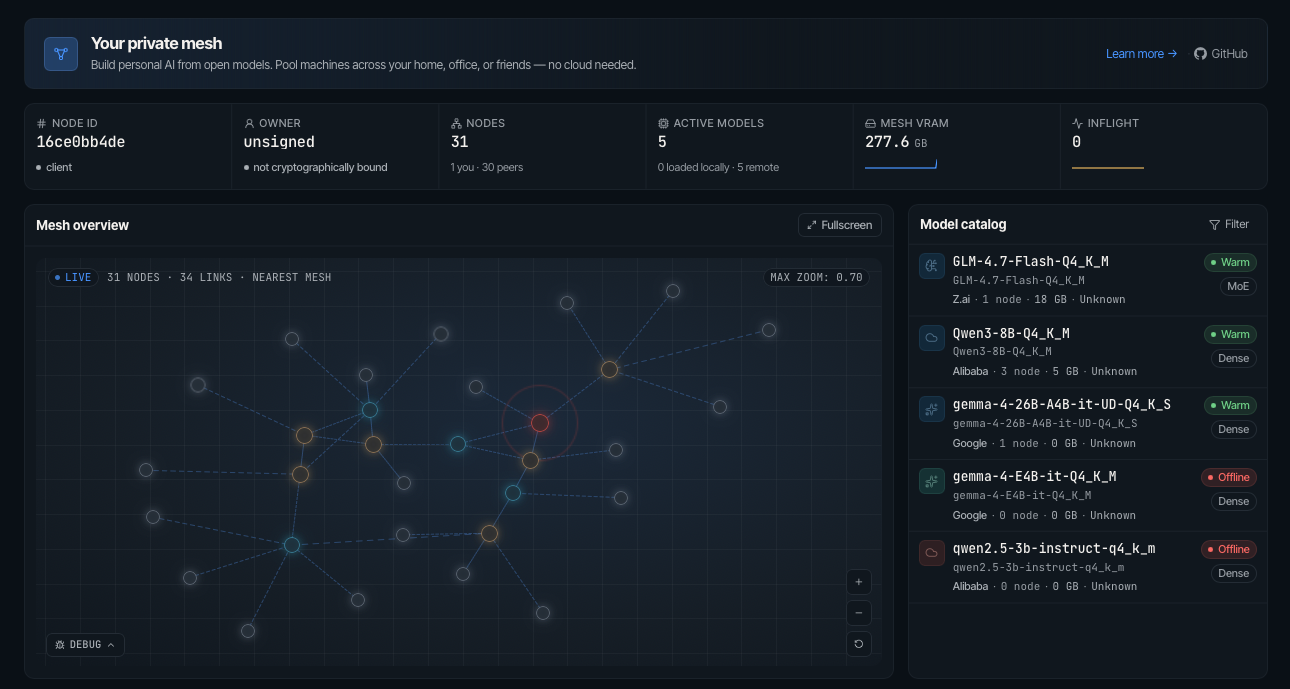
Mesh LLM pools GPUs and memory across machines and exposes the result as one
OpenAI-compatible API at `http://localhost:9337/v1`. Start one node, add more
nodes later, and let the mesh decide whether a model runs locally, routes to a
peer, or uses Skippy stage splits for models that are too large for one box.
## Quick start
Install the latest release executable:
```bash
curl -fsSL https://raw.githubusercontent.com/Mesh-LLM/mesh-llm/main/install.sh | bash
```
On Windows, use PowerShell:
```powershell
irm https://raw.githubusercontent.com/Mesh-LLM/mesh-llm/main/install.ps1 | iex
```
Install the Apple Silicon Homebrew formula with
`brew install Mesh-LLM/tap/mesh-llm`. Versioned formulas, Ubuntu and Arch
packages, checksums, SBOMs, and OCI images are produced by the public
[`Mesh-LLM/mesh-packaging`](https://github.com/Mesh-LLM/mesh-packaging)
repository. See the [platform install guides](https://meshllm.cloud/docs/pages/installing-mesh/)
for the supported package matrix and install commands.
Finish setup:
```bash
mesh-llm setup
```
On Windows PowerShell, use `mesh-llm.exe setup`. *(For native Windows notes, and for the optional WSL2 setup and multi-node LAN clustering, see the [Windows & WSL2 Troubleshooting Guide](#-windows--wsl2-troubleshooting).)*
To remove an executable install later, preview the cleanup first:
```bash
mesh-llm uninstall --dry-run
mesh-llm uninstall --yes
```
Uninstall preserves `~/.mesh-llm` configuration and identity data unless you
explicitly pass `--purge-config`.
Join the public mesh and start serving:
```bash
mesh-llm serve --auto
```
That command chooses a backend flavor, downloads a suitable model if needed,
joins the best discovered public mesh, starts the local API on port `9337`, and
starts the web console on port `3131`.
Check available models:
```bash
curl -s http://localhost:9337/v1/models | jq '.data[].id'
```
Send an OpenAI-compatible request:
```bash
curl http://localhost:9337/v1/chat/completions \
-H "Content-Type: application/json" \
-d '{"model":"GLM-4.7-Flash-Q4_K_M","messages":[{"role":"user","content":"hello"}]}'
```
For server deployments, add `--headless` to hide the web UI while keeping the
management API on the `--console` port:
```bash
mesh-llm serve --auto --headless
```
## Pick the workflow you need
| Goal | Command | Full guide |
|---|---|---|
| Try the public mesh | `mesh-llm serve --auto` | [docs/MESHES.md](docs/MESHES.md) |
| Start a private mesh | `mesh-llm serve --model Qwen3-8B-Q4_K_M` | [docs/MESHES.md](docs/MESHES.md) |
| Serve one model without mesh networking (debugging/dev) | `mesh-llm serve --local-model-only --gguf /models/model.gguf` | OpenAI API defaults to `127.0.0.1:9337` (`--port` and `--listen-all` change it) |
| Publish your own mesh | `mesh-llm serve --model Qwen3-8B-Q4_K_M --publish` | [docs/MESHES.md](docs/MESHES.md) |
| Join by invite token | `mesh-llm serve --join ` | [docs/MESHES.md](docs/MESHES.md) |
| Run an API-only client | `mesh-llm client --auto` | [docs/MESHES.md](docs/MESHES.md) |
| Run a big model with splits | `mesh-llm serve --model hf://meshllm/@ --split` | [docs/SKIPPY_SPLITS.md](docs/SKIPPY_SPLITS.md) |
| Attach a Flash-MoE SSD backend | `mesh-llm serve` with `[[plugin]] name = "flash-moe"` | [docs/plugins/flash-moe.md](docs/plugins/flash-moe.md) |
| Fan out one prompt to every model in the mesh | `curl ... -d '{"model":"mesh", ...}'` | [docs/design/MOA_GATEWAY.md](docs/design/MOA_GATEWAY.md) |
| Use Goose, OpenCode, Claude Code, or Pi | `mesh-llm goose`, `mesh-llm opencode`, `mesh-llm claude`, `mesh-llm pi` | [docs/AGENTS.md](docs/AGENTS.md) |
| Build or contribute | `just build` | [CONTRIBUTING.md](CONTRIBUTING.md) |
## How the mesh works
- **Single-machine fit first.** If one node can host the full model, it serves
the model locally without stage traffic.
- **Mesh routing.** Every node exposes the same `/v1` API. Requests are routed
by the `model` field to the peer that can serve that model.
- **Encrypted peer transport.** QUIC end-to-end encrypts traffic between Mesh
nodes, including inference requests, responses, and split-model activations.
Iroh relays forward encrypted packets without reading their payload.
- **Owner-control plane.** Operator config and inventory actions use an
additive `mesh-llm-control/1` lane with explicit endpoint bootstrap, while
public mesh join, gossip, routing, and inference stay on the public mesh
plane for mixed-version compatibility.
- **Skippy stage splits.** Large dense models can load as package-backed layer
stages. The coordinator plans contiguous layer ranges, starts downstream
stages first, waits for readiness, then publishes the stage-0 route.
- **Layer packages.** Package repositories contain `model-package.json` plus
GGUF fragments so peers fetch only the pieces needed for their assigned stage.
- **Public discovery.** Published meshes advertise through Nostr discovery;
private meshes stay invite-token based.
For a deeper operator guide, see [docs/USAGE.md](docs/USAGE.md). For every CLI
command and switch, see [docs/CLI.md](docs/CLI.md).
### Local model-only serving
> **Debugging and development endpoint.** `--local-model-only` wires the OpenAI
> frontend directly to one local Skippy instance and bypasses mesh networking
> entirely. The supported path for OpenAI clients in production — including tool
> calls — is the regular mesh inference port, which includes the host-runtime
> normalizer. Use `--local-model-only` when you want a lightweight single-process
> setup without joining a mesh, not as a drop-in for the full serving path.
Use the direct topology when a process should expose one complete local model
through the OpenAI API without becoming a mesh node:
```bash
mesh-llm serve \
--local-model-only \
--gguf /models/model.gguf \
--port 9337
```
Use `--gguf ` to serve a specific GGUF file directly. `--model
` also works. Note that `--model ` does **not** work
here — catalog and HF-ref resolution is a mesh function and is not available in
the direct topology; the resulting error is not obvious. See the path requirements
below.
This mode starts the OpenAI frontend and one local Skippy model runtime. It does
not start QUIC, discovery, peer maintenance, split planning, plugins, release
lookup, the web console, or the management API. Add `--listen-all` only when the
OpenAI endpoint must bind beyond loopback. Startup fails if the complete model
does not fit within detected local capacity (or `--max-vram`); it never falls
back to distributed serving.
Values passed to `--model`, `--gguf`, and `--mmproj` must be absolute paths and
must not be symlinks. If you downloaded a model through
Hugging Face, resolve the cache symlink before passing the path:
`realpath `.
## Mixture-of-Agents (`model: "mesh"`) — experimental
> ⚠️ **Experimental.** The MoA gateway is new in this release. Behavior,
> routing heuristics, error shapes, and tuning knobs may change between
> versions while we tune it. Treat `model: "mesh"` as a preview feature
> rather than a stable production path; use a specific model id when you
> need stable semantics.
Send a request with `"model": "mesh"` and the proxy fans it out to every
model available in the mesh in parallel, arbitrates their responses with
deterministic logic, and returns one OpenAI-compatible reply. The arbiter
runs in code (not as another model call) and only escalates to a reducer
LLM on genuine conflict. Tool calls flow through the full pipeline.
```bash
curl http://localhost:9337/v1/chat/completions \
-H "Content-Type: application/json" \
-d '{"model":"mesh","messages":[{"role":"user","content":"What is the capital of Japan?"}]}'
```
Requires at least two distinct models in the mesh. See
[docs/design/MOA_GATEWAY.md](docs/design/MOA_GATEWAY.md) for the
architecture, arbitration rules, and tuning knobs.
## Supported model families
Mesh LLM's Skippy runtime tracks llama.cpp family parity with reviewed GGUF
representatives. The current reviewed support set covers 72 P0/P1 family rows,
with 89 certified rows in the full parity inventory, including Qwen, Llama,
Gemma, Mistral, DeepSeek, GLM, MiniMax, Phi, Granite, Hunyuan, EXAONE, Cohere,
Falcon, RWKV, and many others.
Split multimodal serving is certified for Qwen2-VL, Qwen3-VL,
Qwen3-VL-MoE, HunyuanOCR/Hunyuan-VL, and DeepSeek-OCR using real GGUF plus
projector fixtures. DeepSeek3 and EXAONE-MoE use package-backed stages because
the full GGUFs are too large for the cheap local baseline.
See [docs/skippy/FAMILY_STATUS.md](docs/skippy/FAMILY_STATUS.md) for the full
artifact, split, wire dtype, cache policy, and exception matrix. See
[docs/skippy/LLAMA_PARITY.md](docs/skippy/LLAMA_PARITY.md) for the remaining
llama.cpp parity queue.
## Install and build notes
Tagged releases publish macOS bundles plus Linux CPU, Linux ARM64 CPU, Linux
ARM64 CUDA, Linux CUDA, Linux CUDA Blackwell, Linux ROCm, Linux Vulkan, Windows
CPU, Windows CUDA, Windows ROCm, and Windows Vulkan bundles. Metal is
macOS-only. Every flavor is composed from the same backend-neutral host for its
OS/architecture plus one versioned native runtime. The Linux ARM64 CPU artifact is
`mesh-llm-aarch64-unknown-linux-gnu.tar.gz`; the Linux ARM64 CUDA artifact is
`mesh-llm-aarch64-unknown-linux-gnu-cuda.tar.gz`. In install and release
contexts, `arm64` and `aarch64` mean the same 64-bit ARM target. Portable
archives work offline: the host discovers the adjacent
`native-runtimes/` tree before consulting the user cache.
Build from source with `just`:
```bash
git clone https://github.com/Mesh-LLM/mesh-llm
cd mesh-llm
just build
```
Source builds require `just`, `cmake`, Rust, `sccache`, the platform fast linker
(`mold` on Linux and lld on macOS/Windows), and Node.js 24 + npm. Cargo uses
these defaults from the checked-in configuration, including plain `cargo
build`. See [CONTRIBUTING.md](CONTRIBUTING.md) for installation commands and
linker fallback behavior. To exercise the release boundary locally, build the
neutral host and one runtime:
```bash
just release-host-build
just release-runtime-build metal # or cpu, cuda, rocm, vulkan
MESH_LLM_NATIVE_RUNTIME_BUNDLE_DIR="$PWD/dist/native-runtimes" \
MESH_LLM_NATIVE_RUNTIME_CACHE_DIR="$(mktemp -d)" \
./target/release/mesh-llm runtime list
```
CUDA runtimes need `nvcc`, ROCm runtimes need ROCm/HIP, and Vulkan runtimes need
Vulkan development files plus `glslc`. See
[docs/design/NATIVE_RUNTIMES.md](docs/design/NATIVE_RUNTIMES.md) for the
manifest, discovery, and compatibility contract.
The shipped `mesh-llm` executable uses embedded release attestation for
provenance and admission hardening only. It does not apply to SDK, XCFramework,
or other native artifacts, and it is not a runtime integrity proof. Verify a
stamped packaged executable with `cargo run -p xtask -- release-attestation inspect --binary --public-key-file `.
A packaged release binary reports `valid`, an unstamped local or dev build
reports `missing`, and a binary that changed after packaging reports `invalid`.
Bare `inspect --binary ...` is only enough to classify an unstamped binary as
`missing`; stamped binaries require `--public-key-file` and otherwise report
`invalid` with an explicit error. Post-download mutation can flip a stamped
binary to `invalid`, but default startup still allows it.
## 🪟 Windows & WSL2 Troubleshooting
### Running natively on Windows (NVIDIA)
Native Windows CUDA works, including on CUDA 13.x drivers: GPU detection (`mesh-llm gpus`) and full-speed CUDA inference have been verified on driver 610.74 (CUDA UMD 13.3) with an RTX 4070 Ti. The earlier advice to switch to WSL2 when `mesh-llm` reported `0 GPUs` on CUDA 13 drivers predates the cuda12-runtime compatibility fix ([#1127](https://github.com/Mesh-LLM/mesh-llm/issues/1127)) and no longer applies to current releases.
As of v0.76.0-rc8, three distribution/loading bugs still block the out-of-the-box native path. Until the fixes ship, this sequence works end to end:
1. **Install the prerelease** — the stable v0.75.1 Windows bundles fail `install.ps1` verification ([#1510](https://github.com/Mesh-LLM/mesh-llm/issues/1510)):
```powershell
irm https://raw.githubusercontent.com/Mesh-LLM/mesh-llm/main/install.ps1 -OutFile install.ps1
.\install.ps1 -PreRelease
```
2. **Install the CUDA runtime from the product bundle** — `mesh-llm runtime install cuda` finds no windows/x86_64 runtimes in the release manifest ([#1511](https://github.com/Mesh-LLM/mesh-llm/issues/1511)). Download `mesh-llm-x86_64-pc-windows-msvc-cuda.zip` for your installed version from the [releases page](https://github.com/Mesh-LLM/mesh-llm/releases), extract it, then:
```powershell
mesh-llm runtime install --bundle-dir "\mesh-bundle" cuda
```
3. **Put the runtime's `lib` directory on `PATH` before serving** — runtime DLLs currently fail to load with `LoadLibraryExW` error 126 ([#1512](https://github.com/Mesh-LLM/mesh-llm/issues/1512)):
```powershell
$env:PATH = "$env:LOCALAPPDATA\mesh-llm\native-runtimes\\meshllm-native-runtime-windows-x86_64-cuda12\lib;" + $env:PATH
mesh-llm serve --local-model-only --model "C:\path\to\model.gguf"
```
Good to know on native Windows:
- `--local-model-only` requires an absolute path to a local `.gguf` file; catalog and Hugging Face refs are rejected in this mode.
- Models download to `%LOCALAPPDATA%\huggingface\hub` (the Rust `hf-hub` convention) — a separate cache from the Python tools' `~\.cache\huggingface`.
- `mesh-llm.exe` is not code-signed yet, so SmartScreen may prompt when launching it manually.
### Running under WSL2 (alternative)
WSL2 remains a solid alternative if you prefer the Linux CUDA runtimes or want the multi-node LAN setups described below.
#### 1. Install CUDA 13.0 Toolkit inside WSL2
Inside your Ubuntu WSL2 terminal, install `cuda-toolkit-13-0` to supply `libcudart.so.13`:
```bash
wget https://developer.download.nvidia.com/compute/cuda/repos/wsl-ubuntu/x86_64/cuda-wsl-ubuntu.pin
sudo mv cuda-wsl-ubuntu.pin /etc/apt/preferences.d/cuda-repository-pin-600
wget https://developer.download.nvidia.com/compute/cuda/13.0.0/local_installers/cuda-repo-wsl-ubuntu-13-0-local_13.0.0-1_amd64.deb
sudo dpkg -i cuda-repo-wsl-ubuntu-13-0-local_13.0.0-1_amd64.deb
sudo cp /var/cuda-repo-wsl-ubuntu-13-0-local/cuda-*-keyring.gpg /usr/share/keyrings/
sudo apt-get update && sudo apt-get -y install cuda-toolkit-13-0
echo 'export LD_LIBRARY_PATH=/usr/local/cuda-13.0/lib64:$LD_LIBRARY_PATH' >> ~/.bashrc
source ~/.bashrc
```
#### 2. Enable Hyper-V & Windows Firewall for WSL2 Mirrored Mode
If you use WSL2 `networkingMode=mirrored` in `%UserProfile%\.wslconfig`, Windows 11 manages a separate **Hyper-V VM Firewall** that defaults to `Block` for inbound network traffic when third-party security software (e.g. Norton, McAfee) is present.
##### 2.1 Configure Mirrored Networking (`.wslconfig`) Part 1
Create or edit `C:\Users\\.wslconfig` on the Windows host:
```powershell
notepad $env:USERPROFILE\.wslconfig
```
##### 2.2 Configure Mirrored Networking (`.wslconfig`) Part 2
```ini
[wsl2]
networkingMode=mirrored
autoProxy=true
```
##### 2.3 Restart WSL in Powershell
Restart WSL in PowerShell:
```powershell
wsl --shutdown
```
##### 2.4 Enable Windows Firewall Needs
To allow incoming LAN connections to the Web UI (`3131`) and P2P QUIC mesh transport (`9337`), run **PowerShell as Administrator** on the Windows host:
```powershell
# 1. Allow Inbound Traffic through the WSL Hyper-V VM Firewall Container
$vmCreatorId = '{40E0AC32-46A5-438A-A0B2-2B479E8F2E90}'
Set-NetFirewallHyperVVMSetting -Name $vmCreatorId -DefaultInboundAction Allow
# 2. Allow MeshLLM Ports in Windows Defender Firewall
New-NetFirewallRule -DisplayName "MeshLLM TCP In" -Direction Inbound -Action Allow -Protocol TCP -LocalPort 3131,9337 -Profile Any
New-NetFirewallRule -DisplayName "MeshLLM UDP In" -Direction Inbound -Action Allow -Protocol UDP -LocalPort 9337,5353 -Profile Any
```
#### 3. Match Model Paths for Direct LAN Reading
To ensure worker nodes load GGUF model shards directly off local NVMe/SSD storage without streaming tens of gigabytes over the network, ensure the `--gguf` file path string is identical across all nodes (or use symlinks/bind mounts):
```bash
# Example: Mount or symlink model path on worker nodes
sudo mkdir -p /mnt/d/models/
sudo mount --bind /path/to/local/fast/nvme/ /mnt/d/models/
# Launch Master and Worker with matching path strings
mesh-llm --llama-flavor cuda serve \
--console 3131 \
--gguf "/mnt/d/models/model.gguf" \
--mesh-name "MainMesh" \
--listen-all \
--auto
```
## Documentation hub
| Doc | Use it for |
|---|---|
| [docs/MESHES.md](docs/MESHES.md) | Private meshes, public discovery, publishing, invite tokens, API-only clients |
| [docs/SKIPPY_SPLITS.md](docs/SKIPPY_SPLITS.md) | Running big models with package-backed Skippy stage splits |
| [docs/LAYER_PACKAGE_REPOS.md](docs/LAYER_PACKAGE_REPOS.md) | Contributing and publishing layer package repositories |
| [docs/AGENTS.md](docs/AGENTS.md) | Goose, Claude Code, OpenCode, Pi, curl, and blackboard |
| [docs/EXO_COMPARISON.md](docs/EXO_COMPARISON.md) | Balanced comparison with Exo |
| [docs/CLI.md](docs/CLI.md) | Command reference and JSON automation |
| [docs/USAGE.md](docs/USAGE.md) | Longer operational usage guide, runtime control, owner-control operator flows |
| [docs/design/TESTING.md](docs/design/TESTING.md) | Testing playbook, mixed-version QA, remote deploy checks |
| [docs/plugins/flash-moe.md](docs/plugins/flash-moe.md) | Optional Flash-MoE SSD expert streaming backend setup |
| [docs/skippy/FAMILY_STATUS.md](docs/skippy/FAMILY_STATUS.md) | Certified Skippy model-family status |
| [docs/specs/layer-package-repos.md](docs/specs/layer-package-repos.md) | Manifest and artifact format spec |
| [docs/specs/mesh-setup-installer.md](docs/specs/mesh-setup-installer.md) | Installer/bootstrap and setup command behavior spec |
## CI infrastructure
Trusted `main` Linux jobs may use [Depot's managed GitHub Actions
runners](https://depot.dev/docs/github-actions/overview) through the checked-in
runner policy. Pull requests remain on GitHub-hosted runners until the cache
isolation and protected-workflow gates in [`ci/DEPOT_MIGRATION.md`](ci/DEPOT_MIGRATION.md)
are proven. Hardware-qualified GPU tests remain on dedicated runners.
## Community
Mesh LLM is experimental distributed-systems software. When you report bugs,
include the command you ran, platform/backend flavor, `/api/status` output if
available, and whether the node was private, published, or joined with `--auto`.
## Support
The Mesh LLM project thanks [spiral.xyz](https://spiral.xyz) for their support.


 The Mesh LLM project thanks [spiral.xyz](https://spiral.xyz) for their support.