> This is an English translation of the [Chinese README](README.md), which is the primary version. If the two disagree, the Chinese one is correct. The linked docs and the in-app interface are in Chinese.
## Preface
This project started as something I vibe-coded for my own use, and I never expected so many people to like it. But vibe-coded things come with a lot of problems, including but not limited to "bloated docs that read like AI wrote them and are hard to follow", "huge amounts of useless defensive code", and "messy feature modules".
It works reasonably well today, but it is still far from what I have in mind.
I don't think that does justice to all the trust and stars it has received. I'm going to face these problems head-on, review and rewrite every file by hand, and make the experience better in future updates. Thanks to everyone for using and supporting it. If you have any suggestions, please open an issue. This project will be maintained for the long term.
## Quick Start
### DeepSeek Harness
**DSH requirements**: DSH 0.1.7-alpha.1+, Node.js (see `engines` in `package.json` for supported versions), and `pnpm` on PATH (`dsh plugin` forwards to pnpm). **Python is not required**: the engine is a TypeScript plugin that ships with the package.
```bash
dsh plugin --profile web add @yunmiao/studymate
```
Then **restart DSH** (CLI: reopen `dsh web`; desktop: quit completely and reopen), pick 「学习模式」 when creating a new session, and switch to the reader from the sidebar. On first start the plugin configures the engine path and the two presets itself; the study workspace defaults to `~/StudyMate` and an existing configuration is kept.
- **Desktop app (DeepSeek Harness Desktop)**: the desktop app bundles its own DSH. Launch it at least once, then use `--profile desktop` instead of `--profile web`; if you have no `dsh` command at hand, install by package name from the desktop app's plugin market. After installing, **quit the desktop app completely and reopen it**.
- **Official CLI**: first run `npm install -g @deepseek-ai/dsh@latest`, then run the command above (it goes into the `web` profile by default); start it with `dsh web`.
**Updating**: `dsh plugin --profile web update @yunmiao/studymate@latest`, then restart DSH (desktop: quit completely and reopen; CLI: restart and create a new session).
**On DSH below 0.1.7-alpha.1**, or when you need to name the study workspace or a non-default desktop install location, use `npx -y @yunmiao/studymate@latest install` (`--workspace `, `--profile `, `--dsh `). It only installs the engine materials plus two preset declarations and **will not give you the reader** — upgrade DSH if you can. See the [installation guide](docs/使用/安装.md).
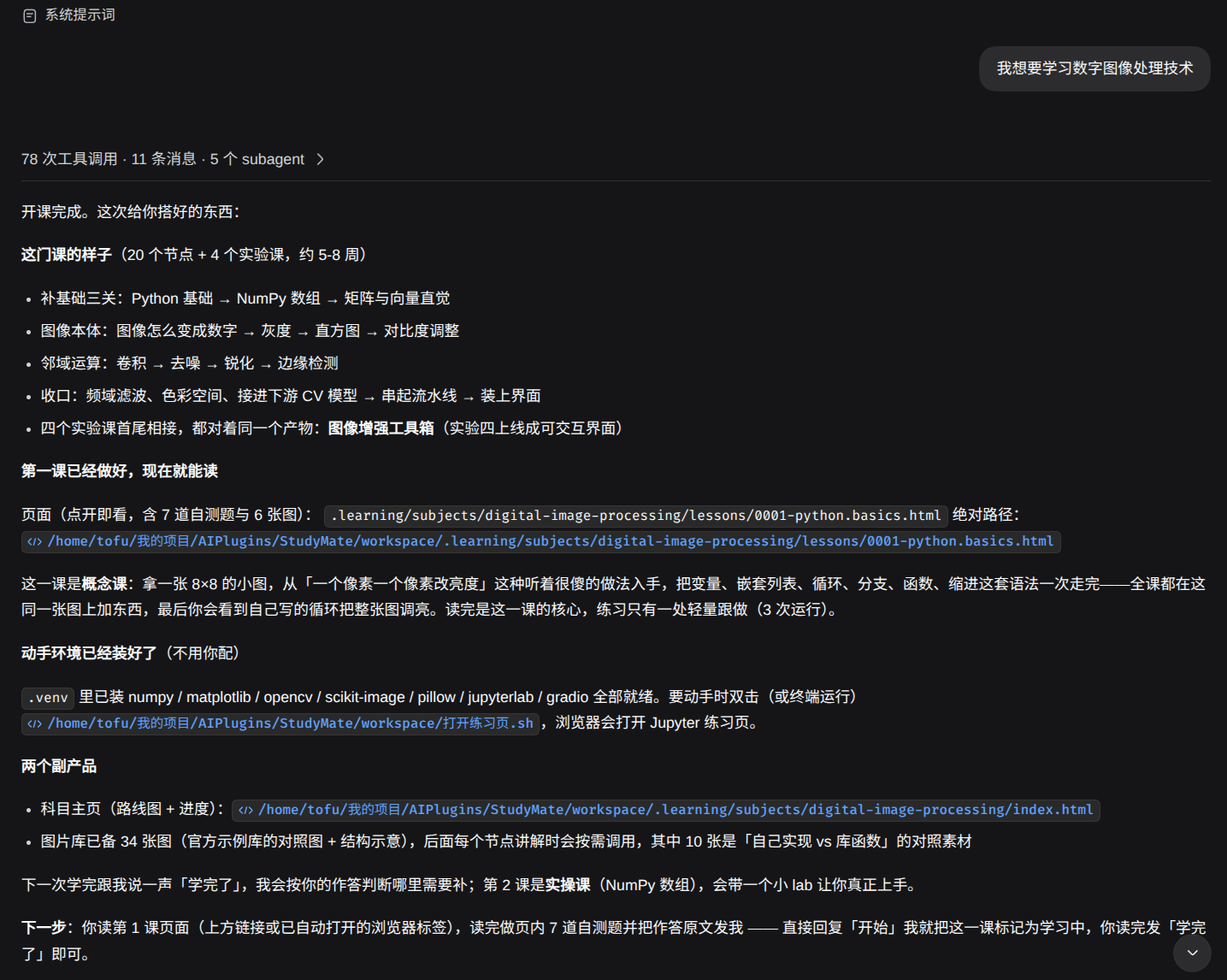
- **Your first lesson**: pick 「学习模式」 when creating a new session and say "I want to learn [some subject]". Study data is written directly into the configured study workspace (staging mode has been removed, so there is no "ask where to put it at the end and move it again" step).
- **Not sure what to learn yet**: in the study conversation, say "I don't know what to learn, help me pick a direction". You can explore first and decide later whether to start a course. If you already have a subject in mind or are resuming, the usual flow applies.
- **The study workspace defaults to `~/StudyMate`, and all lessons and memory live in it**. An existing configuration is kept.
- **Reading happens in the DSH reader**: after installing, pick 「学习模式」 for a new session and switch to the reader from the sidebar to read lessons, answer exercises, and search sources. Pages are rendered live by the reader; HTML is no longer pre-generated.
- **Reading offline**: say "export a copy I can read offline" in the session, or run `npx -y @yunmiao/studymate export` yourself. The output goes to `/export/`, with `index.html` as the entry point.
For the workspace, updating, the desktop app, continuing on another machine, and the fallback for older DSH versions, see the [installation guide](docs/使用/安装.md).
### Codex and ChatGPT Work
Download **studymate-openai.zip** from the [latest release](https://github.com/Miaotofu01/Study-Mate/releases/latest) and import it through the plugin import entry provided by Codex/ChatGPT (see the [import guide](docs/使用/Codex与ChatGPT.md)).
**To update, download the latest ZIP, find your existing plugin link, open it in a browser, and upload the new version.**
### Google Antigravity
Run this in the repository root to build and install in one step:
```bash
node bin/studymate.mjs build-antigravity --install
```
Or build a ZIP with `npm run build:antigravity` and import it manually (see the [Antigravity guide](docs/使用/Antigravity.md)).
## What It Is
StudyMate is a **math/CS study workflow, set of SKILLs, and DSH plugin**. It supports the Learning Mode preset in DSH (DeepSeek Harness), works as a native multi-agent plugin for Google Antigravity, and can be packaged as a plugin for Codex and ChatGPT Work. It organizes five roles as needed: gathering sources, collecting images, course design, explanation, and practice evaluation. When the host supports it, these roles are delegated to subagents; otherwise they are carried out one after another.
- **Each subject has three parts: explanation, practice, and hands-on projects**: every subject gets one outline. Its nodes (knowledge points) form a roadmap ordered by prerequisites, and each node is marked with a lesson type: concept, hands-on, or lab (written as `概念` / `实操` / `实验` in the outline). Progress is saved to files, so each new conversation picks up where you left off.
- **Shared memory across subjects**: it remembers your current level, which explanations work for you, and where you usually get stuck, so you don't have to introduce yourself again for the next subject.
## Why Use It
| Common approach | Where it gets stuck | What StudyMate does |
| --- | --- | --- |
| Just chatting with an AI | Long sessions overflow the context; nothing is kept once the chat ends, so next time you start from zero | Information and preferences are kept in memory files; each session loads only the relevant memory and keeps the context short; lessons are textbook-style explanations with illustrations |
| Video courses / online classes | Uneven quality; they cost money; they can't keep pace with new developments | Explanations are tailored to you; it collects up-to-date sources and standards; fully open source |
## Core Features
**Course overview and outline roadmap**: the overview page lists all your subjects and where you are in each. Open a subject to see its roadmap of nodes, laid out in layers by dependency and colored by status. Click a node to expand its lesson cards in place.
**Lessons are the main way you learn**: explanations in the style of classic textbooks, plenty of illustrations, and exercises and project goals tailored to you.
The reader is the output itself: lesson pages are rendered live by the reader, with formulas, images, and exercises all included. When you need a copy that opens offline, use export (`npx -y @yunmiao/studymate export`, output in `/export/`). The repository **no longer contains a sample workspace**: test subjects are created and thrown away on the fly ([ADR-0009](docs/adr/0009-示例与生成产物不再入库.md)). See the preview images above for screenshots.
## Usage Examples
- **"I don't know what to learn, help me pick a direction"** → one question at a time; you can skip a question or look at suggestions first. Once you pick a direction, it fills in what it needs to start the subject and, after you confirm, moves on to building the subject and the first lesson (see [Optional: explore a direction first](docs/使用/使用说明.md#可选先探索学习方向)).
- **"I want to learn C++ for competitive programming"** → it first asks about your goal, level, projects, and how you want to do labs, then produces the outline roadmap and subject home page and starts the first lesson.
- **Self-study from a specific textbook** → once the questions are done, offer a local path to your materials (lecture notes, your own notes, or a textbook folder). The system converts the textbook to Markdown in `reference/` (for you to browse) and converts the online sources it gathered to Markdown in `sources/` (for keeping lessons aligned). Both the outline and the lessons are written against these originals.
- **Paste a passage you don't understand + "I don't get this part"** → the coordinator answers briefly on the spot, adds a note to your record, and sends you back to where you were reading.
- **"Quiz me"** → it writes questions on the spot, checks your answers against runnable evidence, gives you an assessment record, and updates your progress.
- **"Too easy" / "I didn't get it"** → it switches explanations (adding edge cases and counterexamples, or dropping one level of abstraction) and saves that preference to shared memory.
## Configuration and Maintenance
There is only one command you need day to day, the same one you use to check your setup after installing:
```bash
npm test
```
It doesn't need a real DSH, browser, or model service; the tests create their own temporary subjects and never touch your study workspace. The engine scripts are gone (Python was retired in #83). The **list and parameters of the native tools** are defined in exactly two places: the code in [`lib/tools/index.ts`](lib/tools/index.ts), and the human-readable [native tool contract](preset/skills/learning-system/references/tools.md). Each command's prerequisites, the opt-in entry points (real browser, real DSH), and exit code meanings are in the [testing guide](scripts/tests/README.md). Each of these is the single source of truth, so this README doesn't repeat them.
The standalone Web runtime (`study-mate-web/`, FastAPI + Next.js) used to live on the main branch and has moved to the [`web/0.7.0-beta`](https://github.com/Miaotofu01/Study-Mate/tree/web/0.7.0-beta) branch. It has its own engine and reads and writes the same study workspace as the plugin. It will be merged back once someone adapts it to the new engine. For why it was moved out and what it must meet before merging back, see [ADR-0013](docs/adr/0013-Web运行时移出主线.md).
## Project Structure
For the directory tree, what each directory does, and who maintains which file, see [Engineering Constraints](docs/规范/工程约束.md) §2 (directories and rule ownership) and [File Ownership](docs/规范/文件归属.md). Each is the single source of truth, so they aren't copied here.
On the DSH side, it is **one plugin package** (`@yunmiao/studymate`): the Host half registers the native tools and the reader's data routes, and the Client half is the reader itself. The installer writes the presets and workspace configuration. Study data lives in a separate `~/StudyMate` by default, so you don't need to keep the source repository; see the [installation guide](docs/使用/安装.md).
For what the study workspace looks like inside (subject folders, lessons, labs, records, lesson types, and question types), see [User Guide §6](docs/使用/使用说明.md#六学习数据存在哪).
## FAQ
I installed it but can't see the lesson pages
Lessons are **rendered live by the reader**, and HTML is no longer pre-generated (the page templates were retired in #83). In DSH, create a new session with 「学习模式」 and switch to the reader from the sidebar. For a copy that opens offline, run `npx -y @yunmiao/studymate export`; the output is in `/export/`.
Do I still need to install Python?
No. The engine moved from Python scripts to a TypeScript plugin that ships with the package ([ADR-0002](docs/adr/0002-引擎改用TypeScript.md)), and the installer no longer looks for Python. Only one thing needs extra Node setup: exporting static pages requires a copy of React (`npm i -g react react-dom`, or point `STUDYMATE_REACT_DIR` at one).
For more questions (pitfalls of hand-editing YAML, why the pointer goes wrong after changing outline nodes, whether it works offline), see [User Guide §8 FAQ](docs/使用/使用说明.md#八常见问题).
## Contributing / License
- **Community group** (QQ): 161914370
- **Development**: [CONTRIBUTING.md](CONTRIBUTING.md) (what to read before changing each part, how to verify locally, commit message rules)
- **Changelog**: [CHANGELOG.md](CHANGELOG.md)
- **Docs** (in Chinese): [User Guide](docs/使用/使用说明.md) (everyday use, lesson and question types, checking and record rules) · [Codex and ChatGPT](docs/使用/Codex与ChatGPT.md) (building, installing, and the workspace for the OpenAI plugin) · [Antigravity Guide](docs/使用/Antigravity.md) (building, multi-agent collaboration, and installing the Antigravity plugin) · [Lesson Content Format](docs/规范/课件内容格式.md) (syntax for content files and exercise placement) · [Reader Presentation](docs/规范/阅读端呈现.md) (criteria for whether the four surfaces "look right") · [File Ownership](docs/规范/文件归属.md) (alias ↔ path ↔ maintainer) · [Agent Handoff Protocol](docs/规范/Agent交接协议.md) (machine boundaries for staged subagent delivery) · [Target State Spec](docs/设计/目标态规格.md) (the shape and gates of the system after the refactor) · [Engineering Constraints](docs/规范/工程约束.md) (directory conventions, rule ownership, native tool pointers) · [Workspace Data Skeleton](templates/README.md)
### Run these before submitting a change
The rules are in [CONTRIBUTING.md](CONTRIBUTING.md); what each command runs and its prerequisites are in the [testing guide](scripts/tests/README.md).
### License
MIT (see [LICENSE](LICENSE), copyright Cattofu).
## Star History






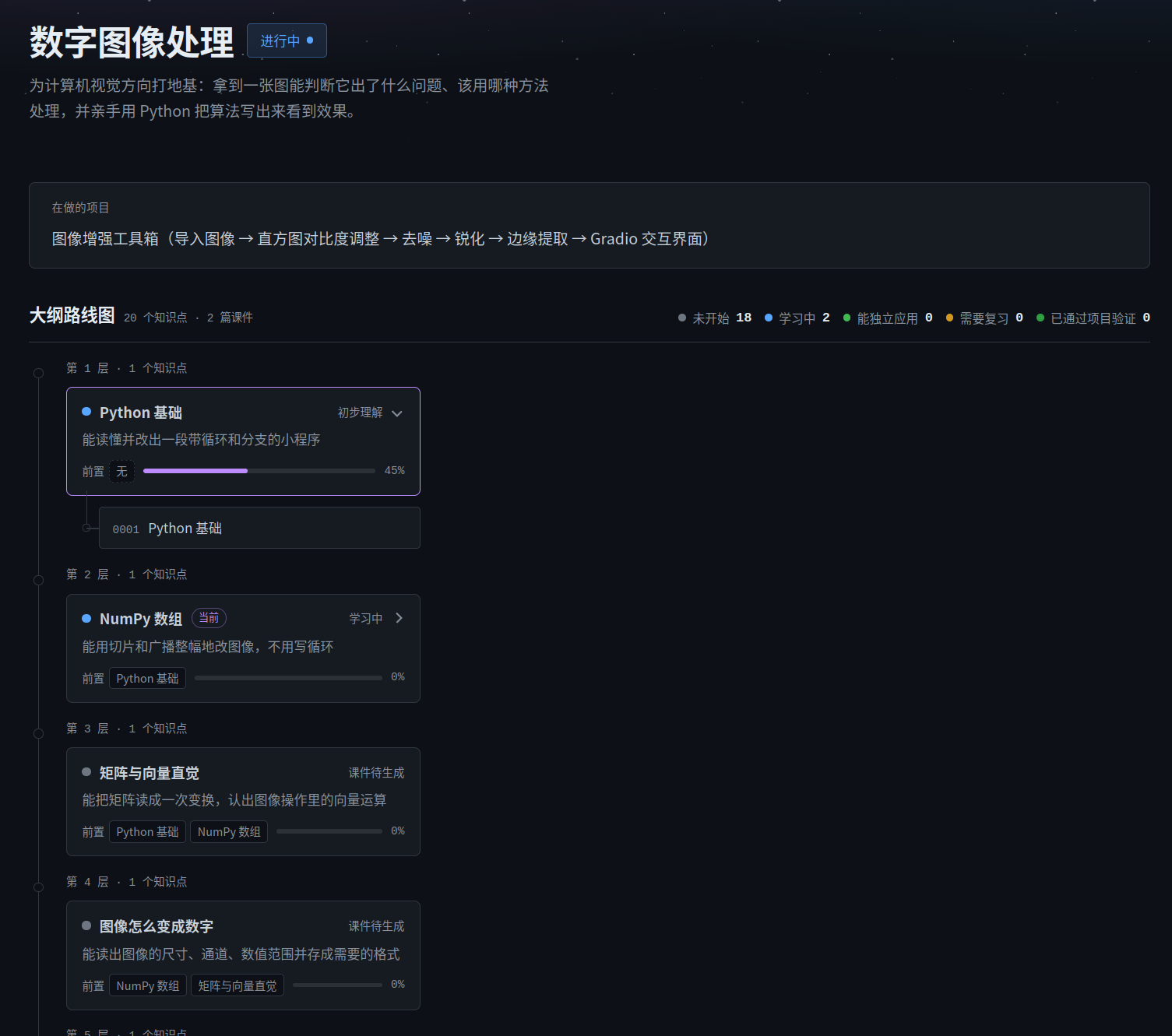 **Lessons are the main way you learn**: explanations in the style of classic textbooks, plenty of illustrations, and exercises and project goals tailored to you.
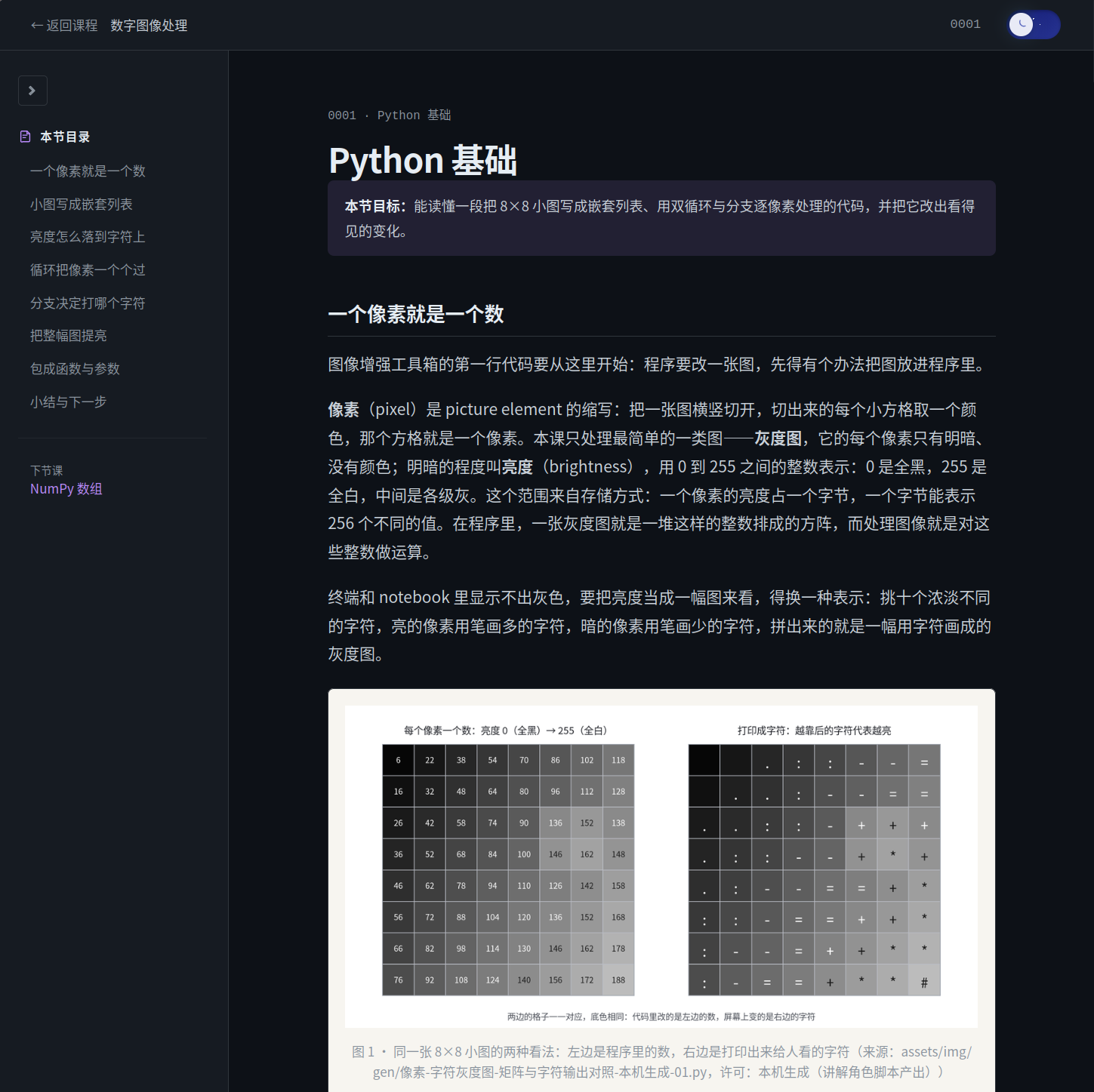 The reader is the output itself: lesson pages are rendered live by the reader, with formulas, images, and exercises all included. When you need a copy that opens offline, use export (`npx -y @yunmiao/studymate export`, output in `
 ## Configuration and Maintenance
There is only one command you need day to day, the same one you use to check your setup after installing:
```bash
npm test
```
It doesn't need a real DSH, browser, or model service; the tests create their own temporary subjects and never touch your study workspace. The engine scripts are gone (Python was retired in #83). The **list and parameters of the native tools** are defined in exactly two places: the code in [`lib/tools/index.ts`](lib/tools/index.ts), and the human-readable [native tool contract](preset/skills/learning-system/references/tools.md). Each command's prerequisites, the opt-in entry points (real browser, real DSH), and exit code meanings are in the [testing guide](scripts/tests/README.md). Each of these is the single source of truth, so this README doesn't repeat them.
The standalone Web runtime (`study-mate-web/`, FastAPI + Next.js) used to live on the main branch and has moved to the [`web/0.7.0-beta`](https://github.com/Miaotofu01/Study-Mate/tree/web/0.7.0-beta) branch. It has its own engine and reads and writes the same study workspace as the plugin. It will be merged back once someone adapts it to the new engine. For why it was moved out and what it must meet before merging back, see [ADR-0013](docs/adr/0013-Web运行时移出主线.md).
## Project Structure
For the directory tree, what each directory does, and who maintains which file, see [Engineering Constraints](docs/规范/工程约束.md) §2 (directories and rule ownership) and [File Ownership](docs/规范/文件归属.md). Each is the single source of truth, so they aren't copied here.
On the DSH side, it is **one plugin package** (`@yunmiao/studymate`): the Host half registers the native tools and the reader's data routes, and the Client half is the reader itself. The installer writes the presets and workspace configuration. Study data lives in a separate `~/StudyMate` by default, so you don't need to keep the source repository; see the [installation guide](docs/使用/安装.md).
For what the study workspace looks like inside (subject folders, lessons, labs, records, lesson types, and question types), see [User Guide §6](docs/使用/使用说明.md#六学习数据存在哪).
## FAQ
## Configuration and Maintenance
There is only one command you need day to day, the same one you use to check your setup after installing:
```bash
npm test
```
It doesn't need a real DSH, browser, or model service; the tests create their own temporary subjects and never touch your study workspace. The engine scripts are gone (Python was retired in #83). The **list and parameters of the native tools** are defined in exactly two places: the code in [`lib/tools/index.ts`](lib/tools/index.ts), and the human-readable [native tool contract](preset/skills/learning-system/references/tools.md). Each command's prerequisites, the opt-in entry points (real browser, real DSH), and exit code meanings are in the [testing guide](scripts/tests/README.md). Each of these is the single source of truth, so this README doesn't repeat them.
The standalone Web runtime (`study-mate-web/`, FastAPI + Next.js) used to live on the main branch and has moved to the [`web/0.7.0-beta`](https://github.com/Miaotofu01/Study-Mate/tree/web/0.7.0-beta) branch. It has its own engine and reads and writes the same study workspace as the plugin. It will be merged back once someone adapts it to the new engine. For why it was moved out and what it must meet before merging back, see [ADR-0013](docs/adr/0013-Web运行时移出主线.md).
## Project Structure
For the directory tree, what each directory does, and who maintains which file, see [Engineering Constraints](docs/规范/工程约束.md) §2 (directories and rule ownership) and [File Ownership](docs/规范/文件归属.md). Each is the single source of truth, so they aren't copied here.
On the DSH side, it is **one plugin package** (`@yunmiao/studymate`): the Host half registers the native tools and the reader's data routes, and the Client half is the reader itself. The installer writes the presets and workspace configuration. Study data lives in a separate `~/StudyMate` by default, so you don't need to keep the source repository; see the [installation guide](docs/使用/安装.md).
For what the study workspace looks like inside (subject folders, lessons, labs, records, lesson types, and question types), see [User Guide §6](docs/使用/使用说明.md#六学习数据存在哪).
## FAQ