# Speedy.js
[](https://badge.fury.io/js/speedyjs-compiler)
[](https://travis-ci.org/MichaReiser/speedy.js) [](https://codeclimate.com/github/MichaReiser/speedy.js)
 Speedy.js is a compiler for a well considered, performance pitfalls free [subset of JavaScript](https://github.com/MichaReiser/speedy.js/wiki/Speedy.js-Language-Reference) targeting WebAssembly. Because WebAssembly is statically-typed, the project uses TypeScript as type-checker and to resolve the types of the program symbols.
The project is very experimental and still far away from being production ready.
## Getting Started
### Setup LLVM
First, you need an LLVM installation that includes the experimental WebAssembly target. You can test if your LLVM installation includes the WebAssembly backend by running
```bash
llvm-config --targets-built
```
If the output contains the word *WebAssembly* you are good to go (continue with *Install Cross Compiler*). If not, then you have to build LLVM from source by following [these instructions](./doc/BUILD_LLVM_FROM_SOURCE.md).
After LLVM has been built and is installed, set the path to the `llvm-config` executable (it is located in the installation directory) using `npm config set` or an `.npmrc` file in your project:
```bash
npm config set LLVM_CONFIG /llvm/install/dir/llvm-config
```
or when using the `.npmrc` file:
```ini
LLVM_CONFIG = "/llvm/install/dir/llvm-config"
```
### Install Cross Compiler
Now the compiler can be installed using `npm install` (or yarn or whatever). Also install the custom TypeScript version that has support for the `int` base type.
```bash
npm install --save-dev speedyjs-compiler MichaReiser/TypeScript#2.3.3-with-int
```
### Prebuilt VM
For those just interested in playing around the prebuilt Ubuntu [Ubuntu VM](https://drive.switch.ch/index.php/s/vpjsvWfVPnJHp9k) (user: speedyjs, password: welcome) might be interesting. It contians the [Speedy.js Playground project](https://github.com/MichaReiser/speedy.js-playground) in the user's home directory.
## Compile your first Script
You have to mark Speedy.js functions with the `use speedyjs` directive. Furthermore, you have to declare Speedy.js functions that are called from a pure JavaScript function as `async` (see `fib`).
fib.ts:
```typescript
async function fib(value: int): Promise {
"use speedyjs";
return fibSync(value);
}
function fibSync(value: int): int {
"use speedyjs";
if (value <= 2) {
return 1;
}
return fibSync(value - 2) + fibSync(value - 1);
}
async function main() {
console.log(await fib(40));
}
```
The compiler will compile the `fib` and `fibSync` function to WebAssembly whereas the `main` function remains in pure JS.
The script can be compiled using:
```
$(npm bin)/speedyjs fib.ts
```
which outputs the `fib.js` file.
To compile all files in the current directory omit any file names or pass multiple file names to the CLI. More details about how to use the CLI are documented in [the wiki](https://github.com/MichaReiser/speedy.js/wiki/CLI).
## WebPack Loader
The package `loader` contains a WebPack loader for Speedy.js. Consult the [README](./packages/loader/README.md) of the loader package for more details.
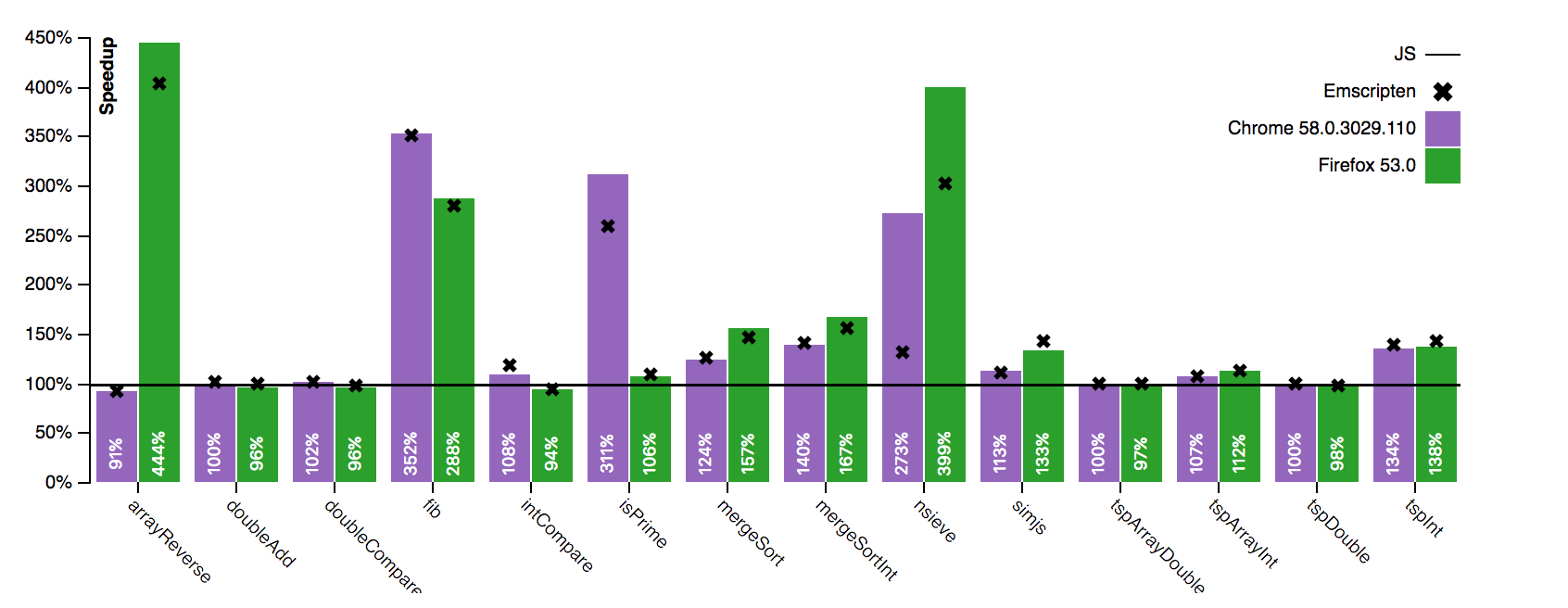
## Benchmark
## Setup the Development Environment
Clone the git repository:
```
git clone --recursive https://github.com/MichaReiser/speedy.js.git
```
Ensure that LLVM is set up (see Getting Started).
Run the `install` and `bootstrap` scripts in the just cloned directory:
```
npm install
npm run bootstrap
```