# DSH BTW
**Ask a side question in DeepSeek Harness. Answers only, no tool execution.**
[简体中文](README.zh-CN.md) · [Screenshots](#screenshots) · [Installation](#installation) · [Usage](#usage) · [Changelog](CHANGELOG.md) · [Apache-2.0](LICENSE)
[](LICENSE)
[](https://github.com/deepseek-ai/deepseek-harness)
[](https://nodejs.org/)
> DSH BTW is a community-maintained DeepSeek Harness plugin, not an official DeepSeek AI product. Type `/btw your question` in the current conversation to get a context-aware answer in an independent bubble without interrupting the main task. Supports DSH Web and desktop apps that include DSH Web.
## Features
- **Context-aware questions**: explain concepts, recap conclusions, or ask a quick question about the current conversation.
- **Answers only**: no reading new files, browsing the web, running commands, or editing code.
- **Independent answer bubbles**: render Markdown, copy answers, collapse, expand, and close individual bubbles. Multiple answers can stay visible.
- **Keep the main task going**: side questions are answered separately and do not add answers to the main conversation.
- **Cancel anytime**: close a bubble while it is answering to cancel that question.
- **Themes and languages**: follow DSH light and dark themes and switch between Chinese and English UI.
## Screenshots
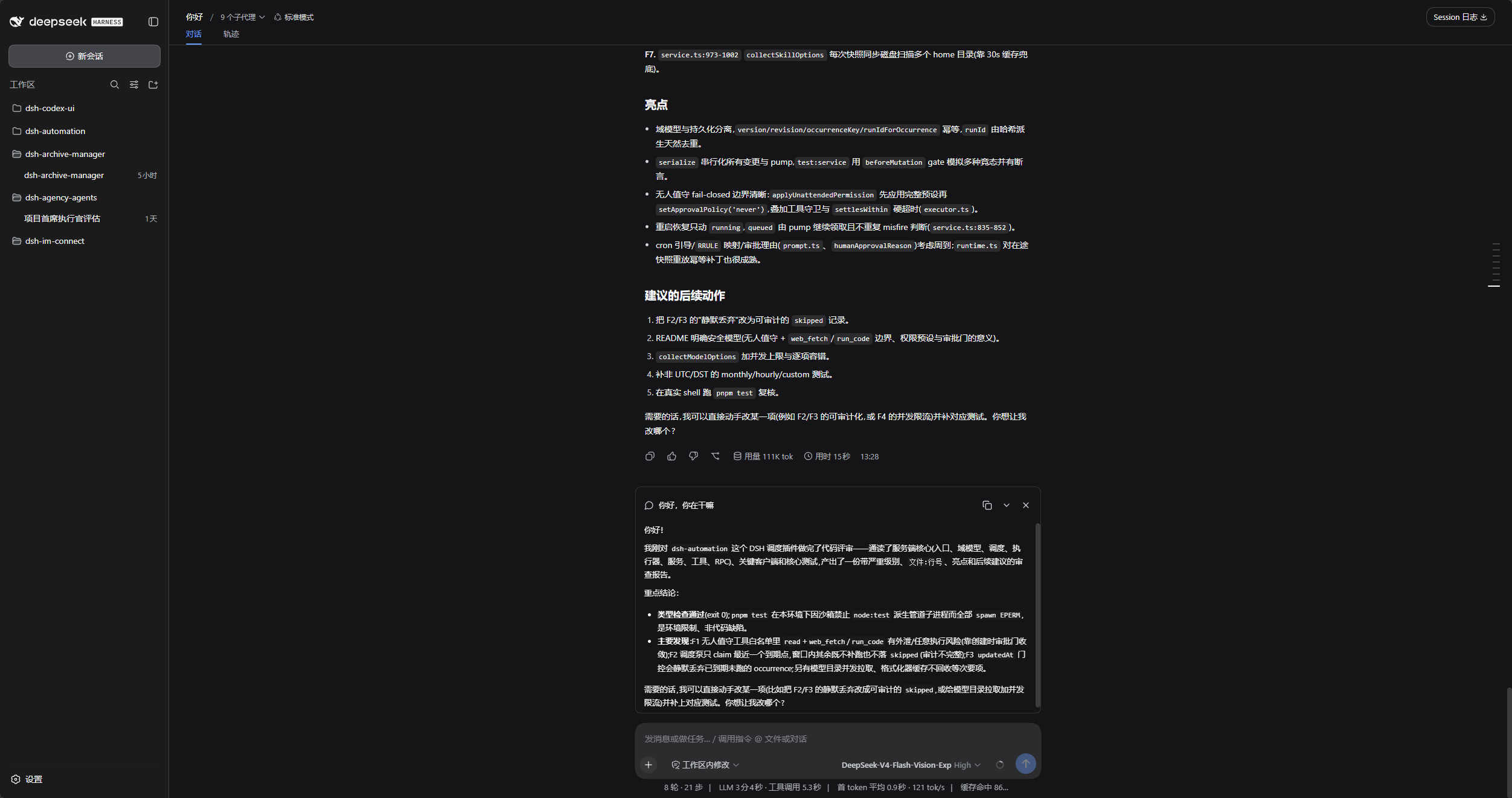
### Side questions in stock DSH
The main conversation stays in place, with the side answer above the composer.
### Command menu
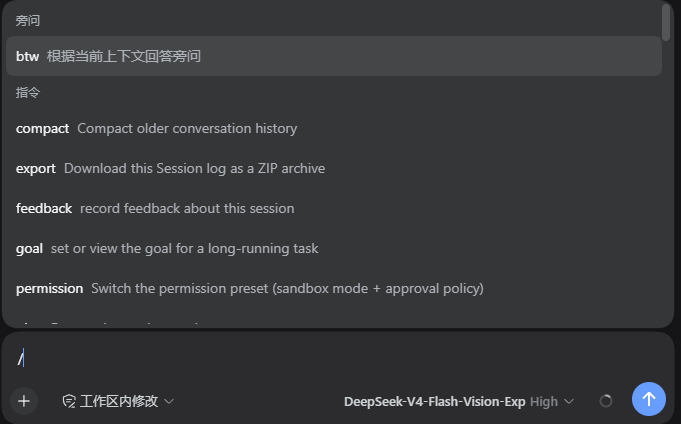
Type `/` and select `btw` under the side-question category, or enter `/btw your question` directly.
### Independent answer bubbles
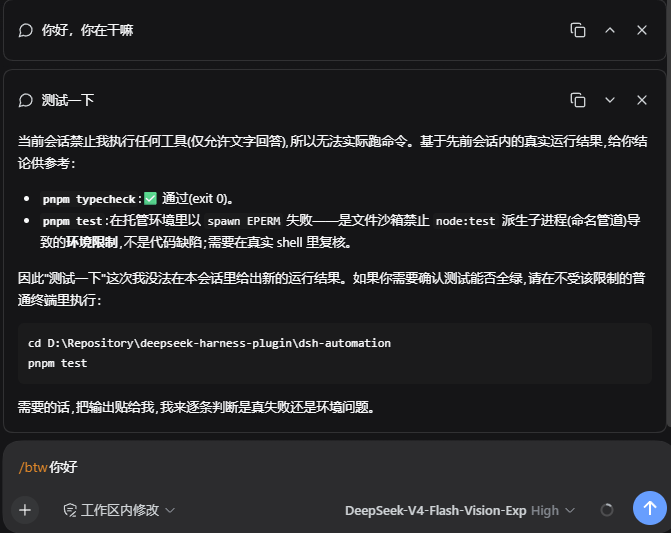
Each answer has its own copy, collapse or expand, and close controls in the upper right.
## DSH product ecosystem
For a ready-to-use workbench, download [DSH Codex Desktop](https://github.com/MichengAI/dsh-codex-desktop/releases). If you already use [DeepSeek Harness](https://github.com/deepseek-ai/deepseek-harness), install any of these eight plugins individually. The desktop app includes all eight.
| Plugin | What you can do |
| --- | --- |
| [Codex UI](https://github.com/MichengAI/dsh-codex-ui) | Organize projects and conversations, search tasks, and navigate chat turns |
| [IM Connect](https://github.com/MichengAI/dsh-im-connect) | Send tasks and receive replies through your usual messenger |
| [Automation](https://github.com/MichengAI/dsh-automation) | Schedule tasks and review each run |
| [Skills Manager](https://github.com/MichengAI/dsh-skills-manager) | Find, enable, create, and import local skills |
| [Archive Manager](https://github.com/MichengAI/dsh-archive-manager) | Search, restore, or clean up archived conversations |
| [Agency Agents](https://github.com/MichengAI/dsh-agency-agents) | Choose and summon specialists for your task |
| [BTW](https://github.com/MichengAI/dsh-btw) | Ask side questions without interrupting the main task |
| [Simplify](https://github.com/MichengAI/dsh-simplify) | Use /simplify to improve code within your Git changes |
## Prerequisites
- An installed copy of DeepSeek Harness.
- Host peers accept exactly `0.1.0-rc.8 || 0.1.1-rc.2 || 0.1.2-rc.1 || 0.1.5-rc.1 || 0.1.5-rc.2`.
- Node.js 22+ and `dsh` available in your terminal.
## Installation
Examples use the `web` profile; replace it with your target profile. Disable other plugins that provide `/btw` before installing.
### Ask an agent to install it (recommended)
Send the prompt below to any agent that can run terminal commands on your computer. Replace `web` with your actual profile. Once installed, use the plugin in DSH.
```text
Install the DSH plugin @michengai/dsh-btw into my local web profile by running: dsh plugin --profile web add @michengai/dsh-btw@latest --registry=https://registry.npmjs.org/. Then run dsh --profile web --dump-config, confirm the configuration includes michengai-btw, and explain how to reload DSH and start using the plugin.
```
### Install manually from npm
```powershell
[Console]::OutputEncoding = [System.Text.Encoding]::UTF8
$OutputEncoding = [System.Text.Encoding]::UTF8
dsh plugin --profile web add @michengai/dsh-btw@latest --registry=https://registry.npmjs.org/
```
### Reloading
Install or update after current tasks finish, as desktop apps may reload automatically. If the change has not taken effect, use the desktop app's reload action or restart the `dsh web` service. Refreshing the browser alone is not enough.
## Usage
### Ask about selected text
Select text within a single conversation message, choose **Ask BTW** from the compact selection toolbar, and enter a question or choose **Explain this**. Enter sends, Shift+Enter inserts a newline, and Esc cancels. Answers use the existing BTW bubbles with an expandable quote.
- Supports prose, lists, and code text; quotes are limited to 8,000 UTF-16 code units including whitespace and are never silently truncated.
- The quote is frozen when the menu opens. Other context comes from completed main-chat content at send time.
- Main-composer drafts are preserved. Cross-message selections, editable fields, and tool output do not show the menu.
- **Add to conversation** appends a quote to the existing draft without sending. After insertion, focus returns to the composer; insertion is blocked while a message is being submitted. Right-click keeps the browser's native menu.
- Keyboard selection is supported inside focused message elements: release Shift to focus the toolbar. Browsers without the Popover API use a fixed-position fallback, which may be clipped by the host layout.
- Coexists with `dsh-better-sidebar`: BTW handles conversation text only; file previews and editors retain the sidebar plugin's own **Add to conversation** action without a duplicate toolbar.
- This entry uses host DOM markers and has been verified in DSH `0.1.5-rc.2` with Edge, including the selection toolbar, draft insertion, question form, and a real-model answer. Unrecognized layouts keep their normal context menu; `/btw` remains available.
### Command entry
In a conversation with existing context, enter:
```text
/btw Summarize the proposed plan in one sentence.
```
| Goal | Action |
| --- | --- |
| Ask a side question | Submit `/btw your question`, or choose `btw` from the `/` menu. |
| Read the answer | Wait for the answer in the independent bubble above the composer. |
| Copy an answer | Click the copy icon in the bubble's upper right. |
| Collapse or expand | Click the collapse or expand icon. |
| Cancel a question | Close its bubble while it is running. The main task is unaffected. |
| Dismiss an answer | Close the completed bubble. |
| Ask again | Submit another `/btw` question. Each question is independent. |
Use the regular conversation to run commands, edit code, or continue the main task. BTW can only answer using existing context.
BTW accepts text only. Side questions with images or files are rejected without clearing the draft or attachments; remove the attachments before retrying.
### Usage Notes
- Each question is independent and uses completed content from the main conversation at the time you ask. It does not include an answer still being generated or previous side questions.
- Bubbles are not restored after refreshing the page. Copy any answers you want to keep first.
## Uninstallation
```powershell
[Console]::OutputEncoding = [System.Text.Encoding]::UTF8
$OutputEncoding = [System.Text.Encoding]::UTF8
dsh plugin --profile web remove @michengai/dsh-btw
```
Reload DSH afterward. Disabling or updating the plugin does not delete the main conversation's records.
## Development
```powershell
[Console]::OutputEncoding = [System.Text.Encoding]::UTF8
$OutputEncoding = [System.Text.Encoding]::UTF8
npm ci --ignore-scripts
npm run check
```
`npm run check` runs type checking, tests, and a build.
Development and builds target `0.1.5-rc.2`. `npm run test:compat` builds with that baseline and runs the test suite on each of the five isolated host versions, using a test model adapter. DOM component tests do not replace live-browser acceptance.
Previous manual end-to-end acceptance with Edge and a live DeepSeek model passed on `0.1.5-rc.1`: side questions, attachment rejection, copying, collapse/expand, cancellation, and continued parent-session operation. This is not part of `npm run test:compat`. The selection toolbar, draft insertion, sidebar coexistence, and real-model side answers were subsequently checked on `0.1.5-rc.2`; the full end-to-end suite remains pending on that version and the older three versions.
To install from source, run `dsh plugin --profile web add . --ignore-scripts` from the project directory, then reload DSH.
## License
[Apache-2.0](LICENSE). Copyright 2026 MichengAI.