

## Features
- Battery Ring with live level, dynamic charging bolt, low-battery state, and optional Battery Color Coding
- Adaptive Ring for desktop Macs: Neutral by default, with automatic CPU, memory, and thermal pressure awareness
- Refined native Duo visual language, rounded Wi-Fi indicator, Battery Ring, volume indicators, and charging presentation
- Automatic Wi-Fi, Ethernet, and offline network states
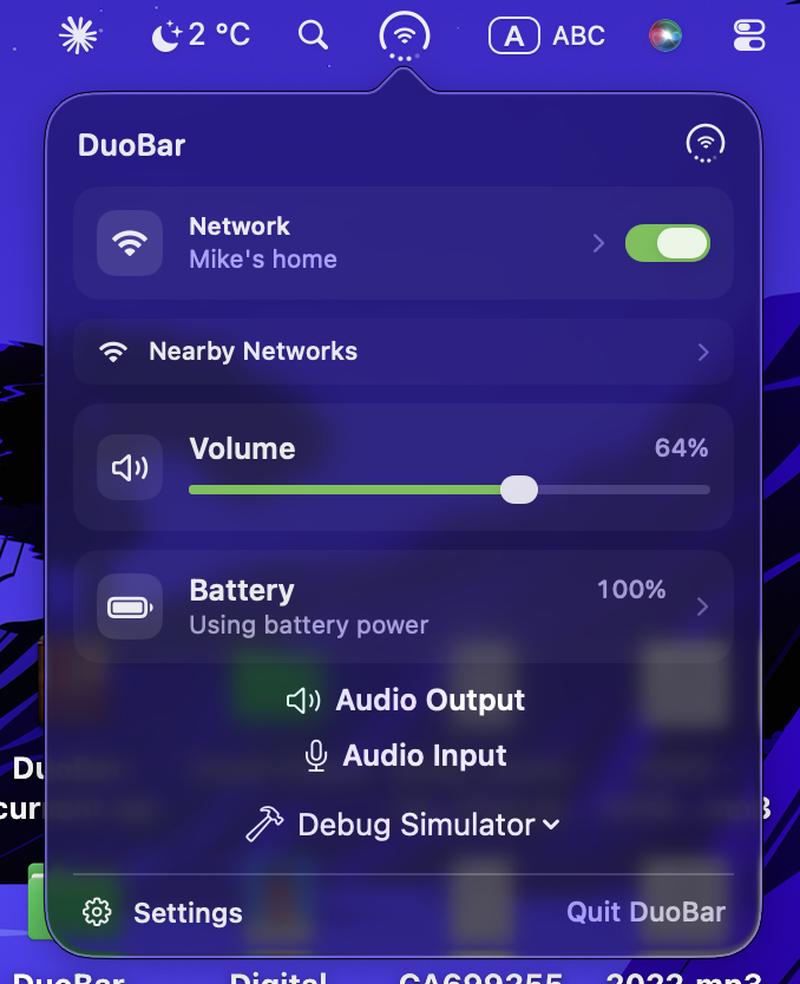
- Wi-Fi network name display and public Wi-Fi power control
- Optional Open on Hover popover behavior
- Four-dot live volume indicator
- Compact volume slider, public Core Audio mute, and output-device switching where supported
- Temporary AirPods/headphones connection presentation
- Adjustable menu-bar Icon Size
- English, Russian, Ukrainian, Simplified Chinese, Traditional Chinese, and Thai
- Compact custom popover: Network and Battery open System Settings, Wi-Fi power, Volume, Audio Output selection, Settings, and Quit
- Light and Dark Mode
- Launch at Login
- Universal 2: Apple Silicon and Intel support on macOS 13+
- Native Swift, SwiftUI, and AppKit
- No Dock icon
## Requirements
**macOS 13.0+**
**Apple Silicon or Intel**
## Installation
1. Open the [DuoBar 1.3.2 release](https://github.com/Mikeli7666/DuoBar/releases/tag/v1.3.2) and find **Assets**.
2. Download **DuoBar-1.3.2.dmg**. Do not download `Source code (zip)` or `Source code (tar.gz)`.
3. Double-click the DMG and drag **DuoBar.app** to **Applications**.
4. Open Applications and launch DuoBar. It is a menu-bar utility and normally does not appear in the Dock.
DuoBar 1.3.2 uses Developer ID signing, Hardened Runtime, and Apple notarization. Normal installation does not require disabling Gatekeeper/SIP, Terminal, `sudo`, or `xattr`.
SHA-256: `18b878391eeab47a53c4ae0b51d10ae0468a8d7d489b5ae056f6cd5281053bae`
Build and compatibility/reliability work was checked using Xcode 27 and the macOS 27 SDK while continuing to support macOS 13+. This does not claim macOS 27 hardware validation.
## Permissions
- **Location:** macOS may require authorization before CoreWLAN can expose the current Wi-Fi network name. Denying access does not break basic connection, interface, or signal state; the SSID may simply remain unavailable. DuoBar requests SSID access only when it is useful to the interface.
- **Bluetooth:** DuoBar retains public Bluetooth controller observation while Core Audio provides the primary source for Bluetooth audio endpoints. The app does not manage or pair devices.
## Audio output behavior
Volume control is available only when the active Core Audio output exposes software-settable public volume properties. HDMI, AirPlay, USB, and other external outputs may instead display **Controlled by device**.
AirPods and Bluetooth audio classification is best-effort using public system metadata. DuoBar does not claim exact AirPods generation detection.
## Privacy
- System-status processing occurs locally.
- No analytics or tracking.
- No backend or telemetry.
- No system-status uploads.
- No unrelated network requests.
## Known limitations
- The Wi-Fi network name may be unavailable without Location permission or when macOS withholds it.
- Wi-Fi strength uses documented RSSI data and broad signal ranges; it does not reproduce Apple's private icon algorithm.
- Some audio devices expose fixed or externally controlled volume.
- DuoBar does not join Wi-Fi networks or pair Bluetooth devices.
- Bluetooth audio and AirPods family detection is best-effort through public APIs.
## Build from source
Open `DuoBar.xcodeproj` in Xcode, select the **DuoBar** scheme, and run. Debug builds include status simulation and marketing-capture tools; those tools are excluded from Release behavior.
## Disclaimer
DuoBar is an independent project and is not affiliated with or endorsed by Apple Inc.
## License
DuoBar is available under the [MIT License](LICENSE).